


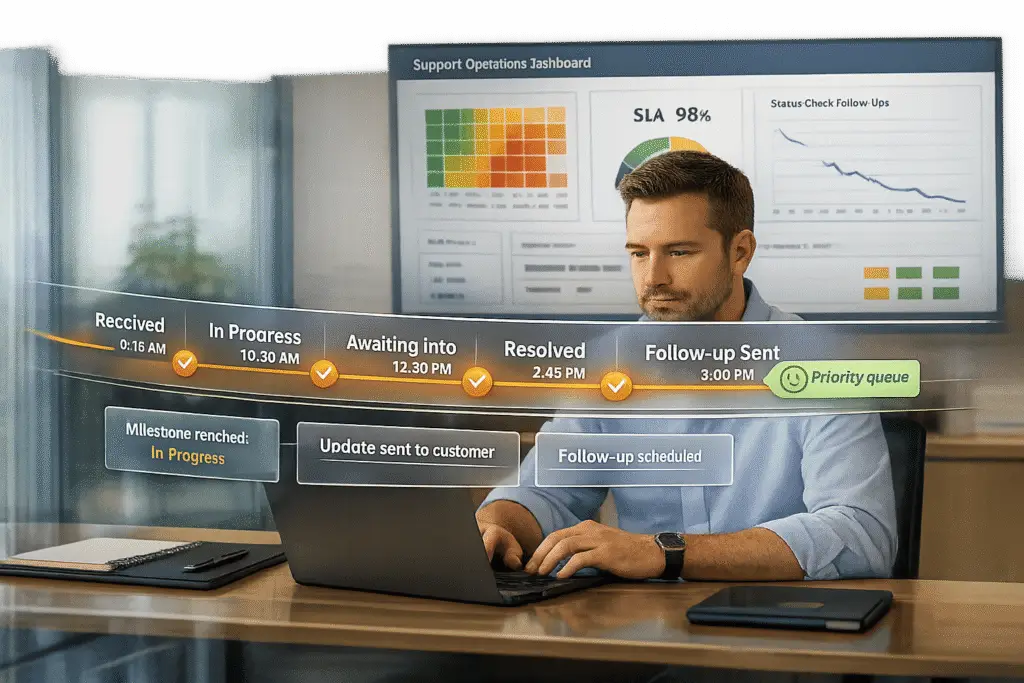
Every "Where is my ticket?" follow-up wastes time and frustrates customers. These inquiries often stem from poor communication, unclear updates, or delays in response. Without visibility into ticket status, customers feel anxious and repeatedly reach out for updates. This not only increases support costs but also slows down issue resolution for everyone.
Here’s the solution: Automate updates to keep customers informed at key moments – like when a ticket is assigned, escalated, or resolved. AI tools can analyze ticket details, detect urgency through sentiment, and send clear, timely notifications via email, SMS, or in-app alerts. This reduces follow-ups, improves efficiency, and ensures customers know their concerns are being addressed.
Key Takeaways:
- Customers ask for updates due to lack of visibility and delayed responses.
- Common mistakes like vague updates, ticket misrouting, and inaccurate wait times worsen the issue.
- AI-driven notifications at critical milestones eliminate uncertainty and reduce unnecessary follow-ups.
- Metrics like First Reply Time (FRT), Ticket Reopen Rate, and Customer Satisfaction (CSAT) help measure success.
Real-World AI for Support: Proactive Updates & Incident Detection
Why Customers Ask ‘Where Is My Ticket?’
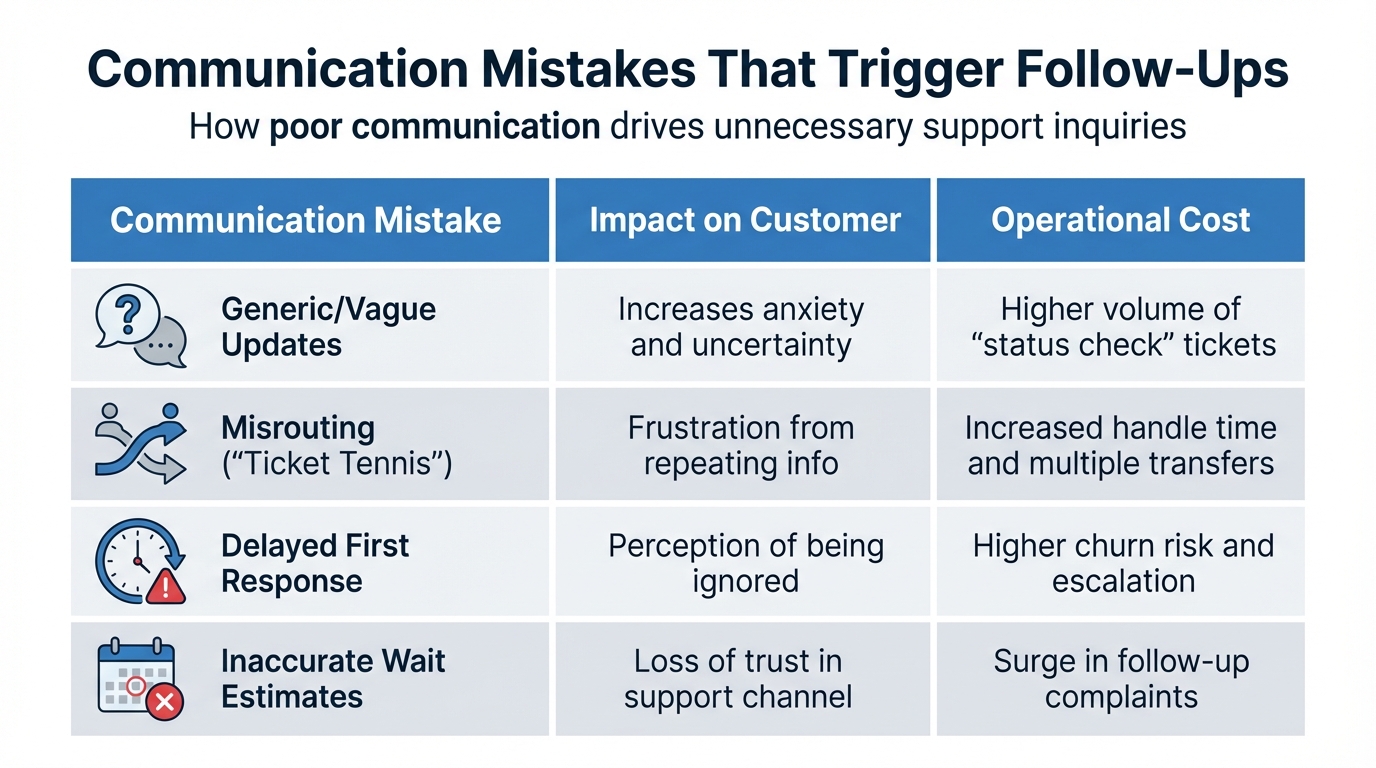
Common Communication Mistakes That Trigger Customer Follow-Ups
When customers ask, "Where is my ticket?", it’s rarely about impatience. Instead, it stems from a lack of visibility. Without knowing where their ticket stands in the queue or how long resolution might take, customers feel anxious. They’re left wondering if their issue will be resolved in minutes or weeks, and this uncertainty prompts them to reach out. This gap in communication not only frustrates users but also increases operational costs.
Sometimes, misrouting escalates the problem. Tickets bounce between teams in a frustrating game of "ticket tennis", delaying resolutions and forcing customers to repeat themselves. Every handoff adds to their frustration and wastes time. On top of that, traditional rule-based systems often fail to prioritize urgent issues. For example, a major production outage might end up in a low-priority queue just because the customer used polite language instead of words like "urgent" or "emergency". Without sentiment analysis to detect frustration, these tickets can sit idle while less critical ones get attention.
How Follow-Ups Hurt Customer Experience and Increase Costs
When customers follow up to check on their ticket, it creates a ripple effect. Agents spend time answering these inquiries instead of solving real problems. This means that instead of focusing on technical challenges, they’re stuck handling status checks – a purely administrative task that adds no value. The result? Slower resolutions for everyone else in the queue.
The financial impact of these follow-ups is hard to ignore. Without self-service options for checking ticket status, customers are forced to use costlier channels like phone or live chat just to get updates. These unnecessary interactions drive up operational expenses and increase customer effort – a major factor behind churn. Studies consistently show that faster first-reply times lead to higher customer satisfaction, but many teams remain stuck in a cycle of responding to follow-ups instead of addressing the root cause.
"Supportbench automates so many of our processes, from case assignments to escalations. This means our agents can focus on solving problems rather than managing logistics." – Michael Floyd, Director of Customer Support, Jenzabar
Common Communication Mistakes That Trigger Follow-Ups
Certain communication missteps only make things worse. For example:
- Vague updates: Telling a customer "we’re working on it" without specifics – like who’s handling the case, what stage it’s in, or when they can expect an update – creates more anxiety than silence.
- Delayed first responses: When customers don’t get immediate confirmation that their ticket was received, they assume it’s been lost. This perception of being ignored increases churn risk and leads to escalations. A simple automated acknowledgment with an estimated wait time can prevent this.
- Inaccurate wait estimates: Overpromising and underdelivering on timelines erodes trust. Using recent queue data to provide realistic timeframes helps manage expectations. Additionally, when systems fail to sync ticket statuses across platforms like help desks, CRMs, and internal tools, customers receive conflicting information, forcing them to follow up again.
Here’s a quick look at these mistakes and their consequences:
| Communication Mistake | Impact on Customer | Operational Cost |
|---|---|---|
| Generic/Vague Updates | Increases anxiety and uncertainty | Higher volume of "status check" tickets |
| Misrouting ("Ticket Tennis") | Frustration from repeating info | Increased handle time and multiple transfers |
| Delayed First Response | Perception of being ignored | Higher churn risk and escalation |
| Inaccurate Wait Estimates | Loss of trust in support channel | Surge in follow-up complaints |
Fixing these gaps is crucial before introducing AI tools that can automate updates and improve transparency. By addressing these issues first, teams can reduce follow-ups and create a smoother experience for both customers and agents.
How to Use AI for Automatic Ticket Updates
AI takes the guesswork out of customer communication by tracking ticket progress and sending updates at the right time. It monitors each case and notifies customers when meaningful events occur – like a ticket being assigned, escalated, or resolved. This ensures customers stay informed without being overwhelmed by unnecessary messages. By focusing on clear and timely updates, AI-driven automation provides an effective solution for keeping customers in the loop.
Intelligent Automation for Timely Updates
AI uses natural language processing (NLP) to analyze ticket details and automatically trigger updates at key milestones. These updates can be sent through email, SMS, or in-app alerts, depending on customer preferences. This flexibility ensures that updates are delivered where customers are most likely to see them. When combined with CRM data, AI can even identify high-priority accounts – like "Premier" tier customers – and adjust the frequency of updates to meet their service level expectations.
Automatic Status Updates at Key Milestones
AI tracks ticket movement through your support system and sends notifications when specific actions occur. For example, when a ticket is created, assigned, transferred to another team, or resolved, customers automatically receive an update. This visibility reduces the need for follow-up inquiries since customers can see their issue is being addressed.
Updates are delivered through the customer’s preferred method. Some may choose email, while others might prefer SMS for urgent issues or in-app alerts while using your product. AI-powered systems can route these updates based on customer preferences and the priority of the ticket. Additionally, AI minimizes internal transfers by directing tickets to the right specialist from the start, ensuring customers know exactly who is handling their case.
Updates Tailored to Customer Sentiment and Urgency
AI also personalizes updates based on real-time customer sentiment. By analyzing tone and language, it can detect emotions like frustration or sarcasm, even if the customer doesn’t explicitly use urgent keywords. If high frustration is detected, the system immediately sends a reassurance update, signaling that the issue is being prioritized.
This approach goes beyond basic keyword detection. For instance, traditional systems might miss a critical issue if a customer misspells "outage" or uses polite language to describe a major problem. AI, however, interprets the underlying urgency, escalating tickets and triggering updates when needed. Generative AI can even adjust the tone of automated updates to align with the customer’s mood while maintaining your brand’s voice. Support teams using AI for triage can save an average of 45 seconds per ticket compared to manual processes – a small but impactful time-saver.
Alerts for Escalations and SLA Changes
AI doesn’t just handle routine updates – it also flags critical changes. It continuously monitors cases for signs that require immediate action. For example, if a ticket is escalated due to negative sentiment, multiple follow-ups, or critical phrases like "system down" or "cannot log in", AI triggers alerts to notify the right stakeholders. These workflows can bypass standard queues, routing urgent issues directly to incident management teams or senior agents.
When integrated with CRM systems, AI applies tiered service level agreements (SLAs) to prioritize high-value accounts. For example, stricter service levels might be applied to accounts nearing renewal deadlines, ensuring their expectations are met with more frequent updates. AI can also identify high-risk cases that need executive attention, reserving senior involvement for true crises rather than routine issues. By automating these escalation rules, teams can make complex decisions without manual oversight. This ensures customers receive timely updates during escalations or SLA changes, reducing the anxiety that often leads to "where is my ticket?" inquiries.
sbb-itb-e60d259
Setting Clear Expectations to Reduce Anxiety
Reducing customer anxiety often starts with clear communication. By pairing AI-powered updates with clear initial confirmations, you can tackle the dreaded "where is my ticket?" loop before it starts. When customers submit a ticket and hear nothing back, it naturally leads to uncertainty and follow-up emails. A simple acknowledgment and an outline of what happens next can go a long way.
Send Instant Confirmations When Tickets Are Created
The moment a ticket is submitted, an automated confirmation email should hit the customer’s inbox. This email should include the ticket ID, a brief acknowledgment, and instructions for adding more details, such as replying to the email. Here’s an example:
"Your request has been received and is being reviewed by our support staff. To add additional comments, reply to this email."
Adding the original ticket title in the subject line can also help customers immediately recognize the email’s purpose, which reduces the chance of duplicate submissions. It’s a small detail, but it makes a big difference in keeping things organized and clear.
But confirmation alone isn’t enough – customers need to know what’s next.
Tell Customers What to Expect and When
Let customers know when they can expect an update. Use data-driven models that analyze recent queue activity – whether it’s from the last 10 minutes or the past three weeks. This allows you to provide dynamic wait-time estimates like, "Expect to wait at least 15 minutes" or "We should be with you in 15–20 minutes." Just make sure to clarify that these are estimates, not guarantees. Combining this with real-time updates further helps manage expectations and reduces uncertainty.
How to Measure the Impact of Automatic Updates
Once you roll out automated ticket updates, it’s essential to track the right metrics to see how they’re working. These updates aim to cut down on follow-up inquiries like "what’s the status of my ticket?" while also improving efficiency. Monitoring specific metrics will help confirm whether these goals are being met.
Key Metrics to Track
Start by keeping an eye on First Reply Time (FRT) and Requester Wait Time. FRT measures how quickly you respond to a customer for the first time, and automating initial acknowledgments can significantly reduce this time. Requester Wait Time, which tracks how long tickets stay in New, Open, or On-hold statuses, is another critical metric. Shorter wait times mean fewer frustrated customers and fewer follow-up emails.
Another important metric is the One-Touch Resolution Rate – the percentage of tickets resolved in a single interaction. A high rate here suggests your automated updates are doing a good job of addressing customer concerns upfront, reducing the need for additional back-and-forth. On the flip side, keep an eye on the Ticket Reopen Rate. If this number is high, it could mean your automated responses aren’t addressing issues thoroughly enough.
Agent Touches is another useful metric. This measures how often agents need to update a ticket. Fewer touches typically indicate that automation is effectively handling routine updates, allowing agents to focus on resolving complex issues instead of managing status communications.
Lastly, track your Ticket Backlog Volume. This will show whether automation is successfully deflecting enough inquiries to keep your backlog under control. If you’re using features like estimated wait times, compare those estimates to actual performance data to ensure accuracy.
Set Baselines and Track Changes Over Time
To measure the success of your proactive update strategy, start by setting baselines for key metrics like response times, resolution rates, and CSAT (Customer Satisfaction) scores. These benchmarks will help you demonstrate the return on investment (ROI) of your automation efforts. Use real-time dashboards to monitor these KPIs and adjust automation rules as needed.
Negative feedback on tickets with multiple updates can reveal gaps in your automated updates. AI-powered sentiment analysis can help you spot trends, particularly in cases where customers express frustration. These are often the tickets that generate repeated follow-ups. Keep an eye on reopen rates and backlog reopens to identify whether proactive updates are reducing customer anxiety or if issues are lingering.
Start small by automating repetitive, high-volume tasks, then expand to more complex workflows once you’ve established a stable baseline. Tagging automated updates can help you directly link them to resolution outcomes and CSAT scores. Regularly feed resolved-case data back into your AI models – monthly updates can fine-tune triggers and cut down on false positives over time.
Conclusion
Proactive ticket updates are transforming how modern B2B support operates. By automating milestone notifications, businesses can eliminate those frustrating "where is my ticket?" inquiries, which not only boosts customer trust but also cuts operational costs and improves satisfaction scores.
These efficiencies free up agents to focus on more complex challenges. For example, Baleària achieved an impressive 96% CSAT score by leveraging AI-powered chatbots to handle common questions proactively, keeping many tickets from even entering the queue. This kind of measurable improvement highlights the potential for scalable, AI-driven support systems.
AI-native platforms enable companies to expand their support capabilities without adding to their workforce. Nooshin Alibhai, Founder and CEO of Supportbench, emphasizes this shift:
"AI is revolutionizing the operational backbone of support by bringing intelligence and context-awareness to ticket routing and prioritization".
During peak times, instead of hiring more staff, intelligent routing and sentiment-based triggers ensure that VIP clients receive immediate attention while routine requests are addressed through instant self-service solutions.
The best approach is to start small and expand gradually. Begin by allowing AI to draft responses or auto-tag tickets before moving toward full automation. Confidence scores help determine when updates should be automated or when a human touch is needed. Training AI with historical documentation ensures that automated messages stay consistent with your brand voice and remain accurate.
FAQs
How can AI identify urgent customer support tickets?
AI tools excel at spotting urgent customer tickets by diving into the content, sentiment, and metadata of each request. Through machine learning, they evaluate details like tone, choice of words, and even the customer’s past interactions to gauge the urgency level. For instance, a request with negative sentiment or multiple follow-ups often indicates a pressing issue.
These tools also tap into real-time data to assign priority scores to tickets. Factors like delayed responses, previous escalations, and customer profile insights play a role in this scoring process. This means critical tickets can be routed directly to experienced agents or flagged for immediate attention. By streamlining the prioritization of urgent cases, AI not only speeds up response times but also enhances the overall customer experience.
How can automating ticket updates improve customer support?
Automating ticket updates takes the guesswork out of the customer experience by delivering real-time, personalized status notifications. This keeps customers in the loop about their ticket’s progress, reducing the need for follow-up questions like, "What’s the status of my ticket?" The result? A smoother and more transparent support experience.
Beyond improving communication, automation also speeds up response times and streamlines workflows. For example, it can trigger updates during key moments like escalations or milestone completions. These proactive updates not only keep customers satisfied but also allow your support team to concentrate on handling more complex issues that require their expertise.
How can sentiment analysis make customer support more efficient?
Sentiment analysis plays a key role in improving customer support by assessing the emotional tone of customer interactions in real time. By identifying signs of frustration or dissatisfaction early, support teams can step in to address critical issues before they spiral into bigger problems. This proactive approach helps reduce follow-up inquiries like "What’s the status of my ticket?" and improves overall response times.
It also streamlines workflows by flagging tickets with negative sentiment, ensuring they get immediate attention or are routed to more experienced agents. This way, pressing concerns are resolved quickly and effectively. The outcome? A support experience that feels more personalized and timely, leaving customers with the impression that their concerns truly matter.






