



Choosing between Pylon and a full helpdesk comes down to how your team operates and what your customers expect. Pylon integrates directly with tools like Slack and Teams, offering faster, AI-driven support. Full helpdesks, meanwhile, focus on traditional ticketing systems and broader channel coverage. Here’s what matters most:
- Speed & AI: Pylon automates up to 60% of tickets, reducing response times by up to 97%. Full helpdesks rely more on manual workflows.
- Channel Focus: Pylon excels in Slack/Teams environments, while full helpdesks cover email, phone, and social media.
- Cost & Scalability: Pylon offers faster implementation (1–3 days) and lower long-term costs, while full helpdesks often require higher up-front investment and scale by adding staff.
- Customer Insights: Pylon provides account-level insights like churn risks, while full helpdesks focus on individual tickets.
Quick Comparison
| Feature | Pylon (Slack-Native) | Full Helpdesk |
|---|---|---|
| Primary Workflow | Slack/Teams integration | Separate web portal |
| AI Automation | Advanced ticket deflection & routing | Limited, manual-heavy workflows |
| Channel Strength | Slack, Teams, Discord | Email, phone, social media |
| Cost per Ticket | ~$11 | ~$22 |
| Implementation Time | 1–3 days | Weeks to months |
| Insights | Account health & churn risks | Ticket-level focus |
Pylon is ideal for B2B teams that prioritize speed, Slack-native workflows, and AI-powered efficiency. Full helpdesks are better suited for businesses needing broader channel support and more traditional ticketing systems.
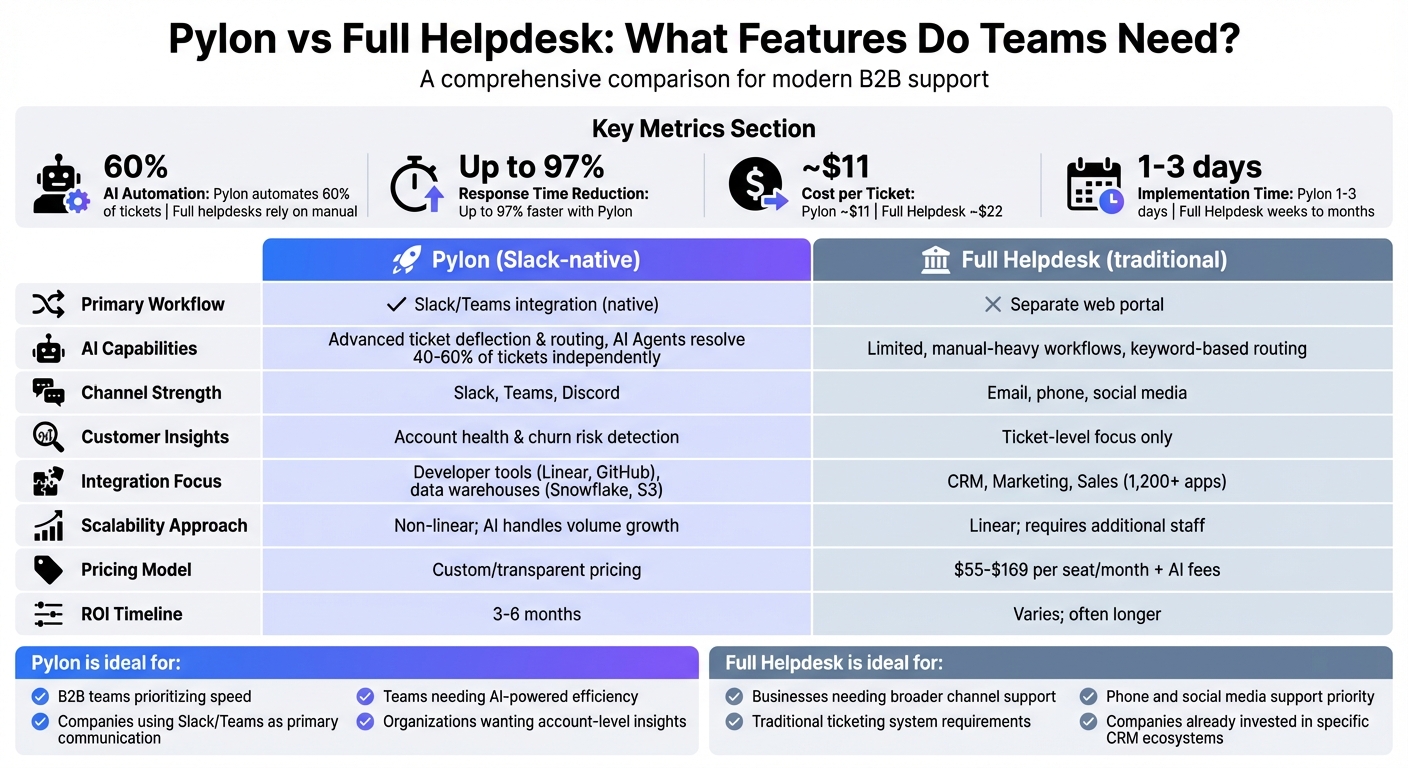
Pylon vs Full Helpdesk: Feature Comparison for B2B Support Teams
9 Best AI Customer Service Software 2025 (AI Agents, Helpdesk, Voice Agents & More)
sbb-itb-e60d259
AI Capabilities: Automation vs. Agent Assistance
The key difference between Pylon-style platforms and traditional helpdesks isn’t just about where tickets are managed – it’s about how AI handles tasks. Pylon separates its AI into two categories: AI Agents, which can independently resolve tickets from start to finish, and AI Assistants (also known as Copilots), which assist human agents by suggesting responses and providing context. In contrast, traditional helpdesks stick to simpler workflows like categorizing and routing tickets, leaving most of the work to human agents.
Automated AI vs. Agent-Assist AI
Pylon takes automation a step further by handling tasks like routing, drafting, and even resolving tickets before human agents get involved. It uses natural language processing to interpret intent and context across platforms like Slack, Teams, and email. Traditional helpdesks, on the other hand, often rely on keyword-based routing and static FAQ searches, which are less nuanced and frequently require manual corrections.
The results speak for themselves. Companies using AI-first platforms like Pylon report 60% higher ticket deflection rates and 40% faster response times. AI Agents alone can resolve 40% to 60% of support tickets, while AI-powered deflection can cut first response times by as much as 97%, reducing wait times from minutes to mere seconds. These improvements are game-changers for scaling support operations in a competitive environment.
Pylon’s AI also goes beyond ticket management by identifying churn risks and calculating health scores. It does this by analyzing patterns in support conversations, such as mentions of competitors or signs of customer frustration. Traditional helpdesks, however, tend to focus narrowly on metrics like response and resolution times.
Now, let’s explore the additional AI capabilities that modern support teams need.
Core AI Features Teams Need
Pylon offers features designed to save time and improve efficiency:
- Auto-summaries: These help agents quickly catch up on lengthy conversation threads.
- Predictive analytics: Alerts Customer Success teams to potential churn risks before they escalate.
- First-contact resolution detection: Highlights issues resolved instantly, helping refine self-service options.
- Intelligent routing: Matches inquiries to the right teams – technical issues go to engineers, while billing questions go to customer success.
Another standout feature is knowledge gap detection, which tracks unanswered questions and can even draft new help articles based on past interactions.
For more technical scenarios, runbook automation offers step-by-step guidance, such as troubleshooting API errors. AssemblyAI, for example, implemented Pylon’s AI-powered routing and Agents in June 2025 under the leadership of Lee Vaughn, Manager of Support Engineering. The results? A 97% reduction in first response time (from 15 minutes to 23 seconds) and a jump in AI resolution rates from 25% to 50%. This allowed them to offer 24/7 support without expanding their team.
"Runbooks have helped us handle weird edge cases much more intelligently. Instead of failing the conversation, the agent now guides customers to the right resources automatically." – Lee Vaughn, Manager of Support Engineering, AssemblyAI
These advanced AI capabilities not only lower operational costs but also boost customer satisfaction. Organizations report a 30% to 55% reduction in total support costs. Many B2B teams see early results within the first month, with full ROI achieved in 3 to 6 months as the AI continues learning from documentation and past tickets.
Here’s a quick comparison of how Pylon stacks up against traditional helpdesks:
Comparison Table: AI Features
| AI Feature | Pylon (AI-Native) | Traditional Helpdesk |
|---|---|---|
| Primary Focus | Automated processing: routing, drafting, resolving | Manual ticket queues |
| Automation Type | Context-aware AI trained on historical interactions | Rule-based workflows and keyword triage |
| Agent Assistance | Auto-summaries, predictive CSAT, response suggestions | Basic categorization and routing |
| Knowledge Base | Detects gaps, drafts new articles automatically | Static search and manual updates |
| Account Health | Churn risk alerts and health scores from support data | Limited to ticket-level metrics |
| Edge Case Handling | Automated runbooks for complex issues | Requires manual escalation |
Channel Management and Workflow Features
Modern B2B teams rely on tools like Slack to keep their operations running smoothly. To support this, they need systems that not only centralize communications but also improve efficiency through better workflows. The choice of support channels has a direct impact on how productive and responsive teams can be. Platforms like Pylon are designed specifically for tools B2B teams already use daily – such as Slack, Microsoft Teams, and Discord – unlike traditional helpdesks that emphasize broader consumer-focused channels like phone support, social media, and web forms.
Slack/Teams Focus vs. Multi-Channel Support
With Pylon, agents can handle an entire ticket lifecycle directly in Slack. In contrast, traditional helpdesks depend on third-party integrations that notify agents in Slack but require them to switch to a separate web portal to complete tasks. This constant switching between tools can reduce productivity by 25% and increase response times by 40–60%.
Slack-native integrations boast over 90% user adoption compared to just 70% for third-party helpdesk apps. Teams using Slack for support report a median first response time of 15–30 minutes, far quicker than the 4–6 hours typical of email-based ticketing systems. For example, in December 2025, Lee Vaughn, Manager of Support Engineering at AssemblyAI, used Pylon to unify fragmented channels like Slack, email, and live chat. The result? A stunning 97% reduction in first response time, dropping from 15 minutes to just 23 seconds.
"Our customers are developers who expect quick, actionable support. We needed a way to meet them where they work without slowing down."
– Lee Vaughn, Manager of Support Engineering, AssemblyAI
Pylon also stands out with its account-level intelligence. Unlike traditional systems that focus on individual tickets, Pylon gives teams a complete view of accounts by integrating health scores, sales data, and product feedback with support interactions. This is especially crucial in B2B settings, where 63% of deals involve more than four decision-makers.
Next, let’s look at how flexible workflows and SLA management contribute to even greater efficiency.
Flexible Workflows and SLA Management
Beyond channel integration, adaptive workflows and SLA management plays a key role in optimizing support operations. Effective workflows should align with the unique needs of a business. Pylon excels here by automating Slack-specific scenarios with Runbooks and triggers. For instance, it can handle unstructured questions or route YouTube links to the right team. Traditional platforms, however, rely on macros and email-based triggers, which can lack the same level of flexibility.
Pylon also offers dynamic SLA management, adjusting SLAs based on factors like customer tier, lifecycle stage, or issue priority. While traditional helpdesks do offer SLA features, they often require agents to check a separate portal for updates, adding unnecessary steps.
Sardine, a fraud prevention platform, is a great example of Pylon’s impact. By leveraging Pylon’s Slack integration and account health features, Sardine managed to handle six times the business volume without increasing team size. As Duke Puniani, Head of Post-Sales at Sardine, put it:
"We’re still the same size team, but we’re supporting 6x the business volume. Pylon isn’t just a tool. It’s a partner and a copilot."
– Duke Puniani, Head of Post-Sales, Sardine
AI-powered automation also plays a big role, allowing teams to handle 92% more tickets daily – rising from 12 to 23 – by automating tasks like triage and ticket categorization based on topic, urgency, and customer segment.
These integrated solutions not only improve productivity but also help teams scale operations without adding more staff.
Comparison Table: Channel and Workflow Features
| Feature | Pylon (B2B/Slack-Native) | Full Helpdesk (Traditional) |
|---|---|---|
| Primary Interface | Slack, Teams, Discord | Web browser / separate portal |
| Slack Integration | Native | Third-party app (notifications only) |
| Context Switching | None (bi-directional sync) | High (requires app switching) |
| Account Intelligence | Unified view with health scores and CRM data | Individual, ticket-centric view |
| Workflow Automation | Runbooks for edge cases | Standard macros and email triggers |
| SLA Management | Dynamic (adjusts by tier and lifecycle) | Robust but portal-based |
| Implementation Time | 2–5 days | 4–8 weeks |
| Channel Strength | Slack Connect, Teams, Discord | Phone, social media, web forms |
Integrations and Customer Data
Integrations play a big role in making B2B support operations run smoothly. Pylon emphasizes tools built for developers, such as Linear and GitHub, which bring engineering details directly into support workflows. This setup is ideal for technical teams that need quick access to information like code commits, bug updates, and feature requests – all without leaving their support platform. On the other hand, full helpdesks prioritize broader integration capabilities, connecting deeply with sales and marketing CRM data.
Developer Tools vs. CRM and Customer Views
Building on earlier discussions about AI-driven insights, integrations also need to provide a clear, unified view of customer health. For B2B teams managing high-value accounts, quality integrations often outweigh sheer quantity. Pylon’s "Account Intelligence" consolidates scattered customer signals from tools like Slack and Teams to calculate health scores and flag potential churn risks. This enables teams to spot patterns like repeated frustration in tickets or mentions of competitors, allowing them to act before losing an account. In contrast, traditional helpdesks often treat support as a series of isolated tasks – solving tickets without considering the bigger picture of the customer relationship.
Platforms like HubSpot Service Hub offer a unique advantage: a seamless flow of data within their ecosystem. For teams already using HubSpot for sales and marketing, support tickets are automatically linked to deal histories and customer records. No need for custom APIs or manual data transfers. However, this convenience is limited to companies already committed to that vendor’s suite of tools.
This focus on actionable account intelligence naturally leads to the importance of bi-directional sync in improving support workflows. For example, when a support team creates a Jira ticket based on a customer request, they should be updated automatically when the corresponding bug or feature is resolved. Pylon offers this functionality natively with tools like Linear and GitHub, whereas traditional helpdesks often require custom API setups or third-party middleware to achieve similar results.
Custom Data and Reporting Options
The way integrations handle data directly impacts how support teams can extract meaningful insights. B2B teams need more than just basic ticket metrics. Pylon connects with data warehouses like Snowflake and S3, allowing teams to combine support data with broader business analytics. This means customer success teams can look at support interactions alongside product usage, revenue trends, and renewal schedules – all from a single view.
Traditional helpdesks, on the other hand, focus heavily on top support metrics like ticket volumes and resolution times. While these are useful, they often lack the detailed account-level insights needed to retain customers. Both types of data are important, but only account-level insights can help identify and prevent churn.
"Account Intelligence turns support data into actionable signals on churn risk, upsell potential, and health" – Pylon Team
This distinction becomes even more apparent when managing enterprise accounts. Pylon uses AI to analyze sentiment and conversation patterns, helping predict churn, while traditional helpdesks stick to metrics like CSAT scores and resolution times. These advanced capabilities enable more proactive support strategies, ultimately improving overall efficiency.
Comparison Table: Integration and Insight Features
| Feature | Pylon (B2B/Slack-Native) | Full Helpdesk (Traditional) |
|---|---|---|
| Primary Integration Focus | Slack, Teams, Linear, GitHub | CRM, Marketing, Sales, 1,200+ App Marketplaces |
| Customer Insight Type | B2B Account Health & Churn Risk | 360-degree Customer Lifecycle & Case History |
| Developer Tools | Native Linear/GitHub context | Often requires custom API or 3rd party apps |
| Data Source | Product usage & conversation sentiment | CRM records, deal history, marketing touchpoints |
| Reporting Focus | Actionable CS signals & retention | Operational metrics, SLAs, & team performance |
| Data Warehouse Integration | Native (Snowflake, S3) | Often requires custom setup |
| Bi-directional Sync | Native with dev tools | Varies by integration |
Scalability, Cost, and ROI
Slack-Native Growth vs. Enterprise Scalability
When it comes to scaling and delivering value over time, the differences between Slack-native platforms and traditional helpdesks are stark. Slack-native solutions, like Pylon, transform Slack into a structured support hub. This setup allows teams to manage hundreds of customer channels seamlessly, without performance slowdowns or a cluttered interface [7, 13]. By keeping support agents within their primary workflow, these platforms eliminate the need to juggle multiple tools. On the other hand, traditional helpdesks rely on enterprise-grade ticketing portals, forcing customers to leave the comfort of their chat environment to submit issues through separate interfaces.
Another advantage? Deployment speed. Modern Slack-native platforms can be up and running in just 1–3 days, compared to the weeks – or even months – required for legacy systems. For instance, Sardine replaced its helpdesk in just 5 days, slashing its first response time from 35 minutes to under 3.5 minutes – a 90% improvement. Similarly, Coalesce reduced response times from 50 minutes to 3.5 minutes.
Operational efficiency adds to these benefits. Pylon-style platforms enhance ticket handling by 40% and reduce email volume and meetings by 32% and 27%, respectively, thanks to streamlined, asynchronous communication. Traditional helpdesks, by contrast, often scale by simply hiring more staff, a linear model that modern AI-powered platforms have surpassed.
Pricing Models and Long-Term Costs
Pricing is another area where Slack-native platforms stand out. Pylon, for example, uses a custom pricing model designed specifically for B2B teams. This approach emphasizes transparency and scalability, avoiding penalties as teams grow [7, 8]. In contrast, traditional helpdesks charge per-agent fees, typically ranging from $55 to $169 per month, with additional AI features costing about $1.50 per resolution or $50 per seat.
Legacy systems also introduce hidden expenses, such as separate analytics licenses, data storage fees, and bundled charges for advanced security features. By avoiding these fragmented costs, companies switching to modern platforms often save between 50% and 85% on support software expenses. For a 15-person team, this can translate to annual savings of $15,000 to $35,000.
The return on investment (ROI) becomes even clearer when factoring in productivity gains. AI-powered ticketing systems can increase the number of tickets handled per agent from 12 to 23 per day – a 92% improvement – while cutting the average cost per ticket in half, from $22 to $11. As demonstrated by AssemblyAI, these systems can significantly reduce response times and improve resolution rates. On average, organizations adopting AI-driven support see a 15–30% reduction in total support costs within the first year.
"Our customers are developers who expect quick, actionable support. We needed a way to meet them where they work without slowing down."
- Lee Vaughn, Manager of Support Engineering, AssemblyAI
The table below highlights the key differences in scalability and ROI between Slack-native platforms and traditional helpdesks.
Comparison Table: Scalability and ROI
| Feature | Pylon (Slack-Native) | Full Helpdesk (Traditional) |
|---|---|---|
| Implementation Time | 1 to 3 days | Weeks to months |
| Primary Workflow | Native Slack/Teams | Separate web portal and email |
| AI Integration | Built-in from day one | Add-on modules with separate fees |
| Pricing Model | Custom/transparent pricing | $55–$169 per seat/month + AI fees |
| Cost per Ticket | ~ $11 | ~ $22 |
| Tickets per Agent per Day | Up to 23 (with AI) | ~ 12 (without AI automation) |
| Scaling Approach | Non-linear; AI handles volume | Linear; requires additional staff |
| Hidden Costs | Minimal; includes migration | Extra fees for storage, security |
| Typical Annual Savings | 50–85% reduction | Baseline |
| ROI Timeline | 3–6 months | Varies; often longer |
Features Teams Should Prioritize Next
As support operations continue to advance, teams should focus on features that enhance existing AI automation and streamline channel integration. Certain tools have become essential for maintaining modern, efficient support systems. One key area to prioritize is integrating AI copilots. These tools can draft responses and provide key account insights, freeing agents to tackle complex issues instead of repetitive tasks like answering routine queries or hunting for customer details.
Another game-changer is predictive metrics, which represent a leap toward proactive support. By analyzing historical data, advanced systems can predict ticket surges, spot emerging issues, and detect patterns that signal churn risks or upsell opportunities. Sentiment analysis takes this further by flagging urgent cases before they escalate. Companies that adopt mature AI systems report impressive results – customer satisfaction rates increase by 17%, while average inbound call handling times drop by 38%.
Dynamic SLAs (Service Level Agreements) are also worth attention. Unlike static SLAs that apply the same rules to every ticket, dynamic SLAs adapt based on factors like contract terms, account value, or lifecycle stages. For instance, SLAs can automatically tighten when a renewal is 30 days away, ensuring more attentive service during critical moments. Pairing this adaptability with centralized communication channels and intelligent workflow engines further enhances efficiency. These engines route tickets based on agent expertise and account priorities, cutting down on the 35% of ticket misrouting that often occurs with manual processes.
Unified portals are another must-have. By consolidating Slack, Teams, email, and chat interactions into a single interface, these tools reduce the inefficiency caused by constant context switching. Beyond just saving time, unified portals provide a comprehensive customer view by syncing CRM data, product usage patterns, and past ticket histories. This enables agents to deliver personalized, proactive support. With 82% of service professionals noting rising customer demands and 81% saying customers now expect more personalized interactions, these tools are no longer optional – they’re essential.
"The difference between an average support team and a great one comes down to the daily tools they use." – Supportbench
Conclusion: Choosing the Right Solution
Deciding between a Pylon-style solution and a full helpdesk platform depends on your customer’s preferred communication tools and whether your customer support ticketing system was designed for B2B scale. If your B2B customers rely heavily on Slack or Microsoft Teams, seamless integration becomes essential. It’s not just a convenience – it’s what enables agents to resolve issues in seconds instead of dragging customers through portals or email chains. For teams managing complex accounts with multiple stakeholders, having account-level insights often outweighs the need for handling high ticket volumes. These points sum up the operational benefits discussed earlier.
Opt for platforms with built-in AI for faster deployment and higher adoption. Platforms with native AI can automatically resolve 40–60% of tickets, highlighting the automation benefits outlined in our earlier AI capabilities comparison. In contrast, legacy systems often treat AI as an afterthought, making them harder to configure and less dependable.
Evaluate total ownership costs, including hidden fees like AI usage charges and storage overages, rather than focusing solely on per-seat pricing. Businesses that switch to AI-native platforms often report significant cost reductions while improving response times by 40%. With transparent pricing and fewer hidden expenses, these platforms typically deliver ROI within three to six months.
When choosing a solution, consider real-world scenarios instead of relying on vendor demos. Test platforms with actual complex tickets and multi-channel interactions to see how they handle your specific challenges. Map out your workflows to identify areas where context is lost – like important messages getting buried in Slack DMs – and prioritize solutions that address those pain points. The right platform should help you achieve faster resolutions, happier customers, and sustainable growth without needing to constantly expand your team. These are the hallmarks of operational efficiency in modern B2B support.
FAQs
What are the main advantages of using a Slack-native support platform like Pylon?
Using a Slack-native support platform, such as Pylon, brings clear benefits to modern B2B support teams. By integrating directly into Slack, it allows agents to handle conversations, manage tickets, and oversee workflows right where customers are already active. This eliminates the need to juggle multiple tools, making day-to-day operations smoother and more efficient.
What sets platforms like Pylon apart are their powerful features. With tools for SLA management, intelligent routing, and automation workflows, teams can handle growing demands without sacrificing service quality. Plus, AI-driven tools take productivity up a notch by automating repetitive tasks and speeding up resolutions, ultimately leading to happier customers.
Another standout benefit is access to real-time analytics and collaboration tools – all within Slack. These insights help teams fine-tune their performance and deliver better service, all while staying in a workspace they already know and use daily.
How does AI automation in Pylon help support teams work more efficiently?
AI automation in Pylon streamlines operations by taking care of repetitive tasks such as routing tickets, categorizing issues, and addressing common questions. This frees up support agents to concentrate on tackling more complex challenges and strengthening connections with customers.
Thanks to its advanced natural language processing capabilities, Pylon can interpret customer messages, craft responses, and even resolve certain issues on its own. This results in quicker resolutions, fewer escalations, and happier customers. By simplifying workflows and cutting down on manual work, Pylon enables teams to handle more tickets efficiently, saving both time and resources.
How do you decide between Pylon and a full helpdesk platform?
Choosing between Pylon and a traditional helpdesk platform boils down to what your team needs most. Let’s break it down.
First, think about automation and AI tools. Pylon stands out with features like natural language processing (NLP), sentiment analysis, and autonomous ticket resolution. These tools are designed to handle high ticket volumes with minimal manual work, making them a smart choice for teams looking to scale efficiently. On the other hand, many traditional helpdesk platforms may not offer such advanced capabilities, which could make them less effective for modern, fast-paced support environments.
Next, look at integration capabilities. Pylon connects effortlessly with tools like Slack, Teams, and Discord, allowing your team to provide omnichannel support without constantly switching platforms. This is a big plus in B2B scenarios, where customers often expect support through their preferred communication channels.
Lastly, weigh cost and implementation. Pylon focuses on clear pricing, easy setup, and specialized features for B2B teams, such as account-focused support and AI-powered automation. These elements can lead to quicker returns on investment and improved efficiency compared to older helpdesk systems.
In the end, the right choice depends on your priorities – whether it’s automation, seamless integration, scalability, or staying within budget.






