
Choosing the right B2B support platform in 2026 can be overwhelming. Here’s the bottom line: Freshdesk is a budget-friendly option with solid features for SMBs, but it may fall short for teams managing complex, multi-stakeholder relationships. Alternatives like Zendesk, TeamSupport, and Salesforce Service Cloud offer stronger account-level tools, advanced AI, and scalability – though often at higher costs.
Key takeaways:
- Freshdesk: Affordable, easy to set up, but limited account-level insights and advanced AI features are locked behind higher tiers.
- Zendesk: Great for enterprise teams with large budgets but complex to implement and maintain.
- TeamSupport: Tailored for B2B with relationship-focused features like customer health scoring.
- Salesforce Service Cloud: Best for companies already using Salesforce CRM, offering deep integration but requiring significant investment.
Quick tip: Watch out for hidden costs like AI add-ons, which can inflate your budget. Always evaluate platforms with real-world scenarios to ensure they meet your team’s needs.
What to Look for in a B2B Support Platform
When managing complex customer relationships, it’s essential to choose a B2B support platform that excels in three areas: account-level visibility, embedded AI automation, and transparent pricing. These features are critical for navigating the intricate dynamics of multi-stakeholder interactions. Let’s break these down.
Account-Level Visibility and Relationship Management
B2B support isn’t about handling individual transactions – it’s about managing relationships with entire organizations. These organizations often involve multiple stakeholders, decision-makers, and end users. A platform that focuses solely on individual tickets won’t give your team the bigger picture. Instead, you need a system that organizes all interactions, SLAs, and escalations at the account level.
For instance, the platform should recognize patterns, like multiple users from the same company submitting tickets about the same issue within a short time. Rather than treating these as isolated incidents, the system should flag them as part of a broader account-level trend.
Here’s why this matters: 91% of organizations now track service-driven revenue. This means your support platform should act as a shared resource for both support and customer success teams. It should also integrate seamlessly with your team’s primary communication tools, preserving context across channels. With B2B customers using more than 10 touchpoints throughout their journey, maintaining continuity is essential. Test how the platform handles a scenario involving multiple stakeholders and channels – like a customer switching from email to Slack mid-conversation – to ensure it provides true account-level visibility.
Now, let’s look at how embedded AI can enhance your team’s efficiency.
AI Automation and Operational Efficiency
In 2026, AI isn’t just a bonus – it’s a necessity. But not all AI solutions are created equal. The key difference lies in whether the AI is merely deflecting tickets by linking to FAQ articles or actually guiding customers through complex decisions. As Qualimero notes:
"All three tools [Zendesk, Freshdesk, Intercom] treat support as a ‘cost center’ that must be minimized (ticket deflection). If you’re looking for AI for product consultation… standard bots quickly hit their limits".
Look for platforms with AI that can handle tasks like autonomous triage, intelligent routing, and predictive scoring. These features shouldn’t come as expensive add-ons but should be integrated into the platform’s core architecture. The impact is clear: 92% of CRM leaders report that AI has improved response times. However, this improvement only happens when the AI works seamlessly with the system.
Be cautious of platforms that treat AI as a premium feature, charging extra for advanced capabilities. Some charge $50 per agent per month or $0.99 per resolution, which can quickly add up. Instead, opt for solutions where AI can draft responses using case history, predict customer effort scores (CES), and detect first-contact resolutions – all without requiring constant human intervention.
While agent-led interactions cost an average of $8.00, self-service options can cost as little as $0.10. But this cost-saving only works if the AI is advanced enough to handle complex B2B issues without frustrating users.
With AI’s efficiency in mind, it’s equally important to evaluate the platform’s pricing structure.
Pricing Transparency and Total Cost of Ownership
The listed "per-agent" price often doesn’t tell the whole story. Hidden costs – like extra fees for AI features, data residency, integrations, or marketplace apps – can significantly inflate your budget. For example, some platforms charge $0.99 per AI resolution, while others require costly plan upgrades for GDPR-compliant hosting or regional data migration.
When calculating total cost of ownership (TCO), factor in implementation time, administrative resources, and ongoing maintenance. Legacy platforms often require lengthy setups and high administrative overhead.
Consider this: Freshdesk offers around 80% of Zendesk’s features at about half the cost. However, it’s crucial to confirm whether the features you need are included in the base plan or locked behind higher tiers.
During your evaluation, request demos that replicate real-world, complex B2B scenarios – not polished sandbox versions. Check if integrations are genuinely bidirectional (without third-party middleware) and verify whether AI capabilities are included or sold separately. Modern platforms can deliver a 315% ROI within three years and a payback period of under six months. But to achieve this, you’ll need to avoid platforms that charge extra for every advanced feature your team depends on.
sbb-itb-e60d259
Freshdesk: Features, Strengths, and Limitations
Freshdesk has carved out a reputation as a cost-effective option in the helpdesk market, offering around 80% of the features you’d find in enterprise-grade tools, but at roughly half the price. With a solid G2 rating of 4.4 out of 5.0, based on over 3,000 reviews as of January 2026, it’s clear that many teams see the value in its offering. But how well does it cater to the unique needs of B2B support operations?
What Freshdesk Does Well
Freshdesk stands out for its speed and ease of use. Teams can get basic setups live in just a week, while more complex omnichannel implementations typically take 2–3 weeks to complete. This quick turnaround is a major plus for businesses looking to get started without long delays.
Its omnichannel functionality is another highlight, [seamlessly integrating email, chat, phone, WhatsApp, and social media into a unified workspace](https://www.supportbench.com/creating-a-seamless-customer-support-management-system/). This setup allows agents to maintain context across ongoing B2B relationships. For companies managing multiple brands, Freshdesk supports separate portals, knowledge bases, and email accounts, all under one administrative umbrella.
Other useful features include parent-child ticketing, which breaks down complex issues into manageable tasks, and multi-SLA policies that let businesses tailor response times based on customer tiers or contract agreements. The Freddy AI Copilot adds another layer of efficiency with tools like reply suggestions, ticket summaries, and sentiment analysis, which can improve agent productivity by an estimated 15–25%. Many users also appreciate the intuitive interface and automation tools that cut down on manual tasks.
Where Freshdesk Falls Short for B2B Teams
For all its strengths, Freshdesk does face challenges when it comes to serving complex B2B operations. Analysts note that its design is rooted in a transactional support model where "everything is a ticket". While this works for simpler workflows, it can be a hurdle for teams that need deeper account-level insights and consultative engagement – key components for managing multi-stakeholder relationships.
Account-level visibility is limited to higher-tier plans, and the platform can struggle with handling layered accounts or intricate entitlements. Freshdesk also lacks built-in tools for Quality Assurance (QA) and Workforce Management (WFM), forcing teams to rely on manual processes or third-party integrations. Additionally, while Freddy AI offers basic functions like FAQ handling, it falls short when it comes to managing more nuanced B2B interactions.
Cost considerations can also become an issue. For instance, upgrading from the Growth plan ($15 per agent per month) to the Omni Growth plan ($29 per agent per month) nearly doubles the cost. Essential features for B2B operations, such as single sign-on (SSO), audit logs, and advanced reporting, are locked behind higher-priced tiers. AI session overages can add up too, costing about $100 per 1,000 sessions once the included 500 sessions are used up. For industries requiring strict compliance, HIPAA and BAA support are typically available only with Enterprise plans.
Reporting is another area where Freshdesk falls short compared to competitors, offering less flexibility than many industry benchmarks. Some organizations transitioning away from Freshdesk have reported a 42% reduction in first response time and a 27% drop in average handle time. This suggests that while Freshdesk is a cost-effective option, it may not meet the needs of teams requiring more advanced capabilities.
These gaps – particularly in account-level tools and advanced AI automation – set the stage for comparing Freshdesk to other platforms. The next section will dive into alternative solutions to identify which ones are better suited for complex B2B support needs.
Freshdesk Alternatives for B2B Teams
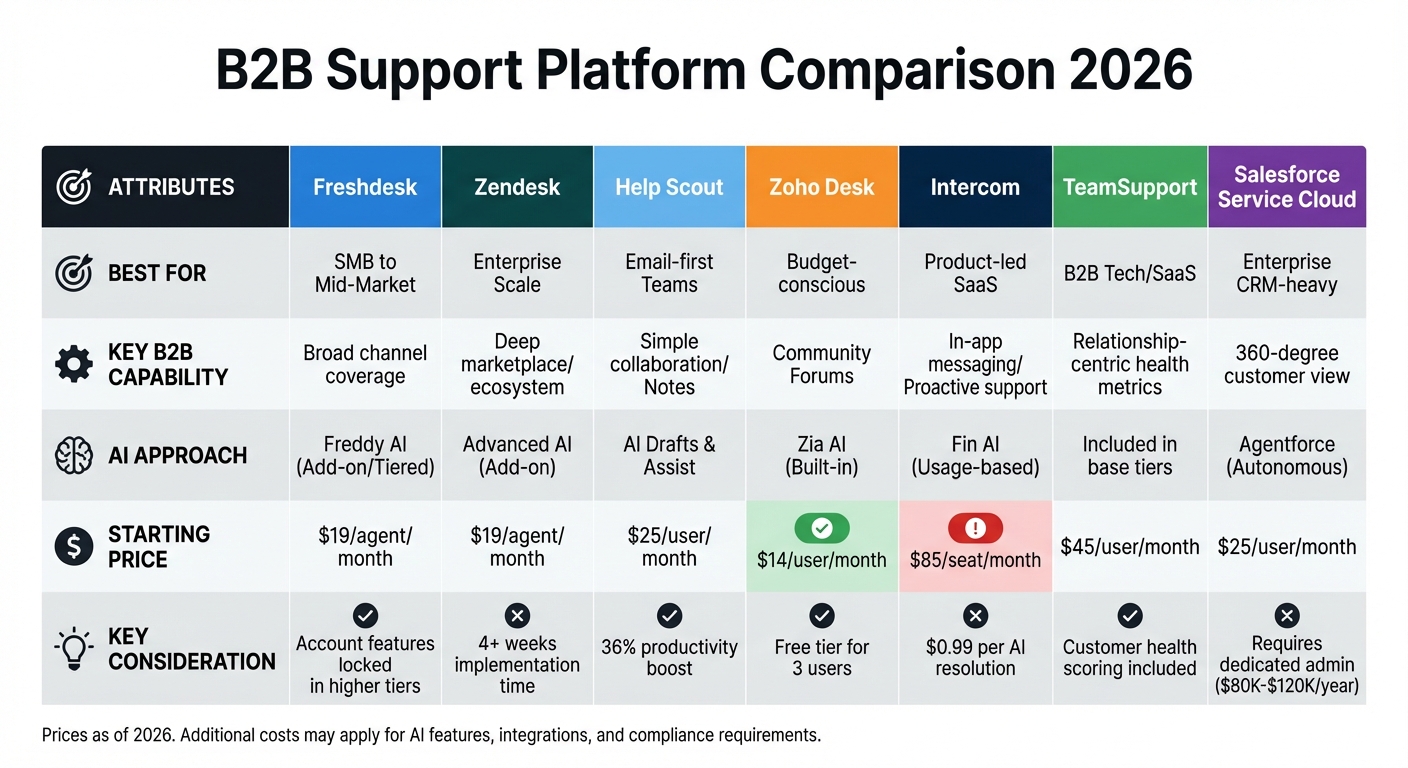
B2B Support Platform Comparison: Features, Pricing & AI Capabilities 2026
This section dives into how various alternatives to Freshdesk tackle the challenges of complex B2B operations. Many businesses are moving away from older platforms due to frustrations with automation that demands constant manual intervention and the lack of account-level intelligence needed to manage B2B relationships effectively.
Feature and Pricing Comparison
Here’s a breakdown of Freshdesk and its competitors, focusing on features that matter most for B2B operations:
| Platform | Best For | Key B2B Capability | AI Approach | Starting Price |
|---|---|---|---|---|
| Freshdesk | SMB to Mid-Market | Broad channel coverage | Freddy AI (Add-on/Tiered) | $19/agent/month |
| Zendesk | Enterprise Scale | Deep marketplace/ecosystem | Advanced AI (Add-on) | $19/agent/month |
| Help Scout | Email-first Teams | Simple collaboration/Notes | AI Drafts & Assist | $25/user/month |
| Zoho Desk | Budget-conscious | Community Forums | Zia AI (Built-in) | $14/user/month |
| Intercom | Product-led SaaS | In-app messaging/Proactive support | Fin AI (Usage-based) | $85/seat/month |
| TeamSupport | B2B Tech/SaaS | Relationship-centric health metrics | Included in base tiers | $45/user/month |
| Salesforce Service Cloud | Enterprise CRM-heavy | 360-degree customer view | Agentforce (Autonomous) | $25/user/month |
While pricing and features provide a snapshot, there’s more to consider. For instance, Zendesk’s implementation can take four weeks, plus an additional week for every 10 agents. Meanwhile, Salesforce often requires dedicated administrative staff, which can add $80,000–$120,000 annually to the total cost. Intercom’s pricing model also includes $0.99 per AI resolution, adding variability to its overall cost.
Strengths and Weaknesses of Each Alternative
Zendesk is a robust choice for enterprise-scale operations, offering extensive customization and a large integration marketplace. However, its complexity can drive up costs as teams expand their use of channels, automation, and analytics. While it scored 88/100 for its scalability, its AI features are often criticized for lacking the sophistication needed for nuanced B2B workflows.
Help Scout shines for email-focused teams that value simplicity. Its user-friendly interface and AI tools have been shown to boost productivity by 36%. However, its limited support for omnichannel integrations, such as Slack or live chat, can be a drawback for teams needing broader communication capabilities.
Zoho Desk stands out as a budget-friendly option, with pricing starting at $14 per user per month and a free tier for up to three users. It integrates seamlessly with other Zoho products and includes community forum features that can help reduce ticket volumes. That said, teams outside the Zoho ecosystem may find it less adaptable compared to standalone solutions.
Intercom is ideal for product-led organizations, excelling in proactive, in-app conversational support. Its Fin AI chatbot is tailored for product-led growth, but the usage-based pricing can be unpredictable for teams with fluctuating ticket volumes. Intercom scored 77/100 in a consultant review, earning praise for its modern interface but facing criticism for its complex pricing.
TeamSupport is purpose-built for B2B teams, offering features like customer health scoring, relationship mapping, and multi-contact management. Starting at $45 per user per month, it delivers analytics tailored to B2B needs without requiring expensive add-ons. This makes it a strong contender for teams that prioritize account-level visibility.
Salesforce Service Cloud is deeply integrated with the Salesforce ecosystem, making it a top choice for companies already using its CRM. Its Agentforce AI, priced at $550 per user per month, leverages CRM data to resolve complex issues autonomously. However, the platform’s implementation can take months, and it often requires dedicated administrators to manage workflows. Despite these challenges, its "Customer 360" view offers a unified perspective on support interactions, including call recordings, product usage data, and renewal timelines – critical for managing multi-stakeholder relationships in B2B settings.
Each of these platforms brings unique strengths and challenges, underscoring the importance of evaluating AI capabilities and operational requirements when selecting a support solution.
How AI Works Across Different Platforms
Built-In AI vs. Add-On AI Features
When it comes to AI-powered support tools, balancing cost and functionality can be tricky. Pricing models vary widely. For example, Freshdesk’s "Pro + AI Copilot" plan offers 500 AI sessions for $78 per agent per month, with additional sessions costing around $100 for every 1,000. On the other hand, platforms like Zendesk and Intercom charge extra fees either per agent or per resolution.
But price isn’t the only factor. The way AI is integrated into a platform has a big impact on how efficiently teams can operate. Platforms like Salesforce Service Cloud, which embed AI deeply into their CRM systems, can access detailed customer histories and purchase data. This allows for more context-aware responses that go beyond what basic bots can handle. In contrast, platforms that treat AI as an afterthought often run into issues, like poor synchronization, where data doesn’t flow smoothly back into the CRM.
Another major shift in AI is its evolution from simple deflection bots to more sophisticated consultative tools. Older systems typically redirected customers to FAQs to close tickets. Today’s consultative AI goes a step further by asking clarifying questions and helping customers make complex decisions.
These differences in cost and integration highlight how AI capabilities can vary significantly in actual use.
AI Use Cases for B2B Support Teams
AI’s role in B2B support has come a long way. Take Freshdesk, for instance: its Freddy AI Agents boast an impressive 80% resolution rate, while Freddy AI Copilot can enhance agent productivity by up to 60%. These gains are driven by features like ticket summarization, automated prioritization and routing, and predictive insights that help flag accounts at risk.
TeamSupport offers a unique edge for B2B teams with its Customer Distress Index. This tool uses predictive analytics to assess account health and churn risk, focusing on broader account-level metrics instead of just individual tickets. Meanwhile, Zendesk users have seen a 42% reduction in first-response times thanks to automation. However, achieving these results often requires significant configuration and consistent updates to the knowledge base.
"I had team members who weren’t comfortable at all with emails. With Freddy AI, they’ve gained so much confidence, and the quality of emails they’re sending now is remarkable." – Keira Hayter, Sales Team Manager
The success of these AI tools heavily depends on the quality of the AI-powered knowledge base they rely on – essentially, if you feed the system poor data, you’ll get poor results. For teams looking to manage AI session costs, it’s a good idea to run a short trial, like two weeks, to understand usage patterns. This can help avoid overage fees that might exceed the base subscription costs. Additionally, for teams that rely heavily on platforms like Slack or Microsoft Teams, AI-native systems often deliver more advanced automation compared to older platforms that only offer basic notifications.
These advancements in AI tools are helping B2B support teams meet the growing complexity of modern customer demands more effectively.
How to Choose the Right Platform for Your B2B Team
What to Consider Based on Your Team’s Needs
When selecting a platform, it’s crucial to align its features with your team’s specific challenges. Start by identifying your pain points. For instance, if your team struggles with losing context when customers switch communication channels, look for platforms with native business messaging integrations. These can cut response times by 30–50% compared to email-first tools. This ties back to the importance of maintaining seamless communication and avoiding hidden costs. For teams handling complex, multi-stakeholder accounts, an account-centric model is key. Unlike systems designed for B2C, this approach organizes data around accounts rather than individual tickets, reducing fragmentation.
Budget planning should extend beyond just the cost of seat licenses. Factor in implementation time, training, and any hidden fees for advanced AI features. These additional costs can quickly add up. If your team doesn’t have dedicated administrative resources, opt for platforms with simpler setups. Without proper staffing, overly complex systems may become "expensive shelfware".
Your team’s growth trajectory is another critical factor. Small and medium-sized businesses (SMBs) often benefit from platforms that can be deployed within days or weeks. On the other hand, enterprise teams with over 500 agents may need the advanced routing and governance features that require months to implement. For rapidly scaling teams, check how pricing adjusts as you grow. Some platforms offer flexible pricing to avoid sudden cost spikes, while others stick to rigid tier structures. Balancing these considerations with feature delivery and scalability is essential.
Balancing Features, Costs, and Scalability
The right platform isn’t about having the most features – it’s about delivering value quickly and with minimal hassle. A good way to evaluate this is by running a pilot program with a small group of agents. This allows you to test real-world scenarios, including AI performance, routing, and SLA compliance. During vendor demos, go beyond polished presentations and test for realistic technical escalations.
If your operations involve European customers, data residency requirements deserve extra attention. Some platforms include EU hosting (like Frankfurt servers) in their standard plans, while others charge extra for specific data center locations. If you’re migrating from a US-hosted instance to an EU workspace, confirm whether historical data can be transferred. Some platforms don’t allow this, forcing you to start fresh and lose previous chat history.
AI capabilities vary widely, so it’s important to distinguish between basic deflection bots that link to FAQs and more advanced AI that understands context and aids in complex decisions. Start by testing AI with high-volume Tier-1 intents to measure its impact on customer satisfaction and handle time reductions. Be sure to clarify costs upfront – features labeled as "advanced AI" can add $50 per agent monthly or come with usage-based fees that significantly increase expenses. A trial period can help you establish realistic usage patterns and avoid unexpected charges.
Conclusion
By 2026, the ideal support platform will align seamlessly with your B2B operational needs. It should emphasize account-level visibility, manage workflows involving multiple stakeholders, and facilitate consultative interactions that boost both retention and revenue.
When evaluating platforms, consider the total cost of ownership and the quality of embedded AI features. For instance, a platform priced at $15 per agent each month may seem affordable at first. However, if it requires $50 add-ons for basic AI or charges $0.99 per resolution, it can quickly outpace the cost of a solution with transparent, all-inclusive pricing.
To make an informed decision, focus on platforms where AI is deeply integrated into support workflows – from triage to predictive insights – rather than being an afterthought. During pilot programs, test these platforms with real-world scenarios, especially for complex product consultations. Additionally, ensure they meet compliance requirements without hidden fees or surcharges.
Efficient and scalable support operations hinge on selecting a platform that evolves alongside your team. Look for solutions with flexible pricing, quick implementation, and the capability to handle growing volumes effortlessly. The right platform doesn’t just support your operations – it transforms them into a strategic advantage.
FAQs
What should B2B support teams look for when choosing a platform in 2026?
When selecting a support platform in 2026, B2B teams need to focus on tools that address their immediate needs while also preparing for future growth. A few key factors can make all the difference:
- AI Capabilities: Features like automation, predictive analytics, and proactive support can streamline operations, boost efficiency, and enhance customer satisfaction. These tools save time and help teams stay one step ahead of customer needs.
- Security: Make sure the platform meets compliance standards and offers strong protection against potential vulnerabilities. Security isn’t just a nice-to-have – it’s a must.
- Seamless Integrations: Look for platforms that work smoothly with tools like Slack or Teams. Integrations like these help centralize workflows and provide a unified view of customer interactions, making life easier for your team.
- Scalability: Your platform should grow alongside your business without surprising you with unexpected costs. Scalability ensures you’re not constantly searching for new solutions as your needs evolve.
- Transparent Pricing: Hidden fees for advanced features like AI or automation can derail your budget. Prioritize platforms that clearly outline their pricing structure to avoid unwelcome surprises.
By weighing these factors, B2B teams can confidently choose a platform that supports efficient, AI-powered customer support while keeping costs under control.
How does AI improve the performance of B2B customer support platforms?
AI is reshaping how B2B customer support platforms operate by tackling repetitive tasks, speeding up response times, and creating more tailored customer experiences. Features like intelligent ticket routing, automated responses, and predictive analytics empower support teams to resolve issues faster while cutting down on manual work. The result? Greater efficiency, consistent service, and lower costs.
On top of that, AI-driven platforms bring together customer data from various channels – such as email, Slack, and Teams – into one unified view. This gives support agents real-time context, enabling them to offer more relevant and effective assistance. This is especially valuable in complex B2B cases where knowing a customer’s history can make all the difference. By streamlining processes and improving customer interactions, AI is helping businesses maintain a competitive edge and keep their focus firmly on the customer as we move into 2026.
What hidden costs should B2B support teams consider when choosing a platform?
Hidden costs in B2B support platforms can take a significant toll on your budget and operational efficiency. A frequent culprit is AI features. While these may be highlighted as part of the platform, they often come with pricey add-ons or require upgrading to premium tiers. As your team expands, these costs can escalate quickly.
Another major expense to watch out for is implementation fees, which can sometimes climb into the tens of thousands of dollars upfront. Beyond that, you might encounter charges for workforce management (WFM) or quality assurance (QA) tools, as well as fees for customization and integrations. Some platforms also require ongoing investments in areas like security or compliance – think GDPR requirements – which may only be available through premium support plans.
By carefully evaluating these hidden costs, you can avoid unexpected financial strain and select a solution that fits both your needs and your budget.