
Portal sprawl happens when companies manage too many disconnected support systems for their products and brands. This leads to wasted time, higher costs, and frustrated customers. To fix it, start by auditing your current portals to spot inefficiencies, redundancies, and gaps. Consolidate knowledge bases into a single, AI-powered system to simplify content management and improve searchability. Use centralized ticketing systems and AI for routing to streamline operations and reduce agent workload. Finally, establish clear governance policies to maintain order and avoid future sprawl. These steps can cut support costs by up to 60% and improve customer satisfaction significantly.
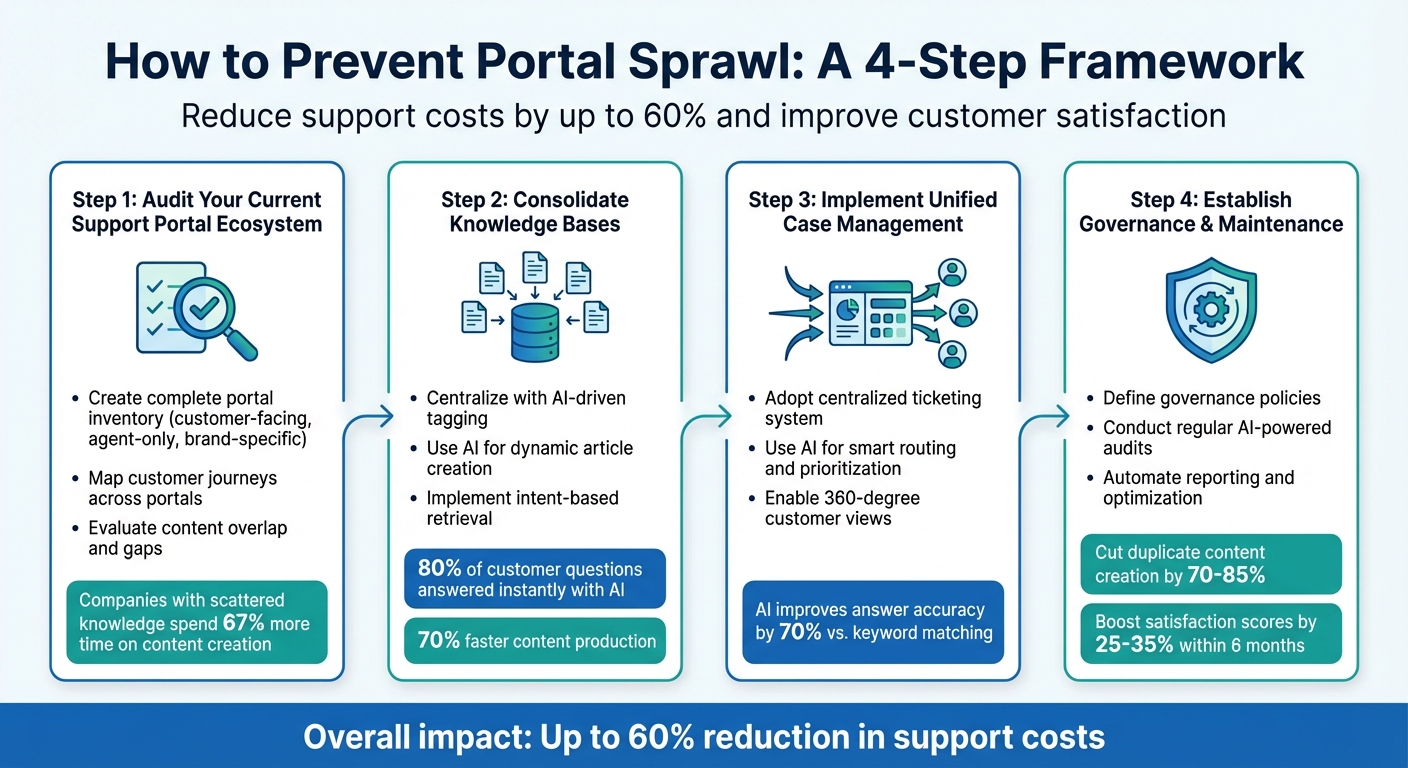
4-Step Framework to Prevent Portal Sprawl in Multi-Brand Support
Audit Your Current Support Portal Ecosystem
To tackle portal sprawl effectively, you first need a clear picture of the current state. A detailed audit helps you identify how many portals you’re managing and where overlaps exist.
Create a Complete Portal Inventory
Start by listing all the support portals your organization uses. Include customer-facing help centers, agent-only systems, and brand-specific knowledge bases. For each portal, document its name, brand, URL, and status – whether it’s active, deactivated, or awaiting deletion.
A great example comes from Improved Racing, an automotive parts manufacturer. In September 2024, they adopted HappyFox’s multi-brand help desk to centralize support for their diverse product lines. By inventorying their brand-specific knowledge bases and reports, they uncovered inefficiencies in their support management, ultimately boosting both consistency and customer satisfaction [3].
Pay close attention to the operational status of each portal. Some portals may appear active but haven’t been updated in months, while others may be deactivated yet still consuming resources like licenses or storage. Keep in mind that deactivating a portal halts new tickets and notifications but retains data, whereas deletion is permanent and irreversible.
Map Customer Journeys Across Portals
Track how customers interact with your portals and support channels. Use a comprehensive ticketing system to uncover patterns. For instance, are customers submitting duplicate tickets across multiple brand portals? Are they jumping between help centers looking for the same information?
To gain more insight, deploy brand-specific customer satisfaction surveys immediately after resolving tickets. These surveys can highlight areas where customers encounter confusion or inconsistent support. Additionally, monitor cross-brand ticket volumes and assess the performance of different channels to pinpoint underperforming portals or areas causing friction.
Once you’ve mapped customer movement, review portal content to identify redundancies and gaps in knowledge.
Evaluate Content Overlap and Gaps
Examine the knowledge base articles, FAQs, and documentation across all portals. You’ll likely discover repeated product specifications, conflicting procedural guides, and information that only exists in one portal but not others.
Research shows that companies managing scattered knowledge across multiple tools spend 67% more time on content creation and upkeep compared to those with a unified system [2].
"AI can organize and surface information, but it can’t create knowledge that doesn’t exist. If your documentation has significant gaps, fill them before expecting the AI to perform miracles." – Stevia Putri, Marketing Generalist, eesel AI [4]
Analyze search success rates to identify "dead ends" where customers look for terms that yield no results. Focus on consolidating duplicated content, particularly around product information and core procedures, as these areas offer the most significant efficiency gains [2]. To streamline your efforts, categorize findings into high-priority (frequently duplicated product details), medium-priority (specialized knowledge with broad relevance), and low-priority (platform-specific details). This approach ensures your consolidation strategy is both organized and impactful.
sbb-itb-e60d259
Consolidate Knowledge Bases and Streamline Resources
Once you’ve identified overlaps and redundancies in your audit, the next logical step is to merge fragmented knowledge bases into a single, AI-powered repository. This approach eliminates the inefficiencies of maintaining separate documentation for each brand or product, making it easier for customers to find answers quickly. The foundation for this consolidation comes directly from the insights gained during your audit.
Centralize Knowledge with AI-Driven Tagging
Manual tagging can be slow and often inconsistent. AI-driven tagging, on the other hand, automates the process by analyzing content and assigning consistent metadata. This creates a seamless search experience, allowing customers to find what they need without navigating through multiple help centers. These tagging improvements are crucial to addressing the fragmentation uncovered during your portal audit.
Unlike traditional keyword-based systems, AI uses intent-based retrieval to understand what customers are really asking. For instance, if someone searches for "login issues", the system can direct them to guides on authentication and troubleshooting – even if those resources use terms like "access problems" or "credential errors."
Adopting unified AI management has significant benefits: it can reduce support costs by up to 60% and speed up content production by as much as 70% [1][6]. Companies using intelligent search report that 80% of customer questions are answered instantly without any human involvement [1][6].
To get started, conduct a content audit to ensure outdated or duplicate material doesn’t make its way into your new system [7]. During the migration phase, establish consistent naming conventions and metadata standards – categories, tags, and article types should align across all brands. Structure your content around customer challenges (like "connectivity issues") instead of internal product categories to improve AI performance [6]. Use incremental syncs to update content across platforms in real-time, ensuring consistency without requiring full-scale migrations [7].
Use AI for Dynamic Article Creation
Building on centralized tagging, AI can dynamically transform resolved support tickets into actionable knowledge. For example, platforms like Supportbench can convert case histories into articles by automatically filling in details such as subject, summary, and keywords [5][8].
This process aligns with the Knowledge-Centered Service (KCS) methodology, where knowledge is captured as a natural byproduct of resolving issues. These assets become instantly searchable and accessible across all portals. AI can also analyze customer search patterns and support tickets to identify gaps in documentation – areas where content is missing or insufficient – so teams can prioritize creating the resources customers actually need [6]. This dynamic approach not only fills gaps but also reinforces the value of a centralized repository, directly addressing the goal of reducing portal sprawl.
"AI doesn’t browse – it retrieves and synthesizes, which means it needs explicit metadata, clear scope boundaries, and defined relationships between content units to produce accurate answers." – MatrixFlows [6]
The shift from static articles to dynamic answers marks a major evolution in how knowledge bases operate. Modern systems treat metadata and relationships as "first-class content", enabling AI to assemble contextual answers from multiple sources instead of simply listing articles [6]. This information synthesis approach improves answer accuracy by 70% compared to traditional keyword matching [6].
To get the most out of this system, break down long, multi-topic articles into smaller, standalone units. AI performs better when retrieving specific "blocks" of information rather than sifting through lengthy documents [6]. Focus on your top 20 support ticket categories – these typically account for 80% of the potential impact an AI knowledge base can deliver [6]. Additionally, consider implementing AI co-pilots to assist agents in real-time by suggesting relevant articles or drafting responses based on the knowledge base. This reduces resolution times and ensures consistent support across all brands [8][5].
Implement Unified Case Management and Smart Routing
Streamlining support operations becomes even more efficient when you unify your ticketing systems. A centralized case management platform enables agents to address requests for all products through a single dashboard. This eliminates the hassle of switching between multiple systems while still allowing for brand-specific customization on the customer-facing side.
Adopt a Centralized Ticketing System
A centralized ticketing system offers the best of both worlds: maintaining unique brand identities while sharing a unified backend. You can host separate support portals and knowledge bases for each brand – complete with their own designs and tone – while consolidating all interactions (email, live chat, phone, or social media) into one dashboard. This setup directly addresses inefficiencies uncovered during your portal audit.
The advantages are immediate. Agents no longer waste time juggling multiple systems or hunting for scattered information. Instead of managing separate SLA configurations, billing tools, or reporting dashboards, you can define brand-specific SLAs and templates within the same platform. For instance, you could set a 2-hour response time for premium enterprise clients and a 24-hour standard for basic tiers, all managed seamlessly in one system.
Use AI for Routing and Prioritization
Traditional rule-based routing struggles in multi-brand setups because it depends on customers selecting the right options or using precise keywords. AI-powered routing, on the other hand, leverages Natural Language Processing (NLP) to understand the actual content and sentiment of incoming requests. This means it can interpret messages even when customers use informal language or misspell product names.
"AI is revolutionizing the operational backbone of support by bringing intelligence and context-awareness to ticket routing and prioritization." – Nooshin Alibhai, Founder and CEO of Supportbench [9]
AI evaluates factors like sentiment, keywords, customer tier, and product mentions to route tickets accurately. This contextual prioritization ensures high-value clients and urgent issues are addressed promptly, even when the language used is vague. It can also assign tickets based on agent expertise (e.g., API knowledge, language skills) and workload, reducing unnecessary handoffs between teams.
| Feature | Rule-Based Systems | AI-Powered Systems |
|---|---|---|
| Logic | Rigid "IF-THEN" rules | NLP and Machine Learning |
| Urgency Detection | Relies on specific keywords like "urgent" | Considers sentiment and context |
| Maintenance | Labor-intensive (manual updates) | Self-improves with data |
| Accuracy | Prone to errors from typos | Consistent across brands |
Before implementing AI routing, test it with historical tickets to ensure accuracy in tagging and routing. Set up sentiment triggers to automatically escalate cases involving "Negative Sentiment" and "High-Value Customer Tier" to incident management teams. Use automated tagging to apply brand-specific labels based on product mentions or error codes, reducing human error and cleaning up data for better cross-brand analysis. This combination of a unified ticketing system and AI routing creates a strong foundation for delivering efficient, personalized support.
Enable 360-Degree Customer Views
Combining customer records into a single platform changes how agents handle support. When a customer reaches out about a different product, agents can immediately access their full history. This unified view includes purchase history, past interactions, escalation notes, and CRM data like renewal dates or contract tiers.
The benefits are clear. According to Zendesk research, faster first reply times directly correlate with higher customer satisfaction scores [9]. When agents don’t waste time searching for context or piecing together fragmented histories, they can focus entirely on solving the issue. Platforms like Supportbench offer built-in AI-driven summaries of customer activity and case histories, providing instant context without the need to scroll through lengthy ticket threads.
To fully leverage this, integrate your helpdesk with CRM systems and internal documentation tools. AI can then cross-reference details like customer tier, active licenses, and recent product updates, giving agents everything they need on one screen to provide faster, more effective support.
Establish Governance and Portal Maintenance
Keeping your help center ecosystem organized requires ongoing effort. Without clear rules, teams might create new portals every time a product launches or a company acquires a new brand. To avoid this, set creation criteria before launching a new help center. Ask yourself: Does the customer base, content, or taxonomy truly require a separate portal? Or can user segments and permissions within your current system provide the same personalized experience without adding unnecessary complexity? By combining consolidation efforts with unified case management, structured governance ensures consistency over the long term.
Define Governance Policies
Assign a portal administrator to manage stakeholders and oversee operations across all brands. Hilary Dudek, Head of Customer Experience at Gamma, emphasizes this approach:
"If you don’t have someone already, assign someone to act as admin for the brands, someone who can liaison between multiple stakeholders while also performing the more operational tasks needed" [10].
This administrator acts as the gatekeeper, ensuring new portals are created only when absolutely necessary and that existing ones adhere to standardized workflows and design principles.
Centralizing knowledge management is just as important. Unify backend structures and ticket workflows across all brands to make it easier for agents to switch between products. This approach guarantees a consistent support experience for customers, no matter which product they use.
Conduct Regular Audits with AI Insights
Regular audits are key to maintaining a healthy system. Once governance policies are in place, AI-powered analytics can make these reviews quicker and more precise. For example, in early 2026, Mario Guisado, then Director of Customer Support at Everbridge, led a two-month project to evaluate whether multiple product help centers should be consolidated. He analyzed ticketing overlap, knowledge sources, and taxonomy across the system. While Everbridge decided to keep separate brands to maintain their unique identities, they unified the design of all help centers to simplify future consolidation and reduce administrative burdens [10].
AI tools can also streamline performance monitoring by aggregating data from multiple portals. They can identify outdated articles, broken links, and overlapping content, helping you decide if sub-brands should merge with the parent brand. Additionally, AI can highlight portal topics that still generate high ticket volumes, signaling areas where your knowledge base needs improvement.
Automate Reporting and Optimization
Automated insights help maintain the unified structure you’ve built, ensuring support workflows remain efficient. Use automated dashboards to track key metrics like FCR (First Contact Resolution), portal usage, and customer satisfaction. Tools like Supportbench can even measure FCR automatically and provide predictive CSAT scores, helping you identify potential issues before they escalate. Automated reporting eliminates the need to manually gather data from different sources, giving you a real-time overview of portal performance.
AI-driven knowledge systems can handle up to 80% of customer queries instantly, significantly reducing response times. By automating knowledge updates with AI-generated responses, you can continually improve your knowledge base without adding extra work. Together, governance policies, AI-driven audits, and automated reporting create a sustainable framework that keeps portal sprawl in check and ensures smooth operations over time.
Conclusion
Portal sprawl becomes inevitable as brands and products expand without a clear support strategy in place. Tackling this issue starts with auditing your current systems, consolidating scattered knowledge bases, implementing unified case management, and setting up governance policies to prevent future fragmentation.
AI-driven tools play a game-changing role in maintaining this unified structure. With deep integration into a centralized knowledge base, AI can instantly address up to 80% of customer questions while slashing support costs by 60% [1]. Each resolved query strengthens the system, paving the way for more efficient interactions down the line. By weaving AI into your strategy, your support system stays streamlined and adaptable.
The secret lies in ensuring all teams rely on a single, unified knowledge base that caters to customers, partners, and employees alike. By adopting a "create once, serve everywhere" philosophy, organizations can cut duplicate content creation by 70% to 85%, while boosting satisfaction scores by 25% to 35% within just six months [2].
Proactively consolidating resources and leveraging automated reporting and analytics creates a scalable and efficient support framework. By combining thoughtful governance with AI automation, businesses can protect their support ecosystem, reduce costs, and ensure it grows seamlessly alongside their needs.
FAQs
When should we keep separate portals versus consolidate?
The decision hinges on what your business operations require and the kind of customer experience you aim to deliver. Separate portals are a great fit when your brands or products target different audiences, have unique branding, or require tailored support. On the other hand, consolidation helps simplify processes, eliminate redundancies, and boost efficiency by using centralized management and AI-powered tools. Weigh the importance of maintaining brand individuality against the benefits of streamlined operations to determine the best path forward.
What’s the fastest way to unify knowledge without breaking search?
To streamline knowledge and avoid search complications, focus on deduplication and canonicalization. This means combining duplicate or conflicting articles into one reliable version while ensuring future content creation avoids redundancy. Additionally, bring together all existing knowledge sources into a single, cohesive system. By incorporating AI-powered search, you can improve both accuracy and accessibility, reducing problems caused by scattered or overlapping content.
How do we govern portals so sprawl doesn’t return?
To keep portal sprawl in check, it’s important to take a structured approach to governance. Start by centralizing management to ensure all portals follow a unified strategy. Standardize designs to create a consistent look and feel, and automate processes to reduce manual errors and improve efficiency.
Set clear policies for creating and updating portals. This includes defining who can create portals, how they should be structured, and when updates are required. Regular audits are also essential to spot and eliminate redundancies that could clutter your system. Leveraging AI can further enhance efficiency by enabling smart routing and fine-tuned access controls.
Lastly, invest in training your teams on best practices. Encourage adherence to these practices to ensure operations stay streamlined and customers enjoy a cohesive experience across all portals.