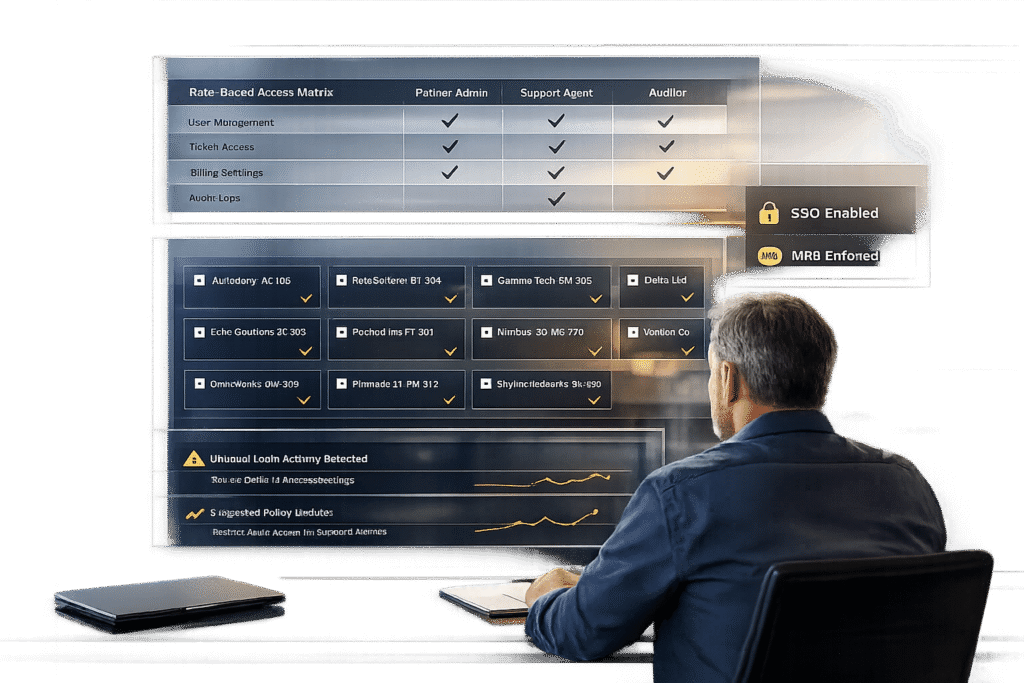
Managing partner access in your customer portal requires balancing security and efficiency. Here’s what you need to know:
- Use Role-Based Access Control (RBAC): Assign roles like "Service Support Administrator" or "Help Desk Administrator" to limit permissions based on tasks, avoiding full admin rights.
- Adopt Granular Delegated Admin Privileges (GDAP): GDAP replaces legacy DAP, offering time-limited, least-privilege access to reduce risks.
- Enable Secure Authentication: Implement Multi-Factor Authentication (MFA) and Single Sign-On (SSO) for all partner accounts to enhance login security.
- Monitor and Audit Access: Use AI tools to detect anomalies, automate access reviews, and ensure permissions align with roles.
- Centralize Multi-Tenant Management: Tools like Microsoft 365 Lighthouse simplify managing multiple customer accounts.
- Avoid Common Mistakes: Prevent over-permissioning and ensure regular monitoring of partner activities.
Access Management: Personalizing Partner Experiences @ZINFITECH
sbb-itb-e60d259
Partner Access Requirements Explained
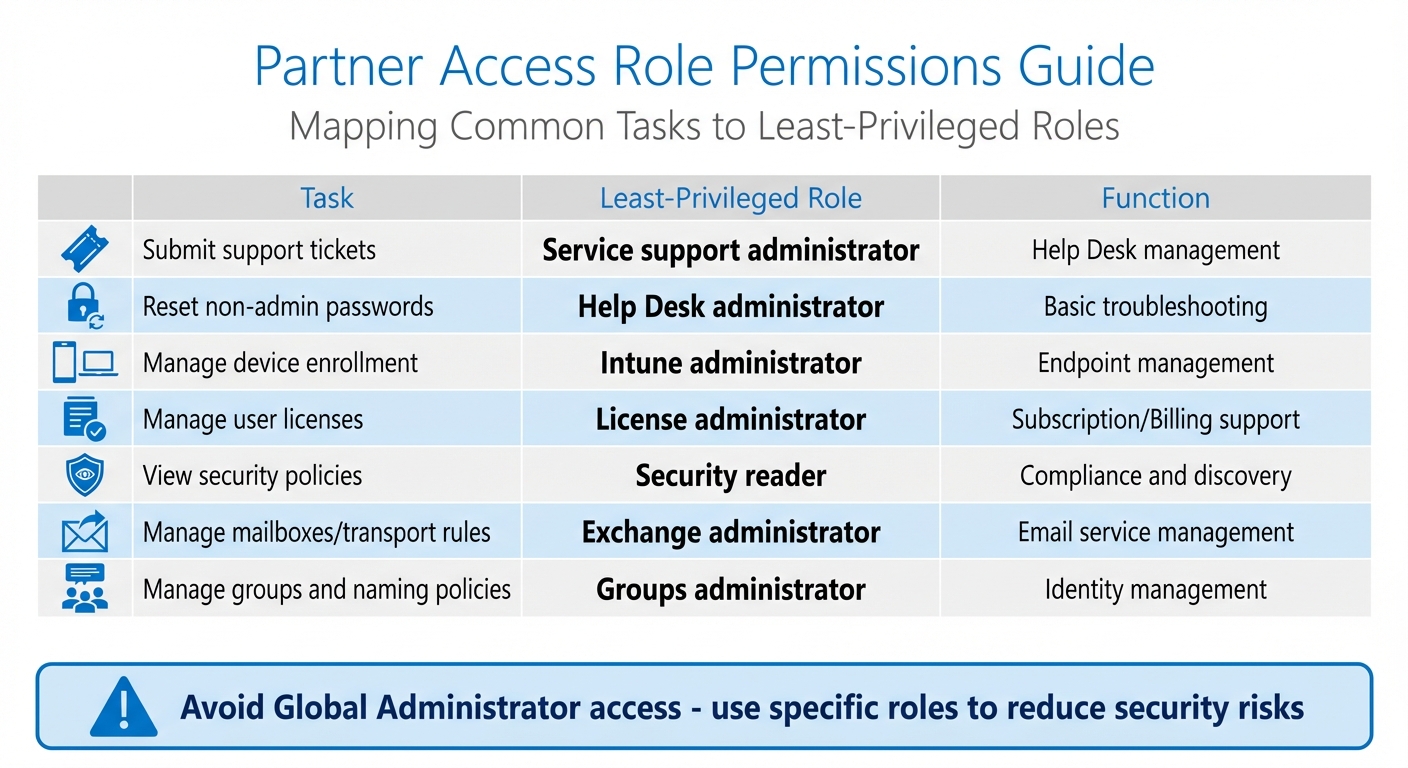
Partner Access Role Permissions Guide: Least-Privilege Roles for Common Tasks
Resellers and MSPs often need tailored access to your customer portal. For instance, a tier-one support technician handling password resets will require different permissions than a security analyst reviewing compliance policies or an escalation manager routing urgent incidents. The challenge lies in aligning access levels with job roles while avoiding security vulnerabilities or operational inefficiencies.
The industry has largely moved away from using legacy Delegated Administrative Privileges (DAP), which provided partners with permanent Global Admin rights. Microsoft ceased issuing DAP for new customer relationships on September 25, 2023, due to the inherent security risks tied to unrestricted administrative access [4]. Modern GDAP (Granular Delegated Admin Privileges) addresses these concerns by enforcing least-privilege and time-limited permissions. Instead of granting blanket access, GDAP allows you to assign specific roles, such as Service Support Administrator for ticket management or Help Desk Administrator for basic troubleshooting tasks [4][5].
"GDAP helps mitigate the risks present in legacy delegated administrative privileges (DAP) by avoiding blanket global admin access to customer tenants, instead using least-privilege access that recognizes zero trust best practices." – NinjaOne [5]
GDAP agreements last up to two years but automatically expire after 90 days if the customer does not approve the request. This design prevents partners from holding elevated permissions indefinitely. For routine tasks, setting a 90-day duration with auto-extension options – adding up to six months for active relationships – strikes a balance between security and operational efficiency [4].
Setting Up Role-Based Access Control (RBAC) for Partners
Role-Based Access Control (RBAC) organizes access into predefined roles that align with specific responsibilities. This approach limits visibility to only the data and functions necessary for the task. For example:
- A Service Support Administrator can manage support tickets but cannot access financial records.
- A Security Reader can view security policies but cannot make changes.
- An Exchange Administrator can manage mailboxes and transport rules without controlling user licenses [4].
Here’s a quick reference table mapping common partner tasks to their least-privileged roles:
| Task | Least-Privileged Role | Function |
|---|---|---|
| Submit support tickets | Service support administrator | Help Desk management |
| Reset non-admin passwords | Help Desk administrator | Basic troubleshooting |
| Manage device enrollment | Intune administrator | Endpoint management |
| Manage user licenses | License administrator | Subscription/Billing support |
| View security policies | Security reader | Compliance and discovery |
| Manage mailboxes/transport rules | Exchange administrator | Email service management |
| Manage groups and naming policies | Groups administrator | Identity management |
By using these predefined roles instead of assigning Global Administrator access, you reduce the risk of widespread damage if a partner account is compromised. For high-privilege tasks that occur infrequently, consider implementing Just-In-Time (JIT) access via Privileged Identity Management (PIM). This approach temporarily elevates permissions and automatically revokes them after task completion [4].
Managing Multi-Tenant and Delegated Access
MSPs often oversee multiple customer accounts, and logging into each tenant individually can be both time-consuming and error-prone. Tools like Microsoft 365 Lighthouse simplify this by providing a centralized dashboard for managing multiple customer environments [5][6].
To maintain isolation between clients, security groups are critical. Create distinct groups within your partner tenant for various customer tiers or support teams, and map these groups to specific customer tenants. This setup ensures that a technician working on Customer A’s account cannot accidentally access Customer B’s data. While partners can manage over 500 groups per tenant in Privileged Identity Management, only 500 of these groups can be role-assignable [4].
Credential separation is another important layer of security. Partner portal accounts should have unique passwords that are different from those used for client applications. This prevents stored credentials from being accessed, even by administrative staff [1]. Additionally, adopting standardized naming conventions (e.g., name.companyname) can improve tracking and accountability throughout your partner network [1].
To keep access streamlined and secure, audit delegated permissions quarterly. Remove outdated roles and ensure current access matches job requirements. GDAP templates can help standardize access configurations across multiple customers. Using APIs and RMM tools to track GDAP expiration dates with automated alerts ensures you stay ahead of any lapses [5]. Next, we’ll explore advanced techniques for secure authentication and delegation to further strengthen access controls.
How to Set Up Secure Access Controls
Setting up secure access controls is all about finding the right balance between partner productivity and safeguarding customer data. A key starting point is enabling Single Sign-On (SSO) and Multi-Factor Authentication (MFA) for all partner accounts. Beginning April 1, 2026, all App+User usage of Partner Center APIs will require MFA enforcement [8]. This mandate extends to all partner and guest accounts accessing management portals and APIs.
For partners using federated identity providers, SSO allows users to authenticate through their organization’s MFA system. The critical part is ensuring your identity provider integrates with Microsoft Entra ID’s MFA claim (AMR claim) [8]. When a partner user logs in, the system checks the "amr" value. If "mfa" is missing, the login fails with a 401 Unauthorized error [8]. Once configured correctly, this validation process runs automatically, eliminating the need for manual checks. Next, let’s explore how SSO and additional authentication layers create secure yet smooth access across environments.
Adding SSO and Authentication Layers
Cross-tenant MFA configuration simplifies access for partners managing multiple customers. By setting up cross-tenant policies to trust the MFA of the home tenant [4], technicians can avoid repeated logins for each customer account. Their initial MFA verification applies across accounts, streamlining the process.
Device registration adds another layer of security. For example, when logging in from a new browser, users receive an email verification code [1]. This step blocks unauthorized access even if credentials are compromised. These layered authentication measures enable efficient delegated administration and reduce the need for manual interventions.
Setting Up Delegated Administration and Permissions
Once secure authentication is in place, delegated administration empowers partners to manage roles within defined boundaries. This is where security groups come into play. Instead of assigning roles individually, create security groups in your partner tenant – like "Tier 1 Help Desk" or "Azure Managers" – and link these groups to specific customer relationships [4][7]. When you update a security group, related permissions adjust automatically, saving time and effort.
Customers remain in control throughout this process. They can view which partners have access and revoke roles or entire relationships directly through their admin portal [7]. For Azure subscriptions, you can organize permissions by nesting your "Azure Managers" group under the "Admin Agents" group, ensuring that administrators only access resources within the correct customer tenant [4]. Regular audits during Quarterly Business Reviews help identify and remove outdated privileges, ensuring access aligns with the current scope of work [5]. Automated alerts also play a key role in maintaining security after these configurations are in place.
Using AI for Access Monitoring and Automation
After setting up secure authentication, AI tools take over to ensure consistent oversight of partner accounts. With secure authentication in place and permissions delegated, the next hurdle is managing visibility across hundreds – or even thousands – of accounts. This is where continuous AI monitoring comes into play.
AI-Powered Access Monitoring and Anomaly Detection
AI systems create dynamic baselines for each partner account, allowing them to identify unusual behavior in real time. For example, sudden spikes in activity or logins from unfamiliar locations trigger instant alerts. These alerts can prompt actions like blocking suspicious IPs, isolating compromised devices, or requiring stricter verification processes.
What makes this approach stand out is its ability to respond immediately. AI-driven security systems don’t wait for manual intervention – they act fast to block unauthorized access, isolate threats, or stop the transfer of sensitive data. For partner portals, these systems can flag access attempts outside predefined permissions and enforce additional security checks.
Microsoft, for instance, invests over $1 billion annually in cybersecurity research and development [13]. AI platforms use machine learning models that process trillions of daily security events to establish accurate behavior patterns [12]. This robust pattern recognition allows AI to detect even complex anomalies that combine multiple risk factors.
Once these detection mechanisms are in place, the next step involves automating access reviews to ensure roles and permissions stay aligned with actual partner activity.
Automating Access Reviews and Role Assignments
Traditional quarterly access reviews often overlook real-time changes. AI bridges this gap by continuously monitoring partner activity and adjusting roles based on current usage patterns. For instance, if a partner’s certification level or contract status changes in your CRM, AI workflows can immediately update their portal permissions [9][11].
A structured hierarchy – spanning Organization, Workspaces, and API Keys – enables the use of metadata (like subscription tiers or certification levels) to automate role assignments [11]. For example, when a partner transitions from a "Professional" to an "Enterprise" tier, AI can automatically adjust their budget limits, rate limits, and access to different models.
Organizations using AI for access management have seen tangible results, including a 60% reduction in support costs and resolution times that are three times faster [10]. Additionally, automated alerts at specific usage thresholds help prevent over-permissioning while avoiding unnecessary restrictions [11].
Common Mistakes and How to Avoid Them
Even with cutting-edge monitoring systems, organizations can still make critical errors that leave their systems exposed. Two of the most common missteps are granting partners excessive access and neglecting to monitor their activities after access is granted.
The Risks of Over-Permissioning
One of the biggest hazards in partner access management is the "Global Admin" trap. Many legacy agreements automatically assign all engineers "Full Administrator" rights, regardless of their specific responsibilities[14]. This setup creates a significant security vulnerability by making it easier for attackers to exploit customer environments[14].
"Most Managed Service Providers (MSPs) provide full administrator permissions to every engineer in the company – from helpdesk engineers to cloud architects."
- Thijs Lecomte, Security Consultant[14]
To address this issue, start by auditing your partner relationships. Go to the "Partner Relationships" section in your admin center[14]. If a partner is listed as a "Full Administrator" but only performs basic tasks, reassign their role to something more appropriate, like "Service Support Administrator" for submitting tickets or "Help Desk Administrator" for password resets[3]. Importantly, you can revoke administrative roles without severing the reseller relationship. This allows partners to continue purchasing licenses without having unnecessary access to your tenant data[14].
Not Monitoring Partner Activity
Another common mistake is failing to monitor partner activity, which can lead to blind spots in security and missed opportunities to improve operations. Without proper tracking, unauthorized access can go unnoticed, and valuable insights into partner usage patterns may be lost.
"By providing Delegated Admin Permissions to a partner, you are essentially handing out a global admin role to all their users. Unfortunately, there’s no way to provide the partner with a restricted admin role, and you also have no way of knowing which users in the partner’s tenant receive the full administrator role."
- Thijs Lecomte, Security Consultant, The Collective[14]
To combat this, assign dedicated accounts to each partner engineer. This creates clear audit trails and ensures security policies, like MFA, can be enforced effectively[14]. Additionally, tracking which portal resources are accessed can help identify underused content and recurring access patterns[2]. Conducting regular quarterly audits is another best practice. These reviews help remove outdated restrictions and ensure partners are assigned roles that reflect their current responsibilities or tier levels[2].
These mistakes underscore the importance of refining workflows, a topic we’ll dive into next when discussing improved partner support and escalation strategies.
Building Better Workflows for Partner Support and Escalations
Improving partner support workflows starts with secure permissions and consistent monitoring. Once these are in place, streamlining processes for handling partner requests can significantly reduce delays and ensure smoother resolutions. The ultimate aim? Making sure your top-tier partners never find themselves stuck waiting for answers.
Dynamic SLAs and Escalation Paths for Partners
Not every partner requires the same level of support. A tier-based system ensures that higher-value partners receive quicker responses, while newer or lower-tier partners follow standard procedures. For instance, Gold or Platinum partners might benefit from "Dedicated Support" or even an "Executive Sponsor" who directly manages their escalations. Meanwhile, Bronze partners would navigate through the regular support queues[2].
Role-based routing is essential for directing requests efficiently. For example, a Direct Bill partner with subscription questions should be routed to a billing expert, while an Indirect Reseller facing a technical issue should immediately connect with engineering. This approach eliminates unnecessary back-and-forth, saving time and resources[15].
Dynamic SLAs take this a step further by modifying response times based on real-time situations. If a partner’s customer is nearing a renewal deadline, the system can automatically shorten SLAs to ensure swift resolutions and maintain the relationship. This automation eliminates the need for manual prioritization and sets the groundwork for AI to refine partner interactions even more.
Using AI Features to Improve Partner Collaboration
AI tools can transform workflows by taking over repetitive tasks that often slow down escalation processes. For example, in 2025, Brizy – a no-code website builder led by CEO Dimi Baitanciuc – introduced an AI agent to manage partner support. By training the agent with real support tickets and documentation, Brizy managed to reduce partner support tickets by 30% in just a few months. The AI handled routine questions about layouts and templates, while more complex issues were escalated to human managers. This approach gave partners a sense of independence and boosted their confidence[16].
"Partners were asking the same questions repeatedly, and our team couldn’t scale one-to-one support. But the hardest part was teaching the agent not to give generic advice."
- Dimi Baitanciuc, CEO and Co-founder, Brizy[16]
AI-powered sentiment tracking adds another layer of efficiency, analyzing emails, chats, and call transcripts to spot frustration early. This allows teams to step in before minor issues escalate into major problems[18]. Intelligent triage assesses the context and urgency of cases, ensuring high-value or high-risk issues go straight to senior teams, while routine queries are handled by frontline staff. Additionally, executive-ready summaries provide quick overviews of escalated cases, including timelines, sentiment changes, and root cause analysis, enabling leadership to address partner concerns effectively[18].
One of the most impactful AI features is context preservation. By maintaining a complete case history during handoffs, AI ensures partners never have to repeat their issues to new specialists. A B2B software company that implemented "Warm Handoffs" and AI-driven communication protocols saw a 31% reduction in escalation resolution times. Over eight months, their customer satisfaction scores for escalated cases improved from 4.8 to 7.9 out of 10[17].
"AI handles scale and speed across partner engagement… Humans handle trust, strategy, and the moments that define long-term partnerships."
Conclusion
Ensuring partner support access is both secure and seamless begins with role-based access control. By assigning only the permissions necessary for specific tasks, you can avoid the risks associated with broad Global Admin rights. For example, roles like Service Support Administrator for ticket submissions or Help Desk Administrator for password resets keep access tightly controlled, reducing potential vulnerabilities while maintaining partner efficiency[3][21].
Integrating AI-driven automation can further streamline operations. Routine queries are resolved automatically, while AI-powered ticket routing ensures complex issues are escalated without manual intervention. This reduces triage time, cuts operational costs, and allows your team to focus on more critical tasks[20]. Additionally, centralized portals simplify workflows by bringing together essential functions like product launches, invoice payments, and support ticket management into one easy-to-use platform[19].
To strengthen security, combine automation with active monitoring. Real-time anomaly detection, trusted device verification, and automated access reviews can help prevent unauthorized access and costly breaches. This is particularly important when considering that 61% of small businesses fail within a year of experiencing a breach[23].
"Digital Identity by Deloitte… combined with the CyberArk MSP solutions, significantly reduces identity security management maintenance time and costs, allowing us to concentrate on bringing identity security benefits to new and wider markets."
- Jan Vanhaecht, Global Digital Identity leader, Deloitte[22]
FAQs
How do I move from DAP to GDAP without breaking partner support?
To move from Delegated Administrative Privileges (DAP) to Granular Delegated Admin Permissions (GDAP) smoothly and without interrupting partner support:
- Request GDAP access: Admin agents need to initiate the process, and customers must approve the new relationship.
- Set up security groups: Create Azure AD groups and assign the necessary roles to enable more specific permissions.
- Transition step-by-step: Keep DAP access active until GDAP is fully implemented and confirmed to be working, ensuring uninterrupted support during the change.
What’s the minimum partner access needed for common support tasks?
The most basic access needed for common support tasks usually involves roles that let users create support requests and handle troubleshooting through the partner portal. Roles such as "Admin agent" or "Helpdesk agent" are good examples. These roles allow team members to submit tickets, manage support-related activities, and resolve customer issues. It’s important that every team member who needs access has their own individual user account within the partner portal.
How can AI catch risky partner activity in real time?
AI keeps an eye on risky partner activity by analyzing behavioral signals and activity patterns to uncover anomalies or shifts in sentiment that could signal potential risks. Using user behavior analytics (UEBA), it can track over 130 signals nonstop, spotting insider threats, unusual behavior, or signs of disengagement. It also highlights high-activity accounts and detects unusual patterns in deal registrations or support interactions, helping to address security or compliance concerns swiftly.
Related Blog Posts
- How do you set up a customer portal that supports role-based access and multiple customer teams?
- How do you design role-based customer portals for B2B (multiple users, permissions, reporting)?
- Customizing Portals for Strategic Accounts: Why One Size Doesn’t Fit All
- Customer portal permissions model: roles, organizations, and least-privilege access