
Keeping your knowledge base accurate and useful is no small task. Knowledge governance ensures your content stays relevant, accessible, and organized – critical for both customer satisfaction and efficient AI-driven support. Here’s how to do it:
- Assign clear ownership: Define roles like Content Owner, SMEs, and Knowledge Manager to maintain accountability.
- Set review cycles: Regularly audit and update content based on schedules or product changes.
- Reduce KB debt: Identify and clean up outdated, duplicate, or irrelevant articles.
- Empower frontline agents: Create simple workflows for agents to flag issues or contribute updates.
- Leverage AI and automation: Use tools to streamline content creation, updates, and governance tasks.
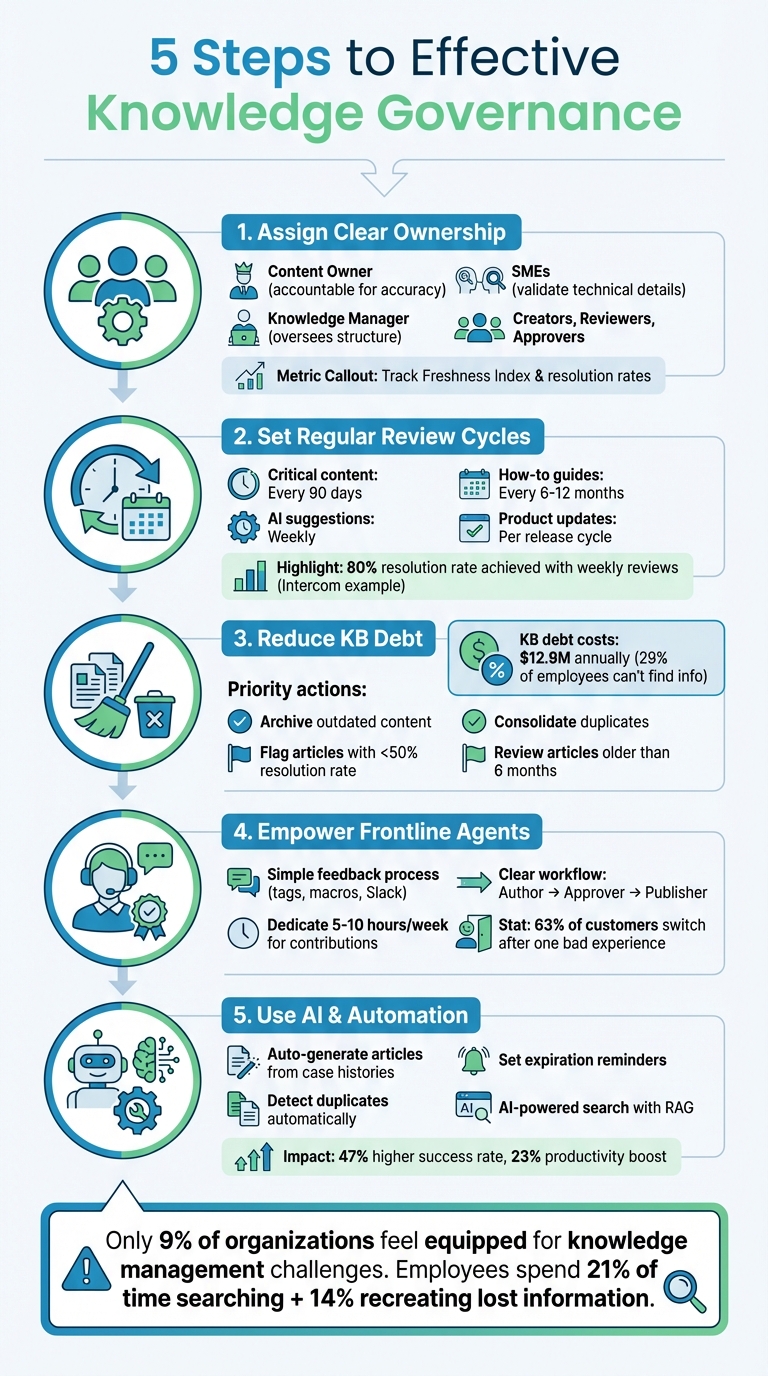
5-Step Knowledge Governance Framework for Maintaining an Effective Knowledge Base
Good Knowledge Starts with Good Governance | 5 Stages + 6 Pillars Explained
Step 1: Assign Clear Ownership and Accountability
When everyone is responsible for the knowledge base, the reality is that no one truly is. Without clear accountability, articles quickly become outdated, content gaps appear, and your support team is left improvising instead of relying on documented processes.
Define Specific Roles in Your Knowledge Base
To keep things organized, assign clear roles for managing your knowledge base:
- Content Owner: This person is accountable for the accuracy and relevance of the content. While they may not write every word, they are responsible for ensuring the final product is error-free and up-to-date. If something goes wrong, it’s on them to address it.
- Subject Matter Experts (SMEs): SMEs validate technical details and act as quality control, catching errors before customers encounter them.
- Knowledge Manager: Think of this person as the governance lead. They oversee the system’s structure, manage user permissions, and monitor overall performance.
- Content Creators, Reviewers, and Approvers: These roles streamline the drafting and publishing process, ensuring a smooth workflow from start to finish.
By defining these roles, you create a solid structure that keeps your knowledge base accurate and effective.
Establish a Governance Framework
A well-structured governance framework is essential for maintaining order. Start by forming a Governance Council – a team with representatives from Support, IT, Product, and other departments. This group sets overarching policies and ensures the knowledge base aligns with your company’s broader goals.
Consistency is key, so use standardized templates such as "Problem, Environment, Resolution, Cause" to guide content creation. Also, implement clear workflows that cover every stage of the content lifecycle – planning, drafting, SME review, approval, publishing, and eventual retirement. This process ensures articles don’t get stuck in limbo or bypass critical quality checks.
Monitor Metrics to Measure Ownership
Tracking performance is just as important as defining roles. Start with the Freshness Index, which measures the percentage of articles reviewed on or before their scheduled review date. This helps ensure content stays relevant. Other metrics to monitor include:
- Helpfulness scores (CSAT): Are customers finding the content useful?
- Resolution rates: Is the content solving customer issues effectively?
- Time to publish: How long does it take to move an article from draft to live?
- Search success rate: Are customers finding the information they need?
- Top failed searches: These highlight content gaps that need to be addressed.
For AI-driven support, flag articles with a resolution rate below 50% for immediate review. To keep things on track, set automatic reminders 14 days before an article’s Freshness Date (typically every 90 to 180 days) to prompt timely updates.
Step 2: Set Up Regular Review Cycles
Keeping your knowledge base accurate and relevant requires consistent attention. Without regular reviews, even the most well-maintained system can fall out of sync with your product, processes, or customer needs. Regularly scheduled reviews ensure content stays fresh, preventing outdated information from causing confusion or inefficiencies. By combining audits, expiration protocols, and synchronized reviews, you can maintain a knowledge base that evolves alongside your organization.
Schedule Recurring KB Audits
A strong governance strategy blends periodic audits with updates triggered by specific events. Start with a tiered system: critical content like compliance or legal documents should be formally reviewed every 90 days, while less sensitive materials, such as "how-to" guides, can be reviewed every six to twelve months. Smaller teams might rotate monthly audits, ensuring the entire knowledge base is refreshed every five months.
To avoid overlooked content, set up automated alerts for articles untouched for 90 days. Route these alerts to a designated steward, who has a two-week window to validate the content. This approach ensures no article slips through the cracks.
Use Expiration Dates and Version Control
Once audits are complete, automated expiration dates and version control can help maintain accuracy. Set reminders based on content type – such as every two weeks for rapidly changing features or every three to six months for standard procedures. Use filters like tags or labels to ensure the right articles are reviewed at the right time.
Version control tracks every change, noting the date and the person responsible for updates. This is especially helpful when a customer flags outdated information, as you can quickly verify when the article was last updated and what adjustments were made. For temporary content, like meeting notes or short-term workarounds, apply time-to-live (TTL) rules so the content either evolves into a permanent resource or expires automatically, avoiding unnecessary clutter.
Sync Reviews with Product and Process Changes
Scheduled audits and automation are just part of the equation. To keep everything aligned, integrate review cycles with product updates. Your review schedule shouldn’t operate in isolation. For example, coordinate documentation updates with product release cycles by asking product managers to share internal notes for every release. This allows support teams to update articles quickly – sometimes in under an hour – using AI-assisted drafts.
A great example comes from Intercom. In 2025, their AI support agent, Fin, achieved an 80% resolution rate thanks to a workflow that included weekly reviews of 10–15 AI-generated suggestions and 15–20 teammate flags. Content Marketing Manager Beth-Ann Sher led the effort, ensuring customer-facing content updates were completed within an hour of receiving internal product notes.
Reviews should also align with training programs, quality assurance findings, and regulatory updates. For instance, if a new compliance standard is introduced, immediately flag and re-validate all related articles. This event-driven approach keeps your knowledge base grounded in operational realities rather than arbitrary timelines.
| Activity | Recommended Frequency | Purpose |
|---|---|---|
| AI Suggestion Review | Weekly | Address AI-flagged gaps |
| Human Feedback Review | Weekly | Resolve teammate-reported issues |
| Product Update Sync | Weekly/Per Release | Align content with new features or UI |
| Stale Content Refresh | Monthly | Update articles older than six months |
| Full Governance Audit | Quarterly/Biannual | Review taxonomies, roles, and policies |
Step 3: Identify and Reduce KB Debt
After establishing a regular content review process, the next step is tackling knowledge base (KB) debt. KB debt refers to outdated, redundant, or conflicting content that slows down your support operations. It can lead to inconsistent AI-generated responses, confuse customers, and waste agents’ time searching through multiple articles on the same topic. Research indicates that 29% of employees struggle to locate the information they need, costing businesses around $12.9 million annually. Addressing these issues requires targeted analytics and a structured cleanup process.
What Is KB Debt and How to Spot It
KB debt often shows up as articles that haven’t been updated in over six months, duplicate documents covering the same subject, or crucial knowledge buried in Slack threads, PDFs, or spreadsheets instead of being centralized. One major warning sign is low resolution rates – if high-traffic articles with AI involvement resolve fewer than 50% of customer questions, they’re likely harming performance. Other red flags include frequent failed searches where users find no results or leave immediately.
Use Analytics to Find Low-Performing Content
Analytics can help identify content that’s dragging down performance. Start by sorting your knowledge base by "last updated" date and "involvement rate." Each month, review high-traffic articles that haven’t been updated in six months, prioritizing those with low engagement metrics. Focus on the top 20% of high-involvement content, as this group often drives the majority of support costs and ticket volume. Use your platform’s tools to track articles with high "Was this helpful?" downvotes and analyze unresolved questions to spot gaps where AI agents struggle to provide answers. Weekly reviews of failed search terms can also highlight areas needing immediate attention, whether through new content creation or restructuring.
Create a Process for Retiring Content
Not every piece of content is worth updating. Establish clear criteria for retiring articles: archive content related to obsolete features, outdated UI terms, or redundant information. Use bulk management tools to streamline this process – filter low-performing content based on metrics like poor satisfaction ratings or high bounce rates, and archive them in batches instead of one at a time. For temporary materials, such as meeting notes or short-term workarounds, set time-to-live (TTL) rules so they automatically expire unless converted into permanent resources. Consolidate duplicate articles by redirecting old URLs to a single, authoritative source. This reduces search result clutter and prevents AI from pulling conflicting information. Simplifying and retiring unnecessary content not only improves search efficiency but also enhances the accuracy of AI-driven responses.
| Cleanup Priority | Identification Criteria | Action |
|---|---|---|
| Critical | High traffic, <50% AI resolution rate, or "No results" search terms | Immediate rewrite or AI optimization |
| High | Articles not updated in >6 months with high volume | SME review and refresh |
| Medium | Duplicate or conflicting content | Consolidate and redirect URLs |
| Low | Low traffic, outdated features, or expired promotions | Archive or retire |
sbb-itb-e60d259
Step 4: Turn Frontline Agents into Knowledge Contributors
Frontline agents are often the first to notice when screenshots are outdated, language is unclear, or the AI fails to address customer questions effectively. Capturing their insights right away can make a huge difference. This kind of immediate feedback loop is what allowed Intercom to achieve an impressive 80% resolution rate for their AI agent, Fin.
Build a Simple Feedback and Submission Process
To keep the system running smoothly, make it easy for agents to flag issues and propose updates. They should be able to report problems without interrupting their regular workflow. For example, you can use a specific ticket tag, an inbox macro, or even a Slack emoji to alert the knowledge team when an agent spots an inaccurate AI response or identifies a gap in documentation that could prevent customer confusion. If a feature works as intended but customers still struggle with it, agents can submit their explanations and tag those conversations for a knowledge base (KB) update.
Set up a clear workflow with well-defined roles to streamline the process. Assign roles like the Author (the agent who creates or updates content), the Approver (a subject matter expert or manager who reviews for accuracy), and the Publisher (the person responsible for a final quality check before publishing). Use stages such as "Work in Progress", "Ready for Review", "Approved", and "Published" to track submissions and maintain visibility. To make it easier for agents to contribute, provide templates – for example, sections like Problem, Solution, and Additional Info. This structure helps agents avoid blank-page syndrome and ensures their work is useful for both customers and AI systems.
Motivate Agents to Contribute
If contributing to the knowledge base feels like a chore, agents won’t be motivated to participate. Intercom tackled this by creating a "Special-T" team – a rotating group of frontline specialists and engineers who dedicate 5–10 hours per week to building and refining the knowledge backlog. As Anthony, Intercom’s Knowledge Manager, put it:
"The way we do it at Intercom is that we have something called a ‘Special-T’… a dedicated team of frontline reps… who are actually spending time out of the inbox every single week".
These contributions are then fed into periodic KB audits to keep everything aligned with product updates. Publicly recognizing agents for their work can also encourage participation and reduce repetitive tickets. With 63% of customers switching to competitors after just one bad experience, maintaining accurate knowledge is more than just helpful – it’s a competitive edge. Rewarding agents for their efforts reinforces the importance of this collaborative approach to scalable, AI-ready support.
Maintain Quality Standards for Agent Contributions
Every piece of content contributed by agents should go through a mandatory SME review. Use a straightforward approval process where technical experts check for accuracy and editors ensure the content meets standards for grammar, tone, and clarity. This ensures your knowledge base remains reliable, even as contributions scale. Encourage agents to focus on smaller, highly specific documents that address individual product features, rather than lengthy, multi-topic guides that are harder to update. The idea is to capture the practical solutions agents use to resolve customer issues – even if it starts as rough notes – and polish them into high-quality, AI-readable content.
Step 5: Use AI and Automation to Scale Knowledge Governance
As your knowledge base expands, managing it manually becomes nearly impossible. Tasks like tracking expiration dates, identifying duplicate content, and maintaining quality can quickly get out of hand. Automation offers a way out. As one expert put it, "Knowledge managers are upleveled into service architects, no longer doing the operational work of writing and updating articles, but rather supervising AI". By integrating AI and automation with human-driven processes, you can efficiently manage your entire knowledge base. Let’s break down how these tools simplify content creation, administration, and search.
Automate Article Creation and Updates with AI
AI can turn raw notes into polished, ready-to-use content in no time. For example, Supportbench‘s AI-driven KB article creation takes resolved case histories and automatically generates complete articles, including the subject, summary, and keywords. Similarly, AI tools can transform rough engineering release notes into customer-friendly help articles in under an hour. AI also helps optimize existing content. If a high-traffic article has a low resolution rate, AI can restructure it in just five minutes to eliminate confusion and better match customer queries.
Automate Routine Governance Tasks
Automation can take care of the repetitive administrative work that drains time and energy. For instance, you can:
- Set expiration dates for articles, triggering automated reminders for content reviews.
- Schedule articles to publish or unpublish at specific times, a feature particularly useful for product launches or time-sensitive updates.
- Use content blocks for shared information like disclaimers or legal notices. Updating a single block automatically refreshes it across all related articles.
AI also acts as a digital "librarian", continuously monitoring your knowledge base to detect duplicate content, resolve conflicts, and retire outdated articles when newer information is available. Michael Floyd, Director of Customer Support at Jenzabar, shared how automation transformed their operations:
"Supportbench automates so many of our processes, from case assignments to escalations. This means our agents can focus on solving problems rather than managing logistics".
By automating these tasks, your team can spend less time on logistics and more time addressing complex customer needs. Once governance is streamlined, the next step is improving how customers find and use the content.
Improve Content Discoverability with AI-Powered Search
Even the most well-written content is useless if it’s hard to find. AI-powered search tools go beyond simple keyword matching to understand user intent and deliver precise answers. For example, Supportbench’s AI Agent Knowledgebase Bot analyzes your entire knowledge base to surface the most relevant information based on context. Using Retrieval-Augmented Generation (RAG), these tools pull out specific, meaningful chunks of information instead of entire articles, resulting in faster and more accurate responses.
AI also simplifies tagging by automatically categorizing articles with accurate keywords, making your knowledge base more searchable without manual input. Additionally, AI can identify gaps in your knowledge base by analyzing conversations that required human escalation and suggesting new content to address those gaps. A quick, weekly review of AI-generated content suggestions – just one hour – can help you spot and resolve issues early, keeping your library aligned with customer needs.
Conclusion: Building a Knowledge Governance Strategy That Lasts
Creating a lasting knowledge governance strategy means focusing on clear ownership, regular review cycles, reducing outdated content, empowering frontline teams, and using AI to automate processes. These elements work together to turn your knowledge base into a dynamic, evolving resource. As Rick Nucci, Co-founder & CEO of Guru, explains:
"Knowledge management governance is the framework that ensures organizational knowledge is accurate, accessible, and aligned with business goals".
This strategy builds on the earlier discussions about roles, review processes, and automation techniques.
The stakes couldn’t be higher. Poor data quality costs companies millions and leads to customer churn. Despite this, only 9% of organizations feel equipped to tackle knowledge management challenges. Employees spend 21% of their time searching for information and another 14% recreating what they can’t find, creating inefficiencies that directly affect revenue.
With the rise of AI-native support, effective governance is more important than ever. As one industry expert noted, "In 2026, unautomated knowledge is dead weight". Your knowledge base now acts as the backbone for AI systems, with its quality directly impacting resolution speed and accuracy. Organizations that integrate AI into their knowledge management see a 47% higher success rate in meeting objectives and a 23% boost in productivity.
To make the most of these opportunities, build on the roles and review cycles discussed earlier. Assign clear responsibilities, set up automated review processes aligned with product updates, and use analytics to phase out underperforming content. Every customer interaction should generate actionable insights, helping you create a system that continuously improves over time.
FAQs
How does AI enhance knowledge governance in customer support?
AI plays a big role in streamlining knowledge management by automating tasks that often take up a lot of time. For instance, it can analyze support tickets to draft articles, cutting down manual work by as much as 70%. It also flags outdated content, keeping information accurate and up-to-date. On top of that, AI makes searching more efficient, helping teams quickly locate the right articles, which leads to faster issue resolution.
Another benefit is how AI keeps an eye on content performance. It spots gaps, identifies duplicate or redundant articles, and helps reduce "KB debt" – that pileup of outdated or unnecessary content that can bog down a knowledge base. By prioritizing which articles need review based on how often they’re used and how relevant they are, AI makes review cycles smoother and more scalable, especially for modern customer support teams.
What are the key roles and responsibilities in managing knowledge governance?
In any knowledge governance setup, defining clear roles and responsibilities is essential for keeping your knowledge base accurate, current, and efficient. Here’s how it typically breaks down:
The knowledge base owner serves as the central figure, ensuring content quality, consistency, and timely updates. This person also oversees review cycles and acts as the go-to for resolving issues or implementing changes.
Then, you have content creators or agents, who draft and submit articles. Their work is reviewed by reviewers or managers, who verify accuracy, completeness, and adherence to established standards before the content goes live. To avoid a cluttered or outdated knowledge base – sometimes called "KB debt" – it’s important to have workflows in place for flagging old content and conducting regular reviews.
By assigning clear ownership, streamlining workflows, and using AI tools to automate repetitive tasks, this governance framework creates a scalable, high-performing knowledge base. The result? Better efficiency and cost-effective support for customers.
How can I effectively manage knowledge base ownership, review cycles, and outdated content?
Managing a knowledge base well isn’t just about creating content – it’s about keeping it relevant, accurate, and easy to navigate. To achieve this, start by assigning a dedicated owner or team to oversee the knowledge base. This ensures there’s always someone accountable for its upkeep and quality.
Set up regular review cycles – whether quarterly or biannually – to check content for accuracy and relevance. During these reviews, identify articles that are outdated, no longer useful, or misaligned with current processes or product features. These audits are key to keeping your knowledge base lean and helpful for users.
To tackle outdated content (often called "KB debt"), consider using AI tools to identify low-performing or stale articles. These tools can highlight areas that need updates or reveal gaps in your content library. By combining clear ownership, consistent reviews, and AI-powered insights, you’ll ensure your knowledge base stays effective, scalable, and free of unnecessary clutter.