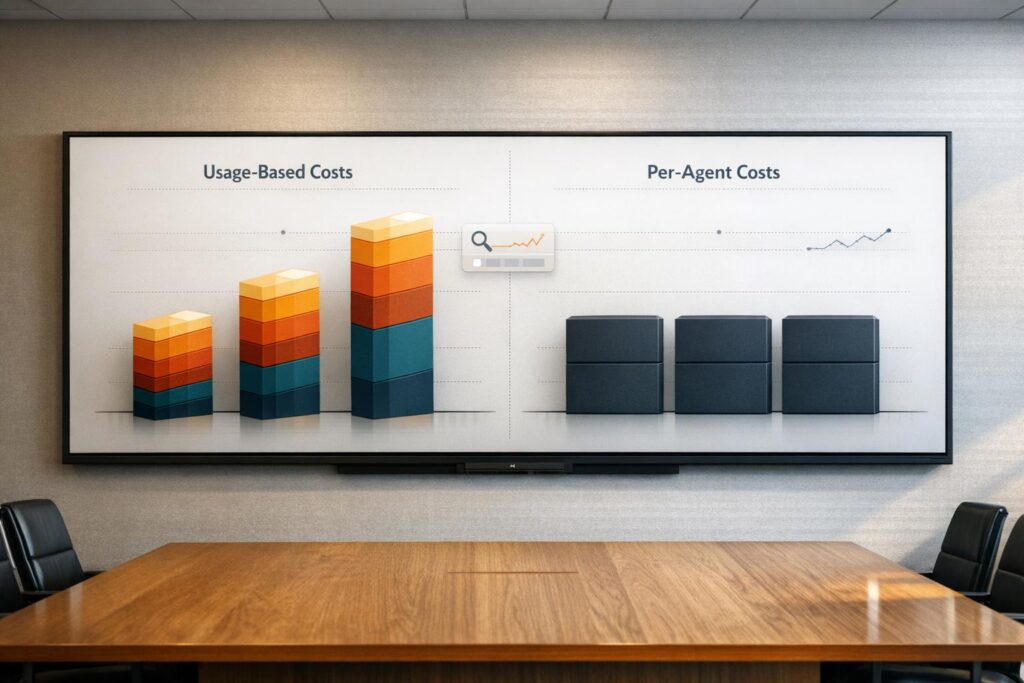
Intercom’s pricing model can be far more expensive than helpdesk platforms as teams grow. While Intercom uses a mix of fixed fees and usage-based charges like $0.99 per AI resolution, helpdesks rely on predictable per-agent pricing. This difference can lead to unexpected cost spikes with Intercom, especially for teams managing high ticket volumes or scaling operations.
Key takeaways:
- Intercom costs rise unpredictably with AI resolutions, messaging overages, and add-ons.
- A 5-agent team on Intercom’s Advanced plan could pay $2,600/month vs. $375/month for helpdesks.
- Helpdesks offer flat per-agent fees, making budgeting simpler and scaling smoother.
- Hidden costs with Intercom include implementation, admin labor, and currency risks.
Quick Comparison
| Category | Intercom (Advanced) | Helpdesk (Mid-Tier) |
|---|---|---|
| Base Seat Price | $85/agent/month (annual) | $50–$90/agent/month |
| AI Resolution Fees | $0.99 per resolution | Included or flat-rate add-ons |
| Cost Predictability | Low (usage-based fees) | High (fixed per agent) |
| 5-Agent Team Cost | ~$2,600/month | ~$375/month |
| Setup Costs | $5,000–$100,000 | $5,000–$15,000 |
| **3-Year TCO (50 agents) | ~$380,844 | ~$282,000 |
If you need predictable costs and handle complex cases, helpdesk platforms are better suited. Intercom works well for high-volume, simple queries but often carries hidden expenses that inflate the total cost of ownership.
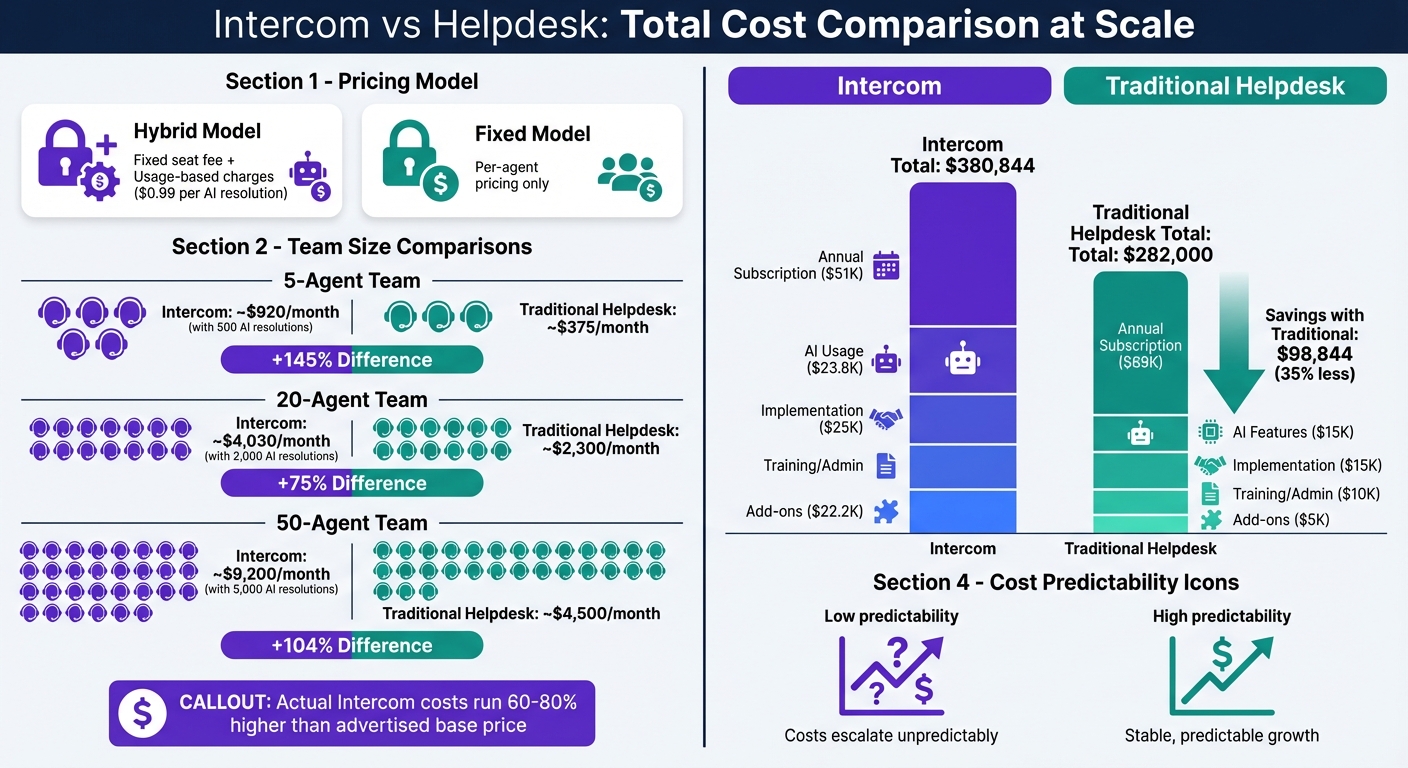
Intercom vs Traditional Helpdesk Pricing Comparison: 3-Year Total Cost of Ownership
Zendesk vs Intercom: Choose Between Support Efficiency and Client Engagement
sbb-itb-e60d259
How Intercom Pricing Works
Intercom’s pricing structure combines a fixed per-seat fee with variable charges for AI resolutions and messaging. This means your costs can shift based on how much you use the platform. Since billing is done in USD, international teams may also face currency fluctuations on top of these usage-based changes. Unlike traditional helpdesk platforms with flat per-agent fees, Intercom’s model requires teams to keep an eye on AI resolution volumes, messaging usage, and any add-ons to avoid unexpected expenses. Let’s break down the subscription tiers and per-seat pricing details.
Subscription Plans and Per-Seat Costs
Intercom offers three main subscription tiers: Essential, Advanced, and Expert. Pricing varies depending on whether you choose monthly or annual billing:
- Essential: $39/seat per month (or $29/seat per month with annual billing)
- Advanced: $99/seat per month (or $85/seat per month with annual billing)
- Expert: $139/seat per month (or $132/seat per month with annual billing)
Each plan targets different needs:
- The Essential plan is a basic option, offering ticketing and a public help center but lacking advanced automation tools. It’s best for smaller teams with simple requirements.
- The Advanced plan includes features like a Workflow builder and multilingual support. It also comes with 20 Lite seats, which provide view-only access for team members like sales or product staff who don’t need full agent capabilities.
- The Expert plan caters to larger organizations, adding enterprise-level security (SSO, HIPAA compliance), multi-brand support, and 50 Lite seats.
Here’s a quick summary:
| Plan | Annual Price (per seat/mo) | Monthly Price (per seat/mo) | Lite Seats Included |
|---|---|---|---|
| Essential | $29 | $39 | None |
| Advanced | $85 | $99 | 20 Lite Seats |
| Expert | $132 | $139 | 50 Lite Seats |
While these fixed costs are straightforward, variable usage fees can significantly impact your budget.
Variable Usage Fees and Overages
Intercom charges $0.99 for each AI resolution handled by its Fin AI Agent. A resolution is counted when a customer either confirms the AI’s answer or ends the chat without needing further help.
"Fin AI is the single biggest source of budget surprises I’ve documented. At $0.99 per resolution, a team handling 2,000 conversations monthly pays $1,188/month in Fin costs alone." – SaaS Price Pulse Research Team
The Fin AI Copilot, which helps agents during live conversations, includes 10 free conversations per agent each month. If you need unlimited usage, it’s an extra $35 per seat per month.
For proactive support, the Proactive Support Plus add-on costs $99 per month for up to 500 messages. Beyond this, overages start at $0.07 per message for the next 500 messages. Outbound messaging options like SMS, bulk email, and WhatsApp have their own pricing tiers. For example, SMS within the US ranges from $0.06 per segment at lower volumes to $0.01 at higher tiers. These variable fees make it essential to monitor your usage as your support needs grow.
Startup and Enterprise Pricing
Intercom offers tailored pricing for startups and larger enterprises. Startups can take advantage of the Early Stage program, which provides a 90% discount for the first year and includes one year of Fin AI Agent for free. While this makes the platform accessible for early-stage companies, costs can rise sharply once the discount period ends.
For enterprises with 20 or more seats, discounts of 25–35% off list prices are often negotiable. Still, enterprise-level needs can come with extra expenses. Features like HIPAA compliance, SSO, and multi-brand support are only available in the Expert tier, which costs $132–$139 per seat per month. Additionally, regional data hosting in the EU requires at least the Advanced plan. If you need to switch from US to EU hosting, there’s no direct migration path – you’ll need to create a new workspace and manually transfer your data.
How Traditional Helpdesk Pricing Works
Traditional helpdesks operate on a straightforward pricing model: fixed per-agent fees tied to tiered plans. This setup ensures steady monthly costs that only increase when additional agents are added. For businesses, this predictability makes budgeting simpler compared to usage-based models. Below is a breakdown of typical fixed per-agent costs across popular helpdesk platforms.
Fixed Per-Agent Subscription Costs
Most traditional helpdesk platforms offer pricing tiers – commonly Starter, Professional, and Enterprise – that scale only with the number of agents. Here’s an example of how these costs look:
| Platform | Starter/Growth Tier | Professional Tier | Enterprise Tier |
|---|---|---|---|
| Zendesk | $19/agent/mo | $115/agent/mo | $169/agent/mo+ |
| Freshdesk | $15/agent/mo | $49/agent/mo | $79/agent/mo |
| Zoho Desk | $14/agent/mo | $23/agent/mo | $40/agent/mo |
| Salesforce Service Cloud | $25/agent/mo | $100/agent/mo | $165/agent/mo |
Starter tiers generally cover essential features like ticketing, email support, social media integration (e.g., X and Facebook), and basic reporting. As you move to mid- and high-level tiers, you’ll find additional tools like multilingual help centers, skill-based routing, SLA management, and private knowledge bases. For instance, while Intercom requires its $85/seat Advanced plan to access multilingual support, many traditional platforms include this feature in their mid-tier offerings.
Add-On Features and Optional Costs
Beyond the base subscription fees, traditional helpdesk platforms offer optional add-ons, which are also billed per agent. These extras can significantly impact the overall cost. Common add-ons include:
- Workforce Management: Around $25 per agent monthly (Zendesk)
- Quality Assurance Tools: About $35 per agent monthly (Zendesk)
- AI Copilot/Assistant: Approximately $29 per agent monthly (Freshdesk)
- Generative AI Features (Einstein): Starting at $75 per agent monthly (Salesforce)
- Data Privacy & Protection: Roughly $50 per agent monthly (Zendesk)
Unlike usage-based models, traditional platforms bundle AI features into their fixed per-agent fees. This contrasts with platforms like Intercom, which charge $0.99 for every successful customer resolution.
How Costs Scale with Team Growth
One of the key advantages of traditional helpdesk pricing is its linear scalability. For example, if the per-agent cost is $75, adding two agents increases your monthly expense by just $150. This makes it easy to forecast expenses.
For context, a 5-agent team on a traditional platform might pay around $375 per month. In comparison, the same team using Intercom’s Advanced plan, combined with typical AI usage, could face costs closer to $1,019 per month.
"Classic helpdesks offer moderate seat costs + add-ons with high cost predictability." – Qualimero
This predictable pricing structure allows finance teams to plan annual budgets confidently, ensuring support operations can grow without unexpected cost spikes due to increased customer interactions. Up next, we’ll dive into setup, integration, and growth-related expenses.
Intercom vs Helpdesk: Side-by-Side Cost Comparison
This cost breakdown dives into the financial differences between Intercom’s pricing model and more SMB or enterprise helpdesk platforms. Intercom’s hybrid approach – combining per-seat costs with variable fees – stands in stark contrast to the fixed-per-agent pricing seen in traditional platforms. With traditional platforms, you pay a fixed monthly fee per agent, which makes budgeting straightforward. Many teams use a helpdesk ROI calculator to further quantify these savings. Intercom, however, layers on AI resolution fees at $0.99 each and usage-based messaging charges, causing monthly bills to fluctuate based on customer interaction levels. Below, the table illustrates how these costs stack up for teams of various sizes.
Cost Comparison Table
| Component | Intercom (Advanced) | Traditional Helpdesk (Mid-Tier) |
|---|---|---|
| Base Seat Price | $85/agent/month | $50–$90/agent/month |
| Included Lite Seats | 20 included free | Typically charged as full or discounted seats |
| AI Resolution Cost | $0.99 per successful resolution | Included in seat price or flat add-on |
| Messaging Fees | Usage-based (SMS, WhatsApp) | Included or flat-rate add-ons |
| Cost Predictability | Low (varies by volume) | High (fixed per agent) |
| 5-Agent Team | ~$920/month (500 AI resolutions) | ~$375/month |
| 20-Agent Team | ~$4,030/month (2,000 AI resolutions) | ~$2,300/month |
| 50-Agent Team | ~$9,200/month (5,000 AI resolutions) | ~$4,500/month |
This comparison underscores a key factor: with Intercom, conversation volume has a direct impact on costs, often outweighing agent count. For instance, a 20-agent team on a traditional platform might pay $2,300 per month, while the same team using Intercom could see costs soar to $4,030 – a jump of 75%. Even smaller teams can feel the pinch: a 5-agent team handling a high volume of tickets might end up paying more than a 10-agent team on a fixed-cost platform.
For finance teams used to predictable per-seat pricing, this variability can be challenging. In many cases, actual costs for Intercom users run 60% to 80% higher than the advertised base seat price.
Setup, Integration, and Growth Costs
Implementation and Setup Costs
Intercom doesn’t charge official setup fees, but getting started isn’t as simple as it sounds. Implementation can take weeks – or even months – because of the manual effort required to overhaul content for AI support. For basic setups, expect to spend around $5,000, while enterprise deployments can climb past $100,000. On top of that, training costs range between $500 and $2,000 per user. By comparison, traditional customer support management systems generally offer easier and less expensive onboarding processes. This upfront investment is just the beginning, with additional challenges arising during integration and ongoing customization.
Another hidden time sink is what’s called “Knowledge Hygiene.” High-performing teams often spend 3 to 5 hours weekly reviewing failed resolutions and updating content to keep the AI accurate. And for every major product update, you’ll need to budget another 5 to 8 hours of manual adjustments to ensure everything stays aligned.
Integration and Customization Costs
Integration costs can also balloon depending on your needs. For example, Intercom limits key integrations – like Salesforce and Marketo – to its Advanced plan, which costs $85 per seat per month, a steep jump from the $29 Essential plan (a 193% increase). If you need GDPR-compliant EU data hosting, you’ll have to upgrade to this tier as well. But here’s the kicker: switching from US-based hosting to EU hosting requires creating a new workspace and manually importing data. This process wipes out your chat history, adding even more complexity.
In contrast, traditional helpdesks often include CRM integrations in their mid-tier plans, making them more accessible for growing teams. With Intercom, however, there’s an ongoing need for “Logic Maintenance.” Every time a new product feature is introduced, routing rules and automated triage paths must be manually updated. These updates might not show up as line items on your budget, but they accumulate into significant labor costs over time.
How Costs Grow Over Time
Intercom’s pricing model doesn’t scale predictably, which can make long-term budgeting tricky. For example, as customer demand rises, you’ll face usage-based AI resolution fees of $0.99 per resolution. A small team of five handling 2,000 AI resolutions per month could see their costs jump from an expected $425 (for seats) to over $2,600 when you factor in resolutions and necessary add-ons. On the other hand, traditional helpdesks tend to scale more predictably, with costs tied directly to headcount.
Adding to the unpredictability, Intercom charges for “assumed resolutions.” This means you’ll pay $0.99 even if a customer abandons a chat without explicitly seeking further help. These charges can cause actual costs to exceed initial estimates by 40%–60%. Over a three-year period, the total cost of ownership could end up being 1.8 to 2.5 times the advertised license price. This unpredictability can be a headache for finance teams that prefer fixed, per-agent pricing models.
Hidden Costs and Total Cost of Ownership
When evaluating Intercom or traditional helpdesk solutions, it’s essential to look beyond the surface-level fees. Hidden costs can significantly increase the total cost of ownership (TCO), often catching companies off guard.
Hidden Costs in Intercom
Intercom comes with several less-visible charges that can quickly add up. For example, there’s a $0.99 fee for every "assumed resolution", meaning you’ll be charged even if a customer leaves without confirming the issue is resolved. Many companies find their actual AI resolution usage exceeds initial estimates by 40% to 60%. When you factor in these resolution fees, along with add-ons and messaging overages, TCO can jump 60% to 80% beyond the base license cost.
If your team requires EU data hosting, you’ll need to upgrade from the $29 Essential plan to the $85 Advanced plan – a 193% price hike. On top of that, switching to EU hosting involves manual data migration, which increases labor expenses.
Another hidden expense is currency risk. Since Intercom bills exclusively in USD, international companies face potential budget swings of 5% to 10% due to exchange rate fluctuations. Additional costs include Premium Support fees, which range from 15% to 20% of the annual contract, and ongoing labor for tasks like maintaining knowledge bases. These factors further drive up TCO.
Hidden Costs in Traditional Helpdesks
Traditional helpdesks are often seen as more predictable in pricing, but they come with their own set of hidden expenses. Implementation and consultancy fees can be steep, covering vendor selection, process analysis, and data migration. For basic setups, professional implementation costs start at $5,000, while enterprise deployments with heavy customization can exceed $100,000.
Advanced features like SSO, HIPAA compliance, or SLA management are usually locked behind premium tiers. This forces companies to pay extra, even if they only need one of these features. In fact, 78% of users on entry-level support plans upgrade within six months due to feature limitations and lack of automation.
Labor costs are another overlooked factor. Internal staff often get pulled from their regular duties to handle implementing a new helpdesk or training, leading to productivity losses. For on-premises or complex hosted solutions, ongoing maintenance and costs tied to decommissioning legacy systems – like data migration or running parallel systems during transitions – further inflate the TCO.
3-Year TCO Comparison
To put these costs into perspective, here’s a breakdown of the total cost of ownership over three years for a 50-agent team, assuming moderate AI usage of 2,000 resolutions per month:
| Cost Category | Intercom (Advanced) | Traditional Helpdesk (Enterprise) |
|---|---|---|
| Annual Subscription | $51,000 ($85/seat) | $69,000 (~$115/seat) |
| AI Usage Fees | $23,760 ($0.99/res) | $15,000 (Flat-rate/Bundled) |
| Implementation (Y1) | $25,000 (Partner-led) | $15,000 (Platform fee) |
| Training & Admin | $25,000 (Annual) | $10,000 (Annual) |
| Add-ons (Copilot/SMS) | $22,188 (Estimated) | $5,000 (Estimated) |
| Year 1 Total | $146,948 | $114,000 |
| 3-Year Total TCO | $380,844 | $282,000 |
Over three years, Intercom’s pricing model – with variable costs for AI resolutions, outbound messaging, and mandatory add-ons – results in a TCO nearly $100,000 higher than a traditional helpdesk. This amounts to about 35% more in total costs. These hidden fees highlight the difference between the initial price tag and the actual expenditure.
What Support Leaders Should Evaluate
Support leaders need to weigh factors like budget stability, scalability, and return on investment (ROI) when deciding between Intercom and traditional helpdesks.
Cost Predictability and Budget Planning
Having predictable monthly expenses is key to managing headcount, allocating resources, and avoiding unexpected budget issues. Traditional helpdesks provide consistent pricing – you pay a fixed cost per agent, and expenses grow steadily as your team expands. On the other hand, Intercom uses a hybrid model that combines seat pricing with usage-based fees for AI and add-ons, which can lead to unpredictable costs. This variability often depends on customer behavior rather than just team size or hiring decisions.
"What used to be a straightforward seat-based model has evolved into a complex system of overages and modular add-ons that can make your monthly invoice look like a high-stakes maths problem." – Uttiya, Content Marketing Manager, Kommunicate
For teams using Intercom, it’s important to regularly review resolution data – if more than 20% of cases are abandoned by customers, it might indicate inefficiencies in your setup. Additionally, non-US companies should account for currency fluctuations since Intercom bills exclusively in USD. Adding a 5% to 10% buffer to your budget can help mitigate this risk. Traditional helpdesks often offer multi-currency billing, which eliminates this potential headache.
These cost uncertainties can make scaling operations more challenging.
Scaling Without Cost Spikes
While predictable pricing helps with budgeting, scaling your support team can still lead to surprise expenses in usage-based models. Traditional helpdesks keep things simple – adding an agent means adding a fixed cost. Intercom, however, charges a $0.99 per-resolution fee, which can cause costs to rise unexpectedly during surges in customer interactions.
To manage scaling costs, consider leveraging Lite seats effectively. Intercom’s Advanced plan provides 20 free Lite seats, while the Expert plan offers 50, making them a good option for non-support staff who only need view-only access.
Another factor to consider is the quality of your documentation. Intercom Fin’s AI relies heavily on accurate knowledge bases, requiring 3 to 5 hours per week of manual auditing to avoid AI errors, or "hallucinations", that lead to failed resolutions. These failures often require human intervention, adding hidden administrative costs that can total $15,000 to $25,000 annually. Traditional helpdesks typically don’t demand this level of ongoing maintenance, which can save both time and money.
If your team is growing rapidly, it’s worth negotiating volume discounts early. Contracts with 20+ seats often come with enterprise discounts of 25% to 35%, and locking in annual pricing can help protect against rate hikes.
ROI for Complex B2B Support
To gauge ROI, it’s essential to assess how well each platform handles complex support cases and contributes to customer retention. As noted earlier, variable fees can hurt ROI in workflows that involve intricate support needs. Intercom’s strengths lie in ticket deflection – quickly closing simple cases. However, for complex B2B support, where deeper engagement and longer conversations are critical, Intercom’s $0.99 per-resolution fee can penalize the very interactions that build strong client relationships.
For perspective, a human agent conversation costs about $6.67, while an AI resolution costs $0.99. While this seems like a cost-saving win, it only works if your priority is speed rather than detailed engagement.
Traditional helpdesks excel in managing complex cases, offering features like multi-touch issue tracking, SLA management, and detailed audit trails. If your tickets often require multiple interactions or involve coordination across departments, a fixed per-agent pricing model may deliver better value. For example, Synthesia reported that after implementing Intercom Fin in early 2026, their team resolved over 6,000 conversations in six months, saving more than 1,300 hours and achieving self-serve support rates of 87%. While these results are impressive for high-volume, low-complexity environments, they may not translate to workflows requiring nuanced, multi-step problem-solving.
To accurately measure ROI, calculate the "labor gap" – the time agents spend reviewing failed AI resolutions and updating documentation. If this takes up more than 20% of an agent’s workweek, the efficiency gains from AI could be offset by the need for additional manual oversight. This mirrors earlier findings about the hidden costs tied to usage-based pricing models.
Conclusion
The cost comparison between Intercom and traditional helpdesk platforms hinges on two different pricing approaches: fixed, predictable costs versus variable, usage-based fees. Traditional helpdesks typically offer straightforward, fixed per-agent pricing, making it easier to plan budgets. On the other hand, Intercom employs a hybrid model that combines seat fees with usage-based charges – like a $0.99 fee per resolution. While this approach can improve efficiency, it can also lead to fluctuating bills. As the SaaS Price Pulse Research Team notes, "Intercom is simultaneously the best and most confusingly-priced support platform on the market". This observation aligns with earlier discussions about the challenges of managing variable costs.
When evaluating these pricing models, it’s essential to think beyond base costs and focus on total ownership. Hidden fees, like per-resolution charges, can quickly inflate expenses – especially for teams managing complex B2B support cases that require multiple interactions. This pricing structure may unintentionally penalize the kind of deep engagement needed to maintain strong client relationships.
A useful rule of thumb is to estimate Intercom’s actual costs by applying a "1.7x multiplier" to its base seat price. This calculation can provide a more realistic view of expenses, which you can then compare to the fixed pricing of traditional helpdesks based on your team size. For teams that need predictable monthly costs and handle intricate, multi-step workflows, a fixed per-agent model might offer better value. However, if your goal is to deflect high volumes of simple queries using AI, Intercom’s model could help reduce costs.
Before making a decision, take a close look at your current support metrics. Assess how many conversations involve multiple interactions, review the quality of your knowledge base, and calculate the time spent on administrative tasks. These insights will help you identify which pricing structure aligns best with your team’s needs and operations.
FAQs
How can I estimate my real monthly cost before switching?
To get a clear picture of your actual monthly expenses, it’s important to look beyond just the subscription fees. Hidden costs – like implementation, support, training, and usage-based fees (such as AI resolutions) – can add up, sometimes increasing your costs by 40–60%. You should also factor in potential expenses from plan upgrades for features like multilingual support or data hosting. Additionally, take a close look at your usage patterns, such as resolution volume, as these can unexpectedly push your costs higher.
What usage metrics should I track to prevent surprise overages?
To keep costs under control and avoid surprises, it’s important to monitor a few key metrics. Start with the number of customer support resolutions, as these can often come with per-resolution charges. Next, pay attention to the volume of messages sent across various channels like email, SMS, WhatsApp, and in-app messaging – especially if you’re using proactive support tools.
Beyond that, keep tabs on active conversations, chat sessions, and agent interactions. These activities can quickly add up, so staying within your plan’s limits will help ensure your expenses remain predictable as your operations grow.
When does a fixed per-agent model cost less at scale?
When you’re dealing with a smaller team, a fixed per-agent pricing model often works out to be more affordable. The subscription fees for each agent stay within a reasonable range, keeping costs predictable. But as your team grows, this model can become even more appealing. If you’re using a pricing structure based on usage – like fees for each resolution or session – those costs can skyrocket as usage increases. In such cases, sticking with a fixed per-agent model can help you avoid those rising expenses as your operations scale.