


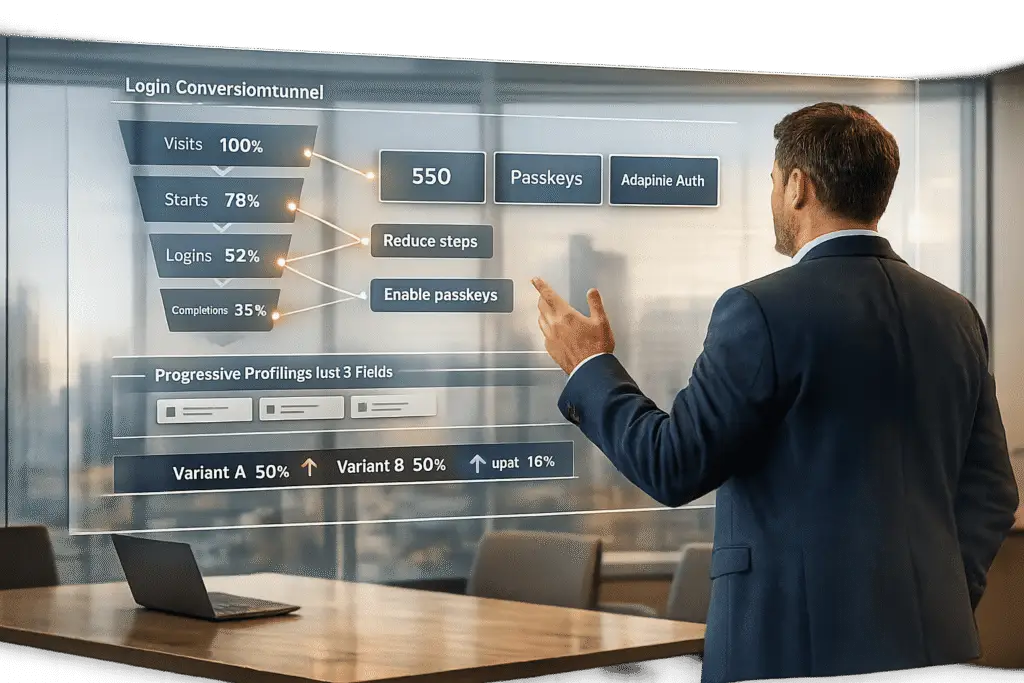
Struggling with low login success rates for enterprise customers? Fixing portal login issues isn’t just about convenience – it’s about retaining customers and protecting revenue. Here’s what you need to know:
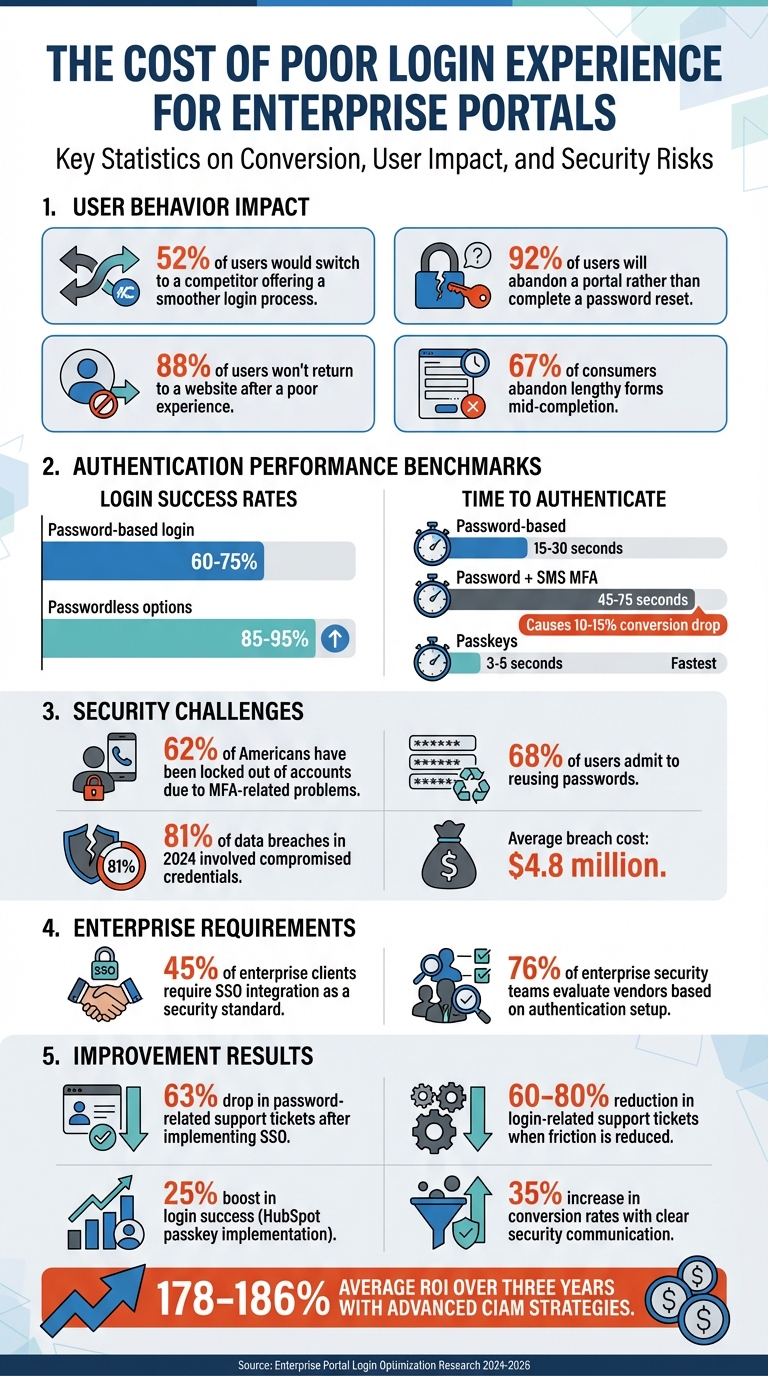
- 52% of users would switch to a competitor offering a smoother login process.
- Login problems lead to abandoned sessions, higher support costs, and churn.
- Enterprise portals face unique challenges like multi-user access, complex permissions, and compliance requirements.
Key Steps to Improve Login Conversion:
- Identify friction points: Analyze where users drop off – complex passwords, MFA issues, or slow processes.
- Simplify login flows: Use better form design, progressive profiling, and Single Sign-On (SSO) to make access easier.
- Balance security and usability: Employ risk-based authentication to adjust security measures without frustrating users.
- Test and refine continuously: Use A/B testing and analytics to track success rates, reduce support tickets, and improve performance.
By addressing these areas, you can reduce friction, enhance security, and create a smooth login experience that retains enterprise customers while cutting costs.
Enterprise Portal Login Statistics and Impact on Customer Retention
Step 1: Find and Analyze Login Friction Points
Before you can improve your enterprise portal’s login experience, you need to understand where users are struggling. This means identifying the specific pain points – whether it’s overly complex passwords, issues with multifactor authentication (MFA), or something else entirely. The right data can help you pinpoint these challenges.
Collect and Review Login Performance Data
To get a clear picture, track every step of the login process: page loads, field interactions, form submissions, and whether users succeed or fail to log in [4][6]. This level of detail shows exactly where users hesitate or drop off.
A key metric to monitor is the completion rate, calculated as the number of successful logins divided by total login attempts. For reference, password-based login flows typically achieve completion rates between 60% and 75%, while passwordless options often reach 85% to 95% [4]. A great example of this is HubSpot‘s 2024 implementation of passkey support, which boosted their login success rate by 25% and made the process four times faster compared to their old password-plus-MFA setup [4].
Timing also matters. Password-based logins usually take 15–30 seconds, while adding SMS-based MFA increases this to 45–75 seconds, which can lead to a 10% to 15% drop in conversions [4]. Another critical indicator is the volume of support tickets related to login issues – reducing friction here can lower these tickets by 60% to 80% [6].
Once you’ve gathered the data, the next step is to segment users to uncover role-specific challenges.
Segment Users by Role and Access Requirements
Not every user encounters the same login hurdles. For example, your IT security team might navigate complex MFA requirements with ease, while executives who log in sporadically – say, to access monthly reports – might abandon the process due to forgotten credentials [4].
Break down your data by department, frequency of access, and device type. For instance, mobile users often face higher drop-off rates because they have to switch apps to retrieve magic links or SMS codes, and some never return [4][6]. Separating frequent power users from occasional ones and analyzing whether high-security roles face more friction [7] can help you prioritize fixes. This approach also reveals which authentication methods work best for each group.
By understanding these nuances, you can better address the specific issues causing friction.
Common Enterprise Login Problems
Certain login challenges are especially common in enterprise settings. For instance, complex password requirements make users 46% more likely to quit the process altogether [1]. Worse, 92% of users will abandon a portal rather than complete a password reset [6]. While MFA is a critical security measure, it’s not without its drawbacks – 62% of Americans have been locked out of accounts due to MFA-related problems [1].
Error logs can also offer valuable insights. If users frequently enter incorrect passwords, it could indicate password fatigue. Spikes in authentication failures at specific times or within certain departments might point to issues like account hierarchy confusion or license restrictions [2]. Mobile users, in particular, often struggle when password managers fail, forcing them to enter credentials manually – a process prone to errors and abandonment [4].
Addressing these common problems is essential for streamlining the login experience and improving success rates across your enterprise portal.
sbb-itb-e60d259
Step 2: Simplify the Login Process
After identifying where users encounter obstacles, the next step is to streamline the login process. The aim is to make authentication as straightforward as possible while maintaining high security standards.
Improve Login Form Design
The login form is often the first hurdle users face, and its design can make or break their experience. Since 88% of users won’t return to a website after a poor experience [8], optimizing this element is critical.
Here’s how to refine your login form:
- Use proper HTML attributes like
autocomplete="username"andautocomplete="current-password"to support password managers and reduce errors [8]. - Allow users to paste passwords and replace "Confirm Password" fields with a "Show Password" toggle [8].
- Pre-fill the username or email field after failed login attempts so users only need to re-enter their password [8].
- For mobile users, use
type="email"to activate the appropriate keyboard layout [8].
Design-wise, go for a single-column, centered layout with a clear, prominent "Sign In" button. Secondary actions like "Forgot Password" should be visually subdued [9][10]. Implement inline validation to provide immediate feedback on errors or password requirements, preventing frustration from failed attempts after submission [8][9].
Statistics show that 10% of active users get stuck in password reset flows monthly, and 75% of them abandon the process entirely [8]. These small adjustments can significantly reduce drop-offs and improve user satisfaction.
Use Progressive Profiling
To avoid overwhelming users, enterprise portals can adopt progressive profiling – a method where only essential data is collected upfront, with additional details requested over time. This approach is particularly effective since 67% of consumers abandon lengthy forms mid-completion [13].
Instead of bombarding users with a long registration form, start with the basics (e.g., name, email, password). Additional information can be gathered later, such as after a few logins, when accessing new features, or when users are more engaged [11][14].
"Progressive profiling transforms your forms from static data collection tools into intelligent conversation partners that build comprehensive prospect profiles over time." – Modalcast Blog [14]
For example, TechRetail, an online electronics marketplace, saw high drop-off rates due to lengthy sign-up forms. By asking for only essential details initially and collecting more information later, they increased registrations and engagement, ultimately boosting conversions [11]. Companies using this approach often see form completion rates rise from 30% to 65% or higher [12].
Transparency is key. Clearly explain why you’re requesting specific information and how it will improve the user’s experience [14]. This builds trust and reduces the mental effort required during the initial login, especially for users managing complex accounts or permissions.
Add Single Sign-On (SSO) for Enterprise Accounts
To tackle the challenges of multi-account access in enterprise environments, Single Sign-On (SSO) is a game-changer. It simplifies the user experience while enhancing security. In fact, 45% of enterprise clients now require SSO integration as a security standard, and 76% of enterprise security teams evaluate vendors based on their authentication setup [5][19].
SSO centralizes identity management, allowing users to log in once via their organization’s Identity Provider (IdP) and access all connected systems without needing separate credentials [16][17]. This approach eliminates password reuse – 68% of users admit to reusing passwords [18] – and prevents "zombie accounts" from lingering after employees leave [16][18].
By replacing passwords with digital tokens (e.g., SAML assertions or OIDC tokens), SSO strengthens security. When combined with multi-factor authentication (MFA), it offers robust protection. Considering that 81% of data breaches in 2024 involved compromised credentials, the average breach cost of $4.8 million highlights the importance of secure authentication [5]. Additionally, organizations often see a 63% drop in password-related support tickets after implementing SSO [19].
Real-world examples underscore its effectiveness. In 2025, an enterprise CRM provider consolidated 14 legacy authentication systems under SAML 2.0 using SSOJet. This led to a 93% adoption rate within six months and annual savings of $1.1 million through automated user lifecycle management [19]. Another case involved a healthcare analytics firm that implemented SSOJet with context-aware MFA, achieving 78% faster compliance approvals and zero audit findings in 18 months [19].
| Use Case | Recommended Protocol | Key Considerations |
|---|---|---|
| Financial Services | SAML 2.0 + FIDO2 | Session binding for FINRA compliance [19] |
| Healthcare | OIDC + PBAC | PHI access logging and HIPAA requirements [19] |
| Cross-Platform SaaS | OAuth 2.1 + JWT | Token exchange optimization for performance [19] |
SSO also simplifies IT management. By pairing it with SCIM (System for Cross-domain Identity Management), user provisioning and permission updates happen automatically in real time [16][19]. To ensure security, enforce MFA for all SSO logins, rotate digital certificates regularly, and conduct third-party audits to identify vulnerabilities [15][17][18].
These steps not only simplify the login process but also enhance security and user experience, making them essential for enterprise portals.
Step 3: Balance Security and Usability
After refining login processes, the next step is finding the sweet spot between strong security and a smooth user experience. Enterprise portals need to stop attackers while ensuring legitimate users can easily access their accounts. The solution? Risk-Based Authentication (RBA). This method adjusts security measures based on real-time analysis of factors like device fingerprints, IP reputation, location consistency, and behavioral patterns [20][22].
Modern AI systems make this possible by analyzing over 100,000 events per second and assigning risk scores to login attempts [21]. For low-risk situations – like logging in from a trusted device on a familiar network – users can access their accounts without extra steps. Medium-risk scenarios, such as logging in from a new network or at an unusual time, might trigger a simple challenge, like a passkey or push notification. High-risk attempts, such as those resembling credential-stuffing attacks or originating from suspicious IPs, either require stronger authentication or are blocked entirely [20].
Communicate Security Clearly
People are more likely to cooperate with security measures when they understand why they’re necessary. Instead of using vague error messages, explain what’s happening. For instance, a message like, "We noticed you’re logging in from a new location. Please verify your identity to keep your account secure", helps build trust [20].
Displaying compliance badges (e.g., FIPS 140-3, SOC, or ISO) prominently can further reassure users about data safety [21]. Additionally, showing password requirements upfront – like "at least 12 characters" – and offering inline validation and a "show/hide" toggle for passwords can reduce frustration during account setup [24].
Clear communication pays off. For example, companies saw a 35% jump in conversion rates and a 60% drop in registration abandonment when they improved how they explained security steps. Financial institutions using adaptive authentication also sped up onboarding to just 180 seconds while cutting fraud by 89% [23].
Use AI for Adaptive Authentication
AI takes authentication to the next level by analyzing subtle behavioral patterns – like typing rhythm, mouse movements, touchscreen pressure, and navigation speed – that are nearly impossible for attackers to mimic [20][22]. Eric Lamanna, Digital Sales Manager, explains it well:
"Risk-based authentication should feel like a well-trained guide dog, not a guard dog that barks at the mail" [20].
The key is combining multiple signals rather than evaluating them individually. For example, a new device might not raise alarms if its location and behavior match the user’s typical patterns. Conversely, a familiar device could be flagged if its network or activity seems suspicious [22]. This multi-layered approach minimizes MFA fatigue by only challenging users when necessary, keeping satisfaction and conversion rates high [22].
Here’s a quick overview of how different risk levels are handled:
| Risk Zone | Context Indicators | Recommended Action |
|---|---|---|
| Low Risk | Known device, expected behavior, trusted network | Allow login without extra prompts; keep security invisible [20] |
| Medium Risk | New network, travel, unusual timing; no clear signs of attack | Use a friendly, phishing-resistant challenge (e.g., passkey, push notification) [20] |
| High Risk | Signs of credential stuffing, bot activity, or impossible travel | Deny access or require the strongest authentication and recovery measures [20] |
Before enforcing new thresholds, test them in "shadow mode" to gather data without disrupting users. This allows for fine-tuning based on real-world traffic [20]. Cache successful challenges during a session to avoid repeated prompts, and if a user fails a challenge, provide a quick recovery option instead of locking them out entirely [20][21].
Adaptive security ensures that streamlined login processes remain effective for high-risk transactions while keeping trusted sessions hassle-free. The rise in automated credential-stuffing attacks, particularly in January 2026, has made risk-based MFA essential for maintaining user trust [21]. Companies that have embraced advanced Customer Identity and Access Management (CIAM) strategies report an average ROI of 178–186% over three years, along with a 70% reduction in customer support costs [23]. By leveraging AI-driven adaptive authentication, organizations can protect accounts without sacrificing usability [22].
Step 4: Test, Measure, and Improve Continuously
After refining processes and boosting security, the next step is to ensure these improvements stick. Optimizing portal logins isn’t something you do once and forget – it’s an ongoing effort. User behaviors shift, security challenges evolve, and without consistent testing, friction can creep back in. Organizations that treat login conversion as a continuous process maintain better results and avoid the pitfalls of neglecting user experience.
A/B Test Login Variations
Once friction points are identified, testing becomes essential to validate changes. A/B testing different login methods helps you understand what works best for your users – versus relying on assumptions. For instance, comparing traditional password logins with alternatives like passkeys, magic links, or social logins can reveal which approach minimizes friction most effectively [4][25].
Here’s an example: HubSpot’s switch to passkeys boosted login success by 25% and sped up authentication by four times. To run effective tests, start with a clear hypothesis, like: “Introducing passkeys to 20% of users will increase login success by 15%.” This keeps your goals measurable and focused. Run tests for about 14–21 days to capture weekly trends and ensure statistically reliable results [4].
Branch, a mobile linking platform, successfully implemented phishing-resistant WebAuthn authentication through workflow-based A/B testing. Their CISO highlighted the flexibility of this approach:
"Descope’s flexible workflow approach has helped us add strong, phishing-resistant WebAuthn authentication when end-user hardware and software support it and fall back on other MFA options when it can’t be supported." [25]
Focus your tests on key metrics like login success rates, time-to-authenticate, and support ticket volume related to login issues [25]. You can also test progressive profiling – asking for details like job role or company name during return visits instead of during signup – to see if it improves conversion rates [25]. For global portals, geo-specific testing can be valuable. For example, in regions like India, testing WhatsApp-based authentication might yield better results due to its widespread use [25].
Monitor Real-Time Performance with Analytics
Real-time analytics let you track every step of the login process. Key events to monitor include page load times, email field submissions, password interactions, form completions, and authentication outcomes (both successes and failures) [4]. This level of detail helps pinpoint exactly where users drop off.
Industry benchmarks show that authentication completion rates typically range between 60–75% for password-only logins and 85–95% for passwordless options [4]. Another important metric is time-to-authenticate – how long it takes for users to log in successfully. Passkeys often reduce this time to 3–5 seconds, compared to the 15–30 seconds typical of password-based logins [4]. Dev Kumar, CEO of MojoAuth, underscores the impact:
"The difference between a 45-second password flow and a 5-second passkey flow is not small from a user behavior standpoint. It is the difference between a flow that users tolerate and one that they barely notice." [4]
Additionally, track login-related support tickets, such as "forgot password" or "2FA code not received", to identify recurring pain points [4]. You can even map login abandonment to revenue loss by calculating the percentage gap in conversions and multiplying it by your average contract value (ACV). This makes a strong case for investing in further optimization [4].
By analyzing these metrics, you can identify areas for improvement and lay the groundwork for predictive solutions.
Use Predictive Analytics for Future Improvements
AI-powered portals take optimization to the next level by predicting and addressing user needs before they encounter issues [26]. By integrating predictive analytics, businesses can anticipate friction points and adjust authentication requirements proactively – preventing problems before they hurt conversion rates [4].
Connecting your portal to systems like CRM and ERP ensures your predictive models have a complete view of customer data [26]. This integration allows AI tools to detect patterns that might go unnoticed, such as higher abandonment rates among specific user groups or on certain devices. As Vezert explains:
"AI-driven portals will proactively suggest solutions, predict user needs, and deliver data-backed insights directly to the customer, turning a support tool into a strategic business asset." [26]
Conclusion: Building Long-Term Portal Success
Improving enterprise portal logins requires consistent attention to user experience, strong security measures, and insights from data. The strategies outlined here – like identifying friction points, streamlining login processes, balancing usability with security, and ongoing testing – work together to create a smooth authentication process. This not only encourages user adoption but also helps cut down on support-related expenses.
To understand how users interact with your portal, track metrics such as success rates, error rates, abandonment rates, and completion times [28]. However, don’t just rely on these technical metrics. Qualitative feedback tools like CES, CSAT, and NPS offer a window into user perceptions of the login experience [27][28]. These insights can help you address potential issues before they grow into larger problems, such as a surge in support tickets or a decline in conversions.
Security also plays a central role in ensuring long-term success. Balancing innovation with reliability is essential. Centralized authentication through Single Sign-On (SSO) not only reduces the burden of managing multiple passwords but also scales easily as your user base grows [3]. With the Single Sign-On market projected to hit $8.4 billion by 2030, it’s clear that unified access is becoming indispensable [3]. To maintain security, pair SSO with phishing-resistant multi-factor authentication (MFA) and continuous monitoring [3].
Beyond authentication, regular performance audits are vital to keep your portal aligned with evolving user expectations. These audits ensure compatibility with both modern cloud services and older legacy systems using protocols like SAML, OIDC, and OAuth 2.0 [3]. For older infrastructure, custom adapters can bridge gaps without sacrificing security or usability [3].
FAQs
What’s a good enterprise login conversion benchmark?
A solid enterprise login conversion rate generally falls between 11.4% and 40.8%, though this can vary widely by industry. Elements like the ease of the user experience, the complexity of creating or managing accounts, and the level of security required all play a major role in shaping these numbers.
How do we add SSO without slowing rollout?
To introduce SSO without delaying your rollout, opt for a phased approach that prioritizes security, user experience, and efficiency. Begin with a pilot phase, focusing on critical applications to test the integration process. From there, gradually expand SSO access while keeping existing login methods available as a backup.
Incorporate AI-driven tools to simplify directory synchronization and automate user provisioning. This approach helps streamline the deployment process, reduces potential disruptions, and ensures a seamless and secure transition for your users.
How can support reduce login-related tickets fast?
To cut down on login-related tickets, make the login process straightforward and give users tools to handle common issues on their own. Start by sending clear, timely onboarding emails that include login credentials and quick-start guides. Follow up with reminders for users who haven’t logged in yet. Additionally, create a user-friendly portal where people can handle tasks like resetting passwords or checking their account status. This approach can lighten the support team’s load, potentially reducing ticket volume by as much as 63%.






