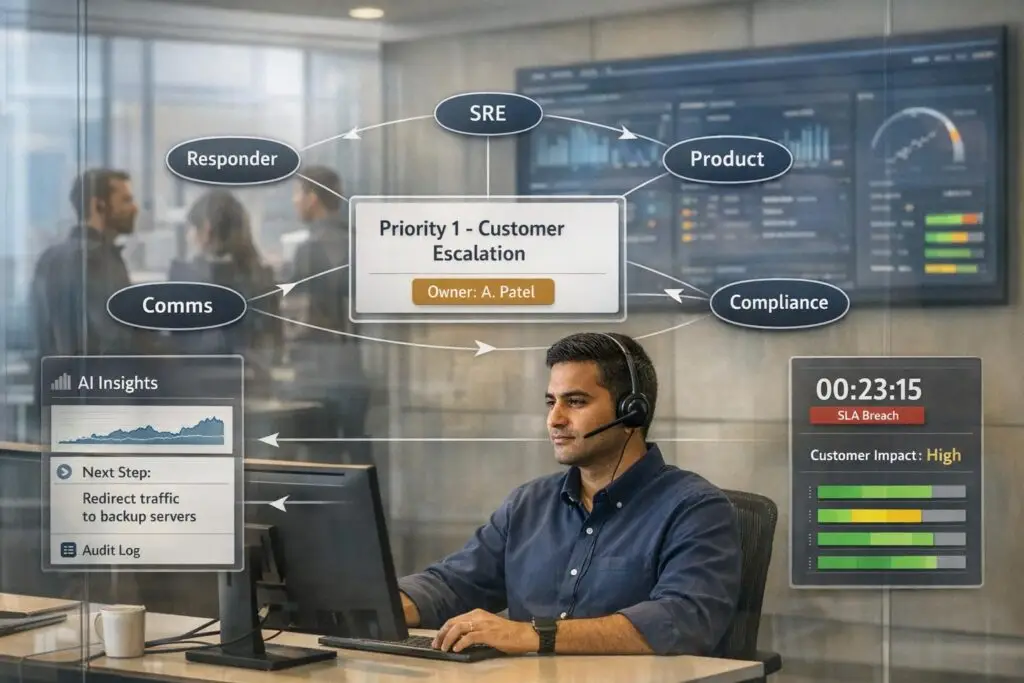
Swarming is a collaborative support model that resolves complex issues faster by involving multiple experts upfront while keeping one agent as the case owner. This approach eliminates delays caused by traditional ticket escalation but introduces challenges like unclear roles and potential burnout. To make swarming effective and accountable, you need clear roles, decision-making protocols, and tools to track contributions.
Key Takeaways:
- What is Swarming? One agent owns the case while collaborating with specialists to resolve it in real-time.
- Why Swarming? Ideal for urgent, high-stakes issues like outages or security breaches.
- Challenges: Shared ownership can lead to confusion, burnout, or lack of clear accountability.
- Solutions:
- Assign clear roles (e.g., case owner, swarm lead).
- Use metrics like "Swarm Assists" to track contributions.
- Deploy AI tools for automated tracking, summaries, and routing.
Swarming works best when reserved for critical cases and supported by automated workflow processes, proper documentation, and performance metrics. This ensures your team stays effective while delivering fast, reliable resolutions.
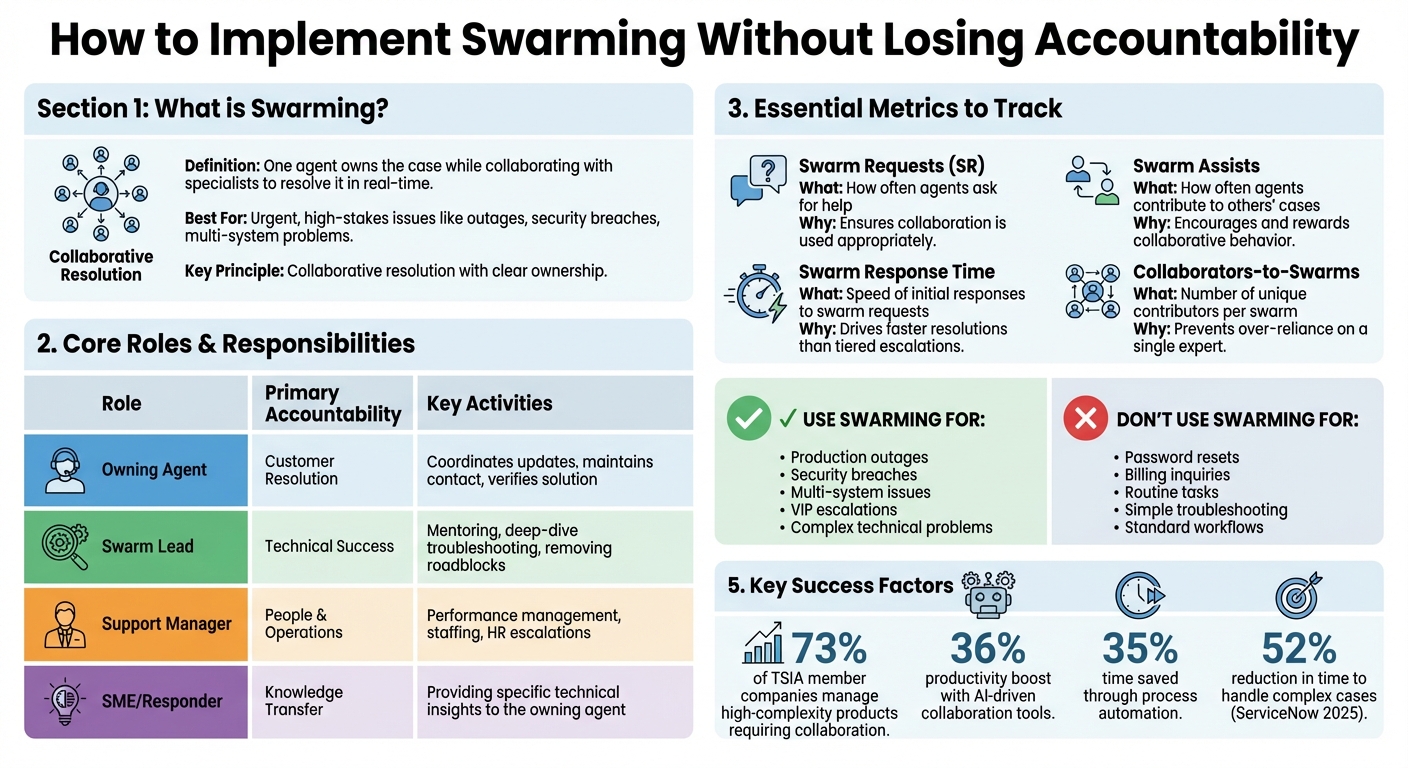
Swarming Support Model: Roles, Responsibilities, and Key Metrics
Intelligent Swarming 101: Better Customer Support Through Smarter Collaboration
sbb-itb-e60d259
Building the Foundation for Accountability
Before launching a swarming model, it’s crucial to establish clear ownership through well-defined roles and decision-making protocols. At its core, accountability relies on three key elements: ownership, authority, and continuity.
The first step is to clarify who owns what and outline role-specific responsibilities.
Assign Ownership and Define Roles
The receiving agent is responsible for the case from start to finish, acting as the "incident commander" who ensures the process stays on track and keeps the customer informed [2]. This role is critical for maintaining accountability and preventing issues from slipping through the cracks.
In addition to case ownership, it’s important to separate technical leadership from managerial tasks. For example, Salesforce introduced the "Swarm Lead" role in April 2022. Swarm Leads are senior experts who focus on troubleshooting complex issues, mentoring team members, and improving metrics like Total Time to Resolution. Meanwhile, Support Managers handle traditional managerial responsibilities such as performance reviews, staffing, and HR concerns [1].
"A swarm lead is a highly experienced technical resource while a Support Manager maintains traditional management responsibilities." – Marlene Summers, VP of Customer Support Services, Salesforce [1]
Another way to streamline swarming is to organize your team into "pods" based on factors like product area, geography, or customer type. This structure makes it easier to identify the right experts quickly when a swarm is needed [1].
| Role | Primary Accountability | Key Activities |
|---|---|---|
| Owning Agent | Customer Resolution | Coordinates updates, maintains contact, verifies solution [2] |
| Swarm Lead | Technical Success | Mentoring, deep-dive troubleshooting, removing roadblocks [1] |
| Support Manager | People & Operations | Performance management, staffing, HR escalations [1] |
| SME/Responder | Knowledge Transfer | Providing specific technical insights to the owning agent [6] |
Set Decision-Making Authority
When multiple team members collaborate on a case, it’s essential to designate someone with final decision-making authority. This is especially important for customer-facing commitments like setting ETAs, offering workarounds, or deciding on customer support escalations. The owning agent should know when they can make decisions independently and when to involve a Swarm Lead or Support Manager.
Using digital tools like Slack or Microsoft Teams can centralize communication during swarming. For example, creating "Product-Topic" channels for ongoing collaboration and "Individual Case" channels for high-priority incidents ensures transparent decision-making. Everyone involved knows who is responsible for driving the resolution.
The Consortium for Service Innovation emphasizes that the agent who takes ownership remains accountable for resolving the issue [5]. Clear decision-making guidelines help teams maintain accountability and streamline handoffs.
Plan for Handoffs and Continuity
Handoffs are sometimes unavoidable – whether due to shift changes, time zones, or workload limits. To maintain accountability, ensure that all discussions and resolutions are documented in real time within a shared knowledge base [2].
By adopting a "command" principle, the case owner remains responsible for the issue until it’s fully resolved [7]. This approach minimizes disruptions during transitions and keeps the resolution process on track.
For global teams, digital channels are invaluable for maintaining continuity across regions. It’s essential to make the entire conversation history and decision log accessible to anyone stepping in.
Once the swarm is resolved, verify the solution and add the findings to your knowledge base [2]. This step not only supports seamless transitions but also reinforces the accountability established at the beginning of the case. Plus, it provides a helpful reference for tackling similar issues in the future.
Processes That Maintain Accountability
Once roles and responsibilities are in place, the next step is creating processes that ensure accountability is visible throughout the swarming lifecycle. This involves setting clear criteria, tracking contributions, and using performance metrics to monitor progress.
Define When to Swarm
Swarming should be reserved for complex, high-stakes cases to avoid overwhelming specialists or mismanaging priorities. To achieve this, establish specific activation criteria, such as production outages, security breaches, or multi-system issues [2][9].
To maintain balance, track the Percentage of Case Inflow Swarmed – this ensures routine cases are handled without unnecessary swarming [1]. Additionally, tools like one-click macros in ticketing systems can streamline the process by instantly creating collaboration channels [9][3]. Once swarming is triggered, it’s essential to systematically track the contributions of everyone involved.
Track Individual Contributions
Traditional metrics often reward agents for closing individual tickets, but swarming requires a shift in focus. Organizations should instead track and recognize collaborative contributions, even when agents assist on cases they don’t directly own [1].
For example, Salesforce uses a "Swarm Assists" metric to measure how often an agent helps on another agent’s case [1]. In a collaborative environment, working alone can actually hurt both individual and team performance [1].
Collaboration tools also help by creating searchable logs that attribute contributions, even for discussions that happen outside the ticketing system [1][4]. Metrics like Coveo’s "Collaborators-to-Swarms Ratio" ensure that teams aren’t overly dependent on a single expert [4][8]. Another useful measure is tracking "Helpful Answers", which highlights knowledge base contributions or responses that receive upvotes from case owners. This ties individual accountability to knowledge sharing [4][8].
Measure and Attribute Performance
Building on contribution tracking, updated KPIs help ensure accountability stays transparent. Instead of relying on traditional metrics like escalation rates, focus on swarming-specific indicators such as Swarm Request Average Initial Response Time and Total Time to Resolution [1][3].
Salesforce, for instance, uses four core metrics to evaluate swarming effectiveness:
- Number of Swarm Requests (SR): Tracks how often agents ask for help, ensuring collaboration is used appropriately.
- Number of Swarm Assists: Measures how often agents contribute to cases they don’t own, promoting teamwork.
- Percentage of Case Inflow Swarmed: Monitors how many cases are escalated into swarms, maintaining balance.
- Swarm Request Average Initial Response Time: Tracks the speed of initial responses, ensuring faster resolutions compared to traditional escalation methods [1].
| Metric Category | What It Measures | Why It Matters |
|---|---|---|
| Swarm Requests (SR) | How often agents ask for help | Ensures collaboration is used appropriately |
| Swarm Assists | How often agents contribute to others’ cases | Encourages and rewards collaborative behavior |
| Swarm Response Time | Speed of initial responses to swarm requests | Drives faster resolutions than tiered escalations |
| Collaborators-to-Swarms | Number of unique contributors per swarm | Prevents over-reliance on a single expert |
AI tools can further simplify this process by automating case summaries, attributing contributions, and using predictive analytics to gauge resolution quality. These technologies help maintain accountability as swarming operations grow and scale.
Using AI and Technology to Improve Accountability
AI is reshaping how accountability is managed by automating documentation and analytics. It eliminates the need for manual tracking and creates a clear, transparent record of contributions. Whether it’s chat platforms, ticketing systems, or real-time troubleshooting, AI-powered tools ensure that no important detail slips through the cracks.
AI Case Summaries and Decision Logs
One of the toughest parts of collaborative problem-solving is keeping a clear record of decisions. AI steps in by automatically summarizing case activities and logging contributions as they happen. This creates an auditable record without requiring agents to manually document every action.
For instance, AI-generated case summaries can index real-time conversations on platforms like Slack or Microsoft Teams. This makes the knowledge shared during a swarm searchable and reusable for future cases [3]. It prevents troubleshooting insights from becoming "dark data" that vanishes after the conversation ends. Modern tools also use APIs to track agent handoffs, showing exactly when and why a case moved from one agent to another [10]. By capturing chat context automatically, AI reduces the manual effort needed for post-resolution documentation, ensuring the CRM remains up-to-date [3].
"Indexing Slack content and making that content available in your search means you can bring knowledge gleaned from past conversations and resolved cases to light, so your intelligent swarm can put it to good use."
– Martin Ceisel, Author, Coveo [3]
These documented insights also power smart routing, making role assignment more precise.
Smart Routing and Role Assignment
Intelligent routing systems assign cases to primary owners while suggesting the best swarm participants based on skills, workload, and past performance. AI-powered "expert finders" rely on "people profiles" – data about agent skills, interests, and history – to route cases to the right contributors [3]. This prevents over-reliance on a single expert or misidentification of the needed specialist.
Skill-based routing ensures that specific tasks – whether billing, technical, or policy-related – are matched with agents who have the right expertise [3]. AI also clarifies accountability by designating the first responding agent as the ticket’s owner and single point of contact [9].
Once roles are assigned, AI takes it further with automated reporting and predictive analytics.
Automated Reporting and Predictive Analytics
AI-powered reporting tools provide visibility into individual contributions and predict outcomes like customer satisfaction or effort scores for swarmed cases. These insights streamline performance reviews and strengthen accountability.
For example, in 2026, Valory used custom-built AI infrastructure to cut deployment time for payments and billing in the Olas AI agent marketplace from six weeks to just six hours. This enabled faster metering and settlement for agent swarms [11]. Similarly, in 2025, ServiceNow reduced the time required to handle complex cases by 52% by deploying AI agents to assist with workflows and task coordination [11]. These tools also identify patterns in frequently swarmed topics, helping teams create documentation to prevent recurring issues [9].
Metrics like "Swarm Assists" and "SME involvement hours" can quantify the impact of contributors who aren’t the primary ticket owners [3][9]. Organizations using AI-driven collaboration tools have reported a 36% boost in productivity, with process automation saving teams 35% more time [3]. Additionally, secure audit trails ensure tamper-proof records, making every interaction traceable and transparent [11].
Common Pitfalls and How to Avoid Them
Even with clear ownership and well-defined processes, swarming can encounter challenges if certain issues aren’t addressed head-on. These challenges often fall into three main categories: unclear ownership, overuse of collaboration, and poor tracking of contributions.
Role Confusion and Unclear Ownership
A major obstacle to accountability in swarming is confusion over case ownership. When multiple experts get involved in a case, there’s a risk that everyone assumes someone else is responsible for updates or follow-through. To avoid this, ownership should always stay with the first responding agent, as outlined earlier. This ensures a clear chain of responsibility, while subject matter experts (SMEs) contribute their specialized knowledge without taking over the case entirely [9].
Another potential issue arises when traditional roles, like Support Managers, overlap with newer roles, such as Swarm Leads. For example, at Salesforce, Swarm Leads focus on providing technical mentorship and facilitating active swarms, while Support Managers handle staffing, performance reviews, and other HR-related tasks [1]. Keeping these roles distinct ensures smooth operations, with technical guidance and personnel management handled separately.
Sometimes, resistance to collaboration can also hinder swarming efforts. High-performing engineers may avoid swarming because they see asking for help as a weakness. To counter this, organizations should normalize swarming as a standard and positive part of the resolution process, helping to eliminate any stigma and speeding up issue resolution [1].
Over-Swarming and Priority Overload
Swarming isn’t a one-size-fits-all solution, and overusing it can lead to distractions and burnout. While 73% of TSIA member companies report managing high-complexity products that often require collaboration [1], not every ticket demands a swarm. Reserve swarming for complex issues, urgent incidents, VIP escalations, or cases involving multiple systems [2]. Routine tasks, like password resets or billing inquiries, are better handled through standard workflows.
To avoid overwhelming team members, use tiered pod structures and rotate swarm responsibilities. This approach prevents any one expert from being overburdened and helps distribute the workload evenly [9].
"If SMEs are pulled into too many swarms, they can burn out quickly. Alternatively, if too many SMEs are drawn into the same swarm, it can be challenging to manage."
– Swifteq [9]
Lost Accountability from Poor Tracking
Without proper tracking, contributions can easily get lost in chat threads, leaving individual efforts unacknowledged and valuable insights inaccessible for future use. To address this, integrate real-time collaboration tools with your ticketing system so that all interactions are automatically logged [12].
Additionally, use metrics like the Collaborators to Swarms Ratio to ensure workloads are evenly shared. Logging a summary of each swarm in your internal knowledge base also prevents recurring problems from requiring repeated swarms [12]. Combining these practices with AI-powered logging tools ensures that troubleshooting insights are preserved and can benefit future cases.
Conclusion
Swarming offers a reliable way to tackle complex cases while maintaining structured accountability. When grounded in clear ownership and well-defined processes, it consistently delivers results.
The concept is straightforward: the initial agent takes full ownership of the case, acting as the customer’s main point of contact while bringing in specialists as needed. Defined roles ensure everyone knows their responsibilities, and AI tools that track and analyze contributions help reinforce accountability at every step.
To make swarming work effectively, focus on refining the process. Use it for high-stakes situations like complex issues, VIP escalations, or urgent incidents – not for routine tasks [2]. Measure individual contributions with metrics such as swarm assists and collaborator-to-swarm ratios. Log every interaction in your ticketing system to build a searchable record of actions and insights [9]. Tools like AI-powered case summaries, automated reports, and integrated knowledge bases turn these real-time collaborations into lasting resources for the organization.
When done right, swarming shifts support from isolated efforts to a collaborative approach, where knowledge is shared freely, and customers benefit from faster, more precise solutions. These strategies position swarming as a dependable and accountable model for support.
The secret lies in balance: collaborate when it matters, document what you learn, and always keep ownership at the forefront.
FAQs
How do we decide which tickets should trigger a swarm?
Tickets that are challenging, time-sensitive, or span multiple systems are perfect candidates for a swarm. Think of scenarios like technical glitches, VIP customer escalations, or significant incidents. Swarming works best when the usual tiered escalation process risks delaying resolution. By bringing the right people together to collaborate in real time, it’s possible to resolve issues faster while keeping customers happy. Prioritize situations where quick access to expertise and teamwork are essential for staying on top of the problem and delivering effective solutions.
How can we track each person’s impact without extra admin work?
Metrics that track collaborative swarming can help teams work more effectively by automatically capturing individual contributions. Tools that measure participation, response times, and resolution input provide a clear view of each team member’s impact – without the hassle of manual tracking.
AI-powered workflows and reporting tools, when built into your support platform, can handle this process seamlessly. These tools log actions in real time, ensuring transparency while cutting down on administrative tasks. This way, your team can focus their energy on solving problems quickly and efficiently, rather than getting bogged down in tracking their own progress.
How do we prevent SME burnout while still swarming fast?
To keep SMEs from feeling overworked while still maintaining swift swarming, it’s crucial to strike a balance between teamwork and managing workloads. Leverage AI-driven tools to cut down on excessive notifications and reduce the constant back-and-forth that can drain energy. Clearly outline roles and responsibilities to make sure tasks are distributed fairly across the team. Regularly monitor performance metrics to detect early signs of burnout and adjust workloads as needed. These steps help ensure SMEs can work efficiently without sacrificing their well-being.