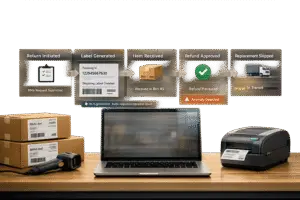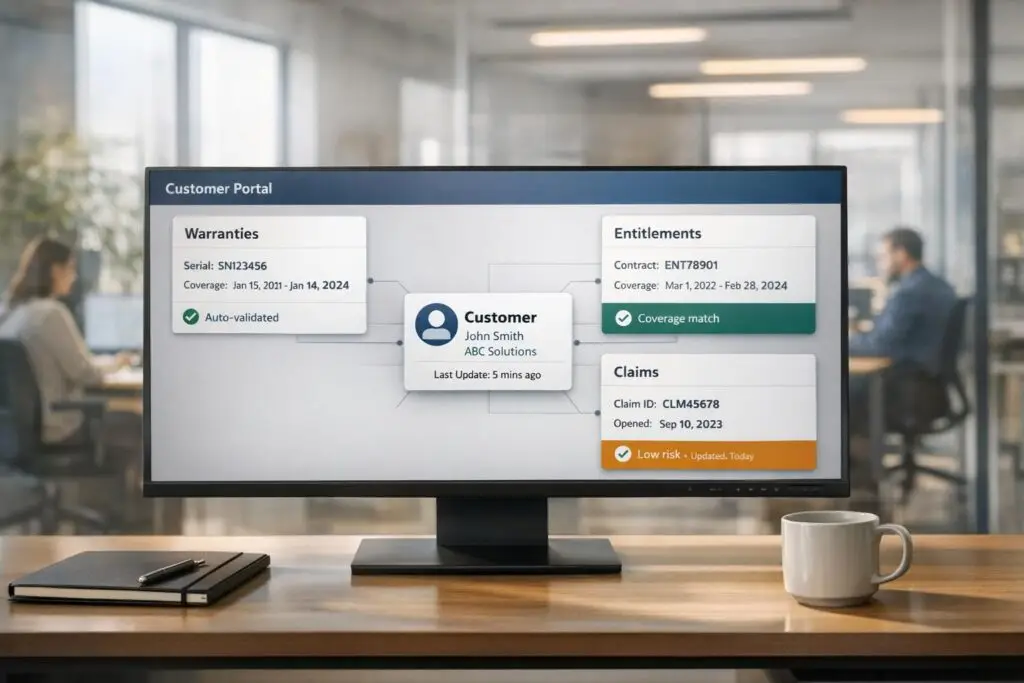
Managing warranties and entitlements can be a hassle without the right tools. A centralized customer portal simplifies the process by offering real-time updates, structured claim submissions, and automated workflows. This eliminates delays, reduces errors, and improves customer satisfaction.
Key Takeaways:
- Centralized Access: Customers can check claim status anytime, reducing follow-ups.
- Automated Processes: Structured forms and real-time checks ensure accurate submissions.
- Data Integration: Connect systems like CRM and ERP for up-to-date warranty info.
- AI Enhancements: Automate validation, detect fraud, and send proactive alerts for expiring warranties.
By transitioning from fragmented systems to a unified portal, businesses save time, cut costs, and deliver better experiences. Let’s dive into how you can set up and optimize your warranty tracking system.
Customer Portal Demo1 0
sbb-itb-e60d259
Setting Up Warranty and Entitlement Tracking in Your Portal
To ensure smooth operations and improve transparency, setting up warranty and entitlement tracking involves outlining coverage details, integrating reliable data sources, and configuring customer-facing fields. When done right, this setup simplifies claim processing and minimizes the need for manual follow-up.
How to Define Warranties and Entitlements
Start by clearly defining the types of warranties you offer – such as standard, extended, or premium. Each warranty should specify key details like coverage duration, start and end dates, included services (e.g., parts, labor, on-site service), and any regional differences. These specifics help eliminate confusion about what’s covered.
Next, tailor customer entitlements based on their purchase history or contract level. For instance, a customer with Next Business Day support should see options that reflect their plan, while someone on a basic plan should only access services included in their coverage. This ensures customers can only file claims for services they’re eligible for, reducing unnecessary back-and-forth.
Connecting Your Data Sources
Accurate data is the backbone of your warranty and entitlement system. Integrating the right sources ensures your portal delivers reliable and up-to-date information. Here’s how:
- CRM Systems: Import customer contact details and contract terms.
- ERP or Warehouse Management Systems: Validate serial numbers and manufacturing dates through product databases.
- Sales Channels: Automatically pull proof of purchase and order dates from platforms like Shopify, Amazon, or your internal order system [5].
For example, in July 2025, Wells Fargo deployed a Microsoft Teams app powered by advanced language models for 35,000 bankers across 4,000 branches. This tool provided instant access to 1,700 internal procedures [3]. Similarly, modern platforms integrate siloed data from tools like Microsoft 365, Google Workspace, Jira, and ServiceNow. This creates a unified customer view that combines purchase records, past claim history, email correspondence, and current entitlements [4].
Once your data sources are connected, focus on configuring your portal fields to capture all necessary claim details.
Configuring Portal Fields and Settings
Design your portal’s claim intake form to collect all the information needed for efficient processing. Break the form into clear sections like Product Details, Contact Info, Purchase Info, Problem Description, and File Upload. Use custom fields for each section to ensure thorough data collection:
- Product Details: Include fields for model name, serial number, and product ID.
- Purchase Info: Capture purchase date, vendor, and region.
- Documentation: Allow uploads for receipts, invoices, and photos of damage.
- Contact Info: Request full name, email, phone number, and shipping address.
Make the process user-friendly by adding visual aids, such as tooltips to help users locate serial numbers, and setting clear file upload guidelines. A save-and-return feature can also be a game-changer for users who need extra time to gather documentation. Additionally, use plain-language status updates like "Received", "Waiting for Documents", or "Replacement Processing" to keep customers informed without confusing them with technical terms like "Pending Classification" [2].
Up next, we’ll explore how to enhance these configurations with real-time checks and automated workflows for even greater efficiency.
How to Implement Warranty and Entitlement Tracking Systems
To streamline warranty management, build workflows that handle product registration, entitlement validation, and automated alerts. A well-organized system minimizes manual tasks, prevents delays in claims processing, and keeps customers informed throughout the process.
Registering Products and Customers
Create two primary entry points for users: "Register a Product" for proactive tracking and "Begin a Claim" for immediate issues. Both options should collect key details like product model, serial number, purchase date, and seller name. For claims, include fields for problem descriptions and file uploads.
Design the registration process in clear stages: Product Details, Contact Info, Purchase Information, Problem Description, and File Upload. Add validation steps at each stage and allow users to save incomplete submissions for later.
For businesses managing large hardware inventories, integrate with manufacturers to automate registration. This setup syncs warranty details (e.g., coverage dates and terms) when a valid serial number is entered [6]. The system can automatically identify the longest warranty end date as the primary expiration, reducing manual errors and ensuring accurate records.
Require proof of purchase uploads in formats like JPG, PNG, or PDF to serve as the definitive reference for claims and avoid disputes [2]. If a receipt is unavailable, configure the system to default to the earliest manufacturer warranty start date [6]. Link each registration record to the corresponding customer profile and invoice, ensuring claims are processed only for verified owners [7].
This structured approach ensures registrations are complete and ready for real-time entitlement checks.
Setting Up Real-Time Entitlement Checks
Once registrations are verified, your system can perform instant checks on customer data points. Configure the portal to automatically validate serial numbers, purchase dates, and proof of purchase before claims reach your support team [2]. These automated checks filter out incomplete claims early. If issues arise – such as a missing serial number, expired warranty, or unreadable proof – redirect those claims to a secondary review process instead of the main review queue.
To ensure accuracy, the system should confirm that the registration is linked to the correct customer and that the warranty expiration date is still valid before allowing a claim to proceed [7].
By addressing errors upfront, these checks help maintain smooth workflows and enable timely notifications.
Automating Notifications and Renewals
Implement immediate activation alerts when a warranty is registered or an order is shipped. These alerts should include details like coverage duration and expiration dates, giving customers a clear reference for future claims [8].
Set up a series of reminders for warranty expirations, triggering notifications at intervals like 30, 14, and 7 days before coverage ends [8]. These reminders not only inform customers about upcoming expirations but also provide an opportunity to encourage repeat purchases or offer coverage extensions.
For stalled claims, send alerts specifying the missing information – such as requesting a clearer photo of a serial number. These targeted messages reduce customer frustration and cut down on support inquiries, keeping the claims process efficient.
Using AI to Improve Warranty and Entitlement Management
AI is reshaping warranty and entitlement management by speeding up validation processes and aligning them with modern, cost-efficient B2B support systems. Tasks that once required hours of manual work can now be completed in seconds. By automating workflows, AI eliminates inefficiencies in traditional systems, cutting operational costs by as much as 40% to 50% [10].
These systems also bring unprecedented accuracy and fraud detection capabilities. With a 99.5% success rate in validation and the ability to catch up to 92% of fraudulent claims, AI dramatically improves processing efficiency. Approval times, which used to span days, are now reduced by 60% to 80%, enabling near-instant decisions [10][13]. This technological leap ensures entitlement verification is faster and more precise.
AI-Powered Entitlement Verification
AI makes entitlement verification seamless by extracting key details – like purchase dates, product specifications, and serial numbers – from invoices and handwritten notes [9][13]. Using this data, it calculates warranty expiration dates and categorizes claims as either "Valid" or "Expired" [9][11].
What sets AI apart is its ability to go beyond simple rule-based checks. Straightforward claims are approved instantly, while anomalies – such as mismatched serial numbers or duplicate claims – are flagged for human review [11][13]. For instance, a global manufacturer streamlined warranty operations for over 700 service partners, achieving remarkable efficiency gains [13].
Integration is straightforward, with AI tools designed to work with existing CRM and ERP systems via OpenAPI-compliant RESTful APIs. This avoids costly platform migrations. Additionally, browser extensions can pull data directly from CRM fields, eliminating repetitive data entry for support agents [11].
Automated Alerts and Predictive Analytics
AI doesn’t just track warranty data; it actively manages it. Automated alerts notify customers of upcoming warranty expirations, while predictive analytics help identify high-risk claims before issues escalate [15]. By connecting data sources such as inspection reports and repair histories, AI uncovers patterns that point to potential part failures or recurring defects [14]. Managers can even ask conversational queries like, "What’s causing breakdowns under 500 hours?" and receive instant, actionable insights [14].
| Feature | Manual Tracking | AI-Powered Tracking |
|---|---|---|
| Entry | Prone to duplicate entries, lost records | Automated extraction via OCR and NLP [15] |
| Expiration Management | Relies on spreadsheets, risks missed renewals | Real-time alerts and automated renewal triggers [15] |
| Trend Analysis | Based on lagging indicators like reports | Predictive analytics for early risk detection [14] |
| Validation | Slow, inconsistent manual reviews | Real-time fraud checks with 99.5% accuracy [13] |
AI analytics can even help manufacturers recover 340% more in supplier costs by generating claims based on root-cause analysis of warranty data [13]. This transforms warranty tracking from a cost-heavy process into a revenue-generating tool. AI bots further enhance this by streamlining self-service claim submissions.
AI Bots for Self-Service and Claim Validation
AI bots create a smoother, faster claim process for customers. Through conversational interfaces, customers can describe issues in plain language. The AI then categorizes the problem, checks warranty eligibility, and gathers supporting evidence – like photos of defects – through mobile-friendly prompts. It cross-references order details, serial numbers, and warranty tiers to confirm eligibility before routing the claim to a support team [16]. This automation filters out incomplete submissions and eliminates manual lookups, with 60% to 70% of claims processed without human intervention [16].
When claims require escalation, AI ensures a seamless transition to human agents. It preserves the customer’s journey – tracking viewed articles, bot conversations, and warranty details – so agents don’t need to ask repetitive questions. This reduces agent handling time from 15 minutes to just 5 minutes [16]. Whether resolved automatically or escalated, the process is smooth and efficient for everyone involved.
Solving Common Warranty and Entitlement Tracking Problems
Streamlining warranty processes with automated workflows and AI validations can help tackle common bottlenecks. Many warranty issues arise from inefficient systems [2]. When claims are scattered across emails, spreadsheets, and call notes, the result is often lost details and missing receipts that slow down resolutions. Support teams also face incomplete forms, while urgent cases get buried in queues. These delays create frustration for everyone involved.
Fixing Data Silos
Disconnected systems often force customers to re-enter the same information they provided during product registration. A centralized portal solves this by linking registration data – such as serial numbers, purchase dates, and proof of purchase – directly to claims. This setup pre-fills essential details, eliminating duplicate data entry and improving accuracy [2].
Automated triage further streamlines the process by filtering valid claims from incomplete ones. For instance, if a serial number is missing or a product is out of warranty, the portal prompts customers to provide the missing details before a human agent even reviews the case [2]. This approach prevents wasted time on poorly documented claims and aligns seamlessly with automated ticket routing.
Reducing Manual Errors
Manual tracking often requires agents to verify receipts, check dates, and route claims correctly – tasks that are prone to human error. AI-powered ticket routing and prioritization eliminates this risk by using Optical Character Recognition (OCR) and Natural Language Processing (NLP) to extract structured data from unstructured sources like invoices and warranty certificates. The system cross-references claims against product specs, warranty terms, and customer history to identify errors or fraudulent submissions early.
"Inaccurate assessments not only lead to financial losses but can also damage customer trust and brand reputation." – OnPoint Warranty [17]
Standardized intake forms guide customers through the submission process with clear, targeted prompts [2]. Visual cues help users locate serial numbers or upload valid proof of purchase, reducing common submission mistakes. Enforcing file format and size rules also prevents delays caused by invalid uploads [2].
Using Dashboards to Monitor Performance
Dashboards offer a big-picture view of process efficiency, going beyond just error reduction. Customizable dashboards allow teams to track metrics like claim processing time, accuracy rates, and fraud detection rates, helping to identify bottlenecks [17]. These tools highlight delays, frequent errors, and slow triage times. Sorting claims by date, issue type, or urgency ensures high-priority cases don’t get lost in the shuffle [2].
Dashboards also improve customer communication. Instead of using internal jargon like "pending classification", plain-language updates such as "Waiting for documents" or "Replacement processing" keep customers informed without the need for additional support calls [2]. This transparency reduces unnecessary inquiries and improves the overall experience.
Tracking Performance with Reporting and Analytics
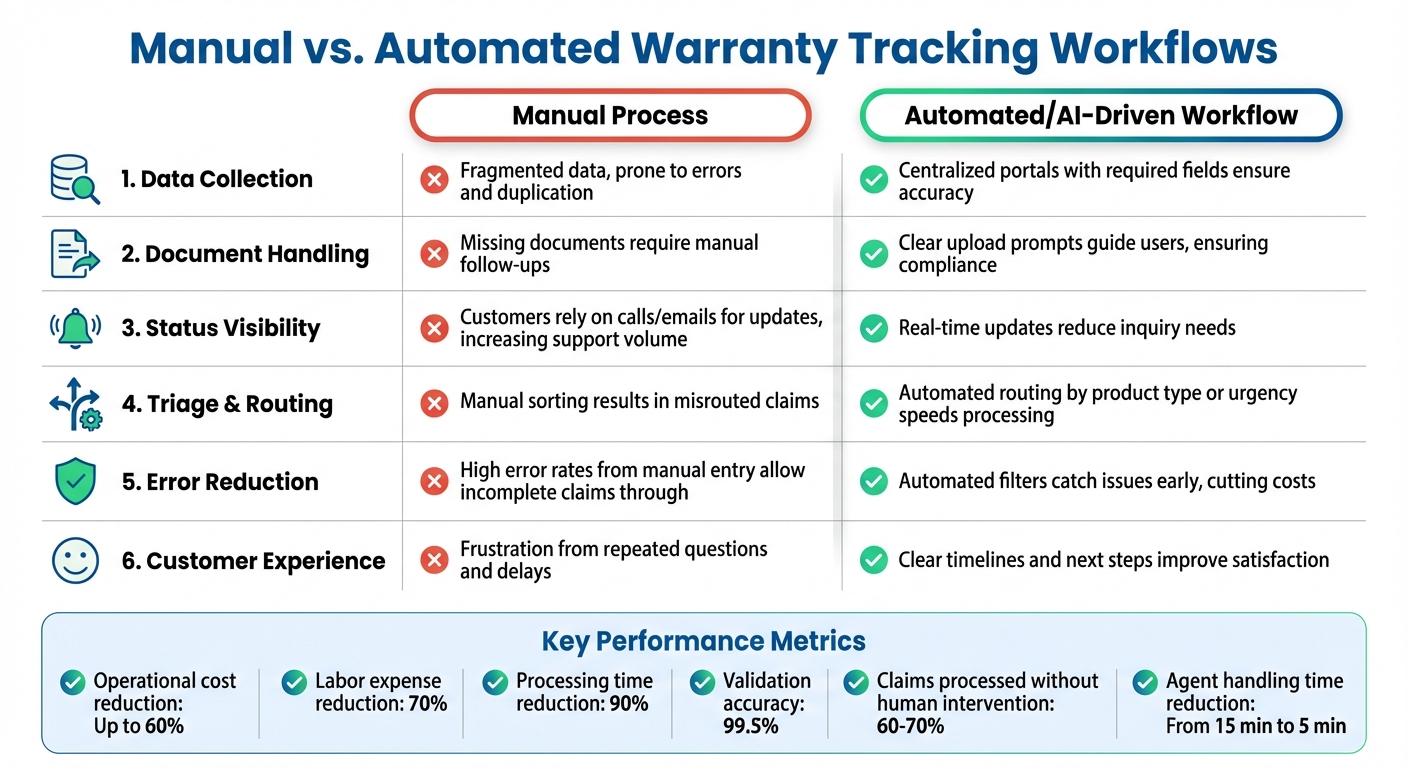
Manual vs Automated Warranty Tracking: Performance Comparison
Turning raw warranty data into meaningful insights can transform how decisions are made. Without structured reporting, support leaders might miss key patterns – like which products are driving the most claims, where delays are occurring, or when a surge of expiring warranties is on the horizon. These insights work hand-in-hand with the automated tracking tools discussed earlier. To make reporting effective, it’s essential to focus on specific metrics throughout the entire claim process, from the initial submission to the final resolution.
Creating Warranty and Entitlement Reports
Start by analyzing claim status distribution across various stages: Received, Under Review, Waiting for Documents, Approved, and Resolved [2]. This breakdown can help pinpoint where bottlenecks occur, enabling better allocation of resources. Additionally, track triage and resolution speed – this measures how long it takes to process claims from submission to resolution, highlighting any delays [2].
Metrics like portal conversion and drop-off rates can identify points where customers abandon the process, such as registration or claim forms. For example, if users frequently exit at the serial number field, it might indicate they’re struggling to find that information on their product. Monitoring data accuracy is equally important – tracking "Action Needed" statuses can shed light on common errors or missing details [2]. Segmenting reports by product model or purchase region can also reveal recurring quality issues tied to specific manufacturing batches [2].
Another valuable metric is warranty expiration patterns, which can help predict spikes in support demand or uncover opportunities for renewal [2][12]. For approved claims, tracking replacement cycle metrics – from approval through shipping – provides insight into the efficiency of the replacement process [2]. Additionally, monitoring customer engagement, such as notification open rates for status updates, can reveal whether customers are staying informed via the portal or turning to support calls for updates [2].
Building Complete Customer Views
Beyond real-time tracking, creating a full picture of the customer experience by combining historical and current data can refine support strategies. For instance, linking product registration history with active claims can help uncover recurring patterns [2]. Including communication logs – like response times to "Action Needed" requests – can distinguish between engaged and unresponsive customers [2].
Tracking device condition records is another useful approach. These records document issues like liquid damage or mechanical failures across a customer’s product history [2][12]. Similarly, understanding exchange preferences – whether customers typically opt for Standard Exchange (return first) or Advanced Exchange (replacement first) – can help streamline future claims processing [12].
Manual vs. Automated Workflows Comparison
When comparing manual processes to automated, AI-driven workflows, the differences in performance and efficiency become clear:
| Feature | Manual Process | Automated/AI-Driven Workflow |
|---|---|---|
| Data Collection | Data is fragmented, leading to errors and duplication [2]. | Centralized portals with required fields ensure accuracy [2]. |
| Document Handling | Missing documents require manual follow-ups [2]. | Clear upload prompts guide users, ensuring compliance [2]. |
| Status Visibility | Customers rely on calls or emails for updates, increasing support volume [2]. | Real-time updates reduce the need for inquiries [2]. |
| Triage & Routing | Manual sorting often results in misrouted claims [2]. | AI-powered ticket routing by product type or urgency speeds up processing [2]. |
| Error Reduction | High error rates from manual entry allow incomplete claims through [2]. | Automated filters catch issues early, cutting costs [2]. |
| Customer Experience | Frustration from repeated questions and delays [2]. | Clear timelines and next steps improve satisfaction [2]. |
Automated workflows address the fragmentation that often plagues manual reporting. When warranty data is centralized – rather than scattered across emails or spreadsheets – teams can more easily identify trends, track performance, and make decisions without the hassle of manual consolidation. Integrating these reports into an AI-driven system further enhances decision-making and boosts support efficiency [2].
Conclusion
Managing warranties and entitlements doesn’t have to drain resources or frustrate customers. With AI-powered customer portals, processes become more efficient, cutting operational costs by up to 60%, reducing labor expenses by 70%, and slashing processing times by 90% [10][18].
These improvements stem from addressing operational inefficiencies at their core. Transitioning from fragmented systems to a centralized, AI-driven platform eliminates manual errors with automated validations and real-time tracking [10]. Features like QR code product registration, 24/7 claim status tracking, and proactive notifications for expiring coverage significantly reduce "status check" inquiries. This allows support teams to focus on resolving complex issues rather than repetitive tasks [2].
"What used to be a chaotic, manual process that caused delays, duplicate claims, and AR disputes is now streamlined and transparent." – Scott Carpenter, Director of IT [18]
For B2B organizations still using outdated systems, the next step is clear. Begin with a pilot program targeting a specific product line or region to demonstrate ROI before expanding [2][17]. Ensure integration with existing ERP and CRM systems to maintain a unified source of truth [10][18]. Most implementations deliver results quickly, with payback periods ranging from 4 to 12 months – and some showing measurable benefits in just days or weeks [20][19].
Adopting AI-driven solutions not only reduces costs but also sets the stage for scalable, future-ready operations. As B2B buyers increasingly expect outcome-based guarantees and real-time insights, businesses need platforms capable of handling millions of transactions while adapting to new markets and product lines [10][1]. Modern solutions built for the complexities of B2B environments provide the operational efficiency, cost control, and customer satisfaction that traditional tools simply can’t achieve.
FAQs
What should I integrate first – CRM, ERP, or order data?
To streamline warranty management, the first step is integrating your CRM system. This helps centralize customer data, giving you a complete picture of customer interactions and warranty entitlements. With this foundation in place, you can then connect ERP and order data to improve operational tracking. This integration also makes it easier to validate warranties and entitlements directly through your customer portal.
How do I prevent ineligible claims before they hit my support queue?
Automated validation systems are a smart way to keep ineligible claims out of your support queue. These systems can flag claims as invalid by verifying warranty coverage right when the claim is created. On top of that, AI-powered tools can handle entitlement checks and even send proactive notifications to ensure only valid claims move forward. By automating these steps, you can cut down on unnecessary workload, avoid invalid submissions, and create a smoother experience for your customers.
Which warranty portal metrics best prove ROI to leadership?
Key metrics for a warranty portal that effectively showcase ROI to leadership include claim resolution time, claim volume trends, entitlement validation accuracy, and proactive notification effectiveness. These metrics not only demonstrate operational performance but also emphasize areas like cost savings and improved customer satisfaction.