


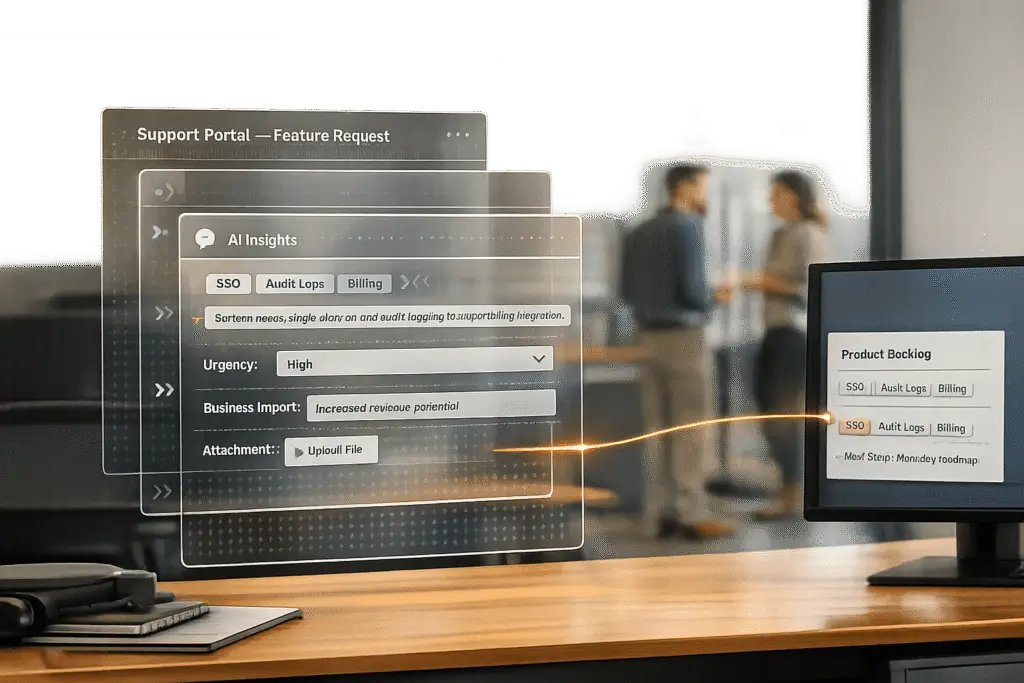
Managing feature requests can be tricky. The main challenge? Important details like customer use cases, business impact, or urgency often get lost when requests move from support to product teams. This leads to frustration for customers and wasted effort for teams.
Here’s a quick solution:
- Use structured forms to collect detailed information upfront.
- Automate tagging and AI case summaries with AI to organize and enrich requests.
- Prioritize requests based on business impact, not just popularity.
- Route requests efficiently to the right teams, keeping all details intact.
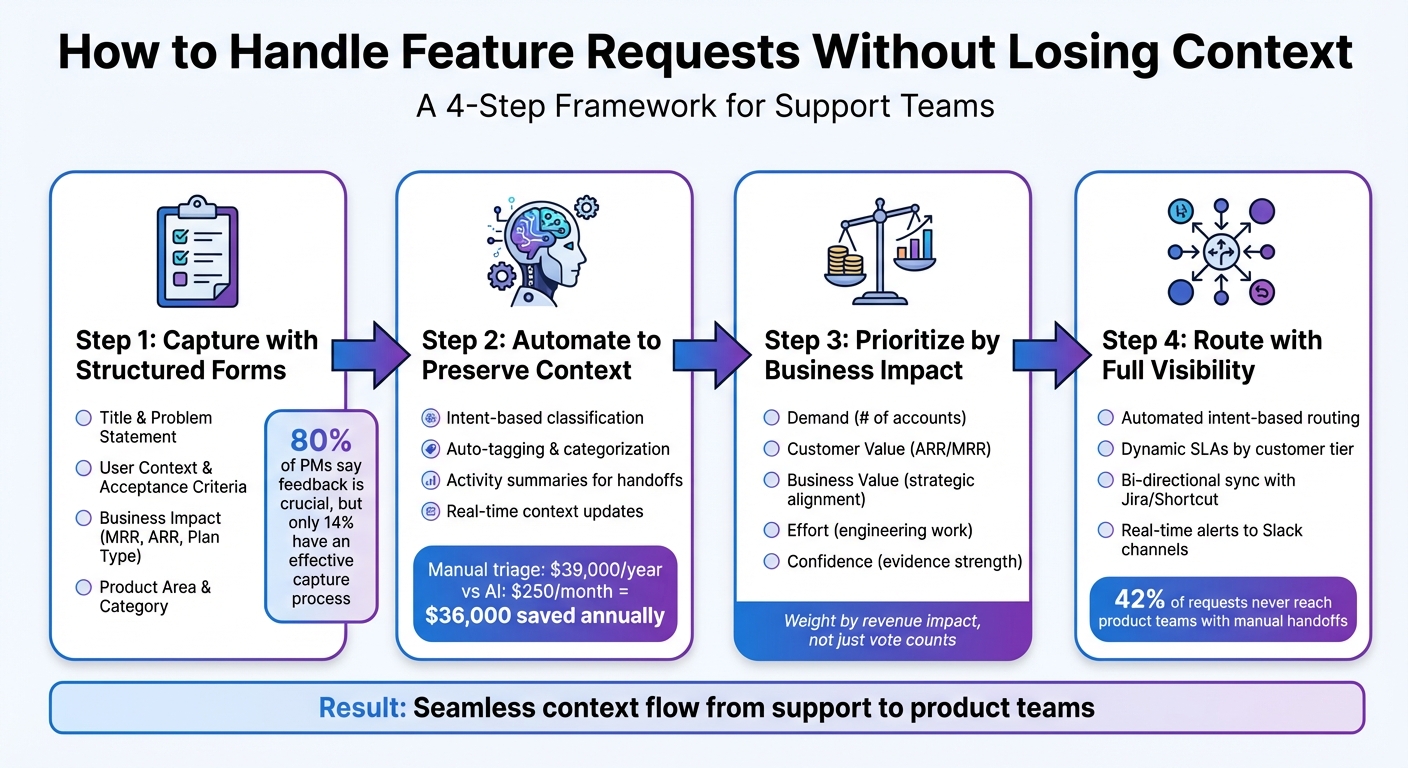
4-Step Process for Managing Feature Requests Without Losing Context
How to Manage Feature Requests Effectively
sbb-itb-e60d259
Step 1: Capture Feature Requests with Structured Forms
To ensure no important details are lost, a well-thought-out intake form is crucial for capturing feature requests. This approach allows you to gather all the necessary information upfront, avoiding the risk of losing context in email threads or over time.
Set Up Required Fields for Complete Context
Your intake form should focus on four key components: a clear Title (the "what"), a Problem Statement/Use Case (the "why"), User Context (who is making the request), and Acceptance Criteria (what "done" looks like) [6]. To prioritize requests effectively, include business impact data like Monthly Recurring Revenue (MRR), Account Value/ARR, and Subscription Plan. This ensures decisions are driven by financial impact rather than sheer volume [2][3].
To streamline routing, add fields for Product Area (e.g., Dashboard, API, Mobile) and Category (e.g., UI, Performance, Integrations). These help direct requests to the appropriate teams automatically [5]. Including an upload option for screenshots or other attachments can provide visual context, making it easier for development teams to understand the request [9]. Interestingly, while 80% of product managers recognize the importance of feedback from customer-facing teams, only 14% have an effective process for capturing it [8].
Capturing these details accurately is essential for later workflows, especially when using AI to prioritize and route feature requests.
Use AI to Auto-Tag and Summarize Requests
AI-powered tools can take this process a step further by automating the organization of incoming requests. Instead of relying on agents to manually categorize feedback, AI can transform unstructured input into structured tickets complete with titles, descriptions, and context [6][3]. Using semantic matching, AI can recognize that phrases like "make exports faster" and "CSV download takes too long" describe the same issue. It also translates user-proposed solutions into problem statements that focus on the unmet need [3][6][1].
AI can also extract critical details like the "why" by analyzing workarounds, issue frequency, and any business impact mentioned in the request [7][3]. This means that by the time requests reach your product backlog, they’re already enriched with CRM data – such as ARR, plan type, and account segment – allowing you to prioritize based on business value rather than just the number of requests [3][1].
Step 2: Use Automation to Preserve Context Throughout the Lifecycle
Once you’ve captured a feature request with structured data in Step 1, the next challenge is keeping every detail intact as the request moves across teams. Preserving this context is essential for aligning support and product teams. But without automation, critical information can easily get lost during handoffs. This is where AI-driven automation steps in to maintain consistency and accuracy.
Apply AI-Driven Tagging and Categorization
The days of relying on simple keyword matching are over. AI now uses intent-based classification, which means it can recognize when different phrases point to the same underlying issue. For example, it can group requests like “export” and “CSV” even if customers describe them differently [11]. This prevents duplicate requests from being treated as separate issues, saving time and reducing confusion.
"That shift from keyword matching to intent-based classification is what finally makes automated ticket routing trustworthy at scale." – Mark Sherwood, CX Strategist [11]
What makes this method even more effective is continuous re-analysis. As new details emerge – whether through public comments or internal conversations in tools like Slack – AI updates tags and summaries in real time to reflect the latest context [12].
For teams managing 500 tickets daily, manual triage can cost about $39,000 annually (calculated at $25/hour with 45 seconds spent per ticket). In comparison, AI-powered classification for the same workload costs under $250 per month, leading to an annual savings of $36,000 [11]. This not only preserves context but also significantly cuts operational expenses. Once tagging is in place, creating detailed summaries for seamless handoffs becomes the next priority.
Generate Activity Summaries for Team Handoffs
When a feature request transitions from support to product, the product team needs more than the initial submission. They require the entire conversation history, including internal discussions from Slack or email. AI-generated summaries pull together all this information, ensuring nothing important gets left behind [10].
A good summary follows a clear structure:
- Request: A one-sentence description.
- Resolution: If applicable, the solution provided.
- Root Cause: For bugs, the underlying issue.
- Recommendations: Suggestions like updating documentation or creating a knowledge base article [10].
This format ensures both technical and business contexts are included, making handoffs scannable and actionable. To keep summaries focused, AI prompts can be configured to skip irrelevant system messages and auto-replies [10].
"Ticket classification only matters if it becomes the foundation for routing decisions. If it doesn’t drive assignment, priority, and escalation automatically, it’s just structured reporting." – Mark Sherwood, CX Strategist [11]
With this process, product teams receive enriched requests that include customer sentiment, business impact, technical details, and internal notes – all without requiring manual effort to piece it together.
Step 3: Prioritize Feature Requests by Business Impact
Once you’ve captured the context and categorized feature requests, the next step is to decide which ones deserve attention based on their potential impact on your business. This approach ensures you’re addressing opportunities that align with your goals rather than just reacting to the loudest voices.
Score Requests Based on Customer and Business Factors
To make informed decisions, use a clear scoring model that evaluates requests across several dimensions:
- Demand: How many accounts are affected by the request?
- Customer Value: What’s the ARR (Annual Recurring Revenue) or MRR (Monthly Recurring Revenue) of the accounts making the request?
- Business Value: Does the request align with your strategic goals for the quarter?
- Effort: How much engineering work will the feature require?
- Confidence: How strong is the evidence supporting the request?
Start by identifying your primary business goal for the quarter. For example, if reducing churn is your priority, focus on requests from at-risk accounts. On the other hand, if you’re targeting enterprise growth, prioritize requests from high-revenue customers [1][13]. Use a simple 1–5 scale for each dimension to score and rank requests, enabling you to justify trade-offs effectively [1].
AI tools can simplify and enhance this process. For instance, they can automatically enrich feature requests with CRM data like account tier, lifecycle stage, and revenue information as soon as they’re submitted [1]. Instead of relying on sheer vote counts, AI can weigh demand by revenue impact. A request from a few enterprise customers might outweigh one with many upvotes from free-tier users [1].
"X has been requested by 150 users including 12 enterprise accounts, while Y has 8 requests and no revenue correlation." – AnnounceKit [5]
AI also enables deeper context gathering. Instead of vague titles like "better reporting", conversational AI can ask follow-up questions such as, "What specific problem would this solve?" or "How often does this issue occur?" This process captures critical details like frequency, workarounds, and overall business impact at the time of submission [7]. This added depth helps teams avoid prioritizing based solely on volume, ensuring high-impact needs aren’t overlooked.
Manual vs. AI-Driven Prioritization: A Comparison
| Feature | Manual Prioritization | AI-Driven Prioritization |
|---|---|---|
| Data Collection | Static forms capturing titles and descriptions [7]. | Conversational discovery uncovering "why" and workarounds [7]. |
| Grouping | PMs manually triage vague requests and merge duplicates [7]. | Automatically groups requests by underlying need and intent [7]. |
| Primary Metric | Often driven by upvote volume or "loudest" voices [7]. | Driven by user impact, business value, and ARR weighting [1][7]. |
| Context | Needs manual follow-up [7]. | Captures full context at submission [7]. |
| Speed | Slow; requires weekly audits and manual data entry [1]. | Real-time; insights delivered instantly [7]. |
By automating scoring and maintaining context, teams can allocate resources more effectively, focusing on features that improve retention and align with strategic objectives [13]. This approach shifts the emphasis from popularity contests to measurable business outcomes.
With prioritized requests in hand, the next step is ensuring they are routed and escalated to the right teams for action.
Step 4: Route and Escalate Requests Without Losing Details
Once you’ve nailed down capturing and prioritizing requests, the next step is making sure they get to the right people without losing essential details. This is often where things go wrong. A feature request might move from the support team to product, but critical context – like the customer’s use case, urgency, or business impact – can easily get lost in the shuffle. Manual handoffs are a common weak point.
Instead of relying on manual processes, consider automating routing based on intent and business context. AI-powered classification tools can analyze the meaning behind a request, turning unstructured comments into structured data like intent, sentiment, and urgency [11]. This approach is far more effective than simple keyword matching. For instance, AI can recognize that "I expect reimbursement" is related to a refund request, even if the exact word "refund" isn’t used. Intent-based routing ensures requests are directed accurately and efficiently [11].
"When routing depends on humans scanning a queue, your risk depends on who is watching and when." – Mark Sherwood, CX Strategist [11]
By removing the human bottleneck, AI classification not only cuts down triage costs but also ensures requests are instantly routed to the right team. For example, API-related issues go straight to backend developers, while billing concerns land with the finance team – no guesswork involved [11]. Once routing is optimized, the focus shifts to setting up SLA and escalation workflows.
Set Up Dynamic SLAs and Multi-Level Escalations
Not all feature requests carry the same weight. A casual suggestion from a trial user doesn’t need the same urgency as a critical issue from a renewing customer. Dynamic SLAs can adjust response times automatically based on factors like customer tier, detected sentiment, and urgency signals such as "we go live tomorrow" [11].
Supportbench takes this a step further with automated escalation management. Multi-level escalation workflows can be configured to trigger when SLAs are breached or specific conditions are met – like a high-risk issue tied to a contract renewal. This way, agents don’t have to decide who to notify; the system handles it, ensuring that context is preserved at every stage. Risk categories, scorecards, and even de-escalation processes can all be tracked seamlessly.
For high-priority requests, set up real-time alerts to notify relevant Slack channels (e.g., #product-feedback or #incident) immediately [11]. This ensures urgent issues don’t sit unnoticed in a queue. You can even apply stricter SLAs, like a one-hour response time for production outages, based on AI-detected urgency [11].
Route Requests to Product Teams with Full Visibility
When it’s time to pass a request to the product team, don’t just forward an email. Instead, use bi-directional synchronization between your support platform and development tools like Jira or Shortcut [2]. This ensures that when the product team updates the status of a feature, both the support team and the customer are notified, keeping the feedback loop intact [2].
To give product teams a complete view, enrich requests with CRM data such as monthly recurring revenue (MRR), subscription tier, and account details before routing [2]. Tools like Supportbench’s Salesforce integration make this process seamless, pulling in licensing and customer context so everyone has access to the same information.
Centralize all feedback into a single repository that aggregates input from various sources – support tickets, Slack conversations, and CRM notes [2]. Prioritize requests based on business impact, such as those tied to high-value deals or churned customers [2]. This way, product teams can focus on strategically important requests rather than just the loudest ones.
"Ticket classification only matters if it becomes the foundation for routing decisions. If it doesn’t drive assignment, priority, and escalation automatically, it’s just structured reporting." – Mark Sherwood, CX Strategist [11]
Common Mistakes When Managing Feature Requests (and How to Fix Them)
Even with solid workflows in place, managing feature requests can still go awry at critical points. The biggest issues often aren’t about missing a request – they’re about losing essential context during handoffs, failing to close the loop with customers, and overlooking opportunities to reduce future ticket volume. Let’s break down these common mistakes and how targeted AI tools can help address them.
Incomplete Handoffs That Lose Key Details
When feature requests are manually passed from support teams to product teams, 42% never actually make it to the product team [6]. And even when they do, they often arrive stripped of crucial information – like the specific user pain point, the customer’s account tier, or the business impact. Manual handoffs are prone to missing these critical details [6].
AI-driven tools can fix this by creating summaries and structured handoffs. Instead of forwarding raw ticket threads, AI can generate concise summaries that highlight the problem statement, the affected customer segment, and urgency indicators. For example, Jessica Hannes, Director of Support at Esusu, shared how AI summarization "saves us the time and energy of looking through an entire thread so we can work more efficiently", especially when onboarding new team members [14]. Tools like Supportbench’s AI automatically generate case summaries, ensuring product teams get actionable insights rather than vague descriptions.
"The difference isn’t just efficiency. It’s organizational memory. Teams that build decision intelligence stop having the same arguments repeatedly." – IdeaLift [6]
Using automated tagging can further streamline the process. Tags like "feature gap", "defect", or "workflow friction" can be applied through intent and sentiment analysis [14][1]. This shared language prevents confusion – like when support labels something a "bug", but product treats it as a "feature request."
Now, let’s look at how failing to provide timely updates can erode customer trust.
Missed Updates That Dissatisfy Customers
When customers submit feature requests and never hear back, they start to think of your feedback system as a "black hole" [5]. This lack of communication damages trust even more than not having a feedback system at all. One of the most common failures here is not notifying users when their requested feature is shipped – a missed opportunity to build loyalty.
Automating the feedback loop can solve this. Sync your support platform with tools like Jira or Shortcut to ensure customers are informed when their requests are implemented. These "you asked, we built it" moments are powerful trust-builders [5].
AI can also help identify dissatisfied customers before they churn. Supportbench’s Predictive CSAT analyzes case interactions and flags potentially unhappy customers, even if they haven’t filled out a survey [4]. This allows teams to proactively provide updates or escalate high-risk accounts. Research shows that 75% of customers spend more with businesses that deliver consistently good experiences [4], making these touchpoints essential for retention.
Beyond handoff and update issues, another frequent mistake is failing to leverage resolved requests to improve self-service options.
Failing to Turn Requests into Knowledge Base Content
Every resolved feature request holds valuable insights that could help other customers resolve similar issues on their own. Yet, many support teams treat each ticket as a one-off interaction, missing the chance to create self-service resources that reduce future ticket volume [4].
AI-powered knowledge base tools can bridge this gap by analyzing resolved tickets and identifying missing content when building a knowledge base. These tools can even draft articles automatically [14]. For example, Unity used an AI agent to enhance its knowledge base, successfully deflecting 8,000 tickets and saving $1.3 million [14]. Supportbench’s AI KB Article Creation feature generates complete articles – complete with subjects, summaries, and keywords – based on case histories, ready for review and publication.
This approach not only reduces ticket volume but also ensures valuable insights don’t get lost. Instead, they become part of a searchable database that improves the customer experience and frees up your support team to handle more complex issues.
| Mistake | Impact on Operations | Impact on Customers |
|---|---|---|
| Manual Logging | Outdated entries, wasted PM time | Delayed responses |
| No Deduplication | Inflated demand counts, wasted triage | Confusion about status |
| Scattered Sources | 42% of signals lost [6] | Feeling ignored |
| Over-Promising | Misused engineering resources | Broken trust |
| No Follow-up | Missed loyalty opportunities | Perception of a "black hole" |
Conclusion: Build Better Workflows for Feature Request Management
Managing feature requests effectively hinges on creating a well-organized workflow. The four essential steps – capturing requests with structured forms, automating processes to retain details, prioritizing based on business impact, and routing with full transparency – lay the groundwork for a system that ensures critical context (like customer ARR, specific use cases, and urgency) flows seamlessly from support teams to product teams. This approach bridges the gap between departments, making sure customer input drives meaningful product improvements.
AI takes this process to the next level, turning what used to be a manual and error-prone task into a streamlined, data-driven operation. By automating tagging, summarization, and prioritization, AI ensures no feedback gets lost in the shuffle. Plus, it helps close the loop with status updates that transform overlooked requests into opportunities to build trust. Consider this: 80% of product managers say feedback from customer-facing teams is crucial, yet only 14% have an effective system for capturing it [8]. The result? Wasted development resources and diminished customer loyalty. On the flip side, 75% of customers are willing to spend more with companies that consistently deliver a great experience [4].
But this isn’t just about efficiency – it’s about creating a shared knowledge base that keeps teams aligned. When support and product teams adopt a unified taxonomy, rely on automated handoffs, and stay synced with development tools, feature requests stop being seen as noise. Instead, they become valuable insights that shape strategy.
To get started, centralize your feedback channels, use structured intake forms, and leverage AI tools to retain context throughout the process. This approach strengthens the connection between customer needs, product development, and support communication. By adopting these AI-powered methods, you’ll ensure your support operations truly make an impact.
FAQs
What fields should a feature request form require?
A well-designed feature request form gathers the right details to help understand customer needs and the context behind their requests. Here are the key elements to include:
- Customer contact information: This could be their name, email address, or account ID – essential for follow-ups or clarifications.
- Feature description: A clear explanation of the requested feature or idea.
- Use case or business impact: This helps you understand why the feature matters and how urgent it might be.
- Priority level: Allows customers to indicate how critical this request is to them.
- Attachments: Screenshots or other files can provide helpful visual context.
You can also consider adding optional fields like the product version or technical specifications for more detailed insights.
How do you deduplicate similar requests automatically?
AI-driven tools, such as auto-tagging and summarization, simplify the process of managing feature requests by automatically identifying and handling duplicates. Auto-tagging works by analyzing the content of requests and categorizing them, which helps pinpoint duplicates with ease. Meanwhile, summarization highlights common themes across requests, making overlaps more apparent. These tools save time and effort for support teams while ensuring important requests are neither overlooked nor repeated, leading to more efficient request management.
How can we prioritize requests by ARR instead of votes?
When prioritizing feature requests, Annual Recurring Revenue (ARR) should be your guiding star. Instead of just counting votes or gauging popularity, focus on the requests that align with your revenue goals. Here’s how you can make ARR the center of your decision-making process:
- Classify Requests by Business Impact: Group feature requests based on their potential impact on revenue. For instance, consider ARR bands (e.g., customers generating $10K, $50K, or $100K annually) or strategic account tiers.
- Leverage Automation for Efficiency: Use automation tools to tag and analyze feature requests by their account impact. This helps you quickly identify which requests come from your most valuable customers.
- Prioritize High-Value Customers: Pay special attention to requests from key accounts or those with significant ARR contributions. Developing features that cater to these customers ensures your efforts directly support revenue growth.
By focusing on the financial weight of each request, you can align feature development with your business objectives, ensuring resources are spent where they matter most. Popularity might feel tempting, but revenue impact is what drives sustainable growth.






