



AI is transforming how businesses handle multi-channel customer support. It connects fragmented systems, ensuring customer context is preserved across platforms like email, Slack, and live chat. This eliminates repetitive conversations, reduces response times by up to 70%, and enables teams to manage increasing workloads without adding staff.
Here’s what you need to know:
- The Problem: support teams struggle with disconnected communication channels, leading to lost context, inefficiencies, and frustrated customers.
- The Solution: AI-powered platforms unify these channels, creating a single view of customer interactions while automating tasks like ticket routing and prioritization.
- The Benefits: Faster resolutions, fewer missed SLAs, and proactive support capabilities that improve customer satisfaction and operational efficiency.
AI is no longer optional – 97% of organizations plan to enhance customer interactions by 2025, with 55% prioritizing seamless experiences. Start by auditing your current systems, integrating AI, and tracking metrics like First Response Time (FRT) and Customer Satisfaction (CSAT) to refine your approach.
The Role of Generative AI in Multi-Channel CX Strategies
sbb-itb-e60d259
What Multi-Channel Support Means for B2B Organizations
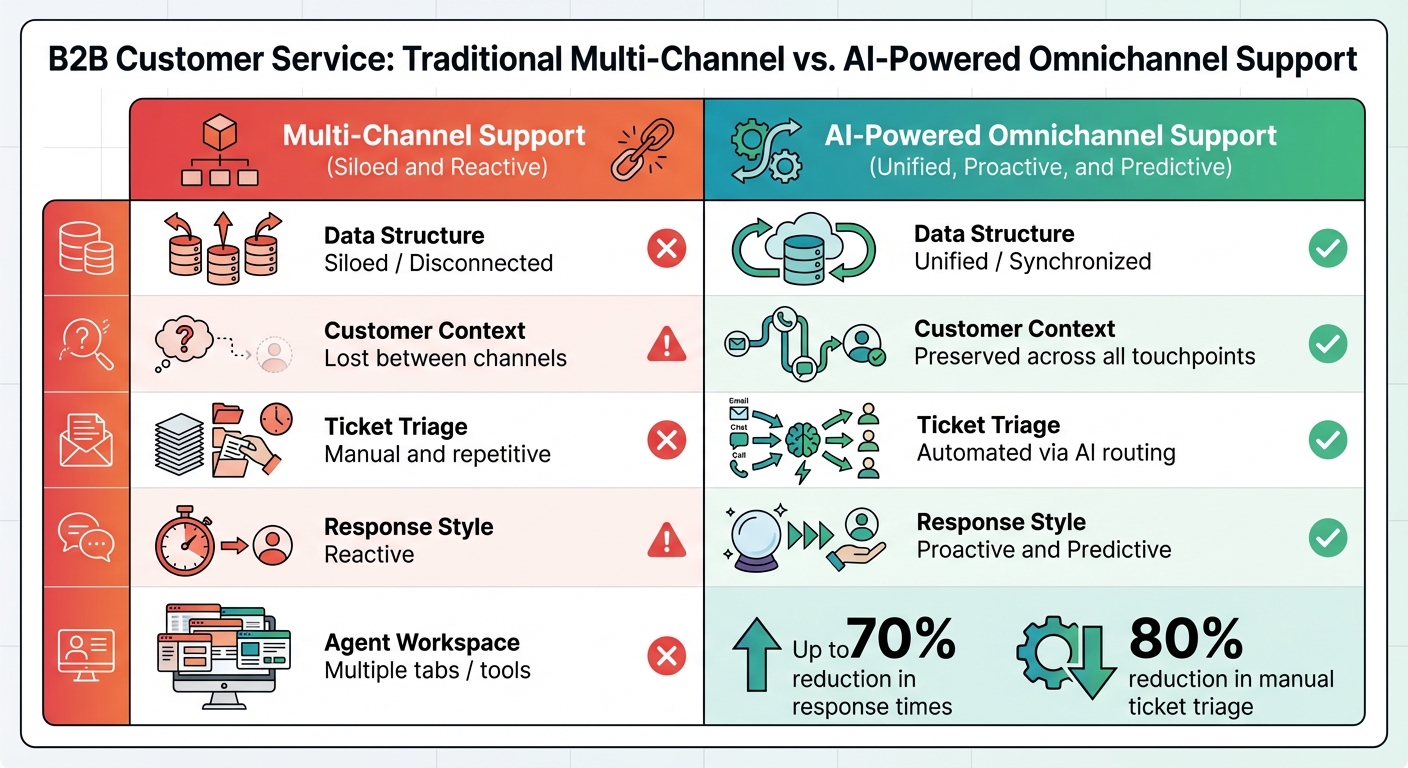
Traditional Multi-Channel vs AI-Powered Omnichannel Support Comparison
Multi-channel support allows customers to connect with your team through various platforms. However, many organizations run these channels as separate systems, creating isolated pockets of information. This fragmentation disrupts the customer experience. For instance, if a customer sends an email and later follows up via Slack, agents often lack the full conversation history. This forces customers to repeat their concerns and leaves agents scrambling to piece together the context.
A better solution is omnichannel support. Unlike multi-channel setups, an omnichannel platform integrates all communication channels into a single, unified system where context is preserved. When a customer transitions from email to chat, your team automatically sees the entire conversation history [2]. This integration is especially critical in addressing the challenges of fragmented systems, as explored in the sections ahead.
For B2B organizations, where relationships are long-term and stakes are high, this unified approach is essential. Unlike B2C support, B2B interactions often involve technical complexities, multiple stakeholders, and ongoing collaboration. A single issue might require input from a customer success manager, a technical support agent, and an engineering team – all working across different tools. Without a unified view, you risk breaking SLAs, losing trust, and jeopardizing high-value accounts [1].
AI is the key to making omnichannel support work. It connects previously siloed systems, automatically threads related messages across platforms, prioritizes tickets based on account importance, and provides agents with a consolidated view of all customer interactions [4]. Ian Heinig, Agentic AI Marketer at Sendbird, describes this shift:
"AI agents act as the bridge between formerly siloed channels and systems – enabling a cohesive, personalized, and seamless experience across channels." [4]
With AI-powered omnichannel platforms, response times can be reduced by up to 70%, and manual ticket triage can be cut by 80% [2]. For B2B teams balancing limited resources with high expectations, AI transforms fragmented systems into streamlined operations.
Common Problems with Disconnected Channel Systems
Disconnected channels create three major issues for B2B support teams:
- Data silos isolate customer information. Sales might see one conversation in the CRM, while support views another in a helpdesk tool, and the product team tracks issues in a separate platform. This lack of a unified view slows resolutions and increases the risk of missed deadlines.
- Inconsistent customer experiences. When agents don’t have access to previous interactions, customers are forced to repeat themselves – especially frustrating in B2B scenarios involving complex, enterprise-level implementations. A striking 80% of customers say their experience with a company is just as important as the products they purchase [4].
- Operational inefficiencies for support teams. Agents waste valuable time switching between tools and searching for context. For organizations managing hundreds or thousands of accounts, these inefficiencies snowball, making it hard to scale without adding more staff.
Take Jenzabar, a B2B software provider for higher education, as an example. In October 2025, the company faced challenges with fragmented visibility across sales, support, and product teams while managing hundreds of products for institutional clients. By switching to Supportbench‘s AI-powered platform, Jenzabar centralized workflows and implemented intelligent routing. The result? Faster issue resolution, improved SLA compliance, and better collaboration across departments [1].
How AI Improves Multi-Channel Support
AI addresses these challenges by consolidating communications and optimizing support processes. Rather than treating each platform as a separate entity, AI threads related messages across channels into a single, seamless conversation. This eliminates duplicate tickets and ensures agents have complete context [2]. For instance, if a customer reports a login issue, AI can instantly surface relevant activity logs, past troubleshooting steps, and any related open issues – all without requiring the agent to dig through multiple systems.
AI also automates ticket routing, prioritizing cases based on customer value, issue severity, and SLA deadlines. This ensures high-value accounts get the attention they need without manual triaging [1][2].
Perhaps the most game-changing aspect of AI is its ability to shift B2B support from reactive to proactive. By analyzing usage patterns, identifying error trends, and detecting sentiment changes, AI can flag potential issues before customers even report them [1][8]. Eric Klimuk, Founder and CTO of Supportbench, explains:
"AI, in this sense, is not just a productivity enhancer – it is reshaping the culture of customer service itself. The focus shifts from resolving issues to preventing them." [1]
Here’s a quick comparison of traditional multi-channel support versus AI-powered omnichannel support:
| Feature | Multi-Channel Support | AI-Powered Omnichannel Support |
|---|---|---|
| Data Structure | Siloed/Disconnected | Unified/Synchronized |
| Customer Context | Lost between channels | Preserved across all touchpoints |
| Ticket Triage | Manual and repetitive | Automated via AI routing |
| Response Style | Reactive | Proactive and Predictive |
| Agent Workspace | Multiple tabs/tools | Unified dashboard |
This shift is already happening on a large scale. For B2B teams managing high-value accounts, these AI-driven improvements lead to stronger customer retention and reduced operational costs.
Step 1: Review Your Current Communication Channels
Before you let AI unify your support channels, take a step back and evaluate what you’re working with. Auditing your existing channels is essential – it gives you a clear picture of where things stand and lays the groundwork for AI to connect the dots in your system.
Document All Active Channels and Their Usage
Start by listing every channel your customers use to contact your team. Sure, you’ve got the usual suspects like email and phone, but don’t overlook platforms like Slack Connect, Microsoft Teams, Discord communities, and in-app messaging. And remember SMS, social media, and even web forms – they all play a role.
Once you’ve compiled your list, dig deeper. Look at ticket volumes to uncover which channels your customers prefer and where your team spends the most time. Assign a primary role to each channel (e.g., Slack for urgent issues, email for documentation, phone for escalations). This can help you spot patterns. Don’t just rely on official processes; ask your agents about “shadow” interactions – those informal or undocumented exchanges that might not be on your radar. These hidden touchpoints can reveal significant gaps in your support workload and customer data.
With your channels mapped out and their usage patterns clear, it’s time to identify where the system breaks down.
Spot Data Silos and Integration Gaps
Now, look for the cracks in your system. Data silos are a major red flag – they show up when customers have to repeat themselves across channels. Duplicate tickets and inefficient workflows are other signs that your AI-powered ticket routing needs work.
Pay attention to how your agents interact with your tools. If they’re constantly switching between tabs or juggling multiple systems to piece together a customer’s history, your channels aren’t as connected as they need to be. 73% of customers switch between at least three different channels during their support journey [4], so every handoff is a potential failure point if your systems don’t sync smoothly [7] [2].
Check how information flows between departments. For instance, sales might log conversations in a CRM, support might use a helpdesk, and the product team could track issues on a separate platform. When these tools don’t communicate, it’s impossible to get the full picture of your customer’s experience [1]. Pinpoint which channels have the most friction or result in the longest resolution times – these are your top priorities for integration [2] [3].
This groundwork prepares you to bring AI into the mix and start streamlining your support systems.
Step 2: Use AI to Connect Your Channels
Now that you’ve mapped your channels and pinpointed any gaps, it’s time to let AI step in. The goal? Create a seamless system where customer data flows effortlessly, repetitive tasks are eliminated, and your team can dedicate their energy to more meaningful work. Let’s dive into how AI helps maintain customer context, automates routine tasks, and integrates smoothly with your existing systems.
Maintain Customer Context Across All Channels
Nothing frustrates customers more than having to repeat themselves when switching between communication channels. AI solves this by threading related messages into a single conversation. For instance, if a customer emails on Monday, follows up on Slack on Tuesday, and calls on Wednesday, AI identifies these as part of the same interaction and presents them to your agent as one continuous thread [2][4].
By consolidating platforms like email, chat, Slack, and social media into a unified dashboard, agents can quickly access the full context of a customer’s history. AI also leverages natural language processing to analyze ticket content, sentiment, and urgency. This ensures inquiries are routed to the right agent and responses are tailored – whether it’s a short SMS update or a detailed chat reply [6].
Automate Repetitive Tasks to Speed Up Resolutions
Repetitive tasks can weigh down your support team, but AI is built to handle these efficiently. It categorizes and prioritizes tickets based on factors like topic, urgency, and customer value, cutting manual triage work by up to 80% [2][7]. Features like response assistance pre-draft replies, suggest responses based on case history, and summarize lengthy interaction threads – giving agents a clear picture before they respond [1][7][10].
For straightforward issues like password resets, access errors, or installation instructions, AI can resolve tickets without requiring human input [1][10]. Many platforms now resolve between 60–70% of tickets autonomously, with AI agents handling up to 80% of first-contact interactions [2][4]. Additionally, AI-driven sentiment analysis for prioritization helps identify frustrated users or high-priority cases, escalating them automatically [2][10].
Connect AI Tools with Your Existing Systems
AI’s effectiveness depends on how well it integrates with your current systems. Start by enabling two-way synchronization with your CRM – whether it’s Salesforce, HubSpot, or another platform – so updates in one system are reflected everywhere [2]. You can also connect AI with development tools like Jira and GitHub to streamline workflows [2][10].
Establish clear guidelines for each channel to optimize AI routing. For example, use Slack for urgent matters, email for detailed documentation, and phone calls for escalations. This minimizes confusion for customers and ensures efficient communication [2]. Begin with a phased rollout, focusing on primary channels like email and chat before expanding to others like Slack or Discord [2].
AI copilots can further enhance your team’s efficiency by offering real-time response suggestions and summarizing interactions. These tools pull insights from prior cases and both internal and external knowledge bases, helping agents resolve issues faster and maintain a consistent tone [7][3]. With these AI capabilities in place, the next step is to monitor their performance and make continuous improvements.
Step 3: Track Results and Improve Your Integration
After setting up your integrated channels and automated workflows, the next step is tracking performance metrics to fine-tune your support system. Once your system is live, focus on measuring and addressing any gaps in performance. Key metrics like First Contact Resolution (FCR), Mean Time to Resolution (MTTR), and First Response Time (FRT) help assess efficiency, while Customer Satisfaction (CSAT), Customer Effort Score (CES), SLA compliance, and escalation rates give insight into the customer experience. Modern AI platforms can significantly enhance performance, cutting response times by 40–50% and resolving 60–70% of tickets without needing human intervention [2].
Customer experience metrics are equally important. Tools like sentiment analysis can flag unhappy accounts early, giving managers a chance to address issues before they escalate into renewal risks [1]. Metrics like SLA compliance and escalation rates are also crucial for understanding whether your AI is effectively prioritizing and routing tickets across channels [1][2].
These operational and customer metrics provide the foundation for refining your AI workflows. Financial metrics, such as cost per ticket and ticket volume per agent, help quantify the return on investment (ROI) of your AI system [2]. For example, in 2024, B2B company Cynet reported a 14-point jump in CSAT (from 79 to 93), a 47% ticket deflection rate, and resolution times cut nearly in half [5].
Metrics to Track for Multi-Channel AI Integration
| Metric Category | Key Performance Indicators (KPIs) | Impact of AI Refinement |
|---|---|---|
| Efficiency | First Response Time (FRT), Mean Time to Resolution (MTTR) | Speeds up resolution by equipping agents with real-time context and pre-drafted replies. |
| Quality | Customer Satisfaction (CSAT), Net Promoter Score (NPS) | Enhances scores through consistent and personalized interactions across all channels. |
| Volume | Ticket Deflection Rate, Self-Service Resolution Rate | Improves by identifying and addressing gaps in the knowledge base. |
| Reliability | SLA Compliance Rate, Escalation Rate | Maintains compliance by proactively rerouting tickets to avoid breaches. |
| Human Impact | Agent Productivity, Utilization Rate | Allows agents to focus on complex, high-value cases by automating repetitive tasks. |
Refine AI Workflows Based on Performance Data
Performance data is your roadmap for improving AI workflows. During the initial launch, review analytics weekly, then shift to monthly reviews once the system stabilizes. Use AI-powered quality assurance tools to evaluate every ticket for empathy and accuracy, eliminating the need for manual spot checks [7].
Experiment with A/B testing to optimize routing logic. For instance, compare skills-based routing with priority-based routing to see which approach yields better CSAT results [2]. Analyze where the AI struggles to provide accurate answers, and use those insights to create new knowledge base articles [3][5]. Human-in-the-Loop (HITL) systems can also be valuable, enabling supervisors to review and correct AI outputs, which helps retrain the models for better accuracy over time [4][5].
Set up your AI to monitor SLA timers in real-time and trigger proactive escalations before deadlines are missed [1]. This ensures a smooth, proactive customer experience. In 2025, StitchTrend, a retail company, integrated AI into their Shopify and support workflows ahead of a major sale. Within just three weeks, the system deflected 82% of inquiries and raised CSAT by 4 points by providing real-time inventory updates across multiple channels [9].
Keep an eye on channel-specific issues by identifying which platforms have the longest resolution times or highest escalation rates. Adjust workflows accordingly to address these bottlenecks [2]. Additionally, leverage sentiment analysis to catch shifts in customer mood or unusual usage patterns, allowing you to step in before a formal ticket is even created [1][4]. By continuously analyzing and refining your system, you’ll ensure your AI integration evolves to deliver faster, more efficient support.
Conclusion
AI-powered multi-channel support is reshaping B2B customer service, turning it from a reactive expense into a strategic advantage. By integrating channels like email, Slack, and Microsoft Teams, AI retains context across interactions, saving customers from repeating themselves. Companies using these systems report faster response times and higher levels of ticket automation [2]. These improvements don’t just enhance efficiency – they also allow support teams to scale effectively while controlling costs.
The financial benefits go far beyond operational savings. Short-term improvements in profit and loss (P&L) can range from 10–20%, while early adopters are eyeing long-term productivity gains of 60% or more and increases in customer lifetime value of up to 30% [8]. With most B2B customers relying on multiple communication channels, businesses that hesitate to adopt AI risk losing clients to competitors offering seamless, predictive support.
Eric Klimuk, Founder and CTO of Supportbench, highlights the broader implications:
"AI is more than a productivity tool; it is the cornerstone of a new era in B2B enterprise customer service" [1].
This shift isn’t just about automation. It’s about empowering agents to focus on building strategic relationships while AI takes care of repetitive tasks like triaging tickets, retrieving data, and drafting responses.
To see these results in action, start by targeting high-impact areas such as account management or tier-1 troubleshooting. Consolidate your knowledge base into a unified platform and establish clear guidelines for AI decision-making. By 2029, AI agents are projected to handle up to 80% of common support issues [5]. Businesses that embrace AI today will secure customer loyalty, streamline costs, and deliver the consistent experiences that modern B2B customers expect across every channel.
The time to modernize your support operations with AI is now – waiting could mean falling behind.
FAQs
How does AI maintain customer context across multiple communication channels?
AI simplifies customer interactions by bringing together all communication – whether it’s via email, chat, SMS, or voice – into a single, real-time profile. This means when a customer switches from one channel to another, the AI instantly retrieves and summarizes their entire interaction history. Key details like previous messages, sentiment, and important topics are highlighted, giving agents or bots a clear view of the customer’s journey without the hassle of digging through scattered information.
With this centralized AI-powered system, automation and routing become much smarter. Cases are automatically tagged with details like priority level, product specifics, and emotional tone, ensuring they’re sent to the right team or AI assistant. This approach not only speeds up resolution times but also cuts operational costs, all while delivering a more seamless and tailored support experience.
How does AI improve multi-channel support for B2B customer service?
AI is transforming B2B multi-channel support by simplifying workflows, increasing efficiency, and creating more tailored customer interactions. Tasks like ticket triage, sentiment analysis, and prioritization are now automated, cutting down on manual labor and speeding up response times. This means teams can focus on tackling more complex customer issues with greater ease.
AI-powered tools also assist agents in real time by suggesting relevant knowledge base articles, summarizing previous interactions, and recommending the best responses. This not only improves productivity but ensures clear and consistent communication across various platforms, including email, chat, social media, and voice.
On top of that, AI provides support teams with valuable predictive insights. It can anticipate customer satisfaction (CSAT) or effort scores (CES), flag potential churn risks, and spot trends that guide better resource allocation. These features enable B2B companies to offer proactive, cost-efficient support that strengthens customer relationships and supports long-term revenue growth.
How does AI help support teams address customer issues before they arise?
AI gives support teams the ability to tackle potential issues before they escalate by analyzing patterns in customer data, including ticket histories, usage logs, and satisfaction trends. It can spot early warning signs – like increasing error rates or repeated complaints – and flag accounts that might be at risk. From there, AI can recommend actions such as tweaking service level agreements (SLAs), automating fixes, or offering preventive self-service tools.
Generative AI takes this a step further by keeping an eye on interactions across channels like chat, email, and voice. It can detect unusual patterns and suggest proactive solutions. For instance, AI could generate knowledge base articles based on resolved cases and share them with customers experiencing similar early-stage issues. This approach not only reduces ticket volume but also boosts customer satisfaction, helps safeguard revenue, and keeps operational costs in check.






