


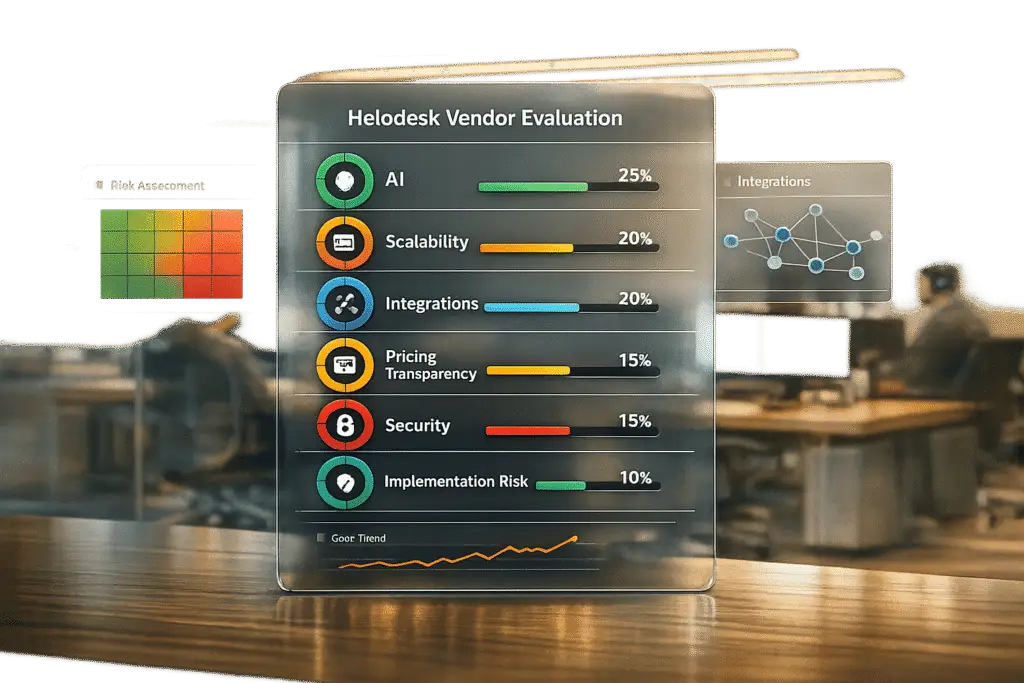
Choosing the right helpdesk platform in 2026 is critical for efficient support operations. With growing ticket volumes and complex customer interactions, a structured evaluation process ensures you select a platform that meets your needs without relying on flashy features or sales pitches. Here’s how to create a checklist that simplifies vendor selection:
- Define your challenges and goals: Identify inefficiencies, such as disconnected tools or repetitive tasks, and set measurable goals like reducing agent workload or improving ticket resolution times.
- Focus on key evaluation categories: Prioritize AI capabilities, scalability, integration options, pricing transparency, and vendor support/security.
- Use a weighted scoring system: Assign importance to each criterion (e.g., AI features: 9/10) and compare vendors objectively based on their performance.
- Test vendors thoroughly: Use demos and proof-of-concept trials with real workflows to validate claims about AI, scalability, and integrations.
- Plan for risks and implementation: Address potential issues like data migration challenges or hidden costs to ensure a smooth transition.
This approach helps you avoid costly mistakes and ensures your helpdesk supports your team’s long-term success.
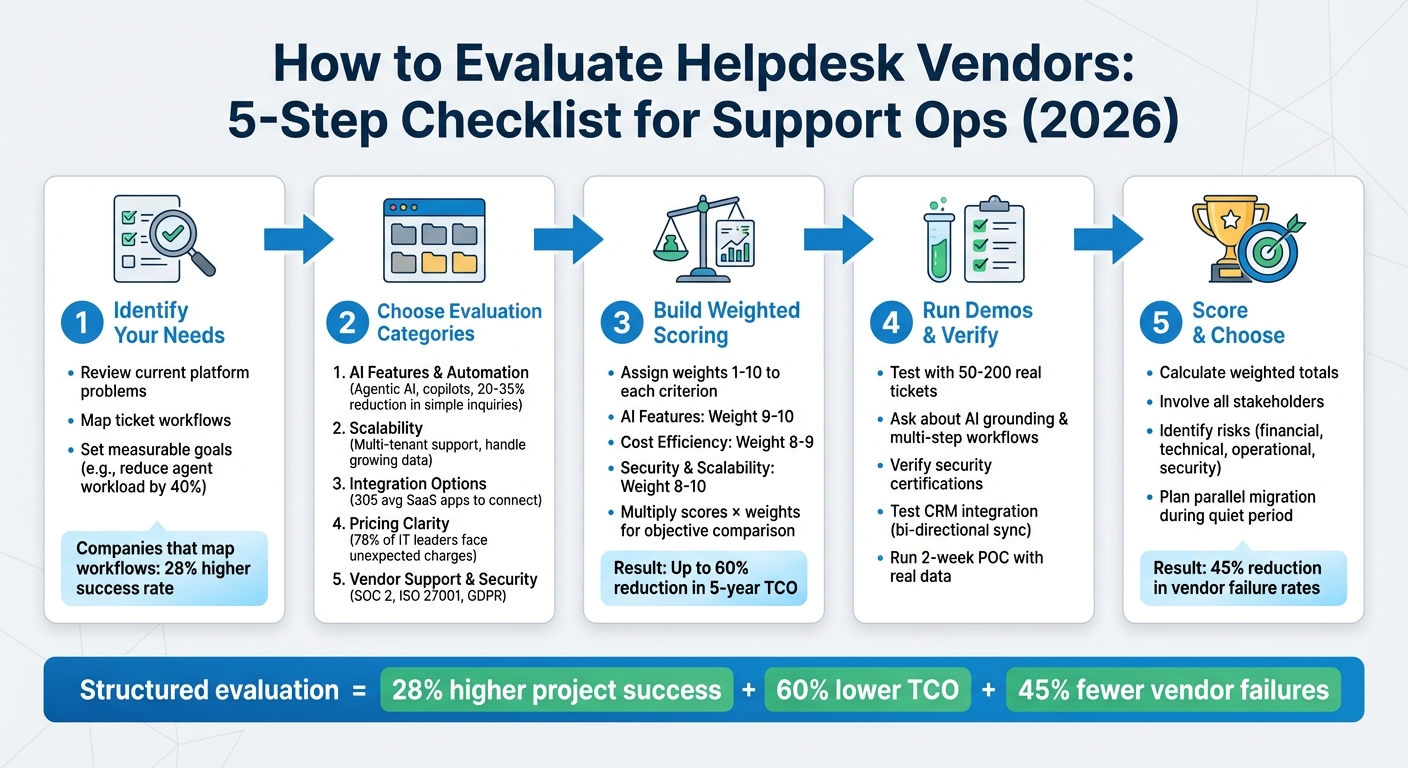
5-Step Helpdesk Vendor Evaluation Process for Support Operations 2026
Step 1: Identify Your Support Operations Needs and Problems
Before diving into vendor comparisons, take a step back and pinpoint what’s not working in your current setup. Many teams rush into evaluating features without fully understanding why they’re switching, often leading to decisions based on eye-catching features that don’t address their core challenges.
Review Problems with Your Current Platform
Start by listing the daily frustrations your team faces. For example, are your agents juggling five or more applications just to resolve a single ticket? That’s a clear indicator you might need a unified workspace. If 15% of high-priority tickets are slipping through the cracks because they’re buried in email inboxes, then centralized tracking is a must. And if 40% of your agents’ time is consumed by repetitive, manual tasks, automation should be a priority.
Don’t overlook financial pain points. For instance, vendor payment fees typically range from $15 to $25 per wire transfer, with hidden foreign exchange (FX) markups of 2–3% silently cutting into your profits. If you’re working with multiple disconnected tools, calculate the real total cost of ownership, factoring in integration fees, API limits, and administrative overhead.
To dig deeper, map out your ticket workflows from start to finish. Where do requests get bogged down? Which steps require manual intervention? Pinpoint disjointed processes, inefficient handoffs, and hidden costs that drive up your operational expenses. Companies that take the time to map their workflows before selecting a new vendor report a 28% higher success rate in meeting their project goals.
Once you’ve outlined these problems, focus on defining clear, measurable goals that directly address them.
Set Clear Goals for Your Support Operations
With your pain points identified, the next step is to set specific success metrics. This ensures that your evaluation process targets the root causes effectively. Instead of vague goals like "improve efficiency", aim for something concrete, such as "reduce agent workload by 40% with AI-powered automation" or "cut simple customer inquiries by 20–35% using a smart knowledge base". If visibility is a challenge, set a goal like "gain real-time insights into agent performance and customer trends through built-in analytics."
Involve all relevant stakeholders to ensure no requirement is overlooked. Frontline agents who use the system daily might highlight missing features like quick-reply templates or difficulty retrieving past interactions. Managers could point out the need for better SLA tracking, while IT leads will focus on compliance requirements such as SOC 2 Type II or ISO 27001 certification.
sbb-itb-e60d259
Step 2: Choose Your Evaluation Categories
Once you’ve identified your challenges and set measurable goals, it’s time to focus your evaluation on what really matters. Instead of getting distracted by flashy features, prioritize five key areas that will shape your ability to provide effective B2B support in 2026. These categories will help you objectively compare vendors in the next steps.
AI Features and Built-In Automation
By 2026, AI has moved far beyond simple chatbots. The top platforms now offer "Agentic AI", capable of not just summarizing tickets but also taking actions like calling APIs, processing refunds, updating subscriptions, and routing orders through your tech stack. Look for vendors that provide both customer-facing AI agents (to autonomously resolve issues) and agent-assisting AI copilots (to draft responses, summarize cases, and suggest next steps).
Instead of relying on rigid decision trees, focus on platforms with Agent Operating Procedures (AOP). AOP enables AI to handle complex scenarios, create multi-step workflows, and confirm actions across systems like billing or CRM. For instance, AI should suggest relevant knowledge base articles to customers and help agents turn resolved tickets into new documentation – potentially reducing simple inquiries by 20–35%.
Don’t forget the trust layer. Features like grounding (ensuring responses are based only on retrieved records), PII redaction, and "policy caps" (e.g., setting refund limits) are crucial for avoiding costly errors. Also, consider predictive analytics tools like sentiment analysis and Customer Effort Scoring to identify frustrated clients before issues escalate. According to recent data, 60% of customers are open to AI improving their experience, and 45% of support leaders say AI and automation enable 24/7 support.
"2026 is the year AI stops being a draft assistant and starts being an operator."
- William Westerlund, Suptask
Beware of "AI theater" – features that sound impressive but don’t deliver real value. Instead, test the platform with 50 to 200 historical tickets to evaluate resolution rates, policy compliance, and escalation quality. Scalability is also a must for handling the growing demands of B2B support.
Scalability for Complex B2B Support
Your platform needs to handle more than just a high volume of tickets – it must also manage the complexities of B2B relationships, like long-running cases, multi-stakeholder interactions, and high-value accounts. Ensure the system stays fast and responsive as your data and user base grow. Ask for case studies from companies with similar growth patterns.
For businesses on the rise, look for features like multi-tenant and multi-brand support to manage different customer segments without constant vendor involvement. Check for limits on tickets, attachments, and knowledge base articles, and understand any additional costs if those limits are exceeded.
Take ClonePartner as an example: they migrated over 2 million tickets and 500,000 customer records in just 72 hours, with no disruption to live support operations. This highlights the scalability of modern cloud-based systems. Beyond ticketing, verify that the platform offers integrated modules for incident, problem, change, and asset management – key components of IT Service Management (ITSM). Use demos to test how the platform handles your specific use cases.
Integration Options with Your Existing Tools
Your helpdesk can’t operate in a vacuum. It needs to integrate seamlessly with CRMs, ERPs, project management tools, and other systems to avoid data silos and workflow interruptions. Start by evaluating the vendor’s API documentation. A well-documented, open API with a developer portal is essential for custom integrations. Check for webhook capabilities to push real-time updates, like notifying your CRM when a ticket is created. Look for native connectors for popular tools like Salesforce, HubSpot, Jira, QuickBooks, and Xero.
Ensure the platform supports Single Sign-On (SSO) to simplify user access and enhance security. Additionally, confirm that data can be exported in standard formats (e.g., CSV) or via API to avoid vendor lock-in. With organizations now managing an average of 305 SaaS applications, integration flexibility is more crucial than ever. This ensures your helpdesk becomes the central hub of your support operations.
Pricing Clarity and Total Cost of Ownership
Pricing models are evolving, and hidden costs can quickly derail your budget. Traditional per-agent pricing is being replaced by outcome-based models, such as pay-per-resolution or pay-per-minute, that align costs with delivered value. For example, Intercom Fin charges about $0.99 per resolved conversation, while Salesforce Agentforce uses a consumption model at roughly $2.00 per conversation.
To evaluate pricing, calculate the Total Cost of Ownership (TCO), including integration fees, API limits, administrative overhead, and add-on expenses. A staggering 78% of IT leaders have encountered unexpected SaaS charges, often due to unclear usage-based or AI-driven pricing models. Be cautious of platforms that charge extra for AI features, advanced reporting, or integrations, as these costs can add up as your team grows. Look for vendors that include enterprise-level features – such as AI tools, workflows, and reporting – from the start, without hiding them behind premium tiers. Transparent pricing is key to maintaining a cost-efficient support strategy.
Vendor Support, Security, and Product Development Plans
Your relationship with the vendor doesn’t end after purchase. Assess their responsiveness and quality of support by asking current customers about their onboarding, training, and ongoing assistance experiences. Security is also non-negotiable in B2B. Ensure the vendor complies with standards like SOC 2 Type II, ISO 27001, GDPR, and HIPAA (if applicable), and verify any data residency requirements. Additionally, ask about their incident response protocols and how they handle data breaches.
Finally, evaluate the vendor’s commitment to improving their product. Request their product roadmap and check how often they release new features. Prioritize vendors investing in AI and automation rather than relying on outdated technology. This focus on innovation ensures your platform remains an asset rather than a liability in the years ahead.
Step 3: Build a Weighted Scoring Checklist
Once you’ve defined your evaluation categories, the next step is creating a scoring system that removes any guesswork. A weighted checklist allows you to compare vendors objectively by assigning numerical values to the factors that matter most. This approach replaces gut instincts with measurable criteria. For example, in healthcare, security might carry a weight of 10, while less critical features could score as low as 3 or 4. Companies that carefully map their workflows and priorities before selecting software experience a 28% higher success rate in meeting project goals. To use this system, multiply each vendor’s performance by the assigned weight and sum the results for a clear comparison. Then, organize these criteria into a structured checklist.
Create a Checklist Template with Weighted Criteria
Start by designing a table with five columns: Criteria, Description, Weight (1-10), Vendor Score (1-10), and Notes. The Criteria column lists the categories you’re evaluating, such as AI Features, Cost Efficiency, Scalability, Security, and Integrations. The Description column explains what each category covers – like "AI Features", which might include auto-tagging, sentiment analysis, and agent copilots. The Weight column reflects how important each criterion is to your operations, while the Vendor Score column records how well each vendor performs during trials or demos.
Focus on criteria that improve AI capabilities, cost management, and scalability. Refine the weights by consulting IT leaders, support agents, and management – those who interact with the system daily often have the best insights into what’s essential versus what’s optional. Once your template is ready, prioritize criteria that directly impact ROI.
Give Higher Weight to AI Features and Cost Efficiency
As we look toward 2026, AI automation and pricing transparency should carry the most weight in your checklist. Assign AI Features a weight of 9 or 10, especially if you’re evaluating tools like intelligent routing, sentiment-based escalation, or AI-generated knowledge articles. Modern AI platforms can reduce simple query volumes by 20–35% and cut resolution times by 30–50%, making AI a major contributor to ROI. Similarly, Cost Efficiency should score an 8 or 9, as structured evaluations have helped organizations achieve up to a 60% reduction in 5-year TCO.
Other key factors, like Security and Scalability, should also rank high (8–10), particularly for B2B companies managing sensitive data or experiencing rapid growth. Criteria like Integrations and User Experience might rank slightly lower (6–8), depending on your tech stack and team size. The goal isn’t to treat every category as equally important – it’s about aligning the checklist with your operational needs so the final scores lead you to the best fit, rather than the most attention-grabbing vendor.
Step 4: Run Vendor Demos and Verify Claims
Now’s the time to ensure vendors can deliver more than just polished marketing pitches. Your weighted checklist becomes the yardstick for measuring their actual performance. Remember, a smooth helpdesk transition hinges equally on software selection and proper helpdesk implementation, including data migration. Treating demos as a mere formality could lead to expensive mistakes. The real objective here? Stress-test each platform using your workflows, your data, and your security needs – not the vendor’s controlled demo environment.
Prepare Questions for Vendor Demos
When stepping into a demo, come armed with precise questions that align with your top priorities. For instance, if AI capabilities are critical, you might ask: "How does the tool detect misinformation or gaps in the knowledge base? Does it generate answers solely from retrieved records, or does it rely on its own memory?". This helps identify whether the AI is properly grounded or prone to inaccuracies.
If you’re considering platforms with agentic AI, ask: "Can the AI handle multi-step tasks, like validating eligibility through an API and then updating our CRM with the results?". By 2026, the focus has shifted from AI drafting replies to AI completing entire workflows – think processing refunds or updating billing records. Confirm that the tool offers "write access" to your systems, not just read-only integrations.
For cost-related concerns, dig into hidden fees with questions like: "Does the platform truly support a no-code setup, or will we need developers to maintain these workflows?". Also, clarify pricing models – whether it’s seat-based, outcome-based (e.g., $0.99 per resolved conversation, like Intercom Fin), or based on consumption credits, such as Salesforce Agentforce. On governance and security, ask whether the platform enforces strict limits for sensitive actions, like issuing refunds. Then, make sure to test these claims thoroughly during a proof of concept (POC).
Test Scalability, Security, and Integration Claims
Once your questions are answered, it’s time to validate vendor claims with hands-on testing. Don’t just take their word for it – demand proof. Use a two-week POC with 50–200 real tickets to evaluate resolution rates and adherence to policies. Test with messy, real-world data to see how the platform handles routing, SLA tracking, and AI accuracy when dealing with incomplete customer histories or edge cases. Reach out to customer references, specifically those from companies with similar growth patterns, to assess how the platform performs under pressure. Additionally, request a live demo of bi-directional, real-time syncing with your CRM (e.g., Salesforce or HubSpot) to ensure the integration goes beyond basic data pushes.
Security is non-negotiable. Verify certifications like SOC 2, GDPR, or HIPAA, and confirm the platform enforces strict AI action limits to prevent unauthorized changes, such as altering addresses or issuing excessive refunds. Ask vendors how they protect against vulnerabilities like prompt injections or "jailbreak" techniques, where users manipulate the AI into accessing sensitive data. If a vendor doesn’t offer a free trial or hands-on demo, the risk of investment may outweigh the potential benefits.
Step 5: Score, Compare, and Choose Your Vendor
You’ve tested the platforms, asked the tough questions, and gathered all the data you need. Now it’s time to make your decision. Your weighted checklist is your guide here, but don’t forget: some features are non-negotiable. For example, a vendor might score 87 out of 100 overall but fail to deliver a must-have feature like bi-directional integration with your CRM. That’s a dealbreaker.
Review Scores to Find the Best Match
Start by calculating each vendor’s weighted total. Multiply the score for each criterion by its assigned weight, then sum up the results. It’s a good idea to involve key stakeholders – like support agents, IT leads, and managers – in this review. This ensures the tool meets both day-to-day operational needs and technical security standards.
If the top-ranked vendor is missing a critical feature, such as CRM integration, you might be better off choosing the second-best option that checks all the must-have boxes. Interestingly, companies that carefully map their workflows before selecting software report a 28% higher success rate in meeting their project goals.
Once you’ve narrowed it down, the next step is to assess potential risks and plan your implementation strategy.
Identify Risks and Plan Your Implementation
After you’ve chosen your preferred vendor, it’s time to tackle potential risks head-on. Use your evaluation to identify risks across four key areas: financial, technical, operational, and security.
- Financial risks: Watch out for hidden API fees or limits on user seats.
- Technical risks: Be prepared for data loss during migration.
- Operational risks: Plan for possible downtime during launch.
- Security risks: Verify certifications like SOC 2 or GDPR compliance.
If data migration is a concern, consider running a small-scale test with a subset of historical tickets. This can help uncover formatting issues or mismatched data before committing to a full rollout. Instead of switching systems all at once, run the new and legacy systems in parallel for a short period. This approach minimizes disruption and gives you time to address any issues. Always have a rollback plan in place – such as reactivating legacy systems or rerouting emails – to handle critical failures.
Schedule the final migration during a quieter business period to reduce risks, and start tracking key metrics like response time and CSAT immediately. One final note: if a vendor doesn’t offer a trial or demo, treat it as a red flag and adjust their score accordingly.
Conclusion
Creating a helpdesk vendor evaluation checklist for 2026 goes beyond simply comparing features – it’s about aligning your choice with your Support Operations goals to avoid costly missteps that could lock you into an unsuitable platform. A structured evaluation process ensures your selection supports the strategic objectives outlined earlier. Understanding your team’s workflows and requirements is key to making the right decision.
Focus on AI-driven capabilities that move beyond basic chatbots. In 2026, prioritize platforms offering features like real-time response generation, ticket summarization, and predictive sentiment analysis – tools that can cut administrative tasks by over 80%. Additionally, ensure the platform can scale for complex B2B environments by supporting account-level tracking and integrating seamlessly with tools like Slack and Microsoft Teams. These considerations should directly guide the weighted scoring model discussed earlier.
Leverage a weighted scoring model to objectively assess vendors. Pay close attention to factors such as AI maturity, security compliance (e.g., SOC 2, GDPR), and total cost of ownership, including implementation fees, training expenses, and data migration costs.
To validate your choice, conduct in-depth demos and trials. Test platforms with real support tickets and challenging edge cases, and involve frontline agents to identify usability issues that managers might miss. Also, confirm that the vendor provides a reliable migration process, ensuring rapid, zero-downtime import of historical data.
A well-structured evaluation process can reduce vendor failure rates by 45% within the first 18 months. By focusing on AI-powered, scalable, and cost-conscious solutions, you’ll position your Support Operations for long-term success.
FAQs
What key factors should be included in a helpdesk vendor evaluation checklist for Support Operations in 2026?
When building a helpdesk vendor evaluation checklist for 2026, focus on the key features that align with modern support requirements. Start by evaluating AI capabilities. Features like AI-powered ticket routing and automation can streamline workflows, reduce response times, and improve accuracy in handling customer issues.
Next, consider scalability. The platform should be able to grow alongside your business, handling increased customer demands without sacrificing performance. Integration flexibility is another must-have – ensure the helpdesk can seamlessly connect with tools you already use, such as CRMs, collaboration software, and knowledge management systems.
Pay close attention to cost transparency. Review pricing models thoroughly to avoid surprises like hidden fees or unpredictable costs down the line. Security features are equally critical – look for compliance support, robust vulnerability management, and other safeguards to protect sensitive data. Lastly, assess the vendor’s commitment to long-term support, including consistent updates, reliable data migration options, and responsive customer service.
By focusing on these factors, you can choose an AI-ready helpdesk solution that aligns with your goals and adapts to future needs.
How can AI improve helpdesk operations in 2026?
AI is set to reshape helpdesk operations by 2026, making them faster, smarter, and more efficient. Imagine this: up to 80% of repetitive tasks – like ticket categorization, password resets, or initial issue triage – handled automatically. This doesn’t just free up agents to tackle more complex problems; it also slashes operational costs by 30–55% while dramatically cutting response times. The result? Happier customers and a more streamlined support experience.
But it doesn’t stop there. AI also enables helpdesks to deliver proactive, personalized service. Through tools like intelligent routing, predictive analytics, and context-aware suggestions, workflows become smoother and support quality stays consistent across various channels – whether it’s email, chat, or collaboration platforms. By adopting AI, companies can scale their support systems without compromising the level of service, staying ahead in a competitive marketplace.
What factors should you consider when calculating the total cost of ownership for a helpdesk platform?
When assessing the total cost of ownership (TCO) for a helpdesk platform, it’s essential to look beyond the initial subscription fee. There are often additional costs – like implementation charges, training sessions, AI add-ons, and routine maintenance – that can significantly affect your overall expenses.
Think about factors like scalability and integration options, as these can drive up costs if your team expands or you require more advanced integrations. Setup, data migration, and training can also be costly, ranging anywhere from a few thousand dollars to tens of thousands. On top of that, ongoing expenses for support, security upgrades, and software updates can accumulate over time.
Taking all these aspects into account will give you a more accurate understanding of the platform’s actual cost over its lifecycle, helping you determine if it fits both your budget and operational goals.
Related Blog Posts
- Which helpdesk tools are built outside the United States (UK/EU/Canada/Australia)?
- How do you evaluate “foreign access risk” when choosing a US vs non-US helpdesk?
- How do you run a helpdesk RFP for Canadian organizations (scorecard + requirements)?
- How do you choose a helpdesk for regulated or high-risk B2B customers (scorecard)?






