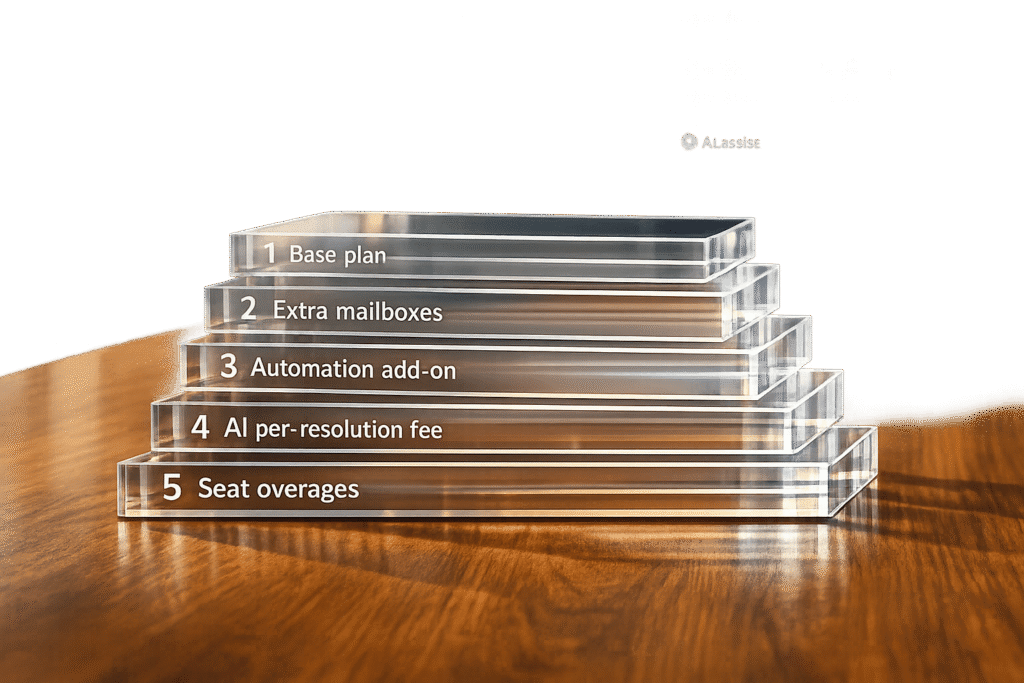
Help Scout has shifted from per-user pricing to a contact-based model, offering unlimited users but charging based on support volume. Additional costs include $10/month per inbox, $20/month per Docs site, and $0.75 per AI resolution, which can quickly add up as your team grows. Advanced integrations and security features require higher-tier plans, increasing monthly expenses. For example, a 26-person team moving from Standard ($25/user) to Plus ($45/user) sees an 80% cost jump.
Supportbench, in contrast, uses per-agent pricing starting at $32/month, with AI tools included at no extra cost. While its costs scale after 15 agents, it avoids surprise AI fees. For a 26-agent team, Supportbench’s Professional plan costs $863/month compared to Help Scout’s $1,170/month Plus tier.
Key takeaway: Help Scout is better for smaller teams needing flat-rate pricing, while Supportbench offers predictable costs and built-in AI tools for mid-to-large teams. Choose by comparing SMB and enterprise helpdesks based on your team size, feature needs, and budget.
Help Scout Review: Best Customer Support Tool for Small Businesses? Honest Review & Free Trial Guide
sbb-itb-e60d259
1. Help Scout
Help Scout provides two main billing options: per-user pricing and a contact-based structure. The per-user model is broken into three tiers – Standard ($25/user/month), Plus ($45/user/month), and Pro ($75/user/month) – all billed annually. Each tier has specific user limits: Standard supports up to 25 users, Plus goes up to 50, and Pro requires at least 10 users but allows unlimited seats. The contact-based model, on the other hand, charges a flat monthly rate and includes unlimited users, though additional infrastructure fees apply.
There are also extra charges to consider. For example, adding an inbox costs $10/month, while an extra Docs site is $20/month. If your team requires advanced security features like SSO/SAML or HIPAA compliance, these are available as add-ons for Standard and Plus plans but come included with the Pro plan.
Each tier is designed to scale with team growth. Here’s a quick breakdown:
- Standard: 2 inboxes, 1 Docs site, 30 days of history, and 200 API calls/min.
- Plus: 5 inboxes, 2 Docs sites, 2 years of history, and 400 API calls/min.
- Pro: 10 inboxes, 5 Docs sites, unlimited history, and 800 API calls/min.
Help Scout also offers tools like AI Answers, which you can compare in our Help Scout or Zendesk guide, which can impact overall costs. AI Answers includes a 3-month free trial, after which it costs $0.75 per successful resolution. Spending caps can help manage these AI-related expenses. Additionally, the Pro plan includes up to 50 "Light Users", which are ideal for managers or team members who need limited access at a lower cost.
To illustrate the costs, consider a 26-person team moving from the Standard plan ($25/user) to the Plus plan ($45/user). This upgrade results in an 80% increase in per-seat costs, jumping from $625/month to $1,170/month. For larger teams handling moderate ticket volumes, the contact-based pricing model might be more economical, though it requires careful monitoring of usage averages over three months.
2. Supportbench – B2B Customer Support & Success Platform
Supportbench uses a pricing model designed to grow alongside your team. The Professional plan starts at $32 per agent per month (billed annually) or $40 per agent per month (billed monthly). For teams exceeding 15 agents, each additional agent costs $2.50, with a maximum cap of $150 per agent. Once a team reaches 60 agents, they transition to the Enterprise plan, which costs $100 per agent per month (annually) or $125 per agent per month (monthly). This pricing structure avoids the steep increases often seen in volume-based models.
One standout feature of Supportbench is its inclusion of Intelligent Support AI – powered by GPT-4o – directly within the base Professional plan. This includes GenAI bots, sentiment analysis, and activity summarization, without additional usage fees. This means you won’t face surprise bills for AI-related services. The Professional plan also covers onboarding and training, while Enterprise customers gain access to a Dedicated Success Manager and live onboarding sessions for a smoother implementation process.
Here’s a breakdown of the key differences between the Professional and Enterprise plans:
| Feature Category | Professional ($32/mo) | Enterprise ($100/mo) |
|---|---|---|
| AI Features | GenAI Bot, Sentiment Analysis, Summarization | All Professional AI + Managed Services |
| Data Storage | 50MB data / 1GB file per agent | 200MB data / 5GB file per agent |
| API Limits | 100 requests per minute | 500 requests per minute |
| Security | 1-year audit log | SSO (SAML) and 3-year audit log |
| Disaster Recovery | 7-day recovery | 45-day recovery |
Add-on: Teams needing advanced analytics can opt for the Direct SQL Access add-on, enabling real-time queries and seamless BI integration.
When compared to competitors like Help Scout, Supportbench’s pricing offers greater predictability. For example, a team of 26 agents would pay about $863 per month for the Professional plan, factoring in scaling surcharges. In contrast, Help Scout’s Plus tier costs $1,170 per month for the same team size.
One customer, Hugh Dauterman, Data Operations Director, shared his experience:
"Supportbench has supplied our group with a whole client control system. Because the whole thing is in a single platform, all are capable of control all conversation in a single area."
Pros and Cons
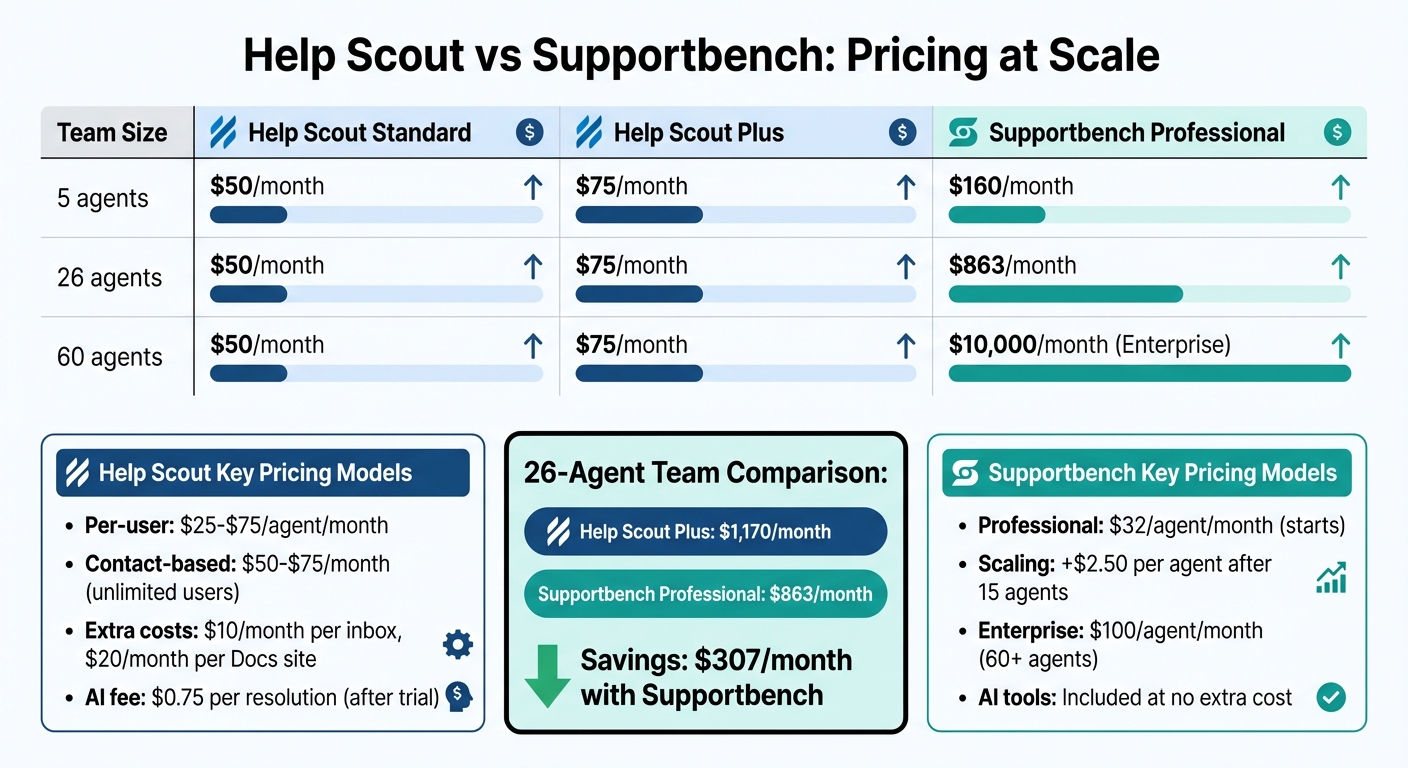
Help Scout vs Supportbench Pricing Comparison by Team Size
The pricing models for Help Scout and Supportbench differ significantly, creating distinct trade-offs as your team grows. Help Scout uses a flat-rate structure, which can be cost-efficient for larger teams, while Supportbench operates on a per-agent pricing model starting at $32 per agent per month. However, Supportbench introduces scaling surcharges after 15 agents and automatically transitions to Enterprise pricing once you hit 60 agents. Here’s a closer look at how these cost differences play out across various team sizes.
For small teams with fewer than 10 agents, Supportbench’s Professional plan tends to cost more than Help Scout’s flat rate. But pricing isn’t the only factor – features also play a big role. Supportbench includes AI-powered tools like sentiment analysis, CSAT/CES prediction, and health scoring as part of its base Professional plan. On the other hand, Help Scout limits key B2B integrations, such as Salesforce and Jira, to its Plus tier. Another consideration is Help Scout’s post-trial fee of $0.75 per AI resolution, which could lead to unpredictable costs for teams that rely heavily on automation. Weighing these factors is crucial for assessing long-term ROI and operational efficiency.
The cost disparity becomes even more pronounced at mid-scale. For example, a team of 26 agents would pay $863 per month for Supportbench’s Professional plan, compared to Help Scout’s flat rates. However, Help Scout’s Docs knowledge base lacks features like automatic updates or AI-driven content auditing, which might require teams to invest in additional tools or dedicate resources to manual updates.
| Team Size | Help Scout Standard | Help Scout Plus | Supportbench Professional |
|---|---|---|---|
| 5 agents | $50/month | $75/month | $160/month |
| 26 agents | $50/month | $75/month | $863/month |
| 60 agents | $50/month | $75/month | $10,000/month (Enterprise) |
Help Scout’s unlimited user model eliminates the worry of per-seat pricing, but scaling still incurs additional costs. For instance, each extra inbox costs $10 per month, and additional Docs sites run $20 per month. In contrast, Supportbench includes internal and customer-facing knowledge bases, health scoring, and a full reporting engine in its Professional plan without extra fees. However, its per-agent pricing can escalate quickly for large teams unless Enterprise pricing is negotiated.
Conclusion
Help Scout’s two pricing models offer different cost dynamics, depending on your team’s structure and growth strategy. The flat-rate, contact-based model – priced between $50 and $75 per month – is tailored for organizations that want unlimited user access to support conversations without per-seat fees. However, keep in mind that additional add-on fees may apply. On the other hand, the per-user model, which ranges from $25 to $75 per agent per month, offers cost predictability for dedicated support teams, though expenses can grow as your team size increases.
One important factor to watch is the $0.75 per resolution fee, which can make automation costs unpredictable. To manage this, you can set monthly spending caps directly in the dashboard.
For smaller teams that need a core group of support agents but also want broader access, the flat-rate model may save money by avoiding per-agent fees. However, critical integrations often require upgrading to higher tiers. Mid-sized teams might find that while the flat-rate pricing remains steady, the manual management of the knowledge base and limited workflow automation could lead to hidden labor costs, potentially requiring extra investment in automation tools.
Ultimately, aligning your team’s size and priorities with the right pricing model is key to minimizing hidden fees while supporting your growth. Help Scout’s pricing is well-suited for smaller teams, but as operations scale, you may face trade-offs between limited features and higher costs. Carefully evaluate your team size and support needs to choose the pricing structure that aligns with your long-term goals.
FAQs
What are the biggest hidden costs that show up as Help Scout scales?
As Help Scout scales, there are often hidden costs to consider. These can include fees for add-ons like AI resolution features, which are billed per resolution. You might also face overage charges if you exceed messaging or contact view limits. Additionally, integrating advanced workflows or using premium features may require higher-tier plans or extra fees. These expenses can stack up as your usage increases, potentially affecting both scalability and your overall return on investment.
How can I estimate monthly AI resolution fees before turning on AI Answers?
To figure out your monthly AI resolution fees, start by estimating how many customer queries your AI handles each month without needing human assistance. Then, multiply that number by the per-resolution rate of $0.75.
For instance, if your AI resolves 1,000 queries, your cost would be $750. To keep expenses predictable, you can set a monthly spending cap in your AI billing settings, ensuring you stay within your budget.
When does it make sense to switch from per-user to contact-based pricing?
Switching to contact-based pricing works well when the scale of your support needs aligns more with the number of customers you assist rather than the number of agents on your team. This pricing model can be especially helpful for growing businesses, as it removes per-user charges, giving you the freedom to add unlimited agents and handle unlimited customer contacts. It’s a smart choice for teams looking to scale up seamlessly or streamline billing, all while managing broader customer support operations powered by AI tools.