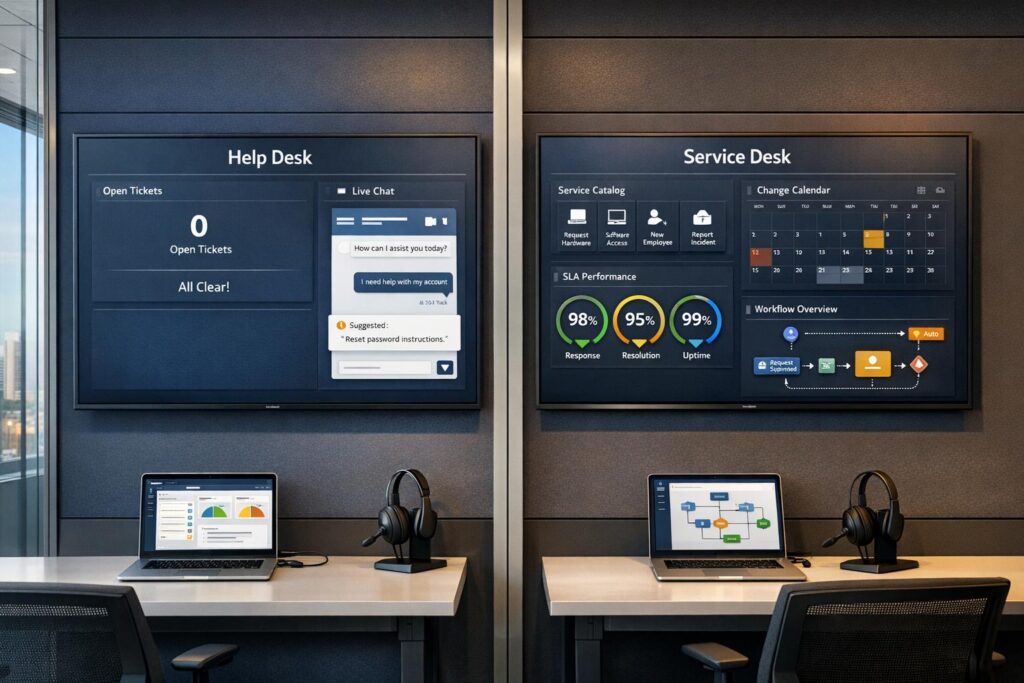
Understanding the difference between a help desk and a service desk is key for choosing the right IT support model for your organization. Here’s the main takeaway:
- Help Desk: Focuses on solving immediate, straightforward technical issues like password resets or software glitches. It’s reactive, task-oriented, and ideal for smaller teams with basic IT needs.
- Service Desk: Manages the entire IT service lifecycle, aligning IT operations with business goals. It’s proactive, handles complex workflows, and supports larger organizations with advanced IT requirements.
Both models can benefit from AI tools, which improve efficiency by automating tasks, reducing response times, and predicting potential issues.
Quick Comparison
| Feature | Help Desk | Service Desk |
|---|---|---|
| Primary Focus | Fixing user issues | IT service management |
| Approach | Reactive | Proactive |
| Scope | Basic IT troubleshooting | Full IT lifecycle |
| Complexity | Simple tasks | Multi-step workflows |
| Key Metrics | Resolution speed | SLA compliance |
| Best For | Small teams, quick fixes | Larger teams, long-term IT planning |
Choose a help desk for quick, basic problem-solving. Opt for a service desk if your organization needs structured IT management that aligns with business objectives.
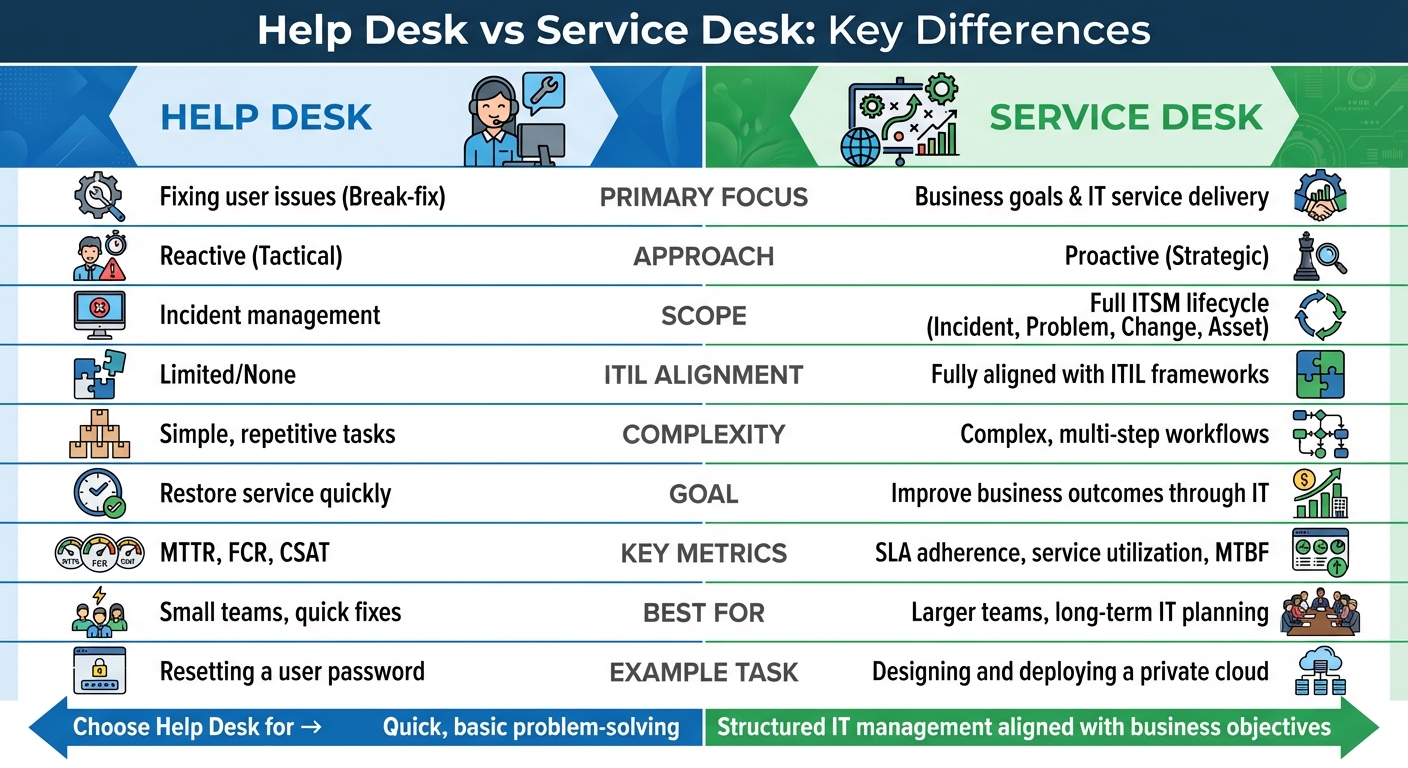
Help Desk vs Service Desk: Key Differences Comparison Chart
Help Desk vs. Service Desk
What is a Help Desk?
A help desk is a reactive support system designed to address technical problems as they arise. It acts as the first point of contact for resolving issues like login problems, software glitches, or hardware malfunctions. As Stephen J. Bigelow puts it:
"A help desk typically focuses on short-term, tangible assistance with a specific set of technical issues… It’s a tactical resource." [2]
The focus here is on quick solutions rather than long-term prevention. Help desks are ideal for B2B organizations with straightforward IT needs, such as startups, small-to-medium businesses, or customer support teams that don’t require complex service management systems. They often maintain knowledge bases, enabling users to access self-service options and standardized solutions for common problems [2][3].
Core Functions of a Help Desk
Help desks are tasked with resolving the technical issues that disrupt employees or customers from completing their work. The primary responsibilities include:
- IT troubleshooting for software and hardware issues
- Password resets and account access support
- Ticket creation and tracking to monitor the progress of issue resolution
- Basic technical support for frequently encountered user problems
These activities are focused on addressing immediate concerns rather than preventing future problems. This short-term approach creates opportunities for AI to step in and speed up incident resolution.
Main Features of a Help Desk
The hallmark of a help desk is its break-fix approach – when something breaks, the help desk steps in to fix it. This system prioritizes quick response times and measures success through metrics like first-contact resolution (resolving issues during the initial interaction) and average resolution time (how quickly tickets are closed). To ease the workload, help desks often include self-service tools, allowing users to solve simpler issues on their own. This lets support teams focus on more challenging problems. However, because of its reactive nature, a help desk typically doesn’t engage in long-term IT planning or broader service strategies. These characteristics highlight how help desks differ in scope from service desks.
What is a Service Desk?
A service desk serves as a centralized support hub that bridges IT operations with business goals, managing the entire IT service lifecycle. Unlike a simple help desk that focuses on troubleshooting, a service desk takes a broader, more proactive role. As IBM puts it:
"The main focus of an IT help desk is on fixing issues, while a service desk is more broadly focused on delivering services to users. Therefore, the former is for tactical IT support, while the latter is more strategic." [1]
Rather than just reacting to problems, service desks anticipate them. They handle tasks like planning system upgrades, managing software licenses, overseeing third-party contracts, and implementing preventive measures [1]. This forward-thinking approach makes service desks essential for B2B organizations that rely on IT as a driver of business success rather than just a repair service. They also play a key role within the IT Infrastructure Library (ITIL) framework, which outlines best practices for delivering IT services [1][2]. With this strategic focus, service desks stand out as a cornerstone of effective IT management.
Core Functions of a Service Desk
Service desks handle much more than quick fixes. Their primary responsibilities include:
- Incident Management: Addressing unexpected outages and disruptions to restore services quickly.
- Problem Management: Identifying and resolving root causes to prevent recurring issues.
- Change Management: Planning and safely implementing IT changes to minimize risks.
- Service Requests: Handling routine tasks like software installations or granting access permissions.
- Knowledge Management: Building and maintaining detailed documentation for both users and IT teams.
These functions emphasize long-term improvements and alignment with business goals, going far beyond just resolving immediate issues.
Main Features of a Service Desk
Service desks focus on achieving business outcomes and measure their success through Service Level Agreements (SLAs). By integrating with the ITIL framework, they adhere to industry best practices for IT service management. Instead of merely closing tickets quickly, service desks prioritize root cause resolution, addressing underlying problems to enhance the overall quality of IT services. They monitor performance through SLA compliance and other business metrics, ensuring IT initiatives align with broader strategic objectives.
This results-oriented approach positions the service desk as the public face of IT operations, serving employees, customers, suppliers, and business partners alike [1].
Help Desk vs Service Desk: Main Differences
The difference between a help desk and a service desk lies in their scope, approach, and alignment with business objectives. A help desk focuses on quick fixes to restore individual productivity, while a service desk takes a broader, strategic role in managing IT services to support overall business goals.
Their operational styles also set them apart. Help desks are reactive, addressing issues as they arise. On the other hand, service desks adopt a proactive approach, identifying patterns, addressing root causes, and working to prevent future disruptions.
The complexity of tasks handled by each is another key distinction. Help desks typically manage straightforward issues like resetting passwords or fixing basic technical problems. Service desks, however, are equipped to handle more intricate processes like change management, asset tracking, and coordinating multi-department workflows, such as HR onboarding or managing legal contracts. This reflects the broader responsibilities that come with a service desk’s role.
Many businesses begin with a help desk and transition to a service desk as their IT infrastructure matures and business needs evolve [2][4]. This progression highlights the importance of selecting the right model to support organizational growth.
Side-by-Side Comparison
| Feature | Help Desk | Service Desk |
|---|---|---|
| Primary Focus | End-user issues (Break-fix) | Business goals & IT service delivery |
| Approach | Reactive (Tactical) | Proactive (Strategic) |
| Scope | Incident management | Full ITSM lifecycle (Incident, Problem, Change, Asset) |
| ITIL Alignment | Limited/None | Fully aligned with ITIL frameworks |
| Complexity | Handles simple, repetitive tasks | Handles complex, multi-step workflows |
| Goal | Restore service quickly | Improve business outcomes through IT |
| Key Metrics | MTTR, FCR, CSAT | SLA adherence, service utilization, MTBF |
| Example Task | Resetting a user password | Designing and deploying a private cloud |
These differences are crucial when deciding which model fits your organization’s needs and growth stage.
sbb-itb-e60d259
When to Use a Help Desk
A help desk is the go-to solution for situations that demand quick and straightforward support. It’s particularly effective for organizations that need real-time assistance with common issues like password resets, software bugs, email setup, or basic hardware troubleshooting. By focusing on resolving immediate problems, help desks allow IT teams to maintain operational productivity without getting bogged down in broader strategic IT initiatives.
"Help desks are generally better for smaller organizations with basic break/fix IT needs, where real-time incident reporting and resolution are vital for user productivity." – Stephen J. Bigelow, TechTarget [2]
Help desks are also budget-friendly, making them an excellent starting point for organizations with limited resources. If your company isn’t ready to implement formal ITIL processes or hire specialized IT staff, a help desk can still provide essential support. Entry-level help desk software typically costs about $29 per user per month, while outsourcing options range from $6 to $40 per ticket [5][6].
Best Scenarios for a Help Desk
A help desk is especially practical in environments with limited IT infrastructure or a high volume of repetitive requests, such as account access issues or software installations. It’s also a great fit for organizations that don’t require formal service level agreements (SLAs). Small teams – or even a single person handling IT support – can benefit from the simplicity and focus of help desk operations.
For companies experiencing rapid growth, a help desk often serves as the first step before transitioning to a more comprehensive service desk. Consider the example of Valley Driving School, which used automation rules within its help desk to process over 100 tickets in just four hours. According to Director of Marketing Melissa Hannam, these automation rules completed 7,000 actions that would have otherwise required manual effort [6]. Similarly, Brastel Co., Ltd. streamlined its ticket resolution process by 35% – saving about 8 minutes per ticket – by designing workflows based on reporting data, enabling the team to manage nearly 2,000 tickets per month [6].
If your organization primarily needs a single point of contact for IT issues – without the added complexity of asset management, change advisory boards, or maintaining a service catalog – a help desk provides exactly the level of support required. Up next, we’ll dive into scenarios where a service desk becomes the better choice for long-term IT service management.
When to Use a Service Desk
A service desk becomes indispensable when an organization moves beyond basic, reactive IT support. Larger businesses with complex IT systems need a solution that aligns technology with their broader goals. If your IT team is bogged down by repetitive problems, managing cross-departmental changes, or supporting non-IT functions like HR onboarding or legal workflows, a service desk offers the structure and strategy to tackle these challenges effectively. Here’s a closer look at when a service desk outshines reactive support models.
"A service desk is generally considered a broader umbrella concept that encompasses help-desk operations as part of the organization’s support structure." [2]
For organizations that need to adhere to ITIL standards, maintain strict audit trails, or implement structured change control processes, a service desk is a must. It’s especially beneficial for preventing recurring issues and managing IT assets through a Configuration Management Database (CMDB). Service desks also extend their value through Enterprise Service Management (ESM), applying ITSM principles to departments like HR, finance, and facilities, all through a single point of contact [1][2].
Best Scenarios for a Service Desk
A service desk is ideal for managing complex workflows that span multiple departments. Its structured approach is built for formal SLAs, detailed asset tracking, and major infrastructure upgrades, making it critical for businesses aiming to scale efficiently [1].
Organizations using service desk solutions often see significant benefits. For instance, self-service portals integrated with a service desk can achieve 20% self-service resolution rates, while overall ticket volumes may drop by as much as 80% [1]. This makes service desks a smart choice for businesses seeking to expand their support capabilities without adding more staff. If your goals include aligning IT investments with business priorities, maintaining compliance records, or creating a well-organized service catalog to define IT offerings, a service desk provides the framework to achieve these objectives.
How AI Improves Help Desk and Service Desk Operations
The evolving roles of help and service desks are getting a major boost from AI, which shifts the focus from simply reacting to problems to actively preventing them.
AI is changing the game by turning help and service desks into proactive hubs. With 83% of support teams seeing a rise in customer expectations and 77% of support leaders planning to invest more in self-service tools, AI is now a must-have for keeping up without overspending [3]. The rise of "Agentic AI" means autonomous systems can now monitor operations, predict potential issues, and fix problems before they disrupt business processes [7].
Modern platforms like Supportbench integrate AI directly into workflows, avoiding the need for costly add-ons. These tools can resolve up to 65% of employee queries automatically by using knowledge bases and process automation, allowing human agents to focus on more complex and high-priority tasks [9]. This approach scales operations efficiently without requiring a larger team.
Let’s take a closer look at how AI optimizes operations for both help desks and service desks.
AI Features for Help Desk Efficiency
Help desks, which focus on resolving immediate issues, see major benefits from AI in ticket management and agent productivity. Automated ticket triage uses intent and sentiment analysis to route requests to the right agent instantly, cutting out delays caused by manual sorting. AI also suggests relevant knowledge base articles to agents in real time, speeding up resolutions and increasing first-contact success rates.
Supportbench’s AI Agent-Copilot takes things further by analyzing past cases and tapping into integrated knowledge bases. It can auto-generate responses, recommend solutions, and summarize new cases, turning time-consuming tasks into smooth, 24/7 workflows – all without adding more staff.
AI Features for Service Desk Optimization
Service desks, which handle more complex operations, benefit from AI’s ability to manage and streamline large-scale processes. AI-powered SLA management monitors real-time metrics and prioritizes urgent requests automatically, ensuring service level agreements are met without constant manual input [8][9]. AI also identifies recurring incident patterns, helping teams find root causes and shift from resolving individual tickets to addressing systemic issues [8][9].
Supportbench offers tools like Predictive CSAT and CES, which alert support leaders to cases likely to result in dissatisfied customers even before feedback surveys are sent. This allows teams to step in early and improve outcomes. AI automation also streamlines request prioritization, auto-assignments, and case tagging, ensuring service desks stay ahead of SLA deadlines and detect problems before they escalate. For organizations managing complex IT setups, this proactive approach helps prevent disruptions and keeps operations running smoothly [7].
Choosing the Right Solution for Your Organization
Now that we’ve explored the differences between help desks and service desks, let’s dive into how to choose the best fit for your business.
Your decision should hinge on your current support needs and how you plan to scale in the future. If your team focuses on handling straightforward technical issues and doesn’t require integration with broader business workflows, a help desk model will work well. On the other hand, if you’re managing tasks like change management, asset tracking, and problem resolution within ITSM or ITIL frameworks, a service desk is the better option [2][3]. Essentially, it boils down to whether your priority is solving individual tickets or improving the entire support process.
AI-driven platforms like Supportbench offer a blend of affordability and advanced features. Whether you operate a help desk or a service desk, Supportbench provides enterprise-level AI tools right out of the box. These include automated ticket triage, predictive CSAT, dynamic SLAs, and an AI-powered knowledge base – all designed to scale with your organization. Plus, there’s no need for costly add-ons or rigid pricing structures. This streamlined approach can lead to noticeable improvements in efficiency and performance.
As we’ve discussed, AI plays a transformative role in both models. Choosing a platform with built-in AI tools can help your organization grow while maintaining operational efficiency. Companies that adopt self-service options and AI-powered automation often see better support quality and reduced costs [1].
FAQs
How can AI improve the efficiency of help desks and service desks?
AI tools are transforming help desks and service desks by taking over tasks that usually eat up a lot of time, like sorting, prioritizing, and directing tickets. With machine learning, requests are routed to the right agent in just seconds, letting teams focus on solving problems rather than organizing them. Generative AI adds another layer of support by suggesting responses, pulling up relevant knowledge base articles, and managing routine questions – like password resets – cutting down on repetitive work and speeding up replies.
But AI doesn’t stop at automation. It also delivers predictive insights that help teams tackle issues before they spiral out of control. Real-time analytics can spot patterns, and AI-powered self-service tools empower users to fix common problems on their own. The result? Fewer tickets, lower costs, and faster support. These tools not only streamline operations but also boost customer satisfaction, making support systems more efficient and scalable.
When is the right time for a company to upgrade from a help desk to a service desk?
When a company’s support requirements grow beyond handling simple, reactive tasks like resolving individual issues, it might be time to transition from a help desk to a service desk. This shift often becomes necessary as ticket volumes increase, multiple services need to be managed, or more advanced processes – like change management, root cause analysis, and service-level agreements (SLAs) – come into play. A service desk takes a broader, more strategic approach to IT service management, linking support operations to the company’s overall business objectives.
Another sign it’s time to upgrade is when your organization wants to move away from a reactive "firefighting" approach and adopt a proactive, AI-powered model. For example, if reducing resolution times, predicting recurring problems, and automating workflows such as triage and ticket routing are priorities, a service desk provides the tools and scalability to make that happen. In short, when support operations become too complex for a help desk to handle effectively, a service desk offers a more advanced and efficient solution.
What are the benefits of aligning a service desk with ITIL best practices?
Aligning your service desk with ITIL (Information Technology Infrastructure Library) best practices brings several clear advantages. ITIL ensures IT services are aligned with business objectives, transforming the service desk from a simple cost center into a function that drives value. By standardizing processes like incident resolution, problem management, and change management, it helps minimize errors, boosts efficiency, and reduces operational expenses.
ITIL principles, such as prioritizing value and leveraging automation, encourage the integration of AI for tasks like ticket routing, triage, and reporting. This not only speeds up response times but also frees up agents to handle more complex, impactful tasks. On top of that, aligning with ITIL strengthens governance and compliance, enabling organizations to better manage risks and meet regulatory requirements. The result? A service desk that operates strategically, efficiently, and reliably, delivering consistent, high-quality support.