



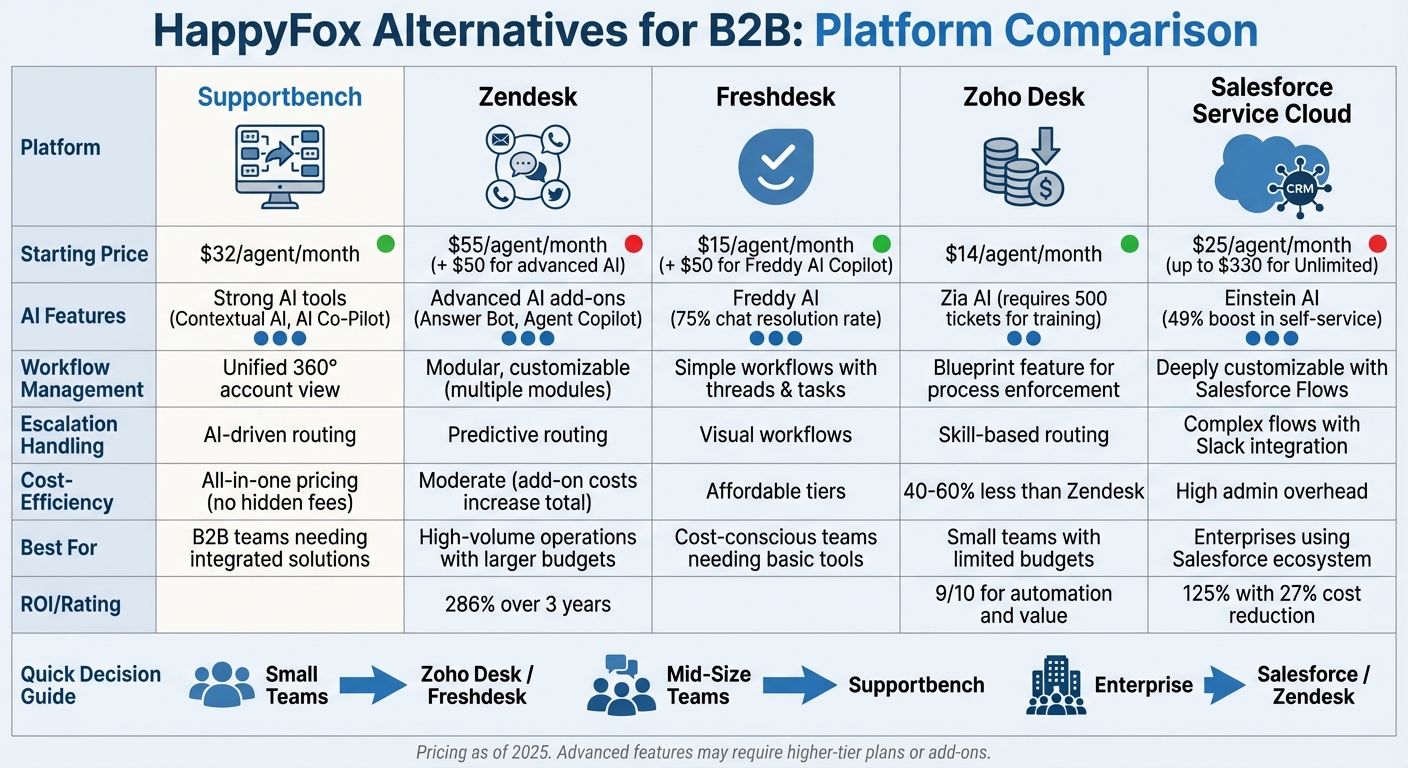
If you’re looking for alternatives to HappyFox for B2B customer support, five platforms stand out: Supportbench, Zendesk, Freshdesk, Zoho Desk, and Salesforce Service Cloud. Each offers tools tailored for managing the complexities of B2B workflows, like multi-stakeholder communication, account-centric support, and advanced automation. Here’s a quick breakdown:
- Supportbench: Designed for account-focused B2B support with AI automation, SLA tracking, and cross-team collaboration. Pricing starts at $32/agent/month.
- Zendesk: Known for omnichannel support and robust AI tools but can be costly with add-ons. Starts at $55/agent/month.
- Freshdesk: Offers simple workflows and automation at competitive pricing, starting at $15/agent/month.
- Zoho Desk: Budget-friendly with workflow automation and AI tools. Plans start at $14/agent/month.
- Salesforce Service Cloud: Best for large enterprises with deep CRM integration, starting at $25/agent/month but can be complex to implement.
Quick Comparison
| Platform | Starting Price (per agent/month) | AI Features | Workflow Management | Best For |
|---|---|---|---|---|
| Supportbench | $32 | Strong AI tools | Unified account view | B2B teams needing integrated solutions |
| Zendesk | $55 | Advanced AI add-ons | Modular, customizable | High-volume operations with larger budgets |
| Freshdesk | $15 | Freddy AI | Simple workflows | Cost-conscious teams needing basic tools |
| Zoho Desk | $14 | Zia AI | Workflow automation | Small teams with limited budgets |
| Salesforce Service Cloud | $25 | Einstein AI | Complex, customizable | Enterprises using Salesforce ecosystem |
Each platform suits different needs based on team size, budget, and workflow complexity. Smaller teams might prefer cost-effective options like Freshdesk or Zoho Desk, while larger organizations with intricate requirements may benefit from Supportbench or Salesforce Service Cloud. Choose the one that aligns with your goals and operational needs.
HappyFox Alternatives Comparison: Features, Pricing & Best Use Cases for B2B Support
Marty Kausas, Pylon CEO on Modern B2B Support, AI KB & Post‑Sales Tools
sbb-itb-e60d259
1. Supportbench
Supportbench is designed to simplify the intricate workflows of B2B support by bringing together multiple customer operations into one platform. Specifically tailored for B2B needs, it combines renewals, assets, entitlements, and performance metrics into a single, comprehensive view of each customer account. This eliminates the hassle of jumping between systems to check contract renewals or verify customer entitlements.
AI-driven automation
Supportbench takes its account-focused approach a step further with AI-powered tools. Its AI Co-Pilot digs into historical tickets and knowledge bases to make finding information faster and easier. Tasks like ticket classification, prioritization, and routing are automated by analyzing the customer’s context, tone, and urgency. Additionally, real-time sentiment analysis monitors customer emotions, helping teams address potential issues before they escalate.
"What sets Supportbench apart is its ability to streamline support processes through intelligent automation and deep insights into customer interactions".
- Eric Klimuk, Founder and CTO of Supportbench
Managing complex workflows
Supportbench is built to handle the layered complexities of B2B service agreements. It tracks and prioritizes commitments in real time by managing SLAs and entitlement rules. By integrating ticketing, analytics, and success notes into a unified workflow, it eliminates the disjointed experience common with older tools. Teams across departments – Support, Success, Product, and Operations – can collaborate seamlessly with shared notes and visibility, which is especially useful for tackling long-term, cross-functional issues. The platform is also scalable, supporting anywhere from 10 to 1,000 agents without requiring major system overhauls. This streamlined setup not only improves efficiency but also aligns with predictable pricing models.
Cost-efficiency
Supportbench offers straightforward pricing starting at $32 per agent per month. This includes automation, analytics, and reporting from the very beginning. Unlike many competitors, it avoids hidden fees or add-ons.
"As post-sale operations become more complex, leaders are searching for alternatives that combine usability, automation, and value – platforms that scale intelligently rather than adding administrative drag".
- Nooshin Alibhai, CEO of Supportbench
2. Zendesk
Zendesk is a well-known enterprise support platform designed to handle high-volume customer operations. Its omnichannel agent workspace combines email, voice, social media, and messaging into one interface, providing agents with a complete view of customer interactions and history. For B2B teams juggling multiple communication channels, this integration minimizes the hassle of switching between tools. On top of that, Zendesk boosts efficiency with its AI-powered tools.
AI-driven automation
In the world of advanced B2B support, automation is no longer optional – it’s essential. Zendesk’s AI features include intelligent triage, which categorizes requests by analyzing intent, language, and sentiment, shaving off 45 seconds of manual sorting per ticket. The Agent Copilot offers ticket summaries and suggests responses based on help center articles, while its generative AI tools transcribe and summarize voice calls, significantly reducing wrap-up time. According to Zendesk, its AI agents can handle over 80% of customer interactions automatically. A real-world example? Catapult Sports, a B2B wearables company, saw a 50% drop in first reply time and a 21% improvement in resolution time after adopting Zendesk’s AI tools.
Managing complex workflows
Zendesk isn’t just about automation; it’s also built to handle the intricacies of ticket routing automation and system integration. It uses skills-based and intent-based routing to assign tickets to the right agents based on their expertise and current workload. With an ecosystem of over 1,800 apps, Zendesk integrates seamlessly with CRM, billing, and project management systems. However, customizing the platform for complex B2B needs often requires technical knowledge or developer resources, which can increase implementation costs. Additionally, features like advanced analytics and enhanced AI capabilities are only available with higher-tier plans or as add-ons.
Pricing and cost considerations
Zendesk’s pricing starts at $55 per agent per month with the Suite Team plan, while the Suite Professional tier costs $115 per agent per month. Advanced AI features add $50 per agent per month, and additional tools like quality assurance and workforce management cost $35 and $25 per agent per month, respectively. While the entry-level pricing is competitive, costs can quickly add up for B2B organizations that need extra channels, automation, or third-party integrations. Still, a Forrester study revealed that businesses using Zendesk experienced a 286% ROI over three years, showing the potential payoff when the platform’s features and costs are well-managed.
3. Freshdesk
Freshdesk combines ease of use with advanced automation, avoiding the complications often found in enterprise-level tools. Its Freddy AI takes care of tasks like ticket categorization, routing, and even assisting agents. Features such as auto-triage and a "Thank You Detector" (which prevents tickets from reopening due to polite follow-up messages) make it especially efficient. The platform also supports multi-channel ticket management, covering email, phone, chat, social media, and WhatsApp.
AI-driven automation
Freddy AI streamlines operations by automating ticket routing and powering chatbots. A notable example is UPayments, which reported that Freddy AI resolved over 75% of live chat conversations, allowing agents to dedicate their time to more complex issues. Abdulrahman Althekair from UPayments highlighted:
"The impact of the Freddy AI Agent has been transformative… resolving over 75% of conversations without the need for human intervention."
Freshdesk also claims that Freddy AI Copilot helps improve agent productivity by 60%. However, setting up custom AI workflows often requires API expertise, which can be a hurdle for non-technical teams. The platform integrates with over 650 apps to expand its functionality, though some advanced features depend on third-party solutions. These automation tools work seamlessly with Freshdesk’s workflow management features, ensuring smooth ticket handling and collaboration.
Complex workflow management
For teams managing intricate support operations, Freshdesk offers tools like Threads and Tasks to break down tickets into smaller, manageable items, Custom Objects to track specific data such as assets or subscriptions, and Collaborators, which allow up to 5,000 internal stakeholders to be involved in tickets without needing full agent licenses.
Bridgestone adopted Freshdesk to manage its global support operations. Christophe Tomborski, Back Office Manager, shared:
"We adopted Freshdesk because it is a highly adaptable solution with metrics that allow us to track and follow up on our customers and agents efficiently."
That said, some users have noted drawbacks. The UI can become sluggish and require frequent page refreshes when dealing with high ticket volumes. Additionally, the platform’s reporting tools are structured in a way that limits advanced analytics to higher-tier plans. Some users feel it lacks the flexibility needed for scaling complex B2B operations compared to newer platforms.
Cost-efficiency
Freshdesk offers a free plan for up to 10 agents. Beyond that, pricing starts at $15 per agent per month for the Growth plan (billed annually), $49 per agent per month for the Pro plan, and $79 per agent per month for the Enterprise plan. Adding Freddy AI Copilot costs around $50 per agent per month. While the entry-level pricing is appealing, costs can rise quickly as businesses scale and require advanced features like approval workflows, audit logs, and skill-based routing, which are only available in higher-tier plans. For B2B teams with complex needs, Freshdesk provides a strong foundation for ticketing, but the pricing for advanced functionality may become a limiting factor.
4. Zoho Desk
Zoho Desk’s Blueprint feature is designed to ensure strict adherence to complex B2B workflows, such as approval chains, refund processes, and multi-step escalations. By requiring agents to follow predefined steps, Blueprint eliminates shortcuts that could disrupt long-term issue resolution. It also includes parent-child ticketing, which breaks down complex issues into sub-tickets for specialized teams while maintaining a unified view of the overall process.
AI-driven automation
To meet modern B2B support needs, Zoho Desk integrates Zia, its AI assistant, to simplify ticket management. Zia performs tasks like sentiment analysis to identify frustrated customers, predicts ticket fields (e.g., category and priority), and leverages generative AI to draft responses or summarize long ticket histories. However, Zia requires at least 500 tickets for training to provide accurate field predictions. This feature is exclusive to the Enterprise tier, which costs approximately $40–$50 per agent per month.
Managing complex workflows
Zoho Desk earned a 9/10 score for automation in professional evaluations. Beyond the Blueprint feature, it offers tools like custom modules and fields for capturing industry-specific data, as well as SLA automation to manage tiered service contracts for high-value accounts. The platform also includes a sandbox environment, allowing administrators to test complex routing rules before deployment, minimizing errors in live workflows.
Jason Nichol, Vice President of Product at Feedonomics, highlighted the benefits of these features:
"I believe that what we’ve achieved in collaboration with the Zoho Desk team has improved our ability to efficiently resolve complex requests for our clients, and it has been a major improvement for our customer experience."
These capabilities make Zoho Desk a strong choice for teams looking to enhance efficiency and streamline operations.
Cost-efficiency
Zoho Desk is estimated to be 40–60% less expensive than Zendesk for similar feature sets. Its free plan accommodates up to 3 agents, while paid plans start at $14–$20 per agent per month for the Standard plan (which includes workflow rules and CRM integration). The Professional plan, priced at $23–$35 per agent per month, unlocks features like Blueprint and parent-child ticketing. Zoho Desk also earned a 9/10 rating for "Value for price".
Additional tools like Zoho SalesIQ (live chat, around $10–$20 per agent per month) and Zoho Voice (telephony) are available as separate subscriptions. While the platform’s learning curve may be steeper compared to simpler tools, the investment pays off as teams fully utilize Blueprint’s process enforcement and automation capabilities. This balance of features and pricing makes Zoho Desk a cost-conscious solution for businesses aiming to optimize their customer support workflows.
5. Salesforce Service Cloud
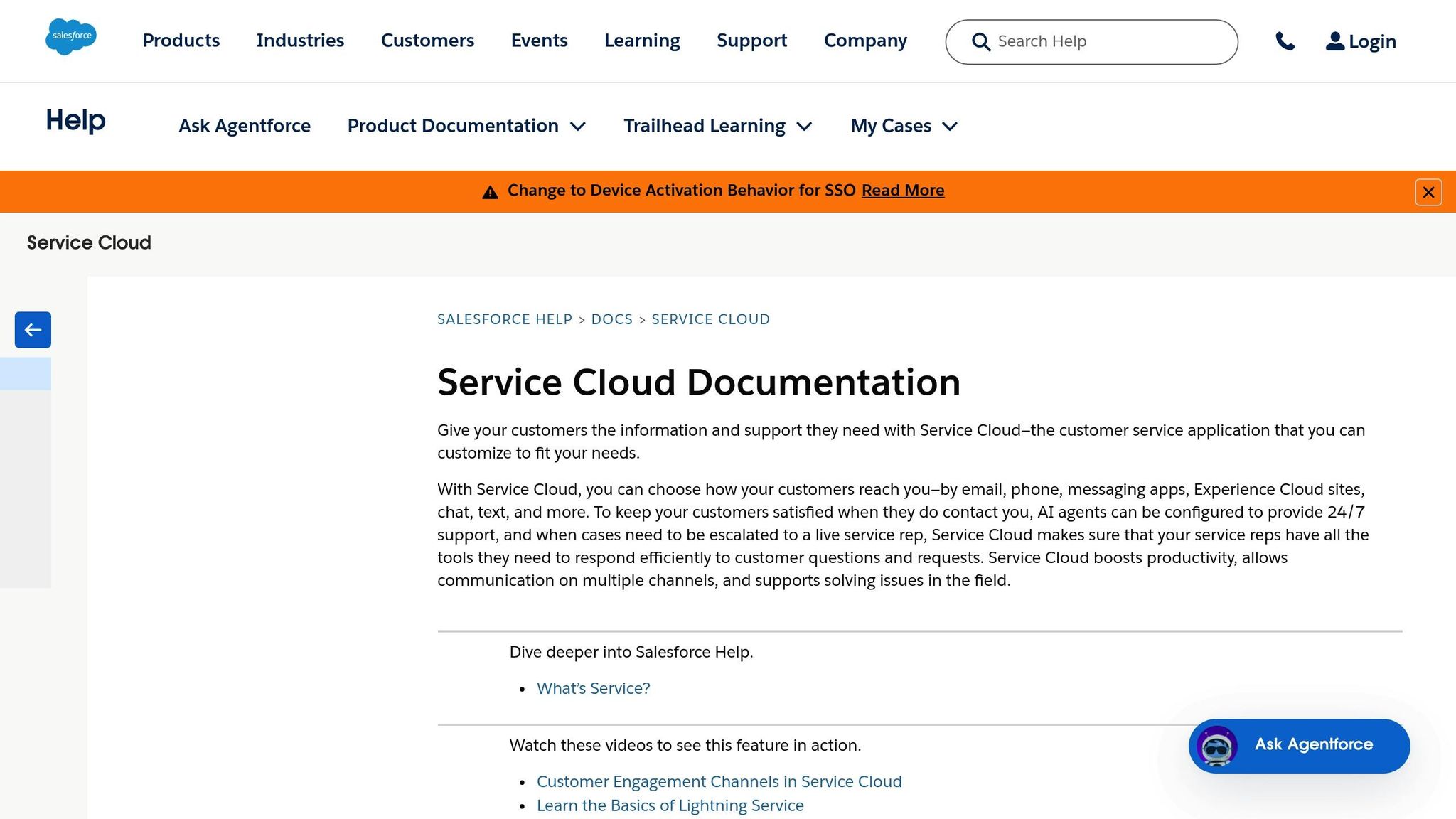
Salesforce Service Cloud stands out as a platform tailored for AI-powered, cost-conscious B2B support. By connecting support data with sales and marketing insights, it provides a 360-degree view of customer interactions – crucial for managing complex, multi-stakeholder accounts. Instead of traditional tickets, the platform uses "cases", which include detailed interaction histories and AI-driven routing to ensure that even the trickiest queries land with the right expert.
Complex Workflow Management
Salesforce Flows simplifies multi-step processes like approval chains and escalations – no coding required. For more collaborative problem-solving, Slack for Service enables cross-functional teams to "swarm" and resolve issues faster. Omnichannel routing directs cases based on agent expertise, workload, and availability, ensuring that high-value accounts are handled by senior-level specialists. This seamless integration highlights the importance of modern support CRM platforms for modern B2B support.
A notable example of its capabilities is Elastic’s integration of its Search AI Platform with Salesforce Service Cloud in 2025. Led by Sri Kolagani, this project used "ElasticGPT" to assist with support guidance and automatically populate ticket fields from conversational cues. The result? A 49% boost in digital self-service and a 23% cut in response times.
AI-Driven Automation
The platform’s Einstein AI takes the guesswork out of ticket management by analyzing historical data to classify new cases by status, priority, and type – saving teams from tedious manual entry. Einstein Copilot goes a step further, offering real-time summaries and action recommendations during live interactions, which speeds up resolutions. Additionally, its Search AI integration pulls answers from tools like Jira, Wiki, and GitHub directly into the Salesforce console, streamlining workflows. Businesses using Service Cloud report a 125% ROI and a 27% reduction in support costs.
Cost-Efficiency
Salesforce Service Cloud pricing starts at $25 per user per month for the Starter plan, scaling up to $330 for the Unlimited tier. Intermediate options include the Professional plan ($75–$80) and Enterprise plan ($150–$165). With a 4.4/5 rating on G2 and Capterra across nearly 8,000 reviews, it’s clear the platform is well-regarded. However, the need for professional services or dedicated developers during implementation can increase the total cost of ownership. This makes it a better fit for large enterprises where the benefits of CRM integration outweigh the complexity and expense.
Salesforce Service Cloud demonstrates how advanced automation and integrated tools can align with the intricate demands of B2B support, offering both efficiency and robust account management.
Strengths and Weaknesses
Managing complex B2B workflows requires platforms that cater to specific operational needs. Here’s a breakdown of the strengths and limitations of several platforms designed for multifaceted B2B support workflows.
Supportbench combines ticketing, SLA rules, and collaboration into one system, offering a comprehensive view of renewals, assets, and entitlements directly within each customer record. This all-in-one approach is priced at $32 per agent per month.
Zendesk provides robust ticketing capabilities and access to a large app marketplace. However, its modular structure often requires additional integrations, leading to extra costs. The base plan starts at $55 per agent per month, with advanced AI features adding $50 more per agent.
Salesforce Service Cloud integrates support seamlessly into its CRM ecosystem, making it ideal for handling escalation chains in large accounts. However, its complexity typically demands dedicated administration and professional services, which can drive up costs.
Freshdesk stands out for its straightforward automation and omnichannel support intake, offered at competitive pricing ranging from $15 to $79 per agent per month.
Zoho Desk provides a budget-friendly solution starting at about $14 per agent per month. It includes workflow automation and AI-assisted ticket routing, making it an attractive option for cost-conscious teams.
The table below summarizes these platforms across key criteria:
| Platform | AI Automation | Workflow Management | Escalation Handling | Cost-Efficiency |
|---|---|---|---|---|
| Supportbench | Strong (Contextual AI) | Strong (Unified 360° view) | Strong (AI-driven routing) | Strong (All-in-one pricing) |
| Zendesk | Strong (Answer Bot) | Moderate (Multiple modules) | Strong (Predictive routing) | Moderate (Add-on costs) |
| Freshdesk | Moderate (Freddy AI) | Moderate (Simple workflows) | Moderate (Visual workflows) | Strong (Affordable tiers) |
| Zoho Desk | Moderate (Zia AI) | Moderate (Standard B2B) | Moderate (Skill-based) | Strong (Low starting price) |
| Salesforce | Strong (Einstein AI) | Strong (Deeply customizable) | Strong (Complex flows) | Moderate (High admin overhead) |
These evaluations weigh operational efficiency against cost, helping you choose the best platform for your needs. Companies handling multi-stakeholder accounts and long-term issue tracking often benefit from account-focused solutions like Supportbench and Salesforce. On the other hand, smaller businesses with tighter budgets may find Freshdesk or Zoho Desk to be practical and effective options.
Conclusion
The best platform for your team ultimately hinges on your specific needs, including team size, budget, and the complexity of your workflows. Smaller teams managing straightforward support tasks can often find affordable options that include AI-powered routing and automation, delivering solid results without straining the budget.
For companies dealing with more intricate scenarios – like multi-stakeholder accounts, long-term issue tracking, or post-sale relationship management – the requirements are more demanding. These situations call for account-focused support tools. For instance, Supportbench provides a robust solution at $32 per agent per month, offering AI features from the start with no hidden fees for analytics or automation. On the other hand, many competitors charge higher per-agent fees and tack on extra costs for advanced features. Considering that boosting customer retention by just 5% can increase profits by 25% to 95%, selecting the right platform becomes a pivotal business decision.
Teams heavily reliant on tools like Slack or Microsoft Teams should prioritize platforms with seamless native integrations to minimize the inefficiencies of switching between apps. If your operations are deeply tied to the Salesforce ecosystem and you have the resources for ongoing administration, Service Cloud might make sense despite its complexity. For B2B teams, it’s crucial to choose a platform with transparent pricing, built-in AI capabilities, and scalability to improve resolution times and retention – without the burden of costly integrations.
To make the most informed choice, test potential platforms with real-world scenarios, such as escalation processes involving engineering handoffs. Also, be sure to factor in the total cost of ownership, not just the per-seat price. The right solution will do more than streamline your support – it will contribute to measurable growth for your AI-driven B2B support operations.
FAQs
Which B2B workflow features matter most when replacing HappyFox?
When considering alternatives to HappyFox for a B2B support environment, focus on key features that enhance efficiency and collaboration. Look for native integrations with platforms like Slack and Microsoft Teams to enable smooth omnichannel communication. Prioritize AI-powered automation to streamline tasks like ticket routing, proactive alerts, and issue escalation. Additionally, tools offering account-focused support and detailed analytics can help deliver tailored service while optimizing workflows, making it easier for teams to handle intricate processes and grow effectively.
How do I estimate total cost of ownership beyond per-agent pricing?
To get a clear picture of the total cost of ownership (TCO) beyond just per-agent pricing, you’ll need to factor in several additional expenses. These include implementation fees, costs for AI add-ons, and usage-based charges that can vary over time. Setup expenses, such as data migration and employee training, can also make a big difference upfront. Then there are the ongoing costs – things like maintenance, upgrades, and ensuring the system can scale as your needs grow.
While some platforms might promote low per-agent fees, the reality is that hidden costs for integrations or customizations can quickly pile up. That’s why it’s crucial to take a thorough approach when evaluating these systems to fully understand your financial commitments.
What’s the fastest way to test complex escalations before migrating?
To ensure your escalation process runs smoothly, it’s essential to test it in either your current system or a controlled environment. Here’s how to approach it step by step:
- Focus on Key Workflows: Identify the most critical workflows that could require escalation. These are often tied to high-priority tasks, customer issues, or operational bottlenecks.
- Create an Escalation Matrix: Develop a clear framework that outlines criteria for escalation, the appropriate pathways, and the roles involved at each level. This matrix acts as a roadmap, ensuring everyone knows what to do when an issue arises.
- Leverage Automation: Use automation tools to trigger escalations based on predefined conditions. For example, if a ticket remains unresolved for a specific time, the system can automatically escalate it to the next level.
- Run Team Tests: Conduct simulations with your team to validate the triggers and protocols you’ve set up. This not only helps identify gaps but also ensures the team is familiar with the process.
- Use AI Tools for Risk Management: If available, integrate AI-driven tools to predict potential risks and manage them proactively. These tools can analyze patterns and provide insights, helping your platform handle complex escalations more efficiently.
Testing and refining these elements will help ensure your escalation process is both reliable and adaptable to real-world scenarios.
Related Blog Posts
- What are the best non-US Zendesk alternatives for B2B support teams?
- Which non-US helpdesk platforms include advanced SLAs, portals, and knowledge base without add-ons?
- What’s the best alternative to Salesforce Service Cloud for B2B support teams?
- Pylon alternatives for B2B support: what should you use as you scale?






