



Tribal knowledge – the unwritten expertise within your team – can cause major problems if left unmanaged. It leads to inconsistent customer responses, operational inefficiencies, and knowledge loss when key employees leave. Studies show that 70% of critical knowledge goes undocumented, costing companies millions annually.
To address this, you need to:
- Identify gaps by auditing tickets, tracking unresolved queries, and interviewing team experts.
- Engage knowledge holders with incentives, gamification, and structured interviews.
- Document efficiently using AI-driven tools to create and update knowledge bases quickly. This process is simplified by AI-driven KB article creation which automates documentation.
- Integrate knowledge into daily workflows with frameworks like Knowledge-Centered Service (KCS) and dynamic SLAs.
5 Steps to Capturing Tribal Knowledge
sbb-itb-e60d259
How to Identify Tribal Knowledge Gaps
The first step to addressing tribal knowledge is figuring out exactly where it resides. This requires more than just guesswork – it involves diving into data from ticketing systems, team workflows, and agent behaviors to uncover areas where critical expertise hasn’t been documented.
Run Knowledge Audits
Start by conducting a detailed review of ticket histories, resolution trends, and agent interviews to uncover informal processes often referred to as "shadow SOPs" [1]. One way to do this is by creating a specialized view in your help desk for tickets tagged with terms like "how-to", "policy", "troubleshooting", or "known issue" [1]. Then, analyze the top 10 high-volume ticket topics from the past 7–14 days to identify recurring undocumented solutions [1].
Assign a "knowledge captain" to spend 20 minutes, 2–3 times per week, reviewing ticket trends and building a documentation backlog [1]. Focus on tickets with long handle times, multiple internal notes, or those that required escalation – these often indicate that agents are seeking help from colleagues because the answers aren’t documented [1]. Additionally, use AI search analytics to track search failures, such as queries returning "no results" or with low click-through rates, as these highlight gaps in your documentation [1].
Interview subject matter experts using open-ended questions to uncover troubleshooting shortcuts and unofficial tips that aren’t written down [6][7]. Managers and team leads can help identify the "informal leaders" within your team – those go-to individuals who may not have formal titles but are relied upon for their expertise [7]. Here’s a telling figure: in companies heavily reliant on tribal knowledge, new employees often take 6 to 18 months to achieve full proficiency [8]. If your onboarding process stretches beyond a month, it’s a clear sign that undocumented knowledge is a bottleneck [8].
These audits are essential for identifying inconsistencies in how various ticket types are resolved.
Find Ticket Types with Inconsistent Resolution Patterns
Using insights from your audits, focus on ticket types with inconsistent resolution times. These discrepancies often point to tribal knowledge being used instead of documented procedures. For instance, in SaaS support, senior reps might resolve an issue in 8 minutes, while newer agents need 45 minutes because they lack access to the same undocumented know-how [5]. Addressing these differences is key to mitigating operational risks.
Pay attention to tickets with numerous internal notes, as they suggest agents are relying on peer advice rather than documented solutions [1]. Categories with frequent escalations also indicate that frontline agents lack the nuanced knowledge held by specialists [1][5]. By creating a knowledge base to capture this expertise, you can reduce internal escalations by 20–30% within just 60 days [5].
Another helpful step is mapping your team’s informal "shadow org chart." Identify who is regularly sought out for answers or who is frequently CC’d on emails with phrases like "we’re not quite sure" [4]. Look for desks that always seem to have a line of people waiting for guidance [4]. Use a "kb-needed" tag for tickets where solutions exist but no corresponding article has been created, and automate the process of building a documentation backlog [1]. Keep an eye on your article view-to-resolve rate – a low rate (e.g., 25%) indicates that the content might be outdated or not useful [5].
"Tribal knowledge is when your company knows things that you don’t" [4].
How to Find and Engage Knowledge Holders
Identifying the experts who hold critical knowledge within your team can be tricky. Some of your most valuable contributors might not have formal titles or even recognize the importance of what they know to daily operations.
Map Experts and Team Networks
Start by examining your shadow org chart to see who your team naturally turns to for advice. Look for patterns – who gets CC’d on emails with questions like "not sure about this"? Who are the go-to people for guidance? These are your key experts. Assign real names to critical support roles instead of just listing job titles. When you notice the same names popping up across multiple functions, you’ve likely found where essential knowledge resides – and where your team might be vulnerable if those individuals were unavailable [4].
A knowledge risk matrix can help you figure out who to engage first. Evaluate team members based on how crucial their knowledge is to operations and the likelihood they may leave due to retirement, burnout, or turnover. Long-tenured employees are often the most critical – if they were absent, it could immediately impact efficiency and resolution rates [3].
AI tools can also speed up this process. For instance, platforms that analyze communication tools like Slack or Microsoft Teams can highlight "knowledge champions" – those frequently tagged for answers but whose expertise hasn’t been formally documented [2].
Once you’ve identified these experts, the next challenge is motivating them to share what they know.
Use Incentives to Encourage Participation
Getting experts to document their knowledge can be a challenge. Many worry that sharing their expertise will make them replaceable – a concern often referred to as the "indispensability" fear [3][9]. Address this head-on by emphasizing that knowledge capture is about strengthening organizational resilience, not replacing individuals. Explain that documenting their expertise ensures smoother operations and helps free them from answering repetitive questions, allowing them to focus on more rewarding tasks.
To make this process more appealing, gamify knowledge sharing. Introduce a points system that rewards employees for documenting what they know or helping peers. Points can be exchanged for perks like gift cards, extra PTO, or public recognition. For example, turning documentation into a game can shift it from being a chore to something engaging and rewarding [9].
Combine elements like gamification, public acknowledgment, and performance metrics to make knowledge sharing a routine part of daily work [9][10]. Most importantly, allocate dedicated time for these activities. Set aside specific hours for documentation so it doesn’t feel like an additional burden on top of regular responsibilities. When knowledge sharing becomes a natural part of the workflow, it can transform into a core aspect of your team’s culture.
How to Capture Tribal Knowledge
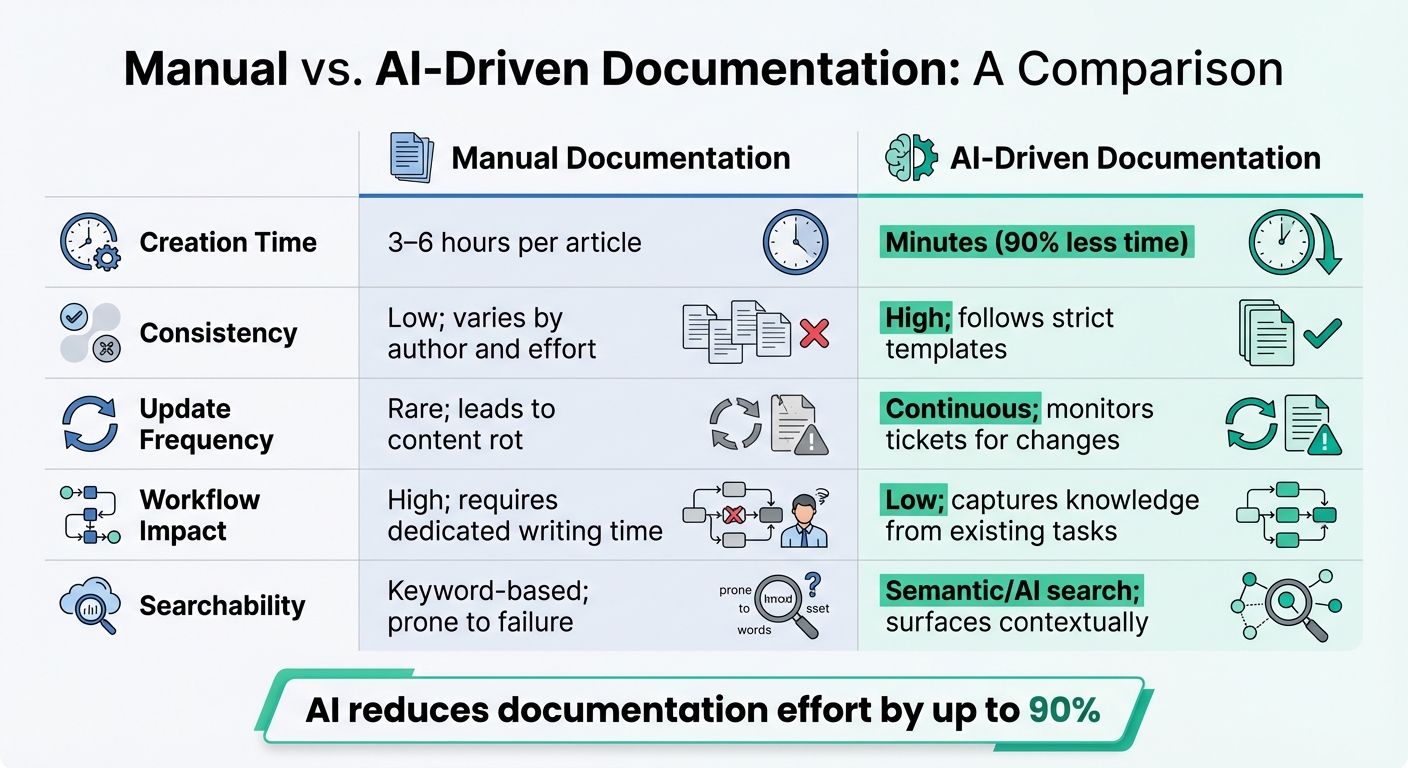
Manual vs AI-Driven Knowledge Documentation Comparison
Once you’ve identified motivated knowledge holders, the next step is figuring out how to efficiently capture their expertise. Relying on traditional methods can be time-consuming and disruptive, so a more streamlined approach is essential.
Use Structured Interviews and Workshops
Structured interviews are a great way to start. By following a standard template, you can capture key details like problem statements, root causes, resolution steps, and related issues[5]. This ensures that important information is documented in a consistent and organized way.
Another effective method is a "Find & Follow" workshop. These collaborative sessions bring together training and operations teams to map out critical procedures before they’re documented. For instance, having a subject matter expert (SME) demonstrate a workflow not only captures the steps but also the reasoning behind them, including any workarounds. While these manual methods provide depth, they can be difficult to scale.
Use AI-Driven Documentation Tools
AI tools have completely changed the game when it comes to capturing knowledge. Instead of asking experts to stop what they’re doing to write documentation, AI can extract insights directly from their day-to-day work. By analyzing support tickets, chat logs, screen recordings, and email threads, AI tools can quickly create structured knowledge base content.
Take Supportbench‘s AI KB article creation feature as an example. It scans the entire communication history of a resolved case and generates a knowledge base article in seconds – complete with a subject line, summary, and keywords. What might take an expert 3 to 6 hours to manually write is done automatically, saving significant time and effort[11]. AI can even create articles from recorded workflows, extracting screenshots, transcripts, and step-by-step instructions without requiring manual input[11].
Another smart approach is event-triggered documentation. By setting up a "missing article" tag in your support inbox, support staff can flag tickets that lack proper documentation. This creates a feedback loop where the AI system compiles flagged tickets into a weekly list, making it easy to batch-create articles for the most common gaps[5].
AI also tackles one of the biggest challenges with traditional knowledge bases: poor searchability. Keyword-based searches often fail when users don’t know the exact terms to look for. AI-powered knowledge base with semantic search, on the other hand, understands intent and pulls up contextually relevant articles right within the support inbox. This can reduce the time it takes to go from "ticket opened" to "first response" by 40–60%[5].
By using AI tools, teams can cut the effort needed to create documentation by up to 90%[11]. This means even the most elusive, undocumented processes can finally be captured. AI-driven documentation works hand-in-hand with human reviews, ensuring both efficiency and accuracy.
Manual vs. AI Documentation: A Comparison
| Feature | Manual Documentation | AI-Driven Documentation |
|---|---|---|
| Creation Time | 3–6 hours per article[11] | Minutes (90% less time)[11] |
| Consistency | Low; varies by author and effort | High; follows strict templates[11] |
| Update Frequency | Rare; leads to content rot[11] | Continuous; monitors tickets for changes[11] |
| Workflow Impact | High; requires dedicated writing time | Low; captures knowledge from existing tasks[11] |
| Searchability | Keyword-based; prone to failure[5] | Semantic/AI search; surfaces contextually[11] |
How to Build Knowledge into Daily Workflows
Collecting knowledge is just the first step. The real payoff comes when that knowledge is woven into the everyday tasks your team already handles. If agents have to pause their work to dig for information, chances are they won’t use it – and you’ll end up falling back on informal, undocumented practices.
Implement a Knowledge-Centered Support Framework
The Knowledge-Centered Service (KCS) framework helps teams build knowledge creation directly into their workflows. It encourages agents to document solutions as they resolve tickets[12].
"Knowledge creation should happen in the flow of work, not separate from it." – Tina Grubisa, Mosaic AI[12]
This framework uses a "double loop" process. Before responding to a customer, agents check for existing articles that address the issue. If one exists, they use it and update it if necessary. If no article is available, they flag the gap and document the solution before closing the ticket[12]. Over time, this process strengthens the knowledge base with every resolved case.
To make this seamless, you can integrate knowledge suggestions directly into your support tools. AI can analyze ticket metadata – like subject lines or initial messages – and instantly suggest the most relevant internal articles. This eliminates the need for manual searches and reduces the time between opening a ticket and providing an initial response by 40–60%[5].
Another way to keep knowledge fresh is by setting up weekly operating loops. During these sessions, support leads can review recurring ticket patterns, knowledge owners can draft or update articles, and approvers can validate the content[1]. This rhythm ensures that your documentation stays relevant and aligned with customer needs.
Embedding knowledge into workflows also lays the groundwork for targeted training, helping your team fully utilize the documented expertise.
Train Teams on How to Use Documented Knowledge
Once knowledge is integrated into daily tasks, the next step is teaching your team how to use it effectively. Instead of letting new hires explore the knowledge base aimlessly, design curated onboarding paths. These paths should focus on the top 10 most common ticket categories, billing workflows, and escalation protocols during their first two weeks[5]. This structured approach helps new agents achieve team-average escalation rates by the end of their second month – cutting the typical learning curve of three to four months in half[5].
Pairing new hires with experienced agents can also speed up their learning process. AI tools, like Supportbench’s AI Agent-Copilot, further streamline case resolution by suggesting relevant answers in real time. These tools allow agents to quickly find solutions without needing to memorize everything.
You can also assign a rotating "knowledge captain" or support lead to review ticket trends two to three times a week. Their role is to identify gaps in documentation and flag articles for updates[5]. Additionally, agents can tag tickets with labels like "kb-needed" or "missing article", which can automatically create drafts in your knowledge backlog using tools like Zapier[1]. This creates a feedback loop that ensures your knowledge base evolves alongside real-world support activity.
Use Dynamic SLAs to Ensure Consistency
Dynamic SLAs (Service Level Agreements) are another way to ensure that institutional knowledge is applied consistently. Unlike standard SLAs, which treat all tickets equally, dynamic SLAs adjust based on customer priority and issue type. For instance, if a customer is up for renewal within 30 days, the SLA can automatically tighten to guarantee a faster response. This ensures your team prioritizes the most critical issues while applying knowledge effectively.
Dynamic SLAs also help reduce internal escalations. When agents have the right information at their fingertips, they can resolve more issues independently. Combining dynamic SLAs with integrated knowledge tools creates a smoother workflow and boosts overall support performance.
Common Pitfalls in Knowledge Capture and How to Avoid Them
Even with great tools and systems in place, human habits and outdated practices can derail your knowledge management efforts. Preserving institutional expertise is crucial for AI-driven support operations, but common challenges often stem from people, not technology. Resistance from team members and outdated documentation are two major hurdles. Here’s how to tackle them effectively.
How to Handle Resistance to Change
Support agents often hesitate to document their knowledge for reasons that go beyond time constraints. A common fear is job security. When an individual’s expertise makes them the go-to person for solving complex issues, sharing that knowledge can feel like giving up their unique value. As the WorkCell Team explained:
"’We want to capture your knowledge’ can sound a lot like ‘we want to capture your knowledge so we can replace you.’"[3]
Another barrier is the loss of informal authority. Experts often hold a special status within the team because they know how to solve problems others can’t. Documenting their methods can feel like diminishing their importance. A real-world example from 2025 highlights this issue: a company let go of an unpopular accounting employee, only to discover that this person was the only one who understood how salesperson commissions were calculated. The process wasn’t documented anywhere, leading to a frantic search for a hidden spreadsheet just to ensure employees were paid correctly[4].
To address these concerns, consider partnering experts with documentation specialists. This allows experts to focus on their work while someone else observes and records the process[3]. It reduces the burden of writing and makes the task feel less like an additional chore. Recognizing contributors publicly and tying knowledge-sharing efforts to performance reviews can also encourage participation.
Another helpful tactic is to document the reasoning behind decisions, not just the steps. For example, capturing why a workaround exists or why certain options were dismissed adds depth to the documentation. This approach helps experts see their contributions as a way to preserve their legacy, rather than a threat to their role[3].
Once resistance is addressed, the next challenge is ensuring documentation stays relevant.
How to Prevent Knowledge from Becoming Outdated
Capturing knowledge is only the first step. Without regular updates, documentation can quickly become irrelevant, and team members may stop relying on it. For instance, when a key employee retires without updating critical processes, inefficiencies can skyrocket. In one case, scrap rates doubled in just a month because operational adjustments weren’t documented[3].
To leverage your knowledge base and keep it accurate, assign each article a "last reviewed" and "expiration" date to ensure regular updates. This creates a structured process for audits. You can also schedule recurring reviews, such as quarterly or annual check-ins, to evaluate key processes[4]. During these reviews, ask straightforward questions like:
"Does what we’ve written still reflect what you actually do?"[4]
Another effective approach is to tie reviews to specific milestones, like product launches, major customer wins, or team promotions. These events often lead to process changes, making them ideal moments to update documentation[4].
Additionally, leverage AI tools to analyze usage patterns. For example, identify "no-result" queries or frequently accessed articles that may need revisions. If certain content hasn’t been opened in six months, it could signal that it’s outdated or no longer useful.
Finally, set up feedback loops so team members can flag documentation gaps during ticket resolution. This ongoing cycle ensures your knowledge stays fresh and relevant, reducing the risk of staleness over time.
Conclusion
Undocumented expertise can seriously limit a company’s ability to grow. While relying on tribal knowledge might seem harmless for a small support team, it becomes a major obstacle when the team grows beyond 35–50 employees. At that point, workflows based on memory start to crumble, making it nearly impossible to scale without proper documentation. These gaps in shared knowledge often lead to inconsistent responses and can cost companies 2–3% of their annual revenue in recovery expenses [4].
On the flip side, documenting and organizing this knowledge can transform operations. A well-maintained knowledge base can reduce handle times and escalations by 20–30% in just a few months [5]. It also speeds up onboarding – new hires can hit team-average performance a month faster when they have access to detailed documentation [5].
AI-powered tools take this a step further by making knowledge management more efficient and sustainable. These tools can automatically suggest relevant articles based on ticket metadata, cutting time-to-first-response by 40–60% [5]. They can also keep documentation up to date, ensuring that the knowledge base evolves alongside the team’s needs [1].
As Alex Radulovic from Purple Owl aptly said:
"Tribal knowledge is when your company knows things that you don’t" [4].
The goal isn’t to replace expertise but to preserve and share it in a way that supports growth. By moving knowledge out of individual minds and into a system, you reduce dependency on key individuals, safeguard 10–20% of your company’s valuation, and create a support operation that scales seamlessly [4].
Start by reviewing your top 20 ticket categories within your ticket management system and tying those reviews to key milestones. The improvements in speed, consistency, and scalability will be immediate.
FAQs
What’s the fastest way to spot tribal knowledge gaps?
The fastest way to spot gaps in tribal knowledge is to identify areas where critical information is held by just a handful of people or exists in an informal, undocumented state. Keep an eye out for signs like repeated questions, conflicting answers, or expertise that isn’t written down in tickets, wikis, or chats. By pulling together scattered sources of information, you can uncover inconsistencies and pinpoint missing documentation. Tackling these gaps early can help prevent productivity slowdowns or the risk of losing essential knowledge.
How do you get SMEs to share knowledge without pushback?
To get Subject Matter Experts (SMEs) to share their insights, it’s essential to create an environment that values open communication and celebrates their contributions. Recognizing their efforts goes a long way in motivating them to actively participate.
Using collaboration tools can make the process smoother. These platforms not only promote teamwork but also provide a space where SMEs can document and share their expertise. Structured methods like interviews, surveys, workshops, or step-by-step guides are particularly effective for capturing their knowledge in a clear and organized way.
It’s also crucial to emphasize how knowledge sharing contributes to the overall success of the organization. When SMEs see the impact of their efforts and feel appreciated, they’re more likely to engage and share their expertise willingly.
Which support metrics prove knowledge capture is working?
Key indicators to watch are fewer repeated questions, better consistency in responses, and quicker onboarding processes. You can also track the accuracy and relevance of documented information by using feedback loops and conducting regular content reviews. These metrics play a crucial role in ensuring that knowledge capture efforts remain effective over time.






