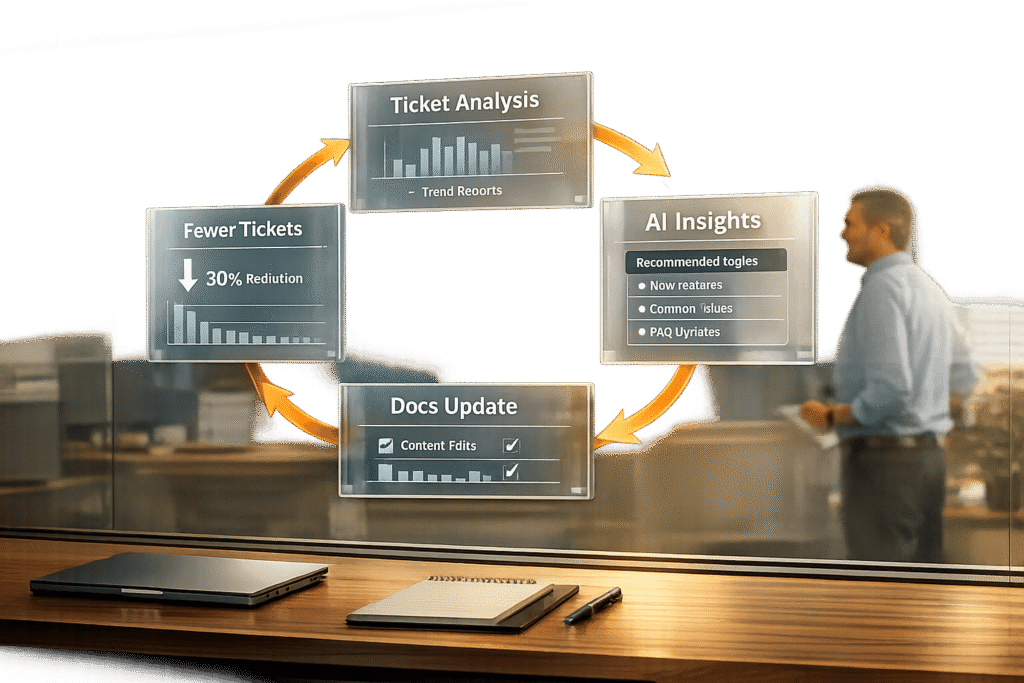
Outdated support documentation costs businesses time and money. Each unresolved ticket can cost $15–$25, and poor documentation leads to frustrated customers and unnecessary support volume. Companies that use feedback loops – systems that turn customer interactions into actionable documentation updates – can reduce support tickets by 20–30% and improve customer satisfaction.
Here’s how it works:
- Identify Patterns: Analyze tickets, chats, and surveys to find recurring issues and content gaps.
- Act Quickly: Update documentation within a week of product changes to reduce errors by 40%.
- Leverage AI: Use AI tools to spot gaps, flag unhelpful articles, and even draft new content.
- Measure Results: Track metrics like ticket deflection rates, failed searches, and time-to-first-success.
The result? Companies with AI-powered knowledge-centric solutions see a 35% drop in support volume and up to 71% resolution rates with quality documentation. Keeping content current ensures customers find answers faster, reduces costs, and builds trust.
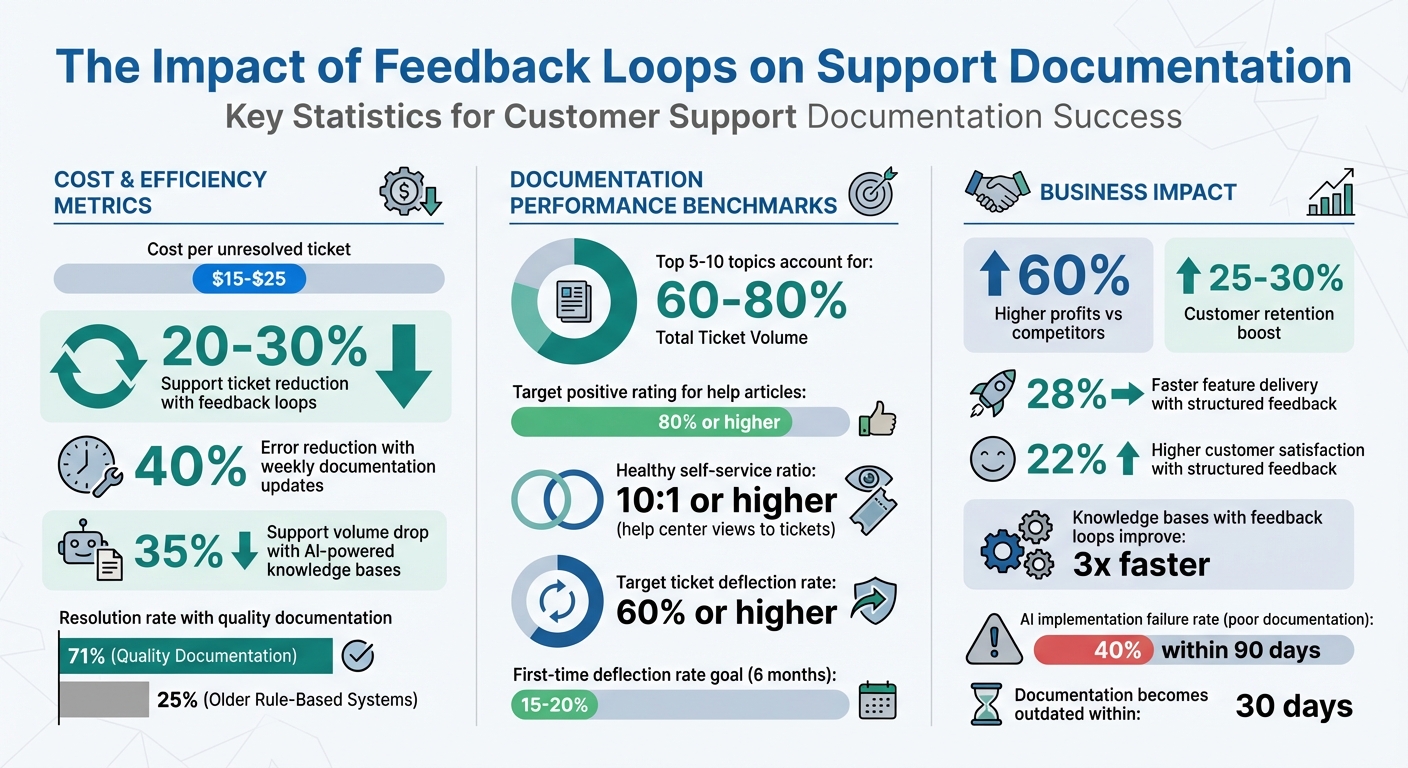
Impact of Feedback Loops on Support Documentation Performance
How to Get Massive Customer Feedback Without a Survey
sbb-itb-e60d259
Collecting Feedback from Support Interactions
Improving your documentation isn’t just about creating content – it’s about refining it based on feedback. Your support channels are a goldmine of insights into what’s unclear, missing, or broken in your materials. To make the most of this, start by analyzing data from ticket closures. Pull your top 20 ticket categories from helpdesk reports, as 5 to 10 topics often account for 60% to 80% of the total ticket volume [4]. These recurring issues highlight areas where your documentation needs the most attention.
Using Tickets, Chats, and Call Data
Support tickets, chat logs, and call interactions are loaded with hints about where your documentation falls short. Questions like "How do I…?", "This doesn’t work", or "What’s the difference…?" point to gaps in guides, troubleshooting steps, or FAQs [4]. A particularly revealing metric is when a customer views a help article but still submits a ticket. This behavior signals that the article didn’t solve their problem effectively [4].
"If a customer views a help article and still opens a ticket, that article needs improvement." – Daniel Sternlicht, Founder & CEO, Vidocu [4]
To address this, track "article-to-ticket" paths to identify underperforming content. Similarly, monitor search queries that yield no results [4]. Integrating your support software with a task management tool can streamline this process. Agents can flag documentation gaps as they work on tickets, linking these tasks to specific ticket numbers for context [5].
Using Post-Resolution Surveys and Feedback Forms
Surveys and feedback forms can reveal additional weak spots in your content. Add thumbs up/down widgets to the bottom of every help article, aiming for 80% or higher positive ratings [4]. High-traffic articles with low helpfulness scores should be prioritized – they’re drawing attention but not solving problems. Also, watch for "bounce-to-search" behavior, where users leave an article and immediately return to the search bar. This indicates the content didn’t deliver on the promise of its title [3].
Another key metric to track is your self-service ratio, calculated by dividing help center views by the number of tickets created. A healthy ratio is 10:1 or higher [4]. Similarly, monitor your ticket deflection rate – the percentage of users who view documentation and don’t open a ticket. Aim for a 60% or higher deflection rate [4].
Tagging and Categorizing Tickets for Patterns
Consistent tagging transforms scattered ticket data into meaningful trends. Use a two-tier tagging system: a required high-level Topic (Tier 1) and an optional Subtopic (Tier 2). Keep Tier 1 categories under 10 to ensure agents use them consistently [6]. Avoid vague tags like "Other" or "General Inquiry", as they don’t provide actionable insights [6].
"If a tag doesn’t change how you handle a ticket or how you understand your support data, it’s adding noise instead of clarity." – Swifteq [6]
For qualitative feedback, tag specific reasons for "unhelpful" ratings, such as "Outdated info", "Inaccurate solution", "Unclear language", "Missing details", or "Difficult to find" [1]. Conduct quarterly audits to refine your tags. For example, if you see 40 tickets tagged as "Billing > Refund Request" in a month, it’s a clear sign that your refund documentation needs improvement [6].
These structured feedback methods will seamlessly integrate into the AI-driven analysis discussed in the next section.
Identifying Documentation Gaps with AI
Once you’ve gathered feedback, AI can help you quickly spot missing or outdated content in your knowledge base. Instead of combing through hundreds of support tickets manually, AI scans your support history to uncover common questions that lack proper documentation.
AI-Driven Pattern Recognition in Support Data
AI uses pattern recognition to group support tickets based on keywords, subject lines, and tags. These clusters highlight high-volume topics that don’t have adequate documentation. For instance, if 150 tickets in a month focus on "API rate limits" but no help article exists on the subject, the AI flags it as a priority gap. By cross-referencing these clusters with your existing documentation, the system identifies "unlinked" topics – questions customers frequently ask but that aren’t addressed in your knowledge base[8].
"A good AI can scan your entire support history and pinpoint common questions that don’t have a matching knowledge base article."
– Stevia Putri, Marketing Generalist, eesel AI[8]
Advanced tools go a step further by connecting your help desk data with platforms like Confluence or Notion. This ensures the AI checks across all systems to confirm whether a topic is genuinely missing or just scattered across multiple sources. For example, Supportbench‘s AI Agent-Copilot analyzes past cases and taps into internal and external knowledge bases to suggest new documentation topics. Sentiment analysis then helps refine these suggestions by identifying where improvements are most urgently needed.
Sentiment Analysis to Identify Frustration Points
AI doesn’t just find missing topics – it also highlights areas where current documentation frustrates users. By analyzing chat logs, tickets, and emails, AI detects signs of confusion, dissatisfaction, or frustration. For example, a spike in negative sentiment around a feature may indicate that its documentation is unclear or outdated. Sentiment scores tied to product tags – like a drop in feedback for "billing" articles – can help you prioritize updates.
Combining survey feedback (e.g., CSAT, NPS, and CES scores) with ticket analysis offers even deeper insights into where self-service resources fall short. Post-resolution surveys asking, "Was the documentation helpful?" can further categorize negative responses, making it easier to target specific areas for improvement[7].
Case Summaries and AI-Powered Insights
Once gaps are identified, AI can help bridge them by generating draft documentation. It condenses detailed support interactions into concise case summaries, capturing the core issue and its resolution. These summaries serve as templates for new knowledge base articles. For instance, a "Gold Standard" ticket – where an agent provided a clear and effective solution – can be transformed into a draft article.
Supportbench’s AI KB Article Creation from Case History automates this process by pulling details from past cases to populate the subject, summary, and keywords for a new article. You can even use prompts like "Use the solution from ticket #12345" to guide the AI. A typical draft might include a title, numbered steps, and a brief conclusion. However, always use a "human in the loop" approach – have subject matter experts review these drafts to ensure technical accuracy and alignment with your brand’s tone. Start with straightforward, high-volume topics to test AI-generated drafts before tackling more complex issues[8].
Prioritizing and Updating Support Documentation
Once you’ve pinpointed gaps in your documentation, the next step is deciding which ones to tackle first. Not all gaps are created equal – some lead to hundreds of support tickets each month, while others might only affect a small number of users. A structured, data-driven approach helps ensure your team focuses on updates that make the biggest difference with the least effort. By prioritizing effectively, you can reduce support tickets and boost customer satisfaction as part of a continuous feedback loop.
Scoring Systems for Documentation Gaps
Start by analyzing ticket categories to identify areas where users frequently need help. Compare these categories with your knowledge base to find topics that lack sufficient coverage. Use an impact vs. effort matrix to rank each gap. For example:
- High-impact, low-effort fixes: These should be your top priority. Think of quick updates like clarifying a confusing "how-to" article.
- High-impact, high-effort projects: These might involve more complex tasks, like redesigning an onboarding flow, and should go on your long-term roadmap.
Pay attention to articles with high view counts but also high ticket follow-ups. This pattern typically signals confusion or incomplete content. For instance, if 500 users view an article on API rate limits but 200 still submit tickets, that article is creating unnecessary support overhead. Considering that a single support ticket costs $15 to $25 in agent time and overhead, improving just one problematic article could save thousands of dollars monthly.
| Priority Level | Impact (Ticket Volume) | Effort to Fix | Recommended Approach |
|---|---|---|---|
| P1: Quick Wins | High | Low | Immediate updates or adding UI tooltips |
| P2: Tactical | High | Medium | Bug fixes or creating tutorials |
| P3: Strategic | High | High | Overhauling onboarding or redesigning workflows |
| P4: Low Priority | Low | Low/Medium | Monitor trends and update during audits |
Building a Feedback Review Process
To keep your documentation relevant, establish a structured review process. Focus on high-priority updates without overwhelming your team:
- Monthly reviews: Concentrate on the top 10–20 ticket drivers and update corresponding documentation using your scoring system.
- Product releases: Ensure documentation for new or updated features is ready before launch to avoid post-release confusion.
- Quarterly audits: Review your entire knowledge base for outdated screenshots, broken links, or workflows that no longer apply.
Standardize feedback by tagging it into actionable categories like "Outdated info", "Unclear language", or "Missing details." This makes it easier to spot recurring issues. For example, if many articles are flagged for unclear language, it may signal a need to refine your overall content style. Assign specific outcomes to each feedback item – such as minor edits, full rewrites, or new articles – and track progress in a shared dashboard so the team stays aligned and accountable.
"We were drowning in tickets because we never analyzed WHY they were coming in. [Analysis] showed us that 60% of our support burden was self-inflicted and fixable."
– Marcus, Head of Support[[9]](https://docs.buildbetter.ai/pages/Use Cases/cs/ticket-analysis)
Finally, share feedback outcomes with product and engineering teams to ensure technical accuracy and alignment.
Collaborating with Cross-Functional Teams
Improving documentation isn’t a solo effort – it requires input from multiple teams. Product, engineering, and content teams all play key roles in ensuring the information is accurate and useful. While support teams excel at writing customer-friendly content, engineers are better equipped to handle technical topics like API documentation.
Sometimes, when users report that an article "doesn’t work", the issue might actually stem from a product bug or usability problem rather than the documentation itself. Sharing these insights with product teams allows them to address the root cause instead of just creating a temporary workaround.
To streamline collaboration:
- Hold monthly syncs between support, product, and documentation teams to review recurring ticket patterns and prioritize fixes.
- Validate that updates align with actual customer pain points. For example, if support agents report that a specific article fails to answer a common question, it’s a clear sign the content needs revision.
- For complex features, implement a review process where technical writers and engineers verify the accuracy of code examples and procedures as the product evolves.
Tools like Supportbench’s AI KB Article Creation can help by generating draft content from past case histories. These drafts can then be reviewed and refined by subject matter experts before publishing, saving time while maintaining quality.
Implementing Updates with AI-Driven Workflows
After identifying and prioritizing gaps in your documentation, the next hurdle is ensuring your knowledge base stays up-to-date without overloading your team with manual tasks. AI-driven workflows can handle tasks like drafting articles and syncing updates, reducing the need for constant hands-on effort while maintaining high-quality standards. These workflows not only streamline content creation but also ensure your documentation evolves alongside your product.
AI-Powered Article Creation from Case Histories
AI can turn resolved support tickets into fully drafted articles, ready for review and publication. Platforms like Supportbench analyze ticket details – such as the subject, customer description, and resolution steps – to generate content that reflects real-world solutions. This ensures your documentation addresses actual customer problems rather than hypothetical scenarios.
For example, when an agent resolves a case, they can instantly convert it into a draft article. The AI incorporates relevant context, suggests tags, and categorizes the content based on the ticket type. Imagine multiple customers reporting API rate limit issues: the detailed solution provided by an agent can be transformed into a searchable article, outlining the exact steps that resolved the problem.
To maintain quality, approval workflows and version control are built into the process. This ensures human review of AI-generated drafts before publication, while also providing traceability for future updates and quality checks.
Testing Documentation Changes with A/B Testing
Publishing a new article doesn’t automatically mean it will solve customer issues effectively. A/B testing allows you to assess whether updates to your documentation improve outcomes like reduced ticket volume or higher self-service success rates. The process is simple: show one group of users the original article and another group the updated version, then compare the results.
Key metrics to monitor include time spent on the page, follow-up ticket rates, and how often users resolve their issues without needing further support. For instance, if an updated article on password resets doesn’t reduce ticket volume, it might indicate the changes are unclear. On the other hand, if the update leads to fewer tickets, it’s a sign that the new version is working. This data-driven approach helps refine documentation based on actual customer behavior rather than assumptions. Insights from these tests can also feed directly into automated workflows for future updates.
Automating Updates Through Workflow Engines
Documentation can quickly become outdated as your product evolves, and manually keeping it current is both tedious and prone to errors. Workflow engines solve this by syncing documentation with source systems and triggering updates whenever changes occur. This ensures your knowledge base stays aligned with product updates, eliminating the risk of "documentation drift."
For example, you can set up scheduled syncs or use webhooks to update content automatically when source material changes. If your engineering team revises API documentation in Confluence, a webhook can flag the corresponding article for an update. This keeps your documentation accurate and relevant, even as your product evolves.
Permission-aware syncing ensures that sensitive content is only visible to authorized users. Integrations with tools like CRMs and issue trackers help align documentation with broader business processes, eliminating the need for manual uploads. Adjusting sync frequency – using real-time webhooks for fast-changing content and daily syncs for more stable information – can also optimize system performance and reduce server load[2].
Supportbench’s workflow engine takes this a step further by automating customer feedback collection through surveys like CSAT, NPS, or CES, sent immediately after ticket resolution. This feedback loop highlights which documentation updates improve customer satisfaction, allowing you to refine content based on actual outcomes rather than guesswork.
Measuring Impact and Closing the Loop
Once you’ve implemented AI-driven updates, the real work begins: measuring their impact. Updating documentation is just the start. Without tracking performance, you won’t know whether your efforts are paying off or what needs tweaking. The real payoff comes from analyzing how these updates influence ticket volume, customer satisfaction, and support costs – and then using that data to refine your approach.
Key Metrics to Track Documentation Impact
To understand how well your documentation is working, start with the ticket deflection rate. This metric shows how often users find answers in your documentation instead of reaching out to support. There are two ways to measure this:
- Deflection by link: Tracks tickets where users explicitly reference an article.
- Deflection by view: Counts users who visit your help center and don’t open a ticket within 24 hours.
For teams new to documentation, achieving a 15–20% deflection rate by view within six months is a strong indicator of success[10].
Another critical metric is Time-to-First-Success (TTFS), which measures how quickly users solve their issues after landing on a documentation page. This reflects how clear and actionable your content is. Alongside TTFS, monitor first contact resolution rates, which track cases resolved with a single knowledge base link. High rates here mean customers are finding the right information easily.
Keep an eye on failed searches – queries that return no results. These highlight content gaps and keyword mismatches. Engagement metrics like average time on page and scroll depth also provide insights into whether users are engaging with your content or leaving too soon.
Finally, calculate your documentation ROI by comparing the value of deflected tickets to the costs of maintaining your knowledge base. With support tickets costing between $5 and $25 each[10], deflecting 2,500 tickets could deliver a 75% ROI just from saved agent time[10].
"Documentation moves from ‘nice to have’ to ‘operational lever’ once you put numbers on these outcomes." – Snehasish Konger[10]
These metrics form the backbone of a continuous improvement strategy, best visualized through real-time dashboards.
Setting Up Dashboards for Continuous Monitoring
Real-time dashboards turn raw data into actionable insights. Use KPI tiles for metrics like TTFS and ROI, and line charts to track trends over time – especially after major updates. This setup makes it easier to spot patterns. For instance, a spike in failed searches for a specific query signals an opportunity to add new content.
AI tools can help by analyzing customer questions to identify gaps in your knowledge base. Advanced AI systems paired with quality documentation achieve a 71% resolution rate, compared to just 25% for older rule-based systems[2].
For accuracy, pull metrics from unsampled data sources like BigQuery or Segment instead of relying on sampled analytics exports. You should also monitor how often your documentation is updated; content typically becomes outdated within 30 days[2]. This is critical because 40% of AI customer service implementations fail within 90 days due to poor documentation quality[2].
Notifying Customers About Documentation Updates
Once you’ve gathered performance data, the next step is closing the loop by keeping customers informed. Add in-article update notes, such as: "Update March 2026: Added troubleshooting steps for Error X." This signals that your content is current and responsive, building trust with users.
For users who provided specific feedback, send personalized follow-up emails once their concerns have been addressed. This small gesture can turn frustrated customers into loyal advocates. For broader updates, include links to new or updated articles in ticket auto-responses or chatbot suggestions. You can also feature popular articles in email signatures, product navigation, or contact forms to improve visibility.
Internally, notify your support and success teams about major documentation updates through tools like Slack, so they can guide customers to the right resources. Monthly "What’s New in the Help Center" updates or product release notes are another great way to highlight changes.
Feedback mechanisms can also supercharge your efforts. Knowledge bases with active feedback loops improve 3x faster than those without[1]. Tools like Supportbench automate this process by collecting feedback through post-resolution surveys (CSAT, NPS, CES). This creates a direct pipeline from customer input to documentation improvements, ensuring your updates are both impactful and aligned with user needs.
Common Pitfalls and Best Practices
Relying solely on isolated feedback collection can hinder meaningful improvements in documentation. When support teams operate without insights from product managers, designers, and researchers, they miss critical perspectives on the user journey [11]. This approach only captures what users explicitly tell support agents, leaving out the broader context of why the documentation might be failing. As a result, future feedback processes often encounter the same shortcomings.
Another common mistake is neglecting follow-ups, which can erode trust with both customers and internal teams. For instance, teams may spend weeks analyzing feedback and updating documentation but fail to communicate these changes effectively.
"If your product feedback loop depends on someone remembering to send a survey or dig through support tickets, it’s not a system – it’s a side project." – Carlos Gonzalez de Villaumbrosia, CEO of Product School [11]
When users see no visible changes based on their feedback, participation tends to decline. To maintain engagement, it’s crucial to notify all parties when updates are implemented.
Automation, while powerful, can introduce serious risks if left unchecked. Even the most advanced AI-driven workflows require manual oversight. Without proper quality control, connecting automation to outdated or disorganized documentation can scale errors rather than solve them.
"Connecting a messy, outdated knowledge base means your AI confidently serves wrong answers at scale." – Inkeep team [2]
Before integrating documentation with AI systems, teams must ensure the content is accurate and up-to-date through manual quality checks.
Misprioritizing feedback is another stumbling block. Teams often focus on the volume of complaints rather than their overall impact, reacting to the loudest voices instead of using ticket prioritization frameworks [11]. For example, while fifty users might complain about a specific feature, their concerns might not warrant immediate action if they represent only a small fraction of the customer base. Behavioral data can provide additional context – users might label a feature "confusing" even if they successfully complete the task [11].
Over-reviewing documentation can also create bottlenecks. Involving too many reviewers often results in conflicting feedback and delays [12]. Instead, assign reviewers specific roles, such as focusing on technical accuracy or content flow, rather than soliciting input from an entire department.
To build a more effective feedback loop, centralize feedback collection across all channels, audit documentation before automating, assign clear roles for reviewers, and always communicate updates to customers and internal teams. These steps help transform feedback into actionable, measurable improvements.
Conclusion
Building effective feedback loops is a game-changer for connecting customer support interactions with documentation updates. This process involves gathering customer feedback, analyzing it with AI, prioritizing updates that matter most, automating changes, and keeping stakeholders informed. Companies that actively listen to their customers tend to outperform, with research showing they achieve 60% higher profits than competitors. Additionally, handling feedback effectively can boost customer retention by 25% to 30% [14].
AI-powered knowledge bases make a big difference, cutting support volume by 35%. When paired with high-quality documentation, advanced AI bots reach a 71% resolution rate, compared to just 25% for older systems [2]. For mid-sized companies, even a modest 40% deflection rate can translate into significant annual savings.
"Stopping at savings is an outdated mental model… AI bots, while conceptualized as a support upgrade, have gone a step further. They’ve shown companies not only how to be more cost-efficient but also how to improve products, generate competitive ideas, and grow revenue." – Emil Sorensen, Kapa.ai [13]
Keeping your documentation relevant is just as important as improving it. Automation and teamwork are key to avoiding outdated content, which can become irrelevant in as little as 30 days without regular updates [2]. Using tools like webhook-triggered syncs can help, as can formalizing processes like CS-to-Product handoffs and holding weekly triage meetings. Companies with structured processes for customer feedback see 28% faster feature delivery and 22% higher customer satisfaction scores [14].
To address gaps in your documentation, start small – focus on one channel, audit your content, embracing AI technologies, and build from there. Strong feedback loops not only cut costs but also enhance customer satisfaction and free up your support teams for more strategic tasks. By combining customer insights, AI analysis, and automation, your support operations can achieve greater efficiency and deliver an exceptional customer experience.
FAQs
What’s the fastest way to start a documentation feedback loop?
The fastest way to kickstart a documentation feedback loop is by leveraging AI tools to analyze support tickets. These tools can help you identify recurring issues and pinpoint gaps in your content. Prioritize updating your knowledge base to address frequently asked questions and topics that have a significant impact on users. By automating updates, scheduling regular reviews, and gathering feedback in real time, you can keep your documentation relevant and effective. This approach not only reduces ticket volumes but also boosts customer satisfaction.
Which documentation metrics matter most for ticket reduction?
If you want to measure how effectively your knowledge base helps customers solve issues on their own, keep an eye on these metrics:
- Ticket deflection rates: This shows how often customers find answers themselves without needing to submit a support ticket.
- Article usage: Tracks how frequently your knowledge base articles are accessed, giving insight into their relevance and usefulness.
- Search behavior: Analyzing what customers search for can highlight gaps in your content or areas needing improvement.
- Content accuracy: Ensures the information in your articles is correct, up-to-date, and easy to understand, reducing confusion and follow-up questions.
These metrics give you a clear picture of how well your resources are working to reduce repetitive support requests and boost efficiency.
How can we use AI for documentation without publishing incorrect answers?
To minimize the risk of publishing incorrect answers, use retrieval-based AI systems that rely on your verified documentation. These systems ensure responses are rooted in approved and reliable content, which helps reduce errors.
For this to work effectively, your documentation needs to be clear, consistent, and regularly updated. This ensures the AI can accurately interpret and match user queries to the correct information. Additionally, updates should be seamlessly integrated into the AI system as soon as they’re made. This way, the AI always reflects the most current information and avoids generating responses based on outdated or unverified content.