


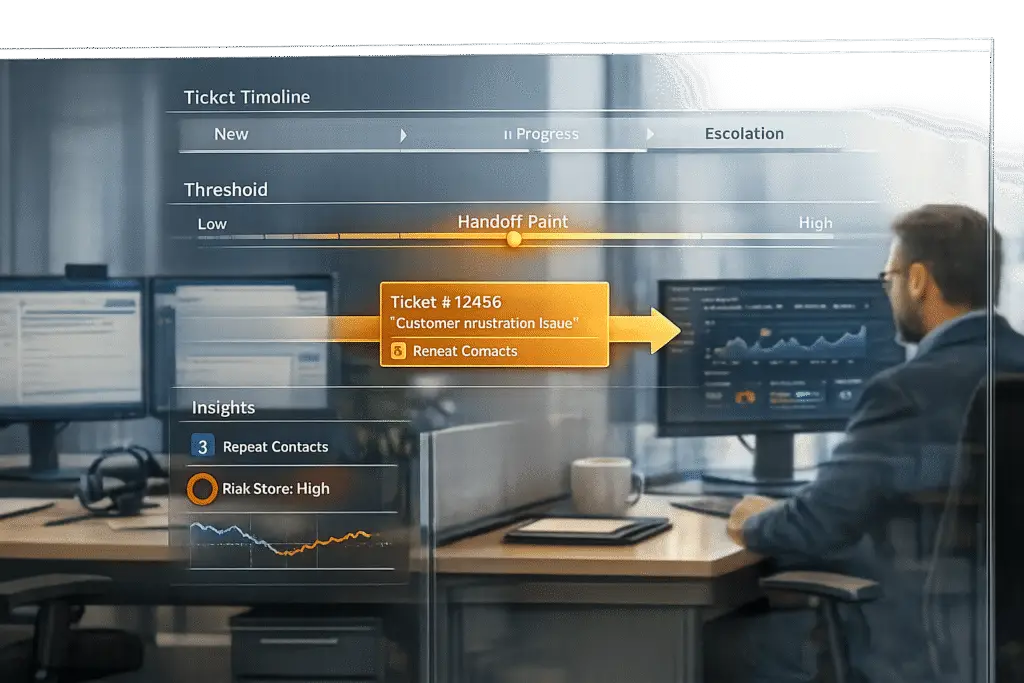
When does a support ticket become a Customer Success (CS) issue? It’s all about timing, clear boundaries, and measurable triggers. Without these, teams waste time, customers get frustrated, and businesses risk losing revenue. Here’s what you need to know:
- Support tickets are reactive and focus on quick fixes like login errors or billing issues.
- CS issues are proactive and deal with long-term challenges like poor product adoption or renewal risks.
- Key triggers for handoff include customer frustration (e.g., aggressive language), unresolved tickets (e.g., loop detection), and high-value account risks (e.g., mentions of cancellation or pricing concerns).
- AI tools in customer support can detect sentiment, predict escalations, and automate context-sharing to ensure smooth handoffs.
- Warm handoffs – where agents are introduced by name and have full conversation history – improve customer satisfaction and resolution times.
Support Tickets vs Customer Success Issues: Key Differences and Escalation Triggers
When to Hand Off: Criteria and Triggers
Signals That Trigger a Handoff
Timing a handoff correctly can make or break customer interactions. The best teams rely on clear, measurable indicators instead of guesswork to determine when a ticket needs to move into Customer Success (CS) territory.
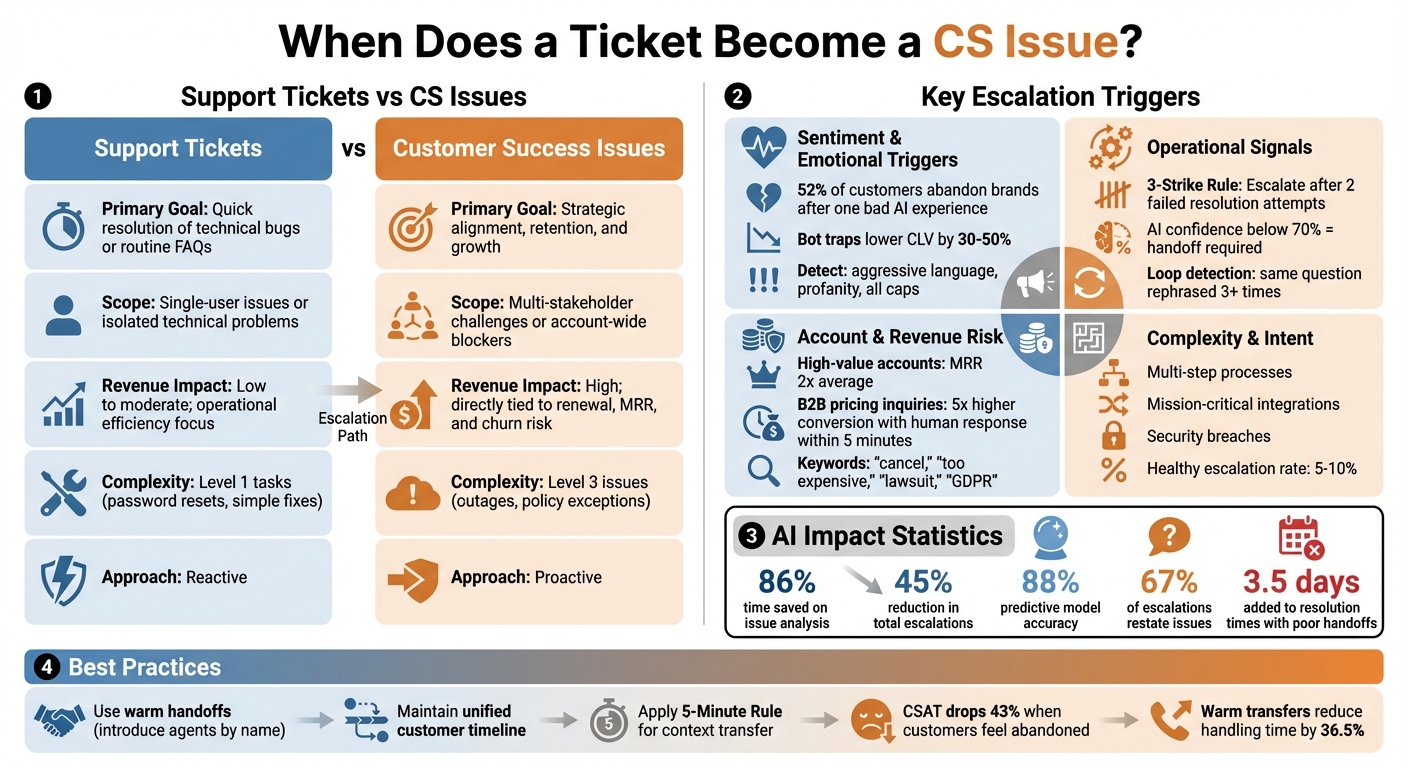
Sentiment and emotional triggers are some of the most reliable signs. For instance, when AI detects heightened frustration – such as customers using aggressive language, profanity, or typing in all caps – it’s time to escalate. Why? Because 52% of customers will abandon a brand after just one bad experience with AI support [3]. Getting stuck in a "bot trap", where users are caught in an endless automated loop, can lower Customer Lifetime Value (CLV) by 30% to 50% [3].
"The difference between AI support that builds customer loyalty and AI that destroys it isn’t just about the sophistication of your natural language processing… It’s about escalation architecture – the deliberate design of when, how, and why your AI recognizes its limits." – Devashish Mamgain, CEO & Co-Founder, Kommunicate [3]
Operational signals also play a major role. For example, a ticket should escalate when the same question is rephrased three or more times without resolution (a sign of "loop detection"), when tickets are reopened, or when they exceed SLA timeframes. A "3-Strike" Rule works well here: after two failed attempts to resolve a query, the ticket automatically escalates [3]. Additionally, if an AI agent’s response confidence dips below 70%, it’s better to hand off the ticket than risk an incorrect or "hallucinated" answer [6].
Account and revenue risk is another critical factor. High-value accounts – those generating Monthly Recurring Revenue (MRR) that is twice the average – or customers in a renewal window should trigger immediate handoffs. Similarly, visits to "cancel subscription" pages or mentions of keywords like "cancel", "too expensive", "upgrade", "custom quote", "GDPR", or "lawsuit" should activate emergency protocols for Revenue Protection, Legal, or Churn Prevention [3]. Human intervention can make a big difference here; B2B companies see a 5x higher conversion rate when pricing inquiries are addressed by humans within 5 minutes compared to bots [3].
Complexity and intent also dictate handoffs. Issues involving multi-step processes, mission-critical integrations, or high-stakes problems like security breaches require human attention. A balanced support system typically has an escalation rate of 5–10% [3]. AI tools can help by predicting escalations, saving 86% of the time spent on issue analysis and reducing total escalations by 45%, with predictive models achieving around 88% accuracy [4].
These metrics and triggers help distinguish between standard support tickets and more strategic CS issues, as shown below.
Support vs. CS: Comparison Table
Here’s a quick breakdown of how support tickets differ from CS issues, making it easier to decide when to escalate:
| Feature | Support Ticket Characteristics | Customer Success (CS) Issue Traits |
|---|---|---|
| Primary Goal | Quick resolution of technical bugs or routine FAQs | Strategic alignment, retention, and growth |
| Scope | Single-user issues or isolated technical problems | Multi-stakeholder challenges or account-wide blockers |
| Revenue Impact | Low to moderate; focused on operational efficiency | High; directly tied to renewal, MRR, and churn risk |
| Complexity | Level 1 tasks like password resets or simple fixes | Level 3 issues such as outages or policy exceptions |
| Trigger | Standard SLA breaches or technical limits | Sentiment shifts, high-value accounts, or growth opportunities |
To keep escalation processes sharp, review escalated conversations monthly. Update keyword lists with actual customer language examples and include summaries of customer intent, attempted solutions, and emotional tone to avoid repeating mistakes [3][5].
sbb-itb-e60d259
How to Build a Handoff Workflow
Step-by-Step Handoff Process
To create a smooth and scalable handoff workflow, focus on three key phases: laying a strong foundation, fostering real-time collaboration, and incorporating predictive tools for optimization. These stages ensure seamless transitions from support tickets to customer success (CS) issues.
Phase 1: Foundation begins with mapping out your support systems. This means integrating your help desk, CRM, and call recordings into a single, unified view. Clearly define issue categories – such as Technical, Business, or Critical – and establish automatic escalation rules based on factors like sentiment or complexity [[7]](https://docs.buildbetter.ai/pages/Use Cases/cs/support-handoff). This setup ensures every team member knows where to find key information and what triggers a handoff.
Phase 2: Intelligent Collaboration takes things further by creating a unified customer timeline. This allows both support and CS teams to access real-time updates without switching between tools. An AI routing system matches issues with the right experts based on skills and availability, while handoff metrics measure how effectively transitions are handled [[7]](https://docs.buildbetter.ai/pages/Use Cases/cs/support-handoff). One major focus here is avoiding the "Repeat Yourself" trap. Currently, 67% of escalations require customers to restate their issue, and poorly managed handoffs can add an average of 3.5 days to resolution times [[7]](https://docs.buildbetter.ai/pages/Use Cases/cs/support-handoff). This phase works to minimize such delays and improve overall efficiency.
Phase 3: Advanced Optimization uses predictive models to catch escalation risks before they escalate into major problems. Automated updates during transitions keep customers informed, reducing confusion and stress. AI-driven processes at this stage can cut resolution times dramatically, saving up to 86% of the time – reducing cycles from 10–22 hours to just 1–3 hours [4]. This phase also introduces tools like dynamic SLA adjustments and automated customer notes to streamline the process.
A key tool here is the "Context Package", which provides an automated briefing containing the customer’s goals, diagnostics, and technical details. Without this, 78% of critical context is often lost during manual handoffs [[7]](https://docs.buildbetter.ai/pages/Use Cases/cs/support-handoff). To avoid this, apply the "5-Minute Rule": if transferring context takes longer than five minutes manually, use AI to automate it [[7]](https://docs.buildbetter.ai/pages/Use Cases/cs/support-handoff).
Whenever possible, use "Warm Handoffs" by introducing the new CS team member to the customer by name and highlighting their expertise. This approach prevents the feeling of being abandoned mid-conversation, which can cause CSAT scores to drop by 43% [[7]](https://docs.buildbetter.ai/pages/Use Cases/cs/support-handoff).
Using Dynamic SLAs and Customer Notes
Dynamic SLAs (Service Level Agreements) add flexibility to your response priorities, adapting to the specific needs of each customer. Instead of static response times, these SLAs adjust based on AI risk scores, customer entitlement levels, and other factors. For instance, a customer showing "Active Frustration" (Level 3) might trigger a 30-minute response target, while a high-value account (with an MRR over twice the average) could require a 15-minute response [1]. This tailored approach significantly reduces resolution times and increases satisfaction.
Sentiment analysis plays a crucial role here, acting as a trigger for dynamic SLAs. For example, if a high-value customer shows signs of frustration – like repeated conversation loops or negative sentiment – AI systems can automatically prioritize their case [5]. These tools use subtle signals to flag issues that need immediate attention.
AI-generated customer notes further streamline the process by summarizing key details into a concise, two-sentence briefing. Instead of combing through 15+ messages for context, agents can read the AI summary and start resolving the issue within 30 seconds [3]. This approach not only saves time but also prevents "Context Blindness", where agents lack visibility into what’s already been attempted, ultimately reducing Average Handle Time (AHT).
"The handoff isn’t a failure of automation. Deflection isn’t resolution. Smooth human handoffs aren’t an admission of defeat – they’re an essential part of a healthy, scalable support system." – AI Shortcut Lab [1]
Proactive communication during handoffs is critical. Let customers know the human agent has access to the full conversation history. This reassurance eliminates the fear of having to repeat themselves and sets clear expectations [1]. When customers feel confident their issue is understood, satisfaction rates increase, and resolution times decrease.
Build a Customer Support Escalation System in n8n (That Actually Works)
Using AI to Automate Handoffs
AI is stepping into the handoff process to improve how issues are detected and routed, making workflows more efficient.
AI Tools for Detecting CS Issues Early
AI has changed the game in analyzing tickets, helping identify when customer service (CS) teams need to step in. By interpreting meaning and sentiment, AI can spot urgent problems – even when customers use unclear or vague language. For example, it can detect a production outage even if the subject line doesn’t explicitly say so.
Sentiment analysis plays a key role here, flagging emotions like frustration, anger, or urgency as soon as they appear [8]. When paired with predictive CSAT (Customer Satisfaction) and CES (Customer Effort Score) models, these tools can predict which tickets might lead to poor experiences before feedback surveys are even sent [9]. AI also picks up on urgency by identifying phrases such as "system down" or "cannot log in", and it monitors rapid follow-ups to confirm escalating dissatisfaction. Through CRM integration, the system automatically prioritizes tickets from high-value or "Premier" clients, ensuring they go straight to CS teams instead of general support queues [8].
"AI is revolutionizing the operational backbone of support by bringing intelligence and context-awareness to ticket routing and prioritization."
- Nooshin Alibhai, Founder and CEO of Supportbench [8]
Unlike traditional rule-based systems that rely on rigid logic and specific keyword matches, AI-powered systems adapt to context, tone, and variations in customer language without needing constant manual updates.
With early detection improved, AI takes the handoff process even further by streamlining other key steps.
Supportbench‘s AI Features for Handoffs
Supportbench integrates AI tools directly into its platform, simplifying handoffs with features like auto-tagging, ticket summarization, and automated escalations [9]. When a ticket arrives, AI generates a quick summary of the issue, saving time for CS teams during their review [8].
Predictive scoring is another standout feature. Supportbench assigns predictive CSAT, CES, and First Contact Resolution scores to every ticket. These scores help identify high-friction cases that might need immediate attention, even before customers provide feedback [9]. Factors like sentiment, customer value, interaction history, and urgency signals are all considered to create a detailed risk profile. Additionally, the system dynamically adjusts SLAs (Service Level Agreements) based on the ticket’s content and urgency, ensuring priorities are always aligned with the situation [10].
Intelligent ticket routing takes efficiency up a notch. By analyzing agent skills, workload, and language proficiency, AI matches tickets to the most qualified team members right from the start [8]. This reduces unnecessary back-and-forth transfers and ensures high-priority customers are connected to senior CS team members immediately.
"AI sets priorities by analyzing multiple factors."
- Supportbench [8]
Common Handoff Mistakes to Avoid
When it comes to handoffs in customer support, even small missteps can cause big problems. These errors can create frustration, waste time, and damage trust – whether you’re relying on AI or human teams. Knowing what commonly goes wrong and how to correct it can help keep your support and customer success teams working in sync.
Over-Escalation and Unclear Ownership
Over-escalation happens when issues are sent to customer success teams too soon, flooding human agents with problems that automation could handle. On the flip side, under-escalation leaves customers stuck in unproductive loops, often leading them to abandon the service altogether. In fact, a single frustrating bot experience can push up to 70% of customers to switch brands [3]. Ideally, a healthy support system keeps escalation rates between 5–10% [3], though some workflows aim for rates as high as 20–35% for better overall outcomes [6].
A big contributor to these problems is unclear ownership. Tickets often get routed to the wrong teams, such as billing issues landing in technical support queues or high-value clients waiting in general support lines instead of getting priority attention. This creates a "swivel-chair" effect, where customers repeatedly explain their issue to different agents, leading to wasted time and mounting frustration [5][2].
To avoid these pitfalls, define clear escalation triggers. For example, automatically escalate when AI confidence drops below 40%, when sentiment spikes sharply, or after three failed attempts to resolve an issue [1][6]. Additionally, segmenting customers by value – like setting up "fast lanes" for high-priority accounts – ensures that Enterprise or Premier clients bypass standard queues for faster service [3][6].
But escalation isn’t the only area where things can go wrong. Preserving context during handoffs is just as important.
Lost Context and Disconnected Metrics
Keeping customer context intact during handoffs is critical for smooth problem resolution. One of the most frustrating failures is when customers explain their issue to a chatbot, only to have the human agent start from scratch with no knowledge of the prior conversation. Alarmingly, one in three agents lacks the information they need to deliver a seamless experience [11]. This forces customers to repeat themselves, leading to dissatisfaction.
Disconnected metrics can make matters worse. For example, some teams focus on "deflection" – where a bot ends the interaction – rather than "resolution", which ensures the problem is fully solved. This can inflate automation success rates while masking deeper handoff issues. A case in point: In August 2025, the Commonwealth Bank of Australia launched an AI voice bot aimed at cutting call volumes by 2,000 per week. Instead, poor handoff processes increased human workloads and forced agents into overtime [11].
To prevent these issues, use unified platforms that bundle customer data – like IDs, conversation history, intents, and confidence scores – so it can transfer seamlessly between systems without losing details [12]. AI-generated summaries (just 3–5 sentences) can also help agents quickly understand the situation without wading through lengthy chat logs [12][3][13]. Additionally, "warm handoffs", where agents greet customers by name and reference their earlier interaction with the bot, go a long way in maintaining trust [2][6].
Finally, track handoff-specific metrics to measure success. Aim for a customer satisfaction (CSAT) score above 85% and keep repeat question rates below 5% to ensure your handoffs are as smooth as possible [12].
Conclusion
Knowing when a support ticket transitions into a customer success issue is all about ensuring smooth handoffs that preserve context and maintain customer trust. These transitions aren’t a sign of automation falling short – they’re a deliberate move to connect customers with the right expertise exactly when they need it.
The key to successful handoffs lies in using measurable triggers. These triggers help escalate issues before minor frustrations grow into major problems. By adopting this approach, support teams can bridge the gap between reactive ticket handling and proactive customer success strategies.
Warm transfers play a critical role here. When agents have access to the full conversation history, they can reduce handling time by 36.5% compared to cold transfers [2]. This not only saves time but also improves the overall experience for the customer.
AI-powered ticket routing and prioritization tools like automated summarization, sentiment detection, and escalation prediction are powerful aids, but they don’t replace human judgment. By 2029, it’s projected that AI will autonomously resolve 80% of routine issues [5]. However, the remaining 20% will still require the empathy and creativity that only humans can provide. Klarna CEO Sebastian Siemiatkowski captured this sentiment perfectly after shifting back to a hybrid support model in May 2025:
"We focused too much on efficiency and cost… The result was lower quality, and that’s not sustainable. Really investing in the quality of the human support is the way of the future for us" [2].
Striking the right balance between technology and human insight is at the heart of effective handoffs. By establishing clear ownership, aligning on shared metrics, and maintaining context throughout the process, teams can achieve faster resolutions, boost customer satisfaction, and create stronger collaboration between support and success teams.
FAQs
What’s the fastest way to set handoff triggers without over-escalating?
The quickest way to improve the escalation process is by using AI-powered tools to automate and simplify it. These tools can evaluate elements like customer sentiment, response times, and case history, then trigger automated workflows based on predefined risk levels. This approach ensures that escalations are based on solid data, happen promptly, and are reserved for situations where key risk factors are present. As a result, unnecessary escalations are minimized while maintaining a high level of responsiveness.
How do you package context so CS doesn’t make the customer repeat themselves?
To avoid making customers repeat their concerns, focus on transferring clear and well-structured details during handoffs. Share critical information such as issue history, customer sentiment, urgency, and the impact on their business. Use accessible formats like AI-generated summaries or unified timelines to streamline this process. Automate workflows by setting up escalation triggers and assigning clear ownership of tasks. Tools like sentiment analysis and case-routing help customer service teams maintain full visibility, cutting down delays, reducing frustration, and resolving issues faster.
Which handoff metrics prove the workflow is working?
When measuring the effectiveness of handoffs, key metrics to watch include a reduction in resolution delays and the retention of at least 78% of critical context during transitions. These factors contribute to a 63% faster resolution speed, which plays a major role in boosting customer satisfaction and loyalty. By keeping a close eye on these metrics, teams can ensure smoother collaboration and deliver better results for their customers.






