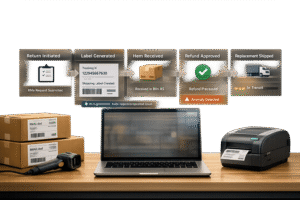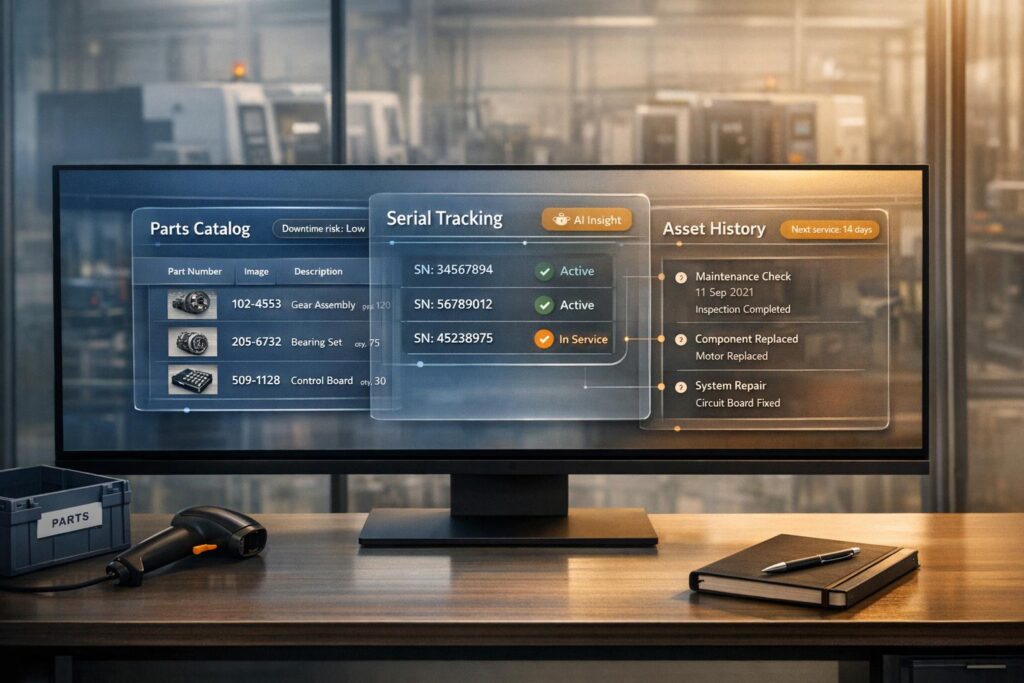
When manufacturing equipment breaks down, the biggest challenge is finding the right information quickly. Support teams often juggle disconnected systems, leading to delays and frustration. A customer portal solves this by centralizing parts catalogs, serial tracking, and asset history in one platform. Customers can:
- Locate replacement parts and check availability.
- Track serial numbers for warranty and service validation.
- Access complete service and maintenance history.
This approach reduces downtime, streamlines support, and empowers customers to resolve issues without waiting for assistance. Companies like Panda Kitchen and Bath have seen major efficiency gains, handling over 5,000 daily online orders and reducing reliance on support teams. By integrating ERP, CRM, and real-time data, a well-built portal ensures faster resolutions, consistent service, and better customer satisfaction.
Customer Portal for Service Industries
sbb-itb-e60d259
Key Features of a Manufacturing Customer Portal
A manufacturing customer portal is designed to tackle operational headaches. Core features like parts catalog management, serial number tracking, and asset history access empower support teams to handle complex problems, reducing the burden of repetitive inquiries.
Parts Catalog Management
Technicians often need immediate access to replacement parts – imagine a CNC machine breaking down at 2:00 AM. A parts catalog integrated with your ERP system ensures accurate pricing and availability, cutting down on order mistakes and expensive returns.
The best portals go a step further by offering Bill of Materials (BOM) access. This allows customers to view the precise components used in their equipment, eliminating guesswork. For instance, instead of trying to figure out which version of a part fits, a technician can locate the exact match. This precision minimizes downtime and gets production up and running faster. Manufacturers starting their digital transformation can begin with spare part kits for scheduled maintenance, gradually expanding to a full catalog for quicker results with less complexity [3].
Advanced search tools make the process even smoother. Features like synonym support and spell check help users find parts quickly, even without exact part numbers [4]. Integration with Product Information Management (PIM) systems ensures that product data remains detailed and consistent across all platforms.
But managing parts is just the start – tracking each unit with precision takes service to the next level.
Serial Number Tracking
Serial numbers act as the key identifier for equipment, linking physical assets to their digital records and creating a complete lifecycle history. This tracking helps validate warranties, manage recalls, and ensure compliance with industry regulations, such as MIL-STD-130 in defense or standards for medical devices.
"Lose track of a serial number, and you can’t process a warranty claim, handle a recall, or prove chain of custody."
– Bizowie [6]
The real value of serial number tracking lies in monitoring parent-child hierarchies. For example, if a spindle in a CNC machine is replaced, the service record follows that specific part rather than the entire machine. This prevents "ghost assets" and ensures warranties are utilized effectively. Companies using UID-based maintenance have reported a 70% drop in unplanned downtime and a 25% cut in maintenance costs by shifting from reactive to predictive strategies [5].
Modern portals offer lightning-fast scan-to-work-order functionality – taking less than 10 seconds [5]. A technician can scan a serial number with a mobile device to instantly access service history, current health data, and work orders, eliminating manual entry errors. This efficiency cuts warranty claim processing time from hours to minutes [6] and reduces ghost assets by 95% within 90 days [5].
AI tools can further enhance tracking by analyzing serial-level data to predict maintenance needs before issues arise.
Asset History Access
By combining detailed parts and serial data, centralized asset history enables proactive maintenance. When customers can access digital machine files, service records, and maintenance plans all in one place, they can predict failures and schedule maintenance during planned downtime instead of responding to emergencies.
Connecting serial numbers with real-time health data allows for failure prediction, automatic work order generation, and pre-checked inventory. This creates a "digital thread", linking data points like vibration analysis and current work orders into a continuous stream of actionable insights [5].
"The UID number is the anchor for this thread. When a technician scans a UID using a mobile CMMS, they aren’t just seeing a part number; they are accessing a live stream of data."
– Tim Cheung, CTO and Co-Founder, Factory AI [5]
For customers, this means they can track repair progress and monitor equipment health without needing to contact support. For manufacturers, it results in fewer routine queries, freeing up teams to focus on strategic tasks. The portal becomes a central hub, connecting customers, service teams, and partners in real-time, replacing inefficient email chains and phone calls.
How to Implement a Manufacturing Customer Portal
Creating a manufacturing customer portal starts with understanding where your data resides. Service agents spend nearly 40% of their time searching through disconnected systems [7]. This challenge becomes even more complex when dealing with equipment that can last 10–30 years [7]. The solution? Bring together transactional data from ERP systems (like SAP or Oracle), technical details from PDM systems, and operational data from SCADA or PLC systems into one centralized hub. Begin by auditing where vital information is stored – order histories, spare parts catalogs, PDF manuals in SharePoint, and maintenance logs scattered across departments. It’s also critical to establish role-based access early on, ensuring that distributors, technicians, and procurement teams can access only what they need [2]. Below, we outline the steps to transform fragmented data into a unified, AI-powered portal.
Define Requirements and Map Data Sources
To create a seamless support experience, start by identifying and categorizing your data streams. Focus on the most frequent support requests your team handles. For example, if inquiries about a specific pump model or CNC machine dominate, prioritize those cases to test API performance and demonstrate ROI quickly [7]. Break your data into four key categories:
- Transactional: Order statuses, invoices, and custom pricing from ERP systems.
- Technical: Exploded diagrams and SKU lists from PDM systems.
- Operational: Equipment runtime and alarms from SCADA systems.
- Support: Manuals, certifications, and case histories from ticketing systems [7].
This process will highlight gaps, such as undocumented expertise, and emphasize the need for standardized APIs using RESTful architecture.
Select and Configure the Portal Platform
Once you’ve mapped your data, choose a platform that fits the complexity of B2B operations rather than high-volume B2C ticketing systems. Look for a headless architecture that integrates with your current CRM and ERP systems via APIs, avoiding a complete system overhaul [7]. The platform should include AI tools for tasks like document extraction, predictive maintenance, and natural language search across databases. Security is non-negotiable – ensure the platform complies with SOC 2 Type II and ISO 27001 standards [1][11]. Mobile access is essential too; field technicians need to scan serial numbers and access service records on the go [2]. Additionally, ensure the platform supports role-based permissions, so distributors can see pricing details without accessing sensitive internal notes.
Integrate Systems and Build Key Modules
Start integrating systems by focusing on high-volume cases to test your APIs under real-world conditions before scaling [7]. Use Python or TypeScript SDKs to create custom logic that accounts for equipment age and manufacturer-specific terminology. Legacy AI models often misclassify older equipment, with error rates as high as 25%; custom routing can reduce these errors by 60% [7]. Connect real-time telemetry from SCADA systems with ERP parts data to form a "single source of truth" that links equipment health to service history [1][7]. Build the portal in phases: start with a parts catalog, then add serial tracking, and finally incorporate asset history with predictive alerts. This step-by-step approach ensures each module is tested and refined before adding more features.
Enable AI for Automation and Predictive Insights
AI can amplify your team’s capabilities by turning unstructured data – like scanned logs or PDF manuals – into structured, actionable information using tools like computer vision and large language models [8]. Some platforms offer "visual grounding", which highlights source data (e.g., bounding boxes) so engineers can verify updates with full traceability [8]. Combine real-time telemetry with historical failure data to generate predictive alerts, helping you address issues before equipment breaks down. Reactive maintenance costs three to five times more than planned preventive maintenance [9]. Start small by standardizing documents for one machine family to demonstrate ROI, then expand. Always include human oversight in AI-driven maintenance recommendations before integrating them into workflows [10].
Test, Launch, and Train Users
Pilot the portal with key stakeholders like field service managers, distributors, and major accounts [11]. Track metrics such as First Contact Resolution (FCR) and Average Handle Time (AHT) for at least 60 days after launch to identify areas where users may need extra training [7]. Build comprehensive knowledge bases and digital spare parts catalogs directly into the portal to encourage self-service and reduce the support team’s workload [2][1]. Effective change management and user adoption are critical – over 50% of successful AI implementations depend on these factors [11]. Finally, brand the portal to match your company’s identity, ensure it works seamlessly on mobile devices, and provide clear documentation. Monitor how users interact with the portal to identify the most valuable features and focus training efforts there. A thoroughly tested and well-trained user base is the cornerstone of delivering a unified, AI-driven support experience.
Common Challenges in Manufacturing Portals and How to Solve Them
Even the best-planned portal implementations can hit roadblocks, often affecting both timelines and budgets. Manufacturing, as a sector, is a frequent target for cybercrime, accounting for 26% of all reported incidents [18]. Beyond these security threats, teams often grapple with fragmented data, resistance to new systems, and the difficulty of integrating decades-old equipment with modern cloud platforms. These challenges, while common, often follow predictable patterns, making them manageable with the right strategies. Let’s dive into some of the most frequent hurdles and how to address them effectively.
Data Integration and Migration
Legacy systems are a notorious challenge. Outdated ERP and MES platforms often operate in isolation across departments, creating inconsistent and redundant data [12][13]. On top of that, manual data entry introduces errors, further degrading data quality and impacting outcomes [13].
A phased migration approach using Change Data Capture (CDC) offers a practical solution. CDC allows real-time synchronization of data from on-premise systems to the cloud without interrupting critical operations [13]. Start with a thorough data audit to map how information flows between ERP, CRM, and MES systems. Identify gaps and redundancies before initiating the migration [12]. Tools like Jitterbit or Boomi, categorized as Integration Platform as a Service (iPaaS), can connect legacy systems to modern portals through pre-built connectors, avoiding the need for a complete system overhaul [12][13]. Automated data cleaning tools can validate and correct incoming data, ensuring accuracy. This streamlined approach can cut time-to-production by up to 50% compared to traditional manual methods [14]. Proper data integration is the foundation for creating a centralized hub capable of supporting AI-driven features.
User Adoption and Training
Once data issues are resolved, the focus shifts to user adoption and training. Simply launching a portal isn’t enough. Resistance to change, competing priorities, and outdated training materials can all hinder adoption [15][17][16].
To tackle these issues, create tailored communication plans for different stakeholders. For example, managers need to understand the return on investment (ROI), while field technicians should see how the portal makes their work easier and faster [16]. Wait until the portal’s configuration is finalized before developing training materials to ensure they accurately reflect the live system [16]. Offer a variety of training formats, such as:
- Instructor-Led Training (ILT): Ideal for detailed, interactive sessions.
- Recorded Demo Videos (RDVs): Short, under-20-minute walkthroughs for visual learners.
- Quick Reference Cards (QRCs): Handy, concise guides for on-the-job support.
Additionally, identify "change champions" within your organization – team members who can provide peer-to-peer support and encourage long-term adoption. For example, in March 2025, Integrant launched an AI-powered portal for a pharmaceutical manufacturing client. The portal, featuring self-service tools and personalized dashboards, reduced time-to-production by 50% and boosted customer engagement [14].
Security and Role-Based Access
Customer portals, when linked to operational technology, can introduce new vulnerabilities. A breach in an IT-based portal can quickly spread to production systems like PLCs and SCADA, potentially halting assembly lines [18]. Third-party access also poses risks, especially when vendors are granted excessive privileges [19]. Managing these risks is time-intensive, with security teams spending over 47 hours per week analyzing third-party access issues [19].
To mitigate these risks, implement a least privilege access model. Ensure that both internal users and third-party vendors have access only to the specific functions and data they need [19]. Multi-factor authentication (MFA) is crucial to defend against phishing and compromised credentials, which remain common attack methods [20]. Maintain an up-to-date inventory of all third parties with portal access – currently, 43% of organizations lack full visibility into who can access their systems [19]. Network segmentation is another critical step, isolating the customer-facing portal from core industrial control networks to prevent lateral movement during a breach [18]. Adopting a cybersecurity mesh architecture can significantly reduce the financial impact of security incidents, by as much as 90% [20]. Finally, ensure compliance with key security frameworks, including:
- IEC 62443: For industrial automation security.
- NIST SP 1800-10: For securing industrial control systems.
- ISO/IEC 27001: For information security management [18].
KPIs for Measuring Customer Portal Performance
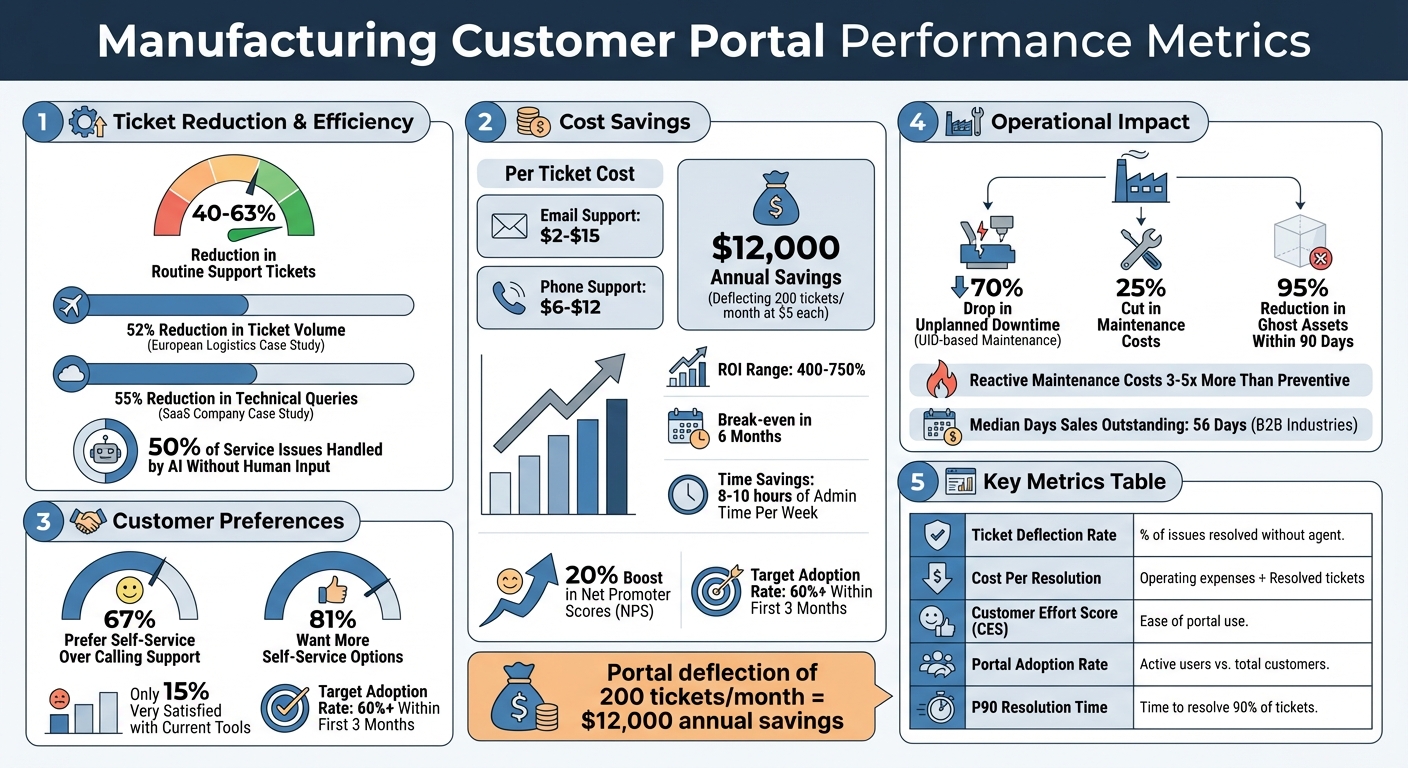
Manufacturing Customer Portal ROI: Key Performance Metrics and Cost Savings
Once your portal is live and secure, the next step is figuring out if it’s doing its job. Without clear metrics, it’s impossible to know whether the portal is simplifying processes or creating more headaches. Management expert Peter Drucker summed it up perfectly: "If you can’t measure it, you can’t manage it" [23]. The goal is to focus on metrics that align with operational efficiency, customer satisfaction, and financial outcomes. Let’s dive into the key indicators that can validate your portal’s performance.
Operational Efficiency Metrics
Start by tracking ticket deflection rate and First Contact Resolution (FCR) to measure how much workload the portal reduces and how quickly issues are resolved. The ticket deflection rate indicates the percentage of problems solved directly through the portal, eliminating the need for agent involvement [25]. Studies show that customer portals can cut routine support ticket volumes by 40% to 63% [25]. For instance, a European logistics company introduced an AI-powered portal with real-time tracking and proactive delay notifications in 2024. Within six months, they achieved a 52% reduction in ticket volume and improved customer satisfaction [25].
FCR measures the percentage of tickets resolved on the first attempt [24]. If customers still submit tickets after using the portal, monitor the ticket-after-portal rate to identify gaps in content or navigation issues [25]. A mid-sized SaaS company found that 40% of their tickets were related to just ten common feature setup questions. By adding an in-app knowledge base with AI-suggested articles, they reduced technical queries by 55% in three months [25].
To avoid overlooking outliers, report median and P90 (90th percentile) metrics to capture those worst-case scenarios [26]. Also, keep an eye on portal adoption rates – the number of active users compared to your total customer base. A good benchmark is a 60%+ adoption rate within the first three months. Anything lower might point to usability problems or a lack of awareness [25][27].
While operational metrics are essential, the customer’s experience with the portal is just as critical.
Customer Satisfaction and Retention
For portals, Customer Effort Score (CES) often matters more than general satisfaction surveys. CES measures how easy it is for users to navigate the platform and find what they need [24]. If customers struggle to locate parts manuals, asset history, or serial numbers, they’re likely to abandon the portal and call support – defeating its purpose.
Customer Satisfaction (CSAT) surveys can also provide valuable feedback, but keep them short and specific. Ask targeted questions like, “How easily did you find the information you needed?” rather than broad satisfaction queries. Retaining customers is far cheaper than acquiring new ones, and companies with effective self-service tools often see a 20% boost in Net Promoter Scores (NPS) [25].
For industries like manufacturing, track metrics like On-Time Delivery (OTD) and Customer Return Rates, as these are closely tied to portal usage and satisfaction [21][22][23]. When customers can quickly access asset history or serial numbers, they’re better equipped to troubleshoot issues before they escalate into returns or warranty claims.
Cost Savings and ROI
The financial impact of a portal is often most evident in Cost Per Resolution, which is calculated by dividing total operating expenses by the number of resolved tickets [24]. Support ticket costs range from $2–$15 for email and $6–$12 for phone interactions [25]. If your portal deflects 200 tickets per month at an average cost of $5 per ticket, you’re looking at annual savings of $12,000 [25].
B2B companies frequently see ROI figures ranging from 400% to 750%, often breaking even within six months [27].
Thomas Franklin from Swapped shared: "My ROI is pretty good – from my own calculations, I’m saving somewhere around 8–10 hours of admin time per week through the platform, which comes to a massive productivity boost" [27].
Another financial metric to monitor is Days Sales Outstanding (DSO). The median DSO for B2B industries is 56 days, but portals can reduce this by offering instant access to invoices and payment details [27]. AI-enabled portals can handle about 50% of service issues without human input [25], freeing your team to focus on tasks that require personal judgment and expertise.
| Metric | What It Measures | Why It Matters |
|---|---|---|
| Ticket Deflection Rate | Percentage of issues resolved via portal without agent involvement [25] | Indicates how well the portal reduces support workload |
| Cost Per Resolution | Total operating expenses / Number of resolved tickets [24] | Measures the cost-effectiveness of support operations |
| Customer Effort Score (CES) | Ease of using the portal [24] | Strongly predicts customer retention |
| Portal Adoption Rate | Active portal users vs. total customer base [25] | Shows whether customers are engaging with the portal |
| P90 Resolution Time | Time to resolve 90% of tickets [26] | Highlights worst-case scenarios that could lead to churn |
Conclusion
A manufacturing support portal offers a practical way to lower costs, lighten the workload for support agents, and give customers the tools to solve problems on their own. With round-the-clock access to parts catalogs, serial numbers, and asset histories, customers can skip the hassle of waiting for business hours or navigating endless email threads. They get fast answers, while your team can focus on tackling more complex issues that demand human expertise. These benefits are backed by solid performance data.
For instance, portals can cut routine support tickets by 40% to 63%, and 67% of customers say they prefer self-service over calling for support [25]. If your operation fields hundreds of asset-related inquiries every month, this can lead to considerable savings and happier customers. Deflecting just 200 tickets a month could save about $12,000 annually [25].
AI-powered platforms like Supportbench take this a step further by automating tasks, predicting maintenance needs, and delivering accurate information right when it’s needed. With AI handling around 50% of service issues without requiring human involvement [25], your team has more time to focus on solving intricate technical problems.
Mary Beth Gibson, Director of Consulting at Logic20/20, summed it up well: "To meet (and possibly exceed) the escalating expectations of today’s customer, businesses are being challenged to increase the quantity as well as the quality of self-service capabilities within their customer portals" [28].
Still, there’s a noticeable gap between what customers want and what’s currently available – 81% of customers want more self-service options, but only 15% are very satisfied with the tools they have today [28]. By adopting a portal that integrates AI, works seamlessly on mobile, and connects directly to ERP and CRM systems, manufacturing support teams can close this gap. This not only meets customer expectations but also sets a new benchmark for efficiency, creating a unified, AI-driven support experience that aligns with the needs of modern manufacturing.
FAQs
What data is needed to launch a manufacturing support portal?
To set up a manufacturing support portal, you’ll need to gather and organize key data such as parts information, serial numbers, and asset history. On top of that, make sure to include essential operational details like maintenance notes, reasons for downtime, and quality check results. These elements will help create a portal that offers well-rounded functionality and effective support for your manufacturing processes.
How do we connect serial numbers to warranties, parts, and service history?
To link serial numbers with warranties, parts, and service history, assign each asset a unique identifier (UID). Incorporate this UID into your asset management system, connecting it to key records such as warranty information, parts used, and maintenance logs. This streamlined approach allows for accurate tracking and quick access to asset data, helping to resolve issues faster and enhance overall efficiency.
How can we prove ROI from a portal within 90 days?
To demonstrate ROI in just 90 days, focus on cutting down support workload and expenses in measurable ways. For instance, a portal that reduces routine tickets by 40–63% can lead to immediate cost savings. Let’s break it down: if you reduce 200 tickets per month, each costing $5, that’s an annual savings of $12,000.
AI-powered tools can make this even more effective. Features like automated interactions and personalized support streamline processes right from the start, slashing costs and boosting efficiency. By tracking these metrics early on, you can clearly show the financial impact and operational benefits.