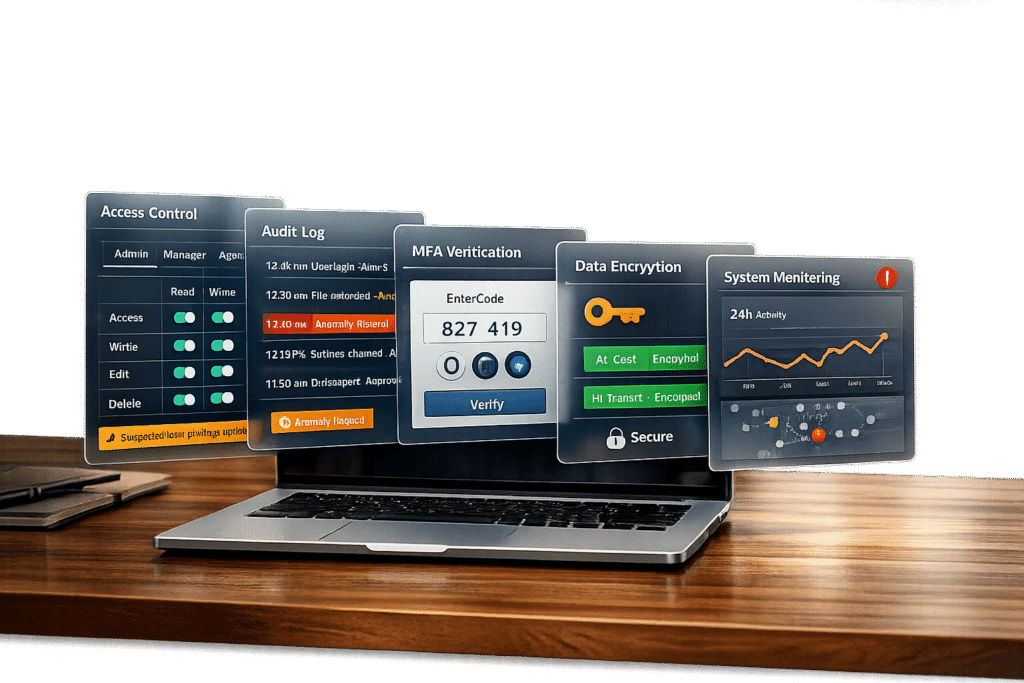
Building a customer portal for regulated industries like healthcare, finance, or government requires strict attention to compliance. Here’s what you need to know:
- Why It Matters: Non-compliance can lead to fines (e.g., GDPR up to €20M or 4% of global revenue) and damage trust. Centralized, secure portals with advanced features are the standard now.
- Key Challenges: Meeting complex standards like GDPR, HIPAA, or SOC 2 while balancing security and efficiency.
- Core Features:
- Audit Trails: Keep a detailed record of all actions for investigations and regulatory reviews.
- Role-Based Access Control (RBAC): Limit data access based on user roles to comply with data minimization principles.
- Activity Logging: Track every login, file change, and permission update for transparency.
Quick Overview of Steps:
- Pre-Design Planning: Identify regulations (GDPR, HIPAA, SOC 2, etc.), document security needs, and involve stakeholders early.
- RBAC Setup: Define roles, enforce least privilege, and regularly review permissions to prevent misuse.
- Audit Trails & Logs: Log all user activities, secure logs against tampering, and align retention policies with regulations.
- Security Measures: Encrypt data (AES-256, TLS 1.3), implement MFA, and automate vulnerability scans.
- Testing & Monitoring: Validate compliance features during development and continuously monitor for anomalies.
By integrating these features and steps, your portal will not only meet regulatory requirements but also build trust and efficiency for your organization.
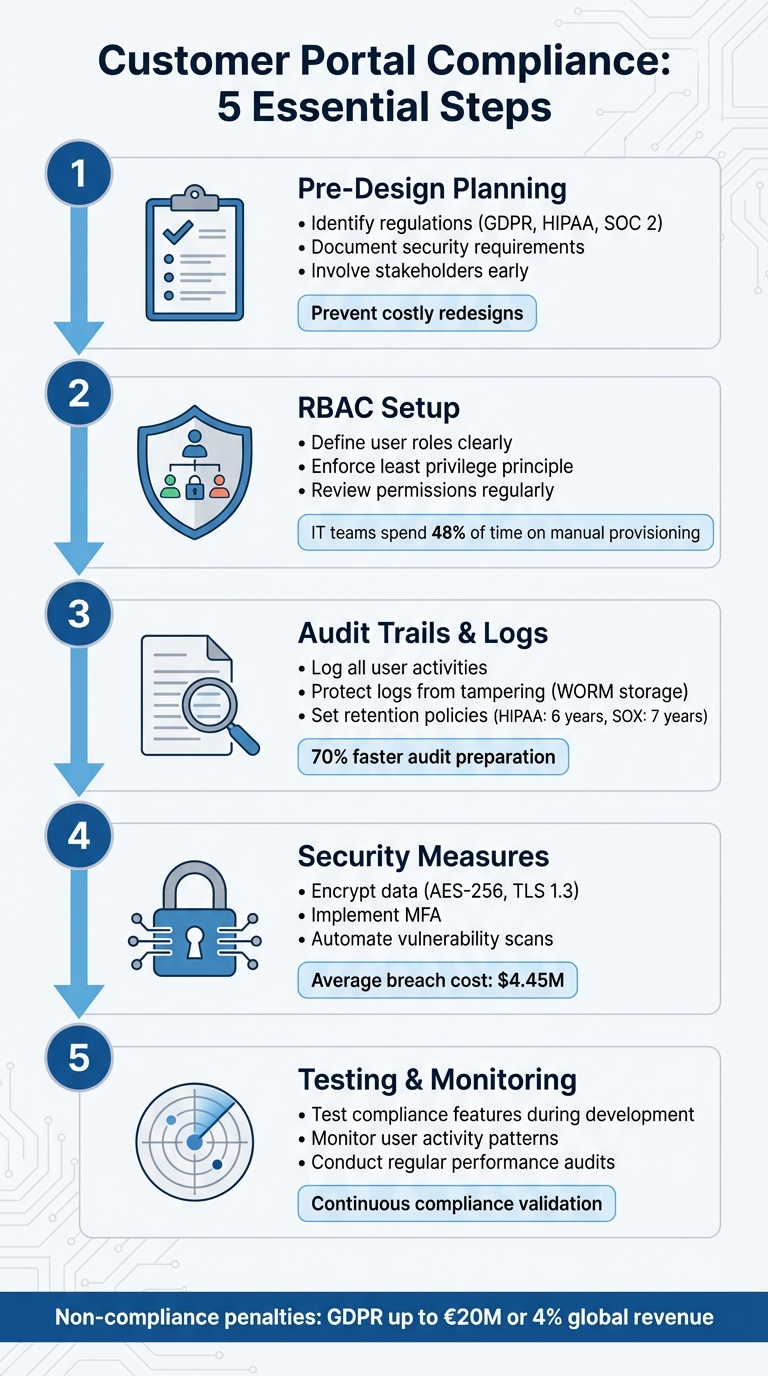
5-Step Customer Portal Compliance Checklist for Regulated Industries
Role-Based Access Control (RBAC) Explained: How It Works and Why It Matters for Security
sbb-itb-e60d259
Pre-Design Compliance Planning Checklist
Planning for compliance before starting any design or coding work is crucial. This phase ensures secure audit trails, Role-Based Access Control (RBAC), and activity logging are built into your portal from the start. Skipping this step can lead to expensive redesigns later. The goal here is to identify your regulatory responsibilities, map out security needs, and involve the right people to ensure nothing is overlooked.
Identify Your Regulations and Standards
The first step is understanding which regulations apply to your organization and the type of data you handle. For example:
- Healthcare: If you process Protected Health Information (PHI), you’re subject to HIPAA. This includes the Privacy Rule, Security Rule, and Breach Notification Rule.
- EU Personal Data: If your portal processes data from EU citizens, even if you’re based in the U.S., GDPR applies. GDPR emphasizes data minimization, the right to erasure, and strict rules about where data can be stored.
- Financial Services & SaaS: SOC 2 Type II certification is often pursued to validate security controls over time.
- California Residents: CCPA mandates transparency and enforces consumer privacy rights.
- Healthcare Portals: HL7 FHIR standards may be required for secure clinical data exchange via APIs.
- Enterprise Clients: ISO 27001 certification is often a must for information security management systems.
Before design begins, conduct a formal risk analysis. Map out where sensitive data resides, how it flows through your system, and identify potential threats like insecure APIs or credential theft. For PHI, establish Business Associate Agreements (BAAs) with third-party vendors to meet HIPAA requirements. Also, address data residency needs early – GDPR, for instance, may require EU data to stay on EU-based servers.
Finally, translate these regulatory and security standards into actionable controls and document them thoroughly.
Document Security and Access Requirements
With your regulations identified, the next step is to outline how your portal will comply. This includes documenting data flows, storage locations, access rights, and usage patterns. While compliance is the focus, this step also ensures transparency and control.
- Permission Hierarchies: Define roles and permissions clearly. For instance:
- Administrators: Configure workflows.
- Team Members: Access assigned workspaces.
- Clients: View their own documents.
- Auditors: Read-only access to logs.
- Example: Engineering teams might need access to technical documentation but not pricing, while procurement teams may need the reverse.
- Data Residency & Retention: Specify where data will be stored and set automated retention policies based on data type (e.g., retaining tax documents for seven years but marketing data for only 90 days).
- Encryption Standards: Document encryption protocols like AES-256 for data at rest and TLS 1.3 for data in transit.
- Multi-Factor Authentication (MFA): Plan for MFA using SMS codes, authenticator apps, or biometric verification.
- Core Workflows: Build security into essential workflows such as e-signatures, invoicing, and forms from the outset.
Involve Stakeholders from the Start
Once technical requirements are defined, gather input from all relevant teams. Compliance planning is a team effort, not a solo task. Bring in compliance officers, IT, HR, support, marketing, engineering, procurement, and quality assurance early to ensure alignment.
For example, support leaders and agents can share insights into common customer issues, helping you design self-service tools that reduce support tickets. Including customers in the requirements phase helps avoid an "internal-only" perspective and ensures the portal is user-friendly.
"Customer portal security isn’t just a compliance checkbox – it’s the foundation of client trust, operational efficiency, and competitive positioning." – The Moxo Team
Marketing teams also play a critical role in ensuring brand consistency and managing online communities or forums, which can handle up to 20% of support volume [3]. By involving all stakeholders early, you can prevent costly redesigns and ensure the portal meets functional and regulatory needs from the start.
RBAC Implementation Checklist
Role-Based Access Control (RBAC) plays a critical role in securing customer portals, especially in industries with strict regulations. By ensuring users only access what they need for their roles, RBAC strengthens compliance efforts and complements audit trails and activity logs. A structured approach to RBAC minimizes risks and simplifies regulatory adherence.
Define User Roles and Responsibilities
The first step is identifying the access requirements within your organization. Studies show IT teams dedicate nearly 48% of their time to manual provisioning requests, while employees lose up to five hours each week due to access-related issues [5]. These challenges often result from poorly defined roles.
You can approach this in two ways:
- Top-down: Managers define roles based on functional needs.
- Bottom-up: IT analyzes current permission patterns to identify common clusters.
Avoid generic titles like "User Level 3." Instead, opt for clear, descriptive names such as "Accounts Payable Processor" or "Clinical Data Reviewer." This clarity simplifies audits and reduces confusion.
Implement the Principle of Least Privilege (PoLP) right away. Start users with minimal access and add permissions only when absolutely necessary for business needs. This approach limits potential damage if credentials are compromised. Additionally, use Separation of Duties (SoD) to ensure critical tasks require multiple approvers. For example, one role might request a financial transaction, while another approves it.
"RBAC permissions are grouped into roles, rather than being directly assigned to individual users. Assign users to defined roles to streamline administration and enhance security." – Susan Stapleton, GRC Expert, Pathlock [4]
Document each role’s purpose, permissions, and responsibilities thoroughly. This documentation is invaluable during audits for frameworks like SOC 2, HIPAA, or ISO 27001. Collaborate across departments – IT, HR, security, compliance, and leadership – to ensure roles align with job functions and regulatory standards.
Configure Granular Permissions
Once roles are established, focus on defining the specific actions each role can perform. Permissions should be explicit, covering actions like "export data", "invite users", "change billing", or "approve transactions" [8].
Centralized enforcement is essential. Permissions must be enforced at both the API and service layers – not just at the user interface (UI). Without backend enforcement, permissions are reduced to mere suggestions.
"If your access control lives in the frontend, you do not have access control. You have a nicer looking incident." – Apptension [10]
For multi-tenant systems, implement tenant scoping to prevent data exposure between customers. For instance, a support agent at Company A should never access Company B’s data, even if their roles are identical. Use modular role-building to avoid "role explosion." Start with basic roles and add scopes or conditions, such as "only for this team" or "only if MFA is verified", to keep the system manageable [10].
| Regulation | Core Access Principle | RBAC Application |
|---|---|---|
| PCI DSS | "Business Need to Know" | Restrict cardholder data access to specific operational roles [9]. |
| HIPAA | "Minimum Necessary" | Align roles to clinical or administrative functions to limit PHI exposure [9]. |
| SOX | "Separation of Duties" | Separate roles for initiating and approving financial transactions [9]. |
| SOC 2 | "Logical Access Control" | Provide evidence that systems and data are protected from unauthorized access [6]. |
After setting granular permissions, shift your focus to ongoing reviews to maintain long-term security.
Review and Update Roles Regularly
RBAC is not a "set it and forget it" solution. Regular reviews are necessary to prevent privilege creep. Conduct quarterly reviews for high-risk roles and semi-annual reviews for standard users.
Automate offboarding processes to immediately revoke permissions and terminate active sessions when an employee leaves or changes roles. Monitor privilege escalation as a security metric. For example, track the number of role changes per week or per tenant to detect unusual activity [10]. Use time-bound access for emergencies – grant temporary admin privileges that expire automatically rather than making them permanent [10][7].
"Most organizations don’t fail audits because they lack policies. They fail because access quietly drifts out of control." – LoginRadius [9]
Maintain audit-ready documentation detailing who has access, why they have it, and how it was granted. Auditors require more than just role names – they need evidence of permissions, access paths, and a history of approvals [10][9].
Audit Trails and Activity Logging Checklist
Detailed audit trails and activity logs are the perfect partners to Role-Based Access Control (RBAC), completing the compliance picture by tracking every access and action. While RBAC determines who can access what, audit logs show what actually happened and when. Without proper logging, accountability falls apart.
Log All User Activities
Comprehensive logging begins with capturing the right events. Start with authentication activities: log every login and logout, MFA prompts, and session IDs. Track data access and all CRUD operations (Create, Read, Update, Delete) – whether it’s viewing, creating, editing, deleting, exporting, or printing sensitive information.
Administrative actions require extra attention. Record role modifications, permission changes, policy updates, and account lifecycle events like provisioning, deprovisioning, credential resets, and service account usage. System operations such as configuration updates, service restarts, API calls, and database queries are also critical to log.
Emergency access, or "break-glass" scenarios, must include the user identity and the reason for the action. Additionally, log data movement activities like generating reports, uploading or downloading files, and transferring data to external systems.
| Log Category | Specific Activities to Capture | Essential Data Fields |
|---|---|---|
| Authentication | Logins, logouts, MFA success/failure, lockout events | Timestamp, User ID, Source IP, Device ID, Outcome |
| Data Interaction | Viewing, creating, modifying, deleting, exporting, printing | Record ID, Action taken, Access channel (UI/API) |
| Administration | Role changes, permission updates, policy edits | Admin ID, Target User/Role, Before/After state |
| System/Network | Configuration changes, API calls, service restarts | System ID, Command used, Result code |
To simplify investigations, always use UTC timestamps in logs. Automating log collection can reduce human error by as much as 95% compared to manual tracking [12].
Once events are captured, the next step is ensuring the logs remain secure.
Protect Logs from Tampering
Maintaining log integrity is essential for meeting regulatory requirements. Centralizing logs in a dedicated system prevents local administrators from altering their own activity records, reinforcing accountability. This separation of duties ensures that no one can tamper with their own audit trail.
Use WORM storage (Write-Once-Read-Many) or cloud-based "Object Lock" features to make log files unchangeable for a set period. Additionally, cryptographic hash chaining can be applied so that each log entry references the hash of the previous one. Any tampering breaks the chain, making it immediately evident.
Restrict access to the logging system using strict RBAC. Reviewers should have read-only permissions, while log management tasks should be separate from system administration. For logs stored in databases, implement safeguards like triggers that block UPDATE or DELETE operations, raising alerts if tampering is attempted.
"Once written, audit records cannot be modified or deleted (except through defined retention policies)." – Nawaz Dhandala, OneUptime
Monitor your logging system actively. Set up alerts for suspicious activities, such as attempts to disable logging, modify retention settings, or access logs without authorization. Noncompliance with data regulations can cost organizations an average of $15 million [11].
Set Up Log Retention Policies
After securing logs, establish retention policies to ensure compliance over time. Retention periods should align with the strictest regulation your organization must follow. For example:
- HIPAA: Retain logs for at least 6 years
- SOX: Retain logs for 7 years
- PCI DSS 4.0: Maintain 12 months of log history, with the last 3 months readily accessible
To manage storage costs while keeping logs accessible, use a tiered storage strategy. Keep recent logs (0–3 months) in high-performance "hot" storage, move mid-range logs to "warm" storage, and archive older logs in low-cost "cold" storage. This can cut audit preparation time by up to 70% [1].
Automate log lifecycle management using tools like S3 Lifecycle policies to handle transitions and deletions. Include a legal hold feature to pause deletion schedules during litigation or investigations. Map specific log types to regulatory requirements to demonstrate compliance during audits.
Finally, regularly test restore procedures to ensure archived logs are accessible when needed. Synchronize all system clocks with NTP to maintain consistent timestamps across distributed systems.
Security and Data Protection Checklist
Securing your systems involves more than just access controls. Combining encryption, multi-factor authentication (MFA), and regular security assessments ensures your portal stays protected against modern threats. Here’s how to strengthen your defenses.
Encrypt Data in Transit and at Rest
Encryption transforms data into an unreadable format, keeping it safe from unauthorized access. Use advanced encryption protocols like AES-256 and TLS 1.3 (or at least TLS 1.2) across all data repositories, backups, logs, and service communications to meet high-security standards [1]. Make sure encryption is applied to web traffic, APIs, and administrative endpoints. Enforce HTTP Strict Transport Security (HSTS) to redirect all HTTP traffic to HTTPS, which helps prevent downgrade attacks. For system-to-system communication, implement mutual TLS (mTLS) to verify both parties and secure the connection.
Encryption keys should be stored securely in a Hardware Security Module (HSM) or a trusted Key Management Service (KMS). Keep keys separate from the data they protect and follow a structured key lifecycle process, including regular rotation, revocation, and destruction. Using envelope encryption through a KMS can simplify key rotation without requiring large datasets to be re-encrypted.
"Encryption safeguards ePHI at rest and in transit so exposure does not become a breach. Treat encryption as a system – cover data stores, keys, certificates, and verification – rather than a single switch you flip." – Kevin Henry, HIPAA Specialist, AccountableHQ [13]
For highly sensitive data like Social Security numbers or payment details, consider application-level or column-level encryption to add an extra layer of protection. With the average cost of a data breach reaching $4.45 million in 2023, investing in encryption is not just smart – it’s essential [2].
Once encryption is in place, the next step is to strengthen user authentication.
Add Multi-Factor Authentication (MFA)
Passwords alone aren’t enough anymore. MFA adds an extra layer of security by requiring two or more credentials, such as a password combined with a mobile code, biometric data, or hardware token. Common MFA methods include:
- SMS codes or authenticator apps
- Biometric verification (e.g., fingerprints or facial recognition)
- Hardware security keys
For mobile-first platforms, biometric login offers a secure and user-friendly alternative to complex passwords. For external users, passwordless options like "magic links" can simplify access while maintaining security.
MFA is especially critical for administrators and regulated users, as it eliminates single-factor vulnerabilities. In enterprise environments, Single Sign-On (SSO) protocols like SAML 2.0 or OpenID Connect can reduce password fatigue while centralizing authentication.
A real-world example: In 2025, BNP Paribas implemented mandatory MFA for its wealth management advisors. The result? Zero unauthorized access incidents and a 50% reduction in client onboarding time [1].
With encryption and MFA in place, the final layer involves continuously assessing your security measures.
Run Regular Security Assessments
Security measures can weaken over time as new vulnerabilities emerge. Regular assessments help identify and address issues before they escalate. Automate security scans within your CI/CD pipeline to catch vulnerabilities during development, rather than relying solely on manual reviews [14]. Use tools like SAST, DAST, Snyk, or Nessus for weekly automated scans, and address critical issues within 48 hours [14].
Conduct professional penetration tests at least once a year, or more frequently for high-risk industries like finance or healthcare. These tests typically cost between $10,000 and $50,000 per engagement. Additionally, SOC 2 Type II audits, which validate the effectiveness of security controls, can range from $20,000 to $50,000 [14]. Given that misconfigurations account for 67% of SaaS security incidents and the average SaaS data breach costs $5.2 million, these investments are well worth it [14].
Establish a Vulnerability Disclosure Program (VDP) to allow external researchers to report security flaws before they can be exploited. Supplement this with quarterly security reviews, tabletop exercises to test incident responses, and regular access and audit log reviews to ensure permissions remain appropriate [1].
"Security is not a feature you ship once – it is a continuous process with quarterly reviews." – DesignRevision Admin [14]
Testing and Monitoring Checklist
Building compliance features is just the starting point; the real challenge lies in ensuring they work as intended and catching issues before auditors do. These practices are essential for maintaining your portal’s regulatory adherence from development through production. Testing during development validates your controls, while continuous monitoring ensures they remain effective over time.
Test Compliance Features During Development
Features like RBAC (Role-Based Access Control), audit trails, and encryption need thorough validation before your portal goes live. Test each user role’s permissions to confirm proper access control. Simulate failed attempts to verify the system rejects unauthorized edits, access attempts, and actions during critical processing periods.
Audit trails require careful scrutiny. Confirm that logs are computer-generated, secure, and time-stamped in sequence using synchronized clocks. Test automated retention and purging processes to ensure data is archived or deleted as required – for instance, retaining financial records for seven years.
Use tabletop exercises to train reviewers in spotting and responding to security issues or log tampering. For high-risk configuration changes, implement a "four-eyes" review process, where a second, independent reviewer must approve changes. Store logs in a centralized, protected repository with minimal access privileges to prevent administrators from altering their own activity records.
"Design for completeness: capture who, what, when, where, and why at appropriate granularity, including pre- and post-values for critical fields." – Kevin Henry, HIPAA Specialist
Once development testing validates these features, the focus should shift to ongoing monitoring in production.
Monitor User Activity and Access Patterns
Testing ensures the design works; monitoring ensures it stays that way. Continuous monitoring helps detect suspicious behavior before it becomes a security breach. Track authentication patterns to flag unusual activity, such as concurrent logins from distant locations, repeated failed login attempts, or unexpected service account usage. Watch for behavioral anomalies like after-hours activity without authorization, bulk record edits, or repeated retries that could signal internal misuse.
Monitor data exports, prints, and system integrations for unusual volumes or transfers to unapproved destinations. Look for signs of log tampering, such as missing sequence numbers, sudden drops in event volume, or unexpected log rotations. Ensure that any privilege changes align with approved requests and RBAC rules.
Standardize identifiers to enable accurate cross-environment comparisons. Correlate audit trail entries with tickets, procedures, or batch records to distinguish authorized changes from potential risks. Review high-risk systems daily or weekly, moderate-risk systems monthly, and low-risk systems quarterly. Always conduct immediate reviews after security incidents, major software updates, vendor patches, or audit findings.
Conduct Regular Performance Audits
Routine audits are critical to maintaining both compliance and system efficiency. Check audit trail integrity by verifying log completeness, sequence continuity, and synchronized timestamps. Use tamper-detection measures like Write-Once-Read-Many (WORM) storage or checksum chains to ensure logs are secure.
Audit privilege changes and configuration updates against approved requests. Maintain a clear separation of duties by ensuring that audit reviewers are independent of system administrators. Regular management reviews of audit metrics and trends can identify residual risks and drive improvements in compliance and performance.
Create a Standard Operating Procedure (SOP) that outlines data collection steps, required tools, and evidence capture for each audit cycle. Use analytics to identify anomalies – such as concurrent logins from different locations or bulk data exports – but ensure human verification of flagged issues.
For example, in 2025, Veon Szu Law Firm reported an 80% boost in workflow efficiency by automating audit processes. Their system logged every case interaction and document revision automatically, eliminating the need for manual compliance tracking (Source: Moxo Case Studies, 2025).
| Audit Frequency | System Risk Level | Example Systems |
|---|---|---|
| Daily / Weekly | High Risk | LIMS, MES, ERP, eDMS, GMP-critical records |
| Monthly | Moderate Risk | Standard business workflows, non-critical databases |
| Quarterly | Low Risk | Supporting systems, general administrative portals |
| Ad-hoc | Incident-based | Post-breach, major releases, vendor patches |
Regular audits ensure your portal stays compliant and operates efficiently, even as requirements evolve.
Conclusion: Building a Compliant Customer Portal
Checklist Summary
Creating a compliant customer portal involves focusing on five key areas: pre-design planning, role-based access control (RBAC), audit trails, security measures, and ongoing monitoring. Start by identifying the regulations your portal must adhere to – whether it’s GDPR, HIPAA, or SOC 2 – and document your security requirements before development begins. Use RBAC to ensure users only access the data they need for their roles, aligning with the principle of data minimization. Set up unalterable audit trails to log every login, file access, and permission change, complete with timestamps and IP addresses.
Strengthen your portal with robust security measures like end-to-end encryption (TLS 1.3 for data in transit and AES-256 for data at rest), multi-factor authentication (MFA), and automated data retention policies to delete records after mandated periods. During development, test compliance features thoroughly and conduct regular audits to confirm the integrity of logs and permission updates. By incorporating automated logging, modern portals can cut compliance audit preparation time by up to 70% [1].
These practices lay the groundwork for integrating advanced AI-driven tools.
Using AI-Native Platforms for Compliance
With a solid compliance foundation in place, AI-native platforms enhance operations by embedding compliance into their core functionality. Features like centralized, real-time audit logs ensure your portal remains "audit-ready" at all times, while detailed permission settings help prevent unauthorized access across different customer teams as your business grows.
"A GDPR-compliant portal extends beyond basic file sharing. It creates a secure environment where data protection is built into every feature." – The Moxo Team [1]
Automation plays a crucial role in reducing the manual workload of audits and permission updates. Platforms like Supportbench, for example, incorporate compliance workflows directly into B2B customer support processes, allowing teams to prioritize customer service instead of managing complex security configurations. In industries like finance, implementing mandatory MFA and secure portals has eliminated unauthorized access incidents and significantly reduced delays in operations [1].
FAQs
Which regulations apply to my customer portal?
The rules governing your customer portal vary based on your industry and the type of data you handle. For instance, the financial sector must adhere to SEC and FINRA regulations, while the healthcare industry is bound by HIPAA requirements. If you’re managing data for EU citizens, GDPR compliance is essential. Additionally, frameworks like SOC 2 and ISO 27001 focus on maintaining security and ensuring auditability. It’s crucial to customize your portal to align with the specific regulations that apply to your business operations.
What events should audit logs capture?
Audit logs play a crucial role in tracking user actions, including timestamps, data changes, and access details. By maintaining detailed records, organizations can ensure compliance, strengthen security, and promote accountability – especially in regulated industries. It’s essential to focus on logging key activities to adhere to industry standards and prevent any gaps in monitoring.
How do I prevent log tampering?
To safeguard logs in regulated systems, it’s crucial to implement tamper-proof measures. Start by using write-once storage solutions that prevent logs from being altered or deleted. This ensures the integrity of your data.
Maintaining a chain of custody is equally important. It tracks who accesses the logs and when, adding another layer of security. For audit exports, stick to structured formats like JSON or CSV. These formats make it easier to analyze and verify the data without risking its integrity.
Automating log management with AI tools can also be a game-changer. These tools can monitor logs in real-time, flagging any anomalies that might indicate tampering or other issues. Finally, ensure that logs are stored in secure, tamper-evident environments for the required compliance period, which is typically between 3 to 7 years. This not only meets regulatory requirements but also reinforces trust in your system’s security.
Related Blog Posts
- How do you set up a customer portal that supports role-based access and multiple customer teams?
- How do you evaluate “foreign access risk” when choosing a US vs non-US helpdesk?
- How do you design role-based customer portals for B2B (multiple users, permissions, reporting)?
- Cybersecurity Software Support: Handling Sensitive Client Data Safely