When issues take hours or days to resolve, silence can create frustration and erode trust. Regular, transparent updates are key to keeping customers informed and reassured. Here’s how to structure an effective communication cadence during long investigations:
- Send an Initial Acknowledgment Quickly: Notify customers within 10-15 minutes of identifying the issue.
- Set Update Intervals Based on Severity: For critical issues, update every 30-60 minutes. Less severe cases can have longer intervals.
- Be Clear and Concise: Share what’s happening, who’s affected, and when the next update is expected. Avoid jargon.
- Adapt as Needed: Adjust update frequency if the situation changes, even if there’s no new progress.
- Define Roles and Escalation Protocols: Assign team members specific responsibilities and establish clear escalation paths.
- Use AI for Efficiency: Automate updates, monitor sentiment, and predict customer satisfaction to maintain communication quality.
- Track and Improve: Measure performance, identify gaps, and refine your process regularly.
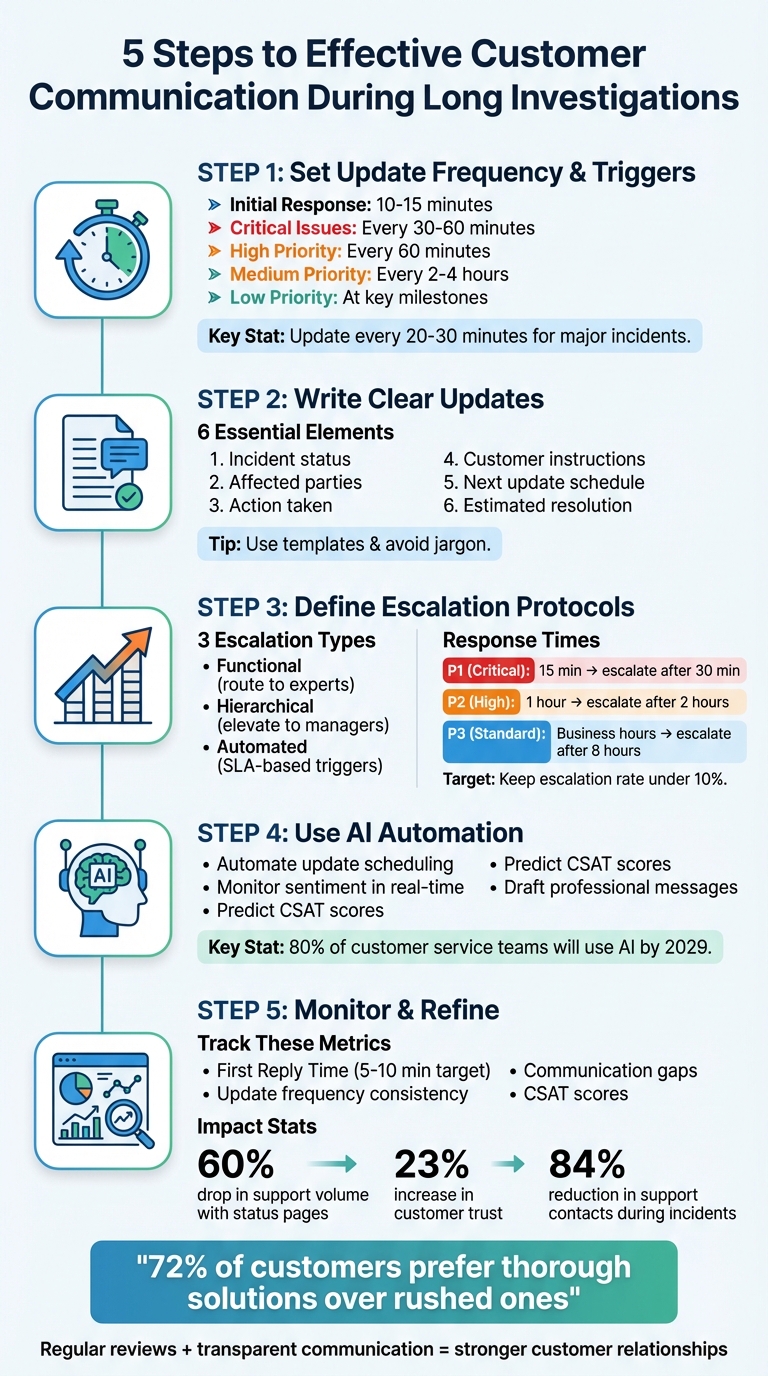
5-Step Customer Communication Cadence Framework for Long Investigations
Step 1: Set Update Frequency and Triggers
When handling lengthy investigations, keeping customers informed is essential. Setting a clear communication schedule from the beginning minimizes speculation and reduces the need for follow-up inquiries. The trick is to adapt your update frequency to the seriousness of the issue while using automated triggers to ensure updates are sent even when there’s no new progress. These triggers help maintain consistent communication during periods of inactivity. Here’s how to establish and fine-tune your update cadence effectively.
Send Initial Acknowledgment and Scope Assessment
Acknowledging the issue promptly is crucial. For customer-facing problems, aim to send the first status update within 10 to 15 minutes of identifying the incident. This initial message doesn’t need to dive into the root cause – it’s simply to confirm awareness and that the issue is under investigation. As incident.io explains:
"The longer they speculate the more frustrated they’ll get, and the worse they’ll assume the issue is. Put their minds at ease by providing some context".
Match Update Intervals to Case Severity
The frequency of updates should align with the severity of the issue. For critical incidents, provide updates every 30–60 minutes; for high-priority cases, aim for every 60 minutes. Medium-priority issues might require updates every 2–4 hours, while low-priority cases can be addressed at key resolution milestones. Always include a clear timeline for the next update, such as "Next update in [time]". For major incidents, Atlassian recommends:
"some kind of update every 20–30 minutes until resolution".
Adjust Cadence Based on Case Changes
Your initial update schedule isn’t fixed. If the situation changes, your communication rhythm should adapt accordingly. Provide immediate updates when there are changes to the incident’s scope or identification. Even during periods of inactivity, brief messages such as "no new developments" help reassure customers and maintain transparency.
sbb-itb-e60d259
Step 2: Write Clear and Effective Updates
When communicating updates, focus on clarity and building trust. Your updates should address the key questions customers have: What’s happening? Who is affected? When is the next update? Avoid overwhelming them with technical jargon or excessive details. The goal is to keep things straightforward and easy to understand.
Include These Core Components in Every Update
Every update needs six essential elements to keep customers informed:
- Incident status: Clearly indicate the current progress (e.g., Investigating, Identified, Monitoring, or Resolved).
- Affected parties: Specify who is impacted (e.g., US customers, API v2 users).
- Action taken: Highlight the steps being taken, such as "We’re identifying the root cause" or "A fix has been deployed."
- Customer instructions: Provide clear guidance (e.g., "Avoid refreshing your browser" or "Use the mobile app instead").
- Next update schedule: Let customers know when to expect the next update (e.g., "Next update in 30 minutes" or "Update by 4:00 PM UTC").
- Estimated resolution: If possible, share a timeline for resolution. If unknown, state that clearly to manage expectations.
These elements ensure your updates are concise, informative, and easy to follow.
Use Templates for Consistency
Creating a library of pre-approved templates can make crafting updates quicker and more consistent. Organize templates by common scenarios – like DNS issues, API errors, or login problems – and include placeholders for details like Team name, Impact scope, and Next update timing.
As Atlassian explains:
"Having a template gives you a great starting point in the heat of an incident and helps avoid writer’s block during critical situations".
Templates provide a reliable structure while allowing for minor adjustments to fit the specific situation.
Stick to Facts and Avoid Technical Jargon
Even with templates, clarity depends on using simple, plain language. Customers don’t need a deep dive into your system’s architecture – they just need to know what’s wrong, how it impacts them, and what’s being done to fix it. For example, instead of saying "Upstream provider API latency", opt for something like "There’s an issue with one of our third-party providers".
Atlassian emphasizes:
"Make sure to explain the issue and how it impacts different stakeholders in layman’s terms".
If there’s no new progress, be upfront and say, "No new developments." Transparency is key – be honest about what you know, what you don’t, and avoid making promises you can’t keep about resolution times. This approach builds trust and helps manage customer expectations effectively.
Step 3: Define Escalation Protocols and Roles
Once you’ve established a regular update schedule, the next step is to set up clear escalation protocols. These protocols are essential for avoiding delays, ensuring accountability, and keeping investigations on track. Without a solid framework, cases can stall, leaving customers frustrated and unsure of who is responsible for resolving their issues. With updates in place, it’s time to focus on escalation strategies to ensure timely and effective resolutions.
Assign Roles and Responsibilities
Clearly defining roles for long-running investigations is critical. Start by assigning a Major Incident Manager to oversee high-priority cases. This person should take charge, make key decisions, and delegate tasks until the issue is fully resolved through the Post-Incident Review. A Communications Manager should handle all messaging, both internally and externally, deciding on the right channels and the appropriate level of technical detail for updates. Meanwhile, your Customer Support Lead ensures that every ticket and call is addressed promptly.
You may also need specialized roles, such as a Social Media Lead to monitor and respond to public sentiment, or Functional Specialists for handling technical or billing-related escalations. To avoid bottlenecks, assign one or two backups for each primary role to maintain coverage at all times.
Create a Multi-Level Escalation Framework
A robust escalation framework should include three types of escalation:
- Functional escalation: This routes cases to the right expert, such as shifting a ticket from customer support to engineering.
- Hierarchical escalation: This elevates cases to managers who can make higher-level decisions, like approving exceptions for refunds or addressing disputes involving key accounts.
- Automated escalation: This uses time-based triggers tied to Service Level Agreements (SLAs). For instance, unresolved Priority 1 issues can automatically escalate after 30 minutes.
To manage response times effectively, categorize issues by severity:
- Priority 1 (Critical): System outages or security breaches require a 15-minute response and automatic escalation after 30 minutes.
- Priority 2 (High): Issues like specific functionality disruptions should have a 1-hour response target with escalation after 2 hours.
- Priority 3 (Standard): General inquiries handled during business hours should escalate after 8 hours.
Keep your escalation rate under 10%. If it exceeds 15%, it may indicate gaps in frontline training or processes.
Set Clear Escalation Triggers and Thresholds
Define specific triggers to initiate escalation. For example, configure your help desk to auto-escalate Priority 1 issues after 30 minutes without a status update. Triggers can also include keyword detection (e.g., "database error") or AI-driven thresholds, such as escalating after two complex use cases to ensure a human takes over before customer frustration builds.
Sentiment monitoring offers another layer of escalation. AI tools can detect shifts in customer tone, such as frustration or anger, prompting immediate supervisor intervention. Keep in mind that 72% of customers would rather wait longer for a thorough solution than receive a rushed, incomplete one. This reinforces the importance of prioritizing quality resolutions over speed alone.
Step 4: Use AI Automation for Communication Cadence
Managing multiple, long-term investigations manually is a daunting task. That’s where AI automation steps in, handling case progress tracking, spotting delays, and triggering updates – all without human intervention. Platforms like Supportbench integrate these tools directly into case management systems, building on clear update protocols to streamline communication.
Automate Update Scheduling and Delivery
AI allows you to create automated playbooks that send updates based on specific milestones in an investigation, rather than relying on fixed time intervals. For instance, when a case status changes to "Lab results received" or "Escalated to Tier 3", the system can automatically notify the customer. This ensures updates are timely and relevant.
AI can also identify early risk signals, such as stalled progress or extended idle times. If a case remains inactive longer than expected, the system sends an update before the delay becomes noticeable.
Additionally, internal statuses can be translated into customer-friendly messages. Instead of showing technical terms like "Pending L3 review", AI can reframe this as "Our engineering team is currently reviewing your case". Tools like Supportbench can also automate the delivery of detailed case reports, offering customers transparency into case priorities and statuses.
Monitor Sentiment and Predict CSAT with AI
AI-powered sentiment analysis reads customer responses in real time, detecting signs of frustration, confusion, or anxiety. If negative sentiment or uncertainty is flagged, the system can immediately escalate the case to a human agent. This ensures customers don’t feel ignored during critical moments.
Predictive tools for CSAT, CES, and NPS can identify dissatisfaction risks before a customer even completes a survey. For example, Supportbench’s AI Predictive CSAT analyzes case histories to forecast satisfaction levels, enabling proactive adjustments to communication style or cadence. By 2029, it’s estimated that 80% of customer service teams will use generative AI to enhance both agent efficiency and customer experience.
Track metrics like Automated Resolution Rate (ARR) to measure how many cases AI resolves independently, and compare this with your reopen rate – the percentage of AI-resolved cases that customers reopen. A high reopen rate may indicate communication gaps or unresolved issues. Assess CSAT scores across different resolution methods to refine your approach.
Draft Update Messages with AI Assistance
AI doesn’t just monitor – it can also help draft precise, professional messages. Tools like AI Agent-Copilot can craft updates by analyzing case history, prior interactions, and your knowledge base. For example, Supportbench’s AI auto-responses ensure consistency and professionalism by pulling from past communications.
You can configure AI to follow specific guidelines for tone, style, and word choice. For instance, instruct it to use active voice, address customers directly, and avoid overused phrases like "unfortunately", opting for clearer alternatives like "currently." Maintaining a "words to avoid" list adds another layer of professionalism.
When using large language models, set the AI’s temperature to zero to minimize creative variance and prevent inaccuracies, such as false promises or incorrect timelines. Incorporate Retrieval-Augmented Generation (RAG) to ensure AI pulls only from verified knowledge bases, maintaining accuracy throughout complex investigations.
AI can also facilitate warm handoffs by summarizing the entire interaction history and sentiment before transferring a case to a human agent. This eliminates the frustration customers feel when they have to re-explain their issue – a common complaint among 78% of customers. Supportbench’s AI Case Summaries automatically generate these summaries at key points, ensuring seamless transitions and preserving context throughout the case lifecycle.
Step 5: Monitor, Measure, and Refine the Cadence
Creating a communication cadence isn’t something you set and forget. Once you’ve implemented it, start tracking performance immediately. Without proper measurement, you won’t know if your updates are easing concerns or creating confusion.
Key Metrics to Monitor
Focus on metrics like First Reply Time (FRT) and update frequency to ensure your communication is both timely and consistent. For high-severity issues, aim to send the first update within 5–10 minutes. After that, ensure updates follow the agreed intervals – like every 20–30 minutes for critical incidents or every 60 minutes for less severe issues.
Look for communication gaps – moments when customers were left without updates. After an incident, review the update timeline to identify the longest periods of silence. As Atlassian points out:
"Few post-incident reviews (PIRs) include analysis of customer communications"
- but they should. Companies that use public status pages during incidents see a 60% drop in support volume.
Don’t stop at timelines. Include Customer Satisfaction (CSAT) scores and feedback tied to how communication was handled. Pair this with AI-driven sentiment analysis from platforms like social media to get a real-time pulse on customer trust and anxiety levels. Also, confirm that your messaging is consistent across all channels – whether it’s your status page, email, or social media updates.
Finally, compare current performance to historical data to see how much your process has improved.
Compare Pre- and Post-Implementation Performance
Pull data from before you introduced structured cadence rules and compare it to your current results. Look at metrics like resolution time, CSAT scores, and support volume during extended investigations. Dive deeper by comparing "bad" customer interactions against "good" ones to see if dissatisfaction stemmed from slow resolution or poor communication quality.
Transparent communication during incidents can boost customer trust scores by 23%. Additionally, structured status page practices can reduce support contacts by 84% during high-severity incidents. Use these benchmarks to set clear performance goals.
To keep improving, make sure to review and refine your process regularly.
Quarterly Reviews and Updates
Every quarter, revisit your communication protocols. Conduct a "Mind the Gap" analysis by mapping out recent incident timelines, marking each communication, and identifying the longest gaps where the process faltered. Tools that visualize cadence consistency can help you spot patterns.
Dig into the reasons behind any breakdowns. Were delays caused by a lack of updates from the development team? Did escalation triggers fail to activate on time? For incidents lasting over two hours, perform a Communication Assessment with input from engineering, support, and marketing teams to review the timeline.
Also, update your communication templates every quarter. Base these updates on common scenarios from recent incidents to keep them relevant and easy to understand. Finally, audit your protocols to ensure they align with your core principles: real-time accuracy, transparency, and consistent messaging. Regular reviews like these will help you stay aligned with customer expectations.
Conclusion
Creating a structured customer support management system during lengthy investigations can go a long way in building trust. Regular updates that match the severity of the situation, paired with complete transparency, show customers that your team is actively working toward a resolution. As Martha Lambert, Product Engineer at incident.io, aptly states:
"Handling incidents well is one of the best opportunities you’ll have to build trust and strengthen the relationship between you and your customers."
The data backs this up: clear and open communication not only reduces the volume of support inquiries but also strengthens customer trust. Customers are often willing to forgive service interruptions if they’re kept in the loop, but silence can lead to frustration and churn.
By following the five key steps – setting update schedules, crafting concise messages, establishing escalation protocols, utilizing AI tools, and tracking performance – you can create a system that reduces strain on your support team while improving customer loyalty.
Adopting these methods and reviewing your approach regularly can help turn challenges into opportunities to build stronger customer relationships. This strategy reflects Supportbench’s commitment to delivering efficient, customer-first support through smart, AI-driven solutions.
FAQs
How can AI improve customer communication during lengthy investigations?
AI tools are reshaping how businesses handle customer communication during lengthy investigations. By automating updates and tailoring interactions to each situation, these tools ensure customers receive timely and accurate information while lightening the load for support teams. This means no more waiting for manual updates, even when dealing with complex or drawn-out issues.
AI also steps in to analyze factors like customer sentiment and the urgency of a situation. Based on this analysis, it can suggest the best timing and tone for updates, helping maintain a sense of openness and trust. Tasks like updating status pages or sending proactive notifications are also handled automatically, reducing customer frustration and easing the burden on support teams. The result? Smooth, consistent communication that keeps customers informed and reassured throughout the entire process.
What should be included in customer updates during long investigations?
When giving updates during long-running investigations, focus on being clear, open, and realistic about expectations. Your updates should cover the following:
- What’s the issue? Explain the problem in straightforward terms so customers understand what’s happening.
- Is the service still usable? Tell users if they can continue using the service and highlight any limitations they might encounter.
- When will it be fixed? Provide a timeline or schedule for updates, even if you can’t guarantee an exact resolution date.
It’s also important to reassure customers by outlining what your team is doing to address the issue and when they’ll hear from you next. Keeping communication clear about the situation and progress not only builds trust but also cuts down on confusion and speculation. Plus, it can significantly reduce the number of support inquiries you receive.
How often should customers be updated during a prolonged investigation based on issue severity?
The frequency of updates during a lengthy investigation should align with how serious the issue is. For major incidents that heavily affect customers or disrupt essential services, updates need to be more frequent to maintain openness and reassure people. For example, you might send the first update within 5 minutes of identifying the problem, followed by regular updates as the situation unfolds. Once things start to stabilize, you can gradually extend the time between updates – but still keep them consistent enough to show that efforts are ongoing.
For less critical problems, updates can be spaced out more, such as every 30 minutes or even hourly, depending on the complexity and how long it takes to resolve. The goal is to find the right balance: keeping customers informed without overwhelming them, while ensuring they feel supported and valued throughout the process.
Related Blog Posts
- AI Prompts for Customer Support: 25 Copy-Paste Prompts for Faster Replies
- How do you build an escalation framework that doesn’t overload Engineering?
- How do you run incident communications during outages so customers stay calm?
- How do you build an incident management process for B2B support (not just engineering)?