
Standard fields in helpdesk software work for simple tasks but fall short for complex B2B needs. They can’t handle layered customer relationships, track detailed product configurations, or meet industry-specific requirements like compliance data. This is where custom objects shine – they allow you to create tailored data models that integrate directly into your helpdesk.
Custom objects bring flexibility: you can track subscription details, product specs, or stakeholder roles, all linked to tickets or accounts. This eliminates messy workarounds like spreadsheets or text fields and gives agents a clearer view of customer data. By combining custom objects with AI, you can automate workflows, improve data accuracy, and route tickets efficiently.
Here’s what makes custom objects useful:
- Better Data Management: Organize data into standalone objects with multiple attributes.
- Improved Relationships: Link objects like contracts or assets to tickets or accounts.
- Automation: Use workflows to trigger actions like reminders or escalations.
- Enhanced Reporting: Analyze trends across custom data for deeper insights.
Custom objects simplify complex processes, reduce manual effort, and help teams deliver faster, more informed support. If your helpdesk struggles with fragmented data or inefficient workflows, custom objects can transform how you manage B2B relationships.
Why Standard Helpdesk Fields Fall Short
Standard helpdesk fields might work fine for simple tasks like password resets or checking an order’s status. But when it comes to managing B2B relationships, they quickly become a roadblock. These fields are built with a B2C approach in mind, treating every interaction as isolated rather than part of a bigger organizational framework.
"Using a tool meant for B2C support in a B2B scenario is like using a sledgehammer to hang a picture frame: you might get the nail in the wall, but you’ll cause a whole bunch of collateral damage." – Josh Solomon, Mosaic [4]
This mismatch becomes painfully obvious in more complex scenarios. For instance, if your team needs to keep track of technical integrations, compliance needs, or product configurations, standard fields force you into clunky workarounds. That often means messy text fields or external spreadsheets, leading to fragmented data, inconsistent inputs, and wasted time as agents jump between tools trying to piece together the full picture. With 74% of organizations already struggling with high turnover and skill gaps [6], a difficult-to-navigate support system only makes things worse.
Can’t Handle Complex Customer Relationships
One major flaw of standard helpdesks is their inability to manage the layered nature of B2B relationships. They treat every user as an individual profile, ignoring the fact that enterprise accounts often involve multiple stakeholders – each with their own roles, goals, and responsibilities. These might include decision-makers, technical users, admins, or even security and finance teams, but standard fields can’t map out these relationships effectively.
"B2B customer relationships involve multiple stakeholders (decision-makers, admins, end users, security teams, finance), requiring account-centric views and context-aware support – capabilities most B2C platforms lack entirely." – Josh Solomon, Mosaic [4]
Without tools that prioritize account-level contexts, your team can’t automatically route and prioritize tickets based on factors like SLA tiers, contract renewals, or account value. This is a big deal considering that, for many B2B companies, the top 100 customers often generate over 50% of total revenue [4]. If your team lacks key insights into these high-value accounts, you’re not just slowing down problem resolution – you’re putting revenue at risk. And with 73% of customers willing to switch providers after just one bad service experience [3], the stakes are simply too high to rely on user-centric systems that overlook this complexity.
Industry-Specific Data Requirements
The limitations of standard fields become even more glaring when you consider industry-specific needs. For example, compliance tracking is non-negotiable in sectors like healthcare or finance. Healthcare providers need to document HIPAA audit trails, while financial services might require GDPR consent records. Standard ticket schemas don’t account for these requirements, forcing teams to rely on free-text fields or external systems. The result? Inconsistent data and unreliable reporting.
Technical configurations present another challenge. When a customer reports an issue, agents often need access to deployment histories, API integration details, or software versions. Cramming this into standard text fields leads to "data bloat" – a chaotic mess of unstructured information that’s hard to search and even harder to report on [5]. One company, for instance, managed to cut ticket resolution times nearly in half, deflect 47% of Tier 1 tickets, improve CSAT scores from 79 to 93, and reclaim about 25 hours per week – all through better data integration [7].
When your support operation demands tailored service, in-depth product knowledge, and strict adherence to regulations, standard fields don’t just underperform – they actively hinder your ability to meet customer expectations. With 80% of B2B buyers saying that the service experience is just as important as the product itself [3], these gaps make a strong case for adopting more flexible, AI-driven tools designed specifically for B2B support needs.
sbb-itb-e60d259
What Custom Objects Can Do
Custom objects are a game-changer when it comes to managing data beyond the limits of standard fields. They allow you to create custom data structures within your helpdesk, tailored specifically to your business needs. Instead of cramming subscription details into a text field or juggling product configurations in spreadsheets, you can build dedicated objects like "Subscription" or "Product Configuration." These objects come with their own fields, workflows, and relationships, making your data organized, searchable, and actionable – no more sifting through messy notes or scattered information.
"Custom objects are a powerful way to extend your data model with unprecedented flexibility and customization, unlock new sales workflows, and personalize at scale." – Nora Pantfoerder, Senior Product Marketing Manager, Outreach [9]
Now, let’s dive into what custom objects are and how they go beyond the capabilities of standard data fields.
Custom Objects Defined
Custom objects are essentially user-created data models designed to meet specific operational requirements. Unlike standard fields, these objects stand on their own and can be linked to tickets, accounts, or contacts using lookup relationships. For example, you could associate a "License" object with a company record, giving agents a clear view of all active licenses for that account – no need to open extra tabs or search through old tickets.
The main distinction here is that custom objects are not just extra fields added to existing records. They are independent entities that connect through lookup relationships, allowing you to represent complex data structures that standard fields simply can’t handle.
Key Features of Custom Objects
Custom objects come packed with features that make them incredibly versatile:
- Custom Fields: Create fields like dates, numbers, dropdowns, or text to track exactly what you need.
- Relationships Between Objects: Build one-to-many connections, such as linking multiple "Service Contracts" to a company or associating "Product Assets" with individual users.
- Workflow Automation: Integrate with automation tools to trigger actions when records are created, updated, or deleted. For instance, when a subscription renewal date approaches, the system can automatically alert the account manager and schedule a follow-up task. This minimizes manual work and ensures critical actions aren’t missed [8][9].
Here’s a quick comparison of standard objects and custom objects:
| Feature | Standard Objects | Custom Objects |
|---|---|---|
| Definition | Predefined (Tickets, Users, Orgs) | User-defined (Assets, Contracts, etc.) |
| Flexibility | Limited to adding fields | Fully customizable schema |
| Relationships | Native connections | Lookup relationship fields |
| Primary Use | Core helpdesk operations | Industry-specific data |
With these capabilities, custom objects provide the tools needed to handle complex workflows and data structures with ease.
How B2B Support Teams Benefit
For B2B support teams, custom objects offer streamlined data management and faster decision-making. Instead of spending time on manual data entry or patchwork solutions, agents can instantly access structured, relevant information. This is critical when you consider that poor data quality costs companies an average of $15 million annually in lost opportunities [10].
Custom objects also enhance ticket routing and prioritization. For example, by linking tickets to custom objects like "Service Contracts" or "Account Tier", you can ensure high-value accounts are automatically assigned to senior agents or escalated based on contract terms. This reduces manual effort, speeds up resolution times, and helps your team deliver the personalized service that B2B customers demand.
Real Examples of Custom Objects in B2B Support
Custom objects bring structure and clarity to complex B2B support processes, eliminating manual workarounds and centralizing critical data. This approach streamlines operations, enhances automation, and boosts customer service efficiency.
Tracking Subscriptions and Renewals
Imagine having all subscription details – like billing sync IDs, organization IDs, start and end dates, status, type, and contract terms – directly tied to support tickets. A subscription custom object does exactly that. Instead of digging through emails or spreadsheets, agents can access everything in one place. For example, if an Enterprise customer submits a ticket and their renewal is due in 30 days, the system can tag it as "renewal-urgent" and route it to a specialized renewals team. This setup also allows AI agents to prioritize tickets, send reminders, and handle subscription-related inquiries. To maintain confidentiality, agent-only lookup fields ensure sensitive contract data stays secure [2].
Managing Multi-Stakeholder Conversations
B2B support often involves multiple players – technical leads, project managers, or executive sponsors – each with unique roles and preferences. A custom object like "Stakeholder" or "Contact Role" can track these details, including decision-making authority. For instance, if a ticket involves a stakeholder marked as "Enterprise", automated triggers can escalate its priority or assign it to a senior agent. This ensures that high-level contacts receive prompt and specialized attention [2].
Storing Product Configuration Details
For businesses dealing with complex products, having detailed configuration data is crucial for effective troubleshooting. A "Product Configuration" custom object can house information like make, model, type, installation location, and custom settings. Take a company managing CCTV cameras across retail locations: this object could include fields for Make, Model, Type, and Store Location. When a ticket comes in about a malfunctioning camera, agents can instantly view the hardware details and dispatch technicians with the right replacement parts. This reduces delays and back-and-forth communication. The same logic applies to industries like manufacturing, network infrastructure, software, or medical devices, where having dedicated, searchable product data is invaluable [1].
Next, we’ll explore how to implement these custom objects to optimize your operations.
How to Implement Custom Objects Correctly
Creating effective custom objects starts with careful, upfront planning. This step ensures your data structure works to reduce agent handle time, improve customer experience metrics, or consolidate external system data into your helpdesk – without adding unnecessary complexity.
Planning Your Custom Object Structure
Start by documenting the purpose of each custom object. Ask yourself: What external data do agents need to streamline their work? Will this object help resolve tickets faster or provide better context during customer interactions? Once the goal is clear, map out your data model in a spreadsheet. Treat each custom object like a table, with its fields as columns. This approach makes it easier to spot redundancies and clarify relationships before building anything in the system.
Next, define the schema attributes for each object. Assign a unique name, a permanent object key, and specific fields. Use dropdown fields for fixed values (like statuses such as Pending, Approved, or Expired) and text fields for unique identifiers. When establishing relationships, always define lookup fields on the "many" side of a many-to-one relationship. For instance, if you’re tracking renters and properties, the property lookup should be on the "renter" object. This setup allows multiple renters to be associated with one property.
For record naming, consider using autonumbering with a clear prefix (e.g., "SUB-" for subscriptions) to keep records consistent and easy to identify. If you’re importing data from external systems, plan for regular bulk imports to keep records up-to-date. Lastly, optimize the agent workspace by placing critical fields at the top of the record preview panel. This simple adjustment can make a big difference in improving the agent experience.
Once you’ve laid out your plan, it’s important to steer clear of common mistakes during implementation.
Mistakes to Avoid
One major misstep is creating custom objects without clear business benefits. If you can’t explain how an object will reduce handle time, improve customer satisfaction, or support sales efforts, it’s likely to clutter your system instead of helping. Another frequent issue is poor searchability planning. Only text-based fields are searchable by agents, so if you rely on other field types for primary identifiers, records may become difficult to find.
Always define lookup fields on the "many" side of a relationship, not the "one" side. This keeps your structure flexible and avoids the need for costly rebuilds later.
Be cautious with deletions. Deleting a custom object or field permanently removes all associated data, records, and permissions, and it can break business rules like triggers that reference them. Before deleting anything, ensure it’s removed from all lookup relationship fields and business rules. Another critical point: object permissions aren’t enforced in macros or triggers. This means agents might accidentally access sensitive data they’re not formally authorized to view.
Once these pitfalls are addressed, focus on setting up proper permissions to safeguard your data.
Setting Up Permissions and Access
Use role-based access control to secure custom object data. On Enterprise plans, you can create detailed permissions to manage who can view, edit, add, or delete records for each role. For example, you might grant admins and agents full access, while limiting light agents and contributors to view-only permissions.
When defining permissions, consider who needs access to specific data. For example, if you’re tracking sensitive subscription details, use agent-only lookup fields to ensure this information isn’t visible to customers or lower-level roles. You can also apply filters to lookup fields on ticket forms, so agents only see relevant records – like showing only "Active" subscriptions when linking a subscription to a ticket. This reduces confusion and ensures agents are always working with the most accurate data.
Using AI with Custom Objects
AI turns custom objects into smart tools that streamline tasks, improve data accuracy, and enable more efficient case routing. By building on the flexible data structures of your helpdesk, AI tools take support operations to the next level, ensuring both precision and speed in handling cases.
AI for Automation and Data Quality
AI takes over repetitive tasks like classifying and tagging tickets by identifying patterns in custom object data. For example, if your custom object tracks subscription tiers, AI can instantly tag incoming cases with the correct product category and priority level. This ensures accurate reporting and smooth automation workflows. And it’s a big deal – 57% of data professionals named poor data quality as their top challenge in 2024 [14].
But AI doesn’t stop at tagging. It actively monitors custom object records to catch errors before they impact analytics. By learning data patterns, AI can spot duplicates, fill in missing fields, and validate records. According to Acceldata, AI-powered data management platforms reduce data downtime by 50% and cut quality issues by 80% [14]. This kind of proactive validation is especially valuable as your data scales, catching subtle anomalies that traditional systems might miss.
To make the most of AI, test workflows in simulation mode first. This lets you measure accuracy and ROI without disrupting live operations. As Kenneth Pangan, Writer and Marketer at eesel AI, points out: "The goal of AI IT support tools for service desks is generally not to replace human agents, but to augment their capabilities and offload repetitive tasks" [11]. However, a clean data foundation is critical – standardize tags and ensure custom fields are correctly mapped. Otherwise, AI could amplify existing data issues instead of solving them. With clean data, AI can seamlessly route cases to the right agents, speeding up resolutions.
AI-Powered Routing and Insights
AI uses custom object data – like 360-degree customer data—like segments, product types, or subscription statuses – to predict case intent and send it to the most qualified agents. For example, if a custom object flags a customer as "VIP" with a renewal date approaching in 30 days, AI can prioritize the case and assign it to a senior agent for faster handling.
AI copilots take this even further by summarizing long case threads and suggesting relevant knowledge base articles based on custom object data. This saves agents time, letting them focus on solving issues instead of digging through documentation. As Buzzi.ai explains: "Zendesk AI isn’t a feature; it’s a dual-stakeholder system. Every AI decision sits between two constituencies – agents and customers – and your job is not to pick a winner but to design for both" [12]. This balance ensures agents stay productive without burning out, while customers still receive excellent service.
AI also uncovers predictive insights by analyzing trends in custom objects, helping teams anticipate and address issues before they arise. For instance, it can forecast which customer segments might experience specific product failures, allowing support teams to allocate resources proactively. AI-enabled processes have been shown to reduce processing times for complex operations by up to 40% [13]. In this way, custom objects evolve from static data repositories to active tools driving operational efficiency.
Custom Objects vs. Standard Fields: When to Use Each
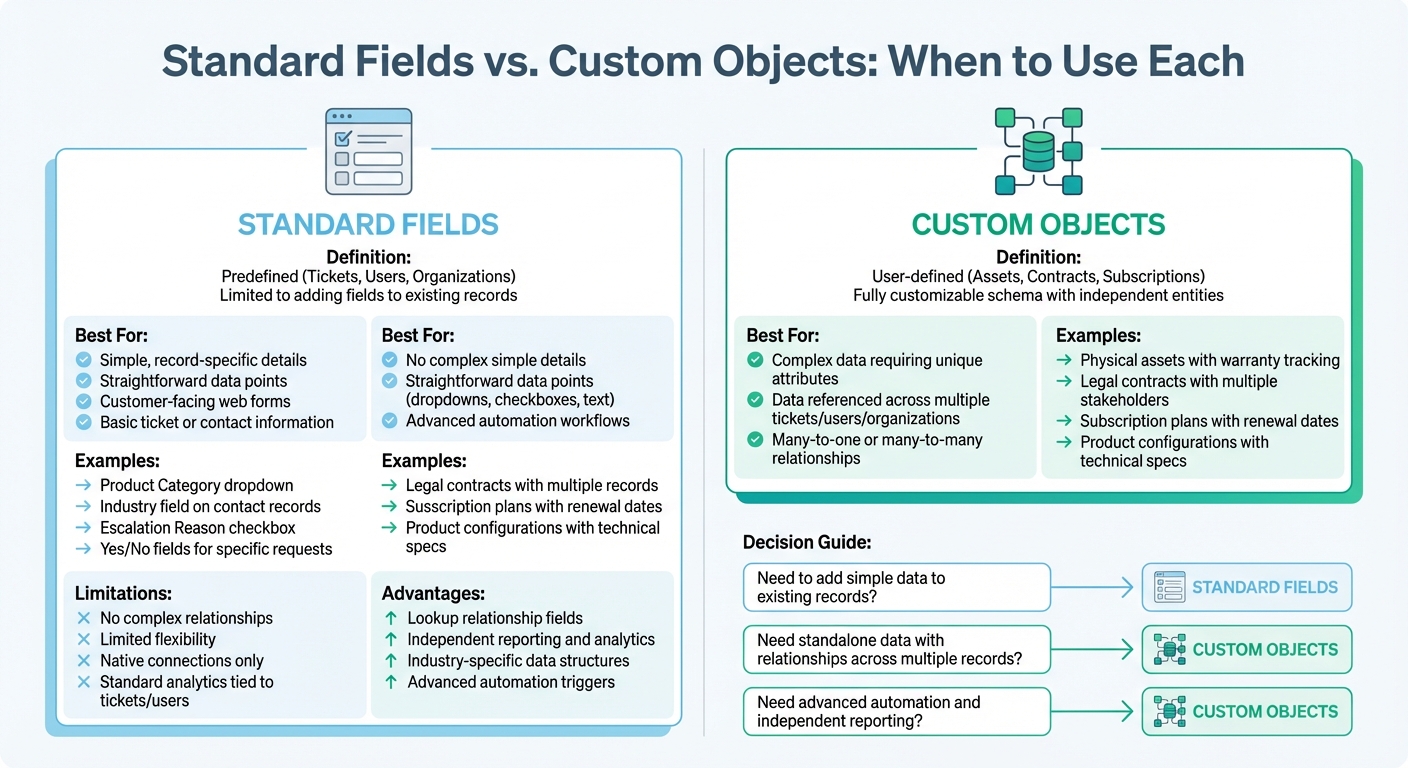
Standard Fields vs Custom Objects in Helpdesk Software
In today’s B2B support landscape, choosing between standard fields and custom objects can directly shape how efficiently your system operates and how well your data stays organized. The right choice depends on how your data needs to function and interact. Standard fields are great for straightforward additions to existing records, while custom objects are better suited for managing data that requires its own attributes and relationships across various parts of your support system.
When Standard Fields Are Enough
Standard fields are perfect for capturing simple, record-specific details that don’t need complex relationships or attributes. For example, if you want to add a "Product Category" dropdown to a ticket or an "Industry" field to a contact record, standard fields handle this easily [16]. These fields work best for straightforward data points, like an "Escalation Reason" checkbox or a "Yes/No" field for specific requests.
They’re also ideal for collecting information directly from customers through web forms, as they can be made visible to end-users [2]. The structure remains simple – text boxes, dropdown menus, dates, or checkboxes – and reporting is handled within standard analytics tools tied to tickets or user data [2].
But when your operations demand interconnected data or more advanced workflows, standard fields may fall short.
When Custom Objects Are Necessary
Custom objects come into play when your data requires more complexity, such as being referenced across multiple tickets, users, or organizations. Think of custom objects as standalone database tables that integrate seamlessly into your helpdesk. If you’re tracking physical assets, legal contracts, or subscription plans with their own unique attributes and relationships, custom objects are the way to go.
These objects allow for many-to-one or many-to-many relationships through lookup fields, enabling advanced automation. For instance, you could set up a trigger to prioritize a ticket if a linked "Asset" object shows the item is still "Under Warranty" [2]. Custom objects also offer independent reporting, giving you insights into trends and patterns across tickets and customers [2].
To keep your system streamlined, periodically review and remove unused custom objects that may clutter your database [16]. By understanding when to use standard fields versus custom objects, you can design a support system that meets both simple and complex data requirements with ease.
How Custom Objects Improve Reporting and Efficiency
Better Reporting and Analytics
Custom objects go beyond basic data management, offering a way to overcome standard field limitations and dive into advanced reporting. They allow you to analyze trends across key business elements like software licenses, rental agreements, or hardware assets – not just individual tickets. For instance, you can create dashboards that show metrics such as ticket volume by software version, hardware failure rates by model, or resolution times based on contract tiers. This kind of detailed insight helps you pinpoint issues with specific products early on, giving you the chance to address them before they escalate. It also supports proactive tasks like managing renewals more effectively.
What makes custom objects particularly powerful is their ability to generate metrics tailored to your business needs. A property management firm might track support requests by furniture type or price range, while an IT team could monitor approval times for software requests. Considering that 88% of customers believe the experience a company provides is just as important as its products or services [17], having access to this level of data is crucial for optimizing customer satisfaction. This advanced approach to analytics naturally leads to operational improvements.
Gains in Efficiency and Productivity
Custom objects don’t just enhance reporting – they also streamline day-to-day operations. By consolidating all relevant data directly within the ticket interface, they minimize the time wasted switching between systems or hunting for information.
On top of that, custom objects make automation more effective. For example, tickets can be routed automatically based on criteria like a customer’s project manager, contract details, or warranty status. This ensures that cases are assigned to the right agent from the start. AI tools further boost efficiency by autofilling fields, summarizing case histories, and predicting next steps. These capabilities are part of a broader shift toward AI for customer service that prioritizes proactive support. These improvements allow teams to handle more complex cases with ease, all without needing to expand the team.
Conclusion
Standard fields work fine for straightforward, isolated interactions. But when it comes to managing the intricacies of B2B relationships, they fall short. Whether it’s juggling software licenses for multiple clients, keeping tabs on hardware warranties with specific expiration dates, or managing support for accounts with multiple stakeholders, standard fields just don’t cut it. That’s where custom objects come in – they organize data in a way that mirrors real-world business relationships.
When combined with AI, custom objects take things to the next level. They enable context-aware responses that go beyond the basics of ticket handling, turning support into something proactive and relationship-focused [15].
"The combination of structured custom data and intelligent automation creates support experiences that feel genuinely helpful rather than generic." – Stevia Putri, Marketing Generalist, eesel AI [15]
This pairing doesn’t just improve the quality of support – it also lays the groundwork for scaling operations effectively. For B2B customer support teams, custom objects are a game-changer. They allow for AI-driven processes that align with how your business actually operates. Whether you’re managing a handful of objects or dozens, the payoff comes in the form of better reporting, quicker resolutions, and support experiences that truly align with your business needs.
Custom objects make it possible to streamline even the most complex customer interactions. The only question left is: how soon can you get started? The path to smarter, AI-driven support begins with custom objects.
FAQs
How do I know if I need a custom object or just a standard field?
Deciding between standard fields and custom objects depends on how complex the data is and how well it fits predefined categories.
- Standard fields work best for straightforward data like tickets or user information. They’re easy to use and already structured for common needs.
- Custom objects, on the other hand, are better for unique or more intricate data. For example, if you’re dealing with subscription information, product configurations, or managing multi-stakeholder conversations, custom objects provide the flexibility you need. They’re also great for integrating external systems or expanding beyond the limits of standard fields.
What’s the best way to design custom objects without overcomplicating the helpdesk?
To create custom objects while keeping your helpdesk straightforward, begin by pinpointing your main data objectives and the critical information agents need to streamline their tasks. Build objects that align closely with these priorities, steering clear of adding extra layers of complexity.
When defining objects, keep them simple by limiting the number of fields. Add more only when absolutely necessary. Periodically revisit and refine your data model to make sure it remains easy to manage and stays in step with the changing needs of your support operations.
How can AI use custom object data to improve routing and reporting?
AI transforms routing and reporting by using custom object data to tackle specific, complex business needs. Custom objects store detailed information, such as subscription details or product configurations. With this data, AI can automate ticket routing based on these attributes, speeding up resolution times. On top of that, AI processes this data for in-depth reporting, uncovering trends, evaluating performance, and fine-tuning workflows. This approach allows businesses to make smarter, data-driven decisions that align with their unique processes.