


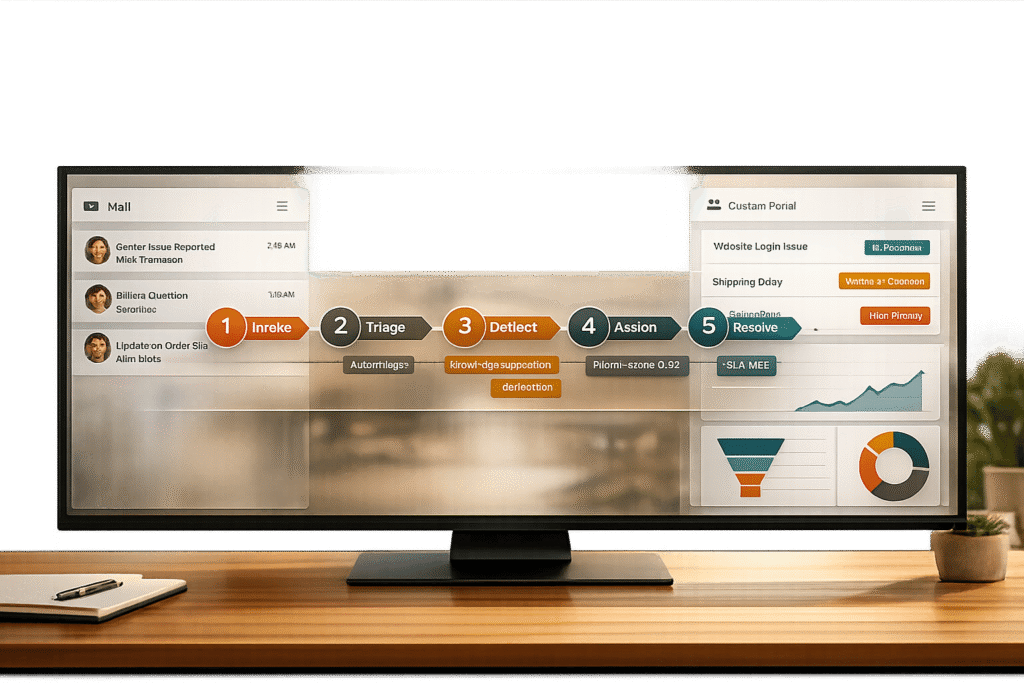
Managing customer support through email can get messy quickly. Long threads, missing context, and duplicate tickets slow down agents and frustrate customers. The solution? A hybrid workflow that combines email’s familiarity with the structure of a customer portal.
Here’s the idea:
- Email remains the primary way customers reach out.
- AI organizes emails into structured cases, reducing chaos.
- A portal works in the background to manage updates, track statuses, and cut down repetitive requests.
This system lets customers stick to email while your team benefits from streamlined operations. AI handles simple tasks, deflects up to 40% of inquiries, and speeds up responses. Meanwhile, customer self-service portals offer self-service options, saving thousands annually.
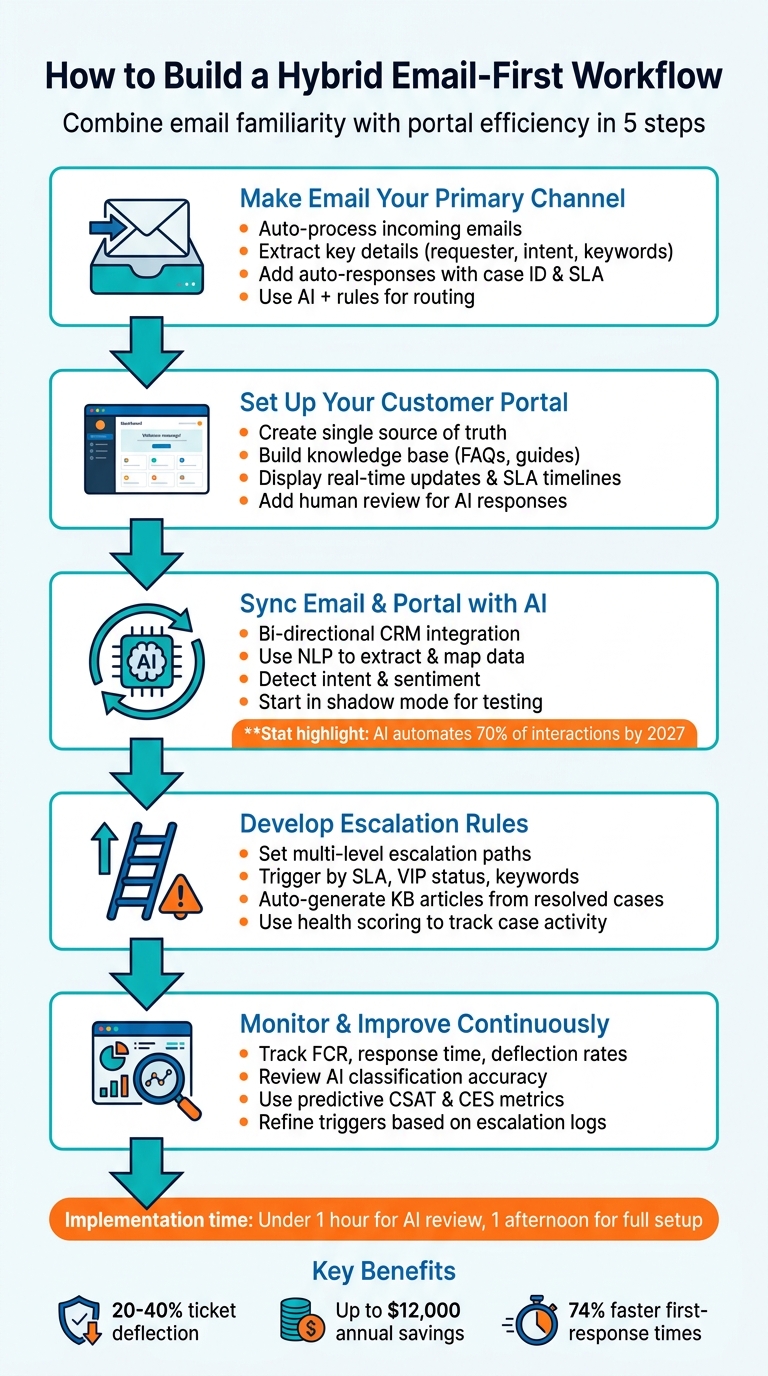
This guide breaks down the process into five steps:
- Set up email as the main intake channel.
- Build a portal to centralize all interactions.
- Sync email and portal data using AI.
- Define clear escalation rules for complex cases.
- Continuously monitor and improve performance.
5 Steps to Build a Hybrid Email-First Customer Support Workflow
What is a Hybrid Email-First Workflow?
A hybrid email-first workflow prioritizes email as the main way customers reach out while using a customer portal to handle operations behind the scenes. This setup respects customer habits but adds the efficiency of a structured system. When a customer sends an email, AI steps in to identify key details like intent, urgency, and sender information. That email is then transformed into a structured case record – a centralized source of truth stored in the portal. Unlike traditional inbox management, this approach creates a more streamlined and organized support process.
The standout feature here is coherence. Rather than juggling chaotic email threads, hybrid workflows standardize every incoming message into a consistent format. As Daniel Mercer, Senior SEO Content Strategist at FreeServiceDesk, puts it: "Multichannel is about access, while omnichannel is about coherence" [1]. Customers can still use email as usual, but the support team works within a unified system that keeps everything in order.
Email as the Primary Communication Channel
Even with this structured system, email remains the go-to channel for detailed and familiar communication. It’s especially popular in B2B support because it works well for asynchronous, in-depth exchanges.
The problem with traditional shared inboxes is their lack of order. Agents often have to sift through long threads to find context, leading to duplicate tickets and missed follow-ups. A hybrid workflow fixes this by using AI to interpret and organize every email automatically. Mercer highlights the goal: "not to eliminate email, but to make it machine-readable" [1]. This keeps the personal touch customers value while ensuring all interactions are efficiently logged and accessible.
How Portal Visibility Improves Support Operations
Customer portals play a key role in cutting costs and improving efficiency. They handle routine inquiries that don’t need human input, which can reduce support volume by 20–40% [3]. Considering that each ticket costs around $5 to handle, deflecting 200 tickets a month could save as much as $12,000 annually [7].
Portals also provide real-time updates on case statuses, order tracking, and related documents, cutting down on repetitive status-check inquiries. As Yaro Labs points out, "A surprising amount of SaaS support volume is customers asking for things they could do themselves if you gave them a way to do it" [3]. This not only lowers costs but also supports a scalable, AI-driven system.
With better portal visibility, customers have more control over their service interactions. Instead of waiting for an email response, they can log in and check updates whenever they want. At the same time, those who prefer email can continue using it without any disruption. This balance ensures a smoother experience for everyone involved.
sbb-itb-e60d259
How to Build Your Hybrid Workflow: 5 Steps
Creating a hybrid workflow isn’t about picking between email and a portal – it’s about blending the two so they complement each other. The idea is to let customers stick with email while your team uses a structured system to keep everything organized. Here’s how you can make that happen:
Step 1: Make Email Your Primary Channel
Set up your system to automatically process incoming emails by extracting key details like requester info, account references, and intent keywords. This transforms messy, unstructured messages into organized records that can be routed automatically.
Add auto-responses that include essential details like the case ID, expected response time (based on your SLA), and a link to the portal for tracking updates.
For routing, mix deterministic rules with AI classification. Use rules for clear matches – like VIP domains or specific keywords – and let AI handle vague language (e.g., "the app is acting weird"). Configure the AI to assign confidence scores: high scores mean the case is routed automatically, while low scores trigger manual review.
"A routing policy without a time commitment is just a suggestion." – Daniel Mercer, Senior SEO Content Strategist [1]
Log every routing decision and map all inbound sources to refine your process over time. Once your email channel is structured, the next step is to centralize interactions through your customer portal.
Step 2: Set Up and Optimize Your Customer Portal
Your portal should act as a single source of truth, consolidating all interactions – whether they come from a phone call, email, or even Slack – into one case record. This prevents duplicate tickets and saves your agents from piecing together fragmented conversations.
Before automating responses, invest in building a knowledge base. Without solid content, even the best language models can produce inaccurate or misleading answers. Build detailed troubleshooting guides, FAQs, and workflows, and regularly update them to avoid outdated information.
Configure the portal to display real-time updates, SLA timelines, and links to relevant knowledge articles. Use consistent identifiers like account IDs and case numbers to keep everything aligned across channels.
Introduce a human review process for AI-generated responses before they go live. This ensures the replies are accurate and match your brand’s tone. If your team can’t explain how to override the automation quickly, your workflow might be too complex.
With your portal in place, you’re ready to sync it with your email system using AI.
Step 3: Sync Email and Portal Data with AI
AI synchronization is the backbone of a smooth hybrid workflow. Use bi-directional CRM integration so every email interaction updates the customer record in real time. Natural Language Processing (NLP) can analyze email content, extract important details, and map them to the right fields in your portal.
By 2027, AI is expected to automate about 70% of customer support interactions, cutting first-response times by up to 74% [8]. For instance, Unity saved $1.3 million in 2024 by implementing an AI agent that deflected 8,000 tickets using its knowledge base [9].
Set your AI to detect intent and sentiment, prioritizing cases accordingly – technical issues go to one team, billing questions to another. AI can also summarize long email threads into concise overviews for quick reference.
Start with a "shadow mode", where the AI drafts responses and syncs data internally without going live. This lets you evaluate its quality and ensures it pulls information from a reliable source, like your portal-hosted FAQ.
Once your AI is syncing data effectively, you can move on to handling escalations with clear rules.
Step 4: Develop Escalation Rules and Workflows
Define clear rules for when and how cases should escalate. Set up multi-level paths triggered by factors like SLA breaches, VIP status, or keywords such as "legal" or "security." Establish thresholds – like inactivity or urgency levels – to automatically escalate cases that need extra attention.
Use AI to create knowledge base articles from resolved cases. When a case has a clear problem–solution pattern, let the AI compile the history into an article with a subject, summary, and keywords. Over time, this builds a stronger knowledge base and reduces future ticket volume.
Implement health scoring to track case activity. For example, if a customer opens multiple cases in a short time or sentiment analysis shows frustration, escalate the issue to a senior agent. Displaying these escalation steps in the portal reassures customers that their concerns are being addressed.
Step 5: Monitor Performance and Improve Continuously
Set up dashboards to track key metrics like first-contact resolution (FCR), average response time, ticket deflection rates, and customer satisfaction scores. AI can now identify FCR from case histories, offering insights that were harder to gather manually.
Keep an eye on how well email and portal updates sync. If customers see outdated info in the portal, adjust your sync frequency or add manual checkpoints for critical cases. Review low-confidence AI classifications and refine your training data or rules to improve accuracy.
Use predictive metrics like CSAT and CES to spot potential dissatisfaction – even without completed surveys – and take action to prevent churn. Analyze escalation logs to tweak triggers based on what works and what doesn’t. Remember, the goal is to refine your process step by step, not to get everything perfect from the start.
Common Problems and How to Fix Them
Even the best workflows can hit a few bumps. The most frequent issues include synchronization delays, information silos, and the hidden costs of manual processes. Tackling these problems head-on is essential to keeping your operations running smoothly.
Fixing Synchronization Delays
Synchronization delays often happen because of system misconfigurations or outdated tools. For example, if your server clock drifts by more than five minutes, it can cause sync failures. The fix? Adjust your clock settings right away. To streamline workflows, you can use a state machine to mark records as "Pending Approval" and close open connections. Reopen them only when a triggering event – like an email reply – occurs [10].
"Microsoft’s on-premises-to-cloud synchronization tools are frustratingly slow, and with multiple administrator consoles, achieving even basic tasks becomes complicated, time-consuming, and error-prone." – CoreView [11]
For real-time updates, consider integration tools that allow external users to update statuses directly through email, eliminating the need for portal logins [6]. These adjustments ensure smoother data transitions, which are vital for hybrid workflows.
Preventing Information Gaps
Information gaps arise when email and portal data don’t sync properly. This disconnect can lead to mismatched case versions, eroded trust, and duplicate tickets.
The solution? Centralize your data. Use a single interface to manage both cloud and on-premises information [11]. This reduces discrepancies and ensures consistency across systems. Before automating responses, double-check that your documentation is up to date. An AI model relying on an outdated knowledge base will generate answers that sound confident but are unreliable [4].
Start with shadow mode testing, where drafts and background data syncs are manually reviewed. If automated drafts require edits less than 30% of the time, it’s a good sign your system is ready to handle more tasks independently [2]. Combining manual and AI-driven processes is key for controlling costs while maintaining accuracy.
Manual vs. AI-Driven Workflows: Time and Cost Comparison
Manual workflows can be surprisingly expensive, even if the costs aren’t immediately obvious. For instance, employees spend about five hours a day on emails, which takes time away from addressing core customer issues [12].
AI-driven workflows help by automating repetitive tasks like follow-ups, ticket sorting, and data entry. Tools like AI assistants and shared inboxes can save users around one hour per day [12]. However, while manual workflows come with predictable labor costs, AI-driven approaches introduce variable expenses, such as subscription fees, token usage, and tool calls. The upside? They scale much better as workload increases [13].
| Workflow Type | Best For | Cost Predictability | Oversight Requirements |
|---|---|---|---|
| Manual | Complex, legal, or sensitive issues | Low (High labor cost) | High (Human-led) |
| Deterministic (Rules-based) | Routine, structured tasks | High (Fixed) | Low |
| AI-Driven (Agentic) | Unstructured or open-ended tasks | Variable (Token-based) | High (Needs audits) |
To optimize, categorize your tasks. Use AI auto-sending for high-volume, simple requests like password resets. For moderately complex issues – like billing disputes – deploy AI drafting with human review. Reserve manual workflows for high-stakes cases that demand human judgment [4]. Monitor your system’s edit rates and adjust thresholds as it learns. Understanding the balance between time and cost will help you fine-tune your automation strategy, a core part of an email-first approach.
Wrapping Up
A hybrid email-first workflow simplifies support in five clear steps: setting up email as your primary channel, adding a customer portal, syncing data with AI, defining escalation rules, and tracking key support metrics. This approach works seamlessly for B2B teams, no matter their size, offering a smoother process and quick, measurable results.
With modern AI tools, teams can review AI-generated replies in under an hour and fully implement the system in just one afternoon[2]. That kind of speed is a game changer, letting you reap efficiency benefits almost immediately[2].
The financial advantages are just as striking. Customer portals can reduce service workloads by as much as 63%[5]. Meanwhile, AI takes care of repetitive tasks, allowing your team to concentrate on handling complex issues and building stronger customer relationships.
"That is the power of AI email support done right – not replacing your team, but giving them superpowers." – Relay Team, Product & Engineering[2]
FAQs
Do customers have to use the portal?
Customers aren’t required to use the portal. It’s mainly there to handle routine tasks and offer self-service options. For more complex issues that need human judgment, email support is the better choice. This combination provides flexibility and accommodates a variety of needs.
How do you keep email and portal updates in sync?
To keep email and portal updates aligned, use a multichannel workflow that brings all customer requests into one organized queue. Incorporate AI tools to automate the syncing process, so updates made in one channel automatically appear in the other. This approach cuts down on manual work and ensures updates are consistent and happen in real time, providing customers with smooth support and precise information across platforms.
What should never be fully automated with AI?
AI has its limits, especially when it comes to tasks that rely on human judgment, empathy, or making nuanced decisions. For instance, negotiating contracts or handling complex customer concerns often involve understanding subtle emotions, context, and intentions. These are areas where human oversight is crucial – not just to ensure accuracy, but also to strengthen trust with customers.






