
Submitting requests for support tools can often feel like a dead end. Why? Engineering prioritizes core product work, and vague or poorly structured requests get deprioritized. To get your tooling requests approved, you need to present clear ROI, precise technical details, and measurable business impact. Here’s how to do it:
- Understand Engineering’s Priorities: They evaluate requests based on feasibility, resources, maintenance needs, business impact, and security.
- Common Mistakes: Vague problem statements, unclear technical details, and misaligned priorities often lead to rejection.
- Use a Proven Template: Include sections like problem statement, proposed solution, technical specs, ROI, metrics, and resource needs.
- Examples That Work: Automating ticket triage, sentiment-based routing, and AI-generated knowledge base articles are examples of effective requests.
How to Create a Technical Design Document (TDD)
sbb-itb-e60d259
How Engineering Teams Review Tooling Requests
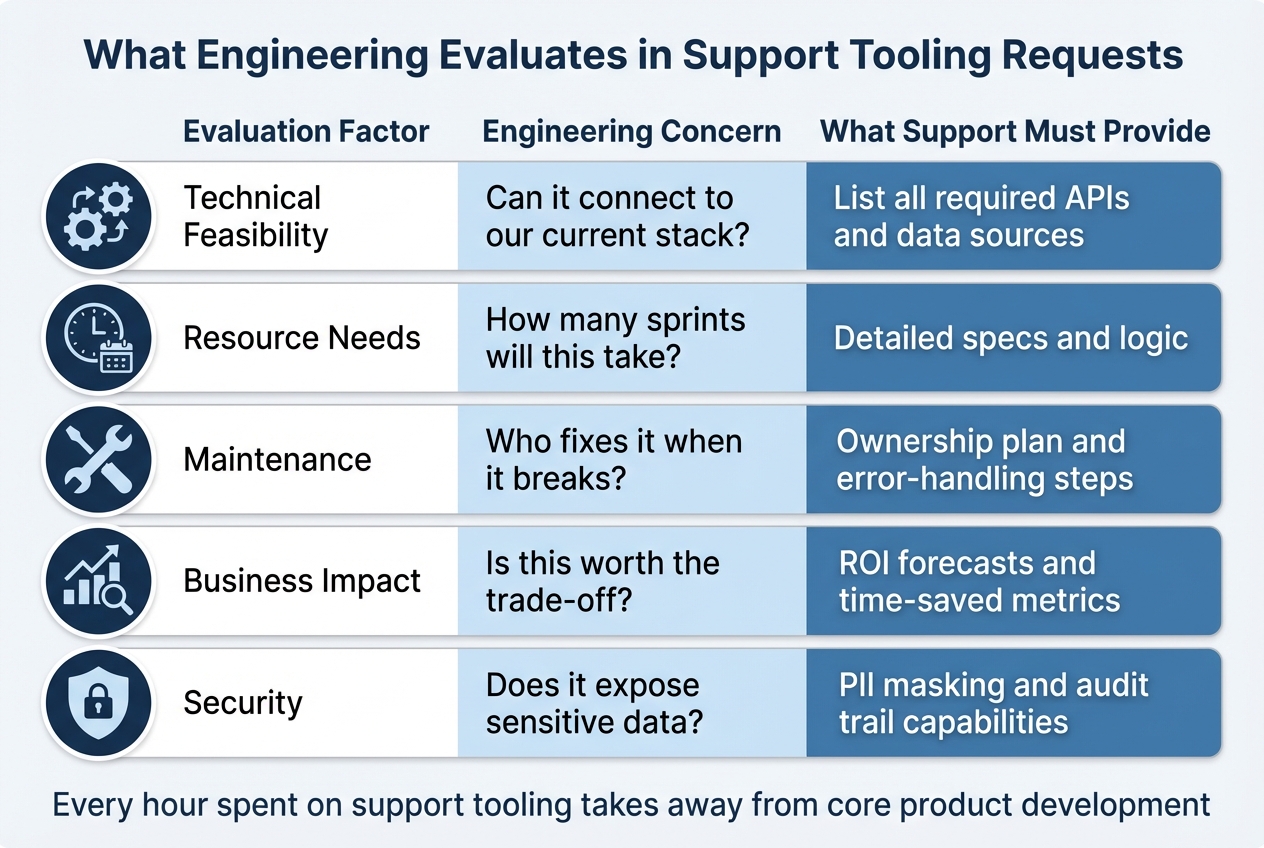
Engineering Evaluation Criteria for Support Tooling Requests
What Engineering Looks for in Every Request
When it comes to tooling requests, engineering teams focus on balancing trade-offs and constraints. Every hour spent on support tooling takes away from core product development, so requests must align with broader priorities.
The first consideration is technical feasibility. Can the tool integrate seamlessly with current systems? For example, if the request involves transferring data from a support platform to an engineering tracker, the team will need specifics: which fields map to which, and what happens to data that doesn’t align. These technical details naturally lead to questions about resource allocation and ongoing maintenance.
Next up is resource allocation. Engineering evaluates how much time and effort the tool will require – both during development and after deployment. They weigh this against the potential business impact. Maintenance is another critical factor: Who will own the tool, and what’s the plan for handling errors? A tool that saves 10 hours a week but demands 15 hours of monthly upkeep won’t make the cut.
Business impact and ROI often determine whether a request moves forward. Engineering looks for measurable outcomes, such as faster ticket resolution, reduced churn, or improved efficiency. Finally, security and compliance are non-negotiable. Does the tool comply with SOC 2 standards? Are features like PII masking and audit logging included? For AI tools, additional safeguards like prompt injection protection are essential. These security measures are crucial for minimizing operational risks.
| Evaluation Factor | Engineering Concern | What Support Must Provide |
|---|---|---|
| Technical Feasibility | Can it connect to our current stack? | List all required APIs and data sources |
| Resource Needs | How many sprints will this take? | Detailed specs and logic |
| Maintenance | Who fixes it when it breaks? | Ownership plan and error-handling steps |
| Business Impact | Is this worth the trade-off? | ROI forecasts and time-saved metrics |
| Security | Does it expose sensitive data? | PII masking and audit trail capabilities |
Why Unclear Requests Get Rejected
Requests that lack clear details are often rejected outright. For instance, a vague request like “help me automate ticket routing” leaves engineering guessing. What tickets need routing? What’s the decision logic? How should exceptions be handled? Without these specifics, the request can’t be properly evaluated and often ends up stuck in the backlog.
Another common issue is data loss at handoff points. Misaligned data schemas can cause critical information to disappear. For example, if support tracks “Customer Impact” in a dropdown menu but engineering’s system doesn’t have a corresponding field, that context is lost. Requests that overlook these potential pitfalls are either rejected or deprioritized.
Finally, security gaps are a dealbreaker. If a request involves customer data but doesn’t address audit trails, PII masking, or compliance, it won’t pass the security review. No matter how much time a tool might save, engineering can’t approve something that introduces unnecessary risk.
Template for Writing Tooling Requests That Get Approved
When crafting tooling requests, aligning with engineering review standards is key to gaining approval. Here’s a structured template to help you create compelling and effective requests.
Required Sections for Every Request
Every request should include these six essential sections:
- Problem Statement: Clearly define the issue at hand. Highlight specific challenges, like losing ticket context or how repetitive, time-consuming tasks impact SLAs. For example, "Our team spends significant time manually processing high-volume tasks, leading to delays in resolution."
- Proposed Solution: Explain your idea in detail, focusing on the desired business outcome and the tool’s specific tasks. For instance, describe how the tool will automate processes like resetting passwords or checking device statuses, ensuring clarity on its functionality.
- Technical Specifications: Provide a detailed breakdown, including field mappings, trigger conditions, and synchronization rules. This section should outline how the tool will integrate into existing systems and workflows.
- Business Impact: Quantify the value of your proposal. Use a straightforward formula: (Time Saved × Hourly Rate × Frequency) – (Platform Costs + Setup Time). This helps demonstrate the potential return on investment and the efficiency gains.
- Success Metrics: Define clear, measurable outcomes. Baseline KPIs might include measuring customer service metrics like Mean Time to Resolution (MTTR), First Contact Resolution (FCR), and ticket deflection rates. These metrics provide a way to assess the tool’s performance post-implementation.
- Resource Requirements: List the APIs, permissions, and team members needed for development and maintenance. Be specific about the resources required to bring your solution to life.
"Don’t begin with the technology. Begin with the pain." – Alistair Russell, CTO, Tray.ai
Copy-and-Paste Request Template
Here’s a ready-to-use template to streamline your request:
Problem Statement:
[Explain the issue. Example: "Our team manually processes 450 MFA reset requests weekly, each taking 8 minutes. This totals 60 hours monthly and delays response times by an average of 2.3 hours."]
Proposed Solution:
[Outline the goal and parameters. Example: "Automate MFA resets for verified users via Okta API integration. The tool will handle identity verification through email, reset credentials, and log actions. Escalation occurs if verification fails or if more than 3 reset requests are made within 24 hours."]
Technical Specifications:
[Detail the technical workflow. Example: "Trigger: User submits ‘MFA Reset’ request on the portal. Required fields: Email (Supportbench) → User ID (Okta), Request timestamp → Audit log. State sync: ‘Pending’ in Supportbench maps to ‘Processing’ in Okta, ‘Completed’ triggers auto-close."]
Business Impact:
[Quantify the benefits. Example: "Saves 60 hours/month × $45/hour = $2,700 monthly. Annual savings: $32,400. Platform cost: $500/month. Net annual savings: $26,400. Reduces average response time from 2.3 hours to 5 minutes."]
Success Metrics:
[Set specific goals. Example: "Pilot phase (4 weeks): Achieve 85% automation rate, maintain sub-10 minute resolution time, keep escalation rate below 15%, and maintain CSAT above 4.2/5."]
Resource Requirements:
[List resources and team involvement. Example: "Systems: Okta API (admin scope), Supportbench webhooks, audit logging database. Team: 1 automation engineer (2 weeks setup), 1 security lead (compliance review), ongoing maintenance: 3 hours/month."]
This template serves as a foundation. Adjust it to align with the engineering priorities and specific needs of your team.
Match Your Request to Engineering Priorities
How to Find Out What Engineering Is Working On
Engineering teams have limited time, and every hour spent on internal tools pulls them away from core product development tasks. To get your request approved, you need to understand their current focus and frame your tooling as something that complements their priorities.
Start by identifying tasks that disrupt engineers’ workflows. How often are they forced to switch focus to handle support-related issues? Quantify these interruptions and present your tool as a way to minimize them. This approach ties the needs of support directly to engineering’s goals.
Look for weak points in the current workflows. Since engineering prioritizes system stability, focus on gaps in handoffs that slow down resolutions. Richie Aharonian, Head of Customer Experience & Revenue Operations at Unito, highlights this well:
"Handoff problems that persist despite documentation and training are usually structural".
To address these gaps, conduct a field mapping audit to confirm where information is getting lost, then position your tool as the solution.
Also, consider how coordination becomes harder as teams grow. Engineering teams aim to standardize processes to reduce manual coordination. If your tool automates handoffs, you’re directly addressing one of their key concerns.
Position Your Request as Risk Reduction or Cost Savings
Once you’ve identified the pain points, frame your request to align with engineering’s top concerns: reducing risk and demonstrating a return on investment (ROI). Use specific data to back up your case.
For risk reduction, show how your tool can prevent incidents or boost platform stability. For example, if it addresses information loss during critical handoffs, provide metrics that quantify this impact. This positions your tool as essential infrastructure rather than an optional add-on.
For cost savings, tie your ROI calculation to engineering’s broader goals. As the Retool team explains:
"Investing in internal tools goes beyond creating smooth workflows, and can contribute in myriad and measurable ways to a business’s health and resilience".
Highlight how automating repetitive tasks frees up engineering hours for core product work.
Here’s how you can frame your request to align with engineering priorities:
| Framing Strategy | Engineering Priority | Business Impact Metric |
|---|---|---|
| Risk Reduction | Platform stability and incident response | Incident resolution time; Prevention of information loss |
| Cost Savings | Resource efficiency and scalability | ROI = (Time Saved × Rate) – Costs |
| Technical Debt | Reducing manual "toil" and context switching | Engineering hours redirected to core product development |
| Scalability | Standardizing cross-functional handoffs | Coordination overhead per new hire |
Use the ROI formula from your request template to quantify these benefits. By aligning your request with engineering’s existing goals – whether it’s reducing interruptions, fixing workflow gaps, or tackling technical debt – you shift your proposal from being a support-only concern to a shared priority. This alignment ensures your request resonates with both support and engineering teams, as emphasized throughout this guide.
Use Numbers to Show Business Impact
When it comes to aligning your tooling requests with engineering priorities, quantifying the business impact is crucial. Engineering teams are more likely to approve requests when there’s a clear financial payoff rather than vague promises of improvement. As the Superhuman team puts it:
"Boards and executives fund what they can verify. A data-backed claim beats a list of flashy features every time."
Metrics That Matter for Support Tooling
To make a compelling case, focus on metrics that directly tie to efficiency, quality, and operational health. Here’s a breakdown of the most impactful ones:
- Efficiency Metrics: Highlight metrics like Mean Time to Resolution (MTTR), First Response Time, and Average Handle Time (AHT). These directly reflect speed improvements and translate into measurable labor cost reductions per ticket.
- Volume Metrics: Metrics like AI containment rates (tickets resolved without human intervention) and self-service success rates demonstrate how the tool can reduce staffing needs.
- Quality Metrics: Customer Satisfaction (CSAT), Customer Effort Score (CES), and First Contact Resolution (FCR) show how the tool enhances customer experience while cutting costs. For instance, research indicates that a 1% improvement in FCR reduces operating costs by 1% and boosts customer satisfaction by 1%.
- Operational Health Metrics: Keep an eye on SLA hit rates, ticket backlog volume, and reassignment frequency. High reassignment rates are a red flag, often signaling inefficiencies caused by poor triage or unnecessary "ping-pong" handoffs.
For tools integrated with platforms like Slack, consider tracking the "DM to Ticket Capture Rate" to quantify previously unseen work happening in private messages.
How to Back Up Your Claims With Data
Once you’ve identified the right metrics, you’ll need solid data to back your claims. Here’s how to do it:
- Establish a Baseline: Start with an 8- to 12-week baseline of your current performance. Collect data on time, cost, volume, error rates, and revenue during a stable period. This gives you a reliable benchmark to measure against projected improvements.
- Leverage Existing Systems: Use your internal ticketing system APIs (e.g., Zendesk, Intercom, HubSpot) to pull live data. Conduct a field mapping audit to identify "compression points" where information is lost during handoffs. Document these gaps with examples of delayed tickets.
- Calculate Labor and Risk Savings: Use simple formulas to quantify savings:
- Labor Savings = hours saved × hourly cost
- Avoided Cost = incident reduction × average incident cost Present three scenarios – conservative, base, and optimistic – to show how different efficiency gains (e.g., 17.5% vs. 32.5%) impact the payback timeline.
Referencing industry benchmarks can also strengthen your case. For example, AI-powered support typically delivers a $3.50 return for every $1 invested, with top performers achieving up to 8x ROI. Automation often leads to 40% to 70% reductions in process time within the first month. These benchmarks demonstrate that your projections are grounded in reality.
The Superhuman team highlights a common challenge:
"The lack of measurable return often isn’t due to a lack of value, but rather the difficulty of measuring that value or return on investment (ROI)."
To sidestep this issue, clearly define how reclaimed hours will be used – whether that’s resolving 1,500 additional tickets per quarter or cutting cycle times by 20% – before submitting your request.
Mistakes That Kill Tooling Requests
Even the most well-thought-out tooling requests can fall flat if they’re riddled with formatting issues or lack proper planning. Spotting these common mistakes can help ensure your requests don’t end up ignored or rejected.
Formatting and Content Problems to Fix
Unclear headings can derail your request from the start. Using generic titles like "General Information" instead of something specific like "Ticket Routing Logic Changes for 2026" leaves engineers guessing where to find the information they need. Similarly, vague technical details – like referring to a parameter as "user" instead of something precise like "user_id" – add unnecessary confusion and slow down progress.
Inconsistent formatting and tone can make your request appear sloppy. Engineers and technical writers generally prefer active voice because it encourages action. For instance, instead of saying, "The ticket will be routed by the system", go with "The system routes the ticket to the appropriate agent." This small shift makes your intent clearer and more actionable.
Overloading your request with irrelevant details is another frequent issue. According to the Retool team, unclear requests often fail because they lack "clear specifications, business logic, or data requirements", leaving engineers to fill in the blanks themselves. Use tools like Markdown to emphasize key points. For example, flag critical details with Critical: or Must-Have: to ensure they stand out.
These formatting issues often hint at deeper planning missteps, which we’ll explore next.
Planning Errors That Cause Rejection
Beyond formatting, poor planning can also doom your request. Proper alignment with engineering priorities and capabilities is just as important as clear communication.
Submitting requests that don’t align with current engineering priorities is a common mistake. Engineering teams often treat internal tooling as a "zero-sum game", where time spent on support tools detracts from the core product roadmap. Before submitting your request, research their focus areas and frame your proposal as something that complements their goals, not competes with them.
Overlooking engineering capacity can also lead to rejection. Requests for custom-built tools often fail because they demand long-term maintenance commitments that engineering teams can’t sustain. Instead, prioritize simpler solutions like templates or low-code tools that can be deployed in weeks instead of months. Don’t forget practical constraints, such as API rate limits (e.g., Slack’s 1 request/second limit) or authentication token expiration, which can disrupt workflows after just a few months.
Lastly, requesting features that already exist wastes time and damages credibility. Before submitting a request, audit your current systems to ensure the functionality you’re asking for isn’t already available. For example, perform a field mapping audit to track how data moves between systems like Zendesk and Jira. This can help you pinpoint real gaps rather than duplicating existing tools. Nobody wants to ask for a solution that’s already sitting unused in the tech stack.
3 Examples of Tooling Requests That Work
These scenarios highlight how well-defined problem statements, technical details, and measurable goals can align support requests with engineering priorities. Below are examples that apply the template discussed earlier, showing how to meet engineering standards while delivering clear business results.
Example 1: Automated Ticket Triage and Prioritization
Request Title: Automated Priority Scoring for Support-to-Engineering Handoffs
Problem Statement:
The support team manually triages over 200 tickets weekly before escalating them to engineering. An audit of five delayed tickets revealed that critical details – like "Affected Users" and "Customer Impact" – are often lost during the transition from the support desk to Jira. This forces engineers to spend an extra 15–20 minutes per ticket asking follow-up questions, which delays issue resolution by an average of 12 hours.
Proposed Solution:
Introduce an automated triage system that calculates a numerical priority score. This score will combine urgency (25 points per level) with sentiment impact (10 points per level). Using AI, the system will analyze Slack threads and email conversations to auto-generate structured Jira titles, descriptions, and acceptance criteria. A trigger-based workflow will activate when an agent uses a specific emoji in Slack or applies an "Escalate" label in email.
Field Mapping:
A table will map fields like "Customer Impact" in the support tool to a custom Jira field. "Troubleshooting Steps" will transfer as structured text, reducing redundant diagnostic work.
Success Metrics:
Reduce average escalation response time by 12 hours and save each team member about 4 hours weekly on manual triage.
Fallback Plan:
If the AI confidence score drops below 95%, route the ticket to a human reviewer instead of auto-escalating.
This example pinpoints the problem, defines how information will flow, and sets measurable goals for success.
Example 2: Sentiment Analysis for Case Routing
Request Title: Real-Time Sentiment-Based Routing to Prevent SLA Breaches
Problem Statement:
With a 61% increase in call volume, frustrated customers are waiting too long in standard queues, leading to escalated issues. Manual sentiment reviews are slow and often miss early signs of churn.
Proposed Solution:
Implement sentiment analysis that categorizes customer emotion into five levels: Very Negative, Negative, Neutral, Positive, and Very Positive. Cases marked as "Very Negative" will be routed directly to senior agents using a push-based webhook architecture for real-time routing.
Field Mapping:
"Very Negative" sentiment will map to "P1 Priority" in Jira, while "Positive" sentiment routes to standard queues like P3 or P4.
Success Metrics:
Achieve 95% routing accuracy and cut response time for high-risk cases by 50%.
Cost Justification:
Calculate ROI as (4 hours/week × $50/hour × 52 weeks) minus platform costs, resulting in about $10,400 in annual savings.
Review Logic:
Set a 95% confidence threshold for automatic routing. Tickets below this threshold will be flagged for human review.
This request tackles a clear operational challenge, provides specific mapping rules, and includes a scalable integration plan.
Example 3: AI-Generated Knowledge Base Articles
Request Title: Automated KB Draft Generation from Resolved Tickets
Problem Statement:
The support team resolves over 200 P3 tickets monthly, many of which involve repetitive solutions. However, only a small portion are turned into knowledge base articles because agents don’t have the time. This slows down onboarding for new hires and limits self-service options for customers.
Proposed Solution:
Develop an AI system to draft KB articles automatically when a ticket is marked "Solved" with a "KB-Ready" tag. The AI will compile content from public comments, internal notes, and Slack threads to provide full context. It will format drafts in Markdown with "Problem", "Steps Taken", and "Resolution" sections.
Human-in-the-Loop:
Drafts will be sent for agent review, and a permission-aware search will ensure sensitive data is excluded.
Field Mapping:
Once a KB article is published, the original ticket will automatically update with a link to the new resource.
Success Metrics:
Deflect 50 support requests per month, saving approximately 33 hours of work.
This request emphasizes efficiency by automating repetitive tasks while ensuring quality through human oversight.
How to Get Your Next Tooling Request Approved
Getting a tooling request approved requires a well-structured approach, clear communication, and a focus on measurable outcomes. Teams that adopt structured processes for development are shown to be 12 times more productive than those that don’t. This level of organization not only simplifies the approval process but also strengthens collaboration between support and engineering teams.
To make your case, focus on estimating ROI. Highlight how much time your request will save for both support and engineering, such as reducing manual data retrieval tasks. Then, connect these savings to crucial metrics like improved customer retention or lower churn rates. Research indicates that 72% of businesses using a structured Stage-Gate process meet their profitability goals, so framing your request around financial impact adds immediate credibility.
"A well-executed request approval process provides a roadmap for decisions. It reduces uncertainty and keeps everyone aligned on shared objectives." – Moxo Team
Be specific in your request. Include details like business logic, data requirements, and UI mock-ups so engineers can act without needing extra clarification. Use "Must Meet" and "Should Meet" criteria to help prioritize critical features over less urgent ones. Anticipate and address potential obstacles upfront to demonstrate thorough planning, and align your deadlines with ongoing sprint cycles.
Non-technical staff spend about one-third of their work hours on internal tools. Positioning your request as a way to reduce recurring manual tasks – like retrieving logs or modifying user accounts – shows that you’re solving a problem engineers already face. By framing your request as a strategic improvement rather than a favor, you increase the likelihood of approval while benefiting both teams.
FAQs
How do I create a tooling request that engineering will approve?
To improve the chances of getting your tooling request approved, focus on connecting it to both engineering priorities and broader business objectives. Start by outlining the specific problem the tool will address. Explain how it can boost efficiency, streamline processes, enhance customer satisfaction, or promote automation. Be as concrete as possible – mention outcomes like shorter ticket resolution times or improved team performance.
Make sure your request aligns with the current workflows and technical roadmap of the engineering team. Include detailed requirements, practical use cases, and measurable results. Avoid vague or overly ambitious proposals. Instead, show how the tool meets immediate operational needs while also contributing to long-term goals. Clear, concise communication that ties your request to tangible benefits is essential for gaining approval.
What should a strong tooling request template include to get approved by engineering?
A strong tooling request template needs to clearly define the problem, outline the desired results, and provide enough context for engineers to understand the scope and impact. Make sure to include key details like priority level, relevant metrics or KPIs, and any constraints or dependencies that could influence the development process.
To steer clear of common mistakes, keep your request specific and actionable. For instance, describe workflows, highlight automation needs, and point out potential failure points. This gives engineers a full understanding of the situation. A well-organized template not only improves communication but also helps engineering teams assess feasibility and prioritize tasks efficiently, resulting in faster implementation and more effective outcomes.
How can I demonstrate the business value of a tooling request?
To demonstrate the business value of a tooling request, tie it directly to key business goals and measurable outcomes. Start by pinpointing relevant KPIs like faster ticket resolution times, higher customer satisfaction (CSAT), or reduced customer churn. For instance, you could highlight how the tool automates repetitive tasks, saving time, or enhances customer interactions, positively influencing metrics such as the Net Promoter Score (NPS).
Additionally, calculate the return on investment (ROI) by weighing the implementation costs against the benefits it delivers. These might include operational savings, improved team efficiency, or streamlined workflows. Combining these hard numbers with qualitative benefits – like better response quality or faster resolutions – helps build a strong, data-backed argument for the tool’s value to the business.