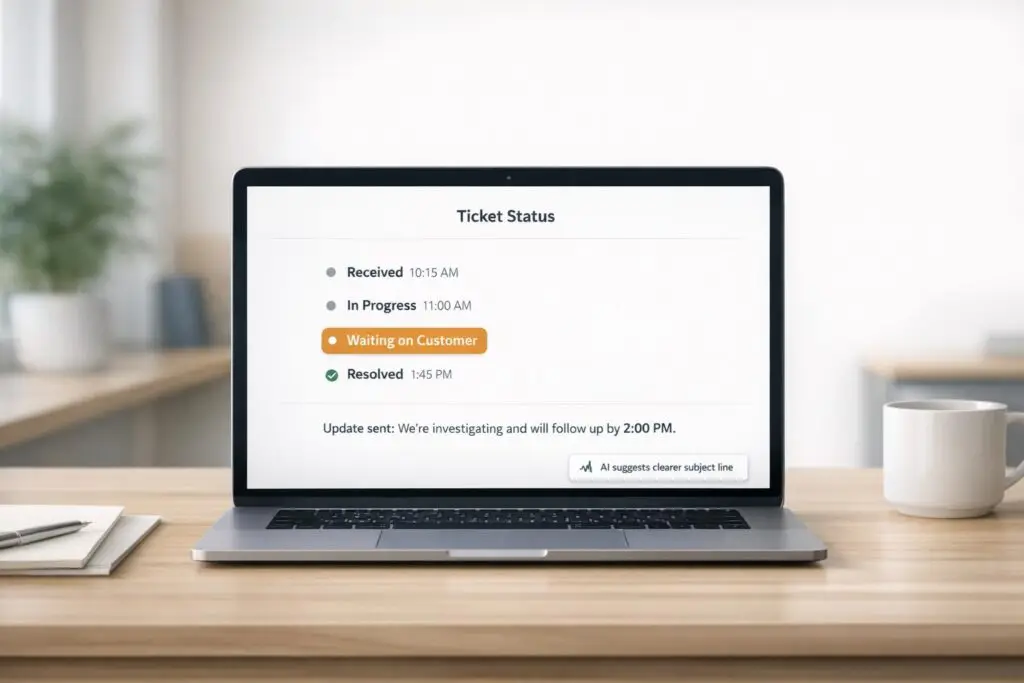
Clear and consistent ticket status updates are essential for building trust and improving customer support. When customers know what’s happening with their issues, they’re less likely to feel frustrated or confused. Here’s how you can streamline ticket updates:
- Use simple, standardized status categories like “New,” “In Progress,” “Waiting on Customer,” and “Resolved.” Avoid overly technical terms.
- Automate updates for key milestones (e.g., ticket creation, resolution) to save time and keep customers informed without overwhelming them.
- Write concise and clear messages that explain what’s happening, what’s next, and when the customer can expect an update.
- Handle delays transparently by setting realistic timelines, updating regularly, and offering alternatives when possible.
- Leverage AI tools to personalize updates, reduce response times, and ensure accuracy across all communications.
- Measure success using metrics like ticket reopen rates, customer satisfaction (CSAT), and first response times to continuously improve.
Creating custom ticket statuses
sbb-itb-e60d259
How to Define Clear Ticket Status Categories
5 Core Ticket Status Categories for Customer Support
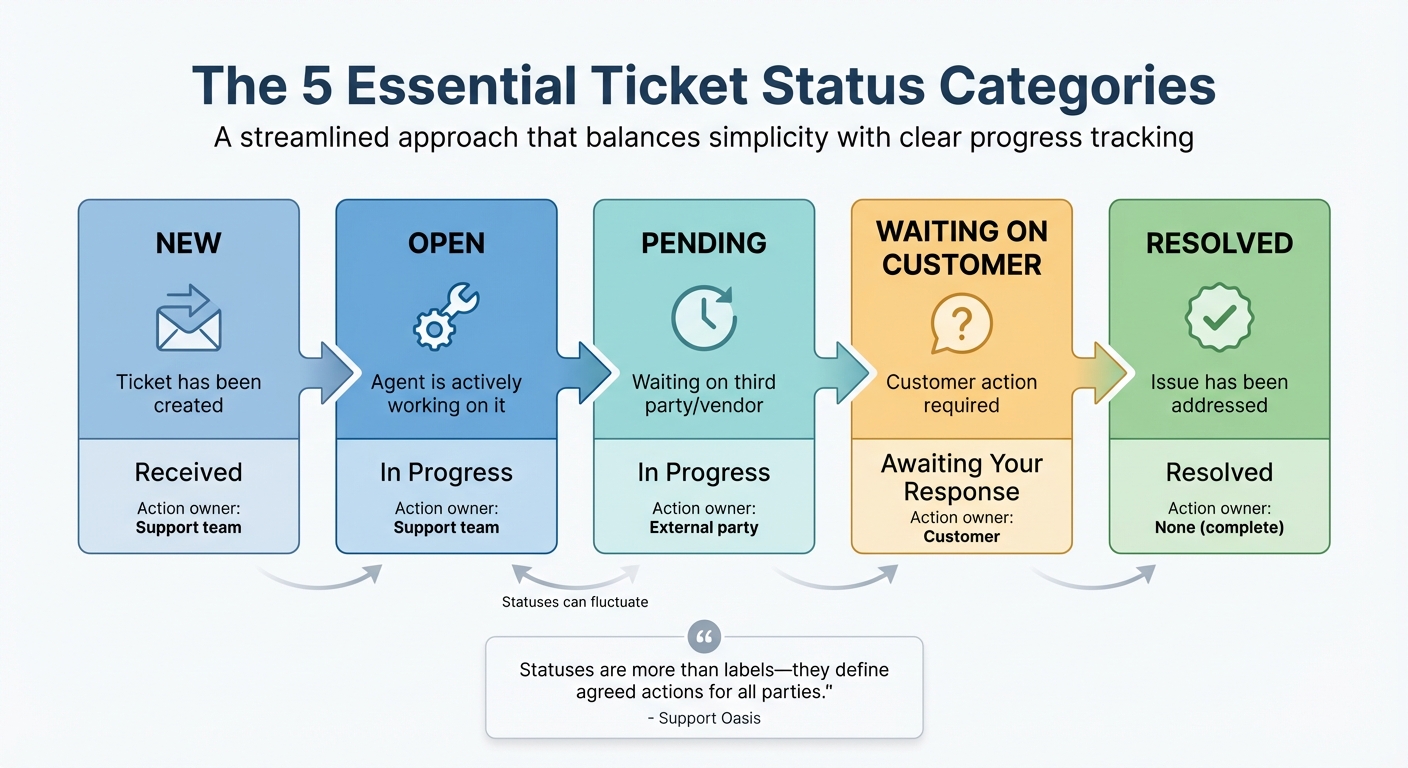
To communicate ticket progress effectively, you need a small, standardized set of status categories that everyone – both your team and your customers – can easily understand. Many support teams make the mistake of creating too many status options, thinking it will improve tracking. In reality, the ideal setup is usually just five core statuses: New, Open, Pending, Waiting on Customer, and Resolved [2][4]. This streamlined approach balances simplicity with enough detail to track progress clearly.
"Statuses are more than labels – they define agreed actions for all parties." – Support Oasis [2]
When everyone knows what each status means and who is responsible for the next step, tickets flow more efficiently. Customers stay informed, and internal tracking becomes smoother. Once you’ve nailed down this simplified list, the next step is choosing labels that make sense to your customers.
Pick Status Labels Customers Can Understand
Your customers don’t care about the nuances of your internal processes – they just want to know what’s happening with their issue. That’s why it’s essential to use plain, action-oriented labels that clearly communicate the ticket’s current state and what’s coming next.
For example:
- "Received" tells customers their ticket has been created.
- "In Progress" shows someone is actively working on it.
- "Awaiting Your Response" makes it clear the next step is on the customer.
- "Resolved" confirms the issue has been addressed.
Avoid using vague or duplicate terms. For instance, replacing "Pending" with "Waiting on Customer" eliminates confusion by explicitly signaling that the customer needs to act. Clear, straightforward labels like these build trust and ensure both sides understand what to expect.
Align Internal and External Status Terms
While your internal team might need more detailed tracking, it’s important to ensure that internal and external statuses align. Customers shouldn’t see conflicting information. The solution? Group detailed internal statuses under broader, customer-facing categories [4]. For example, while your team might use statuses like "Waiting on Engineering" or "Escalated to Product", customers only see "In Progress" – a label that reassures them their issue is being handled without exposing unnecessary details.
Consistency is key here. Define clear rules for when a ticket enters and exits each status. For instance: "Move to ‘Waiting on Customer’ when a question is asked; exit when the customer replies." This prevents confusion and ensures tickets don’t bounce between statuses unnecessarily. Some modern AI tools can even assist by suggesting status changes based on the conversation, like automatically marking a ticket as "Resolved" when a customer confirms the issue is fixed.
Finally, avoid frequent renaming of statuses. Changing labels often leads to customer confusion and messes up historical reporting. If multiple statuses convey the same idea, merge them into one. The goal is to keep things consistent and easy to follow – both for your team and your customers. Stability and clarity always win over complexity.
How to Automate Status Updates
Manually sending status updates can slow down your workflow. Agents end up wasting time crafting repetitive messages, while customers are left waiting for updates. Automating these updates solves this problem by sending the right messages at the right time, without adding extra work for your team.
By identifying key milestones in the ticket process, you can trigger automated updates that keep customers informed. This allows agents to focus on resolving issues rather than drafting messages. Some AI-powered platforms can even suggest status updates based on the context of the conversation, like changing a ticket to "Resolved" when a customer confirms their issue is fixed.
Identify When to Send Automated Updates
Not every internal status change needs to generate a customer notification. Instead, focus on the milestones that represent meaningful progress. These include updates like Ticket Received, In Progress, Waiting on Customer, Pending (when awaiting a third party), and Resolved. These are the moments when customers need to understand what’s happening and what to expect next.
| Milestone | Trigger Event | What to Send |
|---|---|---|
| Received | Ticket created in system | Confirmation with ticket ID and expected response time |
| Assigned/In Progress | Agent accepts ownership | Notification that a specialist is reviewing the issue |
| Waiting on Customer | Agent requests information | Clear request with a deadline and reminder timers |
| Pending | Waiting on vendor or third party | Explanation of the dependency to manage expectations |
| Resolved | Fix delivered or task completed | Final update summarizing the resolution |
Automating updates tied to these milestones ensures that customers stay informed. For example, you can set workflows to handle transitions like moving a ticket from "Waiting on Customer" back to "Open" when the customer replies. This also notifies the assigned agent, ensuring smooth ticket management without manual intervention.
You can also use time-based triggers to manage stagnant tickets. If a ticket stays in "Waiting on Customer" for 48 hours, send a polite reminder. If there’s no response after 10 days, consider auto-resolving the ticket. This proactive approach prevents issues from falling through the cracks and shows customers their concerns are being monitored.
Prevent Update Overload
While automation is useful, too many notifications can overwhelm customers. To avoid this, limit updates to no more than one every six hours unless the situation is urgent. Reserve immediate alerts for critical changes like "Failed" or "Action Required", where quick customer action is necessary.
It’s also important to set rules that prevent duplicate notifications. For instance, ensure that an update is sent only once, even if multiple triggers apply. Tools like Supportbench‘s AI automation can help by prioritizing cases, tagging tickets, and assigning issue types automatically, reducing the need for manual input.
How to Write Clear Status Update Messages
The way you craft status updates can make or break the trust customers have in your support team. A clear and concise message reassures customers and keeps them informed, while a vague or overly technical update can lead to confusion and frustration. Your goal? Strike the right balance between being transparent and professional – give customers the information they need without overwhelming them.
Every status update should address three key questions: What’s happening right now? What’s next? and When will I hear from you again? Covering these basics helps reduce customer anxiety and cuts down on unnecessary follow-ups.
What to Include in Every Status Update
| Essential Component | What to Include | Example |
|---|---|---|
| Current Status | Explain the impact in plain, non-technical language | "Payment processing is temporarily unavailable." |
| Actions Taken | Outline what your team is doing to resolve the issue | "We’ve identified the cause and are deploying a fix." |
| Next Update Time | Give a specific timeframe for the next update | "We’ll update you again by 3:00 PM EST." |
| Data Safety | Reassure customers about the security of their data | "Your account information remains secure." |
Current Status: Use simple, customer-friendly language to describe the issue. For example, instead of saying, "Database connection pool exhausted", try saying, "Login is currently unavailable." This keeps the focus on how the issue affects the customer rather than using technical jargon.
Actions Taken: Clearly explain what steps your team is taking, and use active voice to show accountability. Saying "We’re implementing a fix" is much more direct than "A fix is being implemented."
Next Update Time: Always provide a clear timeframe for the next update. Even if you don’t have a resolution yet, letting customers know when they’ll hear from you again – such as every 30 minutes for urgent issues or every 1–2 hours for less critical ones – can help reduce unnecessary follow-ups.
Data Safety: If the issue involves sensitive customer data, include a brief reassurance. A simple line like "Your data remains secure, and no information has been lost" can go a long way in keeping customers calm during a disruption.
If you don’t have all the answers yet, be upfront about it. Avoid making overly optimistic guesses that could later damage your credibility. Instead, let customers know you’re still investigating and will share updates as soon as you have more information.
Adjust Messages for Different Customer Types
Not all customers need the same level of detail or frequency of updates. For enterprise customers, updates often need to include specifics like SLA compliance, precise timelines, root causes, and steps being taken to prevent future issues. These updates might be shared with internal teams, so they need to be thorough and professional.
On the other hand, general consumers or individual users are usually more focused on the basics: what’s broken and when it will be fixed. For this audience, a message like "We’re working to restore access to your dashboard and expect it to be available within the next hour" is typically enough.
You can also adjust your tone based on the customer relationship. Long-term clients might appreciate a friendly, conversational tone, while new customers or those facing a sensitive issue may respond better to a more formal approach. The key is to stay consistent with your brand voice while tailoring the details to match the customer’s expectations.
Lastly, response time expectations vary by customer type. VIP or enterprise clients often expect updates within 10–15 minutes of an issue being detected, while general users may be more comfortable with longer response times, depending on the communication channel. Use your support tools to segment customers and ensure updates are routed with the appropriate urgency based on their priority level.
How to Communicate Delays Without Losing Trust
Delays happen. Whether it’s due to technical hiccups, shifting dependencies, or unexpected system failures, the real damage to customer relationships often comes from poor communication – not the delay itself. In fact, 46% of client escalations are caused by uncommunicated delays rather than the missed deadlines themselves [7]. By being upfront and clear, you can turn a potentially frustrating situation into an opportunity to build trust and demonstrate reliability.
Set Clear Timelines from the Start
The best way to handle delays is to set realistic expectations right from the beginning. Focus on update times, not just resolution times. For instance, instead of guessing when an issue will be resolved, say, "We’ll provide an update by 3:00 PM EST." This approach reassures customers and prevents them from constantly checking in for updates [5][1].
When exact resolution times are unclear, use time ranges instead of specific deadlines. Saying “We expect this resolved within 1–2 hours” is far better than overpromising and underdelivering. Research shows that small business owners who notify clients of schedule changes within 24 hours are 62% more likely to secure repeat business [7]. Even if there’s no new progress, sticking to your promised update schedule shows that you’re actively working on the issue.
Here’s a simple cadence to follow:
- For critical incidents, update every 30 minutes.
- For high-priority issues, every 45–60 minutes.
- For medium-priority issues, every 1–2 hours [5].
Present Delays in a Constructive Way
The way you communicate a delay matters just as much as the message itself. Instead of defaulting to apologies, express gratitude. For example, say, “Thank you for your patience” instead of “Sorry for the delay.” This small shift in tone can make a big difference.
A helpful framework for structuring delay messages is the 5C Formula:
- Context: Explain what’s happening.
- Cause: Share the root reason for the delay.
- Consequence: Outline what’s affected.
- Correction: Describe how you’re fixing it.
- Confirmation: Specify when the next update will arrive [7].
If a deadline absolutely can’t be met, offer a clear alternative. For example, if an automated feature is delayed, you might say, “While we work on the fix, I can manually generate and email your report within the next hour.” This shows you’re focused on solving the customer’s problem, not just managing the timeline [6].
It’s also important to avoid placing blame in your initial updates. Instead of pointing fingers at third parties or internal teams, focus on the steps being taken to resolve the issue [1][5]. Customers value proactive updates – preemptive communication leads to 43% higher satisfaction scores compared to reactive updates [7]. Even when things run late, being transparent and responsive can boost perceived reliability by 39% [7].
How AI Improves Ticket Status Updates
AI is reshaping how ticket status updates are handled by automating the ticket routing and delivery process. Instead of relying on manual effort, AI uses real-time data – such as order statuses, refund progress, or billing details – to craft precise, context-specific responses. This automation not only reduces confusion but also strengthens customer confidence by providing accurate and timely updates.
Take the example of Fundrise. In October 2025, Phillip Rickett, the company’s VP of IT, introduced Risotto, an AI tool that automated nearly 60% of IT support requests. Risotto analyzed various inputs, including historical Slack conversations, to deliver highly contextual responses. Rickett shared:
"Risotto started answering complex product questions even I didn’t know off the top of my head … It was pulling insights from our own past Slack conversations, surfacing knowledge that would have otherwise been buried." [10]
Use AI to Personalize Updates at Scale
AI taps into historical ticket data, knowledge bases, and standard operating procedures (SOPs) to create responses tailored to your brand’s tone and industry requirements. This personalization significantly reduces response times and ensures updates are relevant and engaging. By integrating AI tools with your existing support platforms, updates happen in real time. Additionally, "human-in-the-loop" systems allow AI to assess its confidence level and escalate tickets to human agents when necessary.
For instance, Retool managed to cut its SLA resolution times from 2 days to under 1 day, while Hazel Health improved its ticket deflection rates from 3%–5% to over 20% by using AI-powered solutions [10]. Beyond just speeding up responses, these tools ensure every update resonates with the specific needs of the customer – providing clarity and relevance at scale.
Generate Context-Aware Messages with AI
AI systems excel at generating updates that incorporate the full case history, expected timelines, and actionable next steps. This reduces the frustration of customers having to repeat themselves. Advanced tools can even analyze customer screenshots to identify errors and recommend fixes quickly. A great example comes from Vidyard, where IT Manager Vergil Smith used AI to automate 56% of IT support requests. By streamlining processes like approval workflows and ticket tracking for SOC 2 compliance, the system ensured proper documentation and approval for privileged system access [10].
AI also adapts dynamically to shifting customer requests by analyzing conversation history in real time. As Dinesh Goel, CEO of Robylon, explains:
"Robylon understands the intent, pulls the right context, and generates a complete, compliant response that actually resolves the issue." [8]
How to Measure and Improve Status Update Quality
Tracking the right metrics can reveal whether your status updates are clear or causing confusion. For example, ticket reopen rate is a strong indicator of unclear updates. Similarly, requester wait time – the time customers spend waiting in unresolved ticket stages – offers a window into their experience with your communication cadence. If you notice a high number of agent touches, it could mean that your initial updates lacked enough detail, prompting unnecessary follow-ups.
Metrics like First Reply Time (FRT) measure the time between ticket creation and the first meaningful response from your team. Meanwhile, one-touch resolution shows how often tickets are resolved in a single interaction. If simple issues require multiple updates, it might signal that the first communication wasn’t clear enough. When reviewing CSAT scores, don’t overlook customer comments – 87% of CX teams still rely on manual methods to analyze this feedback, which can leave important sentiment trends hidden [14].
To dig deeper, use multi-channel feedback collection methods like post-resolution surveys, closing messages, and live chat transcripts [11][13][14]. Adding open-ended questions to your CSAT surveys can help pinpoint why customers found a status update unclear instead of just capturing dissatisfaction.
Track Key Metrics
Certain metrics directly measure how clear and effective your updates are:
- Ticket reopen rate: Signals if a "Solved" status was communicated too early or unclearly.
- Agent touches: High numbers suggest the initial updates lacked necessary context, leading to additional interactions.
- Requester wait time: Reflects delays between updates, which can erode customer trust.
- CSAT comments: Provide qualitative insights into the tone and clarity of your messages.
- One-touch resolution: Indicates if the first update was effective enough to resolve the issue immediately.
| Metric | What It Reveals About Status Updates |
|---|---|
| Reopen Rate | Indicates if the "Solved" status was communicated prematurely or unclearly |
| Agent Touches | High counts suggest initial updates lacked necessary context or clarity |
| Requester Wait Time | Reflects the delay between status updates |
| CSAT Comments | Offers feedback on message clarity |
| One-Touch Resolution | Shows if the first update was effective enough to close the issue immediately |
For live chat, aim for a first response time under 1 minute, and for email, under 1 hour [15]. Tracking average resolution time (ART) can also help refine the accuracy of the estimated timelines you give customers. Missing these timelines consistently can lead to frustration instead of trust.
Clear metrics give your team the tools to make real-time adjustments for better communication.
Refine Messages Using Customer Feedback
Collecting customer feedback is only part of the equation – it’s what you do with it that counts. If customers consistently report confusion about a specific status term, review its use across your system and consider updating it to something more intuitive [14]. For instance, if "Pending" causes confusion, you might switch to "Awaiting Your Input" with a clear explanation of what’s needed.
Use these insights to keep your canned responses up to date. As your products and customer issues evolve, your message library should evolve too [12][13]. Personalize automated replies by including the customer’s name and specific details about their inquiry. This small effort can make even templated responses feel more human [12][15]. Companies that use AI to classify tickets report a 45% reduction in response times by routing tickets to the right specialist immediately, reducing confusing handoffs and status changes [14].
Proactively notifying customers about delays is another critical step. If you anticipate exceeding your initial ETA, inform them before they have to ask [13]. Share feedback insights with teams like Product, Engineering, and Sales to tackle recurring issues that might need cross-departmental attention [14]. As Swati Sharma from Zonka Feedback explains:
"Support conversations are one of the few places where customers are completely honest. They don’t hold back, they don’t sugarcoat, and they often reveal the truth that surveys and NPS scores never capture" [14].
Conclusion
Ticket status updates play a key role in building trust within B2B support. By using clearly defined status categories – like "Pending" for customer action and "On-Hold" for third-party dependencies – you remove uncertainty about who needs to act next [17][19]. Adding automation to these updates, with built-in delays to confirm resolution, helps avoid closing tickets too soon [16].
Beyond clear statuses and automation, actionable messages with specific timelines further enhance trust. B2B customers prioritize accuracy over speed, especially when 77% of them already find their purchasing process challenging [18].
AI takes this a step further by personalizing updates at scale, cutting ticket resolution time by up to 40% [3]. It can gauge sentiment, rewrite unclear subject lines instantly, and retrieve context from past interactions – all while staying true to your brand’s tone [3][9]. Companies leveraging AI for quality assurance can review 100% of tickets instead of sampling just a few, ensuring consistent service across every interaction [3].
The benefits are undeniable. A 5% increase in customer retention can drive profit growth of 25% to 95%, and businesses that actively close the feedback loop with customers achieve retention rates twice as high [18]. Transparent updates transform routine communications into opportunities to strengthen partnerships and encourage renewals. These changes not only improve retention but also streamline overall support operations.
FAQs
How many ticket statuses should customers see?
When it comes to ticket statuses, there’s no one-size-fits-all rule. However, keeping things simple and easy to understand is key. A good starting point is around 4–5 statuses, such as New, Open, Pending, Waiting on Customer, and Resolved or Closed. This approach provides enough clarity for customers to track progress without creating unnecessary confusion, while still aligning with the complexity of your support process.
What status updates should be automated vs manual?
Automated updates shine when handling repetitive tasks. For example, they’re perfect for confirming receipt of a request, sharing progress updates during lengthy investigations, or notifying customers about resolutions or changes in dependencies. They keep things consistent and ensure messages are sent on time.
On the other hand, manual updates are better suited for situations that call for a personal touch or careful judgment. Think of clarifying intricate technical details or addressing escalations – these require a human approach to prevent misunderstandings and provide customized support.
How do you use AI for updates without sounding robotic?
To make communication feel more human and less robotic, use AI tools that focus on personalization and natural language. Include empathetic phrases, specific details relevant to the situation, and even sentiment analysis to adjust the tone based on the customer’s emotions. Regularly update and fine-tune AI templates to keep messages straightforward, relatable, and easy to understand. When you prioritize emotional connection and customization, AI-powered updates can come across as authentic while maintaining clarity and trust.