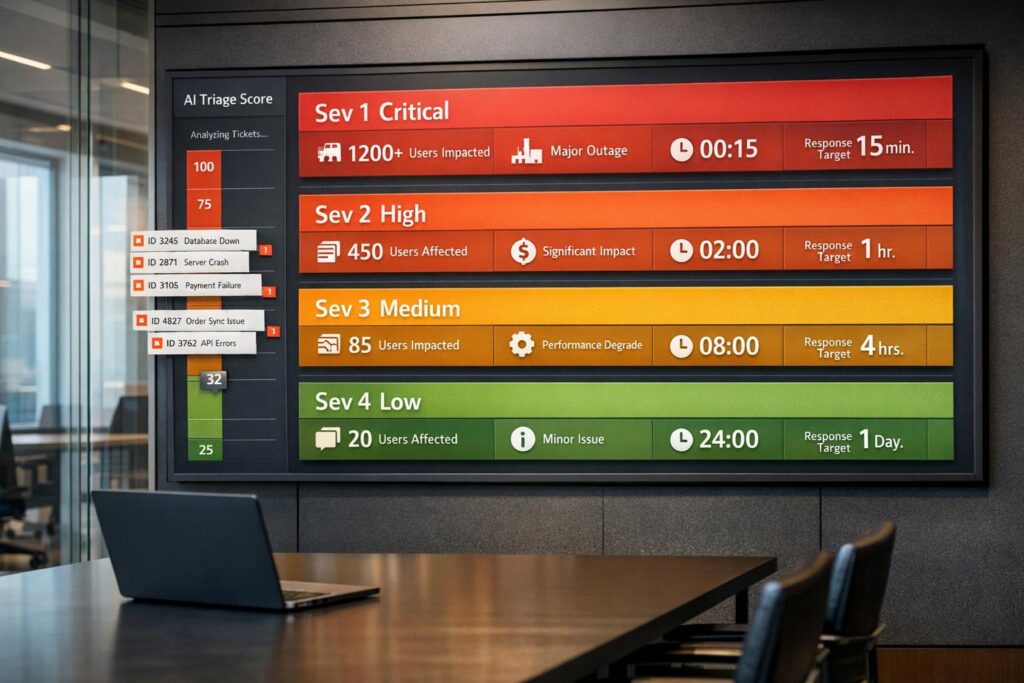
When every issue is treated as a "Sev 1", it overwhelms teams, delays fixes, and frustrates customers. To fix this, you need clear, measurable severity levels that everyone understands. Here’s how:
- Define Severity Clearly: Use 3-5 levels (e.g., Critical, Major, Minor) with measurable criteria like user impact, revenue risk, and workaround availability.
- Separate Severity from Priority: Severity measures impact, while priority decides when to fix it.
- Educate Customers: Explain severity levels during onboarding with examples they can relate to.
- Use an Impact Matrix: Score issues based on user impact, functionality loss, and business risk to classify consistently.
- Automate with AI: Let AI handle classification and escalation to reduce errors and speed up responses.
This approach reduces alert fatigue, improves response times, and ensures critical issues get the attention they deserve.
How to Define Incident Severity Levels For Your Service Desk
Why Severity Levels Break Down
Severity frameworks often fail when their definitions lack clarity or enforcement is inconsistent. Data shows that organizations with well-defined severity frameworks resolve incidents 40% faster than those relying on ad-hoc classifications. However, this efficiency disappears when subjective judgments dominate severity design.
The core issue? Subjectivity disguised as objectivity. When severity definitions include vague terms like "serious impact" or "important feature", they leave room for interpretation. For instance, what feels "serious" to a customer under a tight deadline might seem trivial to an engineer if the fix is quick. Without measurable criteria – such as the number of users affected or revenue at risk – teams waste valuable time debating labels instead of resolving the issue.
"A common failure case with severities is deliberating over what level makes sense, and forgetting to actually respond to the issue. If deliberation consumes time, pick the more severe level and focus on fixing the issue." – incident.io
This problem worsens when teams confuse severity (how bad is it?) with priority (what gets worked on first?). For example, a cosmetic bug that catches the CEO’s eye might be escalated to Sev 1 just to ensure immediate action – even if it impacts no customers. As a result, engineers might be paged at 2:00 AM for issues that could have waited, creating unnecessary disruption.
Why Everything Becomes Sev 1
Unclear expectations and past experiences often push customers to escalate issues to Sev 1. When severity definitions rely on vague phrases like "something important is broken", both customers and support agents tend to default to the highest level to guarantee attention.
A clearer dividing line between Sev 1 and Sev 2 should focus on the availability of workarounds. If a core workflow is completely blocked with no alternative, it’s Sev 1. But if users can still accomplish their goal – albeit through slower or manual processes – the issue should fall under Sev 2.
"Severity is ‘how bad is it?’ Priority is ‘when do we fix it?’ Don’t conflate them." – Engineering Manager, Series B Healthcare SaaS
Labeling everything as Sev 1 has long-term consequences. Over time, on-call engineers experience alert fatigue, where "critical" alerts lose their urgency because they rarely signal true emergencies. This noise can bury real crises, draining resources and focus when they’re most needed.
How Customers and Support Teams See Severity Differently
The way customers and support teams perceive severity often diverges. Customers judge severity based on their immediate experience – whether a workflow is blocked, stakeholder pressure is mounting, or a deadline is at risk. In contrast, support teams focus on measurable impact: the number of users affected, system performance, or potential revenue loss. For example, a customer facing a total outage will classify it as Sev 1, even if no other users are impacted.
This disconnect worsens when severity definitions prioritize internal metrics over customer experience. Monitoring might show normal CPU usage and latency, but if a configuration error prevents a customer from logging in, they’ll still view it as a "total outage." Similarly, dismissing an issue as "just a simple fix" can erode trust and leave customers feeling undervalued.
Resource availability adds another layer of complexity. Many organizations require customers to provide 24/7 technical contacts for Sev 1 issues. But when customers demand immediate attention without staying engaged, severity levels can become negotiable. Without clear policies to downgrade issues when customers are unavailable, support teams risk being stuck in limbo.
"Critical situations may require both Customer and Kaseya personnel to be at their respective work locations on an around-the-clock basis. If the authorized or designated customer contact is not available to engage in this effort, Kaseya Support may reduce the severity level." – Kaseya
How to Define Clear Severity Levels
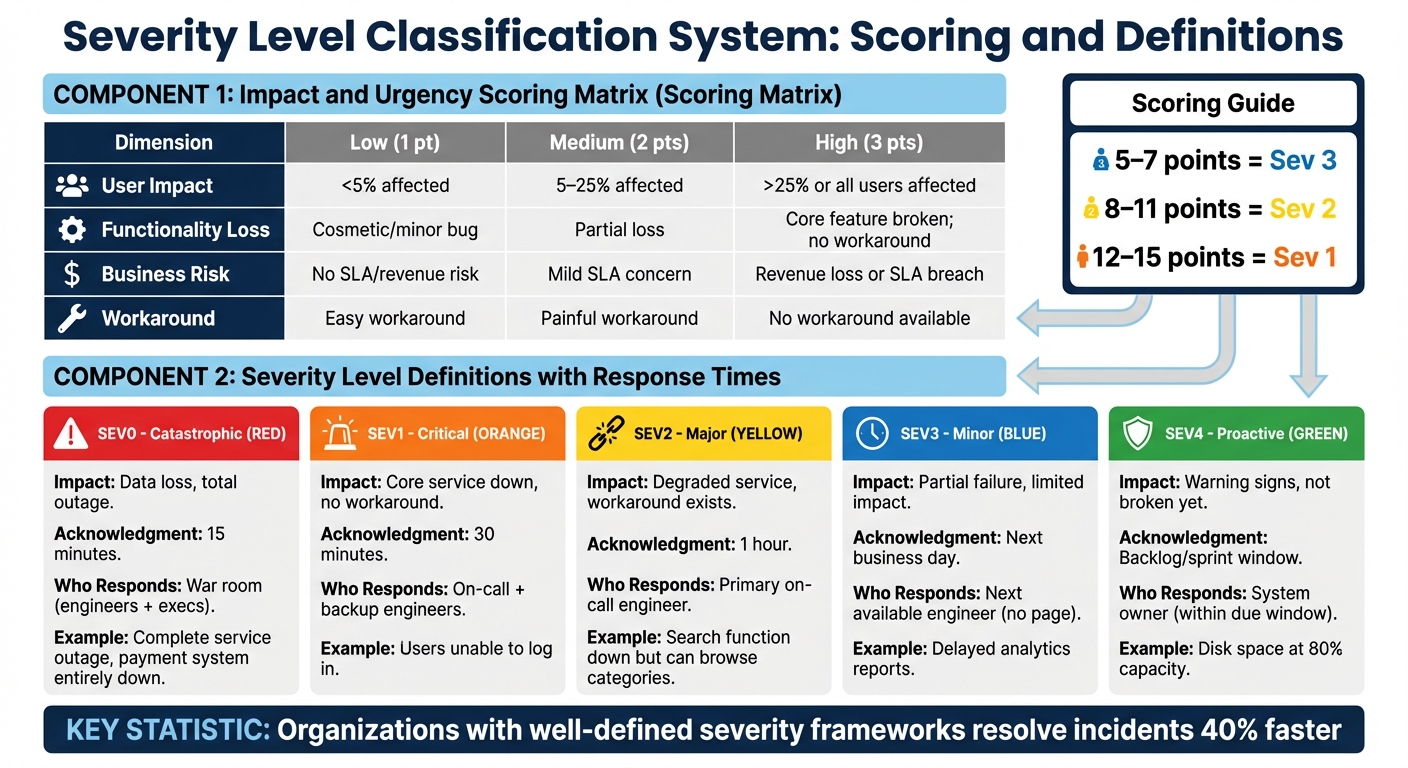
Severity Level Classification Matrix with Impact Scoring Guide
Replace vague descriptors like "serious impact" or "important feature" with measurable criteria – think along the lines of percentage of users affected, revenue impact, or workaround availability. Organizations with well-defined severity frameworks resolve incidents 40% faster than those relying on ad-hoc classifications.
The sweet spot for severity levels is 3 to 5. Too few levels fail to capture nuance, while too many can cause "classification paralysis" during triage. Many teams find that four levels – Critical, Major, Minor, and Low – hit the right balance, offering enough detail without overwhelming users or agents.
Using clear, human-friendly terms like "Critical" and "Major" makes it easier for customers to grasp the urgency, especially in high-pressure situations. Avoid technical jargon that requires decoding.
Build an Impact and Urgency Matrix
A two-dimensional matrix simplifies decision-making by scoring issues based on user impact and business risk. This method replaces subjective debates with objective criteria, ensuring a consistent approach to ticket classification.
Set explicit thresholds for factors like user impact (e.g., <5%, 5–25%, >25%), business risk (e.g., SLA breaches, revenue loss), and workaround availability. For example, if a core function is completely blocked with no alternative, it’s typically Sev 1. If a workaround exists – though slower or manual – it might fall under Sev 2.
A weighted scoring system can further refine classifications. Assign 0–3 points to dimensions such as User Impact, Functionality Loss, Business Risk, and Workaround Availability. For example:
- 5–7 points: Sev 3
- 8–11 points: Sev 2
- 12–15 points: Sev 1
This scoring bridges internal metrics with the customer’s perspective, reducing emotional escalation and helping teams – from support to engineering – reach a quick consensus.
| Dimension | Low (1 pt) | Medium (2 pts) | High (3 pts) |
|---|---|---|---|
| User Impact | <5% affected | 5–25% affected | >25% or all users affected |
| Functionality Loss | Cosmetic/minor bug | Partial loss | Core feature broken; no workaround |
| Business Risk | No SLA/revenue risk | Mild SLA concern | Revenue loss or SLA breach |
| Workaround | Easy workaround | Painful workaround | No workaround available |
To keep things efficient, set a triage time limit of 30–60 seconds. If a classification takes longer, default to a higher severity to avoid delays. As one SRE Manager from a 180-person infrastructure company noted:
"The best severity framework is the one your team actually uses. If on-call hates it, they’ll ignore it".
This matrix ensures clarity and consistency while aligning with customer expectations.
Severity Level Examples That Customers Understand
Customers care most about how an issue affects their ability to work. Translate severity levels into customer-facing terms that focus on their experience rather than internal metrics.
- Critical (Sev 1): A complete service outage with no workaround. Examples include users being unable to log in or a payment system being entirely down, halting all transactions.
- Major (Sev 2): Significant degradation where a critical feature is broken but a workaround exists. For instance, the search function might be down, but users can still browse categories to find products.
- Minor (Sev 3): Partial failures or minor performance issues affecting a small group of users. Examples include delayed analytics reports or profile pictures failing to load.
- Low (Sev 4): Cosmetic issues or bugs that don’t impact functionality. This might include typos or misaligned buttons on a settings page.
Some teams also use a proactive "Sev 4" level for preemptive actions, such as monitoring disk space at 80% capacity or flagging SSL certificates set to expire in 30 days. Over six months, this approach prevented 38 out of 47 potential incidents – about 80% of issues that could have escalated into emergencies. Shifting from reactive firefighting to proactive maintenance improves overall efficiency and user satisfaction.
"Start with 3 levels. Don’t over-engineer day one. You can always add SEV0 and SEV4 later." – CTO, 40-person startup
To tie severity levels to action, align them with contractual SLAs and response times. For example, if a ticket is nearing an SLA breach, its severity should escalate automatically.
Connect Severity Levels to Response Times and SLAs
To ensure smooth operations, response times and SLAs need to align closely with severity levels. By linking severity levels to specific, measurable actions – like clear acknowledgment windows – you eliminate ambiguity and improve efficiency. An acknowledgment window refers to the time between when a ticket is received and when it gets its first response.
Organizations that connect severity levels to response times have been shown to resolve incidents 40% faster than those relying on inconsistent methods. For instance, a SEV0 (catastrophic) issue might demand acknowledgment within 15 minutes, while a SEV3 (minor) issue could wait until the next business day. These predefined targets ensure critical issues are addressed promptly and consistently.
Equally important is defining who responds for each severity level. A SEV0 incident might require a "war room" involving engineers and executives, while a SEV2 issue could simply go to the primary on-call engineer. Automated workflows can further streamline this process by routing tickets to the right team and escalating when acknowledgment deadlines are missed. This structured approach minimizes delays and ensures the right people are engaged at the right time.
Here’s how severity levels can map to response targets:
| Severity | Impact | Acknowledgment Target | Who Responds |
|---|---|---|---|
| SEV0 | Catastrophic (data loss, total outage) | 15 minutes | War room (engineers + execs) |
| SEV1 | Critical (core service down, no workaround) | 30 minutes | On-call + backup engineers |
| SEV2 | Major (degraded service, workaround exists) | 1 hour | Primary on-call engineer |
| SEV3 | Minor (partial failure, limited impact) | Next business day | Next available engineer (no page) |
| SEV4 | Proactive (warning signs, not broken yet) | Backlog/sprint window | System owner (within due window) |
It’s essential to remember that severity measures impact, while priority dictates fix timing.
Use Dynamic SLAs to Adjust Response Times
Static SLAs often fail to capture the nuances of different scenarios, treating all tickets the same regardless of timing or context. Dynamic SLAs, on the other hand, adapt based on factors like severity, customer tier, business hours, and more. For example, a SEV2 issue logged at 3:00 PM might be resolved by the active team during business hours, while the same issue logged at 3:00 AM could trigger an alert for on-call staff. This flexibility avoids unnecessary disruptions while ensuring urgent issues are handled appropriately.
Dynamic SLAs also play a key role in preventing SLA breaches. Instead of waiting for deadlines to pass, they escalate tickets as deadlines approach. For instance, a SEV3 ticket nearing its deadline might automatically escalate to SEV2, speeding up resolution. This proactive approach reduces last-minute scrambles and keeps things running smoothly.
Some teams also use a "Visibility" flag for incidents with high internal attention – like those monitored by a CEO – but low technical severity. This allows teams to prioritize fixes without unnecessarily alerting engineers or skewing severity metrics. The technical severity stays accurate, while the priority reflects the business context.
The goal isn’t to achieve perfect classification but to simplify decision-making. When response targets are clear and automated, teams can focus on resolving issues effectively, rather than debating their seriousness. This clarity ensures faster fixes and happier customers.
sbb-itb-e60d259
How to Communicate Severity Levels to Customers
Even the most well-thought-out severity framework will fall short if your customers don’t understand it. Educating them early on can help avoid disputes about how incidents are classified. Think of severity definitions as a shared agreement between your company and your customers about the impact of an issue and the effort required to resolve it. Ryan McDonald from FireHydrant explains it this way:
"At their core, severity definitions are an agreement among responders and stakeholders on the impact of an incident and the level of response needed. If one party isn’t bought in on that agreement, it’s not very useful."
Introduce and explain severity definitions during onboarding and business reviews. Use clear, specific examples that relate directly to your customer’s business. For instance, instead of vague terms, say, "Any financial loss above $100,000 qualifies as a Critical incident". This clarity ensures that when an incident happens, customers are more likely to accept the classification, even in high-pressure situations. When everyone is on the same page from the start, communication during incidents becomes much smoother.
Teach Customers How Severity Works
Stick to simple, everyday language instead of technical jargon or codes. Labels like "Minor", "Major", and "Critical" are straightforward, whereas terms like "SEV-1" or "P1" can be confusing or interpreted differently depending on the person. Ryan McDonald emphasizes this point:
"Severity definitions should be in plain language. You want them understood and used by every member of an organization, not only engineering."
Make sure customers know that severity reflects the impact of an issue, not the effort required to fix it. For example, a total database outage is still a SEV1, even if the fix is quick. Severity is determined by factors like how many users are affected and whether revenue is at risk – not how complicated the solution might be.
A practical way to explain severity is by using the "workaround" test. If a core workflow is completely blocked with no alternative, it’s a high-severity issue. But if users can still achieve their goal through another method, the severity level decreases.
It’s also important to distinguish severity from priority. Severity measures the impact of the problem, while priority determines how quickly it will be addressed. Once customers understand this distinction, it’s easier to manage any disagreements that arise about classifications.
Handle Severity Disagreements Without Damaging Relationships
Even with clear education, disagreements about severity can happen. When they do, approach the situation calmly and follow established protocols. Acknowledge that severity classifications are subjective. The team at incident.io advises:
"Severities are subjective… If you’re spending any amount of time deliberating, pick the more severe level and focus your effort on fixing things."
When in doubt, lean toward assigning a higher severity. It’s easier to downgrade later than to justify having underestimated the situation. During the incident, prioritize solving the issue over debating the label. Once the dust settles, you can revisit the classification with all the facts in hand.
For cases where a customer feels highly distressed but the technical impact is minor, consider using a separate "Visibility" tag. This allows you to provide frequent updates and personalized communication without skewing your severity metrics. It’s a way to reassure customers that you’re taking their concerns seriously while keeping your internal data accurate.
Finally, establish consistent communication routines, regardless of the severity level. Regular updates can often calm anxious customers faster than debating the classification itself. Use clear, standardized messaging to confirm that the issue is being addressed and provide a predictable schedule for updates. When customers trust that they’ll hear from you regularly, they’re less likely to escalate based on fear or uncertainty.
Use AI to Automate and Improve Severity Classification
AI brings consistency and precision to the process of severity classification, addressing the common issue of overusing high-severity labels. When handled manually, severity classification often suffers from inconsistencies, particularly during periods of high demand. AI eliminates much of this variability by applying clear, measurable criteria to every ticket. Instead of relying on subjective human judgment, automated systems evaluate objective factors like user impact, system availability, and revenue risk.
Some advanced teams take this a step further by embedding severity scoring logic directly into their alerting systems. For instance, if a monitoring tool detects a database outage, it can immediately assign a SEV1 classification as the alert is generated. This automation doesn’t just classify incidents – it also triggers workflows based on severity. Critical incidents might notify executive teams, while lower-severity issues could create backlog tickets for later resolution. To refine this process even more, AI-powered triage can be integrated to improve prioritization.
Automate Triage and Prioritization with AI
AI simplifies triage by removing much of the mental burden from classification. Using a weighted scoring system, it evaluates dimensions like User Impact, Functionality, Business Risk, Urgency, and Workaround Availability to calculate a severity score in seconds. For example, if a ticket scores between 12 and 15 points, the system can automatically classify it as a SEV1 and route it to the appropriate team.
To ensure no ticket goes unclassified, configure your tools to notify the incident channel if a severity level remains "UNSET" for more than two minutes. This ensures every ticket is accounted for and provides accurate data for reporting and continuous improvement.
Predict Escalations
AI isn’t just about classification – it can also predict potential escalations, allowing teams to act proactively. By monitoring early-warning signs, such as disk space nearing 80% capacity, SSL certificates close to expiration, or database queries slowing down, teams can identify and label these as SEV4 issues. One Engineering Manager at a Series B SaaS company highlighted the benefits of this approach:
"We added SEV4 when we hit 80 people. Prevented 38 out of 47 potential incidents in 6 months."
This proactive strategy helps teams address problems during regular business hours instead of scrambling in the middle of the night. AI also monitors critical "danger zones", where product performance edges close to SLA breach limits. By automatically escalating severity levels in these situations, teams can avoid penalties and maintain strong customer satisfaction. Even as operational toil is projected to rise to 30% by 2025, predictive workflows allow teams to stay ahead of issues rather than constantly reacting to them.
Mistakes to Avoid When Implementing Severity Levels
When setting up severity frameworks, certain missteps can seriously hinder their effectiveness. One of the most common issues is having too many severity levels. Going beyond five levels often slows down response times because teams spend precious minutes – sometimes over 10 – debating the correct level instead of addressing the problem. In fact, organizations with clearly defined severity frameworks resolve incidents 40% faster compared to those relying on ad-hoc classifications.
Another frequent error is mixing up severity with priority. These two concepts are not interchangeable. For example, a minor bug might be labeled as high priority during a major product launch, but that doesn’t mean it’s high severity. Confusing the two can lead to inaccurate classifications and mismanagement of resources.
Ignoring the customer impact is another pitfall. Just because internal tools are unaffected doesn’t mean the incident isn’t severe. If your public API goes down, it’s a high-severity issue for customers who rely on it – even if your internal systems are running smoothly. Similarly, letting the root cause influence severity is misleading. Severity should always be based on the impact, not on how familiar or easy the issue seems to fix.
A less obvious but equally damaging mistake is treating severity levels as static. Initial assessments are often incomplete, and sticking to them without adjustment can lead to mismanagement. As more information becomes available, teams should refine their classifications to reflect the actual scope of the incident.
Stephen Whitworth, Co-Founder & CEO of incident.io, emphasizes the importance of simplicity in communication:
"Choose human words like Low, Medium, over codewords like SEV-1 or P1. Some people will expect P1 to be more severe than P5 and others, well, won’t!"
Using clear, plain terms instead of cryptic codes ensures everyone is on the same page.
To avoid these traps, focus on clarity and consistency. Apply the Goldilocks Principle: stick to 3–5 severity levels with straightforward language. For smaller teams, start with three levels and expand only as the complexity of your operations increases. When in doubt, initially classify an issue at a higher severity and adjust as more details emerge.
Conclusion
Having clear severity definitions creates a shared understanding between technical teams, support staff, and customers. When everyone knows the difference between terms like "Critical" and "Minor", you avoid wasting valuable time debating an incident’s severity during the critical early moments of an outage. Organizations that implement well-defined severity frameworks gain a noticeable edge in resolving incidents faster.
This clarity not only speeds up responses but also ensures that strategies align with customer expectations. Over-escalation becomes less of an issue when customers can consult specific criteria before submitting a ticket. By linking severity levels to clear SLAs, companies can set realistic expectations, allocate resources effectively, and reduce the risk of engineer burnout.
AI-powered automation adds another layer of consistency by removing subjective decisions. With automation, customer-facing outages always trigger the appropriate response level, no matter who is managing the situation. This approach connects technical assessments with customer impact, ensuring seamless incident handling. It also safeguards SLAs, reduces unnecessary alerts, and allows teams to focus on solving problems instead of debating severity labels.
As highlighted earlier, a strong severity framework improves response times and builds trust with customers. Robert Ross, CEO of FireHydrant, emphasizes this point:
"Reliability is a business metric, not an engineering metric".
FAQs
How can AI simplify and improve severity level classification?
AI simplifies the process of severity classification by using machine learning models trained on past incident data. These models assess key factors – like the number of users impacted, the extent of system disruption, and the overall scope – to assign severity levels quickly and without bias. This approach minimizes delays and reduces the risk of human error.
By automating workflows based on predefined rules – such as whether critical services or revenue streams are affected – AI ensures severity levels are assigned consistently and accurately. Over time, these systems learn and improve, helping to avoid the overuse of top-priority levels like "Sev 1." This allows support teams to concentrate on genuinely urgent issues rather than being overwhelmed by misclassified incidents.
What’s the difference between severity and priority in incident management?
Severity and priority serve different purposes when managing incidents, and understanding their roles can help teams respond more effectively.
Severity measures the impact of an issue on the business or system. It reflects how much harm or disruption the problem causes. For example, a complete system outage would rank as high severity because it disrupts many users, while a small visual bug might have low severity since it causes minimal inconvenience.
Priority, on the other hand, focuses on the urgency of addressing the issue. It considers factors like business requirements, customer expectations, or service-level agreements (SLAs). While high-severity issues are often treated as high priority, there are exceptions. For instance, a low-severity issue affecting a VIP customer might still be escalated as a top priority.
To put it simply: severity gauges the impact, while priority determines the urgency. This distinction helps teams allocate resources wisely and avoid overreacting to less critical issues.
Why is it crucial to help customers understand severity levels?
Helping customers grasp severity levels is key to setting expectations and maintaining clear communication. When customers understand how issues are prioritized, it minimizes confusion and builds trust in the support process.
By agreeing on what each severity level means, support teams can concentrate on tackling the most urgent problems first. At the same time, customers gain insight into how their concerns are being managed. This approach not only streamlines workflows but also discourages the overuse of high-priority labels like Sev 1, creating a more balanced and predictable support experience for everyone.