


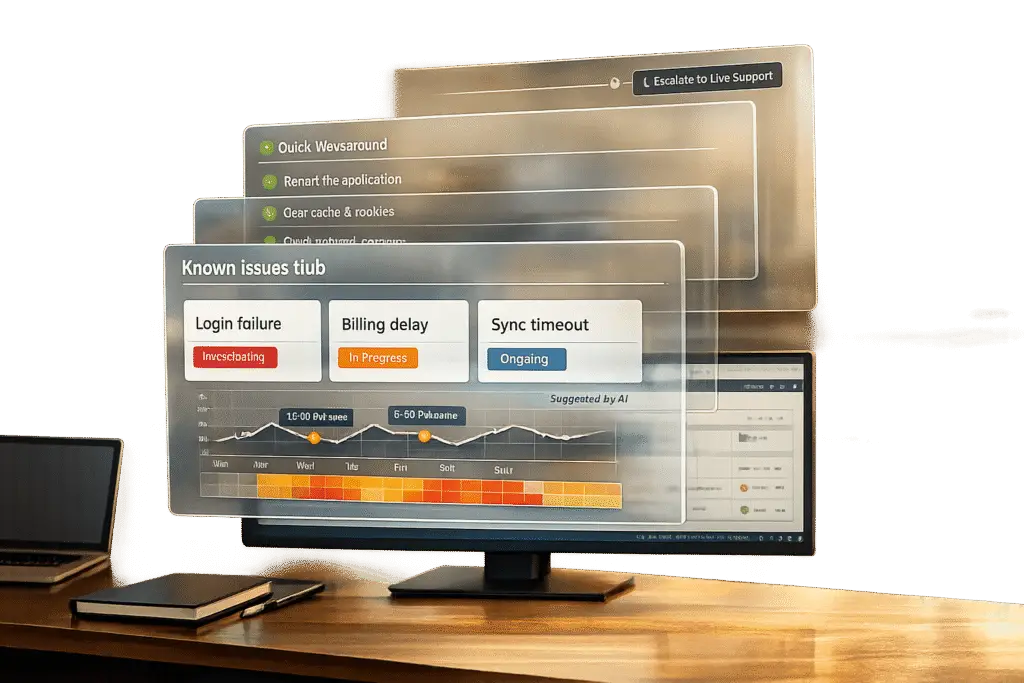
A "known issues" section in your support system can save time, reduce repetitive tickets, and build trust with users by addressing common problems upfront. Here’s how to create one effectively:
- Identify recurring issues: Analyze ticket trends, use AI to detect patterns, and gather insights from frontline agents.
- Organize content clearly: Group issues by user-friendly categories like "Troubleshooting" or "Billing", and prioritize by severity.
- Write search-friendly titles: Use clear, simple language and optimize for common search terms (e.g., "How to reset your password").
- Provide updates and workarounds: Be transparent about issue status and offer temporary solutions where possible.
- Automate maintenance: Use AI to generate articles from resolved tickets, auto-tag content, and flag outdated information.
- Integrate with live support: Embed self-service tools in chat or ticket forms, and ensure seamless escalation to human agents when needed.
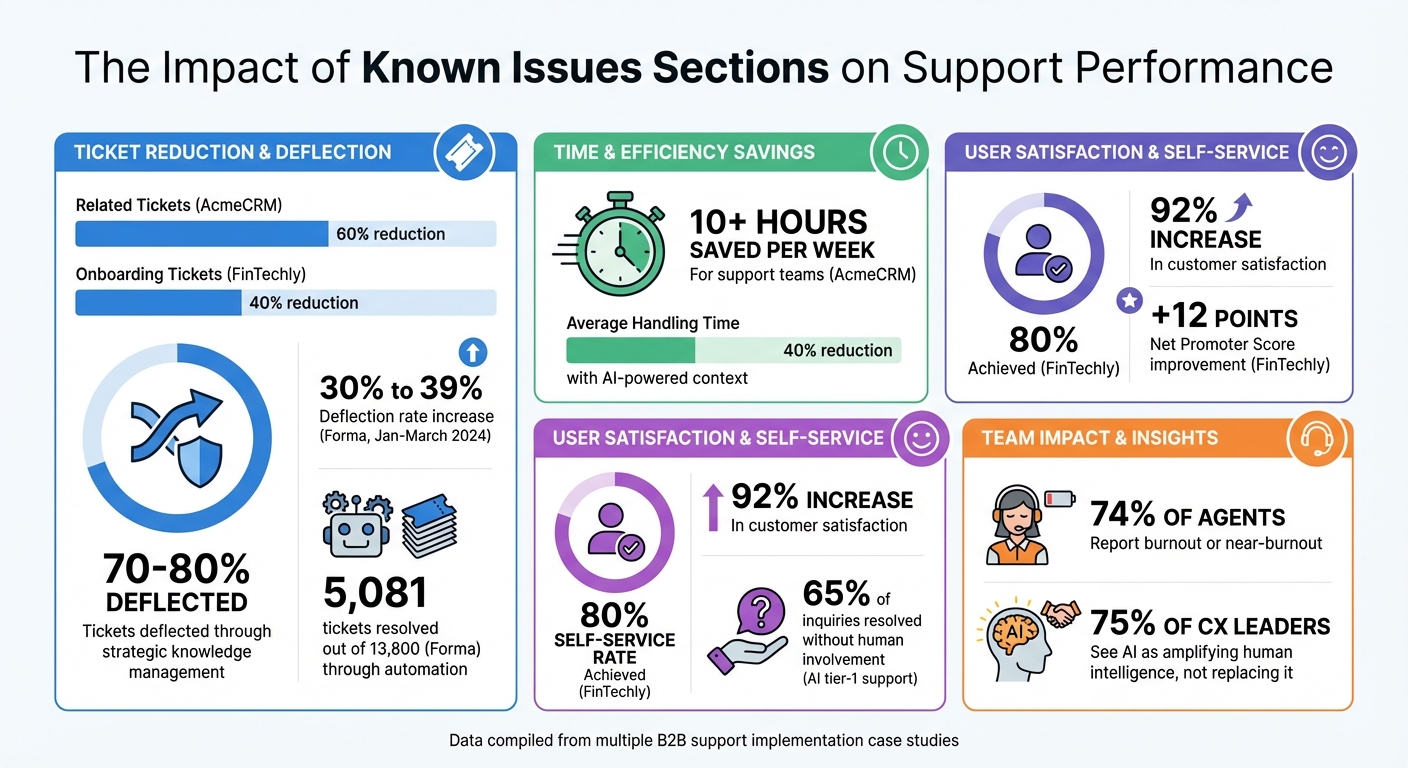
Key Metrics: How Known Issues Sections Reduce Support Tickets and Improve Customer Satisfaction
How to Identify Recurring Issues for Your Known Issues Section
To build an effective known issues section, start by identifying recurring problems that consume resources and frustrate customers. This involves analyzing data, using AI tools, and gathering insights from your frontline agents. Together, these methods create a solid foundation for a clear and actionable list of known issues.
Analyze Ticket Trends and Categories
Taking a data-driven approach is key. By reviewing ticket volumes by category, service type, and client group, you can uncover recurring patterns. Relying on manual processes often leads to errors like misclassification or redundant work, which can prevent you from addressing the real problem.
Consistency is critical here. For example, one agent might log an issue as "VPN failure", while another calls it "can’t connect to remote network." Without standardized categories and resolution codes, these could go unnoticed in your reports. By tracking repeat issues by category and service, you can spot trends that have the biggest impact. Use historical ticket data to confirm these patterns and create root-cause workflows for the most common recurring problems. This not only makes identifying recurring issues easier but also cuts down on repetitive support requests.
Use AI to Detect Patterns and Emerging Issues
AI tools can group tickets with varied wording into similar categories using natural language processing. They can also predict priority levels based on historical data and business impact. By analyzing ticket subjects and content through API workflows, AI can recommend assignments with confidence scores, improving classification accuracy throughout the process.
Training AI models on accurate closure notes ensures the system learns from past resolutions. This helps prevent "queue debt", where unresolved issues pile up and overwhelm staff. AI can spot recurring patterns early, keeping support teams ahead of the curve and reducing the volume of routine inquiries.
Collaborate with Agents for Practical Insights
Frontline agents often develop temporary fixes long before official solutions are in place. Their firsthand knowledge is invaluable for spotting recurring issues that may be misclassified or described inconsistently. Considering that 74% of call center agents report being burned out or close to it [3], involving them in documenting known issues can help balance workloads more effectively.
"A customer service team not being in sync and making customers repeat themselves over and over again is one of the most annoying things for someone calling your business." – RingCentral [3]
Shadowing experienced agents allows newer or specialized team members to learn about recurring problems and service patterns that need to be documented. Internal communication tools can also enable agents to flag urgent issues to managers in real time, ensuring the known issues section stays up to date. These agent insights complement AI detection, creating a more accurate and user-focused support experience. This combined approach not only identifies recurring issues but also reduces the frequency of routine inquiries over time.
sbb-itb-e60d259
How to Structure Your Known Issues Section
Once you’ve identified recurring problems, the next step is organizing them in a way that makes it easy for users to find what they need. A messy, disorganized section only adds to user frustration and increases the likelihood of them reaching out to your support team. The goal is to make the information clear, accessible, and actionable, giving users the tools to solve their issues without feeling overwhelmed. A well-structured section can significantly reduce support tickets and streamline AI-powered knowledge base systems.
Here’s how you can structure your known issues section to empower users and enhance their experience.
Organize Content by Category and Severity
Think like your users when grouping issues – focus on how they experience the problem, not on internal jargon. Use categories such as Getting Started, Account & Billing, Product Features, or Troubleshooting to help users quickly zero in on relevant topics. Within each category, list issues based on their severity and impact. For example, critical problems that disrupt core functionality should appear first, followed by minor bugs or limitations.
Keep the number of categories manageable – 10 to 20 key topics are usually enough to cover the majority of support issues. For instance, AcmeCRM discovered that 40% of their support tickets were related to inviting team members. By creating clear, categorized articles with screenshots and auto-suggest features, they cut related tickets by 60% in just one month, saving their support team over 10 hours per week [1].
Once your categories are set, focus on crafting titles and descriptions that make the content easy to find.
Write Clear, Search-Friendly Titles and Descriptions
Titles are the first thing users see, so they need to be both clear and informative. They also play a big role in helping AI tools provide accurate answers.
Use action-oriented titles that start with verbs like "How to", "Fixing", or "Updating." For example, instead of a vague title like "Login Problems", use something more specific like "How to Reset Your Password When Locked Out." Follow each title with a short description to help users quickly determine if the article is relevant to their issue.
Avoid technical jargon and keep the language simple so even beginners can follow along. It’s also a good idea to add tags with synonyms and common misspellings. For example, someone searching for "can’t log in" and another searching for "login failure" should both find the same article. Optimizing for both internal and external search engines ensures users can find answers directly, whether they’re searching on your site or through Google.
Include Status Updates and Workarounds
Transparency is key when dealing with unresolved issues. Each entry in your known issues section should include a current status (like "Investigating", "Fix in Progress", or "Resolved") and, if possible, an expected resolution timeline. If no permanent fix is available yet, offer users a workaround they can use in the meantime.
Enhance your instructions with visuals like screenshots, GIFs, or short videos to make them easier to follow. You can also add a "Tips" section with common pitfalls and links to related articles to keep users engaged within your self-service resources. For example, FinTechly, a fintech startup, introduced a "Getting Started" section with video walkthroughs and troubleshooting guides to help users connect their bank accounts. This reduced onboarding-related tickets by 40% and enabled 80% of users to resolve issues independently, boosting their Net Promoter Score (NPS) by 12 points [1].
How to Automate Updates and Maintenance with AI
A well-organized known issues section is just the beginning. Automating updates with AI ensures your content stays accurate and adapts to real-time support activity.
By using AI to analyze ticket trends, generate articles, and flag outdated content, your team can focus on solving problems instead of documenting them. The goal is to develop systems that update themselves based on actual support data, rather than relying solely on scheduled reviews.
Use AI to Create Articles from Case Histories
AI can transform resolved tickets into helpful articles by identifying problem–solution patterns. With RAG (Retrieval-Augmented Generation) architectures, data from live ticket databases can be pulled in real time, making new resolutions instantly searchable – no need for retraining cycles [2]. For example, Supportbench’s AI KB Article Creation from Case History feature allows agents to mark cases as documentation-worthy. The system then reviews interactions and generates an article complete with a subject, summary, and keywords.
This process is faster and more consistent than manual methods. To enhance accuracy, structure your knowledge base with atomic articles – each addressing a single issue. This way, AI can efficiently map ticket resolutions to the right documentation without duplicating content [2]. Automating this step ensures your B2B support documentation stays relevant and reduces repetitive inquiries.
Use AI for Monitoring and Auto-Tagging
AI can identify emerging issues before they escalate. By monitoring ticket volume and content in real time, it spots patterns – such as five tickets reporting the same issue – and flags them for inclusion in your known issues section [2]. Multi-layered intent recognition also auto-tags tickets by type and urgency, helping prioritize them quickly.
Auto-tagging ensures that newly generated articles are searchable right away. AI applies a consistent taxonomy – covering aspects like product area, user type, and complexity level – eliminating the need for agents to manually remember tagging rules. It also links articles back to their source tickets, giving agents valuable context for escalations. Companies using AI for tier-1 support often resolve 65% of inquiries without human involvement, significantly boosting automated resolutions [2]. This real-time automation keeps your known issues section aligned with actual support trends, reducing ticket volume.
Schedule Regular Content Reviews
While AI takes care of daily updates, periodic reviews are crucial for maintaining quality and user trust.
During the initial implementation phase, schedule weekly reviews, then move to monthly as the system stabilizes [4]. AI can flag articles with low engagement or negative feedback and highlight knowledge gaps – areas where common questions remain unanswered – that need attention [2].
"AI automation will make your processes faster and more consistent, which means it will make bad processes consistently bad at scale." – Talha Fakhar, AI Automation Expert [4]
Review flagged articles regularly, focusing on engagement and quality metrics. For instance, if users frequently move from the known issues section to live support, check whether the AI is providing agents with enough context to reduce handling time. Tools like Supportbench’s AI Predictive CSAT and AI First Contact Resolution (FCR) detection can help evaluate whether self-service options are resolving issues effectively or just adding frustration. These processes not only keep your documentation up to date but also strengthen your AI-driven support operations, helping deflect routine inquiries more efficiently.
How to Integrate Known Issues with Live Support Channels
Your known issues section works best when it’s not a standalone feature. By connecting self-service tools with live support channels, you create a smooth experience where users can escalate issues when self-service doesn’t meet their needs. This means placing your known issues content where users naturally seek help – like in chat widgets, ticket forms, or support portals – while ensuring clear pathways to reach human agents. This approach not only improves efficiency but also builds trust through transparency.
Embed Self-Service Portals and Chatbots
Integrating self-service tools like auto-suggest features into chat widgets or ticket submission forms can make a big difference. These tools can recommend relevant articles as users type their queries, helping resolve issues before they even create a ticket [1].
Make navigation easier by using buttons and quick replies instead of asking users to describe their problems from scratch. For more complex solutions, consider adding visuals like GIFs or annotated screenshots [1][6].
A seamless handoff is critical when escalation is needed. Pre-chat windows should gather basic information (e.g., name, email, and issue type) and link it to CRM records. This way, live agents can see the user’s history with self-service attempts, eliminating the need for users to repeat themselves [5].
"The biggest mistake companies make is treating chatbots as standalone tools, instead of part of a bigger, well-connected system."
– Irsan Buniardi, Dartmedia [8]
With these integrations in place, the next step is to use user feedback to fine-tune your support system.
Track Feedback and Refine Content
Once your self-service tools are set up, it’s essential to gather user feedback to keep improving. Add "Was this article helpful?" prompts with thumbs-up/down options at the end of every article or chatbot interaction. Content with low ratings should be flagged for immediate review by your support team [1].
Regularly check your help center search logs, focusing on "no-result" queries that highlight new issues needing documentation [1]. Similarly, review chatbot logs to identify where users abandon conversations – these drop-off points often indicate areas where the content is confusing or overwhelming [7].
Include a clear "Still Having Issues?" option at the bottom of every known issue article. This should link directly to live chat or a prioritized ticket submission path, reassuring users that human support is always available [6].
Measure Deflection Impact with Predictive Metrics
User feedback is just one part of the puzzle. Tracking specific metrics helps you measure how well your integrations are working. Beyond traditional metrics like resolution rates, focus on deflection metrics. Explicit deflection measures users who start a ticket but abandon it after finding a suggested solution, while implicit deflection tracks users who resolve their issues via search without attempting to create a ticket [10].
For example, Forma, a benefits platform, introduced automated self-service in January 2024 to handle repetitive requests. By March 2024, they increased their deflection rate from 30% to 39%, resolving 5,081 tickets out of 13,800 total inquiries through automation [9].
Here are some key metrics to track:
| Metric | What It Measures | Why It Matters |
|---|---|---|
| Self-Serve Rate (SSR) | Percentage of issues resolved through self-service | Shows how well users are adopting your known issues content |
| Completion Rate | Users who finish a workaround without abandoning | Indicates the clarity and usefulness of your content |
| Search-to-Ticket Ratio | Frequency of searches leading to ticket creation | Highlights content gaps and escalation triggers |
| Self-Serve Error Rate | Frequency of incorrect or outdated information | Protects user trust and ensures effective deflection |
Set clear goals, like achieving a 90% helpfulness rating on your top 20 known issue articles or reducing ticket volume by 30% within six months [1]. Use AI-driven tools like predictive CSAT and sentiment analysis to forecast demand and evaluate whether your integrated system is effectively lowering your cost per resolution [11].
Common Mistakes to Avoid When Building a Known Issues Section
To keep your AI-driven support running smoothly, it’s important to sidestep some common missteps. Even the best intentions can go sideways if certain issues aren’t addressed. The difference between a helpful resource that reduces support tickets and one that frustrates users often boils down to a few key points. Let’s break down what to watch for and how to handle these challenges effectively.
Failing to Keep Content Updated
Outdated information is a fast track to losing user trust. If your known issues section becomes a graveyard for irrelevant FAQs and workarounds, users will stop using it – and your support inbox will stay packed. To prevent this, assign someone to regularly review and update the content. Conduct quarterly audits to catch outdated details, and make immediate updates when new features roll out or user feedback highlights new issues. Including "Last Updated" timestamps reassures users that the information is current. You can also use AI tools to monitor for emerging issues and identify missing content in real time [1]. Next, let’s talk about how overly complex language can alienate users.
Overloading Users with Jargon or Complexity
While technical language might make sense internally, it often leaves users confused or overwhelmed. Skip the insider terminology and write with beginners in mind. Use straightforward, action-focused titles like "How to Reset Your Password", and break down complicated steps with numbered lists, screenshots, or GIFs. For example, FinTechly revamped their "Getting Started" section by adding video walkthroughs. The result? A 40% drop in onboarding tickets, an 80% self-service rate, and a 12-point improvement in their Net Promoter Score [1]. Once your content is beginner-friendly, it’s time to make sure people can actually find it.
Neglecting Promotion and Visibility
Even the most well-organized known issues section won’t help if users don’t know it exists. Make sure your content is visible at every key touchpoint. Add a help widget directly in your app, link to it in email signatures, onboarding materials, and product updates. When users start submitting tickets, use auto-suggest tools to recommend relevant articles as they type. The goal? Make self-service the easiest and most obvious choice for users looking for answers.
Conclusion
A well-organized known issues section does more than just reduce support tickets – it builds trust with users and turns customer support into a scalable, cost-effective solution. By analyzing recurring problems through ticket trends and AI-driven pattern recognition, you can create a go-to resource that addresses common user concerns. When structured effectively, this section becomes your first line of defense against repetitive inquiries.
AI plays a key role in keeping this system flexible and up-to-date. With tools like Retrieval-Augmented Generation (RAG), you can implement real-time updates without the need for lengthy retraining processes [2]. AI also highlights gaps in your knowledge base by flagging unresolved user searches, ensuring your content stays relevant and helpful. This continuous improvement approach paves the way for smooth integration with live support channels.
When AI-powered tools work hand-in-hand with live support, the results are even more impactful. Embedding features like help widgets, auto-suggestions, and seamless handoffs between the known issues section and live agents creates a unified experience. This not only helps users resolve issues faster but also equips agents with the context they need, cutting average handling time by as much as 40% [2].
"75% of CX leaders see AI as a force for amplifying human intelligence, not replacing it" – Last Rev Team [2].
Strategic knowledge management can deflect 70–80% of tickets while increasing customer satisfaction by 92% [2]. The known issues section isn’t just a tool for support – it’s a driver of growth. It empowers users to solve problems independently, allowing your team to focus on complex, high-value interactions that truly make a difference.
FAQs
Which issues should go in a known issues section?
Recurring problems can disrupt user experiences and overwhelm support teams. By identifying common symptoms, their root causes, and effective fixes, we can streamline solutions and reduce the need for repeated support tickets. Here’s a breakdown of frequently reported issues:
1. Login and Authentication Errors
- Symptoms: Users are unable to log in, experience password resets not working, or encounter two-factor authentication (2FA) failure.
- Causes: Forgotten credentials, expired passwords, or incorrect 2FA setup.
- Fixes:
- Ensure users reset passwords through the official link.
- Verify email addresses and phone numbers for 2FA.
- Provide clear instructions on setting up authentication tools.
2. Slow Loading Times
- Symptoms: Pages or apps take longer than usual to load, leading to frustration or abandonment.
- Causes: High server traffic, outdated software, or poor internet connectivity.
- Fixes:
- Recommend users clear browser cache or update their app.
- Monitor server performance and scale resources during peak times.
- Offer troubleshooting steps for checking internet speed.
3. Payment Failures
- Symptoms: Transactions are declined, double charges appear, or users experience errors during checkout.
- Causes: Incorrect payment details, expired cards, or system errors.
- Fixes:
- Guide users to verify payment information.
- Ensure payment gateways are functioning properly.
- Provide a direct line to resolve billing disputes quickly.
4. Software Bugs or Crashes
- Symptoms: Applications freeze, crash unexpectedly, or display error messages.
- Causes: Incompatible updates, memory overload, or unresolved bugs in the software.
- Fixes:
- Encourage users to update to the latest version.
- Share known workarounds while permanent fixes are being deployed.
- Regularly test and patch the software to prevent future issues.
5. Account Access Restrictions
- Symptoms: Accounts are locked, suspended, or flagged for unusual activity.
- Causes: Security protocols triggered by suspicious login attempts or policy violations.
- Fixes:
- Provide a straightforward account recovery process.
- Educate users on security best practices to avoid future flags.
- Clearly communicate the reason for restrictions and next steps.
Why Documenting These Issues Matters
Keeping a regularly updated list of common problems and their fixes not only helps users resolve issues independently but also reduces the workload for support teams. It builds trust by showing transparency and a commitment to improving user experience. Always use customer feedback and data analysis to refine these resources for maximum effectiveness.
How do we keep known issues updated without extra work?
AI-powered automation can streamline the process of keeping your knowledge base current with minimal effort. These tools can review resolved support tickets, identify recurring problems, and automatically refresh your documentation with updated solutions. This approach not only saves your team from the hassle of manual updates but also ensures that your knowledge base remains accurate and thorough, all while lightening the load for your support staff.
How do we add known issues without blocking human support?
One way to streamline support without overwhelming your team is by creating a centralized hub for recurring issues and solutions. This section should be easy to access and clearly organized, so users can quickly find what they need.
Here’s how to do it effectively:
- Use standardized templates to describe each issue. Include key details like symptoms, causes, and step-by-step solutions. Consistency makes it easier for users to follow along.
- Leverage AI tools to spot trends in support tickets. These tools can help you identify frequently reported problems and ensure the hub stays up-to-date with the latest fixes.
- Keep the balance: While this resource can reduce tickets for common problems, make sure users still have a way to reach live support for more complex or unique situations.
By combining clear documentation with proactive updates, you can empower users to resolve simpler issues on their own while reserving human support for when it’s truly needed.






