


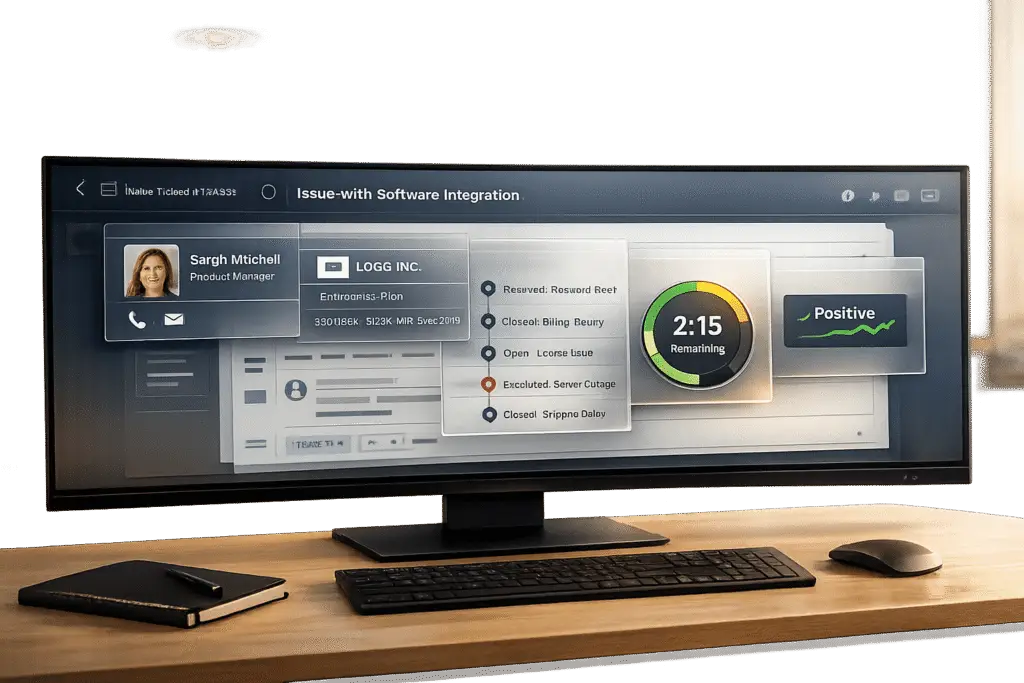
Agents need the right customer details in their ticket view to work efficiently. This includes contact profiles, account overviews, case history, and SLA metrics – all organized to reduce time spent searching for information.
Here’s what matters most:
- Contact Details: Name, role, time zone, and preferred communication channel.
- Account Snapshot: Plan tier, ARR (Annual Recurring Revenue), renewal dates, health score, and risk flags.
- Case History: Summaries of past tickets, recurring issues, and cross-channel interactions (e.g., email, portal, chat).
- SLA Metrics: Response times, breach status, and priorities clearly displayed.
- Sentiment & Intent: AI-driven insights into customer mood and urgency.
The AI Playbook for B2B Support Teams
sbb-itb-e60d259
How to Design a Ticket View That Works
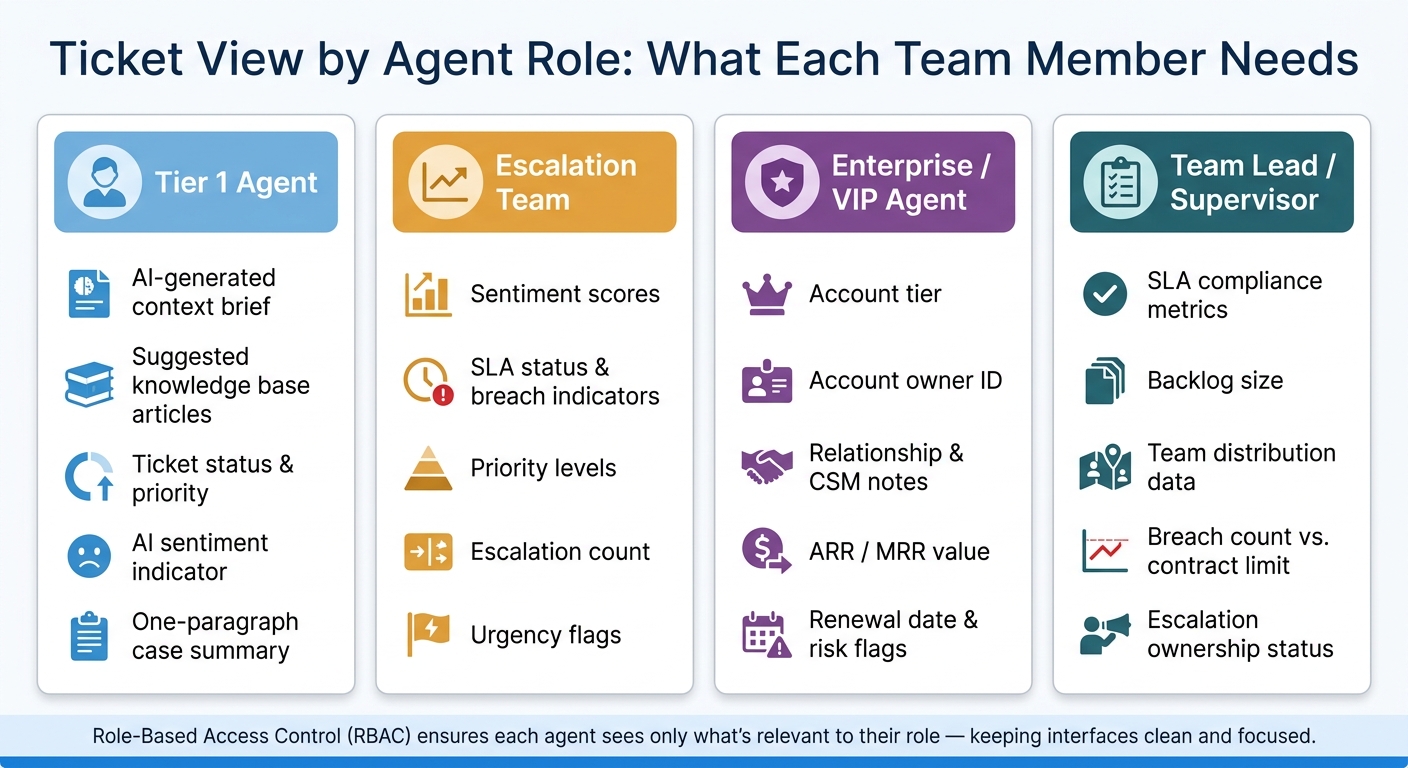
Ticket View by Agent Role: What Each Team Member Needs
Creating an effective ticket view is all about showing the right data at the right time. When agents waste time hunting for information, ticket resolution slows down. This isn’t a staffing issue – it’s a design problem. The solution lies in how you structure the ticket view. Let’s break down how to streamline this process and avoid overwhelming agents with too much information.
Avoiding Information Overload
One of the quickest ways to slow an agent down is by cramming every possible data point onto a single screen. Instead, break the information into logical sections – think contact profiles, account details, and case history. Use collapsible panels so agents can expand only what they need at that moment.
Keep the default view simple. Show only the essentials, like:
- Ticket status
- Priority
- AI sentiment analysis indicator
- A brief one-paragraph summary for context
Everything else? It should still be accessible but hidden until it’s needed. This approach minimizes distractions and keeps agents focused.
"The bottleneck isn’t ticket volume or staffing levels. It’s the context gap: the distance between receiving a ticket and knowing enough to answer it." – Viktor Blog [2]
This kind of structured design also lays the groundwork for AI to function effectively, as we’ll see next.
Setting Up Ticket Views for AI
AI thrives on well-organized data. With structured fields in place, AI tools can generate summaries and trigger automations more effectively. For example, integrating your ticketing system with CRM, billing, and product analytics can allow AI to deliver a ready-to-go summary as soon as a ticket is opened.
This eliminates the need for agents to spend an average of 8 minutes switching between tabs to gather information [2]. The result? Faster resolutions and fewer escalations.
Adjusting Views by Role
Not every agent needs the same level of detail. Tailoring ticket views to specific roles ensures that everyone gets the information they need – nothing more, nothing less. Here’s how this can look:
- Tier 1 Agent: Access to an AI-generated context brief and suggested knowledge base articles helps them resolve issues quickly and avoid unnecessary escalations.
- Escalation Team: Visibility into sentiment scores, SLA status, and priority levels allows them to identify high-risk cases immediately.
- Enterprise/VIP Agent: Information like account tier, owner ID, and relationship notes ensures seamless service for high-value clients.
- Team Lead/Supervisor: Data on SLA compliance, backlog size, and team distribution provides real-time insights for managing operations.
Using Role-Based Access Control (RBAC) ensures that agents only see what’s relevant to their role [1]. This keeps the interface clean and focused, helping teams work faster and smarter.
Checklist: Contact and Account Context
Agents need instant access to key customer details the moment a ticket opens. The goal isn’t to gather more data but to ensure the most critical information is automatically available through a modern support CRM. This checklist focuses on the essential contact details that streamline AI-driven support and improve efficiency.
Contact Profile and Role
Every ticket view should highlight the contact’s full name, job title, department, time zone, and preferred communication channel. In B2B support, understanding a contact’s role within their organization is just as important as knowing their name. For example, is this person the primary technical contact, the billing decision-maker, or an end user with limited authority? These distinctions affect how agents approach the conversation – shaping tone, technical depth, and even determining who else might need to be involved.
"A response that references their specific situation signals competence. A generic template signals they’re a ticket number." – Viktor Blog [2]
Account Snapshot
An account snapshot provides a quick overview of the organization’s commercial relationship and status. Essential details like the account name, plan tier, MRR/ARR (in USD), contract start date, renewal date, assigned CSM or account owner, health score, and active risk flags should be visible right in the ticket view. For instance, a risk flag such as "trending down" or "at-risk" instantly alerts the agent that this interaction might require extra care.
| Category | Key Data Points |
|---|---|
| Contract & Value | Plan tier, MRR/ARR, renewal date, contract start date |
| Organizational | Company name, segment, region, industry |
| Relationship | CSM/account owner, health score, risk flags |
| Usage | Active products, seat count, last login date |
Including details like the last login date and recent feature usage adds even more depth. For example, an account that hasn’t logged in for three weeks presents a very different scenario than a power user actively reporting a bug [3].
Relationship Notes and Expectations
Internal knowledge plays a huge role in delivering effective support, but agents often lack easy access to it. To address this, pinned notes from the CSM or account manager – covering escalation preferences, renewal activity, and other key insights – should be displayed directly in the ticket view.
"The problem is not missing data. The problem is that pulling it all together takes time and requires knowing where to look." – Ibby Syed, Founder, Cotera [3]
Agents should also be able to see open tasks, pending feature requests, and upcoming renewals (e.g., a renewal 45 days away). This ensures that every support interaction becomes an opportunity to strengthen the customer relationship – provided the agent has the right context at their fingertips.
Checklist: Case History and Interaction Context
Once agents understand who the customer is, the next step is figuring out what’s already happened. Without this context, agents risk asking redundant questions or missing patterns that could explain recurring issues. Leveraging historical interactions is key to providing effective and efficient support.
Ticket and Case History
A well-designed ticket view should provide quick access to recent tickets, resolution summaries, escalation counts, and recurring issue alerts – all without forcing agents to sift through archives. This matters because support agents spend a staggering 60% of their time searching for information instead of resolving problems [2].
AI-generated briefs can make a huge difference here. Instead of manually combing through past cases, agents should see a concise summary that highlights the customer’s goal, key milestones, previous attempts, and what methods have already been tried. Labeled fields – like issue type, urgency, and systems involved – help reduce mental effort. For example, a flag for reopened cases is especially helpful since it signals that earlier resolutions may not have stuck.
"The bottleneck isn’t ticket volume or staffing levels. It’s the context gap: the distance between receiving a ticket and knowing enough to answer it." – Viktor Blog [2]
By building on past cases, agents can move seamlessly into the next layer of understanding: cross-channel interactions.
Cross-Channel Interaction Records
Customers rarely stick to a single channel when seeking support. They might email first, then submit a portal ticket, and finally browse a knowledge base article before giving up. If agents can’t see this journey in one place, they’re forced to start from scratch – and so is the customer.
To avoid this, the ticket view should include omnichannel interaction records – email, portal, and even self-service actions like knowledge base searches. This ensures agents don’t ask customers to repeat details they’ve already shared. One practical solution is an automated, one-paragraph internal note that appears when a ticket opens. This brief can pull data from tools like CRM, billing systems, and product analytics, saving agents from endless tab-switching. Considering the average support interaction involves 3–5 tools and up to 8 minutes of switching per ticket [2], integrating these records directly into the ticket view eliminates unnecessary friction.
Sentiment, Intent, and Emotional Context
Understanding the emotional tone of a ticket is just as important as knowing its history. Not every issue carries the same emotional weight, and agents shouldn’t have to dig through long threads to figure this out. A good ticket view should display sentiment scores, detected intent, and urgency indicators to help agents tailor their response from the very start.
Intent detection works best when tied to clear categories like login troubles, billing disputes, or outage concerns. Knowing the intent upfront gives agents a head start on resolving the issue [4]. Sentiment scores add another layer of insight: a frustrated customer needs a different approach than someone with a routine question. Importantly, summaries should preserve critical customer language. For instance, a phrase like “locked out of production” conveys high stakes that a generic label like “access issue” might miss [4].
Finally, showing the AI’s confidence level in intent detection is crucial for high-risk scenarios, such as security breaches or payment failures. Even a “fairly confident” classification should prompt human review in these cases. Setting clear thresholds for when AI versus human intervention is needed ensures no critical details are overlooked [4].
Checklist: SLAs, Impact, and Risk
Using insights from customer history and interactions, the next step is to address urgency by focusing on SLA metrics and risk indicators.
SLA and Time-Based Data
Key SLA metrics – like First Response Time (FRT), Resolution Time, and breach status – should be front and center. A simple, color-coded badge system works best: green for on track, amber for approaching breaches, and red for already breached SLAs. This approach allows support leads to quickly spot urgent issues without spending time on filters or sorting [5].
"The visual hierarchy means a support lead scanning the dashboard can identify the most urgent situation in under 10 seconds – no filtering, no sorting, no calculation required." – Yaro Labs [5]
Two key configurations make this system work effectively. First, SLA clocks should align with business hours, not calendar hours, to avoid false breach alerts during weekends or holidays. Second, SLA targets must adjust automatically when ticket priorities change [6]. Teams using highly visible SLA dashboards have seen breach rates drop by 35–50% within the first quarter [5].
Supportbench takes this further by offering dynamic SLAs that adapt based on account activity, such as tightening response times when a renewal date is near.
Impact and Severity
Beyond SLA metrics, tickets should clearly communicate business impact. Essential information like account tier, ARR (Annual Recurring Revenue), renewal status, and severity level should be displayed together. For instance, a ticket tied to a $400,000 ARR account nearing renewal demands more immediate attention than one from a lower-value account [5].
Severity levels typically fall into these categories:
- Urgent: Outages or security incidents
- High: VIP or complex issues
- Normal: Standard requests
- Low: Feature requests
Enterprise SaaS contracts often specify strict timelines, such as a 4-hour first response for P1 issues and an 8-hour resolution target for P2 issues [5]. Displaying the correct severity tier directly in the ticket view helps agents prioritize their workload effectively.
Additionally, tickets should flag any breach remedies, like service credits or refunds tied to specific contracts. This gives agents a clear understanding of the financial stakes involved in resolving a breach.
Escalation Status and Ownership
In complex B2B environments, accountability can quickly become unclear. To prevent this, the ticket view should show details like the current owner, last touch timestamp, escalation level, and breach count against the contract limit [5]. Highlighting outdated or unassigned tickets ensures timely intervention and minimizes unnecessary notifications.
For example, if a contract allows three P1 breaches before service credits kick in and the account has already reached two, that context adds urgency to resolving the issue. Assigning ownership immediately – and making it visible – keeps everyone accountable from the moment a ticket is opened. This transparency equips agents to act quickly, resolve issues efficiently, and manage risks in real time.
Conclusion: Building a Ticket View That Supports Faster, Smarter Work
An effective ticket view isn’t about cramming in every piece of information – it’s about surfacing the right details. By focusing on the essentials, agents can avoid wasting time digging through multiple systems to find what they need.
In B2B support environments, it’s crucial for agents to have instant access to key customer context. This includes important details like contact roles, account snapshots with ARR and renewal status, SLA management indicators, cross-channel interaction history, and clear escalation ownership – all presented in a single, unified layout. When these elements are brought together, teams often see measurable improvements: average handle times drop by 10–25%, and first-resolution times improve by 15–30% [7][8]. Additionally, when agents can easily view account expectations and past resolutions, unnecessary internal escalations tend to decrease by 10–20% [7].
Role-based customization takes this a step further. Tailoring the ticket view to each agent’s responsibilities ensures they only see what’s relevant. For example, frontline agents need quick access to customer identity, active issues, sentiment, and SLA timing. Meanwhile, senior agents and managers benefit more from insights like escalation status, ownership history, and account risk indicators. This approach eliminates unnecessary noise and sharpens focus.
To complement these design principles, AI plays a critical role. Supportbench integrates tools like sentiment analysis, concise case summaries, SLA breach alerts, and response suggestions – all directly within the ticket pane. This automation shifts the burden of context gathering off the agent, allowing them to concentrate on resolving issues. With role-based layouts and dynamic SLAs built into the system, Supportbench keeps ticket views optimized without requiring a dedicated IT team. By consolidating critical customer information and incorporating AI-driven features, Supportbench empowers teams to deliver faster, more efficient, and accountable support.
FAQs
What should be shown by default in the ticket view?
A well-designed ticket view provides agents with the essential information they need to resolve issues quickly and effectively. This typically includes a user profile card that displays vital details like contact information, time zone, and language preferences.
To further enhance support, agents can also see recent interactions, such as previous tickets or conversations. Some systems go a step further by including the customer’s recent activity, like pages or screens they’ve viewed. These details ensure agents can deliver personalized and timely assistance without wasting time searching for context.
How do we avoid information overload for agents?
Centralizing essential customer details in a single workspace can significantly ease the burden on support agents. By reducing the need to juggle multiple tools, agents experience less cognitive strain, which helps them work more efficiently. AI-powered dashboards play a key role here, bringing together interactions, customer data, and relevant knowledge articles into one streamlined view.
On top of that, virtual agents can handle routine tasks – like answering common questions or updating account information – so agents can dedicate their energy to tackling more complex problems. This approach not only boosts productivity but also helps reduce mental fatigue for the team.
What data does AI need to generate reliable ticket summaries?
AI needs access to the complete conversation history – this includes customer messages, agent responses, and internal notes – to generate accurate ticket summaries. Additionally, structured data such as case descriptions, priority levels, and subject lines help provide essential context.
To maintain reliability, confidence scoring and verification processes play a key role, especially when dealing with complex scenarios. With thorough and well-organized data, AI can produce summaries that are precise, actionable, and aligned with what customers expect.






