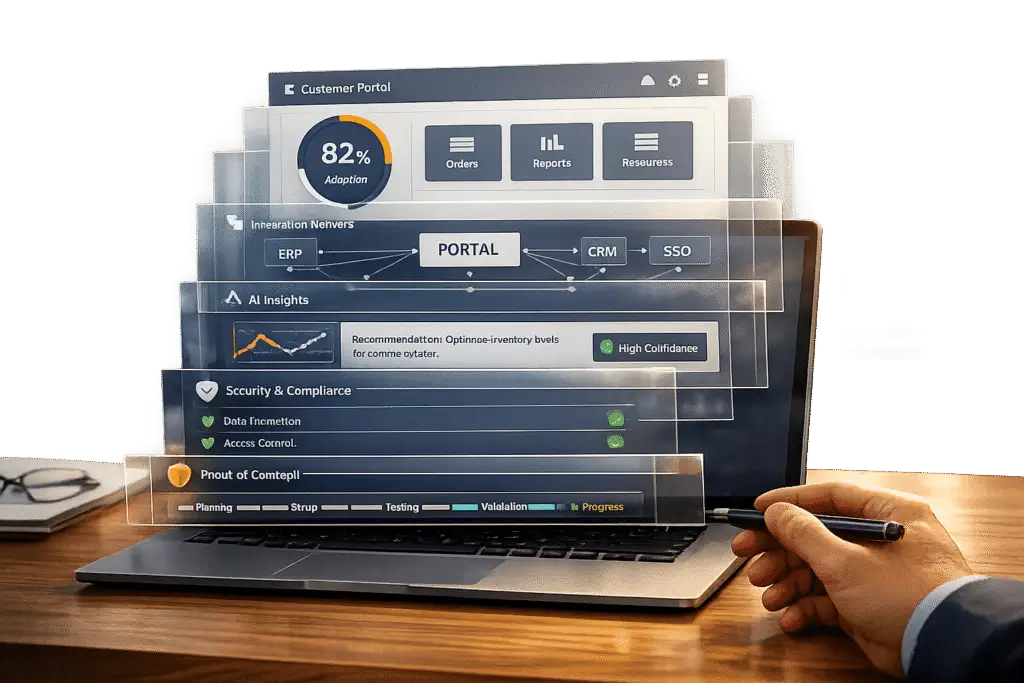
Only 10% of B2B customer portals achieve full adoption. Why? Most fail to meet the expectations of enterprise users who demand intuitive design, seamless integration, and effective self-service tools.
Here’s how to ensure your portal succeeds:
- Set clear goals: Focus on measurable outcomes like reducing ticket volumes and improving SLA compliance.
- Prioritize user experience: Clean interfaces, mobile optimization, and AI-powered search are must-haves.
- Integrate with existing systems: Real-time data syncing with CRMs, ERPs, and other tools is essential.
- Leverage AI tools: Automate ticket routing, sentiment analysis, and knowledge base suggestions for faster resolutions.
- Ensure scalability and security: Role-based access, multi-brand support, and robust encryption protect sensitive data while supporting growth.
- Test before committing: Run proof of concepts with real users to identify and fix potential issues.
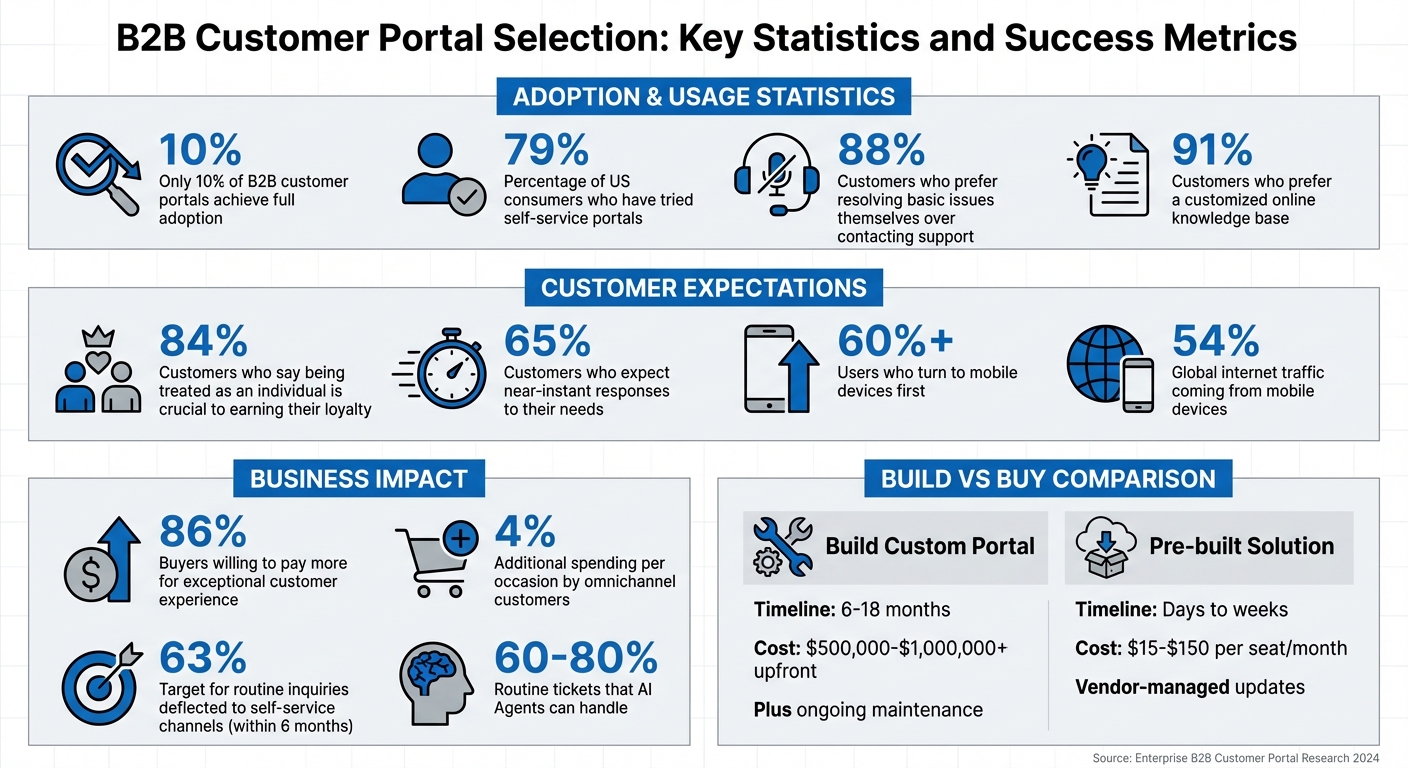
B2B Customer Portal Selection: Key Statistics and Success Metrics
Define Your Enterprise Support Goals
Before diving into portal options, take a step back and establish clear goals. The aim isn’t to chase every shiny feature vendors advertise – it’s to ensure your portal investment supports measurable business outcomes that matter to your enterprise clients.
Understand Complex Account Requirements
Supporting enterprise B2B accounts is a whole different ballgame compared to consumer support. Instead of one-off issues, you’re dealing with multiple stakeholders and complex needs. Think technical users troubleshooting integrations, managers keeping an eye on SLA compliance, and procurement teams reviewing invoices. Your portal has to handle these extended, multi-layered cases while enabling seamless collaboration across support, engineering, and customer success teams.
Security is another key factor. Large organizations often require admins to access all company-wide support tickets, while regular users should only see their own. This level of granular permission control is non-negotiable when sensitive enterprise data is involved.
Once you’ve mapped out these operational needs, it’s time to define metrics that will measure how well your portal performs in terms of adoption and efficiency.
Set Clear Adoption and Engagement Targets
Avoid vague objectives and focus on specific, measurable goals tied to efficiency and customer behavior. For instance, you could aim to deflect 63% of routine inquiries to self-service channels within six months or reduce ticket resolution times through AI-driven automation.
Track metrics that directly impact both efficiency and revenue. Here’s what to monitor:
- Self-service engagement: Metrics like knowledge base article views, successful search queries, and tasks completed without agent help show whether your portal is delivering real value to users.
- Ticket deflection rate: This reveals how many issues are resolved before they even reach your support team, translating into operational cost savings.
- SLA compliance rate: For enterprise accounts, meeting SLA deadlines is critical. Your portal should include proactive alerts to help teams stay on track.
It’s worth noting that 86% of buyers are willing to pay more for an exceptional customer experience [4]. Your portal isn’t just a tool to cut costs – it’s a strategic asset that can boost renewal rates and open doors for expansion. Setting clear targets ensures your portal’s performance ties directly to revenue retention and operational success.
These well-defined goals will guide your evaluation of self-service features and AI capabilities.
sbb-itb-e60d259
Evaluate User Experience and Self-Service Tools
Even the most advanced portal won’t succeed if enterprise customers avoid using it. Here’s the truth: 79% of US consumers have tried self-service portals, yet many of these tools fail to resolve issues effectively [2]. Why? Because too often, these portals lack user-friendly design and practical functionality.
When evaluating a portal, the goal is to ensure it feels almost invisible – users should complete tasks effortlessly, without unnecessary hurdles. As Hexus.ai puts it, "If your grandmother needs a manual to use your portal, you’ve already failed" [5]. It’s not about stripping away features; it’s about respecting users’ time by eliminating needless complexity.
Look for Clean Interfaces and Customization Options
Enterprise customers expect intuitive dashboards and straightforward navigation. The best portals focus on specific tasks – like downloading invoices, checking order statuses, or tracking SLA compliance – rather than forcing users to wade through menus that mimic a company’s internal structure.
Customization is a must, especially no-code customization. Your support team shouldn’t have to rely on IT or engineering every time branding needs an update or workflows need tweaking. Drag-and-drop builders allow non-technical teams to make quick adjustments, which is critical for managing multiple enterprise accounts with varying requirements. Portals should also tailor content by user roles, offering "Getting Started" guides for new users while providing advanced troubleshooting resources for experienced ones.
And don’t overlook mobile optimization. With over 60% of users turning to their mobile devices first [5], a portal that doesn’t perform well on phones or tablets risks losing engagement. Always test the portal on actual mobile devices – not just browser simulation tools – to ensure smooth performance.
Verify Self-Service Capabilities
Self-service tools can reduce support tickets, but only if they meet user expectations. While 88% of customers prefer resolving basic issues themselves over contacting support [3], they’ll only stick with self-service if the experience is fast and effective.
Start by evaluating the portal’s search functionality. Can it handle typos, understand user intent, and quickly surface relevant results? AI-powered semantic search that learns from user behavior can improve ticket deflection rates by promoting the most helpful content. If users can’t find answers within seconds, they’ll likely resort to filing a support ticket.
A robust knowledge base is key, but it shouldn’t rely solely on text articles. Video tutorials are especially useful for explaining complex processes, often preventing hundreds of support requests compared to text instructions alone [5]. Additionally, the portal should provide 24/7 access to essential account data like invoices, order history, and real-time ticket updates. This reduces repetitive inquiries, such as “What’s the status of my ticket?” that can overwhelm support teams.
Security is just as critical as usability. Enterprise customers expect features like Single Sign-On (SSO), Two-Factor Authentication (2FA), and Role-Based Access Control (RBAC) to protect sensitive information. Granular permission controls are vital in B2B scenarios, allowing admins to oversee company-wide tickets while limiting regular users to their own.
Lastly, always ensure there’s a clear path to human support [2]. Even the most well-designed self-service tools won’t resolve every issue, so customers need an easy way to escalate their concerns.
Once user experience and self-service tools are optimized, the next step is to focus on seamless system integration and preparing for future growth.
Check Integration and Scalability
A customer portal can’t function effectively on its own – it has to work seamlessly with your existing systems like CRM, ERP, billing platforms, and ticketing tools. Bi-directional data flow is key, enabling real-time updates in both directions. This means the portal should not only pull data, like transactions, from your backend systems but also push updates back. This ensures customer-facing teams always have accurate, up-to-date information without the hassle of manual data entry.
When deciding whether to "build or buy", integration complexity often plays a major role. Building a custom portal can take anywhere from 6 to 18 months and cost between $500,000 and $1,000,000 or more upfront, not to mention the ongoing resources needed for development and maintenance. On the other hand, pre-built solutions can be ready in days or weeks, with costs ranging from $15 to $150 per seat per month. These often come with native integrations and vendor-managed updates, saving time and effort.
Test Integration with Existing Systems
Start by reviewing the portal’s API documentation. Strong APIs allow you to create custom workflows and connect systems that aren’t natively supported. Portals with native integrations are especially valuable, as they eliminate the need for manual data transfers.
Put the portal to the test in real-world scenarios. For example:
- Can it sync customer data from your CRM automatically?
- Does it update ticket statuses in your helpdesk without delays?
- Can it pull invoices from your ERP and display them instantly?
Data silos, where information gets stuck in one system, lead to unnecessary friction. Customers shouldn’t have to contact support for details they could access themselves. Smooth integrations not only reduce manual work but also improve response times.
Omnichannel integration is another critical factor. Today’s B2B customers expect support across various channels like chat, email, phone, Slack, and Microsoft Teams. A portal that consolidates these interactions into a single view eliminates fragmented conversations. This matters because omnichannel customers spend an average of 4% more per shopping occasion [1], directly impacting your bottom line. Additionally, ensure the portal can handle increased communication demands as your user base grows.
Confirm Scalability for Growth
Scalability goes beyond just adding more users – it’s about maintaining high performance even as demand spikes. Can the portal handle thousands of users logging in simultaneously? Does it slow down when processing large datasets? Given that 65% of customers expect near-instant responses to their needs [3], any performance lag could hurt customer satisfaction and increase support escalations.
Role-Based Access Control (RBAC) becomes essential as your user base expands. This allows for granular permissions, ensuring admins can oversee company-wide tickets while restricting regular users to their own data. It’s a safeguard against security risks and keeps sensitive information protected.
For businesses managing multiple brands or customer segments, multi-brand portal support is non-negotiable. The ability to create separate portals with unique branding, custom URLs, and tailored content – without needing additional licenses – provides flexibility and cost efficiency. Centralized file management with version control also helps keep contracts, invoices, and reports organized as data volume grows.
Don’t overlook mobile optimization. With over 54% of global internet traffic coming from mobile devices [1], a portal that doesn’t work flawlessly on smartphones and tablets will frustrate users. Test the portal on actual mobile devices – not just browser simulations – to ensure it’s responsive and fast.
Once you’ve confirmed the portal integrates well and scales effectively, you can move on to evaluating its AI-native features.
Review AI-Native Features
To improve enterprise support, AI-native capabilities should be seamlessly integrated into your platform, not treated as costly extras. Platforms with built-in AI can handle tasks like ticket routing and sentiment analysis without the need for expensive add-ons. This means quicker resolutions, better customer experiences, and predictable costs.
When assessing AI features, it’s important to understand the difference between AI Agents and AI Co-pilots. AI Agents are autonomous systems designed to handle routine tasks, such as password resets or billing inquiries, and they can manage 60–80% of these routine tickets [7]. On the other hand, AI Co-pilots support human agents by providing suggestions and context, significantly boosting productivity – up to three times more efficient [7]. The best platforms will combine both functionalities for a well-rounded solution.
Identify Built-In AI Capabilities
Make sure the platform you choose includes core AI features as part of its base offering. For instance, predictive CSAT can analyze ticket interactions to predict customer satisfaction levels [6]. Similarly, sentiment analysis identifies the tone of customer messages, flagging potential frustrations that may require immediate attention.
Another key feature is AI-powered ticket routing and prioritization, which automates the process of assigning tickets. The system evaluates urgency based on factors like customer value and contractual SLAs, ensuring cases are routed to the most qualified agent [6]. Look for platforms that also provide SLA monitoring with proactive alerts, so deadlines aren’t missed [6].
Real-time agent assistance is equally critical. AI tools should offer contextual recommendations, pre-written responses, and case summaries that help agents resolve issues more efficiently [6]. For example, the ability to turn brief agent notes into polished responses ensures consistency while saving time.
These integrated AI tools are essential for improving first-contact resolution rates.
Test AI Tools for First-Contact Resolution
First-contact resolution (FCR) is a major factor in customer satisfaction and cost reduction. With 88% of customers preferring to handle basic issues themselves [3], self-service AI tools can significantly cut ticket volumes while enhancing satisfaction.
Evaluate the AI’s ability to summarize ticket histories into concise overviews during initial interactions. This reduces the need for customers to repeat themselves and speeds up resolutions [6]. Also, check if the AI-driven knowledge base can suggest relevant articles during conversations, further increasing the chances of resolving issues on the first try.
"AI is not just a productivity enhancer – it is reshaping the culture of customer service itself. The focus shifts from resolving issues to preventing them."
– Eric Klimuk, Founder and CTO, Supportbench [6]
Be cautious of platforms that charge extra for AI resolutions or restrict key features to higher-priced tiers. Ensure that essential AI tools – like automated routing, sentiment analysis, and case summaries – are included in the standard subscription and not hidden behind premium pricing.
Assess Customization, Security, and Pricing
Enterprise portals should work with your business, not force you to adjust to their limitations. The ideal platform will handle complex account structures, safeguard sensitive data, and grow alongside your needs – without unexpected expenses. Before committing, make sure customization, security, and pricing align with your long-term goals.
Review Customization for Enterprise Requirements
Customization is a must for enterprise portals. Start by testing role-based permissions. These ensure that admins have complete control while regular users only access their relevant tickets. Combine these permissions with dynamic SLAs that prioritize high-value accounts [3]. Together, these features strengthen the portal’s secure framework.
Dynamic SLAs go beyond static response times. They adjust based on customer-specific factors like upcoming renewals or contract value, ensuring top-tier accounts get the attention they deserve. Look for platforms that support dynamic content, allowing you to personalize the portal experience based on customer history and preferences [1]. After all, 84% of customers say being treated as an individual is crucial to earning their loyalty [1].
Another key feature: the ability to categorize tickets by department. This ensures seamless tracking across sales, technical support, and account management without losing important context [3].
"Security shouldn’t be an afterthought – it’s a must-have."
– Paulina, Thena [3]
When it comes to security, the platform should offer 256-bit SSL encryption for data both in transit and at rest [3]. Regularly auditing permissions is also critical to keep access controls up-to-date as teams evolve [3].
Compare Pricing Models
Once you’ve confirmed the portal meets your customization and security standards, take a close look at its pricing structure. Transparent pricing is key to avoiding budget headaches as your team grows. Be wary of platforms that tack on per-resolution fees or charge extra for features like generative AI and semantic search [3].
Here’s a quick comparison of pricing examples:
- Zoho Desk: $14 to $40 per user per month
- Thena: Free for up to 10 seats; $79 per user for the standard plan
- Clinked: Flat monthly rates ranging from $83 to $836+, depending on features [3]
Understanding these pricing tiers can help you plan for future costs as your support team expands.
Finally, ask whether AI-driven features like deflection, automated routing, and sentiment analysis are included in the base price or sold as premium add-ons [3]. Platforms that bundle these capabilities into standard subscriptions offer better value and easier budgeting. Since 88% of customers prefer solving basic issues on their own [3], essential features like these should be accessible from the start – not locked behind expensive enterprise plans.
Test Before You Commit
Once you’ve assessed customization, security, and pricing, the next step is to put the portal through its paces with real-world testing. This means validating the platform by running it through actual workflows to ensure it meets your business needs. A proof of concept (PoC) is a great way to determine if the portal can handle your team’s complexities and if your customers will find it useful. This stage separates platforms that can deliver under pressure from those that can’t.
Run Proof of Concepts
Start by focusing on the 20 most common customer issues. This strategy allows you to test essential workflows – like submitting tickets, searching the knowledge base, or automated routing – without getting bogged down in rare scenarios. Use real customer data to verify critical details such as pricing, credit terms, and contracts. Testing with generic data won’t reveal pricing mismatches, which can harm user trust.
Involve actual customers in your pilot program. Select a small group of 10–20 "friendly" accounts and observe how they interact with the portal. For example, watch them as they place orders or search for specific articles. As Travis Sansome, Founder of Artigence, puts it:
"User testing reveals problems that internal review misses. Watch actual customers attempt to place orders. Note where they hesitate, where they get confused, where they give up." [9]
Their actions will highlight issues like unclear navigation or confusing terminology that internal teams might overlook.
Make sure to test high-frequency tasks on real mobile devices to confirm smooth performance. Additionally, train your internal support and sales teams so they can confidently assist customers in using the portal.
During your PoC, apply a "Must/Should/Could" framework. For example, eliminate vendors that lack critical features like SOC 2 compliance or role-based access [8]. Track key metrics to measure the portal’s effectiveness:
| Success Metric | Definition | Why It Matters |
|---|---|---|
| Ticket Deflection Rate | Percentage of issues resolved without human help | Cuts support costs and reduces agent workload [5] |
| Resolution Time | Average time to find an answer via the portal | Faster resolutions boost satisfaction and reduce escalations [5] |
Once you’ve gathered these insights, you can shift your attention to avoiding common pitfalls in the selection process.
Avoid Common Selection Mistakes
One common mistake is designing the portal around your internal ERP categories and terminology rather than aligning it with how your customers think. As Travis Sansome explains:
"The portal should match customer mental models, even if that means translating to your internal systems behind the scenes." [9]
Another misstep is trying to mimic B2C experiences. B2B users prioritize features like quick reordering and negotiated pricing over a retail-style browsing experience. Your portal should focus on enabling efficient, phone-call–like interactions rather than replicating an e-commerce site. Launching with list prices instead of customer-specific contract pricing can push users back to email or phone calls – defeating the purpose of a self-service portal.
Instead of a full-scale launch, start with a pilot program involving a small but representative group of users. Establish clear feedback loops so participants can report issues directly within the portal. Even more importantly, act on their feedback quickly to show that their input matters.
Lastly, ensure real-time inventory visibility. If the portal allows orders for out-of-stock items due to missing live data, you’ll end up with manual callbacks – undermining the whole point of self-service. Test these integrations thoroughly during the PoC phase. Delaying critical connections like inventory and pricing to a later stage can erode customer trust before the portal even gets off the ground.
Conclusion
Selecting a B2B customer portal that your enterprise clients will actually use means focusing on features that meet their real-world needs. A successful portal should emphasize self-service capabilities that match how your customers operate. With 91% of customers preferring a customized online knowledge base [10], integrating AI-powered tools that align with their workflows is a must.
Modern portals stand apart from outdated systems through AI-native features. One effective strategy is to simulate AI responses using past tickets to measure deflection rates and accuracy before launching [10]. This lets you assess performance without jeopardizing customer satisfaction. The right AI tools should provide first-contact resolution, tailor content based on user behavior, and respond quickly to evolving customer needs – something 65% of users now expect almost immediately [3].
Your strategy should also focus on system integration and scalability. The portal must balance growth potential with cost-efficiency. Off-the-shelf solutions often provide better long-term value as your business complexity increases. During the proof of concept, test integration with at least three existing systems and confirm the portal supports complex account structures with role-based access. Mobile functionality is also critical – ensure the portal delivers a full range of features across devices. These components highlight how AI-native solutions enhance enterprise-level support.
Finally, personalization is key to delivering value. With 84% of customers prioritizing personalized service over generic interactions [1], your portal must provide tailored experiences that reflect contract terms and specific workflows. The most effective platforms make enterprise customers feel appreciated while reducing operational costs through automated workflows.
FAQs
Which portal features drive enterprise adoption fastest?
Enterprise adoption tends to take off when certain features are prioritized. These include simplified navigation for ease of use, AI-powered search to quickly find relevant information, and customization options that allow users to tailor the experience to their needs.
Beyond that, tools like automated workflows, structured issue tracking, and centralized dashboards significantly boost efficiency and streamline processes. Portals designed to be intuitive, highly personalized, and capable of handling complex tasks through automation often see the best engagement rates among enterprise users.
How do I verify real-time CRM/ERP integration during a PoC?
To ensure smooth real-time integration between CRM and ERP systems during a Proof of Concept (PoC), focus on testing the system’s ability to exchange data quickly and accurately. Here’s how to approach it:
- Establish real-time data exchange protocols: Configure systems to use APIs like REST or GraphQL, and set them up for asynchronous updates to handle data flow efficiently.
- Test live data transactions: Try actions like creating or updating records to check how responsive the system is under real-time conditions.
- Analyze logs and dashboards: Keep an eye on synchronization logs to catch any errors, delays, or issues that could disrupt operations.
These steps help confirm whether the integration is functioning as expected.
How can I prove AI will reduce tickets without harming CSAT?
Tracking metrics like deflection rates, resolution times, and CSAT scores before and after introducing AI is a great way to show that AI can reduce support tickets without negatively impacting customer satisfaction. AI tools – like self-service options and automation – typically deflect anywhere from 20% to 60% of tickets. At the same time, they enhance resolution speed and first-contact resolution rates, both of which contribute to higher CSAT. To reinforce these results, consider using benchmarks and real-world case studies as evidence.