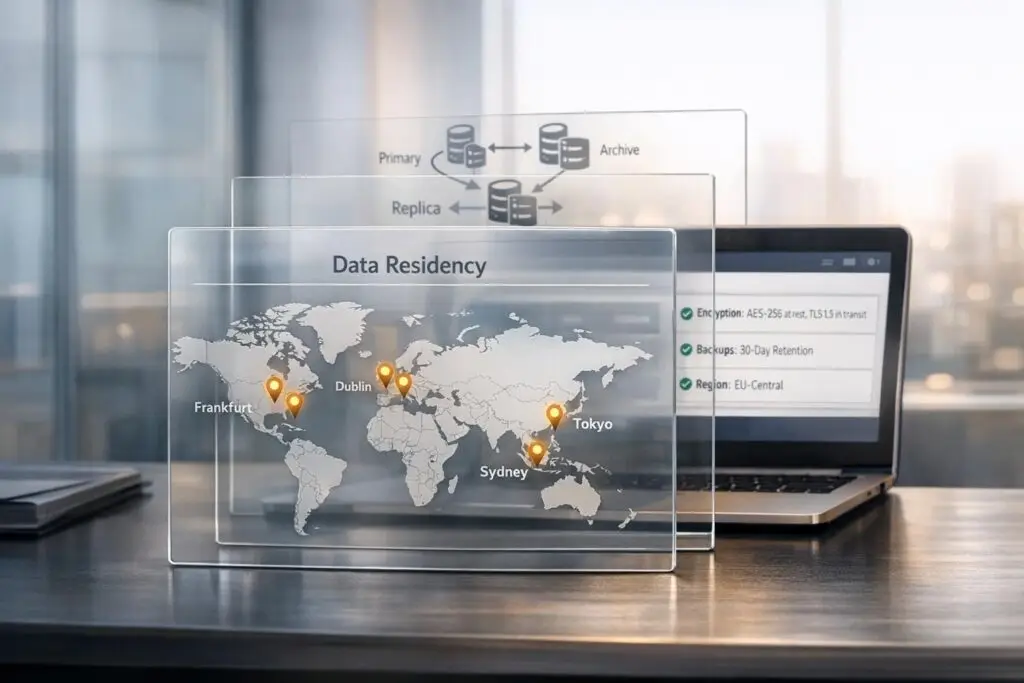
When customers ask, "Where is my data stored?" they’re looking for trust and clarity. Answering this question effectively requires transparency, precision, and compliance with legal and security standards. Here’s how you can address these inquiries:
- Be specific: Avoid vague statements like "in the cloud." Instead, specify exact storage locations (e.g., "AWS US-East-1 region in Virginia").
- Acknowledge compliance: Reference certifications like SOC 2, GDPR, or HIPAA, and outline safeguards like encryption (e.g., AES-256 for data at rest).
- Clarify legal jurisdictions: Explain how laws (e.g., the US CLOUD Act) may impact data sovereignty, even if data is stored in a specific region.
- Address customer concerns: Tailor responses to their priorities – whether it’s data residency, sovereignty, or third-party processors.
- Use visual aids: Offer data flow diagrams or sub-processor lists to show how data is handled.
Failing to provide clear, actionable answers can erode trust, delay deals, or lead to compliance risks. By combining accurate documentation with tools like AI for faster, consistent responses, you can turn data storage questions into opportunities to build stronger customer relationships.
How to Stay Compliant With Data Protection Laws As an Enterprise
sbb-itb-e60d259
Why Customers Ask About Data Storage
When customers ask, "Where is my data stored?" they’re not just being inquisitive. These questions are rooted in a need to avoid hefty regulatory fines and to meet strict legal, security, and geographic requirements. With penalties for noncompliance exceeding €1 billion in some cases, understanding data storage locations is absolutely critical for businesses [1]. This isn’t just a technical detail – it’s a key factor that can either strengthen or strain vendor relationships.
Compliance and Legal Requirements
Data storage is now a legal cornerstone for businesses, especially with over 60 countries enforcing data localization laws [6]. Regulations like GDPR, HIPAA, and Canada’s Law 25 impose stringent rules on where data can be stored and transferred. For instance, the US CLOUD Act allows American authorities to access data stored overseas by US companies, even if it’s located in regions like the EU or Canada [8]. This creates a legal conflict where companies must navigate between US demands and the privacy laws of other jurisdictions.
Different industries face their own set of compliance hurdles. Healthcare providers under HIPAA or PHIPA must ensure patient data remains local [7]. Similarly, financial institutions are bound by regulators like India’s RBI or Canada’s OSFI, which often require data to be stored within the country [1]. A striking example of noncompliance occurred in 2016 when Russia’s Federal Service for Supervision of Communications blocked LinkedIn for failing to store Russian citizens’ data within its borders, as mandated by Federal Law 242-FZ [6]. When customers ask about data storage, they’re trying to avoid becoming the next cautionary tale.
Security and Privacy Concerns
Beyond legalities, security and privacy risks add another layer of complexity. 73% of enterprises cite data privacy and security as their top concerns related to AI [1], and 77% consider a vendor’s country of origin when making AI purchasing decisions [1]. These aren’t just hypothetical worries – cases like the Samsung Electronics data leakage have heightened awareness of the risks tied to generative AI [1].
Customers want transparency about every step of the data lifecycle, from storage and AI training to temporary caching [1]. They’re particularly wary of third-party providers like OpenAI, Anthropic, and Pinecone, which might handle sensitive data. Even seemingly insignificant details, like cached data or application logs, can include personal information or conversation fragments that expose businesses to risk [3].
Geographic and Residency Preferences
Understanding the nuances between data residency, sovereignty, and localization is crucial for meeting compliance demands [6][9].
"The jurisdiction that matters is not where the data center sits. It is where the entity controlling the data is incorporated, where its executives can be compelled to appear in court, and whose laws it must obey." – Stealth Cloud Intelligence [8]
This means that selecting a region like "EU" in services such as AWS, Azure, or Google Cloud doesn’t necessarily ensure sovereignty if the provider is based in the US [1]. The legal jurisdiction of the company itself takes precedence. In fact, 65% of global CIOs have rejected SaaS solutions because vendors couldn’t meet data residency requirements [9].
Customers also need to examine backup and disaster recovery practices. Vendors may store primary data in the requested region but rely on backup sites in different jurisdictions [9]. Even support teams accessing data from another country can trigger legal complications, as this may qualify as a "data transfer" under certain laws, even if the data never physically moves [9].
How to Write Clear Data Storage Responses
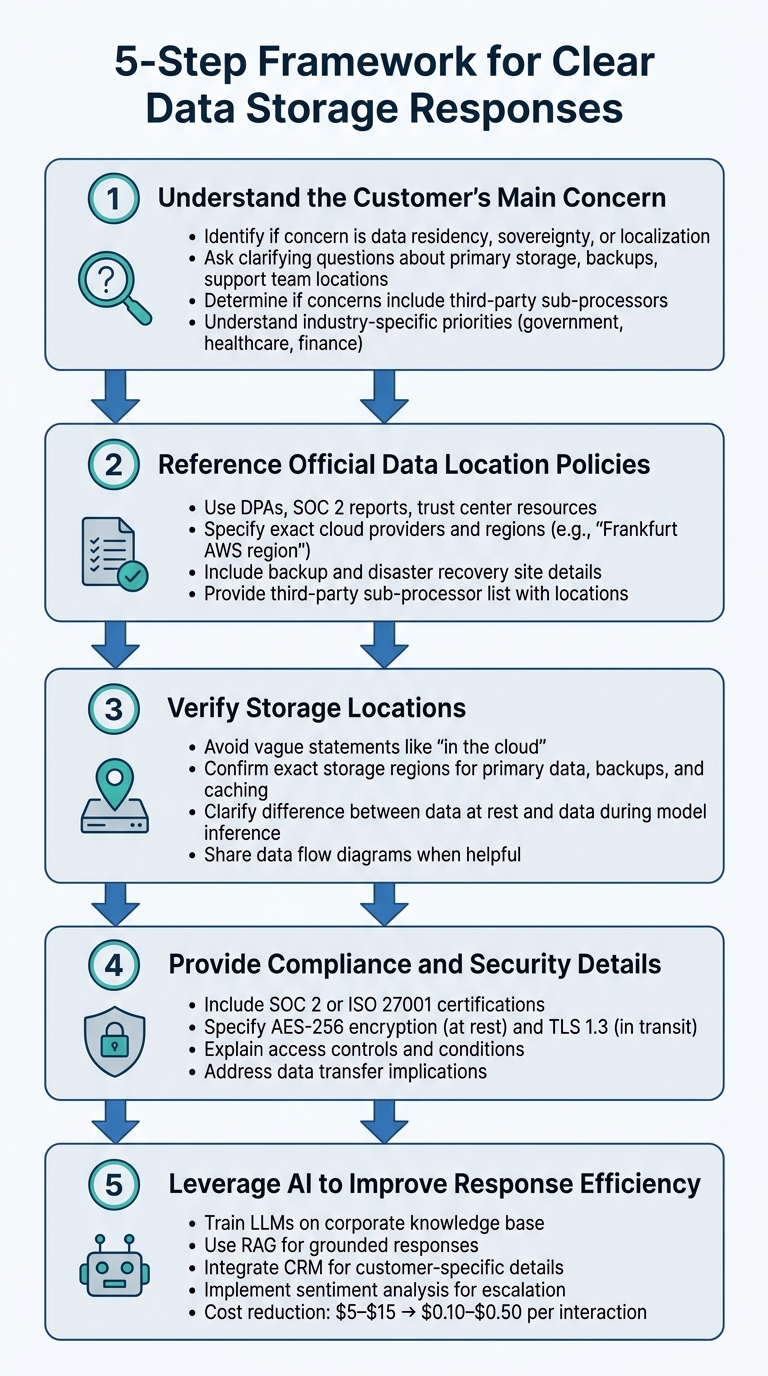
5-Step Framework for Answering Data Storage Questions
When addressing questions about data storage, it’s essential to provide accurate, transparent, and compliant information. This five-step framework ensures your responses align with customer needs and regulatory requirements.
Step 1: Understand the Customer’s Main Concern
Start by pinpointing the customer’s exact concern. Are they asking about data residency (where data is physically stored), data sovereignty (laws governing the data), or data localization (legal requirements to keep data within certain borders) [1][9]? Different industries and regions have varying priorities. For example:
- Government and financial sectors often require strict sovereignty guarantees.
- Healthcare organizations may focus on residency for HIPAA compliance [9].
- EU customers might prioritize GDPR compliance and seek to avoid the US CLOUD Act’s reach, while regions like China, Russia, or India might have strict localization rules [1][6].
Ask clarifying questions about their needs, such as whether they require details on primary storage, backups, or even where support teams are based [9]. Also, determine if their concerns extend to third-party sub-processors (e.g., OpenAI, Anthropic, Pinecone) or involve data at rest versus data used during model inference (e.g., GPU execution) [1][3][10].
Once their primary concern is clear, refer to documented policies for precise answers.
Step 2: Reference Official Data Location Policies
Always rely on official documentation to provide accurate information. This includes DPAs, SOC 2 reports, trust center resources, and data flow diagrams [3][9]. Train your team to use these resources consistently and maintain a centralized knowledge base that includes:
- Specific cloud providers (e.g., AWS, GCP, Azure) and their regions (e.g., "Frankfurt AWS region" instead of just "Europe") [3][9].
- Details on backup and disaster recovery sites, which might differ from primary storage locations [3][9].
- A list of third-party sub-processors, their locations, and the data they handle [3][9].
Transparency is crucial. As PremAI notes:
"Selecting ‘EU region’ in AWS, Azure, or Google Cloud does NOT guarantee sovereignty if your company is US-headquartered. The legal jurisdiction follows the company, not the data center." [1]
Ensure the information you share is backed by verified policies and documentation.
Step 3: Verify Storage Locations
Avoid vague statements like "your data is securely stored in the cloud." Enterprise customers expect specific details about where their data resides, including primary storage, backups, and temporary caching [3][9]. Before responding, confirm the exact storage regions using validated processes. For AI tools, clarify the difference between data stored at rest and data locations used during model inference [1][10].
If the customer’s requirements are unclear, consider sharing a data flow diagram. This can help outline how their data is ingested, processed, stored, and eventually deleted [3].
Step 4: Provide Compliance and Security Details
Customers often inquire about data storage to prepare for audits, renew contracts, or meet regulatory requirements. Strengthen your response by including compliance evidence such as:
- SOC 2 or ISO 27001 certifications
- AES-256 encryption for data at rest
- TLS 1.3 encryption for data in transit
- Strict access controls [11]
Explain who can access the data and under what conditions. For instance, remote troubleshooting might be considered a "data transfer" under certain laws [9]. A high-profile example is Meta’s €1.2 billion fine in May 2023 for transferring European user data to the US without adequate safeguards. This highlights the importance of clear contractual commitments around data access and transfer [1].
Step 5: Leverage AI to Improve Response Efficiency
AI tools can significantly speed up and personalize data storage responses. By training Large Language Models (LLMs) on your corporate knowledge base – including FAQs, DPAs, and objection-handling guidelines – you can generate accurate responses in seconds. This reduces the cost per interaction from $5–$15 for human processing to just $0.10–$0.50 [11].
To enhance accuracy and efficiency:
- Use Retrieval-Augmented Generation (RAG) to ground AI responses in official documentation.
- Integrate your CRM (e.g., HubSpot, Salesforce) to automatically pull in customer-specific details like region, subscription plan, and data residency requirements [11].
- Implement sentiment analysis to identify frustration and escalate sensitive cases to human operators.
- Ensure AI tools mask personal information in logs and encrypt data both at rest (AES-256) and in transit (TLS 1.3) for strong security.
Mistakes to Avoid When Answering Data Storage Questions
Even the most well-meaning support teams can unintentionally erode customer trust or lose deals by mishandling data storage inquiries. Let’s break down some common pitfalls – and how to steer clear of them.
Vague or Generic Responses
Saying something like "your data is securely stored in the cloud" or "we use European servers" just doesn’t cut it for enterprise customers. In fact, 65% of global CIOs have walked away from preferred SaaS solutions because vendors failed to provide clear data residency commitments [9].
These kinds of generic answers skip over critical details like backup sites, support locations, or where metadata and audit logs are stored. Often, these components reside in different jurisdictions than the primary data [12]. A vague statement like "in Europe" doesn’t provide the specificity enterprises need. As one guide puts it, "A vague promise of ‘in Europe’ is not specific enough" [9].
Instead, give precise details. For example, specify storage regions – like "the Frankfurt AWS region" – and share data flow diagrams that map out where customer data is ingested, processed, stored, and deleted [3][9]. Without this level of detail, you risk further missteps when addressing data sovereignty requirements.
Overpromising on Data Sovereignty Options
Another big mistake? Making promises you can’t technically keep. For instance, don’t claim full data sovereignty if you’re using US-headquartered cloud providers. Why? Because jurisdiction is tied to corporate incorporation, not just server location. As Stealth Cloud Intelligence explains:
"The jurisdiction that matters is not where the data center sits. It is where the entity controlling the data is incorporated, where its executives can be compelled to appear in court, and whose laws it must obey when a government demands access." [8]
Even if your servers are in Frankfurt, the US CLOUD Act allows US authorities to demand data from US-based companies [8][1]. And the consequences of overpromising can be severe. In May 2023, Meta was fined €1.2 billion for transferring EU user data to the United States without sufficient safeguards [1]. Only promise localization or sovereignty when the entire data chain meets the necessary standards [9].
Failing to Provide Compliance Documentation
Clarity and realistic promises are a good start, but they aren’t enough without proper documentation. Simply asserting compliance won’t satisfy enterprise customers. 78% of organizations involve IT or security teams in final purchasing decisions, and these teams expect verifiable proof [2]. Without it – like SOC 2 reports or transfer impact assessments – compliance teams may block a deal, often after significant time and effort have already been invested [2].
To address this, provide concrete evidence. Share certifications like SOC 2 or ISO 27001, along with a detailed sub-processor list that includes names, locations, and the types of data processed [3]. For cross-border data transfers, offer a transfer impact assessment that evaluates the destination country’s legal framework [6]. For highly regulated industries, consider providing a zero data retention addendum backed by a service-level agreement [1]. This isn’t just about ticking compliance boxes – it’s about showing customers you take their concerns seriously and have nothing to hide.
Avoiding these common mistakes can make all the difference in building trust and ensuring transparent, compliant communication with your customers.
Example Responses and AI Tools for Data Storage Questions
Here are some examples of how to craft clear, compliant responses tailored to different customer concerns about data storage.
Example 1: Compliance-Focused Enterprise Customer
When a healthcare or financial services customer asks about data storage, they need more than a vague answer like "in the cloud." Here’s a better response:
"Your customer data is stored at rest in the AWS US-East-1 (Virginia) region. Chat history, file attachments, and case records remain within this region. For AI-powered features, we use the OpenAI API with inference residency restricted to US-based infrastructure, applying the inference_geo: "us" parameter to ensure GPU processing stays within US borders [14]. We hold SOC 2 Type II and HIPAA certifications. All data is encrypted at rest using AES-256-GCM, and we offer configurable retention periods of 30, 60, or 90 days to align with your internal policies [3][4]."
This response clearly separates data residency (where data is stored) and inference residency (where AI processing occurs), while addressing compliance frameworks and providing verifiable details.
Example 2: Security-Focused Customer Inquiry
Security-focused customers often ask about encryption, access controls, and audit trails. A clear response could be:
"All customer data is encrypted both in transit (TLS 1.3) and at rest (AES-256). Access is managed through role-based access control (RBAC), ensuring only authorized personnel with specific permissions can access your data. Audit logs are maintained in Datadog (US-East, 90-day retention), capturing every data access event, including timestamps, user IDs, and actions performed. For AI operations, we use OpenAI’s API with zero data retention (ZDR) for model training – your prompts and completions are processed in memory and are never stored or used to improve models [1][13]. You can also request a full data flow diagram that outlines ingestion, processing pipelines, storage points, and deletion pathways [3]."
This type of response directly addresses encryption, access control, and auditability while clarifying that API data isn’t used for training – an important point for enterprises worried about privacy risks.
Example 3: Data Transparency Questions During Renewals
When customers revisit data storage questions during renewals, it’s an opportunity to connect transparency with customer success:
"As part of our transparency efforts, we’ve updated our data residency documentation to include 10 regional storage options, such as Canada, India, and the UAE [10]. Your account currently uses US-East storage with EU inference residency for AI features. Additionally, we’ve integrated AI Predictive CSAT into our platform, which analyzes case resolution patterns to predict customer satisfaction without storing sensitive case content outside your designated region. This allows us to proactively identify renewal risks while staying compliant with your data residency requirements. You can access our data flow diagram, sub-processor list, and transfer impact assessment in your customer portal under ‘Compliance Documentation.’"
This approach reinforces trust by showing how compliance and customer success go hand in hand.
AI Tools That Streamline Data Storage Inquiries
Modern AI tools can make handling data storage questions faster and more efficient. Here are a few examples:
- Automated data mapping tools create real-time visual diagrams of data flows, tracking everything from ingestion to storage and deletion [3].
- AI response generators pull from official policies and sub-processor lists to craft accurate, personalized responses instantly, ensuring consistency across teams.
- Sentiment analysis tools can flag high-urgency inquiries, enabling agents to escalate cases to compliance specialists before they escalate further.
- Platforms like Supportbench offer AI Agent-Copilot features, which search past cases and knowledge bases to suggest relevant answers, helping agents respond quickly and accurately.
- For enterprise customers, workspace-level policy enforcement through Admin APIs ensures inference requests are routed to approved regions automatically (e.g.,
allowed_inference_geos: "us"), reducing manual oversight [14]. - In February 2026, Anthropic launched Data Residency Controls for the Claude API, allowing enterprises to restrict model inference to US-based infrastructure using the
inference_geoparameter, which is especially useful for processing sensitive data like patient records [14].
These tools not only improve efficiency but also help maintain compliance and build customer trust through reliable, accurate responses.
Conclusion
The steps and insights shared earlier highlight how delivering precise, transparent responses builds both trust and compliance. Providing clear details about data storage – like specifying "AWS US-East-1 (Virginia) region" instead of a generic "in the cloud" – empowers compliance teams to greenlight your platform quickly. This level of clarity is critical, especially since 78% of organizations now include their IT or security teams in final decision-making [2].
AI tools play a pivotal role in making this transparency faster and more reliable. Features like automated data mapping can generate real-time visual diagrams that track every storage location, while AI-driven response tools pull directly from official policies to provide accurate answers in seconds. These technologies can slash first response times by 90% and reduce ticket handling times by 40% [5]. Taking a proactive approach – such as offering data flow diagrams and sub-processor lists during onboarding – removes compliance hurdles that might otherwise delay feature approvals. It also eases the burden of audits for GDPR, HIPAA, and SOC 2, benefiting both your team and your customers. As Gartner points out, "Data residency requirements are a top concern for enterprises evaluating cloud-based AI tools, with over 75% of large enterprises expected to have formal data sovereignty policies by 2026" [3].
When customers inquire about where their data is stored, they’re ultimately questioning whether they can trust you. By combining thorough documentation with AI-powered workflows, modern support teams can not only meet compliance standards but also transform these inquiries into opportunities to strengthen customer relationships.
FAQs
What data locations should I share (primary, backups, logs)?
When customers ask about data storage, it’s crucial to provide clear information about where their data lives. Start by explaining the primary storage locations, detailing the specific geographic regions where the main data is stored. Next, outline the backup sites, which are used to ensure data recovery in case of an emergency, and specify their geographic regions as well. Additionally, mention how logs are handled, including their storage locations, as these often contain sensitive information.
Make sure to highlight any compliance measures your company adheres to, such as GDPR for data protection in Europe or HIPAA for healthcare data in the U.S. Clarify whether the data is stored in databases, backups, or logs, as each serves a different purpose and may have unique regulatory requirements. Offering this level of detail not only builds trust with your customers but also demonstrates a commitment to transparency and meeting legal standards for data residency and security.
How do I explain data residency vs. sovereignty vs. localization?
- Data residency is about where your data physically resides – think of it as the specific country or data center hosting the information.
- Data sovereignty deals with the laws that apply to the data based on its location. Essentially, the jurisdiction governs how that data can be accessed, used, or protected.
- Data localization refers to legal requirements that mandate data to stay within certain geographic boundaries, restricting its storage or processing outside those borders.
Understanding these distinctions helps clarify the physical, legal, and regulatory aspects of data management.
What proof should I provide to back up my data storage claims?
To back up your data storage claims, it’s essential to provide clear and detailed documentation. This should include:
- Data flow diagrams: Show exactly where data is stored and how it moves through your systems.
- Vendor certifications: Highlight certifications from your storage providers that demonstrate compliance with industry standards.
- Compliance reports: Include reports that confirm adherence to regulations like GDPR, HIPAA, or data sovereignty laws.
- Audit results: Share findings from independent audits to verify your data storage and security practices.
These documents should explicitly confirm data residency and storage methods. By offering this level of transparency, you not only build trust but also demonstrate a commitment to meeting regulatory requirements.