



AI hallucinations – when a response sounds correct but is actually wrong – can harm trust, especially in B2B customer support. Imagine an AI quoting a fake refund policy or incorrect pricing. These errors can damage relationships and even lead to legal issues, as seen in a 2024 tribunal where Air Canada was fined for its chatbot’s fabricated policy.
To reduce hallucinations:
- Set clear boundaries: AI should refuse to answer rather than guess. Use a risk-based approach to route high-stakes queries to humans.
- Ground responses in verified data: Use techniques like Retrieval-Augmented Generation (RAG) and ensure knowledge bases are always up-to-date.
- Improve prompts: Explicitly instruct AI to admit when it lacks information and require source citations.
- Use guardrails: Apply topic filters, validate outputs, and monitor AI confidence scores.
- Involve human review: Start with human oversight, then transition to tiered QA processes for ongoing checks.
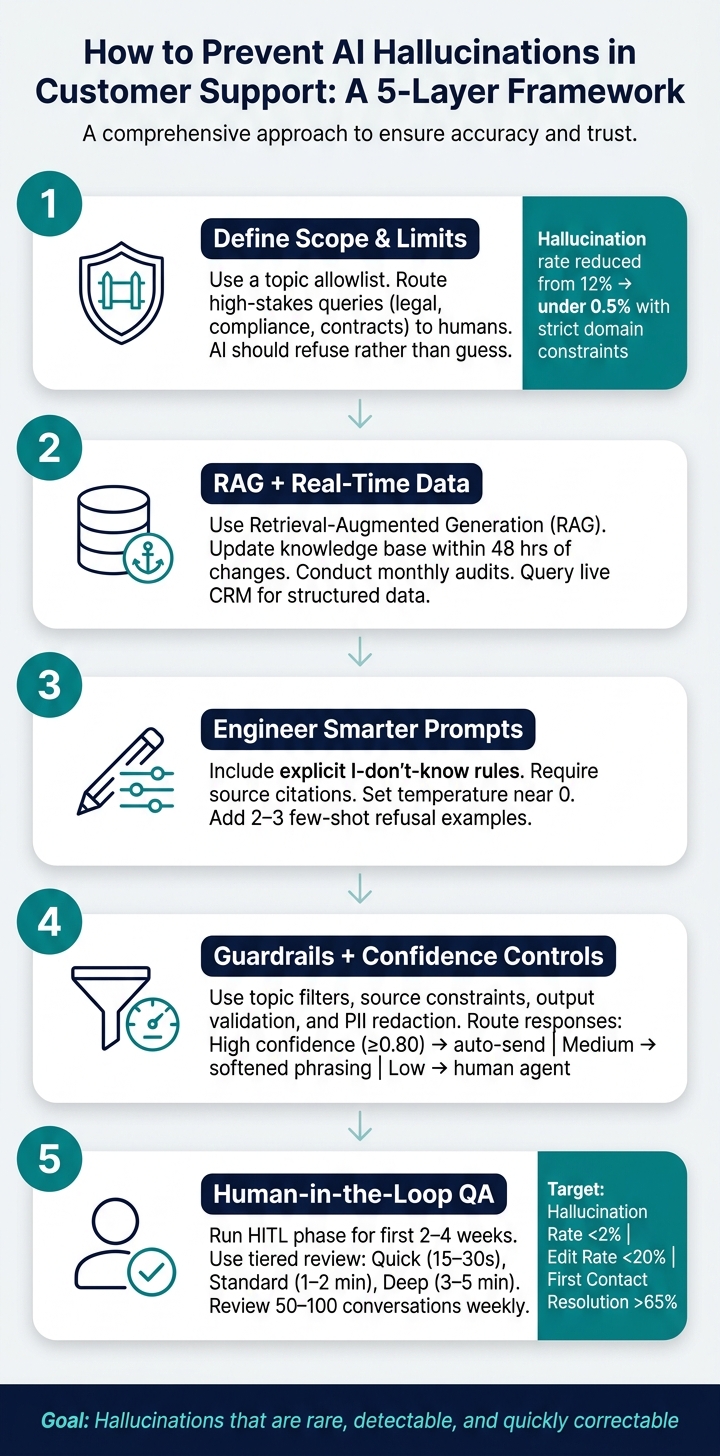
How to Prevent AI Hallucinations in Customer Support: A 5-Layer Framework
Laying the Groundwork to Reduce Hallucinations
Defining the scope and limits of AI replies
When implementing AI for support, it’s crucial to establish clear boundaries for what the AI can and cannot handle. Without these guardrails, AI models tend to prioritize being "helpful", which often leads to filling gaps in knowledge with plausible but incorrect information. This is where hallucinations – AI-generated inaccuracies – become a problem.
The solution? Set up a topic allowlist tied directly to verified documentation. If a query falls outside this list, the AI should respond with a refusal message rather than guessing. As Chatsy explains:
"Telling the model it’s better to say ‘I don’t know’ than to guess reframes its objective entirely." – Chatsy [3]
Additionally, define clear action boundaries. For example, while an AI can accurately describe return policies, it should not invent exceptions or make commitments it cannot uphold. Certain high-stakes topics – like "legal", "compliance", or "contract terms" – should bypass AI entirely and be routed to human specialists. Below is a practical framework for categorizing queries based on their risk level:
| Query Risk Level | Handling Strategy | Example Topics |
|---|---|---|
| Low | Autonomous AI response | General FAQs, return windows, shipping times |
| Medium | Data-grounded AI | Order status, account balances, subscription details |
| High | Guardrails + validation | Pricing inquiries, feature availability by plan |
| Very High | Human-only | Legal advice, safety complaints, liability issues |
This risk-based routing isn’t just theoretical – it’s measurable. By implementing strict domain constraints and scope restrictions, companies have reduced hallucination rates from 12% to under 0.5% [3].
Once boundaries are in place, the next step is ensuring that AI responses are grounded in accurate, up-to-date information.
Grounding AI in accurate, up-to-date data
While defining scope limits the "what", grounding focuses on the "how." To ensure AI delivers reliable answers, it must rely on verified sources. Techniques like Retrieval-Augmented Generation (RAG) allow AI to pull information directly from a company’s knowledge base, minimizing reliance on its internal training data.
RAG is widely regarded as a critical tool for preventing hallucinations in customer support [1]. However, its effectiveness depends on the quality of the underlying data. A knowledge base riddled with outdated policies or incomplete product details can still lead to incorrect answers, even if the AI is technically following protocol. To combat this, companies should:
- Update knowledge base articles within 48 hours of any changes.
- Conduct monthly audits to ensure all information is current [1][3].
For structured data, like account balances or subscription details, the AI should query real-time systems such as CRMs and provide citations for transparency [1][4].
"Hallucinations occur when AI fills gaps in knowledge or context, making prevention a system-level accountability issue rather than a model-only problem." – Anjana Vasan, Principal Content Marketer, Parloa [2]
By grounding responses in verified data, organizations can significantly reduce errors while improving the reliability of their AI systems.
How Supportbench supports data accuracy for AI outputs

Supportbench takes a systematic approach to ensuring AI accuracy, starting with a strong data foundation. Its AI Agent Knowledgebase Bot uses RAG to anchor responses in verified internal and external documentation, avoiding reliance on general training data when precise answers are needed [1][6].
For account-specific details, Salesforce synchronization allows the AI to fetch real-time data – such as licensing information, subscription history, and account status – directly from the CRM, eliminating the risk of generating outdated or incorrect information [1][4]. Additionally, Supportbench’s centralized case management ensures that the AI has access to the full interaction history, reducing the chances of context loss during long or complex conversations [2][6].
These measures address common failure points – like incomplete knowledge, factual inaccuracies, and context drift – and help build lasting customer trust. By prioritizing accurate data and clear boundaries, Supportbench ensures its AI delivers reliable and consistent support.
sbb-itb-e60d259
Prompt Design and Workflow Structure to Cut Hallucinations
How to write prompts that reduce hallucinations
Even with a strong knowledge base, poor prompt design can lead to unreliable outputs. A simple yet effective method is to include an explicit "I don’t know" rule. For example, instruct the model: "If the provided context does not contain enough information to answer accurately, respond with ‘I don’t have specific information about that.’" This shifts the AI’s focus from trying to sound helpful to prioritizing accuracy and honesty [1][7]. Another essential step is requiring the model to cite sources for every response. This not only promotes accountability but also allows human reviewers to verify the information easily [1][5].
Two additional strategies can further improve prompt performance. First, set the model’s temperature close to 0 for support-related tasks. A lower temperature reduces randomness, making responses more consistent and fact-based [2]. Second, include 2–3 few-shot examples in the system prompt to illustrate correct refusal behavior, helping the model understand when and how to decline to answer [3].
"LLMs are designed to generate plausible text, not to verify truth. Without proper architecture and guardrails, they will fill gaps in their knowledge with generated content that sounds right but is not." – Dinesh Goel, CEO, Robylon [1]
Once the prompts are fine-tuned, the next step is to ensure the input context is equally well-structured.
Structuring context for AI replies
Even the best prompt won’t work if the AI is fed disorganized or incomplete context. To get accurate responses, the model needs a clear, structured mix of relevant information – no more, no less.
A practical way to achieve this is by organizing context into four layers: customer history (previous interactions and case notes), product data (current pricing and feature availability), policy context (refund rules, SLA terms), and session context (the customer’s most recent inputs) [2]. This layered approach helps the AI stay grounded in verified information, reducing the risk of mixing unrelated details – a common cause of inaccurate responses.
One common pitfall to avoid is overloading the context window. Feeding the model too many documents at once can lead to context loss, where the AI starts blending details from different sources and generates technically sourced but incorrect answers [6]. Instead, focus on retrieving 3–5 highly relevant chunks of information from your knowledge base. For specific queries like order status or account balances, pull data directly from structured systems like CRMs or order management APIs [1][4].
How Supportbench structures AI workflows
Supportbench has built its AI workflows around these principles of controlled prompts and structured context. Its tools, including the AI Agent-Copilot, AI auto-response, and AI Agent Activity Creation Helper, are designed to ensure responses are grounded in verified documentation and recent case history.
The AI Agent-Copilot combines internal and external knowledge bases with past case history to provide relevant answers and draft suggestions for agents. By anchoring suggestions to verified data rather than relying on open-ended generation, agents receive accurate, actionable information without needing to double-check. Similarly, the AI auto-response feature generates replies by reviewing the complete case history and knowledge base, ensuring that responses are based on existing context rather than guesswork. Together, these tools create a workflow where structured, sourced, and accurate responses are the standard, not the exception.
Guardrails, Confidence Controls, and Case Routing
Practical guardrails for AI outputs
Even with well-structured prompts and clear scopes, additional safeguards are essential to keep AI outputs within acceptable boundaries. These safeguards, or guardrails, act as a safety net to ensure outputs remain accurate, relevant, and compliant.
Some of the most effective guardrails include:
- Topic filters: These restrict the AI to specific domains, such as billing, troubleshooting, or account management. If a customer asks about something outside these areas – like legal or medical advice – the AI should decline to answer and escalate the query instead.
- Source constraints: This ensures the AI only pulls information from approved documentation, addressing knowledge gaps and minimizing the risk of relying on outdated or biased training data.
- Output validation: This adds a layer of checks to verify specific data types (like prices, dates, or product features) against a trusted system of record, reducing errors in critical information.
- PII redaction: A redaction layer scans and masks sensitive customer data before responses are delivered, keeping your operations compliant with privacy regulations.
Here’s how these guardrails correspond to specific risks:
| Guardrail Type | Function | Risk Mitigated |
|---|---|---|
| Topic Filters | Limits AI to specific subjects (e.g., billing) | Out-of-scope errors and speculative responses |
| Source Constraints | Uses only approved documentation | Knowledge gaps and biased data |
| Output Validation | Verifies keywords (e.g., prices, dates) | Policy inaccuracies and pricing mistakes |
| PII Redaction | Masks sensitive data in outbound replies | Data leaks and compliance breaches |
These guardrails work alongside structured prompts to ensure customers receive accurate and verified responses.
Using confidence scores to route uncertain replies
Even with strong safeguards, some AI responses may fall into a gray area – technically within scope but not reliable enough to send automatically. Confidence scores help manage these situations by assessing how certain the AI is about its response.
A confidence score is calculated using factors like how well the retrieved information matches the query and the internal consistency of the answer. For most systems, a threshold of 0.80 is a good starting point: responses above this level can be sent automatically, while anything below should be routed to a human agent for further review [1]. In practice, support teams usually operate within a range of 0.75–0.85, but starting cautiously during early deployment is a safer bet.
A tiered response system helps streamline this process:
- High confidence: Responses are sent automatically.
- Medium confidence: Responses include softened phrasing, such as "Based on our documentation, it appears…"
- Low confidence: Queries are routed directly to a human agent.
For high-stakes topics – like pricing, feature guarantees, or anything with legal implications – it’s best to bypass confidence scoring altogether and route these cases directly to a human. The potential cost of errors in these areas far outweighs any efficiency benefits.
"The goal is not zero hallucination – that is not achievable with current technology. The goal is a system where hallucination is rare, detectable, and quickly correctable." – Twig [8]
By combining techniques like retrieval-augmented generation (RAG), confidence scoring, and domain constraints, teams can significantly reduce hallucination rates. For instance, applying these controls consistently has been shown to decrease hallucination rates from 12% to under 0.5% [3]. Within 60–90 days of deployment, teams often achieve error rates below 2% [1].
Case routing workflows in Supportbench
Supportbench simplifies case escalation with its workflow engine and escalation management features, ensuring smooth routing of cases without manual agent involvement. The workflow engine identifies low-confidence or high-risk cases – triggered by keywords like "refund", "cancel", or "legal" – and automatically routes them to the appropriate team. Each case includes the full conversation transcript and the reason for escalation, giving agents all the context they need to assist the customer without requiring them to repeat their issue.
The escalation management system also tracks multi-level escalations, supports de-escalation when necessary, and links escalation patterns to team scorecards for better visibility. This ensures that every routed case is handled efficiently while maintaining a seamless experience for the customer.
Human Review, QA Processes, and Ongoing Improvement
How human review fits into QA
Routing cases effectively is just one piece of the puzzle; a strong QA process is essential to catch mistakes both before and after customer interactions.
Start with a human-in-the-loop (HITL) phase for the first 2–4 weeks. During this time, every AI-generated response must pass human approval. This phase helps fine-tune confidence thresholds and uncover gaps in the knowledge base before they affect customers.
Once this initial period ends, many teams adopt a tiered review system based on complexity:
| Review Tier | Duration | Use Case |
|---|---|---|
| Tier 1: Quick | 15–30 seconds | For high-confidence, routine cases; a quick scan to catch obvious errors |
| Tier 2: Standard | 1–2 minutes | For moderately complex cases that need quick validation |
| Tier 3: Deep | 3–5 minutes | For sensitive or high-value interactions requiring thorough review |
Avoid falling into the trap of "rubber-stamping" approvals. Regular spot-checks of previously approved responses ensure reviewers remain diligent. For critical topics – like legal, financial, or regulatory matters – always assign these cases to specialists rather than generalists.
To complement human reviews, AI-powered QA tools can make error detection more efficient.
Using AI to assist with QA
Human reviewers can’t realistically evaluate every case. This is where AI tools step in, flagging potential issues before a human even opens the ticket. These tools can generate summaries to speed up reviews, analyze sentiment to identify frustrated or confused customers, and spot inconsistencies between responses and source documentation.
For example, multi-step detection pipelines, such as HalluDetect, are about 25% better at identifying hallucinated responses compared to standard methods [2]. Another emerging approach involves using a secondary lightweight model to audit the primary AI output, helping catch factual errors before they reach the customer.
When hallucinations are flagged, it’s crucial to act quickly. Update the knowledge base and refine prompt instructions within a week to prevent the issue from recurring. This feedback loop not only improves the system but also shows reviewers that their input drives real changes.
Metrics for tracking and improving AI accuracy
Setting clear benchmarks is the only way to measure whether your AI is performing well or starting to drift. Here’s a breakdown of key metrics:
| Primary Quality Metric | Target | Alert Threshold |
|---|---|---|
| Hallucination Rate | < 2% | > 5% (pause autonomous mode) |
| Edit Rate | < 20% | > 40% (trigger immediate investigation) |
| Rejection Rate | < 5% | > 10% |
| First Contact Resolution | > 65% | < 50% |
Additionally, track customer correction rates by identifying conversations where phrases like "that’s wrong" or "that’s not right" appear – these can highlight hallucinations that slipped through. Keep an eye on the AI’s "I don’t know" rate as well; if it’s too low (below 2%), the system might be guessing instead of escalating when unsure [3].
To maintain quality, review 50–100 conversations weekly and hold monthly calibration sessions with 10 AI drafts. These sessions help align reviewer standards and identify inconsistencies before they affect overall performance metrics.
How to Prevent AI Hallucinations when Building Your Chatbot
Conclusion: Building Accurate, Trustworthy AI-Driven Support
Bringing together the strategies and practices discussed, this section highlights the essential steps for creating reliable AI-driven support systems.
Minimizing AI hallucinations requires constant attention and effort. The approaches outlined here tackle the issue at every level: from controlling the data the AI can access, to guiding how it formulates responses, filtering outputs before they’re delivered, and ensuring human oversight is in place.
Methods like RAG (Retrieval-Augmented Generation), improved prompt engineering, and strong safeguards work together to produce accurate responses. These tools help the AI explain its reasoning and admit when it’s unsure. By grounding answers in verified information, providing clear context, and involving human review, the system maintains both reliability and trust.
"The goal is not zero hallucination – that is not achievable with current technology. The goal is a system where hallucination is rare, detectable, and quickly correctable." – Twig Blog [5]
This multi-layered approach has shown measurable success. For example, error rates have dropped significantly, from 12% to under 0.5% [3]. However, even one incorrect AI response can make customers three times more likely to request help from a human in future interactions [3]. By aiming for a hallucination rate below 2%, keeping citation accuracy above 90%, and having an "I don’t know" rate between 5–15%, these strategies ensure the AI provides dependable answers while staying within its limits.
Supportbench exemplifies this methodology by offering AI workflows, quality assurance tools, and confidence-based routing. Together, these practices represent a modern and cost-effective model for AI-driven B2B customer support.
FAQs
What should AI never answer in customer support?
AI in customer support must prioritize accuracy and transparency. Providing false, fabricated, or unverified information – whether about policies, product features, pricing, or order statuses – can damage customer trust. A common issue, known as hallucinations, occurs when AI confidently shares incorrect or unsupported details. To prevent this, responses should rely on verified data. If the AI doesn’t have an answer, it’s better to acknowledge that rather than risk sharing incorrect information. This approach helps maintain credibility and trust.
How do I set a safe confidence-score threshold for auto-replies?
To ensure accuracy in automated systems, it’s important to establish a confidence-score threshold that filters out uncertain responses. A good rule of thumb is to set this threshold above 0.8 (or 80%). This way, only high-confidence replies are sent automatically. For responses falling below this threshold, it’s better to involve human review or escalate the issue.
It’s also crucial to regularly monitor and fine-tune the threshold. This helps maintain accuracy and reduces the risk of errors, especially in customer-facing interactions where precision is key.
How can I prove an AI reply is based on verified sources?
To make sure AI-generated replies are trustworthy, it’s essential to ground them in verified sources. One way to achieve this is by including citations that reference specific documents, datasets, or knowledge bases. These references act as a foundation, showing where the information comes from and making it easier to verify.
Techniques like retrieval-augmented generation (RAG) are particularly useful here. RAG works by pulling relevant information from trusted materials and integrating it into the response. This approach ensures the AI isn’t just generating text from patterns but is building its answers on solid, factual data.
However, this process doesn’t end with citations. It’s equally important to regularly review and validate those references against the original data. Doing so helps confirm their accuracy and ensures the information shared – especially in customer-facing communications – remains reliable and credible.






