
Native AI helpdesks integrate AI directly into their systems without relying on external plugins. These platforms can handle tasks like AI-powered ticket triage, sentiment analysis, and proactive escalation management, streamlining support processes and reducing resolution times. Here’s a quick overview of the top options:
- Supportbench: Tailored for B2B environments with predictive sentiment analysis and robust reporting. Starts at $32/agent/month.
- Gorgias: Best for e-commerce with Shopify integrations, handling refunds and order tracking. Pricing starts at $50/month for 300 tickets.
- Zendesk AI: Offers intelligent triage and dynamic sentiment tracking. AI add-ons cost $50/agent/month.
- Freshworks Freddy AI: Includes sentiment detection and auto-triage. Plans start at $78/agent/month with AI included.
- Help Scout: Simplified setup for smaller teams with AI summaries and drafts. Plans start at $25/user/month.
- HappyFox AI: Advanced automation with sentiment tagging and SLA monitoring. Pricing starts at $14/agent/month.
- Atlassian Intelligence (Jira Service Management): Real-time sentiment analysis and bulk triage. Starts at $22.05/agent/month.
Quick Comparison:
| Platform | Key Features | Best For | Starting Price |
|---|---|---|---|
| Supportbench | Predictive CSAT, sentiment analysis | B2B support | $32/agent/month |
| Gorgias | Shopify integrations, refunds | E-commerce | $50/month (300 tickets) |
| Zendesk AI | Intelligent triage, sentiment | General support teams | $50/agent/month (add-on) |
| Freshworks Freddy AI | Auto-triage, sentiment detection | B2B and mid-size teams | $78/agent/month |
| Help Scout | AI summaries, email-like interface | Small to mid-size teams | $25/user/month |
| HappyFox AI | SLA monitoring, sentiment tagging | Complex workflows | $14/agent/month |
| Atlassian JSM | Bulk triage, real-time sentiment | IT and service teams | $22.05/agent/month |
Each platform offers unique strengths, so your choice depends on your business needs, budget, and support complexity.
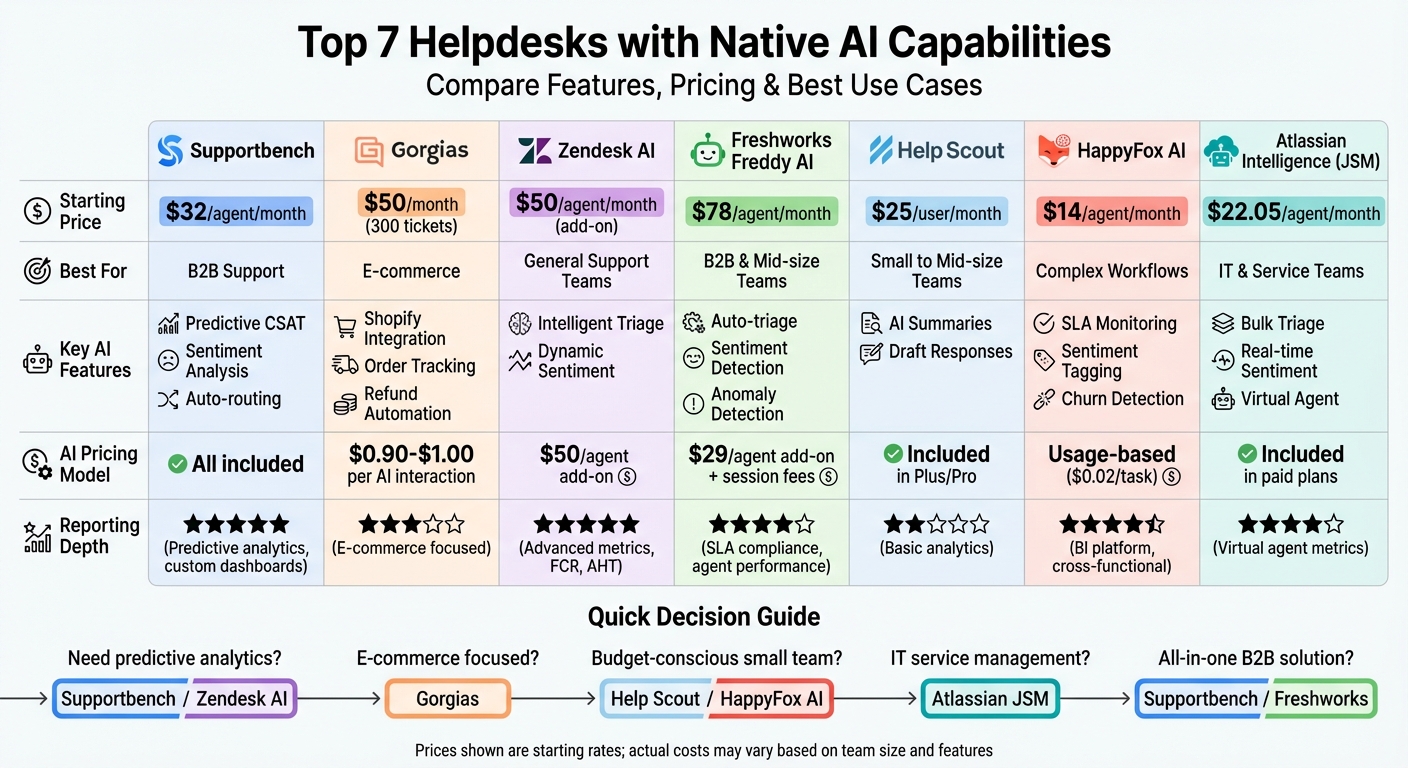
Top 7 AI Helpdesks Comparison: Features, Pricing & Best Use Cases
7 Best Helpdesk Software & Ticketing Systems for 2025 (Ranked by Best Use Cases)
sbb-itb-e60d259
1. Supportbench
Supportbench is designed to simplify and automate the support process for complex B2B environments, offering tools that adapt to the unique challenges of these setups.
AI Triage and Automation
Supportbench leverages Natural Language Processing (NLP) to handle incoming tickets without relying on rigid keyword-based rules. By analyzing subject lines and message content, the platform identifies issues – like bug reports or feature requests – and assigns appropriate tags and categories automatically, removing the need for manual intervention [2].
Its routing system takes things further by evaluating multiple factors simultaneously. These include agent skills, language fluency, workload, availability, urgency keywords, customer tier, and even sentiment. This approach ensures tickets are assigned to the right person the first time, avoiding unnecessary handoffs [2].
"AI is revolutionizing the operational backbone of support by bringing intelligence and context-awareness to ticket routing and prioritization." – Nooshin Alibhai, Founder and CEO of Supportbench [2]
The AI Agent Copilot enhances efficiency by suggesting replies based on case history and summarizing previous interactions. Supportbench reports that this feature can cut agent onboarding time by up to 50% [2][3].
Beyond routing, the platform’s AI also excels in sentiment analysis and proactive escalation management.
Sentiment and Escalation Prediction
Supportbench’s AI evaluates email content and ticket interactions to assess customer emotions, tone, and empathy. It even predicts metrics like CSAT, CES, and NPS before surveys are completed, enabling teams to act preemptively in high-stakes situations.
The platform also identifies potential escalation risks early through predictive First Contact Resolution (FCR) scoring. For complex cases, automated multi-step escalation paths ensure that tickets are directed to the right personnel without delays [3].
These predictive capabilities are paired with advanced reporting tools that give teams a clear view of performance metrics.
Reporting and Analytics
With real-time dashboards and predictive analytics, Supportbench provides B2B teams with a unified view of customer relationships by integrating CRM data, monitoring tools, and sales platforms [4][5].
Its AI-powered Quality Assurance system reviews tickets for tone, empathy, and accuracy, eliminating the need for manual spot-checks. Customizable KPI scorecards track trends in escalations, agent performance, and team efficiency. Additionally, customer health scoring highlights at-risk accounts, helping businesses act before churn occurs [3][5].
B2B Scalability and Pricing
Supportbench offers a straightforward pricing model starting at $32 per agent per month. This includes all enterprise-grade AI features, avoiding costly add-ons or hidden fees often associated with per-agent pricing.
Dynamic SLAs adjust automatically based on ticket content and context, ensuring complex cases get the attention they need. For B2B SaaS companies focused on growth, this approach balances operational efficiency with cost control [4][5].
2. Gorgias
Gorgias is designed for Shopify-based ecommerce brands, offering AI-powered tools to handle transactional support. However, it’s not the best fit for traditional B2B or non-ecommerce businesses [10][20].
AI Triage and Automation
Gorgias employs "agentic logic" to understand customer intent and execute multiple actions at once. Its AI Agent can handle over 100 automated tasks directly within the helpdesk. These include processing refunds, updating shipping details in Shopify, and managing subscriptions through integrations like Recharge and Loop Returns [7][12].
The platform also analyzes messages to identify sentiment and intent, automatically tagging and sending tickets to the right department [6][9]. The Guidance feature allows support teams to give the AI specific instructions for managing different customer groups, such as VIPs or international shoppers [11][12].
"Guidance is so important because we have a lot of internal processes that we do not need to be described in a customer-facing article, but we want AI Agent to be able to access that information and manage tickets accordingly." – Tosha Moyer, Senior Customer Experience Manager, Psycho Bunny [11]
In 2024-2025, menswear brand Psycho Bunny transitioned to Gorgias, automating 25–30% of repetitive tickets. This led to a 4.67/5 CSAT score and ticket resolutions in under 2 minutes, enabling the company to double its revenue without adding staff [9][11]. Similarly, Dr. Bronner’s automated 45% of support questions within two months, saving $100,000 annually and improving CSAT scores by 11% [9].
These automation capabilities are further bolstered by real-time sentiment detection, making support workflows more efficient.
Sentiment and Escalation Prediction
Gorgias AI can detect frustration or anger in real-time. If a customer seems upset or specifically requests a human, the AI Agent automatically escalates the conversation to a support team member [13]. Automation rules also monitor social media comments, including ad responses, tagging and routing based on sentiment or keywords. This ensures that critical or negative interactions are prioritized [14].
The platform also creates concise, one-line ticket summaries, which detail the issue, resolution status, and customer sentiment. Brands using these summaries and the Customer Timeline feature typically resolve tickets 26% faster [15].
Reporting and Analytics
Gorgias complements its automation tools with robust reporting features, including live statistics, performance reports, and AI-specific analytics [18]. Custom dashboards provide insights into over 70 metrics, such as ticket backlog, CSAT scores, and one-touch ticket rates [18]. Additionally, the "Voice of Customer" tool tracks product trends and customer feedback down to the SKU level [19].
The platform’s AI reporting also includes Intent and Outcome tracking, helping teams identify why customers are reaching out and how their issues are resolved [17]. However, these analytics are tailored to ecommerce workflows, making them less suitable for complex B2B support systems.
B2B Scalability and Pricing
Gorgias offers a Basic plan starting at $50/month for 300 tickets (billed annually), with AI interactions costing $0.90 per instance (annual) or $1.00 (monthly) [8][16]. Some users find the per-ticket pricing challenging during seasonal spikes, especially compared to per-seat pricing models [16].
While Gorgias focuses on improving efficiency, its ecommerce-centric design limits its use in B2B environments. It excels at transactional support tasks like order tracking, refunds, and returns but is less suited for complex, multi-stakeholder B2B scenarios with longer resolution timelines and account-based workflows.
3. Zendesk AI
Zendesk AI streamlines customer support with Intelligent Triage, leveraging pre-trained models to instantly identify ticket intent, language, and sentiment. This approach eliminates manual routing, saving 30–60 seconds per ticket.
AI Triage and Automation
Zendesk AI comes equipped with industry-specific models for IT, HR, and finance, ready to use from the start. This means teams can implement AI without delay. The Agent Copilot feature suggests replies and provides ticket summaries, leading to a 20% boost in agent productivity. As conversations progress, the system dynamically updates its predictions, ensuring accurate sentiment tracking and timely escalations. These real-time adjustments help maintain smooth communication and effective issue resolution.
Sentiment and Escalation Prediction
Zendesk AI doesn’t just stop at efficient triage. It continuously evaluates emotional tones across five levels, making it possible to identify dissatisfied VIP customers or at-risk accounts. This enables support leaders to prioritize tickets based on customer mood, not just ticket volume or time of arrival. With a well-implemented AI setup, businesses can reduce response times by as much as 65% [1]. The system also tracks sentiment throughout each interaction, automatically escalating tickets when frustration rises or specific keywords indicate urgency.
Reporting and Analytics
AI-powered analytics play a key role in improving support efficiency. For instance, they can boost self-service resolution rates by 30–50% and cut first response times by up to 70% [1]. These benefits are especially crucial in complex B2B environments where speed and accuracy are paramount. However, the quality of the knowledge base is critical – duplicate articles should be removed, and outdated content must be refreshed to ensure accurate AI-driven insights. Sentiment monitoring through AI reports also helps teams quickly identify and escalate high-emotion tickets, safeguarding CSAT scores [1]. These measurable improvements in response and resolution times highlight Zendesk AI’s effectiveness in modern B2B support workflows.
4. Freshworks Freddy AI
Freddy AI tackles key B2B support challenges with built-in automation and real-time analytics, offering a streamlined and cost-effective solution. It integrates native AI capabilities for tasks like triage, sentiment detection, and analytics, eliminating the need for external plugins. Using Natural Language Processing (NLP), Freddy AI assigns sentiment scores (0 to 100) to incoming tickets, categorizing them as Negative (10–30), Neutral (31–70), or Positive (71–100). These scores are presented with color-coded visual cues, helping agents quickly identify and prioritize frustrated customers.
AI Triage and Automation
Freddy AI simplifies ticket management by recommending values for fields like priority, group, and status based on past data. This Auto Triage feature reduces manual effort and speeds up routing decisions. Another handy tool is the Thank You Detector, which identifies closing replies from customers, preventing unnecessary ticket reopenings and ensuring accurate ticket counts. Before rolling out AI configurations, teams can use Simulation Mode to test the system against historical tickets, helping to identify any gaps in the knowledge base. These features work together to streamline triage, laying the groundwork for Freddy AI’s advanced sentiment and escalation tools.
Sentiment and Escalation Prediction
Freddy AI doesn’t stop at triage – it continuously monitors sentiment throughout conversations to anticipate potential escalation issues. If a customer’s sentiment shifts from positive to negative, the platform can trigger automated workflows to address the situation. Support leaders can also set up dashboards to prioritize tickets with negative sentiment, ensuring these cases are handled quickly. Freddy AI Insights offers even more support by providing early warnings about trends like declining customer satisfaction (CSAT) scores or increasing SLA breaches. It also delivers root cause analysis, helping teams address problems before they escalate further.
Reporting and Analytics
Freddy AI Insights tracks seven key metrics, including average response time, resolution time, and SLA violations. With Conversational Analytics, users can ask plain English questions like "Show unresolved tickets by priority" to generate instant visual reports – no manual setup needed. The platform’s Root Cause Analysis tool uses tree map visualizations to pinpoint specific factors behind metric changes, such as identifying which regions or channels are driving up ticket volume. Insights are refreshed weekly on Mondays and monthly on the first day, keeping data up-to-date.
B2B Scalability and Pricing
Freshworks highlights a 30–40% cost advantage compared to similar platforms offering equivalent features. The Pro + AI Copilot plan is priced at $78 per agent per month (billed annually) and includes 500 AI Agent sessions, with additional sessions costing around $100 per 1,000 sessions. The Enterprise plan, priced at $79 per agent per month, unlocks advanced features like Autonomous Resolution Agents, sandbox environments for testing automation, and skill-based routing. However, for high-volume B2B operations, it’s important to monitor AI session usage to avoid unexpected costs. Features like Freddy AI Insights are available only on Enterprise and Omni Enterprise plans, which could pose limitations for mid-market teams with tighter budgets.
5. Help Scout
Help Scout keeps things simple with a shared inbox that feels just like email, while offering built-in AI features without unnecessary complexity. Instead of relying on ticket numbers or rigid workflows, it uses an intuitive, email-like interface that’s easy for teams to adopt. Its AI Summarize and AI Drafts features are included in the Plus and Pro plans, so there’s no need for extra add-ons or third-party tools. Let’s dive into how these AI tools help streamline ticket management.
AI Triage and Automation
Help Scout focuses on cutting down repetitive tasks with features like automated summaries and draft responses. AI Summarize offers quick overviews of long conversation threads, making it easier for agents to get up to speed when handling ongoing tickets. This is especially useful for B2B support, where keeping track of multiple exchanges is key to resolving issues effectively. Additionally, the AI Drafts feature suggests responses, saving time and improving efficiency. While these tools are great for straightforward workflows, teams that need complex routing or auto-assignments based on historical data might find Help Scout’s AI capabilities less robust compared to platforms with more advanced triage options. Still, its streamlined approach makes scaling more affordable and manageable.
B2B Scalability and Pricing
Help Scout’s efficient AI tools are paired with pricing that works well for mid-market teams choosing the right customer support software for B2B requires balancing these features with long-term growth. It offers three main plans: Standard at $25 per user/month, Plus at $45 per user/month, and Pro at $75 per user/month [22]. There’s also a contact-based pricing option for 2026, starting at $50/month for 100 contacts, which includes unlimited users and full access to AI features [21]. For AI resolutions, the cost is $0.75 per resolution [21]. Onboarding is quick, with an average setup time of just one day, making it a fast option for teams ready to get started. However, Help Scout’s built-in channel support is mostly limited to email and live chat. Teams needing omnichannel communication, like WhatsApp or SMS, will need third-party integrations [21], which could be a hurdle for B2B operations handling diverse customer touchpoints.
6. HappyFox AI
HappyFox AI is designed to streamline complex B2B support workflows with native automation tools. At its core are AI Agents (Autopilot), which operate behind the scenes to handle tasks like triaging issues, tagging tickets, and updating custom fields based on ticket details [27]. The AI Urgency feature prioritizes high-impact or time-sensitive tickets in real time, ensuring critical issues are addressed promptly [25]. Additionally, AI Copilot assists by summarizing complex technical tickets, drafting response suggestions, and offering real-time chat support to accelerate resolutions [24][25]. The platform also excels at identifying sentiment changes, churn risks, and growth opportunities by analyzing ticket content [27]. Together, these tools enable efficient ticket management, as outlined below.
AI Triage and Automation
HappyFox AI employs specialized agents to manage tasks like Custom Field Triage and the Missing Context Assistant, which gather essential information before a human agent steps in [27]. The Churn Risk Detector flags tickets from unhappy clients, giving account managers a chance to act quickly [27]. Avinash Mugali of Darwinbox shared how HappyFox’s AI-powered tools improved their first response time by 3x, reducing it from 24 to 10 hours. The AI also helped identify recurring issues, leading to the creation of 30% more knowledge base articles than initially planned [23][28]. Many users report a 50% decrease in ticket volumes and response times, with the platform claiming to boost agent efficiency by 10x and knowledge coverage by over 70% [25].
"HappyFox’s system uptime is superb. Despite adding many users and increasing complexity, it remains robust and scalable. We also experienced a 3X improvement in the first response time." – Avinash Mugali, Head of Customer Excellence, Darwinbox [23]
Sentiment and Escalation Prediction
HappyFox AI analyzes customer sentiment in tickets and live chats to provide agents with immediate insights into a customer’s mood and urgency [29][30]. Leveraging Anthropic’s Claude 2.1 via Amazon Bedrock, the platform has significantly improved its ability to follow complex instructions and maintain context during multi-turn interactions [31]. This upgrade, led by CTO Pradeek J, resulted in a 40% rise in automated ticket resolutions and a 30% increase in agent productivity for customers [31]. The switch to AWS-hosted generative AI also reduced latency by 20%, cutting response times from 15–20 seconds to under 10 seconds [31]. By staying within a company’s knowledge base, the AI minimizes errors and ensures accurate support in complex scenarios [31]. These sentiment insights are seamlessly integrated into the platform’s business intelligence tools.
Reporting and Analytics
HappyFox includes a robust Business Intelligence (BI) platform that works alongside its help desk to deliver advanced analytics, custom dashboards, and cross-functional reporting [33][37]. AI Insights evaluates ticket data to uncover common themes and suggest updates for the knowledge base [32]. The platform also offers detailed reports on SLA monitoring, agent activity, ticket inflow, and customer satisfaction (CSAT) [35]. Its BI features can display data for up to 200 agents or 100 categories in a single widget for quick comparisons [34]. Beyond the help desk, the BI platform integrates with tools like Salesforce, Aircall, and Wrike, helping organizations bridge data gaps between departments [33]. A Forrester TEI study found that HappyFox users achieved a 401% ROI over three years [33].
B2B Scalability and Pricing
HappyFox provides three agent-based plans with AI features: Standard – $14/agent/month (500 Agent Copilot interactions); Premium – $29/agent/month (2,000 Agent Copilot interactions, AI Knowledge for 500 tickets, 2,500 AI Resolve interactions); and Enterprise – $39/agent/month (10,000 Agent Copilot interactions, AI Knowledge for 2,000 tickets, 10,000 AI Resolve interactions) [25]. Autopilot tasks are priced at $0.02 each [27]. For unlimited agent access, the platform offers Growth – $1,499/month, Scale – $3,199/month, and Scale Plus – $4,799/month, based on two-year billing [36]. This pricing model supports cost-efficient, AI-driven support operations. HappyFox currently holds a 2.0% market share in the IT Helpdesk Management category and boasts a 4.5/5 rating on G2 [23][26].
7. Atlassian Intelligence in Jira Service Management
Atlassian Intelligence introduces built-in AI features to Jira Service Management (JSM), eliminating the need for additional plugins. These tools streamline processes like ticket triage, sentiment analysis, and context summarization for B2B support teams. Key functionalities include AI Triage for bulk ticket categorization, the Service Triage Assistant (Rovo Agent) for prioritizing requests, and AI-driven sentiment analysis. The Virtual Service Agent handles Tier-1 support through guided conversations and generative search across knowledge bases, while Predictive Assignment matches agents to tasks based on workload and past performance. These capabilities simplify workflows and speed up resolutions in complex support environments.
AI Triage and Automation
Jira Service Management’s AI Triage lets agents classify multiple unorganized tickets – like those marked "Emailed request" – by applying AI-suggested request types and field values (e.g., "Affected Service" or "Urgency") in bulk. The Service Triage Assistant uses ticket content and sentiment to rewrite titles or assign tasks via automated rules. To ensure accuracy, organizations can test these AI rules on historical tickets using Simulation Mode. With natural language processing, the system identifies similar requests, helping teams avoid duplicated efforts during major incidents.
Sentiment and Escalation Prediction
Atlassian Intelligence analyzes ticket descriptions and comments in real time, assigning sentiment labels – Positive, Neutral, or Negative – that update as conversations progress. This dynamic tracking helps agents monitor emotional shifts throughout the support process. While JSM doesn’t include a dedicated escalation prediction tool, managers can use Jira Query Language to create queues for Negative tickets and flag potentially at-risk customers. This allows teams to focus on high-frustration cases rather than strictly following a first-come, first-served approach. However, a limitation is the absence of aggregated sentiment reporting, which makes it challenging to analyze long-term trends or recurring issues [39].
Reporting and Analytics
Jira Service Management evaluates its Virtual Service Agent using three key metrics: Resolution rate (percentage of queries resolved without human input), Matched rate (percentage of queries accurately linked to an intent), and Customer Satisfaction (CSAT) scores for AI interactions. The Premium plan includes 1,000 assisted conversations per month, while Enterprise-tier plans offer Advanced Analytics for deeper insights into AI performance and service outcomes [40]. Rovo Analytics provides tools for managers to refine AI responses through conversational feedback loops. Additionally, the Atlassian Teamwork Graph integrates data from Jira, Confluence, Slack, and Microsoft Teams, creating a unified view of support performance. Tracking the Matched rate also helps identify gaps in the knowledge base, ensuring continuous improvement and efficient scalability.
B2B Scalability and Pricing
Atlassian Intelligence is bundled with Jira Service Management Cloud’s paid plans, aligning with the cost-conscious needs of modern B2B support teams. The Standard plan starts at $22.05 per agent per month, offering basic features like content generation, bulk AI triage, and sentiment hints. The Premium plan, priced at $49.35 per agent per month, includes the full Virtual Service Agent, 1,000 assisted conversations per month, and AI summaries. For larger organizations, Enterprise plans provide a custom pricing model with the full AI suite, Advanced Analytics, and unlimited scalability [38][40]. It’s worth noting that native AI Triage in JSM requires manual activation, whereas some third-party solutions offer fully autonomous 24/7 ticket processing.
Platform Strengths and Weaknesses
To distill the core functionalities of each platform, the table below compares their AI-driven capabilities in key areas like triage, sentiment analysis, reporting, and pricing. These insights align each platform’s offerings with operational needs, highlighting both strengths and limitations.
| Platform | AI Triage & Routing | Sentiment Analysis | Reporting Depth | B2B Pricing Model |
|---|---|---|---|---|
| Supportbench | Automated prioritization, auto-assigning issue types, auto-tagging | Sentiment, intent, and emotional scoring | AI-driven predictive CSAT, CES, FCR detection, custom dashboards | From $32/agent/month (all features included) |
| Gorgias | E-commerce intent detection, order-aware routing | Intent-based routing (no dedicated sentiment tracking) | Retail-specific metrics focused on order status and refunds | Tiered by ticket volume; starts at $60/month for 300 tickets |
| Zendesk AI | Intelligent triage by intent, language, and priority | Native intent and sentiment signals | Advanced metrics, including FCR, AHT, deflection, and MOS | Per agent plus $50/agent/month AI add-on |
| Freshworks Freddy AI | Automated ticket categorization | Sentiment and anomaly detection | SLA compliance and detailed agent performance tracking | Per agent plus $29/agent/month Copilot add-on and session-based fees |
| Help Scout | Basic shared inbox routing | AI-assisted summarization and tone adjustment | Basic conversation analytics and history | $49/user/month with AI included |
| HappyFox AI | Machine learning ticket classification | Intent and priority tagging | Detection of support bottlenecks and SLA trends | Tiered plans (pricing varies by features) |
| Atlassian Intelligence (JSM) | Bulk AI triage with a Service Triage Assistant | Real-time sentiment labels | Virtual Service Agent metrics such as resolution rate, match rate, and CSAT | Standard: $22.05/agent/month; Premium: $49.35/agent/month |
Pricing Models: Cost Structures and Scalability
The platforms vary significantly in cost structures. Supportbench and Help Scout include AI features in their base pricing, which helps avoid unexpected costs as teams grow. In contrast, Zendesk and Freshworks charge additional fees for AI capabilities, either per agent or per session, potentially driving up total expenses for larger teams.
Reporting Depth: Tactical vs. Strategic Insights
The depth of reporting tools can make or break operational efficiency. Platforms like Zendesk AI and Supportbench stand out with extensive KPI tracking, covering metrics like First Call Resolution (FCR), Average Handle Time (AHT), and deflection rates. Meanwhile, Atlassian Intelligence offers insights into Virtual Service Agent performance but lacks aggregated sentiment dashboards, which are crucial for proactive escalation management. Help Scout’s analytics are suitable for smaller teams but fall short for larger organizations needing detailed insights.
AI Triage: Automation and Routing Capabilities
AI triage levels also differ widely. Supportbench and Zendesk AI excel with fully automated ticket classification and intelligent routing, ensuring high efficiency. Help Scout, on the other hand, leans more toward agent-assist features like tone adjustment rather than full automation. Gorgias is highly effective for e-commerce-specific tasks, such as handling order statuses and refunds, but its narrow focus may struggle with the complexities of multi-channel B2B support.
Sentiment Analysis: Escalation Management Tools
Sentiment analysis plays a crucial role in identifying and managing escalations. Supportbench offers a comprehensive approach, combining sentiment, intent, and emotional scoring throughout the customer journey. Freshworks Freddy AI adds anomaly detection, flagging unusual patterns for further investigation. While Atlassian Intelligence provides real-time sentiment labels, the lack of aggregated sentiment dashboards limits its ability to support proactive strategies. Similarly, Help Scout and HappyFox offer basic sentiment indicators, which may not meet the advanced needs of high-value B2B accounts.
Conclusion
The comparisons above shed light on how different platforms incorporate AI, helping you decide which helpdesk solution aligns with your needs and budget.
For businesses managing complex B2B operations, Supportbench offers a standout option with features like predictive CSAT, CES, and FCR detection – all included at a straightforward $32 per agent/month. This pricing model ensures transparency and avoids the surprise of hidden fees.
In the e-commerce space, Gorgias stands out with tools like order-aware routing and refund automation. However, other platforms often adopt tiered pricing, requiring careful financial planning. If your team prefers a simpler, email-focused setup, Help Scout provides basic AI capabilities. For those seeking balanced and reliable support automation, HappyFox AI and Atlassian Intelligence offer machine learning features tailored for consistent performance.
These examples emphasize the importance of native AI integration for keeping costs manageable while boosting operational efficiency. Platforms that embed AI as a core feature often deliver better long-term value compared to those treating it as an optional add-on. With AI’s proven ability to improve ROI and streamline workflows, choosing the right platform with built-in AI capabilities could make all the difference for your business.
FAQs
What makes a helpdesk “AI-native” versus AI add-ons?
An “AI-native” helpdesk is built with AI as a fundamental part of its structure. This design allows for smooth automation, real-time decision-making, and effortless scalability – all without needing third-party plugins. On the other hand, AI add-ons are external modules tacked onto existing systems. These often come with extra setup steps and additional costs.
Platforms that are AI-native include integrated tools like automated triage and sentiment analysis right out of the box. In contrast, relying on add-ons can result in inconsistent performance and potential integration headaches.
How do I estimate total AI costs before rollout?
When figuring out the total cost of AI implementation, start with the initial setup expenses. These can range anywhere from five to six figures, depending on the project’s scale and the vendor’s fees. But don’t stop there – factor in ongoing costs such as licensing fees, professional services, and usage charges, as these can add up quickly over time.
You also need to account for the complexities of maintaining AI systems, like retraining models or applying updates. To get a clearer picture of your budget, take advantage of vendor pricing models or use cost calculators offered by providers.
If you’re looking to manage costs more effectively, consider options like all-inclusive platforms or exploring AI workforce models that bundle multiple services under one plan. These strategies can help streamline expenses while still meeting your AI needs.
What data do I need for accurate AI triage and sentiment?
For AI to handle triage and sentiment analysis effectively, it requires access to key data points such as customer interaction history, ticket context, language, tone, and emotional cues. These elements fuel natural language processing (NLP) and sentiment detection, allowing AI to deliver more accurate and efficient support.
Related Blog Posts
- Which helpdesk tools are built outside the United States (UK/EU/Canada/Australia)?
- Which helpdesks offer Canadian hosting – and what questions should you ask vendors?
- What are the signs you’ve outgrown Help Scout (SLAs, tiers, escalations, reporting)?
- Front vs. Supportbench: Why Collaboration Tools Can’t Replace a Helpdesk