



AI support tools often come with hidden costs that can drastically inflate your budget. While the advertised price may seem affordable, extra charges for setup, integrations, premium features, and usage-based pricing can quickly add up. Here’s how you can avoid these fees:
- Understand the Pricing Model: Many platforms rely on tiered pricing or charge for essential AI features like sentiment analysis or automation as add-ons. Opt for platforms with transparent, all-inclusive pricing.
- Evaluate Features Carefully: Confirm that critical AI tools are included in the base price. Avoid solutions that require costly integrations or third-party apps for core functionality.
- Choose AI-Native Platforms: Platforms built with AI at their core (like Supportbench) bundle advanced features into every pricing tier, eliminating surprise fees.
- Plan for Growth: Check how costs scale with team size or usage. Predictable pricing models help avoid "growth penalties."
How Add-On Fees Drive Up Support Platform Costs
How Legacy Platforms Charge Extra for AI Features
Older support platforms were never designed with AI at their core. Instead, they were built to handle simpler tasks like organizing PDFs or routing tickets. As AI became more critical, these platforms retrofitted AI capabilities as extras rather than fully integrating them into their systems [7]. This approach means that advanced tools – like predictive intelligence, automated triage, or sentiment analysis – often sit behind expensive premium tiers. The result? Limited functionality upfront and higher costs over time.
On top of tiered pricing, AI features introduce variable compute costs that traditional billing models didn’t account for [8]. These include charges for GPU usage, tokens, and API calls. For example, AI voice agents can cost anywhere from $0.50 to $1.50 per minute, with overage fees that can be two to three times the regular rate [1].
Adding to the expense, legacy platforms often rely on paid marketplace apps for features that should arguably come standard. Tools like advanced reporting, parent/child case management, or renewal-aware service level agreements frequently require separate subscriptions or integrations [6]. This patchwork approach forces teams to juggle multiple add-ons, driving up the overall price tag.
How Add-Ons Increase Total Cost of Ownership
Add-ons don’t just raise costs – they complicate everything. What starts as a seemingly affordable subscription quickly balloons when you factor in extra fees for AI tools, advanced workflows, third-party apps, and integrations [4]. This piecemeal pricing strategy makes it nearly impossible to predict or control budgets. Support teams often face a tough choice: stick with limited features that hinder productivity or pay for costly upgrades that strain financial resources. And let’s not forget the added expenses of configuring, integrating, training, and managing these tools [5].
The hidden costs don’t end there. Many AI features operate outside the platform’s main control system, requiring separate governance, audit trails, and compliance measures. Vendors often bundle these necessities as premium add-ons, forcing teams to pay extra for what should be built into the platform [7]. This means paying not just for the base software but also for AI capabilities and the compliance tools to manage them.
For B2B support teams handling intricate customer relationships, these rising costs are especially painful. Industry data shows that a single human-handled interaction can cost between $6 and $20 or more [5]. AI is supposed to help reduce these expenses, but when the AI itself demands additional fees and integrations, the expected savings can vanish. Teams are left with a difficult choice: settle for ineffective tools or shoulder unsustainable costs. In contrast, AI-native platforms avoid this issue by offering robust, enterprise-level features across all pricing tiers [4].
Select AI-Native Platforms With Built-In Features
Benefits of Unified AI Platforms
When AI features are built directly into a platform instead of being sold as separate add-ons, support teams can enjoy two major perks: lower costs and easier implementation. Unlike older systems that require pricey integrations and constant maintenance, unified AI platforms are ready to use right out of the box. This eliminates the hassle of extensive engineering work, hefty integration projects, and surprise fees.
Here’s a staggering fact: integration costs can eat up 50% to 60% of an AI project’s total budget [10]. By opting for a unified platform, teams sidestep these expenses while reaping benefits like quicker issue resolution, improved customer satisfaction, and the ability to manage complex B2B cases without adding more staff. This streamlined approach drives immediate efficiency gains, making platforms like Supportbench – where AI is built-in and free of add-on charges – a smart choice.
"Supportbench stands out in AI by providing enterprise-grade automation at all levels… these features are not gated by expensive add-ons."
– Nooshin Alibhai, Founder and CEO, Supportbench [4]
How Supportbench Includes AI Without Extra Fees
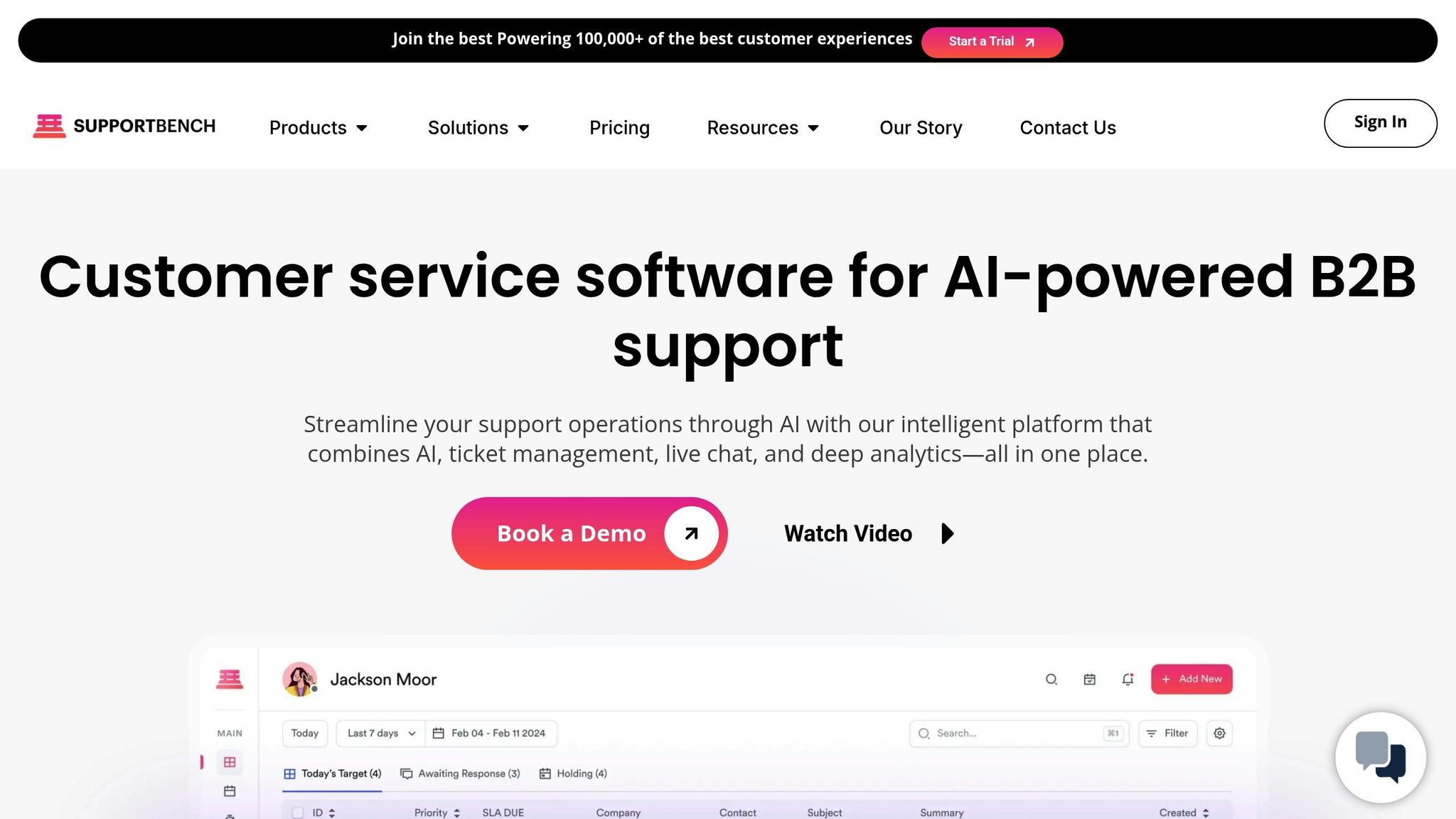
Supportbench takes the idea of unified AI platforms to the next level by embedding advanced features into every pricing tier – starting at just $32 per agent per month [3]. No additional fees, no hidden costs. Essential tools like AI-powered case management, automated knowledge base creation, and dynamic service-level agreements come standard, making it a cost-effective solution for support teams.
One standout feature is the platform’s AI Copilot, which delivers relevant answers from past cases and knowledge bases in real time. When agents solve complex issues, Supportbench can instantly generate new knowledge base articles with just one click, saving time and ensuring that solutions are always documented.
For B2B teams managing long-term customer relationships and renewal-focused cases, these built-in tools provide immediate value. Predictive insights help identify at-risk customers even when feedback surveys are ignored, while AI-driven quality checks review every ticket for empathy and accuracy, eliminating the need for external tools. Plus, generating custom reports is as simple as typing a query in natural language – like "Show me the top 3 customers creating tickets." This intuitive, all-in-one approach allows support teams to deliver better service without breaking the bank.
Transparent vs. Tiered Pricing Models
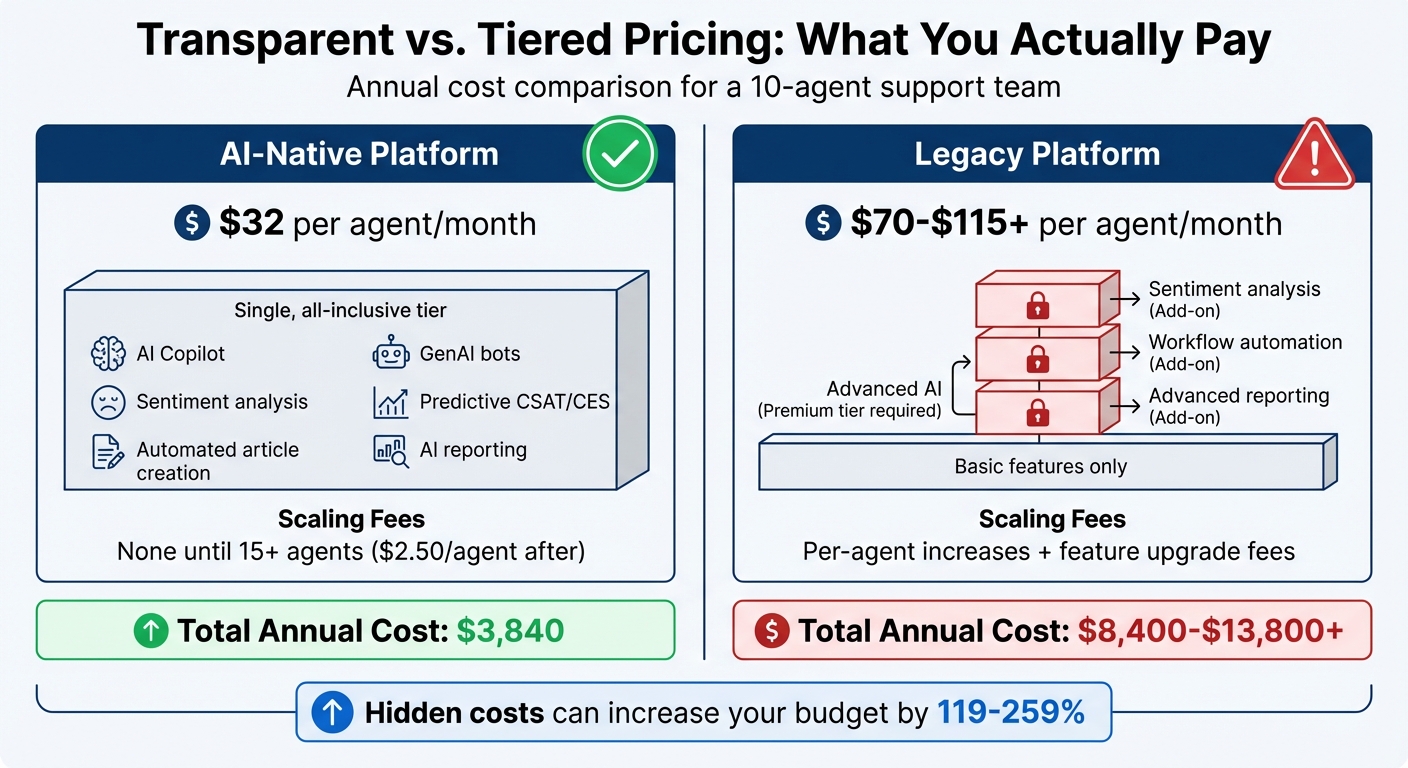
AI Support Platform Pricing Comparison: Transparent vs Tiered Models
When choosing an AI support platform, the pricing structure is just as important as the features it offers. Two common pricing approaches dominate the landscape: transparent, all-inclusive pricing and tiered pricing with add-ons. These models can lead to vastly different annual costs, sometimes reaching thousands of dollars in unexpected expenses. Understanding this difference is key to evaluating how bundled AI tools compare with tiered models.
Transparent pricing, like the approach used by Supportbench, offers predictable costs as your team grows. This model wraps essential features – such as AI tools for sentiment analysis, predictive CSAT, and workflow automation – into a single base fee. In contrast, tiered pricing often hides advanced tools behind higher-priced plans, leading to increased expenses when you need efficiency-boosting AI features.
For instance, a 10-agent team using a transparent platform like Supportbench might spend about $3,840 annually, with access to all AI tools included from the start. On the other hand, the same team on a tiered platform could face costs of $8,400 to $13,800+ after adding advanced AI capabilities, SLAs, and workflow automation [3][4].
"Supportbench stands out in AI by providing enterprise-grade automation at all levels… these features are not gated by expensive add-ons."
– Nooshin Alibhai, Founder and CEO, Supportbench [4]
Pricing Comparison Table
Here’s a side-by-side look at how these pricing models stack up for a 10-agent team. Notice how platforms with gated AI features can lead to significantly higher costs than their base pricing suggests.
| Plan Type | Base Cost (per agent/month) | Included AI Tools | Scaling Fees | Total Estimated Annual Cost (10 Agents) |
|---|---|---|---|---|
| Supportbench Professional | $32 | Full suite: AI Copilot, GenAI bots, sentiment analysis, predictive CSAT/CES, automated article creation, AI reporting | None until after 15 agents ($2.50/agent) | $3,840 |
| Legacy Tiered Platforms | $70–$115+ | Basic features only; advanced AI tools require premium tiers or separate add-ons | Per-agent increases and feature upgrade fees | $8,400–$13,800+ |
Supportbench’s pricing model caps costs at $150 per agent, no matter the team size, and automatically transitions teams to an Enterprise plan once they reach 60 agents. This ensures they receive the right level of support without sudden cost spikes [3]. By avoiding the "growth penalty" that comes with tiered pricing, Supportbench provides a cost-effective, scalable solution for support teams, making it easier to plan for the future without hidden expenses.
sbb-itb-e60d259
How to Avoid Add-On Dependencies
When it comes to sidestepping unexpected fees tied to AI platforms, a careful approach is key. The trick is to thoroughly evaluate platforms before making a purchase and to understand how costs might grow as your team expands. Many teams only uncover hidden dependencies after committing to a platform, often finding out that core AI features require additional purchases. A proactive evaluation can help you avoid these surprises and set your team up for scalable success.
Evaluate Platform Functionality Before Purchase
Start by examining the base subscription to ensure that essential AI functions – like ticket automation, sentiment analysis, predictive CSAT, and workflow orchestration – are included and not locked behind higher-priced tiers. During product demos, ask vendors to showcase core workflows, such as automated ticket resolution and customer satisfaction prediction, without requiring extra integrations.
Request a clear feature list that specifies which functionalities come standard and which require add-ons. For instance, confirm whether the platform includes pre-built CRM connectors, enterprise-grade security features such as SOC 2 compliance, and no-code configuration tools right out of the box. Some platforms, like Supportbench, integrate AI directly into case management, knowledge creation, and customer insights, avoiding the need for additional bolt-on features often found in older systems.
When testing the platform, ensure features like auto-translation, multi-channel support, and advanced analytics work seamlessly without requiring extra integrations. Check the no-code or low-code capabilities to verify that non-technical teams can configure AI behaviors, test updates, and optimize workflows without needing IT support. This reduces long-term costs by minimizing reliance on engineering resources [12].
Consider Scalability and Future Costs
Beyond the immediate features, it’s essential to evaluate how the platform’s pricing evolves as your team grows. Calculate the total cost of ownership for a team twice your current size to see how per-agent pricing changes. Look at how pricing scales based on user seats, ticket volume, or AI interactions, and prioritize platforms with predictable pricing models. For example, Supportbench charges an additional $2.50 per agent after the first 15, capping at $150 per agent, which helps avoid the "growth penalty" often associated with tiered pricing [3].
Also, review the vendor’s roadmap to understand how they plan to enhance their platform. Ask whether future AI advancements will be built natively into the system or require third-party add-ons. Legacy platforms often rely on bolt-ons for innovation, whereas AI-native tools typically offer unified updates that include new capabilities without additional costs [2][13]. Additionally, check storage limits (e.g., 50MB vs. 200MB per agent) and API request limits (e.g., 100/min vs. 500/min) to ensure they align with your growth needs [3].
Unified platforms can save you money and headaches in the long run.
"Supportbench stands out in AI by providing enterprise-grade automation at all levels… Unlike Zendesk, these features are not gated by expensive add-ons."
– Nooshin Alibhai, Founder and CEO, Supportbench [4]
Conclusion
Opting for an AI-native platform from the start can help you sidestep unnecessary add-on fees. Legacy systems often treat AI as an afterthought, leading to inflated costs – teams typically spend between $48,000 and $60,000 annually when you account for platform fees, add-ons, integration expenses, and ongoing maintenance costs[10][11]. In contrast, AI-native platforms integrate features like automation, sentiment analysis, predictive insights, and knowledge management directly into their core systems. This streamlined approach can reduce costs by up to 60%, saving organizations over $100,000 annually, all while enhancing functionality[9][10][12]. These savings directly address the rising expenses associated with outdated systems.
Fragmented systems come with hidden costs, especially when integration and deployment consume up to 60% of project budgets[10], and unused credits go to waste[2]. Unified platforms, such as Supportbench, eliminate these inefficiencies by offering enterprise-grade AI tools like predictive CSAT, automated triage, and dynamic SLA management. Unlike legacy systems, these features aren’t locked behind premium tiers or sold as separate add-ons[3][4].
For growing support teams, scalability without surprise costs is critical. Transparent pricing models that cap per-agent costs and include all AI capabilities from day one help teams avoid the "growth penalty" that legacy platforms impose as ticket volumes rise[3]. This unified strategy not only reduces expenses but also simplifies operations, enabling teams to scale effectively.
By choosing a unified AI solution, organizations can maintain cost control and streamline operations for the long term. Teams that thoroughly evaluate platforms, ensure that essential AI features are built-in, and prioritize predictable pricing models set themselves up for sustainable growth without compromising on functionality or budget stability. Carefully assess your platform’s native capabilities and pricing structure to support your organization’s growth.
"Supportbench stands out in AI by providing enterprise-grade automation at all levels… these features are not gated by expensive add-ons."
– Nooshin Alibhai, Founder and CEO, Supportbench[4]
FAQs
What are the advantages of using AI-native platforms instead of traditional systems?
AI-native platforms bring a host of advantages compared to traditional systems by embedding advanced AI features right into their core. This approach eliminates the hassle of purchasing expensive add-ons or upgrades, offering straightforward pricing while lowering the average cost per ticket. Teams can manage a larger volume of support requests without needing to expand their workforce, making these platforms a smart, cost-effective way to scale operations.
Key features like real-time copilot assistance, automated knowledge-base creation, predictive routing, and semantic search help streamline workflows and boost productivity. Agents can respond more quickly with tools like context-aware suggestions and auto-tagging, which significantly cut response times and reduce idle time by as much as 80%. On top of that, dynamic SLA adjustments and predictive analytics provide managers with actionable insights – all without needing additional software.
By integrating ticketing, knowledge management, and reporting into a single, unified interface, these platforms simplify operations and eliminate the inefficiencies caused by fragmented systems. This all-in-one setup not only improves customer experiences but also keeps costs predictable, making AI-native platforms a smart choice for modern support teams looking to scale effectively.
How can I confirm that a platform’s pricing is fully transparent?
When evaluating a platform’s pricing, make sure it offers a straightforward per-agent rate that covers all core AI features without any hidden charges. The pricing details should clearly explain what each tier includes and confirm there are no surprise fees for necessary tools or upgrades. This transparency not only prevents unexpected costs but also makes it easier to plan your budget with confidence.
How can I avoid hidden fees when choosing AI support tools?
To steer clear of hidden fees, prioritize platforms that offer clear, all-inclusive pricing. Opt for solutions with a straightforward per-agent fee that covers essential features like ticketing, AI-powered routing, knowledge base creation, sentiment analysis, and reporting – without tacking on extra costs for AI tools or usage-based charges.
Make sure the platform’s AI features are built-in and seamlessly integrated, rather than separate modules requiring additional licenses. Features like automated tagging, knowledge base generation, and predictive analytics should come standard, so you’re not stuck paying for third-party AI engines or per-interaction fees.
Also, consider platforms with flexible, predictable pricing. The right solution will let you scale up – whether by adding agents or managing higher ticket volumes – without surprising you with tiered pricing jumps or per-ticket charges. Choosing a system with transparent costs and integrated AI ensures your support operations remain efficient without breaking the bank.






