


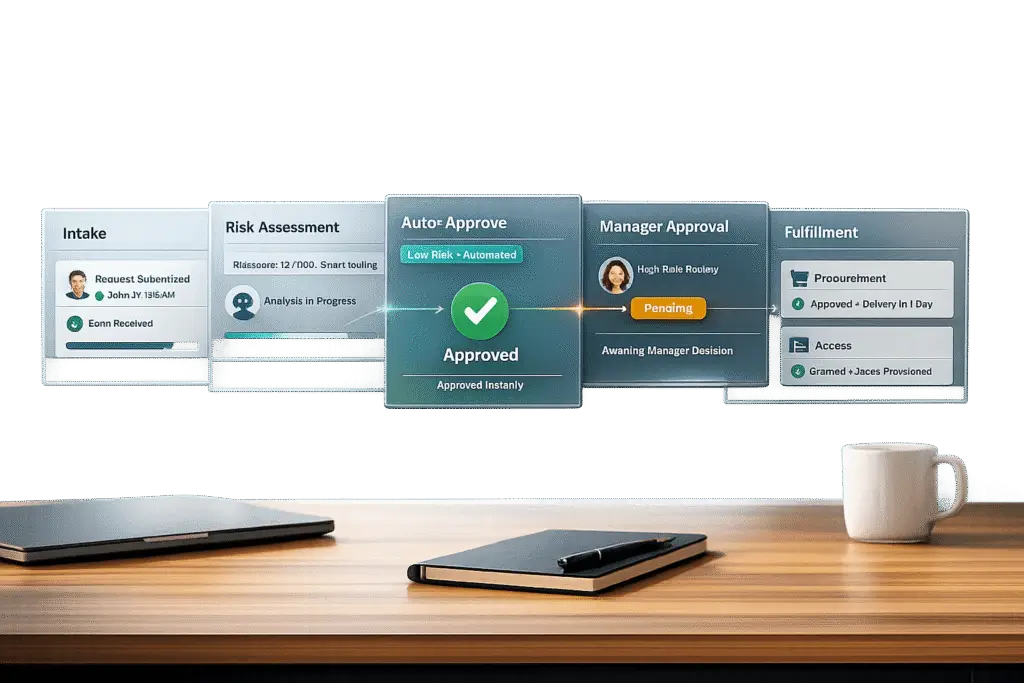
Building an efficient approvals workflow for internal requests can save time, reduce costs, and ensure compliance. Unstructured processes, like relying on emails or chats, lead to delays, incomplete information, and financial risks. By implementing structured workflows, organizations can automate routine tasks, prioritize high-risk approvals, and maintain clear audit trails.
Key takeaways:
- Why structured workflows matter: They reduce costs (manual processes cost $12.88–$19.83 per invoice), improve compliance, and prevent rogue spending.
- Benefits of automation: Faster approvals (e.g., cutting 7-day cycles to 2–4 hours), better decision-making using AI, and enhanced tracking for audits.
- Steps to implement: Map current processes, identify bottlenecks, set goals, design approval tiers (low, medium, high risk), and implement AI-driven tools using a comprehensive customer support platform like Supportbench.
Structured workflows, especially when powered by AI, transform manual approvals into efficient systems that save time and improve accuracy.
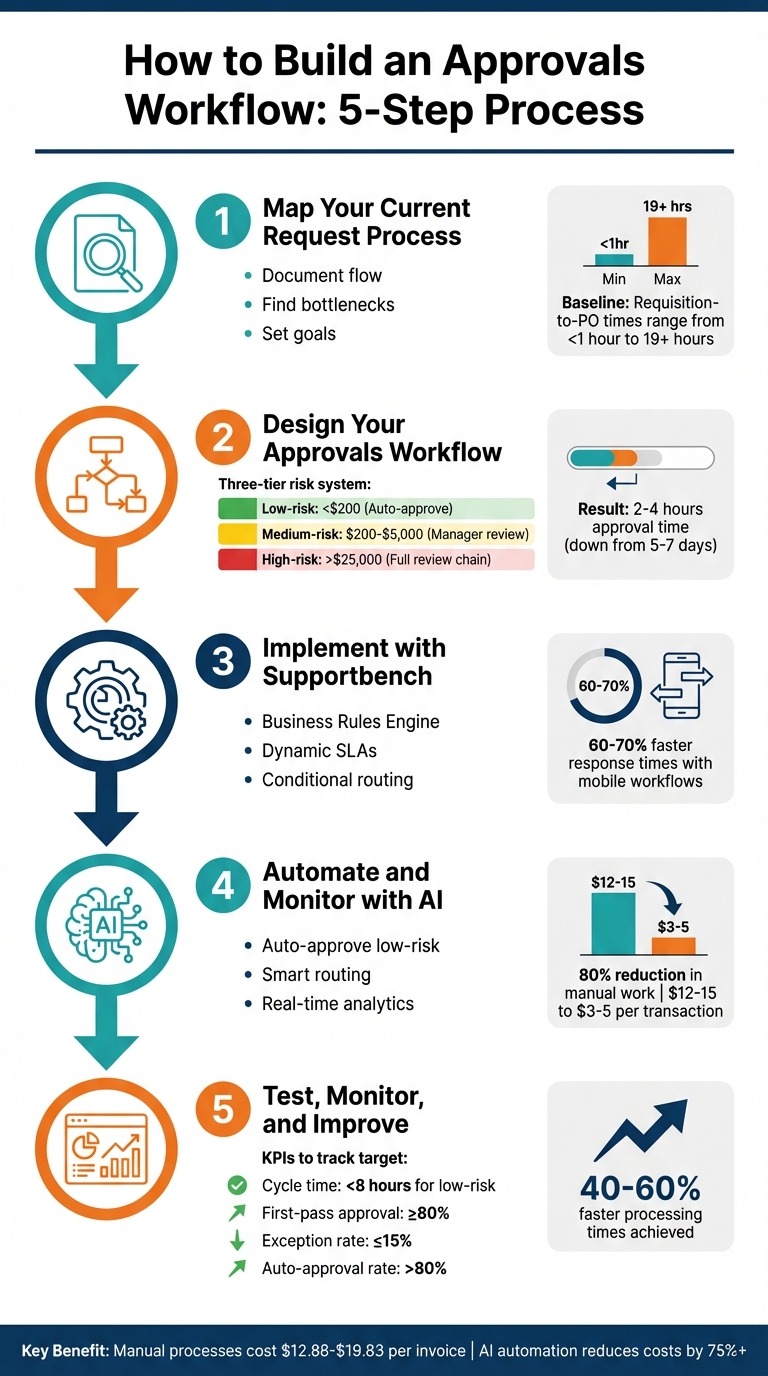
5-Step Approvals Workflow Implementation Process with Key Metrics
Step 1: Map Your Current Request Process
Document Your Current Request Flow
Start by reviewing the past year of procurement and access requests. This will help you spot patterns in spending – like which categories see the most activity, the amounts typically spent, and which vendors are used most often. For example, routine requests (like office supplies under $250) differ significantly from higher-risk ones, such as capital expenditures or new vendor contracts [1].
Next, outline every stakeholder in your current process. This could include lab managers, department heads, IT admins, finance teams, and others. Pay close attention to where requests tend to stall. What triggers these requests? It could be a Slack message, an email, a webhook, or even a status update in your project management tool. Write this process down in simple terms so it’s clear for both human reviewers and AI systems [2].
Don’t forget to address the "silence case" – what happens when an approver doesn’t respond? Define specific wait times and escalation paths to ensure requests don’t disappear into someone’s inbox [2]. Once you’ve mapped everything out, focus on identifying where delays occur.
Find Bottlenecks and Delays
Identify the "dead time" in your process – those moments when requests sit idle because a manager is traveling or tied up in meetings. These delays might indicate a need for parallel approvals or mobile-friendly workflows [1]. Also, review your communication channels. Fragmented conversations across platforms can slow everything down, so consolidating these trails is key [4].
Examine your approval layers. Are there too many steps that add bureaucracy without adding value? For instance, healthcare and nonprofit organizations often process 800 to 1,000 purchase orders annually. Most of these are under $250, yet they’re sometimes subjected to the same rigorous process as high-value capital expenditures [1]. As Sachin Sharma, CEO of ProcureDesk, explains:
"The problem isn’t the people – it’s the process. Traditional workflows treat every purchase the same way, creating unnecessary bottlenecks for routine purchases while potentially under-scrutinizing high-risk buys" [1].
Once you’ve pinpointed these bottlenecks, you can start setting specific goals to improve the workflow.
Set Clear Goals for Your Workflow
Before making changes, establish baseline KPIs. Measure your current cycle times and budget compliance rates. For example, requisition-to-PO times can vary widely, from under an hour to over 19 hours [1]. These benchmarks will help you track progress.
Set goals like reducing approval times from days to hours, achieving over 80% auto-approval for routine purchases, and maintaining a complete audit trail [1][6]. Direct executive attention to the top 20% of transactions, as these often account for 80% of total spending. Automate the rest [1]. Companies that prioritize speed in procurement workflows report 40% to 60% faster processing times, and those that incorporate mobile-enabled workflows see response times improve by 60% to 70% [1].
sbb-itb-e60d259
Automate Approval Workflows: Business Process Automation
Step 2: Design Your Approvals Workflow
Now that you’ve mapped your process and set clear goals, it’s time to focus on designing an efficient workflow. The key is to align approval stages with the level of risk involved. This ensures low-risk orders don’t bog down executives’ time while high-risk expenditures get the oversight they require. Tailor your approval process to match varying risk levels for maximum efficiency.
Build Approval Stages for Procurement Requests
To streamline procurement, consider creating three tiers based on risk:
- Low-risk: These requests, such as routine purchases under $200 from approved vendors, can be auto-approved without manual intervention.
- Medium-risk: Items like new vendor contracts or purchases between $200 and $5,000 should go through a quick review by a department manager.
- High-risk: Major expenditures, such as capital investments or contracts over $25,000, require a full review chain. This might involve a department head, finance controller, and CFO [1][7].
Choose a routing strategy that fits your organization’s needs. For strict hierarchies, use a linear approach. For processes involving multiple departments, consider parallel routing to allow simultaneous reviews. Conditional routing – based on factors like purchase amount, department, or vendor status – can add another layer of flexibility while keeping things efficient [3].
For example, Chattanooga Public Schools revamped their approval process in 2025 by replacing a 5–7 day paper-based system with automated workflows. By introducing risk-based tiers, they cut routine purchase approvals to just 2–4 hours and achieved 98% budget compliance. Their Finance Director shared:
"The automation has been transformational. Teachers get what they need quickly, and we maintain complete financial control" [1].
Build Approval Stages for Access Requests
Access requests come with unique challenges, especially when security is involved. A parallel workflow – where IT, Security, and Legal teams review requests simultaneously – can prevent bottlenecks that might occur with sequential reviews [3].
Use conditional logic to differentiate between types of access. For example:
- Standard software access might only need manager approval.
- Requests for administrative privileges or sensitive data access should trigger a full cross-functional review.
To maintain security, include a segregation of duties check. This ensures no single individual can request, approve, and grant access to the same system [7][9].
Assign Roles and Responsibilities
Clearly defining roles is essential to keeping your workflow effective as your team grows. Assign responsibilities based on function, and create an approval matrix that specifies who handles what. For instance:
- Department managers could approve routine or medium-level requests (up to $5,000).
- CFO approval might be required for high-risk transactions exceeding $25,000 [7][8].
Prevent self-approvals, particularly for high-value transactions, and designate backup approvers to avoid delays when someone is unavailable. Coast Flight, an aviation company, implemented flexible routing with backups and reduced its approval cycle from 7 days to just 2–3 days [1].
Set role-based SLAs (Service Level Agreements) for each stage of the approval process. For example:
- Department managers may need to respond within 24 hours.
- Finance teams could have 48 hours for budget verification.
To keep things moving, configure automatic escalations. If an approver doesn’t act within the SLA window, the request can be routed to their supervisor. This ensures accountability and prevents unnecessary delays [9].
Step 3: Implement the Workflow with Supportbench

Now that you’ve mapped out your process and designed approval stages, it’s time to bring it all to life using Supportbench’s workflow engine. The best part? You don’t need IT support or custom coding. The platform separates decision logic from task sequences, so you can tweak approval rules as policies evolve – without rebuilding the entire workflow.
Configure Workflow Rules and Triggers
At the heart of Supportbench’s workflow system is its Business Rules Engine (BRE), which acts as the decision-making brain. While the workflow engine handles task sequences (what happens next), the BRE focuses on the "how" and "why" of actions – like automatically escalating a high-value request or prioritizing it based on spending thresholds [10].
The setup process involves four steps: trigger initiation, data evaluation, automated decision-making, and action execution. For example, if a procurement request exceeds $5,000 and comes from the Marketing department, the BRE can automatically route it to both the department head and the finance controller.
Eric Klimuk, Founder and CTO of Supportbench, highlights the flexibility of the BRE:
"A Business Rules Engine (BRE) is a software component that automates decision-making by applying a set of defined rules to incoming data… logic can be updated without modifying the underlying codebase" [10].
You can also configure conditional branching to create unique approval paths. For instance, a small office supply request under $200 might be auto-approved instantly, while a new vendor contract could trigger a more comprehensive review process.
Once your rule engine is in place, you can tailor workflows to meet the specific needs of different types of requests, such as procurement or access approvals.
Customize Workflows for Procurement and Access
Supportbench allows you to implement the risk-based tiers and routing strategies you developed in Step 2. For procurement workflows, you can automate low-risk approvals, set up managerial reviews for medium-risk requests, and create sequential chains for high-risk cases – all guided by the BRE’s evaluations.
For access requests, things get even more efficient. Configure parallel routing so IT, Security, and Legal teams can review requests simultaneously instead of one at a time. The BRE applies different logic depending on the type of access requested. For example, standard software access might only need a manager’s approval, but a request for database administrator rights would trigger a full cross-functional review.
To keep things organized, group your rules into modular categories. This way, you can update procurement logic without disrupting access workflows – or make department-specific changes without affecting others. This modular design makes it easier to scale and adapt as your organization grows or compliance needs shift [10].
With these customized workflows in place, the next step is to ensure requests are prioritized and managed efficiently.
Use Dynamic SLAs to Prioritize Requests
Dynamic SLAs (Service Level Agreements) adjust in real time based on changing conditions. Supportbench monitors requests against SLA terms and sends alerts or escalations if deadlines are at risk of being missed [10]. For instance, if a high-priority procurement request is nearing its deadline, the system can automatically escalate it to a senior manager or send reminders to speed up the process.
You can set SLA rules based on factors like request type, requester tier, spending amount, or even AI-driven sentiment scores. This ensures that urgent requests get fast-tracked while routine ones stick to standard timelines. Organizations using mobile-enabled workflows often see response times improve by 60–70% because approvers can take action directly from their smartphones [1].
The BRE continuously evaluates live ticket data to ensure that requests are handled consistently across all channels – whether they’re submitted via email, chat, or your internal portal. This centralized approach eliminates delays caused by communication gaps and ensures every request follows the same decision-making criteria [10].
Step 4: Automate and Monitor with AI
With your workflow structure in place, AI steps in to streamline operations by managing repetitive tasks and ensuring data consistency. Once your workflow is live in Supportbench, AI takes over to evaluate, route, and track requests in real time. This transition transforms your structured processes into intelligent automation that evolves alongside your organization.
Automate Approvals Based on Predefined Criteria
AI can instantly approve straightforward, low-risk requests – like office supply orders under $200 from approved vendors – by using OCR and machine learning to extract and auto-fill relevant details [11][14]. For more complex scenarios, AI analyzes spending patterns to flag anomalies and performs three-way matching to verify invoices against orders and logs. This approach reduces manual work by up to 80% and slashes processing costs from $12–$15 down to $3–$5 per transaction [11][14][15].
Tyler Toft, Senior Finance Manager at Drata, highlights the efficiency gains from AI-powered approvals:
"Every morning I log into Tropic and look at my active requests and I can clear out my queue within five to 10 minutes. It’s seamless." [12]
Route and Escalate Requests Automatically
Supportbench’s AI ensures requests reach the right approvers by analyzing historical data, such as the requestor’s department, location, and vendor. This dynamic routing assigns the most suitable approver for each case [13]. Parallel routing options for departments like IT, Finance, and Legal can reduce cycle times by 40–60% [1].
If a primary approver is unavailable, fallback routing quickly reassigns the task to a backup, ensuring no request goes unanswered [1]. For urgent matters – like a breakdown in production equipment – emergency pathways can bypass regular approval cycles, alerting multiple senior approvers simultaneously [1]. Additionally, the system enforces segregation of duties, preventing any individual from requesting, approving, and paying for the same item [7].
Track Workflow Performance with AI Analytics
AI-powered dashboards provide real-time insights into key metrics, such as average cycle times, first-pass approval rates (≥80%), and exception rates (≤15%) [7][17]. Using process mining and predictive analytics, the system identifies bottlenecks – like frequent delays caused by a specific approver or recurring issues with certain request types [16][5].
Explainable AI (XAI) adds another layer of transparency by detailing the logic behind routing decisions and risk scores, which is especially valuable for audits and building trust with stakeholders [16][7]. The platform also maintains detailed audit trails, logging every interaction with timestamps to ensure compliance with regulations [13][14]. Organizations leveraging these AI tools have reported a 35% boost in decision-making speed and a 28% improvement in decision quality [17].
These advanced analytics set the stage for continuous testing, monitoring, and refining of your workflows as you move forward.
Step 5: Test, Monitor, and Improve Your Workflow
Now that your AI-powered workflow is in place, it’s time to ensure it’s running smoothly and make improvements for better efficiency.
Test the Workflow with Real Scenarios
Start by running the workflow through real-world test cases. Divide these into categories – low-risk, medium-risk, and high-risk requests – to see how well your routing logic handles different levels of complexity and spending thresholds.
Make sure to test the workflow across multiple platforms, like email, mobile apps, Slack, and Microsoft Teams. This ensures that approvers can take action no matter where they are. For businesses that prioritize mobile workflows, response times can improve by 60–70%[1]. Don’t forget to test edge cases, such as what happens when an approver is unavailable. For example, check if requests are reassigned automatically and if rejected requests return to the requester with clear instructions for corrections.
A pilot run using historical data is a great way to validate the workflow. It can help confirm that automated processes significantly cut down approval times. Dynamic routing and escalation, as discussed earlier, are crucial – regular testing ensures these features are working as intended.
Track Key Performance Metrics
Once the workflow is live, keep an eye on critical metrics. Aim for an average cycle time of under 8 business hours for low-risk requests. First-pass approval rates should be at least 80%, and exception rates should stay below 15%[7]. For routine purchases, try to achieve an auto-approval rate above 80% – a benchmark many top-performing companies hit[1].
AI tools like those in Supportbench can help spot bottlenecks that might go unnoticed otherwise. For instance, if a particular approver frequently delays requests or specific types of requests are often rejected, the system can flag these issues in real time. Features like parallel routing can also shave days off the approval process.
Set up RAG (Red, Amber, Green) indicators to monitor thresholds. If cycle times deviate by 10–20% from your goals, configure alerts to catch the problem early[18]. Additionally, keep an eye on leading indicators like the number of open requests to stay ahead of potential issues.
Once you’ve gathered enough performance data, use it to fine-tune the system and make it even more effective.
Refine the Workflow Over Time
Feedback is essential. Talk to both requesters and approvers to identify pain points. These could include confusing form fields or routing logic that sends requests to the wrong person. Watch out for approval layers that add unnecessary delays without improving accountability.
Apply the Pareto principle to focus on the 20% of transactions that drive 80% of spending[1]. Automate as many routine, low-risk requests as possible. Start with straightforward rules and gradually add complexity as needed. Role-based routing is another smart move – it assigns tasks based on authority levels rather than specific individuals, which helps maintain continuity when team members change roles[6].
Before rolling out any updates, run simulations to catch potential errors. Tools like process mining in Supportbench can analyze live data to uncover inefficiencies that might not have been obvious during initial testing[5]. Businesses that continuously tweak their workflows often report 40–60% reductions in approval times[1], turning processes that once took days into tasks completed in just hours.
Conclusion: Building Scalable Approvals Workflows with AI
Creating a streamlined approvals workflow calls for thoughtful planning, smart use of AI, and a commitment to ongoing improvement. By laying out your current processes, establishing clear approval stages, and using tools like Supportbench for dynamic routing, you can turn time-consuming manual workflows into efficient systems that get the job done in hours instead of days.
AI takes care of repetitive decisions and flags complex cases for human review. When set up correctly, it can assess requests based on factors like spending limits, vendor status, or department-specific rules, then automatically send them to the right approver. This "human-in-the-loop" approach ensures routine requests are handled swiftly, while more critical decisions get the attention they need.
The results speak for themselves. Many organizations report faster approval times and better compliance after adopting AI-driven workflows. These systems not only save time but also enhance accuracy and consistency by reducing manual errors.
The key to scalability lies in treating your workflow as an evolving system. Regularly tracking performance metrics helps identify areas for improvement, allowing you to refine thresholds, remove bottlenecks, and automate more tasks as your needs grow. Testing and refining along the way ensures the system adapts and improves over time.
The goal isn’t to achieve perfection right away. Instead, focus on building a system that learns and evolves. Start with clear rules, test them in real-world scenarios, and tweak them based on results. With AI managing the routine and humans concentrating on strategic choices, your approval process becomes a powerful tool for improving operations and staying ahead in a competitive landscape.
FAQs
What should I collect before building an approvals workflow?
Before setting up an approvals workflow, it’s crucial to gather all the necessary details about how the process currently operates. Identify the specific steps involved, the stakeholders responsible at each stage, and the types of requests that require approval. Make sure to also document the approval criteria, the sequence of levels, and any current bottlenecks or delays that slow things down. This groundwork helps you create a workflow that’s efficient and customized to fit your organization’s needs.
How do I set the right approval tiers for spend and access risk?
To create a system that balances efficiency with oversight, a tiered approval process can help streamline decision-making while ensuring proper governance for higher-risk scenarios. Here’s how you can structure it:
1. Low-Risk Requests: Automate or Minimize Oversight
Low-risk requests, such as small purchases or routine access approvals, should require minimal intervention. These can be automatically approved based on predefined thresholds. For example:
- Spend Amounts: Purchases under $500 could be auto-approved.
- Access Levels: Access to non-sensitive systems or data can be granted without manual review.
Automation tools can handle these requests, reducing delays and freeing up resources for more critical tasks.
2. Moderate-Risk Requests: Standard Review
Requests that fall into a moderate-risk category – such as mid-range spending or access to moderately sensitive data – should go through a standard review process. This might involve:
- Managerial approval for expenses between $500 and $5,000.
- Department-level review for access to systems with some level of sensitivity.
This ensures an extra layer of oversight without overburdening senior staff.
3. High-Risk Requests: Thorough Review by Senior Management
High-risk requests demand a more detailed review process. These could include:
- Spending above $5,000.
- Access to highly sensitive or restricted data.
Such requests should be escalated to senior management or a dedicated oversight committee. This ensures that larger risks are thoroughly evaluated before decisions are made.
4. Escalation Paths
Clear escalation paths are essential for handling exceptions or disputes. For instance:
- If an automated system flags unusual activity in a low-risk request, it should escalate to a human reviewer.
- Requests denied at one level should have a defined path for appeal or secondary review.
5. Refining the Process Over Time
A tiered approval system isn’t static. Regular reviews can help identify bottlenecks or inefficiencies. Use data from the approval process to adjust thresholds, refine automation rules, and ensure the system continues to balance speed with governance.
By defining clear thresholds, leveraging automation for low-risk cases, and ensuring thorough oversight for high-risk scenarios, you can create an approval process that’s both efficient and secure.
Which metrics prove the workflow is actually improving?
Key metrics that show how workflows have improved include shorter approval cycle times, fewer bottlenecks, increased efficiency in processes, and better compliance rates. These metrics highlight quicker, more seamless, and dependable approval processes, leading to stronger operational performance.






