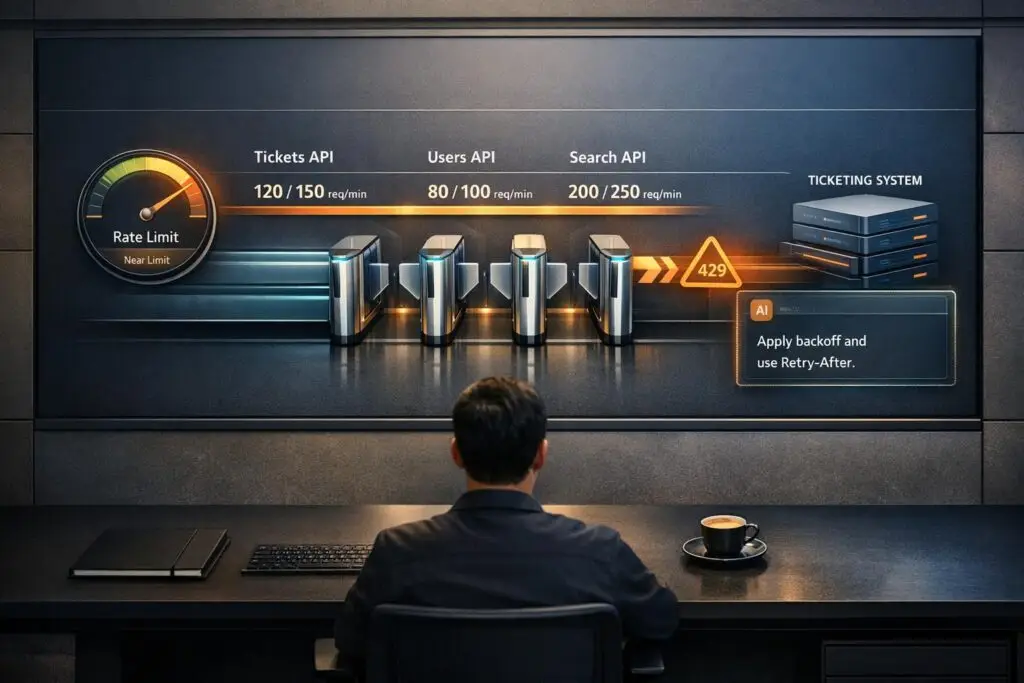
API limits and throttling can disrupt your helpdesk operations if not managed properly. These restrictions, like requests per minute or tokens per minute, control how much data flows through your systems, often leading to issues like HTTP 429 errors when exceeded. For example, AI-driven requests or bulk data syncs can quickly consume your quota, delaying ticket updates, breaking integrations, and impacting SLAs.
Here’s what you need to know:
- Rate Limits: Set caps on the number of API requests or tokens you can use within a timeframe. Exceeding these leads to throttling.
- Throttling: Slows or blocks requests during high usage, often causing system delays or retries.
- Common Problems: AI workflows and bulk operations can hit limits quickly, creating bottlenecks and retry storms.
- Error Handling: Proper strategies like exponential backoff and respecting Retry-After headers can reduce disruptions.
- Key Questions for Vendors: Ask about limits, upgrade options, separate AI quotas, burst capacity, and monitoring tools.
To avoid disruptions, choose vendors with clear API policies, scalable options, and robust monitoring tools. Test APIs under realistic conditions and optimize your usage with efficient workflows like webhooks instead of polling.
Understanding API Rate Limits: Purpose, Types, and Essential Insights
sbb-itb-e60d259
What Are API Limits and Throttling?
API limits define the maximum number of requests a system will allow within a specific time frame – such as 100 requests per minute or 90,000 tokens per minute [1]. These limits ensure fair resource distribution, prevent server overload, and help vendors manage operational costs. Essentially, they act as a guarantee from the platform: "This is the level of service we can consistently provide for this volume of requests" [3].
When you exceed these limits, throttling kicks in. This mechanism slows down or outright rejects additional requests, often returning HTTP 429 errors [4]. While throttling is vital for maintaining platform stability during traffic surges, it can disrupt time-sensitive processes like AI-powered ticket routing or AI-driven workflows during peak usage.
How API Limits Work
API limits are designed to prevent any single customer from consuming an unfair share of resources. These limits are often tied to subscription plans. For instance, a Growth plan may allow 400 requests per minute, while an Enterprise plan might offer 700 [6]. On top of plan-based limits, vendors frequently impose restrictions on specific API endpoints. For example, Freshdesk‘s Enterprise plan permits 700 total requests per minute but caps ticket creation at 280 calls per minute and ticket listing at 200 [6].
Modern platforms, especially those incorporating AI features, often use token-based limits instead of simple request counts. These measure data volume, making it crucial to understand how large AI-related requests can consume quotas more quickly than traditional API calls.
How Throttling Affects Your Operations
When API thresholds are exceeded, throttling takes effect immediately. Requests are blocked, workflows grind to a halt, and HTTP 429 errors flood your logs. Many systems then attempt to retry failed requests automatically, creating "retry storms" that further strain resources and worsen delays [4]. This can disrupt essential processes, such as syncing CRM data or updating tickets, especially during high-demand periods.
Polling-based integrations, which repeatedly check for updates (e.g., new tickets or customer data), can deplete your API quota even when activity is low [2]. Switching to webhooks – where updates are pushed only when events occur – can significantly reduce API usage [2].
Types of API Limits and Throttling Levels
API limits and throttling mechanisms are implemented at various levels:
- Account-level limits: These apply to the entire organization, such as a cap of 700 requests per minute shared across all users and integrations.
- Endpoint-level limits: These restrict specific actions, like allowing only 280 ticket creation calls per minute, even if the overall account limit is higher [6].
- User-level or method-level limits: These prevent overuse by individual users, IP addresses, or API keys. For example, a single user might be limited to 30 ticket updates every 10 minutes [1].
Some platforms use a Token Bucket algorithm, which enables brief bursts of activity above the steady-state limit if you haven’t recently used your quota [1]. Understanding how these limits reset and how retries are handled is essential for optimizing API usage in demanding environments [3].
"Rate limiting and throttling are not optional features anymore – they are essential components of modern API design." – Daydreamsoft [1]
Common Throttling Problems in B2B Helpdesk Operations
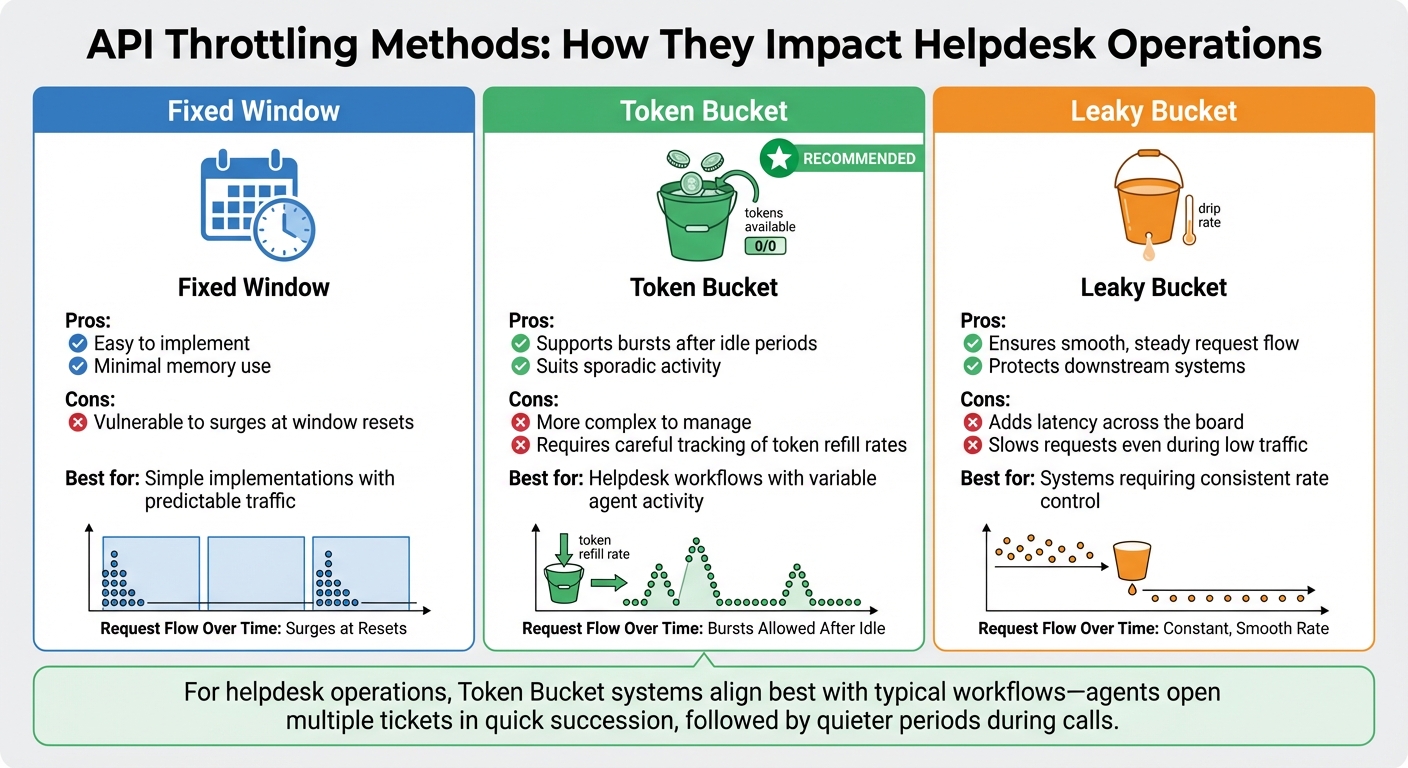
API Throttling Methods Comparison: Fixed Window vs Token Bucket vs Leaky Bucket
Let’s delve into the common throttling challenges that often disrupt B2B helpdesk operations. In environments where AI automation and bulk data handling are becoming standard, API throttling can turn what seems like a minor traffic spike into a full-blown operational issue. Below, we’ll look at specific scenarios that highlight these challenges.
Traffic Spikes from AI Automation
AI-driven tools like automated case summaries, chatbots, and sentiment analysis introduce unique throttling challenges. Unlike traditional API calls, these AI requests can consume thousands of tokens and tie up compute resources for several seconds [7]. This means your helpdesk might hit Tokens Per Minute (TPM) limits well before running into Requests Per Minute (RPM) caps [4].
For example, a single action – like an agent clicking "Generate Summary" – can trigger a chain of API calls. These might include large language model operations, vector searches in your knowledge base, fetching related tickets, and querying external tools – all from just one click [7]. This cascading effect can quickly overwhelm your API limits. Studies reveal that rigid rate-limiting rules block around 41% of legitimate AI agent traffic [7], leaving your automation features vulnerable to failure when you need them most.
"Rate limiting is the #1 reason AI API calls fail in production. It’s not a bug – it’s the provider protecting their infrastructure."
– Sindhu Murthy, DEV Community [4]
Bulk operations, discussed next, present another layer of complexity.
Bulk Operations and Data Syncs
Bulk imports, CRM integrations, and nightly backups can drain your API quota in minutes. When this happens, live support operations often come to a standstill as background tasks consume all available capacity.
This issue creates resource contention, especially in multi-tenant setups. For instance, one department’s heavy data sync – or even a single customer’s aggressive automation – can degrade service for everyone sharing the same API infrastructure [7][4]. Without isolating tenants properly, a runaway script can impact your entire system.
When bulk operations hit API limits and fail with HTTP 429 errors, they often retry aggressively, further escalating the problem. What starts as a slowdown can quickly snowball into a system-wide failure.
Understanding how different throttling mechanisms work can help you anticipate these disruptions, as explained below.
Fixed Window vs. Token Bucket Throttling
Not all throttling methods are created equal, and the type in use can significantly affect your operations. Here’s a quick breakdown:
| Throttling Method | Pros | Cons |
|---|---|---|
| Fixed Window | Easy to implement; minimal memory use [7]. | Vulnerable to surges at window resets [7][9]. |
| Token Bucket | Supports bursts after idle periods; suits sporadic activity [7]. | More complex to manage; requires careful tracking of token refill rates [7]. |
| Leaky Bucket | Ensures smooth, steady request flow; protects downstream systems [7]. | Adds latency across the board, even during low traffic [7]. |
For helpdesk operations, Token Bucket systems often align better with typical workflows. Agents might open multiple tickets in quick succession, followed by quieter periods during calls. In contrast, Fixed Window systems can cause sudden surges, leading to 429 errors at the worst times. Meanwhile, Leaky Bucket mechanisms, while steady, can unnecessarily slow down requests by forcing them into a queue – even when capacity is available [7].
"If your API layer has retries but no queue and no budget guard, you don’t have reliability. You have delayed failure."
– KissAPI [8]
How API Limits Affect B2B Customer Support Operations
API throttling can throw a wrench into critical workflows, putting customer relationships and service commitments at risk. Let’s break down how these limits disrupt operations and what you can do to mitigate the impact.
Delayed SLAs and Escalation Workflows
When APIs hit their limit, ticket updates, status changes, and syncing between support tools and CRM systems are delayed. This can lead to missed SLA targets, especially during high-traffic periods [4]. Even worse, tickets that should escalate automatically might remain stuck, creating a bottleneck in your processes.
Inefficient error handling can make things worse. If failed requests are retried immediately without proper backoff logic, traffic surges and the throttling issue escalates [4]. These unchecked retries can overwhelm the system in no time.
In multi-tenant environments, there’s also the "noisy neighbor effect." A single high-volume task or an overly aggressive tenant can consume shared API quotas, leaving other tenants unable to complete critical real-time support workflows.
Reduced AI and Automation Performance
AI-powered tools like predictive CSAT scoring, intelligent ticket routing, and automated prioritization often rely on Tokens Per Minute (TPM) rather than just request counts. For instance, a single request involving a 50,000-token document can eat up more than half of a minute’s token budget, triggering throttling even if your requests-per-minute usage seems fine [4].
When these limits are breached, AI features grind to a halt. Teams are forced to revert to manual processes, which slows down ticket resolution and compromises SLA compliance. In fact, rate limiting is the top reason AI API calls fail in production [4]. Imagine an agent clicking "Generate Summary" only to get an error message – they’re then left to manually comb through long ticket histories while the customer waits.
"Rate limits aren’t bugs. They’re a feature of every AI API. The difference between a junior and senior engineer: Junior: ‘The API is broken…’; Senior: ‘We’re hitting our TPM limit… I’m adding a request queue…’"
– Sindhu Murthy, Dev.to [4]
Error Handling and Recovery Methods
How your system handles throttling errors can mean the difference between a small hiccup and a major disruption. The best approach? Exponential backoff with jitter. When a 429 error pops up, the system waits progressively longer between retries (1s, 2s, 4s, 8s) and adds a random delay to avoid multiple clients retrying at the same time [10].
Another key practice is respecting the Retry-After header included in 429 responses. This header tells you how long to wait before trying again [10]. For tasks like creating tickets or updating customer records, using idempotency keys ensures retries don’t lead to duplicate actions [10]. Additionally, implementing a circuit breaker pattern can help – if an API repeatedly fails, pause all requests temporarily to give both your system and the provider’s infrastructure time to stabilize [10].
To reduce API call volume, consider swapping polling-based integrations for webhooks. Polling constantly queries the API for updates, while webhooks push notifications in real time. This simple change can cut API call volume by over 90% [2], significantly easing throttling issues.
Questions to Ask Your Helpdesk Vendor About API Limits
When selecting a helpdesk platform, understanding API constraints is critical. These constraints can directly impact how well the platform scales with your needs. To make an informed decision, ask these key questions to ensure the vendor aligns with your operational requirements.
What Are the Default API Rate Limits?
Start by asking about the default API rate limits. Specifically, how many requests per minute (RPM) are included in your plan? Some plans, especially basic ones, may have lower RPM limits, while enterprise plans often offer higher thresholds. Additionally, check if specific endpoints have different limits. For instance, high-demand operations like bulk exports or incremental syncs may have much lower limits – sometimes as low as 10 RPM – compared to routine tasks like ticket lookups[2].
It’s also important to clarify how these limits are calculated. Are they based on concurrent requests or total volume over a set period? For example, Microsoft Dataverse imposes a limit of 6,000 requests within a five-minute sliding window, factoring in a combined execution time of 20 minutes[13]. Knowing this level of detail can help you plan your usage effectively.
Finally, ask if these limits can be adjusted as your needs grow.
Can You Increase API Limits? What’s the Process?
Find out if and how API limits can be increased. Ask about the process for upgrades, any associated costs, and how long it typically takes. Some vendors provide self-service tools for increasing limits, while others may require a formal support request, often with a detailed explanation of your use case[6][2].
Also, inquire about temporary burst capacity for handling short-term spikes in demand. Understanding these options can help you avoid disruptions during critical moments.
Do AI and Automation Features Have Separate Limits?
If the platform includes AI-driven features, it’s essential to ask whether these operate under separate limits. AI workflows, such as auto-summarization or knowledge base generation, often use different metrics like Tokens Per Minute (TPM) instead of RPM. Confirm whether these features share the same rate limits as standard operations like ticket integrations, or if they have their own dedicated quotas[2].
Additionally, find out how the vendor calculates AI token usage. For example, OpenAI bases its limits on the greater of the max_tokens parameter or an estimate derived from the character count[12]. Knowing this can help you manage AI-related usage without inadvertently exceeding your limits.
What Burst Capacity Is Available During Peak Times?
API traffic can spike unexpectedly during events like product launches, outages, or seasonal demand surges. Ask how the platform handles these traffic surges. Does it offer burst capacity during peak times, and if so, how is it managed[13]?
Request details about both steady-state and burst limits so you can plan for high-demand scenarios. Organizations using real-time analytics dashboards have shown they can reduce quota overages 55% faster than those relying solely on manual monitoring[5].
What Monitoring and Alerting Tools Do You Provide?
Managing API usage effectively requires robust monitoring tools. Ask if the platform provides real-time dashboards and alerting features to track usage. These tools should include visibility into rate limits and Retry-After headers for 429 errors, which are crucial for implementing intelligent backoff logic[14][15].
Some advanced platforms also use AI-driven anomaly detection to identify unusual traffic spikes before they become issues[15][16]. This is increasingly important as Gartner predicts that by 2026, 70% of API-related incidents will stem from unmonitored performance or security drift rather than coding errors[15].
How to Reduce Throttling and Maximize API Efficiency
Once you’ve got a handle on a vendor’s API limits, the next step is to fine-tune your integration to avoid disruptions. The key is to stay within those boundaries while keeping performance levels high for your support team. Here’s how to get it done.
Test Vendor APIs Under Realistic Workloads
Before diving into full integration, take the time to stress-test the API under conditions that mimic your actual use. For instance, if the vendor specifies a 100-requests-per-minute limit, send 101 requests to confirm that the 429 "Too Many Requests" error kicks in exactly when expected [17]. This ensures the vendor’s documentation aligns with how their system actually behaves.
Don’t stop there – test different scopes, such as per-IP, per-user, and per-endpoint limits, since these often operate independently [17]. If your workload involves AI, try sending fewer requests with large prompts (e.g., 50,000-token documents) to see if token caps become an issue before hitting request limits [4]. Industry standards suggest that a stable production AI workload should keep 429 error rates below 1% [8].
Push the boundaries by testing edge cases. For example, send requests right at the window’s edge (like the last millisecond of a minute) or in bursts – 50 requests all at once, pause briefly, then send another 50. This helps you understand how the vendor’s throttling system handles sudden spikes [17]. Also, check if requests are immediately allowed after the reset window or if blocking continues unnecessarily [17].
These insights will shape how you approach error handling, especially under heavy operational loads.
Select APIs With Flexible Error Handling
Once you’ve validated the API’s performance under real-world conditions, shift your focus to error handling. A solid error-handling strategy can mean the difference between a quick recovery and a major outage. Look for APIs that provide clear rate limit headers, like X-RateLimit-Remaining and X-RateLimit-Reset, so your system can adjust request speeds dynamically [11][10].
It’s also worth asking vendors how their rate-limiting system behaves during failures. Does it fail open (letting all traffic through) or fail closed (blocking everything)? Knowing this helps you prepare for worst-case scenarios [17].
"A safety valve that doesn’t work is worse than no safety valve at all – you think you’re protected when you’re not." – Zoyla [17]
Finally, build exponential backoff with jitter into your integration. When you hit a 429 error, wait progressively longer between retries (e.g., 1 second, 2 seconds, 4 seconds) and add a random delay. This prevents multiple clients from retrying at the same time [8][4][10]. Pair this with features like adjustable concurrency limits and request queuing to keep your operations running smoothly, even under intense pressure.
Conclusion
API limits and throttling can make or break your support operations. As AI-driven workflows become the norm in B2B support, the importance of managing these limits effectively only grows. Poor error handling, for instance, can trigger retry storms – flooding your system with traffic and causing critical workflows to fail just when you need them most [4].
Switching from requests-per-minute (RPM) to token-based throttling (like tokens per minute or per day) changes the game entirely. Take this example: a single AI request processing a 50,000-token document could eat up more than half of a typical 90,000 TPM budget [4]. If your vendor can’t clearly explain token limits, burst capacity, or error handling, your operations could be at risk. That’s why it’s crucial to work with vendors who not only understand these complexities but also offer scalable, reliable solutions.
"Rate limiting should be like good plumbing, you only notice it when it’s broken." – Cloudflare [18]
Your helpdesk is the backbone of your customer relationships. To keep it running smoothly, look for vendors who provide transparent rate limit headers, flexible throttling mechanisms (like token bucket algorithms for handling bursts), and clear upgrade options as your needs grow. The difference between inexperienced and experienced teams is stark: while one might blame the API for every issue, the other will proactively optimize your support workflow by building in queuing, exponential backoff, and caching from the start [4].
Don’t let unseen API limitations slow down your operations, breach SLAs, or lead to surprise upgrade costs. Ask tough questions early, test under realistic conditions, and choose a platform that can handle the demands of modern, AI-powered support systems.
FAQs
How do I estimate our real API usage before we buy?
To get a handle on your API usage, start by keeping an eye on your current request activity and rate limits. Use tools or check the response headers to track how many requests you’ve made and how much of your quota is left. You can also simulate typical API calls or test up to your expected limits. This approach helps you spot any potential hiccups, ensures your setup can handle the workload, and gives you a better understanding of your usage patterns before deciding to scale or upgrade your limits.
What’s the fastest way to stop 429 retry storms?
To address 429 retry storms effectively, use exponential backoff with jitter, respect the Retry-After header, and avoid retrying immediately. These measures help control traffic spikes and prevent the situation from escalating further. By adopting these practices, you can stabilize recovery and reduce the chances of additional disruptions.
Should AI token limits be isolated from core ticketing limits?
Separating AI token limits from core ticketing limits is a smart way to improve cost management, performance, and scalability. This approach ensures that sudden increases in AI usage won’t interfere with ticketing operations. It also allows for more precise control over AI workloads, like setting specific token budgets for different tasks. By managing these limits independently, support teams can better control expenses, keep systems stable, and ensure a smooth experience for both agents and customers.