Slack-first support can boost efficiency but often leads to burnout if boundaries aren’t set. Here’s the challenge: customers expect instant responses in Slack, but this constant demand strains support teams. Without clear limits, teams face notification overload, context switching, and fatigue.
Key Takeaways:
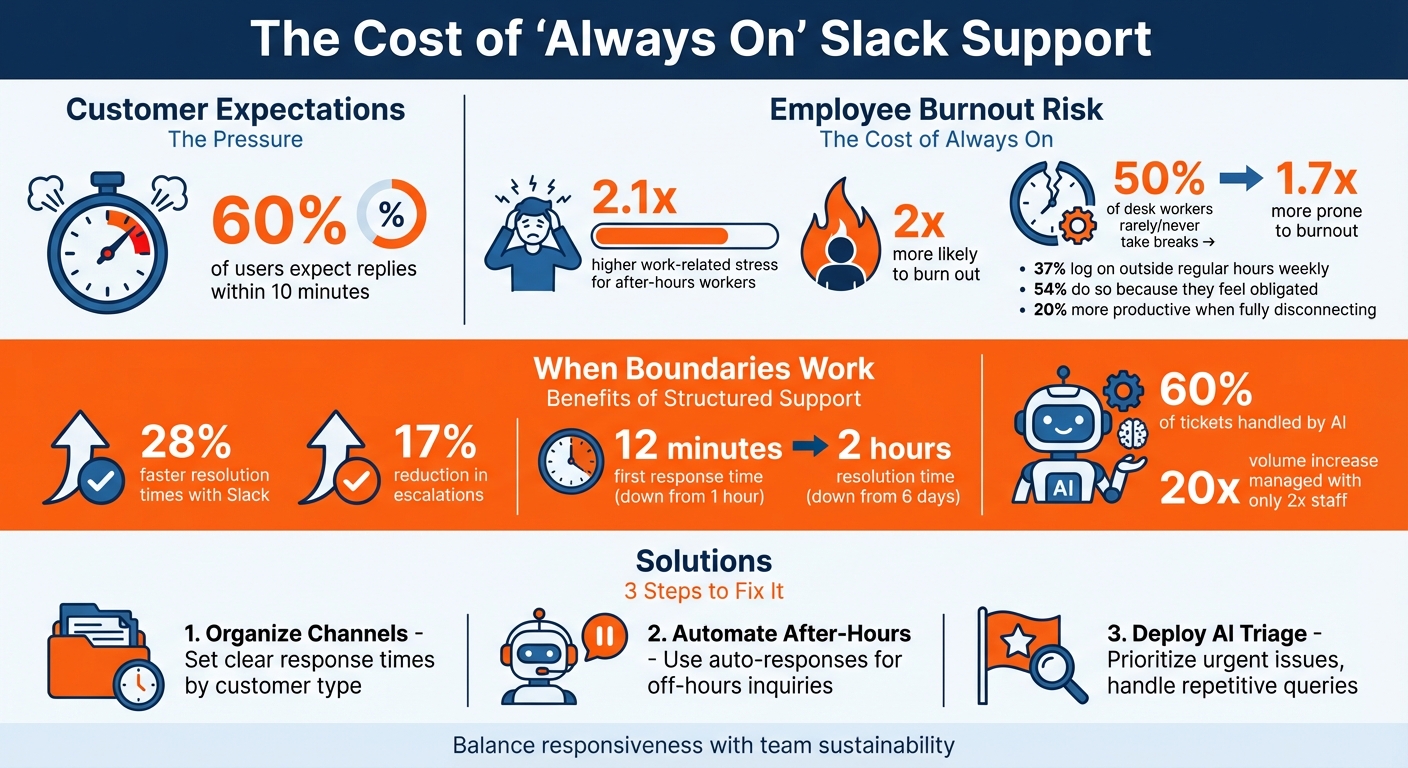
- Customer expectations: 60% of users expect replies within 10 minutes.
- Burnout risk: Employees working after hours report 2x higher stress.
- Solutions: Set business hours, automate repetitive tasks, and use AI for triage and sentiment analysis.
How to Fix It:
- Organize Slack channels by customer type and clarify response times.
- Use auto-responses to manage after-hours inquiries.
- Leverage AI in customer support to prioritize urgent issues and handle repetitive queries.
Slack Support Burnout Statistics and Boundary-Setting Solutions
The ‘Always On’ Pressure in Slack-First Support
Slack has become the go-to hub for B2B support, acting as a "front door" for customer inquiries and urgent issues that flow in non-stop [3]. This constant stream of messages creates a psychological expectation for immediate responses, even when support teams aren’t available around the clock. As Happy Das points out, this mismatch between customer expectations and staffing availability adds strain to support workflows [2].
The problem gets worse when work grinds to a halt while waiting for the right expert to respond [8]. With no clear ownership or prioritization, requests often pop up in multiple Slack channels, forcing agents to manually track conversations instead of using a unified system [3]. This scattered approach delays issue resolution and frustrates customers. Over time, the constant demand for speed clashes with the need to maintain a sustainable pace for support teams.
Responsiveness vs. Burnout
Real-time communication through Slack has its perks – it can speed up resolution times by 28% and reduce escalations by 17% [4]. But without boundaries, the endless back-and-forth between Slack, modern support CRMs, and engineering tools drags down productivity and increases the risk of burnout [9].
The numbers paint a clear picture: employees who feel pressured to work after hours report 2.1x higher work-related stress and are 2x more likely to burn out [7]. Add to that the 50% of desk workers who rarely or never take breaks during the day, making them 1.7x more prone to burnout [7]. And let’s not forget the 37% of desk workers who log on outside regular hours at least once a week, with 54% doing so because they feel obligated [7]. Interestingly, those who fully disconnect at the end of the workday are 20% more productive than their always-logged-in counterparts [7]. These stats highlight the importance of setting boundaries in Slack-first workflows.
Why Boundaries Matter in Slack-First Workflows
Without clear limits, the costs of constant availability can spiral out of control, affecting both team morale and operational efficiency. For instance, developers and technical teams often prefer asking questions in Slack rather than searching documentation – it’s easier to "tap a teammate on the shoulder" digitally than leave their workspace [5]. While convenient, this habit risks trapping critical information in private DMs or scattered threads instead of being properly documented [5]. This creates "tribal knowledge" silos, where valuable insights remain inaccessible to the broader team.
Another challenge is the "work of work." Desk workers spend 41% of their time on repetitive, low-value tasks that don’t directly contribute to their main responsibilities [6].
"If the average desk worker is spending two full days each week on this ‘work of work,’ that’s a problem – and an opportunity."
- Christina Janzer, Senior Vice President of Research and Analytics at Slack [6]
When workflows lack structure, support teams stay busy but not necessarily productive – leading to frustration and higher turnover rates.
| Symptom | Root Cause | Impact |
|---|---|---|
| Messages get buried | No unified queue or prioritization | Missed SLAs, unhappy VIP customers |
| Constant context switching | Jumping between Slack, CRM, and Jira | Slower resolutions, agent burnout |
| Frequent interruptions | No clear escalation process | Slower engineering development velocity |
| Fragmented tracking | Conversations spread across channels | Lost requests, unmeasurable performance |
The solution isn’t to ditch Slack-first support altogether. Instead, teams need to establish boundaries, automate triage processes, and protect focus time. Many high-performing teams are now leveraging AI tools to filter and prioritize requests based on urgency and sentiment, ensuring that human agents focus on the most complex and valuable interactions [3].
sbb-itb-e60d259
How to Set Boundaries and Manage Slack-First Support
Dealing with constant Slack notifications can quickly lead to burnout. To prevent this, you need clear boundaries and smart automation. By organizing communication channels, defining work hours, and using AI effectively, you can protect your team while maintaining strong SLA performance. Here’s how to create workflows that work for both your agents and your customers.
Standardize Slack Channels and Communication Rules
Start by organizing your Slack channels thoughtfully. Many companies group channels by customer type – dedicated spaces for high-touch enterprise clients and shared channels for general users [1]. A hybrid approach can also work: VIP clients get private channels, while others use shared spaces.
Once your channels are set, make sure to communicate your support hours clearly. Update channel descriptions with business hours (e.g., "Mon–Fri, 9 AM–5 PM PT") and pin a welcome message that explains SLA expectations and how to log tickets [2]. For example, Tinybird streamlined their Slack Connect channels in January 2026, creating a unified queue. This reduced their first response time from 1 hour to 12 minutes and resolution time from 6 days to 2 hours [1]. Treat Slack like a structured support channel, not a casual chat room, to achieve similar results.
Define Business Hours and Use Auto-Responses
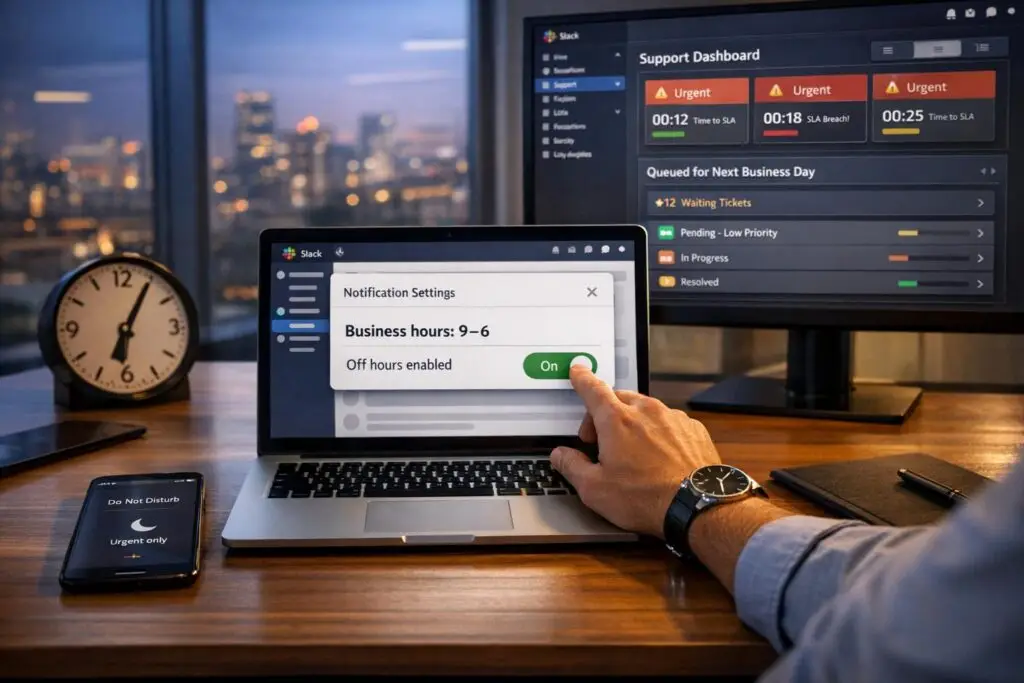
Slack’s real-time nature can make customers expect immediate responses – even late at night. But your team doesn’t need to be available 24/7. By setting clear business hours, you can shift expectations from "always on" to "reliably available."
Use tools like Slackbot or third-party platforms to send automated replies outside work hours. A simple message like this can set the right tone:
"Thank you for your message! Our team is currently offline, but we’ll respond first thing in the morning."
Additionally, configure your support system to pause SLA timers during weekends and holidays, ensuring your team starts each day with an accurate queue. For VIP clients, you might offer extended hours while keeping standard availability for everyone else.
Use AI for Triage and Sentiment Analysis
AI can help filter and prioritize support requests. Start by automating repetitive tasks like password resets, billing inquiries, or onboarding steps – these are easy wins where answers remain consistent. For example, in January 2026, n8n introduced an AI-first support model for Slack. This allowed AI to handle 60% of tickets, enabling their team to manage a 20x increase in volume with only double the staff [1].
AI-driven sentiment analysis is another valuable tool. Use it to identify frustration or urgency in customer messages and move those to the top of the queue. Define clear rules for what counts as "urgent" – keywords like "outage", "blocked", or "payment failure" can trigger immediate escalation to a human agent [3]. When AI passes cases to a human, ensure it includes the full conversation history and any attempted solutions, so customers don’t have to repeat themselves.
Apply Predictive Metrics and AI Auto-Responses
Predictive metrics, such as CSAT (Customer Satisfaction) scores and resolution time forecasts, can help you detect potential issues early. AI-driven auto-responses are also incredibly efficient, answering simple queries in 3.2 seconds with a 4.8/5 accuracy rating [11]. During a 30-day trial, Question Base automatically handled 35% of repetitive questions, saving internal experts over 6 hours per week [11]. For a company of 1,000 employees, this kind of efficiency could save over $2 million annually in lost productivity [11].
Track where AI struggles to provide accurate answers – these gaps highlight areas to improve your documentation [5]. Ensure seamless handoffs between AI and human agents so customers never feel like they’re starting over. Keep in mind that AI performs best when it’s tailored to your team’s specific workflows. Tools that pull from your internal resources, like Notion, Salesforce, or Slack history, deliver far better results than generic systems [10].
Using Supportbench AI to Enforce Boundaries
Supportbench’s AI tools take boundary-setting to the next level by automating essential support tasks. Designed for B2B support teams, this AI-powered platform ensures workflows remain manageable without compromising service quality. Tasks like case routing, urgency detection, and priority adjustments are handled automatically. This means your team can concentrate on meaningful tasks during work hours instead of constantly firefighting across channels.
AI Agent-Copilot and Auto-Triage
The AI Agent-Copilot eliminates the need for manual ticket management by instantly classifying and assigning cases. When a message comes through Slack, the system evaluates its content, detects urgency and sentiment, and routes it to the appropriate team member. Urgent or high-stakes issues, like frustrated customers, are flagged and escalated automatically, while routine requests are queued for later.
Another game-changer is auto-summarization. Instead of combing through lengthy Slack threads for context, agents receive concise, AI-generated summaries of previous interactions and case histories. The copilot also suggests responses based on your knowledge base and past cases, saving time and effort in crafting replies. These tools free up your team to focus on high-priority tasks while maintaining excellent service levels.
Dynamic SLAs and Predictive Insights
Dynamic SLAs adapt in real time, factoring in elements like ticket urgency, customer sentiment, and contract specifics. For instance, if a renewal is approaching or a customer shows signs of frustration, the system tightens SLAs to ensure faster resolution. This proactive measure maintains service standards without requiring constant monitoring, which can lead to burnout.
Supportbench also leverages predictive insights to forecast CSAT (Customer Satisfaction) and CES (Customer Effort Score) metrics before surveys are even sent. As Northflank CEO Will Stewart notes, integrating AI triage into Slack improves response times by eliminating the guesswork about unresolved issues [1]. Supportbench goes further by predicting potential CSAT dips and alerting your team only when intervention is necessary. This shift from reactive to proactive support minimizes escalations and allows your team to focus on impactful work, all within defined working hours.
Measuring Success in Slack-First Support
Tracking the impact of AI-driven boundaries is a crucial step in refining your support strategy. As Eric Klimuk, Founder and CTO of Supportbench, aptly states:
"If you’re only tracking how many tickets your team closed last week, you’re flying blind" [12].
To truly understand the health of your support operations, shift from measuring ticket volume to focusing on outcome-based metrics. These provide a clearer picture of both customer satisfaction and team well-being.
Before and After Metrics Comparison
The best way to gauge progress is by comparing metrics from before and after implementing AI automation and defined boundaries. Focus on data that reflects improvements in customer experience and team sustainability. These numbers showcase the real benefits of blending AI with structured support workflows.
For example, AI-driven triage can significantly reduce First Response Time (FRT) by streamlining routing and cutting down on notification overload. At the same time, agent burnout should stabilize around 60%–70%, a range that balances productivity with manageable workloads [12]. Customers also benefit, as CSAT scores tend to stabilize between 75% and 85%, thanks to timely updates replacing long periods of silence during busy times [12]. Additionally, SLA compliance can improve dramatically, with automated alerts and dynamic adjustments helping high-performing teams maintain 75%–100% adherence [12].
One key metric for Slack-first support is "Time to Update", which should take precedence over "Time to Resolution." In Slack, where ongoing communication is critical, regular updates every 2–3 days for complex issues strengthen customer relationships. As Vlad Shlosberg, Founder of Foqal, explains:
"Encouraging agents to end the conversation faster does not encourage a great working, long-term relationship" [13].
This emphasis on consistent, meaningful updates ensures agents focus on quality interactions without rushing to close tickets just to meet resolution goals.
Beyond these metrics, keep an eye on escalation rates (aim for under 5%, as rates above 20% often indicate deeper issues) and First Contact Resolution (a strong benchmark is 70%–79%) [12]. Backlog growth can also signal potential burnout or SLA risks. To stay ahead of problems, use real-time dashboards that act like a "flight deck", offering early warnings instead of just reporting past performance [12]. Tools like Supportbench’s KPI dashboards allow you to break down data by channel, making it easy to identify whether Slack-specific workflows are falling short compared to traditional ticketing systems.
Conclusion
Slack-first support doesn’t have to mean your team is "always on." By implementing strategies like standardizing channels, setting clear business hours, using AI for triage, and focusing on outcome-based metrics, you can create a framework that delivers high-quality support while safeguarding both customer satisfaction and your team’s well-being.
The key is striking the right balance. Automation should complement human judgment, not replace it. As the ClearFeed team aptly says:
"The goal isn’t to remove human judgment. It’s to ensure human attention is spent where it matters most" [3].
Tools like Supportbench’s Agent-Copilot handle routine tasks, freeing up your team for more complex and impactful issues. AI systems grounded in Retrieval-Augmented Generation (RAG) reduce hallucination rates by up to 50% and provide reliable, cited answers [5]. This means customers can receive accurate, instant responses outside of business hours – without requiring your team to be on call around the clock. Features like proactive SLA alerts, clear communication about availability, and dynamic adjustments ensure customers feel supported even when agents aren’t online.
Shifting from deflection metrics to measuring answer acceptance rates and documentation health represents a smarter way to assess support success [5]. Instead of focusing on the number of closed tickets, the emphasis is on how effectively AI resolves recurring questions, creating a system that continuously improves with every interaction.
Ultimately, setting boundaries in Slack-first support isn’t about doing less – it’s about focusing on what truly matters. With the right structure, AI tools, and well-defined metrics, your team can meet customer expectations while avoiding burnout.
FAQs
How do we set Slack support hours without upsetting customers?
To manage Slack support hours effectively without frustrating customers, start by being upfront about your availability. Clearly communicate your support hours using tools like Slack status updates or pinned messages. Share your schedule with customers so they know when to expect responses. To cover gaps outside of these hours, offer asynchronous communication options like email or ticketing systems. This way, customers can still reach out, and your team can maintain a healthy work-life balance while ensuring customer needs are addressed.
What should count as “urgent” in Slack, and who decides?
An issue in Slack is marked as urgent when it demands immediate action. Teams often rely on visual cues, such as the 🔴 (red circle) emoji, to highlight its priority. What qualifies as "urgent" usually depends on the guidelines set by the team or support leadership, shaped by their established communication practices and workflows.
Which metrics best prove boundaries and AI are working?
Key metrics to focus on are response time (such as time to first response), SLA breach rates, and escalation rates. These indicators show how effectively your team meets responsiveness goals, complies with service-level agreements (SLAs), and uses AI tools to handle escalations efficiently. Keeping an eye on these numbers helps ensure your team is balancing speed and quality while maintaining high standards of support.