



Managing idle time in support teams is critical to improving productivity and cutting costs. AI tools help by automating repetitive tasks, such as ticket categorization and password resets, allowing agents to focus on complex customer problems. This reduces operational costs, improves response times, and enhances customer satisfaction.
Key Takeaways:
- AI can handle up to 80% of routine tasks, freeing agents for high-value work.
- Response times drop significantly – from 15 minutes to just seconds.
- Cost savings range from 30–55%, with higher ticket volumes managed efficiently.
Popular tools include:
- Supportbench: AI Copilot for context-based suggestions, intelligent routing, and predictive scoring. Starts at $32/agent/month.
- Zendesk: Automates 80% of requests with advanced triage and AI agents. Plans start at $19/agent/month, with add-ons for AI features.
- Freshdesk: Freddy AI automates up to 70% of inquiries and offers ticket routing. Pricing starts at $15/agent/month.
- Intercom: Fin AI resolves up to 65% of tickets autonomously. Pricing starts at $29/seat/month plus $0.99 per conversation.
- Salesforce Einstein: AI-powered triage and resolution tools starting at $25/user/month.
- Ada: Handles up to 70% of inquiries with customizable workflows.
- Tidio: Lyro AI manages 70% of queries, starting at $32.50/user/month.
- Zoho Desk: Affordable AI assistant Zia starts at $7/user/month.
These tools improve efficiency by automating repetitive tasks, reducing idle time, and enhancing resolution rates. Choose based on your team’s needs, workflow, and budget.
1. Supportbench – Cost-Efficient AI B2B Customer Support & Success Platform
Reducing Agent Idle Time
Supportbench integrates an AI Copilot directly into the agent workspace to minimize downtime. This assistant simplifies workflows by pulling context, summarizing case histories, and suggesting responses, cutting out the need for constant tab switching or digging through tickets. On top of that, the platform uses intelligent ticket routing to prioritize cases based on urgency, value, topic, or even customer emotion. This ensures agents are always working on the most relevant tasks without wasting time on manual sorting.
Another standout feature is its predictive First Contact Resolution (FCR) scoring, which highlights cases that can be resolved quickly, allowing teams to focus their efforts where it matters most. These tools pave the way for automating repetitive tasks and improving overall efficiency.
Streamlining Repetitive Tasks with Automation
Supportbench takes the hassle out of repetitive tasks by automating processes that typically eat up agent hours. For example, its one-click knowledge management transforms resolved tickets into knowledge base articles instantly – no more delays from manual documentation. Other features like auto-tagging, priority detection, and dynamic SLA adjustments ensure smoother triage and better workload distribution.
With a no-code automation builder, teams can create triage rules based on factors like sentiment or customer value, all without needing IT support. For B2B teams handling high-value accounts, this means urgent requests from key clients are addressed immediately instead of waiting in a queue.
Leveraging AI for Better Resolution Rates
Supportbench doesn’t stop at automation; it also uses AI-powered quality assurance to review tickets in real-time. This feature evaluates empathy, tone, and accuracy, giving agents immediate feedback during their shifts. No need to wait for periodic reviews – agents can adjust on the fly.
The platform also includes predictive CSAT (Customer Satisfaction) and CES (Customer Effort Score) scoring, which flags potentially challenging cases before customers even have a chance to submit feedback. This proactive approach helps teams address issues early, improving overall resolution rates.
Built for Scalability Without Breaking the Bank
Starting at just $32 per agent per month, Supportbench delivers enterprise-level AI features without hidden fees. By combining tools like case management, a knowledge base, AI copilots, and quality assurance into a single platform, it eliminates the need for multiple subscriptions. This not only reduces costs but also simplifies operations by avoiding tool sprawl.
With AI capabilities built right in, Supportbench allows B2B teams to scale their operations efficiently – no extra headcount or complicated IT setups required. It’s a practical solution for businesses looking to grow while keeping costs and idle time in check.
2. Zendesk AI Tools
Agent Idle Time Reduction
Zendesk tackles idle time by leveraging AI-powered agents to handle routine customer interactions. These autonomous bots take care of over 80% of incoming requests across email, messaging, and voice channels. They categorize tickets based on intent, sentiment, and language, shaving 30–60 seconds off each request for agents. The Agent Copilot provides real-time support by suggesting the next best action during live interactions and even executing tasks like refunds once approved by an agent. For voice support, AI steps in to transcribe and summarize calls, cutting down wrap-up time significantly. Thanks to these features, agents can resolve interactions 38% faster compared to working without AI assistance. By shifting repetitive tasks to AI, Zendesk ensures agents can focus on more critical responsibilities.
Automation Capabilities for Repetitive Tasks
Zendesk simplifies repetitive workflows with automation tools, such as macros that analyze tickets and recommend pre-approved responses for common questions. The Auto Assist feature follows admin-defined protocols to suggest solutions and can even perform actions on behalf of agents after approval. These tools drastically reduce manual effort. For instance, in 2024, Unity connected a Zendesk AI agent to its knowledge base, eliminating over 8,000 support requests and saving $1.3 million annually. Similarly, Catapult, a sports tech company, used generative AI tools to summarize conversations and improve response tone, cutting their agents’ first reply time by 50%.
AI-Driven Insights for Improved Resolution Rates
Zendesk’s AI tools also provide agents with actionable insights to improve resolution rates. The similar tickets feature highlights previously resolved cases with comparable issues, giving agents quick access to proven solutions instead of starting from scratch. Sentiment analysis helps identify customer emotions, enabling agents to prioritize escalations and adjust their responses for better outcomes. For example, Motel Rocks achieved a 50% reduction in ticket volume and a 9.44% boost in CSAT scores by using AI agents to handle straightforward queries, freeing up human agents to focus on more complex issues.
"Quick solutions – like answers given by the AI agent – help free up our agents to spend more time with customers that need tailored help for more in-depth queries." – Lucy Hussey, Customer Service Manager, Motel Rocks
Scalability and Cost-Effectiveness
Zendesk’s pricing structure is designed to accommodate various needs, with plans starting at $19 per agent per month when billed annually. However, advanced AI capabilities – like the Agent Copilot and summarization tools – require the Zendesk Copilot add-on, which comes at an additional cost. AI agents are priced based on "Automated Resolutions" (AR), with each plan including a set number of ARs. While these add-ons enhance functionality, they can significantly increase costs for teams seeking comprehensive AI integration across their operations.
Cut idle time with AI that’s included, not an add-on.
Supportbench bakes an AI Co-Pilot, automation, and CX intelligence into one B2B support platform, from $32 per agent.
See a 20-minute demo Compare Supportbench vs other helpdesks →
3. Freshdesk AI Suite
Agent Idle Time Reduction
Freshdesk’s Freddy AI Agent operates around the clock, across multiple channels, automating up to 70% of repetitive customer inquiries. This constant availability ensures agents spend less time waiting for tickets to accumulate and more time handling complex issues that genuinely need human attention. With intelligent routing, tickets are instantly assigned to the most suitable agent, saving an average of 12 minutes and 31 seconds per ticket. Additionally, chatbot deflection, capable of managing up to 85% of incoming queries, significantly reduces interruptions caused by routine requests. The Freddy Copilot feature takes this further by drafting responses and summarizing conversation threads in real time, allowing agents to move through queues faster without manually gathering data. All of these tools integrate seamlessly with Freshdesk’s broader automation suite.
Automation Capabilities for Repetitive Tasks
Freshdesk leverages a no-code chatbot builder powered by natural language prompts and generative AI tools, such as ticket summarizers and rephrasers, to cut resolution times by up to 38%. AI-driven self-service FAQs empower customers to find answers on their own, reducing resolution times by as much as 50% when compared to businesses lacking these tools. Freddy AI’s intent detection further enhances efficiency by automatically understanding customer needs and guiding them to solutions – no agent intervention required.
AI-Driven Insights for Improved Resolution Rates
Freshdesk consolidates customer data into a single timeline, eliminating the need for manual log reviews and speeding up context gathering. Its conversation analytics help teams identify the 20% of ticket types that account for 80% of handle time. This allows managers to prioritize automation efforts where they’ll have the biggest impact. Generative AI-powered summarization tools also give agents a quick overview of long-running ticket histories, helping them respond more effectively. Teams using these insights have reported up to a 6% boost in customer satisfaction.
"They want everything available at their fingertips and expect minimal contact. This means companies need to adopt new tools to meet these expectations."
- Murali Krishnan, Senior VP of Customer Service, Freshworks
Scalability and Cost-Effectiveness
Freshdesk offers scalable pricing, starting at $15 per user per month for teams needing a flexible help desk solution. Freddy AI is available for $29 per agent per month (billed annually), with the Freddy Copilot add-on costing an additional $29 per month. The platform supports over 60 languages and includes a 14-day free trial. However, some advanced AI features are only accessible on higher-tier plans. With a 4.4 out of 5 rating on G2, based on 3,570 reviews, users often highlight its strong feature set at entry-level pricing, though some mention limitations in workflow customization.
4. Intercom AI Automation
Reducing Agent Idle Time
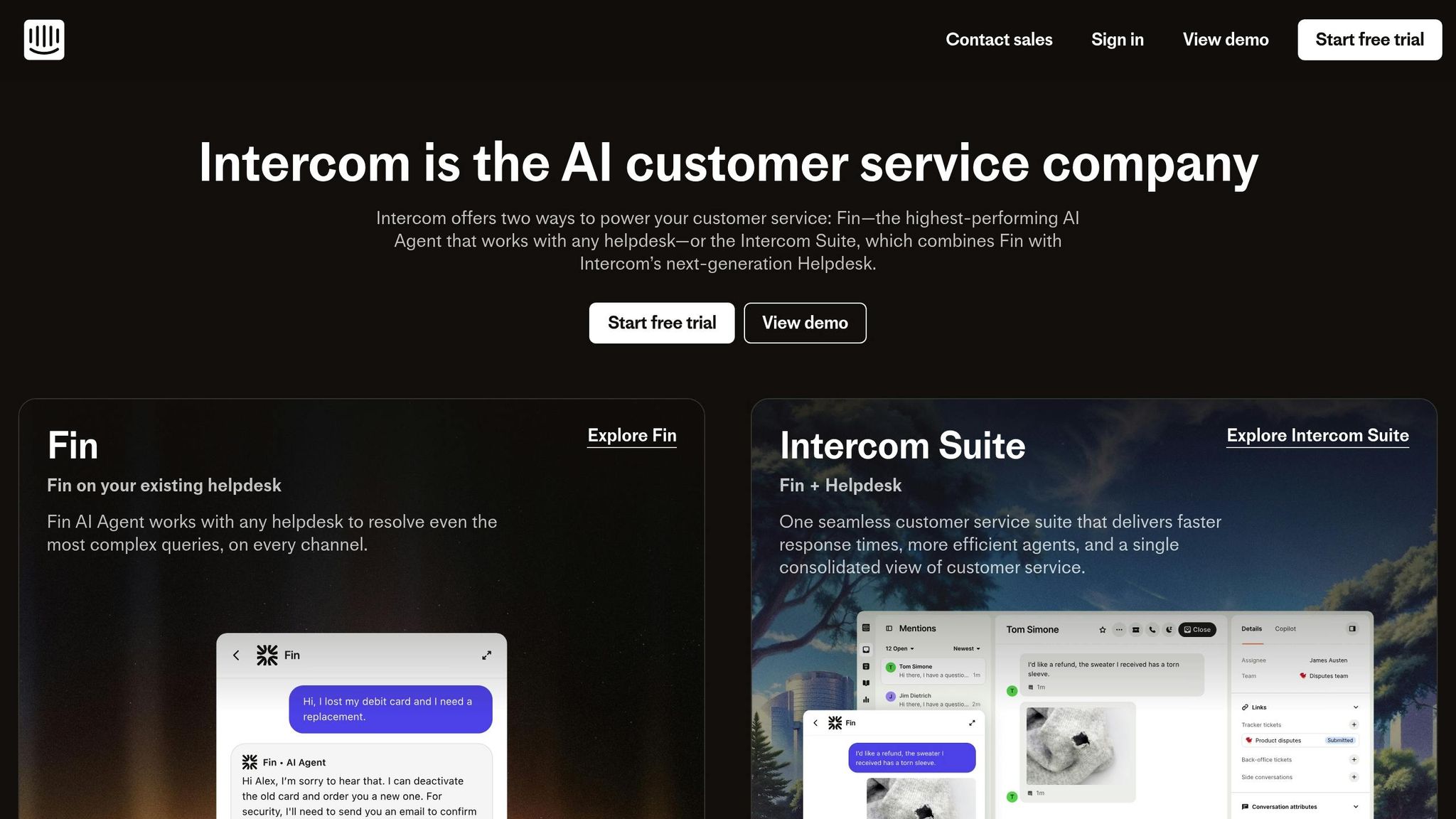
Intercom’s Fin AI Agent is designed for quick deployment – up and running in under an hour. It handles conversations across multiple channels and achieves up to 65% resolution without human intervention. By taking care of routine queries, Fin ensures these repetitive tasks don’t clog up the agent queue, freeing up support teams to tackle more complicated issues. Acting as a multilingual assistant, Fin efficiently manages tasks like initial triage, order tracking, and account updates. These are the kinds of jobs that often create idle time as agents juggle systems or wait for customer replies. This fast setup lays the groundwork for broader automation opportunities.
Automating Repetitive Tasks
Fin seamlessly integrates with popular helpdesk platforms like Salesforce and HubSpot. It requires a minimum of 50 resolutions per month and costs $0.99 per conversation. By enabling proactive customer engagement, Intercom helps reduce ticket creation. A great example is Lightspeed, which implemented Fin and saw it involved in 99% of customer conversations. Impressively, Fin resolved up to 65% of these interactions end-to-end, including some complex queries that would typically need human input.
"Fin is in a completely different league. It’s now involved in 99% of conversations and successfully resolves up to 65% end-to-end – even the more complex ones." – Lightspeed
Fin’s ability to automate common tasks while handling more challenging queries highlights its potential to streamline support operations.
AI Insights That Drive Better Results
Fin doesn’t just stop at automation – it keeps learning. By analyzing customer interactions, it fine-tunes its responses to improve accuracy over time. Customizable dashboards provide a bird’s-eye view of customer data, helping agents step in when needed. The platform also includes knowledge base tools, which encourage customer self-service and reduce the number of incoming tickets. With an impressive 4.5 out of 5 rating on G2 based on over 3,500 reviews, Intercom has built a reputation for maintaining high customer satisfaction scores while scaling support through automation.
Scaling Support While Managing Costs
Intercom offers flexible pricing options with annual plans: Essential at $29, Advanced at $85, and Expert at $132 per seat per month. Additionally, the $0.99 per-resolution pricing helps businesses calculate ROI by comparing costs to agent hourly rates and seasonal demand. To maximize efficiency and control costs, it’s best to start by piloting Fin on a single channel. This approach allows teams to measure customer satisfaction (CSAT) and refine the system before expanding its use.
5. Salesforce Service Cloud Einstein
Cutting Down Agent Idle Time
Salesforce Service Cloud Einstein introduces the Einstein Service Agent, an AI-powered tool that manages inquiries across multiple channels, reducing the number of tickets that require human intervention. With Einstein Copilot for Service, agents receive real-time, context-aware guidance, including suggested next steps and drafted responses. This means less time spent digging for information and more time spent solving customer problems.
On top of this, Einstein optimizes workflows further with advanced automation, ensuring smoother operations and less downtime for agents.
Automating Repetitive Tasks
Einstein takes on high-volume, repetitive tasks like password resets, processing refunds, and updating orders. Its intelligent triage system classifies and categorizes incoming conversations based on intent, language, and sentiment, ensuring they’re routed to the right agent quickly.
To save even more time, AI-powered summarization condenses long ticket comments and call transcripts, giving agents a clear understanding of the case in seconds. Additionally, resolved support cases can be transformed into knowledge base articles automatically using generative AI, cutting down the manual effort needed to maintain self-service tools.
Smarter Insights for Better Resolutions
Einstein doesn’t just automate – it also improves efficiency by using custom bots to handle basic queries, reducing incoming call volumes and filtering out repetitive tasks. By consolidating customer data into a single, unified view, agents can quickly access the context they need without wasting time.
The platform also automates feedback collection at critical points in the customer journey, helping teams monitor satisfaction levels. With analytics dashboards, teams can break down feedback by factors like industry or location, uncovering trends that lead to better resolution strategies.
Scalable and Cost-Friendly
Service Cloud plans are priced starting at $25 per user per month (available for monthly or annual billing). Additional features, such as the Einstein AI agent, Field Service packages, and cloud telephony, can be added as needed.
The platform ensures agents have a seamless experience, allowing them to access previous chat records during voice calls to avoid making customers repeat themselves. AI-driven suggestions also empower agents to make pre-approved decisions – like issuing credits – without waiting for supervisor approval, saving time and boosting confidence.
6. Ada – AI Chatbot for Customer Support
Cutting Down Agent Idle Time
Ada’s AI chatbot takes care of routine customer inquiries on its own, significantly reducing agent downtime. It’s designed to handle these everyday questions with performance levels that rival other top AI solutions. The result? Fewer tickets end up in agent queues in the first place.
By redirecting simple queries to AI, support teams can manage up to three times more tickets compared to teams without AI assistance. This approach clears out the clutter in support queues, letting agents focus on challenging, high-priority issues instead of spending time on repetitive tasks. It’s a shift that streamlines workflows and enables smarter automation.
Automating Everyday Tasks
Ada steps in to automate common tasks like answering FAQs, handling billing questions, managing account access, and performing basic troubleshooting. Thanks to its advanced natural language processing (NLP) capabilities, the chatbot understands customer intent and navigates users through multi-step processes without needing human intervention.
While older chatbot systems typically deflect only about 25% of inquiries, Ada pushes that number up to an impressive 70%. This means most routine tickets never even reach a human agent, cutting down on manual work and freeing up teams to focus on more complex and meaningful customer interactions.
Smarter Insights for Better Resolutions
Ada stands out for its high containment rates, which measure how many inquiries are fully resolved by AI without needing escalation. Its customizable workflows allow businesses to tailor the chatbot to their specific needs and escalation policies.
What sets Ada apart is its ability to recognize customer intent, even when questions are phrased in unexpected or unconventional ways. This goes beyond simple keyword matching, offering a more nuanced understanding of customer needs. With some fine-tuning, Ada’s resolution accuracy can be aligned to meet specific business goals. These insights help support teams refine their processes and improve overall efficiency.
sbb-itb-e60d259
7. Tidio AI-Powered Chatbots
Reducing Agent Idle Time
Tidio’s Lyro AI Conversationalist leverages advanced large language models to provide natural, human-like responses, steering clear of rigid decision trees. This approach allows the chatbot to handle up to 70% of common customer queries automatically. By managing routine inquiries, it significantly reduces the need for human intervention. For more complex issues, Tidio efficiently triages and directs tickets to the most suitable agent, freeing up support teams to focus on challenging tasks. This smart ticket routing paves the way for even greater automation in handling everyday customer needs.
Automating Repetitive Tasks
Lyro, powered by Anthropic AI’s Claude, connects seamlessly with your knowledge base to deliver precise answers to FAQs, identify potential sales opportunities, and offer personalized recommendations based on user behavior. Its natural language processing capabilities also allow it to gauge customer sentiment and adjust responses accordingly, ensuring interactions feel tailored and empathetic.
Flexible and Cost-Effective Solution
Tidio’s AI Agent plan is priced at $32.50 per user per month, covering 50 AI-driven conversations. A 7- or 14-day free trial is available, letting you explore its features before committing. The platform is designed for quick setup with an easy-to-use interface, making deployment straightforward. However, fine-tuning workflows may require some adjustment, and AI functionalities are limited on lower-tier plans. Altogether, these tools help support teams minimize idle time and boost overall productivity.
8. Zoho Desk AI Features
Cutting Down on Agent Idle Time
Zoho Desk’s Zia AI assistant minimizes agent downtime by taking over routine chat support tasks and pulling answers directly from its knowledge base. With intelligent routing, Zia identifies the intent, language, and sentiment behind incoming tickets, ensuring they’re directed to the right agent immediately. It also automates ticket tagging by analyzing sentiment and intent in customer requests, which helps streamline queue management. This allows agents to focus on resolving issues rather than getting bogged down in administrative tasks.
Simplifying Repetitive Tasks with Automation
Zoho Desk excels at automating repetitive tasks to save time. Zia provides real-time grammar suggestions to help agents craft polished responses and keeps a close eye on the knowledge base, flagging outdated content. This ensures agents always have access to accurate and up-to-date information, enabling them to respond more efficiently and confidently.
Smarter Insights for Faster Resolutions
With Zia’s sentiment analysis, agents can gauge a customer’s emotional tone before replying, leading to more thoughtful and empathetic interactions. The Reply Assistant suggests responses based on the knowledge base and previous solutions, helping to reduce reply times. Additionally, Anomaly Detection keeps an eye on ticket trends, flagging unusual spikes or negative sentiment. This allows teams to adjust resources proactively, ensuring smoother operations and quicker resolutions.
Affordable and Scalable for Businesses
Zoho Desk offers a starting price of $7 per user per month (when billed annually) and includes a 15-day free trial for new users. While its knowledge base editor covers basic documentation needs, its formatting options are somewhat limited. Even so, its entry-level pricing makes it an appealing choice for small and medium-sized businesses looking to introduce AI-powered support without a hefty investment. It’s a practical way for SMBs to enhance productivity and improve customer service through AI.
Completely AUTOMATE Customer Service With This AI Tool
Tool Comparison
AI Support Tools Comparison: Features, Automation Rates, and Pricing
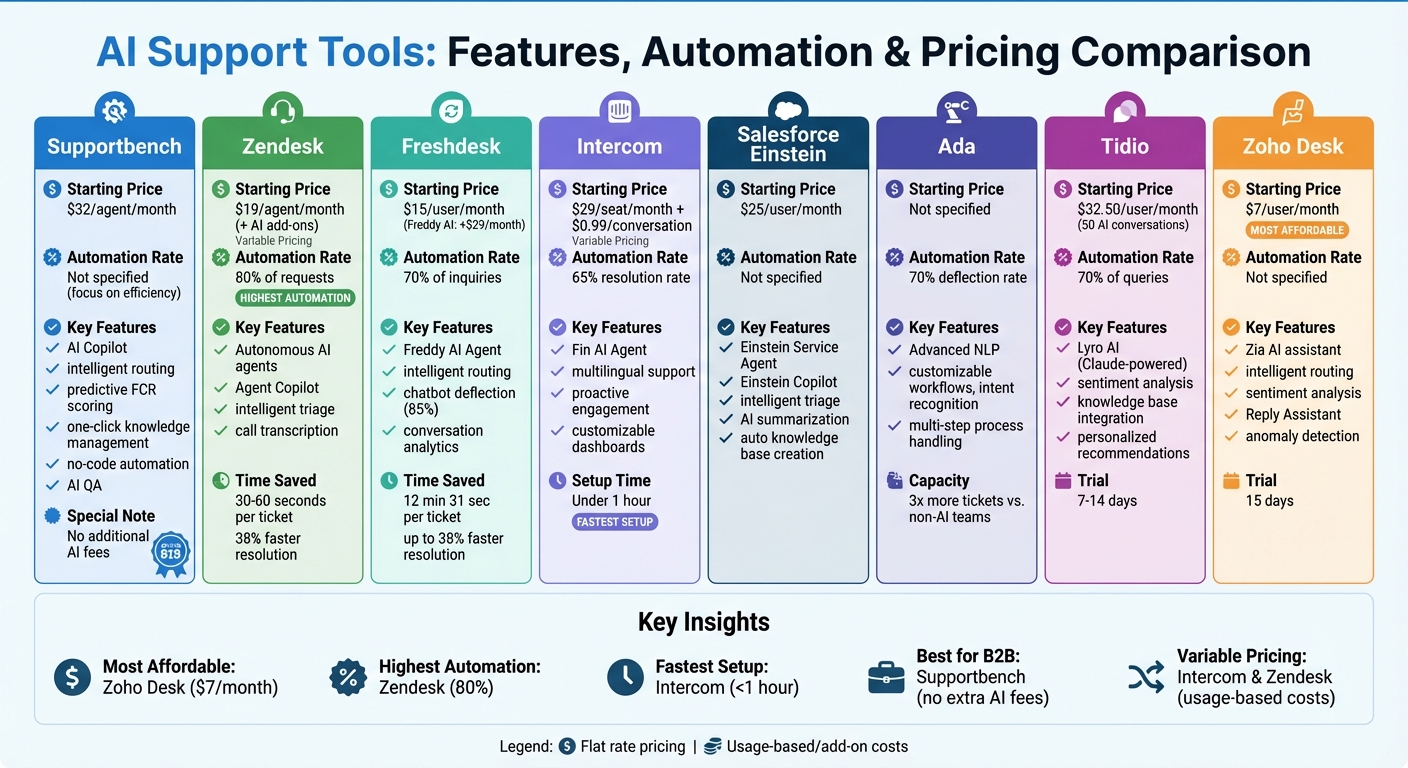
When assessing AI tools for B2B support teams, it’s essential to weigh the depth of automation against cost efficiency. As highlighted earlier, reducing idle time is a priority. Here’s a breakdown of how some tools stack up in terms of their features and value.
Supportbench integrates AI seamlessly into case management workflows. It stands out with features like auto-routing cases based on priority, topic, and even emotion analysis. Additionally, it provides real-time Copilot suggestions that leverage case history, helping agents work smarter. Supportbench also simplifies administrative tasks with built-in AI QA scorecards and one-click knowledge base article creation. Unlike some competitors, Supportbench bundles its AI capabilities without additional fees, making it a cost-effective choice for B2B teams managing intricate, long-term cases.
On the other hand, Zendesk focuses heavily on automation, handling over 80% of customer interactions autonomously. Its intelligent triage system saves an average of 45 seconds per ticket. Agents using Zendesk AI resolve issues 38% faster compared to those who don’t. However, Zendesk’s pricing model is tied to "Automated Resolutions" (AR), meaning costs increase as the volume of AI-handled tickets grows. This requires careful cost monitoring as usage scales.
For smaller teams, platforms like Freshdesk and Zoho Desk offer more budget-friendly AI solutions, ideal for those experimenting with automation. Intercom, starting at $29 per seat per month, provides flexibility but often distributes its features across multiple packages, which can drive up costs as teams expand. Meanwhile, Ada and Tidio focus on deflecting routine queries rather than providing comprehensive support solutions, making them better suited as supplementary tools rather than full-service platforms.
The time savings these tools deliver can be substantial. For example, AI-driven deflections saved Unity $1.3 million and cut first reply times by 50% for Catapult. For an average enterprise retailer, AI can save up to 120 hours per month. Ultimately, selecting the right tool depends on how well its features align with your team’s specific workflow challenges and goals.
Conclusion
Cutting down on idle time is key to eliminating inefficiencies that slow down support teams. AI tools play a major role here by automating time-consuming tasks like ticket categorization, knowledge base searches, and documentation. These tasks often eat up a large chunk of handle time, but with AI, teams can resolve issues faster and manage higher ticket volumes without needing to increase staff proportionally.
When selecting AI tools, it’s crucial to focus on two main metrics: how well the tool can deflect tickets through autonomous resolution and how effectively it enhances human agent productivity with intelligent assistance. A smart way to start is by piloting the tool on a high-volume channel, such as order tracking or password resets. This allows you to gauge ROI and customer satisfaction before rolling it out more broadly.
Once performance improvements are evident, it’s time to look at the pricing model to ensure scalability remains cost-effective. Pricing structures can vary significantly – some platforms include AI features at no extra charge, while others use pay-per-resolution models, which can increase costs as ticket volumes grow. Knowing these differences upfront can help avoid unexpected budget surprises during scaling.
However, success with AI isn’t just about the tool itself – it also requires a strong foundation of clean data and well-organized processes. As Jorge Damico, Founder of Auxyly, wisely points out:
"Sometimes the real problem isn’t lack of AI, it’s the lack of solid processes, clean data, or a decent knowledge base. If your house isn’t in order, AI won’t fix it. It’ll just make the mess faster".
In other words, AI is only as effective as the processes and data it works with. To get the most out of it, audit your knowledge base, maintain clear and accurate Q&A documentation, and involve agents early on to identify areas ripe for automation. Research shows that high-quality knowledge bases can boost AI resolution rates by 15–25%.
Ultimately, choosing the right AI tool comes down to aligning it with your workflow, budget, and growth plans. The less time your team spends searching for solutions, the more time they can dedicate to solving problems.
FAQs
How can AI tools help support teams reduce idle time?
AI tools are a game-changer when it comes to cutting down on idle time. By automating repetitive tasks and simplifying workflows, they free up agents to focus on meaningful customer interactions. Take ticket management, for instance: AI can quickly analyze incoming tickets to determine sentiment, priority, and customer value. From there, it automatically routes the ticket to the most suitable agent – no need for manual sorting. This process ensures agents always have actionable tasks at hand, eliminating the bottlenecks typically caused by traditional triage methods.
AI copilots take this a step further by boosting efficiency in real time. They can summarize previous interactions, recommend relevant knowledge base articles, and even draft responses on the spot. This means agents don’t have to waste time hunting for information or typing out repetitive replies – the AI generates suggestions that can be sent with a single click. The result? A smoother workflow that keeps support teams productive, engaged, and free from unnecessary downtime.
How does implementing AI impact the cost of running support operations?
Integrating AI into support operations can be a game-changer for cutting costs. By consolidating tools and removing the need for pricey add-ons, companies can simplify their tech stack. For example, platforms like Supportbench come with AI-native features built right in, such as auto-routing, predictive CSAT scoring, and dynamic SLA adjustments. This means businesses can avoid spending extra on chatbots, third-party analytics, or custom integrations, bundling all expenses into one predictable subscription.
AI also tackles hidden costs like agent idle time. By automating key tasks – like prioritizing tickets, distributing calls, and retrieving knowledge – support teams can handle more requests in less time. The result? Greater efficiency and a lower cost per interaction. These improvements often let businesses maintain excellent service levels without needing to expand their staff.
On top of that, AI-driven processes deliver a fast return on investment. From reducing churn to automating documentation and boosting agent productivity, AI transforms support operations into a cost-effective powerhouse for modern B2B teams.
How does AI help improve customer satisfaction in support teams?
AI is transforming customer support by making interactions faster, more precise, and tailored to individual needs. For example, tools like Supportbench’s AI Copilot empower agents by instantly pulling up relevant case histories, summarizing previous conversations, and offering suggested responses. This means agents can resolve issues in seconds, cutting down on wait times and delivering a smoother customer experience.
AI also steps in to detect potential problems early with real-time sentiment analysis. This allows agents to spot frustrated customers, prioritize their cases, and adjust their tone to calm the situation. Features like automated ticket tagging, SLA adjustments, and predictive scoring further ensure that customers get timely, effective solutions. These capabilities not only improve first-contact resolution rates but also help reduce the risk of customer churn.
Another major advantage is how AI keeps knowledge bases current by generating articles and summaries. This ensures support teams can provide accurate answers without delays, removing one of the most common pain points for customers. Predictive tools go a step further by helping teams foresee customer satisfaction levels and address concerns before they escalate. The result? Support operations shift from being reactive to proactive, consistently delivering a service that goes above and beyond.
Related Blog Posts
- 10 Ways to Reduce Support Ticket Response Time
- 7 AI Tools That Improve Customer Support Efficiency
- What is Customer Support Automation? FAQs Answered
- How AI Predicts Ticket Escalations
Evaluating help desks for a B2B team?
Supportbench is all-inclusive from $32 per agent per month, with migration and onboarding included. See pricing or book a 20-minute demo.






