
AI is reshaping customer support by automating repetitive tasks, reducing resolution times, and boosting agent productivity. From ticket triage to real-time assistance, these tools help businesses handle more inquiries without adding staff. Below are seven AI-powered platforms designed to streamline support:
- Supportbench: Automates case prioritization, tagging, and routing. Includes predictive CSAT scoring and knowledge base creation. Pricing starts at $32/agent/month with no extra AI fees.
- Zendesk: Offers tools like Intelligent Triage and Suggested Macros but requires add-ons for full AI capabilities. Base plans start at $19/agent/month; advanced features increase costs.
- Freshdesk: Features Freddy AI for ticket automation and chatbots. Plans start at $15/agent/month, but AI support is session-based, costing $100 per 100 sessions.
- Intercom: Combines Fin AI Agent and AI Copilot for multi-channel support. Pricing starts at $29/seat/month, with additional $0.99 per AI resolution.
- Salesforce Einstein: Advanced AI integrated with Service Cloud for enterprise use. Requires add-ons, starting at $175/user/month plus $125 for Einstein AI.
- HubSpot Service Hub: Simplifies workflows with AI-driven ticket routing and CRM integration. Plans start at $15/user/month, ideal for existing HubSpot users.
- Gorgias: Tailored for e-commerce, automates responses to common queries. Pricing starts at $10/month for 50 tickets, scaling with ticket volume.
These platforms vary in cost, complexity, and features, so your choice depends on your team’s needs and budget.
9 Best AI Customer Service Software 2025 (AI Agents, Helpdesk, Voice Agents & More)
1. Supportbench – Affordable AI-Powered Platform for B2B Customer Support & Success
Supportbench integrates AI directly into the support process, eliminating the need for expensive add-ons. By automating tasks like case prioritization, tagging, and routing based on customer intent and sentiment, the platform removes the manual sorting that often bogs down support teams. This smart triage system ensures smoother operations right from the start.
The platform’s AI Agent-Copilot takes efficiency further by analyzing past cases, internal notes, and knowledge base content to offer real-time recommendations. This feature keeps agents in one system, speeding up resolution times. In fact, companies leveraging AI for agent assistance report that 94% of calls are handled within 30 seconds, while advanced AI users see a 38% reduction in average inbound call handling times.
Supportbench also enhances first-contact resolution by automatically summarizing cases as tickets are created and suggesting follow-up actions based on prior interactions. Once a case is resolved, the platform can transform the conversation history into a knowledge base article – complete with a subject line, summary, and keywords – all without manual effort. This KCS-driven process converts everyday support interactions into a reusable knowledge base, reducing future ticket volume.
Pricing is straightforward, starting at $32 per agent per month, with full AI capabilities included from the beginning. On average, teams using AI agents see a 14% boost in productivity. Additionally, companies that effectively use AI in customer service report a 17% increase in customer satisfaction rates, all while avoiding the need for extra staff or system complexity.
For B2B teams handling intricate, long-term cases tied to renewals, Supportbench offers advanced tools like predictive CSAT and CES scoring, dynamic SLAs that adapt to account conditions, and customer health tracking. These features help teams identify accounts at risk of churn and align support efforts with proactive, value-driven engagement strategies.
2. Zendesk AI Features for Customer Support
Zendesk offers several AI-driven tools designed to make customer support faster and more efficient. Intelligent Triage automatically categorizes incoming tickets by analyzing intent, sentiment, and language, saving agents 30–60 seconds per ticket by eliminating manual labeling tasks. Meanwhile, the Auto Assist feature uses pre-configured workflows to suggest solutions or even take actions on repetitive tickets. Another time-saver, Suggested Macros, identifies the most relevant pre-written responses, so agents don’t have to search for them manually. Together, these tools streamline ticket handling and improve the chances of resolving issues on the first contact.
To further boost first-contact resolution, Zendesk employs generative AI to draft Suggested First Replies using existing macros and help center resources. These tools are embedded directly into the agent workspace, ensuring a seamless workflow. The Intelligence in the Context Panel provides real-time insights, such as customer intent, sentiment, and similar past tickets, helping agents resolve issues more quickly. For example, LendingClub reported achieving a 60% first-contact resolution rate, which translated to an estimated $434,000 in annual cost savings.
Here’s what users are saying about the impact of Zendesk AI:
"With Zendesk AI, I’m seeing an exciting opportunity to streamline and be more efficient. That will allow our team to have more time to work on projects of importance to the business." – Ian Hunt, Director of Customer Services, Liberty London
Zendesk also integrates AI into the agent workspace through Copilot, which provides ticket summaries and suggests next steps. However, advanced features like Auto Assist, Intelligent Triage, and macro suggestions require the Zendesk Copilot add-on for all agents, which can significantly increase costs for B2B teams.
While Zendesk’s base plans start at $19 per agent per month, unlocking the full suite of AI tools requires purchasing the Copilot add-on for the entire team. Although Zendesk advertises "day one" readiness with pre-trained models, some tools – like Auto Assist – require prior configuration. Additionally, features like Suggested Macros depend on having sufficient macro usage history to function effectively. These capabilities offer powerful advantages but come with trade-offs in terms of cost and setup effort.
3. Freshdesk AI-Powered Automations
Freshdesk takes automation to the next level with Freddy AI, a system that uses natural language processing (NLP) and machine learning (ML) to handle repetitive tasks that often bog down support agents. Freddy AI can manage tasks like order processing, appointment scheduling, and account updates. It also analyzes incoming inquiries to provide agents with suggested solutions and relevant information, helping to resolve issues faster. Additionally, it automates ticket assignment using time-triggered workflows, ensuring tickets are routed to the right agents without delay. These features set the foundation for advanced chat capabilities.
To boost first-contact resolution rates, Freshdesk employs AI-powered chatbots that detect customer intent, guiding inquiries to the appropriate solutions. The AI also auto-fills ticket fields – such as Priority, Group, and Status – based on the content of the inquiry. It even summarizes customer issues and drafts responses, saving time for agents. For teams looking to customize their workflows, the platform includes a no-code conversational bot builder, making it easy to create and deploy AI-driven chatbots.
Freshdesk also integrates seamlessly with essential business tools like Slack, Microsoft Teams, Salesforce, Jira, and Google Workspace, ensuring smooth workflows across platforms. With support for multiple languages, the platform is equipped to serve a global customer base effectively.
That said, Freddy AI is not included in Freshdesk’s base plans and comes as a paid add-on. The standard plans start at $15 per user per month (billed annually), while the Omnichannel plans begin at $29 per agent per month. Freddy AI Agent support is priced at $100 for every 100 sessions. For teams handling high ticket volumes, this session-based pricing model may lead to unpredictable costs, and mastering the platform’s advanced reporting features can take some time.
4. Intercom‘s AI Inbox Assistant
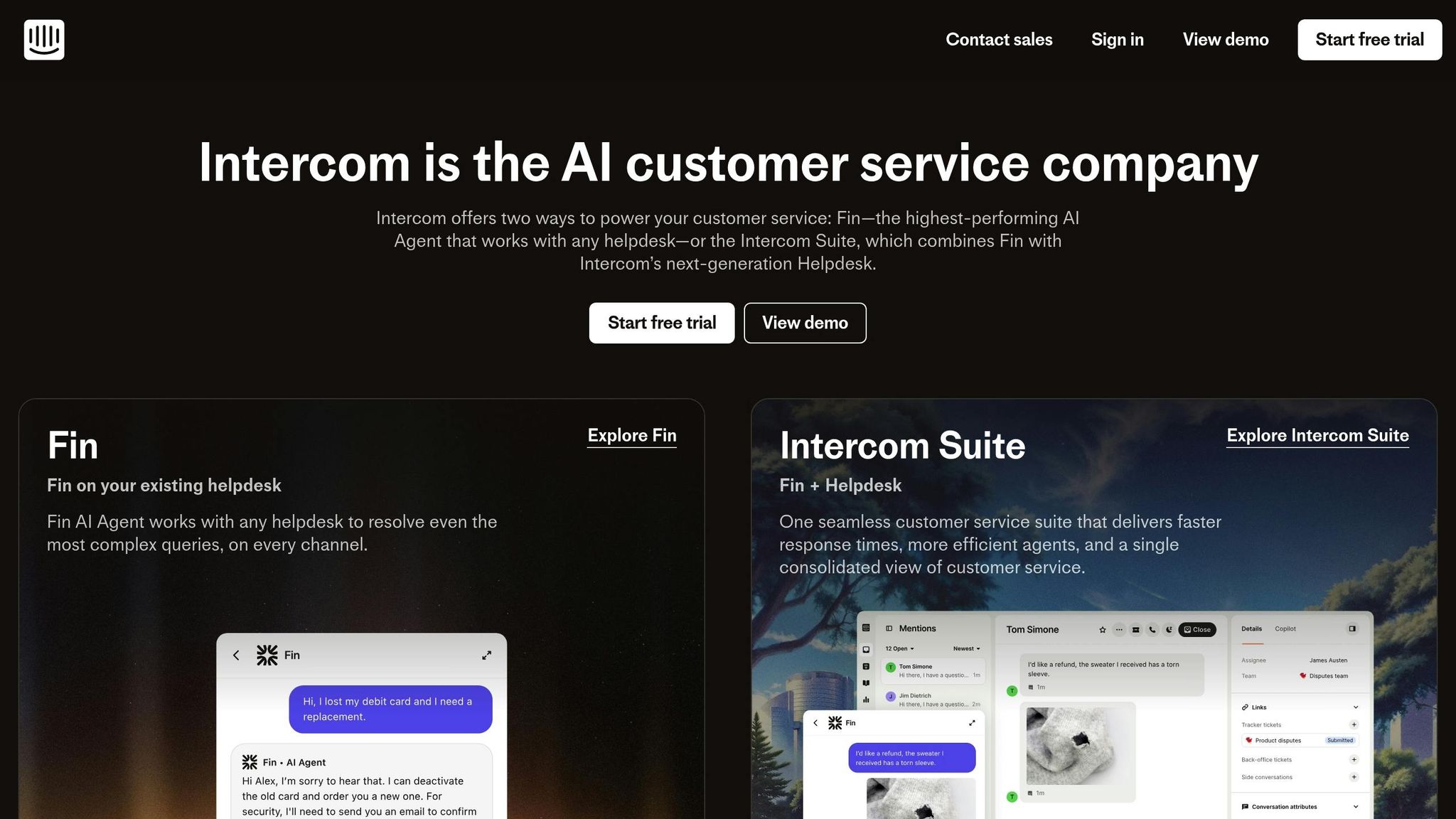
Intercom has taken customer support to the next level by integrating its Fin AI Agent and AI Copilot into a single platform designed to make support more efficient. Fin handles both routine and complex inquiries across multiple channels, boasting an impressive 66% resolution rate, which continues to improve by 1% each month. Meanwhile, AI Copilot works alongside agents, simplifying workflows and enhancing productivity.
AI Copilot provides real-time troubleshooting, expert advice, and instant translations, eliminating the need for agents to manually search through knowledge bases. This seamless integration reflects a growing trend of embedding AI directly into platforms to reduce inefficiencies. Angelo Livanos, Vice President of Global Support, highlights its impact:
"Our agents are dramatically more efficient when using Copilot. In testing, agents using Copilot were able to close 31% more customer conversations daily, compared to agents not using Copilot".
Intercom also leverages intelligent routing to prioritize cases, automatically categorizing and assigning conversations to the right team or agent. This removes the need for manual triage. Additionally, the system pulls up relevant help center articles and past resolutions, saving agents an average of 45 seconds per customer issue. For long conversation threads, automatic summaries allow agents to quickly get up to speed without reading through the entire history.
Efficiency is further enhanced with AI-powered macros and shortcuts that standardize responses for recurring issues. The AI Insights feature identifies trending topics, enabling administrators to automate responses to new queries proactively. Lee Burkhill, Project Manager at Mony Group, shared:
"Intercom’s AI Agent, Fin, has transformed our operations delivering improvements across our support metrics".
Intercom’s pricing starts at $29 per seat per month, with an additional cost of $0.99 per AI resolution. New users can take advantage of a 14-day free trial, with setup completed in just a few days and AI ready to start resolving conversations right away.
sbb-itb-e60d259
5. Salesforce Einstein for Service Cloud
Salesforce Einstein integrates AI into Service Cloud workflows, offering tools like Agentforce AI Agents to manage both routine and complex inquiries. This automation simplifies ticket routing and reduces the need for manual triage, making processes smoother and faster.
The Service Assistant takes this a step further by creating dynamic action plans. These plans are based on case data, customer history, and the knowledge base, helping agents resolve issues on the first contact. Additionally, Einstein’s Service Replies feature generates personalized response drafts, allowing agents to quickly review and send polished replies.
AI-driven summarization is another standout feature. It captures key recommendations during handoffs and escalations, eliminating the need for repetitive documentation while maintaining complete context. The system also uses sentiment analysis to monitor customer emotions in real time, enabling it to adjust responses or escalate cases as necessary.
To access Einstein, users need a Service Cloud license (Enterprise or Unlimited, starting at $175 per user/month) and the Agentforce add-on, priced at $125 per user/month. Some features also require a Digital Engagement license, and advanced generative AI functions operate on a Flex Credits consumption model.
Salesforce emphasizes the importance of high-quality data for Einstein to perform effectively. Ideally, this includes 100+ knowledge articles and at least 1,000 closed cases. As Salesforce puts it, "The future of customer service isn’t AI or humans – it’s AI and humans, working side by side to deliver personalized, seamless, and empathetic experiences". This approach showcases how AI embedded in support platforms can transform B2B customer interactions, making them more efficient and impactful.
6. HubSpot Service Hub AI Tools
HubSpot Service Hub takes customer support to the next level by incorporating AI to simplify and enhance support operations. For instance, AI chatbots manage initial customer inquiries, gathering key details before handing conversations off to human agents. This approach eliminates repetitive back-and-forth, allowing agents to focus directly on resolving issues.
The platform also automates essential ticket workflows by creating, categorizing, and routing support requests to the appropriate team members. With automated responses, routine questions are addressed instantly, improving first-contact resolution rates and reducing response times.
Another standout feature is HubSpot’s native CRM integration, which provides agents with instant access to complete customer records and interaction histories. This is especially beneficial for teams already using the HubSpot ecosystem, as it ensures a smoother and more cohesive support experience.
HubSpot Service Hub also leverages AI-powered analytics to pinpoint inefficiencies in support processes. By analyzing customer interaction patterns, the platform highlights bottlenecks and suggests actionable improvements, helping teams operate more effectively and uncover trends that might otherwise remain hidden.
With plans starting at just $15 per user per month, HubSpot Service Hub offers an affordable way for businesses to integrate AI into their support workflows without a hefty initial investment.
7. Gorgias AI for E-commerce Support
Gorgias is tailor-made for online retailers managing a large volume of customer inquiries without needing to expand their support teams. By using AI-driven ticket management, the platform automatically sorts and prioritizes incoming requests. This ensures that agents can focus on urgent issues while routine questions are handled through automation, creating a smoother workflow and better customer experience.
The platform excels at cutting down repetitive inquiries by automating responses to common questions. For example, it can instantly address queries about order statuses, shipping times, or return policies. This frees up support staff to tackle more involved tasks, like offering personalized product recommendations or resolving escalated complaints.
What sets Gorgias apart is its seamless integration with major e-commerce platforms such as Shopify and Magento. When agents open a ticket, the system provides all the essential details – like order information, tracking numbers, and full customer histories – right within the interface. This often allows agents to resolve issues in just one interaction.
While its e-commerce-specific automation is a major strength, Gorgias’s pricing model, based on ticket volume, can make cost management tricky. Additionally, new users may face a learning curve when setting up integrations.
For established online retailers, Gorgias lightens the workload for support teams and improves first-contact resolutions by equipping agents with detailed customer insights.
Comparison Table
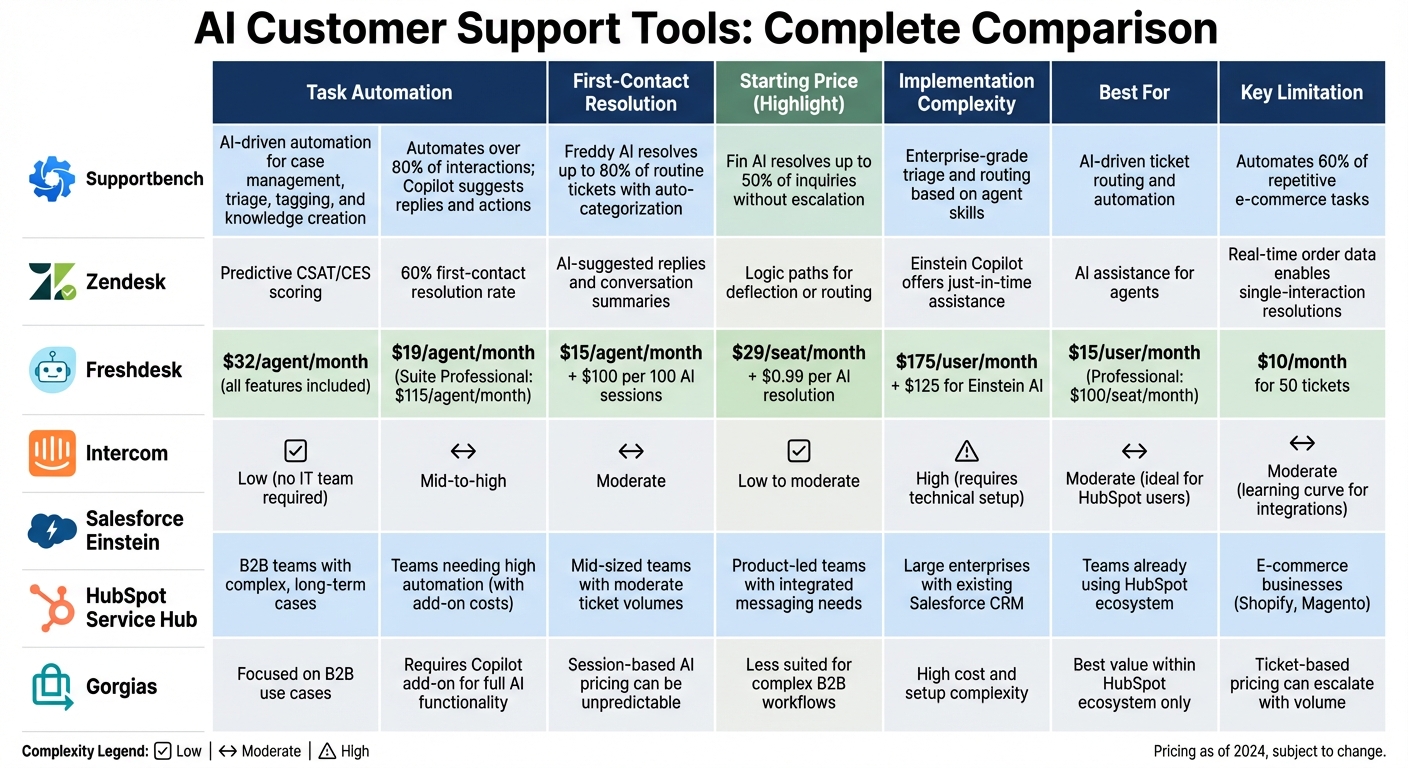
AI Customer Support Tools Comparison: Features, Pricing, and Implementation
The table below highlights the strengths and trade-offs of each platform in optimizing B2B support operations. Each tool brings a unique focus – whether it’s high-volume automation, workflow integration, or pricing predictability.
| Tool | Task Automation | First-Contact Resolution | Case Prioritization | Workflow Integration | Pricing Model | Implementation Complexity |
|---|---|---|---|---|---|---|
| Supportbench | AI-driven automation for case management, triage, tagging, and knowledge creation | Predictive CSAT/CES scoring for first-contact resolution | Dynamic SLAs and automated prioritization | Unified platform with Salesforce integration | From $32/agent/month, all features included | Low – no IT team required |
| Zendesk | Automates over 80% of interactions; Copilot suggests replies and actions | 60% first-contact resolution rate | AI-powered routing and triage | Requires Copilot add-on for full AI functionality | Starts at $19/agent/month; Suite Professional at $115/agent/month | Mid-to-high |
| Freshdesk | Freddy AI resolves up to 80% of routine tickets with auto-categorization | AI-suggested replies and conversation summaries | Automated ticket prioritization | Advanced AI features on higher-tier plans | Growth at $15/agent/month; Freddy AI Agent at $100 per 100 sessions | Moderate |
| Intercom | Fin AI resolves up to 50% of inquiries without escalation | Logic paths for deflection or routing | Focused on integrated messaging | Designed for product-led teams; less suited for complex workflows | Essential at $29/seat/month; Fin AI at $0.99 per resolution | Low to moderate |
| Salesforce Einstein | Enterprise-grade triage and routing based on agent skills and availability | Einstein Copilot offers just-in-time assistance | Advanced routing logic | Deep CRM integration for large enterprises | Starts at $25/user/month; Einstein AI is an add-on | High – requires technical setup |
| HubSpot Service Hub | AI-driven ticket routing and automation | AI assistance for agents | Integrated with HubSpot CRM workflows | Best for teams already using HubSpot | Professional at $100/seat/month; Enterprise at $150/seat/month | Moderate – ideal for HubSpot users |
| Gorgias | Automates 60% of repetitive e-commerce tasks like order status and refunds | Real-time order data enables single-interaction resolutions | Ticket sorting and prioritization | Integrates with Shopify, Magento, and BigCommerce | Starter at $10/month (50 tickets); Pro at $360/month (2,000 tickets) | Moderate – some learning curve for integrations |
While Zendesk and Freshdesk excel in automation, their advanced AI features often require additional costs. Intercom, with its focus on integrated messaging, works well for straightforward workflows but may fall short in handling complex B2B operations. Salesforce Einstein delivers enterprise-level capabilities but comes with higher costs and setup demands. HubSpot is a natural fit for teams already embedded in its ecosystem, and Gorgias is tailored for e-commerce businesses.
Supportbench stands out by incorporating all AI features natively – offering tools like predictive CSAT/CES scoring, dynamic SLAs, automated case prioritization, and seamless knowledge base creation. This all-in-one approach eliminates hidden costs and reduces complexity, making it a streamlined solution for B2B support teams looking to enhance efficiency and effectiveness.
Conclusion
AI systems aren’t all created equal, and the difference often comes down to whether the platform has AI built in from the start or tacked on later. Platforms with native AI capabilities offer immediate benefits: they’re ready to go without complex setups, provide a unified view of every customer interaction, and deliver accurate responses based on real customer history and CRM data. On the other hand, older systems that add AI as an afterthought can lead to fragmented workflows, require extra configurations, and often come with hidden costs like per-resolution fees or tiered feature limitations. These practical differences highlight why integrating AI natively into support workflows makes such a big impact.
For B2B support teams handling intricate customer needs and long-term cases, using a platform with built-in AI simplifies operations. It eliminates the hassle of juggling multiple vendors, lowers overall costs, and allows teams to grow without needing to hire at the same pace. The goal isn’t to replace human agents but to empower them – helping them resolve issues faster, focus on what matters most, and deliver excellent customer experiences without feeling overwhelmed.
With 82% of service professionals noting higher customer expectations, the choice of an AI-native platform isn’t just about keeping up – it’s about staying ahead. These platforms make AI-powered efficiency available from day one, avoiding months of integration headaches or surprise licensing fees. The decision you make today will shape how well your team can scale and succeed in the future.
FAQs
How can AI help improve first-contact resolution in customer support?
AI improves first-contact resolution by seamlessly integrating the right tools and information into an agent’s workflow. For instance, it can suggest relevant knowledge-base articles, generate polished responses, or extract key details from previous interactions. This enables agents to address customer inquiries in a single exchange, cutting down on follow-ups or additional tickets.
On top of that, AI-powered features like real-time sentiment analysis and intelligent case routing ensure that complex or time-sensitive issues land with the appropriate specialist. These capabilities not only help resolve queries more efficiently but also enhance the customer experience by reducing delays and eliminating repetitive exchanges. By simplifying workflows and delivering instant context, AI helps drive up first-contact resolution rates while keeping support costs in check.
What costs should I consider when selecting an AI tool for customer support?
When choosing an AI tool for customer support, it’s crucial to think beyond the subscription fee and factor in the total cost of ownership. Here’s what to consider:
- Subscription or usage fees: These typically range from $20 to $300 per agent/month or $0.05 to $2 per interaction. Some platforms also add a base fee, which can vary from $1,000 to $10,000 per month.
- Implementation and integration: Connecting the AI tool to your existing systems, such as CRMs or ticketing platforms, can cost anywhere from $3,000 to $60,000, depending on the complexity.
- Knowledge base and training: Building an AI-ready knowledge base often starts at $5,000 and can exceed $100,000 for larger operations. Ongoing costs for updates and model retraining should also be factored in.
Keep in mind that hidden costs, like agent turnover, reworking tickets, and constant monitoring, can also affect your budget. To make the best choice, balance these costs against the efficiency improvements the tool offers. Be cautious of platforms with fragmented pricing or frequent upsells, as they can inflate your expenses over time.
Why is native AI integration essential for B2B customer support platforms?
Native AI integration embeds artificial intelligence directly into the heart of customer support workflows. This means agents can access tools like real-time ticket summaries, sentiment analysis, and action suggestions without juggling multiple platforms. By keeping everything in one place, agents work faster, avoid repetitive tasks, and experience fewer interruptions during their day.
What sets native AI apart is its ability to operate within the same data model and security framework as the platform itself. This ensures insights are always current, consistent, and secure, while also cutting down on maintenance costs. Unlike older systems that bolt on AI as an afterthought, native integration offers a streamlined, cost-efficient way for teams to grow. It supports high-quality, human-focused customer service without compromising efficiency or breaking the bank.