



If you’re replacing Helpjuice, the short answer is this: pick the tool that matches how your support team works, not the one with the nicest demo. For most B2B teams, the main checks are search quality, permissions, workflow fit, analytics, and upkeep cost.
Here’s the core takeaway in plain English:
- Supportbench fits teams that want knowledge and support work in one system
- Document360 fits teams that care most about review control and doc structure
- Zendesk Guide fits teams already deep in Zendesk
- Salesforce Knowledge fits teams already deep in Salesforce
- Guru fits internal agent knowledge, not a full public help center
And one more thing matters more than most teams expect: stale content. Around 30% of articles can go out of date within 90 days of a big product release, and manual upkeep for a 200-article knowledge base can cost about $25,000 to $37,000 per year in writer time.
If I were building a shortlist, I’d score each option on:
- AI search and agent assist
- SCIM, SSO, RBAC, and audit logs
- CRM/help desk integrations
- Three-year cost, including licenses, AI fees, and upkeep labor
Quick comparison
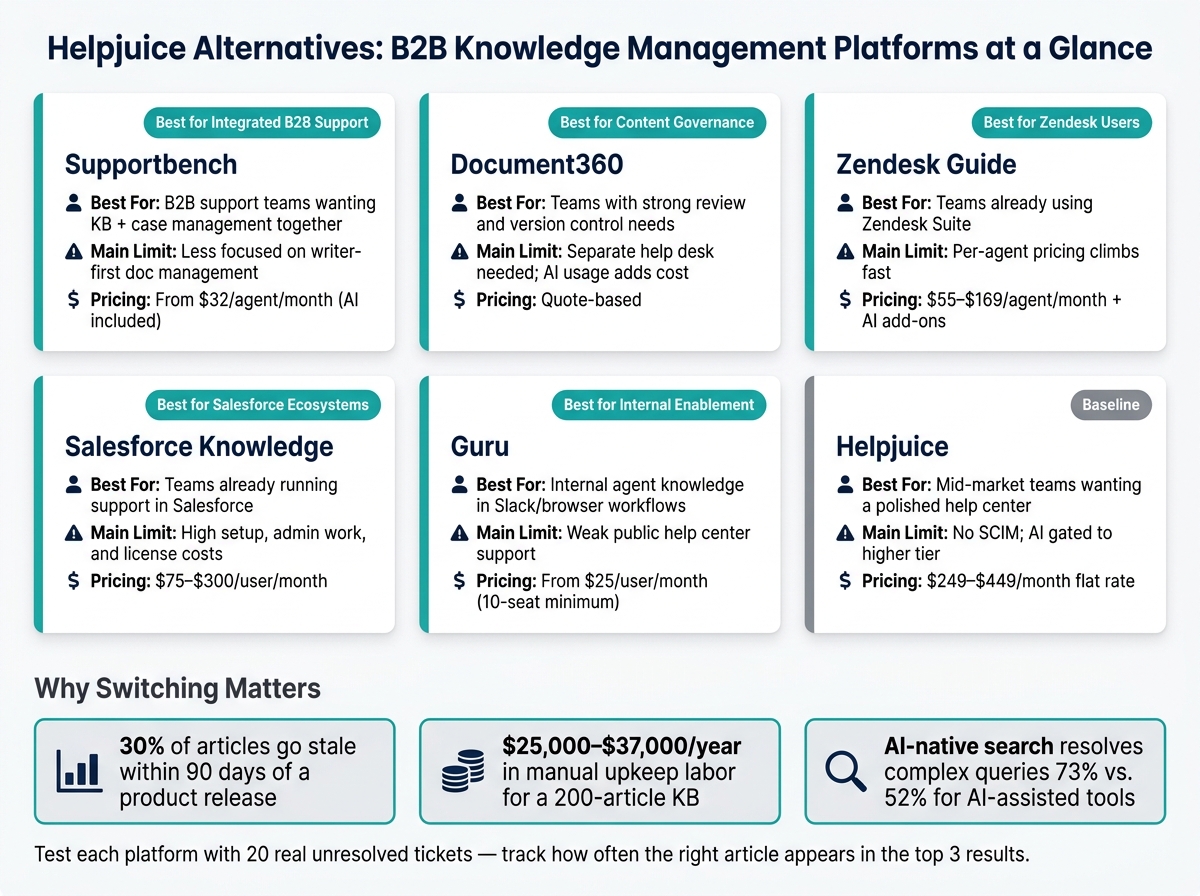
Helpjuice Alternatives Compared: B2B Knowledge Management Platforms
| Platform | Best for | Main limit | Pricing shape |
|---|---|---|---|
| Supportbench | B2B support teams that want KB + case work together | Less focused on writer-first doc management | From $32/agent/month |
| Document360 | Teams with strong review and version control needs | Separate help desk needed; AI usage can add cost | Quote-based |
| Zendesk Guide | Teams already using Zendesk Suite | Per-agent pricing climbs fast | $55–$169/agent/month + AI add-ons |
| Salesforce Knowledge | Teams already running support in Salesforce | Setup, admin work, and license costs | From $75/user/month to $300/user/month |
| Guru | Internal knowledge for agents in Slack/browser workflows | Weak public help center support | From $25/user/month |
| Helpjuice | Mid-market teams that want a polished help center | Thin public detail on SCIM/security items | From $249/month to $449/month |
The simplest way to choose is to test each platform with 20 unresolved tickets from your own queue and see how often the right answer shows up in the top three results. That tells you more than a sales call ever will.
sbb-itb-e60d259
1. Supportbench
Supportbench brings together knowledge management, case management, AI assist, workflows, and reporting in one place. For B2B support teams, that matters. The big question isn’t just whether the tool has these features. It’s whether knowledge, case data, and approvals stay tied together inside one working flow.
AI search and assist
Supportbench uses AI Copilot to draft replies based on knowledge base content and case history. That gives agents a running start instead of making them write every response from scratch.
It also uses separate internal and customer bots. That split helps keep internal knowledge out of external replies, which is a big deal when teams need to protect internal notes, process details, or account-specific information.
Governance and permissions
The platform keeps internal and external knowledge bases separate. Role-based permissions control who can see what based on audience, account, or product line.
Approval workflows add a human check before AI-drafted articles go live. On top of that, versioning, audit logs, and configurable data retention settings give teams more control over how knowledge is managed over time.
Workflow and integrations
Native Salesforce synchronization lets agents pull in licensing and contract information without jumping between systems. Jira integration supports issue linking, which helps when support and engineering need to stay in sync. Slack can be used for routing and alerts, so teams can move work along without extra friction.
If you need something more tailored, a REST API supports custom data tables for account-specific operational data.
Analytics and total cost
Reporting is where tools like this either help or get ignored. If knowledge gaps are hurting SLA performance or driving escalations, teams need to see that fast.
Supportbench reporting shows where knowledge gaps are slowing resolution and leading to more escalations. It also gives visibility into:
- SLA attainment by tier
- Escalation patterns
- Account-level health and risk
Pricing starts at $32 per agent per month, with AI included.
2. Document360
Document360 is built for teams that need a structured knowledge base, tighter review control, and search that shows where content is falling short. If your team cares about version history, granular permissions, and analytics, it’s a solid Helpjuice alternative. The big question is simple: do those controls help people keep docs accurate without slowing down support?
AI search and assist
Document360’s Eddy AI uses semantic search, so it tries to match intent instead of just hunting for exact keywords. The platform also includes an AI Writing Agent that can draft documentation from prompts, ticket threads, audio files, or video files.
Governance and permissions
Document360 includes RBAC at the workspace, category, and article levels. It also supports roles like Reviewer, Draft Writer, and Localization Manager. You also get approval workflows, version history, audit logs, SAML SSO, and SOC 2/GDPR controls. That matters a lot for regulated teams or support groups that work across multiple departments.
Workflow and integrations
Document360 connects with Zendesk, Salesforce, Intercom, Slack, Microsoft Teams, and GitHub. On higher plans, it also includes a workflow builder. Zapier and Make add more automation on those higher tiers too.
Analytics and total cost
Reader heatmaps and failed-search reports help teams spot the gaps that lead to avoidable tickets and show which content people skip. Failed-search tracking is especially useful because it points to documentation that’s missing or hard to understand. That gives you more to work with than plain page-view reporting.
The pricing side needs a close look. Document360 moved to quote-based pricing in August 2024 and removed its free plan in November 2024 [7]. AI search calls are metered. The Business tier includes 2,000 credits per month, and each search call uses one credit [8]. If you run a high-volume support operation, it’s smart to model those usage-based costs before you migrate.
That makes Document360 a better fit when content governance matters more than deeply embedded case management.
3. Zendesk Guide
Zendesk Guide comes as part of the Zendesk Suite, not as a standalone knowledge base. That works well for teams already using Zendesk. But if you’re looking at it as a replacement, you’re not just buying knowledge management. You’re buying a full suite, which can be more than a knowledge-focused team wants.
That puts the spotlight on a practical question: can a knowledge base built into a support suite keep up with B2B docs, permission controls, and deflection needs? For B2B support leaders, the main test is pretty simple. Does embedded knowledge help agents handle tickets faster without slowing the team down with extra governance work?
AI search and assist
Guide’s AI Copilot cuts search time during ticket work by drafting agent replies from help center articles right inside the ticketing interface [3][4]. That can save time when agents are moving through a heavy queue.
Zendesk also launched Knowledge Builder in November 2025. It looks at the previous 90 days of ticket data and can generate up to 40 draft articles based on common customer issues [10]. On top of that, conversational search uses retrieval-augmented generation across 100+ languages [4].
The weak spot shows up in more complex B2B support. If the answer is partial or misses context, the result is extra back-and-forth, more rework, and more escalations.
Governance and permissions
Guide Enterprise includes custom RBAC roles, SAML SSO, SCIM provisioning, and audit logs for authentication events, permission changes, and content edits [3]. Approval workflows are available on Suite Professional and above [11].
Zendesk also holds SOC 2 Type II, ISO 27001, HIPAA, and FedRAMP Moderate certifications. That’s a solid set of compliance boxes for teams with stricter security needs.
The catch is Article Verification. It still depends on age and tags, not product-change detection. So if your product shifts often, someone still has to review content by hand.
Workflow and integrations
Guide fits closely into the Zendesk workflow. Articles appear right in Agent Workspace while agents handle tickets, which is helpful for high-volume support teams [3].
Zendesk also released a native Knowledge Connector in October 2025. It lets agents search Confluence spaces from Guide and Agent Workspace without third-party sync apps [10]. That’s a nice step if your docs already live across tools.
Outside the Zendesk setup, though, deeper customization still takes developer time and custom CSS. So Guide feels more tied to the support workflow than built for knowledge management first. That matters when documentation changes faster than support tickets get closed.
Analytics and total cost
Zendesk’s analytics cover views, search terms, and engagement, but they don’t show task completion or workflow drop-off [9]. For B2B teams, that makes root-cause analysis harder. You can see what people looked at, but not always where they got stuck.
Cost is another big part of the picture. Zendesk uses per-agent pricing, so spend climbs with headcount. For a 200-agent team, Suite Enterprise costs about $33,800 per month before AI add-ons [3][4]. AI Copilot adds about $50 per agent per month [3][4].
Automated resolution usage can also trigger overage fees, usually between $1.50 and $2.00 per resolution once the included volume runs out [11]. For teams that want deeper CRM context and account-level governance, that tradeoff often comes up right before they look at Salesforce Knowledge.
4. Salesforce Knowledge
If your support team already lives in Salesforce, the main question is simple: does a CRM-native knowledge base make up for the extra license costs and admin work?
Salesforce Knowledge makes the most sense for teams that already handle support in Salesforce. Agents can pull up articles right inside the case workspace and turn resolved cases into new knowledge articles. For customer self-service, though, you also need Experience Cloud. That adds one more license and one more setup layer. Pricing climbs fast: Professional starts at $75/user/month, Enterprise at $150/user/month, and Unlimited at $300/user/month [12][14]. On Professional and Enterprise, read/write access often needs extra licensing, while Unlimited includes full read/write access [12].
AI search and assist
Einstein AI helps with article suggestions and case classification, but Salesforce Knowledge is still an AI-assisted system, not an AI-native one [4][14]. It can recommend content based on the case context, which helps in the moment. But it won’t automatically spot stale articles or catch documentation drift [14].
That gap matters in fast-moving B2B teams. Product details change, workflows shift, and docs can go out of date before anyone notices. The content itself is also static. There’s no branching logic or guided troubleshooting path. So when an agent is working through a messy, multi-step issue, they still have to read and interpret long documents on their own [14]. In practice, that puts a lot of pressure on how well the content is structured and maintained.
Governance and permissions
This is where Salesforce Knowledge is strongest.
It uses a strict version-controlled setup, so every edit creates a new version. The system tracks draft, published, and archived states [15]. Approval workflows can send higher-risk content, like billing, security, or legal topics, to specific reviewers before anything goes live [16]. Data categories also let teams limit access by audience, which means internal runbooks can stay private while customer-facing FAQs stay visible [16].
That level of control is useful, especially for larger teams where one bad article can create a mess fast. Still, versioning and approvals don’t solve everything. Teams still need manual review to catch stale content.
Workflow and integrations
Salesforce Knowledge works best when you keep everything inside the Salesforce stack.
Native ties with Field Service, Case Management, and Digital Channels keep knowledge close to the agent’s day-to-day work [12]. The Knowledge One widget shows articles right in the workspace, so agents don’t have to keep jumping between tabs during live cases [12]. That alone can save time.
Outside that ecosystem, things get harder. Setup tends to be more involved, and advanced configurations usually need Salesforce admin skills. Data modeling also needs careful planning up front, or teams can end up with duplicate articles or content that overlaps in messy ways [17]. If your team isn’t already deep in Salesforce, expect a steeper learning curve before you start seeing productivity gains [14][17].
And that’s the catch: tight workflow fit does not always mean better insight into what knowledge is missing.
Analytics and total cost
Salesforce Knowledge includes reporting for engagement and search activity, but the analytics are less tuned for knowledge management than what you get from dedicated platforms [13][14]. That can make it harder to see where agents or customers are getting stuck.
Cost is another big factor. On Enterprise, $150/user/month means a 200-agent team lands at about $30,000/month before add-ons. That’s before Experience Cloud and any extra Knowledge licensing [12][14]. In larger Salesforce organizations, Knowledge can also end up competing with other CRM projects for admin time and development resources [14].
5. Guru
Guru is an internal knowledge layer, not a full customer-facing help center. It works best for teams that need verified answers inside Slack, browsers, CRMs, and ticketing tools. So while it can help support teams move faster, it leans more toward agent enablement than external deflection.
AI search and assist
Guru’s Knowledge Agents work in Chat or Research modes and are built to deliver verified answers inside agent workflows [5]. That’s the big selling point here: answers come from reviewed content, not the entire knowledge pool.
That distinction matters. Instead of pulling from everything and hoping for the best, Guru keeps the answer set tied to approved material. Reported results point to faster onboarding and lower support load, but the main draw is simple: verified answers, delivered where agents already work.
Governance and permissions
Guru’s governance model is built around SME verification. Every card has an assigned expert, and cards expire on a review cadence, which helps keep content current but also creates extra upkeep for SMEs [19].
For customer-facing operations, there are clear limits. Guru does not offer custom domains, white-label portals, or multi-tenant delivery, so it is not a full replacement for a dedicated help center [20][21]. That setup makes the most sense when agents need trusted answers without bouncing between tools.
Workflow and integrations
Guru is built for in-workflow delivery. Agents can access verified knowledge cards in Slack, and the browser extension surfaces relevant content inside agent tools [4][18]. It also supports 50+ languages through auto-translation [20][21].
The format is part of the story too. Guru’s card system is a good fit for:
- short policies
- scripts
- quick answers
It is less suited to long, multi-step troubleshooting where users need a deeper path from one step to the next.
Analytics and total cost
Guru’s analytics center on Knowledge Insights and Productivity Insights – how teams use information internally, which cards get used, and where content gaps show up [22]. That’s useful for internal knowledge teams, but it doesn’t do as much for customer self-service analytics.
Pricing is another point worth looking at closely. Guru charges per user, and that can stack up fast. At $25/user/month with a 10-seat minimum, a 30-person support team would pay $750/month, and the median annual enterprise deal is about $39,874 [5].
That makes Guru easier to justify for internal enablement than for teams that also need customer self-service.
Those tradeoffs show up most clearly in search, permissions, workflow, analytics, and upkeep. The next comparison comes down to how each platform handles those dimensions across the full evaluation.
Feature-by-feature breakdown: what matters most in B2B support
The real test isn’t how many features a platform can stack on a slide. It’s whether the tool makes search better, tightens governance, fits the team’s workflow, and keeps costs under control without piling more work on admins.
That’s the line between software that helps operations and software that just looks slick in a demo.
The four factors that matter most are AI search quality, governance, workflow integration, and total cost of ownership.
AI search and agent assist
The biggest gap between platforms is what the AI can actually search, understand, and reuse. AI-native search tends to handle mixed intent and technical language better than basic semantic search.
| Platform | AI Search Type | Agent Assist |
|---|---|---|
| Supportbench | AI Copilot using case history and the knowledge base | Auto-responses, case summaries, and KB article creation |
| Document360 | Eddy AI with grounded, cited answers | Writing Agent / Summarizer |
| Zendesk Guide | Semantic/hybrid search with multilingual support | Copilot for draft replies |
| Salesforce Knowledge | Einstein Search | Einstein Copilot |
| Guru | Governed Knowledge Layer | Slack/browser extension delivery |
Search alone doesn’t solve much if the output isn’t controlled. That’s why governance is the next filter.
Governance and permissions
In B2B support, governance is non-negotiable. The baseline is SSO, SCIM, granular RBAC, and audit logs. And if your content is exposed through APIs, you need to check that those same controls hold up at the API layer too.
| Feature | Supportbench | Document360 | Zendesk Guide | Guru | Salesforce Knowledge |
|---|---|---|---|---|---|
| Permissions | Role-based security | RBAC per workspace | Custom roles (Enterprise) | RBAC per collection | Data categories and visibility controls |
| Workflow / approval controls | Custom workflow engine | Multi-step workflows | Basic / advanced approvals (Enterprise) | SME verification timers | Approval processes |
| Internal / external split | Separate internal and external knowledge | Private / public KBs | Multiple help centers | Internal focus | Data categories and visibility |
Once access is locked down, the next thing to check is whether knowledge stays inside the agent’s day-to-day flow.
Workflow and integrations
Adoption goes up when agents don’t have to jump between tabs, tools, and side systems just to find an answer. Knowledge works best when it lives inside the ticket workflow.
| Platform | CRM / Help Desk Integration | Workflow / Handoff | Notable Capability |
|---|---|---|---|
| Supportbench | Native Salesforce synchronization, email, and portal | Dynamic SLAs and escalation management | KB article creation from case history |
| Document360 | Zendesk, Freshdesk, Intercom | Custom workflows | Webhook API |
| Zendesk Guide | Native to Zendesk Suite | Ticket-to-KB handoff | Resolution Learning Loop |
| Salesforce Knowledge | Native to Salesforce | Flow Builder | Apex / REST API depth |
| Guru | Slack, Salesforce, Jira | Verification-based delivery | Browser extension delivery |
If the workflow fits, the last check is whether reporting can show that the content is doing its job.
Analytics and total cost
Analytics differs a lot from one platform to another, and so does the main metric each one leans on. Some teams care most about search terms and zero-result queries. Others need content health, verification status, or predictive CSAT.
| Platform | Analytics Focus | Pricing Model | Cost Driver to Watch |
|---|---|---|---|
| Supportbench | Predictive CSAT/CES, FCR detection, QA insights | From $32/agent/month | AI is included in base pricing |
| Document360 | Search gaps and Knowledge Pulse drift detection | Quote-only | Customization and add-ons |
| Zendesk Guide | CSAT, SLAs, deflection, Content Cues | $55–$169/agent/month + $50/agent AI Copilot | Headcount scaling plus AI add-on |
| Guru | Verification health | $25/user/month with a 10-seat minimum | Per-user cost at scale |
| Salesforce Knowledge | Einstein Analytics | Full Salesforce contract dependency | Broader Salesforce licensing |
Cost can sneak up fast. For a 200-article knowledge base, manual upkeep can run $25,000 to $37,000 per year. If your product ships weekly, stale-content detection stops being a nice extra and turns into a direct way to control spend.
Pros, cons, migration factors, and how to choose
Those feature gaps don’t stay on a product page for long. They turn into migration risk, budget risk, and ownership risk.
Helpjuice can work well for a while. But the picture changes when governance, identity, and scale start to matter more than visual polish. The limits show up in day-to-day operations: flat-rate pricing eventually tops out, there’s no SCIM provisioning, the security portal is thin, and AI features sit behind the $449/month tier [3][6]. The table below shows where each option fits in practice.
| Platform | Main advantage | Main tradeoff | Best fit |
|---|---|---|---|
| Helpjuice (baseline) | Flat-rate pricing | No SCIM; AI gated to higher tier | Mid-market teams wanting a managed look |
| Supportbench | AI included; native Salesforce sync for deflection and resolution speed | – | B2B support teams needing integrated KB + ticketing |
| Document360 | Version control and approval workflows | Opaque pricing; requires a separate help desk | Teams with dedicated technical writers |
| Zendesk Guide | Native ticket-to-KB links | Per-agent pricing scales poorly | Large orgs already on Zendesk |
| Salesforce Knowledge | CRM data access | Tied to the broader Salesforce environment | Enterprises where KB and CRM must share data |
| Guru | SME-verified internal answers | Weak as a public help center | Internal-only knowledge for distributed teams |
Most migration problems come from the same four areas: content export, redirects, permissions, and training.
If your current KB only exports HTML, expect a slower and riskier cleanup. Structured JSON or Markdown is much easier to move and fix. Redirects matter too. Build your URL redirect map before cutover, not after, or you’ll spend time cleaning up broken links when people are already looking for answers.
Permissions can get ugly fast. If your team has 100+ people, SCIM 2.0 on the new platform is required. Former employees keeping access isn’t just messy – it’s a security risk [3].
Training is the other budget item teams often undershoot. Enterprise platforms can take 3–6 months to implement, while agent-focused tools usually need much less runway [1]. That gap affects staffing, rollout timing, and how long your team is stuck in transition.
The fastest way to build a shortlist is simple: match the platform to your operating model first, then compare tools.
| Criteria | Dedicated KB | Integrated B2B support platform | CRM/help desk module |
|---|---|---|---|
| Content volume | High | Moderate | High |
| Primary user | Technical writers | Support agents | Support and sales teams |
| Maintenance model | Manual/workflow-heavy | AI-assisted | Manual/governance-heavy |
| Hidden cost to watch | Separate help desk subscription | Limited deep versioning | High per-agent pricing + complex setup |
Pick the model that lines up with your operating center: support-led, writer-led, or CRM-led.
And before you move anything, audit the articles you already have. Industry data keeps pointing to the same problem: 30% to 60% of knowledge bases are outdated at the time of migration [3]. Moving stale content into a better system doesn’t fix bad information. It just makes the wrong answers easier to find.
Conclusion
After comparing search, governance, integrations, and cost, the choice comes down to operational fit. There isn’t one Helpjuice alternative that works for every B2B support team. The right pick depends on the biggest problem you need to fix: deflection, resolution speed, governance, or day-to-day upkeep.
If deflection and resolution speed are at the top of your list, AI-native platforms tend to do a better job with complex queries on the first pass: 73% versus 52% for AI-assisted tools[4][5]. Once you get past 500 documents, that gap gets even bigger: 81% versus 52%[4][5].
If governance and content upkeep are causing more pain, look past sticker price and add upkeep labor into your three-year cost. For a 200-article knowledge base without automated drift detection, that labor can run about $25,000 to $37,000 per year[4][5]. That’s not a side note. It can change the whole math.
The simplest way to turn those gaps into a shortlist is to score each platform against your own support load and admin work. A weighted scorecard works well here. Focus on:
- AI search quality
- Granular permissions and SCIM
- API and webhook depth
- Three-year total cost, including license, AI add-ons, and upkeep labor[2][3]
Then run a test with 20 real unresolved support tickets – not vendor-picked examples – and track how often the right article shows up in the top three results[2]. That gives you something far more useful than a sales demo: proof based on your own tickets, your own permission needs, and your own cost model.
FAQs
How should I test search quality before migrating?
Go beyond vendor claims and test how search handles conceptual intent versus exact keyword matching.
Run natural-language queries to see whether it understands related ideas even when the wording changes. A good search tool shouldn’t need the exact phrase every time. If someone asks for the same thing in a different way, it should still get them to the right answer.
Test edge cases too. You want to confirm it gives direct, accurate answers with cited sources, not just a list of links. That’s the difference between a tool that helps and one that sends people off to do more digging on their own.
Then review reporting for failed searches. This is where the blind spots usually show up. Failed queries can reveal content gaps and show what customers are trying to find but can’t.
What hidden costs matter beyond subscription pricing?
Beyond subscription pricing, there are a few costs that tend to sneak up on teams:
- Per-seat pricing, even for read-only internal users
- AI features locked behind higher tiers, paid add-ons, or usage credits
- Maintenance labor needed to keep docs from drifting out of date
- Migration work, like content restructuring, access rules, and search intent setup
For a 200-article library, upkeep alone can cost $25,000 to $37,000 per year.
How do I choose between internal knowledge and a public help center?
Choose based on your audience and how your team works. A public help center helps customers solve problems on their own and can cut down on support tickets with neutral, brand-safe content. An internal knowledge base helps agents move faster by giving them quick access to runbooks, SOPs, and escalation paths.
If you use one platform for both, pay close attention to article-level permissions and separate search scoping. That’s what keeps private content from showing up in public search results.
Related Blog Posts
- Knowledge Base Examples: What Great Help Centers Have in Common
- JSM alternatives for customer-facing B2B support: what to use instead
- The “Search” Problem: Why Knowledge Gets Lost in Slack Support Threads
- Helpjuice vs modern knowledge bases: what support teams actually need now
Evaluating help desks for a B2B team?
Supportbench is all-inclusive from $32 per agent per month, with migration and onboarding included. See pricing or book a 20-minute demo.






