



Jira Service Management (JSM) is a popular choice for IT teams, but it often falls short for external B2B customer support. Its focus on internal IT workflows and limited account-level insights make it less ideal for managing complex, multi-stakeholder relationships. Additionally, key AI features and advanced tools are locked behind higher-tier pricing, starting at $47.82 per user per month.
Supportbench, on the other hand, is designed specifically as a B2B helpdesk. It offers AI tools like sentiment analysis and ticket summarization across all pricing tiers, starting at $32 per user per month (billed annually). It simplifies SLA management, provides a unified customer view, and eliminates the need for extra software like a third-party knowledge base.
Key Takeaways:
- JSM: Best for internal IT teams already using Atlassian tools; higher costs for advanced features.
- Supportbench: Tailored for B2B support with built-in AI, cost savings, and better account management.
Quick Comparison:
| Feature | JSM | Supportbench |
|---|---|---|
| AI Features | Premium tier ($47.82/month) only | Included in all plans |
| Pricing | Starts at $19.04/month (Standard Plan) | Starts at $32/month (billed annually) |
| SLA Management | Rigid, ITIL-focused | Flexible, customer-focused |
| Knowledge Base | Requires Confluence (extra cost) | Built-in |
| Account Insights | Limited | Comprehensive 360° customer view |
| Setup Complexity | Requires technical expertise | No-code workflows, quick onboarding |
If you’re managing internal IT operations, JSM’s integration with Atlassian tools may be worth it. But for external B2B support focused on customer retention and cost efficiency, Supportbench is the better fit.
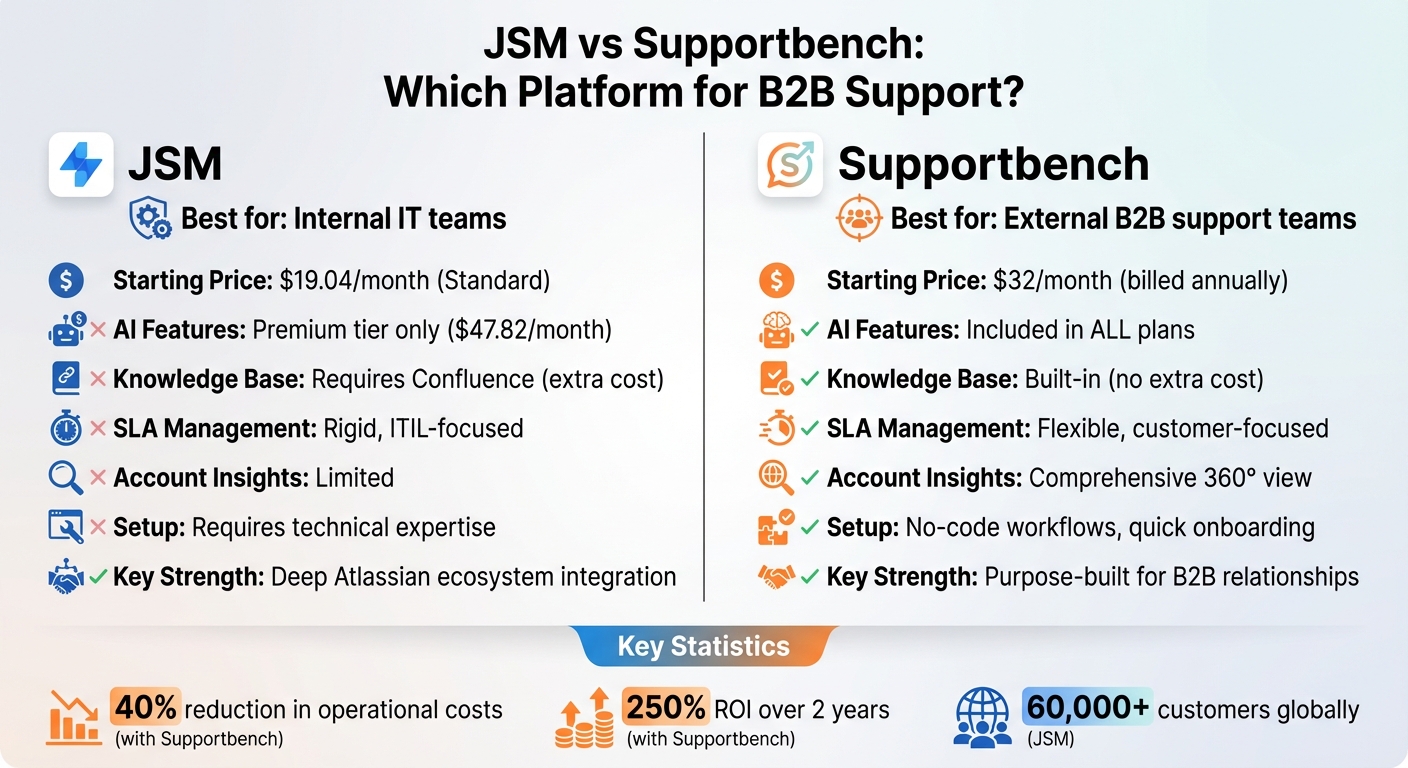
JSM vs Supportbench: Feature and Pricing Comparison for B2B Support
How I Solved 5,000 Support Tickets for a B2B SaaS with Ai
sbb-itb-e60d259
1. Jira Service Management (JSM)
Jira Service Management (JSM) is Atlassian’s service desk platform designed primarily for internal IT operations. While it’s trusted by over 60,000 customers globally, JSM doesn’t always meet the specific needs of external B2B customer support. Many organizations adopt JSM because they already use other Atlassian tools like Jira Software for development or Confluence for documentation. However, this familiarity often doesn’t translate into the best results for customer-facing teams managing complex, multi-stakeholder accounts.
AI-driven capabilities
JSM incorporates features like Atlassian Intelligence and Virtual Service Agents (VSA), which automate tasks such as password resets and knowledge retrieval in help centers or Slack. It also offers tools like AI-powered ticket summarization, sentiment analysis to identify frustrated customers, and recommendations for next steps or subject matter experts. Martin Brignall, Developer Tooling Specialist at OVO Energy, highlighted its benefits:
"We leveraged the virtual [service] agent to create an AI-powered Developer Assistant to streamline support for developers in Slack; this means they can get help without having to leave their favorite tools".
While these AI tools enhance administrative efficiency, they’re less focused on the day-to-day workflows critical for external customer support. This gap becomes evident when managing Service Level Agreements (SLAs) for complex, multi-stakeholder issues.
SLA management
JSM allows teams to track SLAs using customizable goals and automation rules tied to specific workflows. However, advanced SLA features and 24/7 support are limited to the Premium plan, which costs $47.82 per agent per month. Configuring SLAs often requires admin permissions and familiarity with Jira Query Language (JQL), making it challenging for non-technical teams to navigate. For B2B teams handling long-term, multi-stakeholder issues, JSM’s rigid structure can feel restrictive compared to platforms designed for relationship management.
Pricing scalability
JSM offers a free plan for up to three agents, with paid plans starting at $19.04 per agent per month for the Standard tier, $47.82 for Premium, and additional Enterprise options. Premium and Enterprise plans include 1,000 AI-assisted conversations monthly, with a $0.30 charge for each additional conversation. As B2B teams grow, the need for essential features often pushes them toward higher-tier plans, which can significantly increase costs.
B2B account handling
JSM’s "Organizations" tool enables grouping customers by company and allows for separate branding across customer tiers. However, its focus remains on resolving individual tickets rather than providing broader account-level insights. Features like predicting churn risk or consolidated views of customer interactions – key for B2B teams – are notably absent. As a result, many teams turn to third-party tools like SupportLogic for predictive sentiment analysis and escalation alerts. These limitations highlight the need for a solution better aligned with the demands of external customer support.
2. Supportbench
Supportbench stands out by focusing on the specific needs of external B2B support teams rather than internal IT service desks. Designed for customer support and success teams, it consolidates communication from email, chat, phone, and social channels into a single workspace. With AI-powered tools, SLA management, and a built-in knowledge base, it eliminates the need for extra software. This integrated approach lays the groundwork for its standout features in AI capabilities, SLA management, pricing, and account handling.
AI-driven capabilities
Supportbench integrates AI into everyday support tasks to enhance efficiency and outcomes. The AI Co-Pilot assists in real time by summarizing previous interactions, suggesting responses based on case history, and pulling relevant details from the knowledge base. As Eric Klimuk, Founder and CTO, puts it:
"Supportbench embeds AI into daily support actions, making it practical for customer-facing teams to save time and improve outcomes."
The platform also creates knowledge base articles directly from resolved tickets, following KCS principles. For teams managing complex, multi-stakeholder issues, its Intelligent Routing feature uses AI to prioritize tickets based on urgency, topic, or customer sentiment – no need for complicated manual rules. Additionally, CX Intelligence predicts CSAT and CES scores and flags potential churn risks by analyzing customer sentiment before surveys are completed. To top it off, AI-Powered Quality Assurance reviews tickets for empathy, accuracy, and tone, offering instant feedback to help agents refine their approach.
SLA management
Supportbench takes a flexible, customer-focused approach to SLA management. It uses trigger-based SLAs that adapt to case specifics, customer tiers, or shifts in sentiment. For instance, SLAs can automatically tighten as contract renewals near or when sentiment analysis detects rising customer frustration. Real-time alerts and dashboards allow teams to monitor SLA performance proactively, all without the need for complex configurations. This approach contrasts with JSM’s more rigid, ITIL-aligned structure.
Pricing scalability
Supportbench pairs its adaptable SLA features with transparent pricing. The Professional Plan starts at $32 per agent per month (billed annually) or $40 if billed monthly. This plan includes core AI tools, ticket management, and SLA tracking. For $100 per agent per month (billed annually) or $125 monthly, the Enterprise Plan adds extras like SSO, sandbox environments, and white-labeling. Unlike JSM, which reserves AI features for higher-priced tiers, Supportbench includes AI tools in all plans at no additional cost. Companies switching to Supportbench report an average 40% drop in operational costs and a 250% ROI over two years.
B2B account handling
Supportbench offers a comprehensive 360° view of customer accounts, consolidating history, performance metrics, products, assets, entitlements, and contract renewals into one interface. This all-encompassing view promotes collaboration among Support, Success, Product, and Operations teams through shared visibility, threaded discussions, and clear hand-offs. Hugh Dauterman, Data Operations Director, highlights this benefit:
"Supportbench provides a unified client control system, enabling all teams to manage conversations and view comprehensive client details in a single platform."
Pros and Cons
Both platforms shine in different areas, offering distinct advantages and challenges depending on the use case. JSM stands out in ITIL-aligned internal IT environments, thanks to its deep integration with the Atlassian suite, including Jira Software, Confluence, Bitbucket, and Opsgenie. It’s a trusted solution for large enterprises, particularly those with structured workflows for incidents, problems, changes, and assets. However, the platform’s setup can be daunting, often requiring IT or DevOps expertise to configure workflows, permissions, and field mappings. Additionally, its Confluence-based knowledge base and AI features come with added costs, as AI tools are available only in the Premium and Enterprise tiers, leaving Standard users ($19.04 per agent per month) without access.
Supportbench, on the other hand, is tailored for external B2B support teams, offering built-in AI tools – like sentiment analysis, ticket summarization, and predictive CSAT – across all pricing tiers at no additional cost, starting at $32 per agent per month (billed annually). Its native knowledge base, built on KCS principles, eliminates the need for third-party integrations, and its no-code workflows allow teams to get up and running in just days. Companies transitioning to Supportbench have reported an average 40% reduction in operational costs and a 250% ROI over two years. However, Supportbench lacks the brand recognition of legacy platforms and offers a smaller marketplace of third-party apps compared to Atlassian’s extensive catalog of over 1,000 integrations.
Here’s a quick comparison of the platforms’ strengths and weaknesses:
| Criteria | Supportbench Pros | Supportbench Cons | JSM Pros | JSM Cons |
|---|---|---|---|---|
| Cost | Transparent pricing with AI included | Higher base price than JSM Standard | Free tier for up to 3 agents | Additional costs for AI and knowledge base |
| Scalability | Quick no-code onboarding | Less ideal for internal ITIL workflows | Handles deployments of 1,000+ agents | Requires technical expertise and dedicated admins |
| Integration | Strong CRM and Salesforce focus for B2B | Smaller app marketplace than Atlassian | Seamless integration with Jira and DevOps tools | Complex setup for non-Atlassian integrations |
| AI & Automation | AI tools like sentiment analysis available in all tiers | Newer to the market with less history | Advanced features for IT workflows | AI features restricted to Premium tier ($47.82/agent/month) |
For teams already entrenched in the Atlassian ecosystem and managing internal IT operations, JSM remains a solid choice. Bill Hall, Director of IT, highlights its benefits:
"With our prior tool, procurement requests would get stuck with manager approval. With Jira Service Management, the biggest win is transparency. People know where their issue is and when it’s being resolved".
Meanwhile, Supportbench is a better fit for B2B support teams focused on customer-facing workflows, AI accessibility, and cost efficiency. Eric Klimuk, Founder and CTO, shares:
"Supportbench is purpose-built for B2B customer support, offering AI tools, fast setup, and simple per-user pricing. JSM is best for internal IT teams… but comes with higher setup complexity".
Ultimately, the right choice depends on your operational priorities. If your focus is on internal service desks with strict ITIL compliance and you’re already leveraging Jira Software or Confluence, JSM’s ecosystem integration is a strong advantage. But for external B2B support teams managing complex accounts, long-term cases, and renewal-driven relationships, Supportbench provides the flexibility, features, and cost model to meet your needs. These factors underline the importance of aligning your platform choice with your operational goals, paving the way for the final recommendations.
Conclusion
When it comes to modern, cost-conscious, AI-focused B2B customer support, the choice between JSM and Supportbench largely hinges on your specific support model. JSM shines in internal IT operations and scenarios requiring strict ITIL compliance, especially if your organization already uses Jira Software, Confluence, or other Atlassian products. It’s designed for incident management, change tracking, and DevOps workflows – areas where it excels. However, it’s not as well-suited for the relationship-driven needs of external B2B customer support. Additionally, its AI features are only available in Premium tiers, priced at $47.82 per agent monthly, and often require IT or DevOps expertise for setup.
On the other hand, Supportbench is tailored for external B2B support, offering a more straightforward and cost-effective solution. With AI tools like sentiment analysis, ticket summarization, and predictive CSAT included in its $32 per agent per month pricing (billed annually), Supportbench avoids hidden fees for advanced features or knowledge base access. Its no-code workflows and built-in KCS-based knowledge base allow for quick onboarding without the need for extra tools.
For businesses prioritizing cost efficiency, ease of setup, and accessible AI features, Supportbench stands out. Companies switching to Supportbench report a 40% reduction in operational costs and a 250% return on investment over two years.
Supportbench also addresses the challenges faced by teams managing complex, multi-stakeholder accounts – an area where legacy ITSM platforms often fall short. As Nooshin Alibhai, Founder and CEO, explains:
"Supportbench addresses what Zendesk [and JSM] overlooked: maintaining context across complex B2B customer relationships".
FAQs
What should a B2B support platform track at the account level?
A B2B support platform needs to focus on critical account-level details to effectively manage relationships and drive customer success. This includes monitoring account health metrics like customer satisfaction and the likelihood of contract renewals. Keeping tabs on ongoing projects and the status of support issues is equally important to ensure nothing falls through the cracks.
Additionally, the platform should handle multiple contact types within each account, such as end users and decision-makers, to maintain clear communication. Keeping a close eye on long-running issues, escalations, and resolution timelines is essential for prioritizing resources effectively and delivering strong, account-focused support.
How do AI features reduce support costs in B2B teams?
AI tools can significantly reduce support costs by taking over repetitive tasks, allowing customer service agents to focus on more complex problems. They simplify workflows through features like ticket triage and chatbots, which can handle 40-60% of customer inquiries. Predictive tools, such as escalation prediction, also play a key role in identifying potential issues before they grow.
By automating tasks like routing tickets or updating knowledge bases, AI minimizes manual work, speeds up resolution times, and boosts overall efficiency. These improvements not only enhance the customer experience but often lead to a return on investment within just a few months.
What’s the fastest way to migrate from an ITSM tool to B2B support?
Migrating from an ITSM tool to a B2B support platform can feel overwhelming, but a clear plan can make the process smoother. Start by evaluating your current system – pinpoint the essential data, workflows, and integrations that need to be carried over. This step ensures nothing vital gets overlooked.
Next, opt for an AI-powered platform that offers robust automation and integration features. These capabilities can save time and reduce manual effort during the migration process. Instead of moving everything at once, take a phased approach. Begin with non-critical data, which allows you to test the new system without risking disruptions to your operations. Running both systems side by side during this phase can help catch any issues early.
When it’s time to transfer data, use automated tools to streamline the process. Once the data is moved, test the platform thoroughly to ensure everything works as expected. Finally, make sure your team is well-prepared – offer training sessions to familiarize them with the new system and its features. With these steps, you can transition smoothly and minimize downtime.






