


Yes – but mostly for smaller B2B teams with simple support flows. If you need deep routing, strong AI help, and low-risk migration later, I’d test Vtiger hard before I commit.
Here’s the short answer:
- Vtiger covers the basics: ticketing, email-to-case, portal, knowledge base, SLA rules, and shared CRM data.
- Its main strength is context: support, sales, and account history sit in one place.
- Its main risk is complexity: once routing, approvals, and cross-team work get harder, manual work can creep in.
- AI is there, but limited: reply help and sentiment exist, but this looks more like agent assistance than AI that runs work on its own.
- Pricing can shift fast: support teams may need higher plans for workflow depth, reporting, or AI. Annual pricing runs from $0 to $50 per user/month, with Single App User pricing from $20 to $38 on some plans.
- Migration is not always simple: CSV export is possible, but linked records and custom setups can turn a move into a multi-step project.
One stat sets the bar here: by 2024, 65% of organizations were already using generative AI in customer support and other business functions, with customer service as a key use case. So in 2026, buyers should expect more than a basic ticket queue with light AI on top.
Quick comparison
| Area | What I’d expect in 2026 | Vtiger at a glance |
|---|---|---|
| Ticketing | Stable multi-channel case handling | Yes |
| Customer context | One view across support and sales | Strong fit |
| SLA controls | Multi-level rules and escalations | Good for standard use |
| Routing | Deep rule-based, multi-team logic | Can get limited |
| AI | Summaries, reply drafts, risk flags, intent help | Partial |
| Reporting | Live dashboards across team performance | Basic to mid-level |
| Migration | Clean export and rebuild path | Can get hard with custom links |
If your team wants CRM + helpdesk in one system, Vtiger may fit. If you need a support-first platform for heavier B2B case work, I’d check whether it can hold up for the next 12 to 24 months without extra admin load. If you decide to switch, follow best practices for implementing a new helpdesk to ensure a smooth transition.
sbb-itb-e60d259
The 2026 baseline for a modern B2B helpdesk
In 2026, buyers should judge a helpdesk on one simple thing: can it handle long-running B2B cases without manual patchwork? That’s the standard Vtiger needs to meet to count as a viable helpdesk in 2026.
Core workflows buyers should verify
B2B support works differently from consumer support. Cases stay open longer. More teams get pulled in. And agents need account history on screen right away, not buried three clicks deep.
A helpdesk that does this well pulls email, web forms, portals, and chat into one queue, stops duplicate tickets, links each case to customer and account history, and applies SLA rules on its own [8][9][2][3].
Escalation logic matters more than many buyers expect. A system should be able to alert a manager when a ticket sits unresolved for 48 hours. It should also route cases by topic, urgency, and skill instead of dumping everything into a general queue [2][3].
Reporting is another place where weak tools get exposed fast. Teams need real-time visibility into first response time, resolution time, and CSAT. That’s the minimum needed to run support well and catch problems before they snowball [8].
What AI-native support adds beyond basic automation
There’s a big gap between workflow automation and AI-native support.
Workflow automation follows set rules. AI-native support goes a step further. It can summarize a case, suggest a reply, or flag escalation risk before the customer even sends a follow-up [10].
It can also turn resolved cases into draft knowledge articles, which adds more value over time [10].
The table below shows the 2026 minimum standard for B2B support:
| Capability | 2026 B2B Minimum Standard |
|---|---|
| AI assistance | Case summarization, intent categorization, agent reply drafting [8][10] |
| SLA management | Multi-level rules, automated escalation triggers, configurable queues [3][5] |
| Reporting | Real-time dashboards for response time, resolution time, and CSAT [8] |
| Account context | Contact-to-account linking, interaction timeline, cross-team visibility [5][9] |
| Self-service | Searchable knowledge base, branded portal, AI-surfaced article suggestions [1][3] |
The real test is whether AI cuts handle time and rework, not whether it just rewrites knowledge-base content.
With the baseline defined, the next section tests Vtiger against it.
What Vtiger Help Desk offers today
Vtiger is an all-in-one CRM platform with a built-in help desk module. The big draw is simple: sales and support work from the same database.
That sounds good on paper. But for support teams, the bigger question is whether shared CRM data alone can handle day-to-day service work. It helps to look at Vtiger as a CRM-led help desk, not a support-first system. So the issue isn’t whether Vtiger can open and track tickets. It can. The issue is whether it can handle deeper B2B service needs without extra setup, added tools, or outside help.
Ticketing, channels, and customer context
Vtiger supports intake from email, phone, chat, web forms, social, and customer portals [11][6]. Once a case comes in, agents can see sales history, open deals, and past interactions in the same record [11][12]. It also supports SLA management with priority-based targets, business hours by time zone, and automated escalation rules [11][12]. For team coordination, Vtiger includes @mentions, co-owner assignments, and internal work orders linked to cases [11].
That setup matters most when a case isn’t just a support issue. Maybe billing is involved. Maybe sales promised something. Maybe the account has a long service history. In those moments, having everything in one place can save time.
Automation, reporting, knowledge base, and AI
Vtiger’s workflow engine handles trigger-based automation, including case assignment and email-to-ticket conversion [11][2]. Workflow limits depend on the plan:
It also includes a customer portal and knowledge base, so customers can track tickets and read help articles [11][2]. Reporting covers basics like resolution time and agent workload, though cross-team analytics remain fairly limited [11][12].
Calculus AI can suggest replies, detect sentiment, and recommend when to contact someone, but it relies on past data and may fall behind live case activity [11][12][2]. That’s the part buyers should look at closely. Does it cut manual triage, or does it just make the queue look smarter? The only metric that matters here is whether it lowers handle time instead of adding one more layer of suggestions.
Setup effort, pricing exposure, and migration risk
Basic setup is fairly simple, but once teams start building custom workflows and linking modules in more detailed ways, API work or consulting often enters the picture [12][2]. For support-only users, Vtiger offers Single App User licenses, which can save about $10 to $12 per user per month [4].
Migration gets harder when workflows and record relationships are more complex. Vtiger supports CSV exports, but moving linked records cleanly usually takes staged imports: Contacts first, then Organizations, then Cases [2]. If that sequence goes wrong, record links can break. That’s where setup cost turns into day-to-day risk, especially for teams with heavily customized support processes.
Pricing also matters because support features are split unevenly across plans.
| Plan | Annual price (per user/month) | Single App User | Key support features |
|---|---|---|---|
| One Pilot | Free | N/A | Basic ticketing, 3 workflows, 3,000 records [4][12] |
| One Growth | $12 | N/A | 15 workflows, 100,000 records, basic AI [4][12] |
| One Professional | $30 | $20 | Unlimited workflows, full customization, SLA reporting [4][12] |
| One Enterprise | $42 | $30 | Advanced reporting, internal collaboration tools [4] |
| One AI | $50 | $38 | Full Calculus AI suite, sentiment analysis [4] |
Where Vtiger fits and where the risks begin
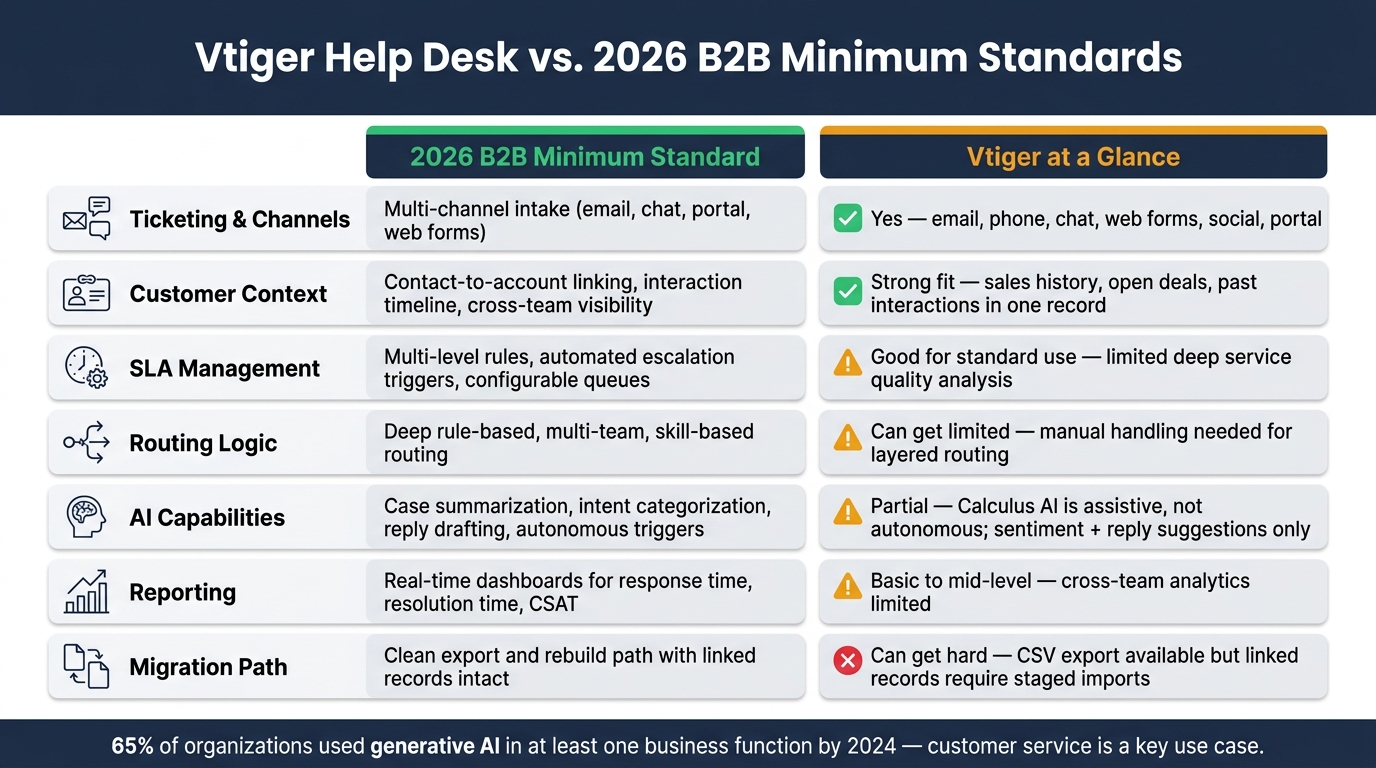
Vtiger Help Desk vs. 2026 B2B Standards: Feature Comparison
The fit changes once support work moves past simple ticket handling.
Where Vtiger works for smaller teams that want CRM and support together
Vtiger works best when support and sales need to work from the same customer record. For smaller B2B teams, that shared data cuts down handoffs. Support agents can see account history, and sales can spot open cases before a renewal call, all without jumping between tools or waiting on a manual sync [7].
If case volume stays modest and routing is simple, Vtiger can manage the workload without much friction.
Common gaps for complex B2B support operations
The picture changes as support gets more complex. Vtiger’s workflow engine can handle linear, trigger-based logic fairly well. But once you add multi-step approvals across teams, the limits start to show.
That matters in daily work. If routing logic can’t factor in account tiering or other detailed business rules on its own, agents end up doing the sorting by hand. Manual triage slows resolution, creates inconsistency, and leads to extra escalations that chip away at customer trust over time.
You can see that gap more clearly in the day-to-day needs below.
| Requirement | Operational Risk |
|---|---|
| Multi-team routing | Basic assignment rules; manual handling needed for layered routing [3][7] |
| SLA complexity | Standard escalation rules only; deep service quality analysis is limited [3] |
| Approvals & escalations | Constrained for multi-step, cross-departmental chains [7] |
| AI-assisted workflows | AI remains assistive, not autonomous [10] |
| Staffing & QA | No native staffing forecasts or QA scorecards [5] |
For Tier 1 deflection or autonomous drafting, Vtiger still has limits. Those are the areas buyers should test for themselves before choosing Vtiger.
How to decide before choosing Vtiger
The feature list only gets you so far. What matters now is whether Vtiger can handle your day-to-day support work without pushing extra tasks back onto your team. That’s the line between shared customer data and actual support depth.
Questions support leaders should ask during evaluation
Before you sign anything, test Vtiger against your actual workflows, not a polished demo setup. A demo can look smooth. Your queue on a busy Monday is the better test.
Ask these questions:
- Can routing handle your real rules? If your assignment logic depends on several conditions or layered escalation paths, check whether Vtiger can route cases on its own – or whether agents will end up sorting tickets manually.
- How fresh is the AI? Vtiger’s Calculus AI can provide scoring and sentiment analysis, but ask how often those insights refresh and whether that timing matches your resolution targets [2][10].
- Who owns implementation? Setup can take time and may need a dedicated admin or outside help. Get clear on what that adds to your rollout cost.
- What does migration look like if we outgrow it? Vtiger supports CSV exports, but migration can turn into a multi-step engineering job when custom fields and account links need to be remapped [10]. Make sure the platform can handle that level of complexity for at least the next 12 to 24 months.
- Are you paying for modules you don’t need? If your team only needs helpdesk features, see whether single-app licensing fits your budget better than a full platform license [4].
Conclusion: Vtiger covers the basics, but test for complexity and AI depth before committing
Vtiger can be a good fit for smaller B2B teams that want CRM and support in one customer database. On the Professional plan [4], the value case is there if keeping customer context in one system is your main goal.
But there are tradeoffs. Vtiger’s Calculus AI is closer to assistive than autonomous [10], and limits in routing, AI refresh timing, or migration complexity can turn into major rebuild costs as support operations grow. Choose Vtiger only if it can support the next 12 to 24 months without manual routing, stale AI signals, or heavy migration work.
FAQs
Is Vtiger enough for complex B2B support?
Usually, no. Vtiger can cover basic B2B support with ticketing, SLAs, and customer portals, which may be enough for small to midsize teams. But once the setup gets bigger and more complex, it often starts to show cracks.
If your team needs advanced routing, deeper QA controls, high-volume workflow handling, or AI-native support, Vtiger may not keep up. Common pain points include performance slowdowns, extra setup work, and limits around integrations.
When does Vtiger become too manual?
Vtiger starts to feel too manual once your support team moves past simple, rule-based automation. It can handle basic trigger workflows, like escalating a ticket after 48 hours or sending cases into simple queues. But in busier, more complex support setups, that approach starts to hit a wall.
You’ll usually notice it when your team needs channel handling that feels split up, smarter routing, deeper QA, staffing forecasts, or real-time AI help instead of batch-based insights that still need someone to step in and do the work.
How hard is it to migrate away from Vtiger?
It depends on how much of Vtiger you use.
You can export data from major modules like Contacts, Deals, and Organizations as CSV files. You’ll also need to export any custom modules or fields.
Because Vtiger is an all-in-one platform, the harder part usually isn’t the export itself. It’s mapping that data into your new system with care, so the links between sales, marketing, and support records stay intact.
Related Blog Posts
- HappyFox alternatives for B2B: what platforms support complex workflows best?
- Zoho Desk vs. Supportbench: Which Offers Better Customization for B2B?
- Kayako vs. Supportbench: Modernizing Your Legacy Support Stack
- Best “Email-Like” Interfaces in Enterprise Helpdesks
Evaluating help desks for a B2B team?
Supportbench is all-inclusive from $32 per agent per month, with migration and onboarding included. See pricing or book a 20-minute demo.






