


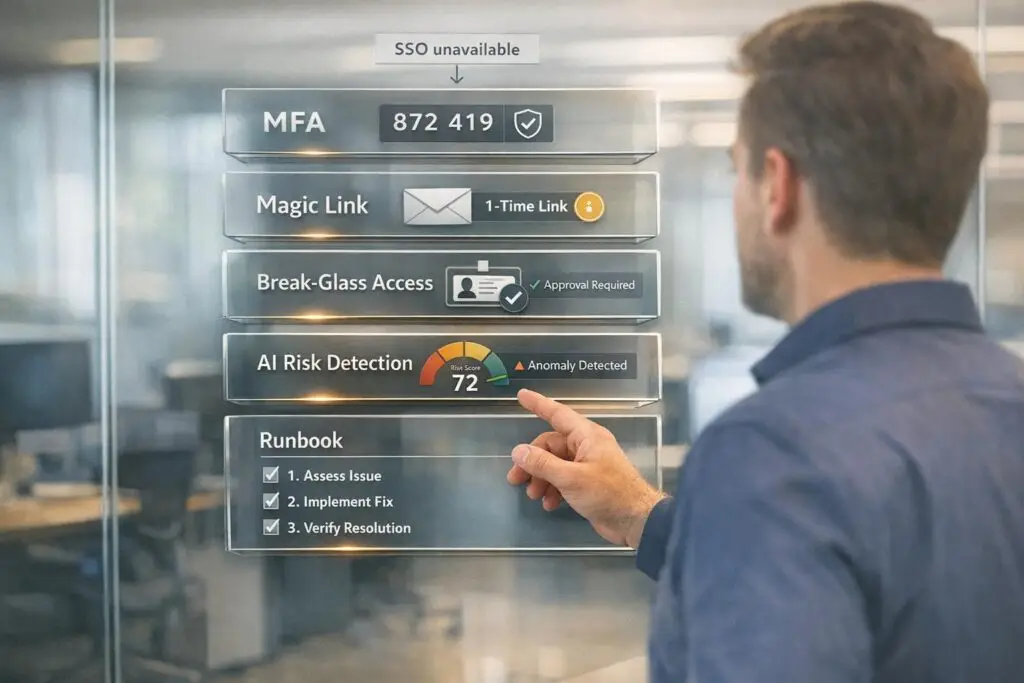
If some customers can’t use Single Sign-On (SSO), you can still ensure secure access with alternative methods. SSO simplifies authentication, but challenges like legacy systems, cost barriers, or mixed environments often prevent its use. Here’s how to manage these cases securely:
- Strengthen Passwords: Enforce strong password policies and pair them with multi-factor authentication (MFA). Use phishing-resistant MFA options like WebAuthn or FIDO2.
- Magic Links: Implement email-based magic links for secure, temporary access without passwords.
- Break-Glass Access: For emergencies, provide time-limited, dual-approved credentials with strict audit trails.
- AI Monitoring: Use AI to detect unusual behavior, like login anomalies, and automate risk-based responses.
- Clear Workflows: Develop runbooks for tasks like password resets or onboarding to ensure consistency and compliance.
- Periodic Reviews: Regularly audit accounts to remove inactive users and adjust permissions as needed.
Non-SSO environments demand stricter controls to reduce risks like social engineering or credential theft. By combining secure alternatives with clear processes, you can maintain security without relying solely on SSO.
Identify When Non-SSO Support Is Needed
Different login failures require specific solutions. Before jumping to a fix, it’s essential to figure out why the customer can’t use SSO. Let’s dive into common scenarios, assess potential risks, and explore how to decide on the best course of action.
Common Non-SSO Scenarios
One of the most frequent issues is a provisioning lag. This happens when there’s a delay in syncing with the IdP (Identity Provider), often because the user hasn’t been added to the correct group via SCIM. While it might look like a bug on your end, it’s usually not [1].
Another issue stems from IdP-side problems, like expired sessions or system downtimes. These are external factors and should be directed to the customer’s IT team for resolution [2].
In mixed-mode environments, some users in the same organization might log in via SSO, while others rely on local credentials. This means you can’t assume the authentication method based on the tenant alone – you need to confirm it for each user [2].
Lastly, keep an eye out for SSO bypass requests. These come from customers who’ve lost access to their IdP or are trying to sidestep their company’s security policies. These situations require a completely different approach [1].
Assessing Risk and Business Impact
Understanding these scenarios is critical because the risks go beyond just frustrating login issues.
Password and SSO-related problems are a major operational challenge.
"Password and SSO issues are 50 to 80 percent of tier-1 ticket volume in B2B SaaS." – CallSphere Team [2]
The bigger concern lies in the identity layer, which is a prime target for social engineering attacks. Support teams, often trained to be helpful, can accidentally enable unauthorized access. For example, a single vishing attack on an Okta admin led to the ADT breach on April 26, 2026, exposing 10 million records [3]. The stakes are high.
Provisioning delays can slow down onboarding and damage trust, which can hurt renewal discussions. In mixed-mode setups, applying the wrong security protocols to the wrong users can lead to compliance issues that won’t hold up in a SOC 2 audit [2].
Decision Matrix: Push for SSO or Accept an Alternative
Here’s a quick guide to help decide whether to prioritize SSO restoration or go with a secure alternative:
| Criterion | Push for SSO | Secure Workaround |
|---|---|---|
| Org Policy | SSO is required by the customer’s IT team | No IdP exists, or SSO is optional |
| User Role | Admin, executive, or finance access | Standard user with minimal data access |
| Verification Signals | Identity signals are inconsistent | Strong Tier 1 and Tier 2 signals verified (Tier 1 signals indicate high confidence in user identity) |
| Error Source | Failure occurs on the IdP side (e.g., Okta, Azure AD) | Local authentication failure or unsupported IdP |
| Environment | SSO-only tenant | Mixed-mode or local-auth tenant |
| Business Urgency | Routine access, no pressing deadline | Critical deadline requiring immediate access |
One key rule: if SSO is enforced, do not create a separate password login. Such requests should always be routed back to the customer’s IT or security team [1].
sbb-itb-e60d259
Secure Workarounds for Non-SSO Authentication
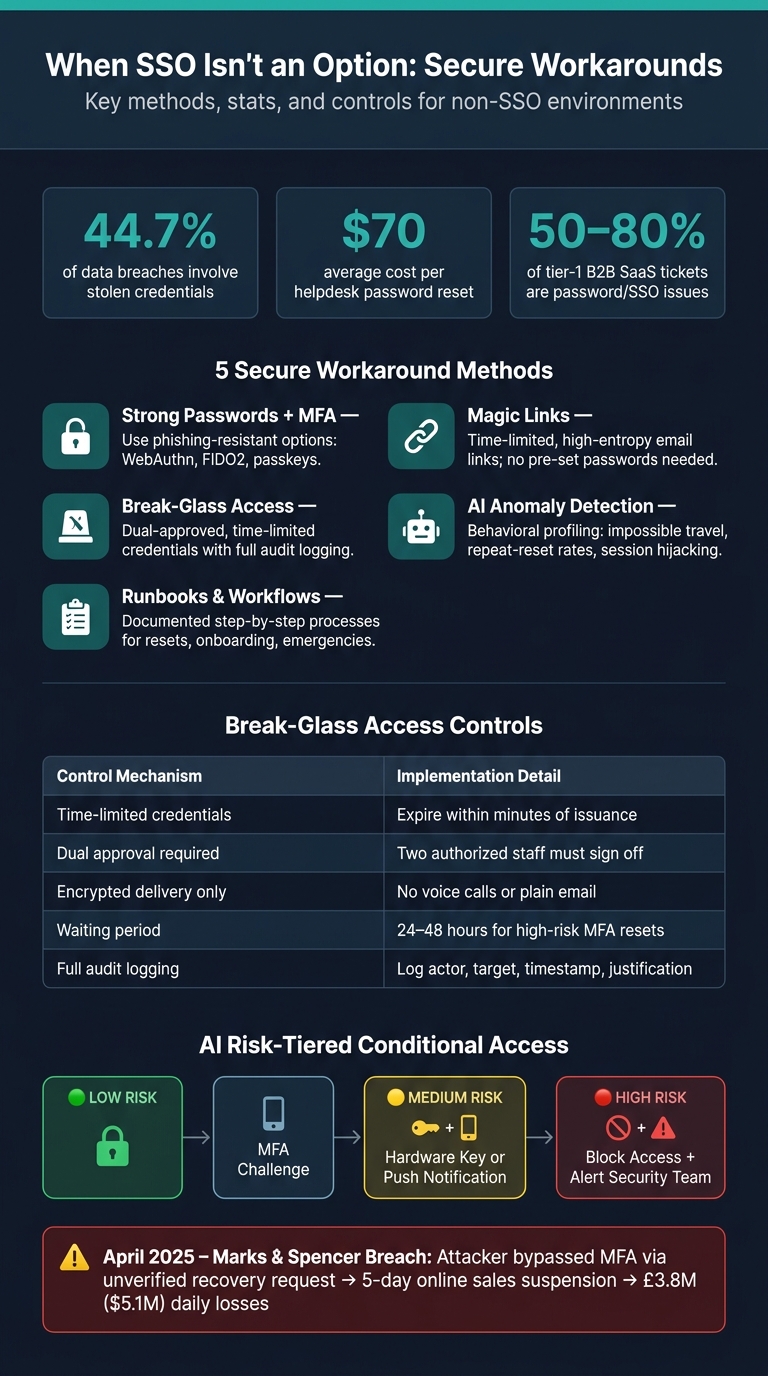
SSO vs Non-SSO Security Controls: Decision Matrix & Best Practices
If single sign-on (SSO) isn’t an option, it’s critical to implement secure alternatives to reduce risks. Below are methods to strengthen authentication and manage user access effectively in non-SSO environments.
Strengthening Password-Based Authentication
Passwords can still provide security when paired with additional measures. Start by enforcing strong password policies, but don’t stop there – layer on multi-factor authentication (MFA) and risk-based controls. Opt for phishing-resistant MFA options like WebAuthn, FIDO2, or passkeys, as these are far more secure than SMS-based one-time passwords (OTPs). For account recovery, use high-entropy tokens (at least 128 bits), signed with HMAC, and hash them server-side. These tokens should expire within 5–15 minutes, and all active sessions should be invalidated immediately to prevent token reuse [5].
To avoid abuse, limit password reset requests to five per hour per IP address and three per 24 hours per account before requiring manual review [5]. If unusual activity is detected – such as login attempts from unexpected geolocations or mismatched device fingerprints – automatically increase authentication difficulty instead of outright blocking access.
"January 2026’s password-reset storms should be a wake-up call – account recovery is an authentication channel and must be treated with the same rigor as login." – Security Ops Playbook [5]
Password recovery is no small matter. A staggering 44.7% of data breaches involve stolen credentials, and each helpdesk password reset costs companies around $70 on average [6].
Now, let’s look at provisioning methods when passwords remain the primary access mechanism.
Just-in-Time User Provisioning Without SSO
Even without SSO, user accounts can be managed securely. A practical option is using email-based invitation flows with signed magic links. These links verify identity through a time-limited, high-entropy URL, removing the need for pre-set passwords and minimizing risks from dormant accounts [8].
For larger teams, consider integrating SCIM or a custom API to sync user data from trusted sources (like HR systems) directly into your application [2][8]. This approach scales well even with local password setups. Use stable identifiers from the source system – such as employee IDs – rather than relying on email addresses, which can change [8]. Additionally, automate session revocation during provisioning and log every action (including actor, target account, and timestamp) to meet compliance standards [2].
When provisioning fails or emergencies arise, a "break-glass" approach may be necessary.
Temporary and Break-Glass Access
"Break-glass" access should only be used in emergencies, such as when an administrator is locked out. These fallback methods must be more secure than standard logins to prevent abuse.
"If the fallback path is easier than the normal path, it will be abused eventually." – NHI Mgmt Group [7]
The April 2025 Marks & Spencer breach is a cautionary tale. Attackers impersonated an employee, exploited a poorly verified recovery request, bypassed MFA, and caused a 5-day suspension of online sales, leading to daily losses of £3.8 million ($5.1 million) [6].
To secure break-glass access:
- Use time-limited credentials that expire within minutes.
- Require dual approval, meaning two authorized staff must sign off on the access.
- Deliver credentials through encrypted channels only – never via plain email or voice calls.
- Impose a 24–48 hour waiting period for high-risk resets.
- Maintain a detailed audit log that captures the actor, target account, timestamp, and justification for every action.
| Best Practice | Implementation Detail |
|---|---|
| Time-limited credentials | Expire within minutes of issuance |
| Dual approval | Two authorized staff must sign off |
| Encrypted delivery | Use secure channels only – no voice calls or plain email |
| Waiting period | 24–48 hours for high-risk MFA resets |
| Audit logging | Log actor, target, timestamp, and justification |
A strong audit trail isn’t just a good idea – it’s what separates a defensible security process from potential liability when something goes wrong.
AI-Driven Workflows for Stronger Access Security
AI-driven workflows are transforming access security by automating detection and response processes. When managing hundreds of non-SSO accounts with passwords and MFA, manual reviews simply don’t scale. These gaps in oversight can create vulnerabilities, but AI steps in to monitor behavioral signals that human teams might overlook in real time.
AI-Powered Anomaly Detection
AI tools create a behavioral profile for each user, tracking factors like login times, locations, devices, and network activity. This baseline allows the system to detect unusual patterns, such as impossible travel (e.g., logging in from New York and Tokyo within two hours), logins from anonymous IP addresses, or new device enrollments on unrecognized networks.
For example, AI can identify a proxy attack, where credentials are used in one country while a new device is enrolled from another within a short window, such as 120 seconds. Another red flag is a sudden surge in password reset requests for a single account, which could signal an account takeover attempt. AI monitors these patterns, known as "repeat-reset rates", and can escalate the issue automatically for further review before it reaches a support agent [2][3].
"The attacker never touches your infrastructure until after the identity layer has been compromised. There is no CVE to patch, no exploit to block at the firewall." – Lyrie Research [3]
Real-world examples underscore the importance of behavioral detection. In the April 2026 ADT breach, attackers used a vishing call to steal credentials and hijack an active session via a proxy page. AI tuned to detect session token reuse from a different IP address could have disrupted this attack early [3].
A practical way to leverage these insights is by implementing risk-tiered conditional access policies. For instance:
- Low-risk signals might trigger an MFA challenge.
- Medium-risk signals could require hardware key verification or push notifications.
- High-risk signals might block access entirely and alert the security team [9].
These automated responses ensure that potential threats are addressed swiftly and effectively.
Automated Credential Resets
Once anomalies are detected, AI simplifies the process of resetting credentials to minimize user disruption. AI-driven agents can handle up to 80% of tier-1 support tickets related to passwords and SSO issues, maintaining strict security standards [2][11].
The reset process uses a tiered identity verification system, scaling the level of friction based on the risk:
- Tier 1: Verifies account knowledge, such as the last four digits of a payment method.
- Tier 2: Confirms behavioral consistency, like matching the current IP and location to the user’s history.
- Tier 3: Requires additional steps, such as an MFA challenge or a magic link sent to a registered device [1].
A real-world example highlights the effectiveness of this approach. In January 2026, a social app faced a 600% surge in password reset requests during a credential-stuffing attack. By deploying rate limits and risk scoring to flag repeated device-fingerprint reuse, the company reduced reset volume by 85% in just four hours, keeping false positives under 1% [5].
AI also automates session token invalidation after a reset is completed. This step ensures that no active sessions, including refresh or short-lived access tokens, remain open – eliminating a common vulnerability [5].
Periodic Access Reviews and Risk Scoring
Static access reviews often fall short in today’s fast-paced environments. AI provides continuous risk scoring by evaluating real-time behavior, helping organizations maintain secure and efficient customer support operations.
Risk scores are generated from data such as login attempts, geographic activity, and data export behavior. For instance:
- A user enrolling a new MFA device within 60 seconds of logging in could indicate an attacker adding their own device.
- An account inactive for 90 days might represent a stale account that increases the attack surface [3].
The table below outlines signals and recommended AI-driven actions:
| Detection Signal | Risk Indicator | Recommended AI Action |
|---|---|---|
| Impossible travel | Login from atypical location | Block access or require MFA [9] |
| MFA factor added within 60s of auth | Attacker enrolling own device | Hold enrollment for review [3] |
| Session token reused from different IP | Active session hijacking | Revoke session and alert [3] |
| Leaked credentials in breach data | Compromised password | Force password change [9] |
| High repeat-reset rate | Brute force or social engineering | Escalate to human admin [2] |
"Identity is fluid. A legitimate user can become a risk if their account is compromised or if they start exhibiting ‘insider threat’ behaviors." – Nevins Bartolomeo, Noelle Kagan, and Ann Ming Samborski [12]
For non-SSO environments, AI can also enable SCIM-aware re-provisioning or de-provisioning. This means that accounts flagged as high-risk can be automatically removed or adjusted without waiting for manual intervention. This proactive measure can detect compromised accounts in minutes rather than weeks, preventing potential damage [2][10].
Turning Non-SSO Policies Into Team Workflows
AI detection and automated resets are only as effective as the human processes supporting them. Even the most advanced security tools can falter when a support agent is forced to make a quick decision under pressure. That’s where clear workflows come into play – they transform policies into actionable steps that teams can rely on.
Runbooks for Common Non-SSO Tasks
A runbook is essentially a policy translated into a streamlined, step-by-step checklist. The most critical runbooks address tasks like new user onboarding, password or MFA resets, and emergency access scenarios.
For onboarding, the runbook should mandate the use of a Temporary Access Pass (TAP) or MFA-protected registration before issuing any credentials. It’s not enough to simply log that an account was created – document how the user’s identity was verified. When it comes to resets, enforce separation of duties: the person receiving the request must not be the one approving and executing it. This single rule significantly reduces risks like insider threats and social engineering attempts [4][7].
"Treat recovery as high-assurance identity proofing, not a routine service desk task." – NHI Mgmt Group Editorial Team [7]
Adding practical steps to these runbooks can also make a big difference. For instance, include instructions for users to connect to the corporate VPN after a reset. This simple step prevents the all-too-common "cached credentials" issue, where a laptop fails to sync with the domain controller, leading to unnecessary follow-up tickets and frustration [13].
These runbooks form the backbone of effective workflows for managing mixed SSO and non-SSO environments.
Managing Mixed SSO and Non-SSO Environments
Mixed setups introduce an uneven security surface. While SSO users benefit from automated, strong controls, non-SSO users depend on the team’s diligence. This discrepancy creates a prime opportunity for attackers.
A practical strategy is to treat non-SSO accounts as inherently higher-risk, applying stricter controls accordingly. For privileged or high-risk accounts, fallback methods should be more difficult to use than the standard SSO login, not less. This approach protects sensitive accounts while aligning with the broader goal of secure, AI-driven support operations.
Role changes in mixed environments also require careful handling. Map SAML attributes to appropriate team assignments, and if a user’s SAML assertion lacks the expected attribute, assign them to a default restricted group by default. This prevents accidental over-provisioning when directory data is incomplete. For high-risk requests like MFA resets, implement a 24–48 hour waiting period. Legitimate users will wait, but attackers often won’t [1].
Governance and Compliance Documentation
Operational runbooks are only part of the equation; governance and documentation ensure long-term compliance and accountability. Proper documentation turns good decisions into repeatable and auditable processes. A common pitfall is logging only the outcome of a ticket (“reset completed”) without recording the evidence that justified the action. Auditors need to see what verification signals were evaluated, who approved the action, and when it occurred [4][7].
Alarmingly, 23.7% of organizations still share sensitive information through insecure channels like email or Slack [7]. A governance-first approach eliminates this risk by requiring all recovery tokens to be short-lived, single-use, and issued only through approved methods. The table below outlines how workflow components align with security and documentation requirements:
| Workflow Component | Security Requirement | Documentation Requirement |
|---|---|---|
| User Onboarding | TAP or MFA-protected registration | Record compliance with onboarding policy |
| Password/MFA Reset | Step-up verification; separate approver | Log justification, approver name, and timestamp |
| Emergency Access | Break-glass account with policy exclusion | Post-action review and immediate credential rotation |
| Role Changes | SAML attribute mapping; restricted group | Audit team membership against directory assertions |
To ensure governance remains actionable, conduct quarterly social engineering simulations targeting your help desk. These tests reveal whether agents stick to verification protocols, even when faced with urgent or familiar-sounding callers. The April 2026 ADT breach, which exposed 10 million records, began with a single vishing call to an administrator [3]. By red-teaming your own procedures, you can identify weak points in your workflows before attackers do.
Conclusion: Keeping Non-SSO Customers Secure Without Slowing Them Down
Supporting non-SSO customers doesn’t have to compromise security. By implementing tools like MFA, IP whitelisting, RBAC, and AI-driven monitoring, you can build a robust defense without relying on centralized identity management. The key is to treat non-SSO access as a carefully managed exception, not an afterthought.
Checklist for Non-SSO Customer Support
Here’s a quick-reference checklist to help you set up or review your non-SSO support environment:
| Category | Action Item | Benefit |
|---|---|---|
| Authentication | Enable MFA (app, SMS, or email) | Prevents unauthorized access, even if passwords are compromised [15] |
| Access Control | Configure IP restrictions for high-risk accounts | Limits access to trusted networks [14] |
| Policy | Set account lockout thresholds | Protects against brute-force and credential stuffing [15] |
| Governance | Assign role-based permissions | Ensures least-privilege access [14] |
| Monitoring | Enable AI anomaly detection | Identifies suspicious behavior in real time [14] |
| Maintenance | Schedule periodic password rotations | Reduces risk from compromised credentials [15] |
One step that’s often overlooked? Removing inactive users. Regularly auditing non-SSO accounts to eliminate dormant credentials is just as critical as any technical safeguard.
This checklist highlights the essential practices to maintain security in non-SSO environments.
Final Thoughts
Non-SSO setups inherently require more effort to manage compared to SSO environments. However, with clear procedures, automated monitoring, and tools designed for mixed authentication systems, that effort becomes manageable. As outlined in this guide, Supportbench’s centralized dashboard simplifies these challenges. It allows teams to toggle MFA, enforce IP restrictions, and manage RBAC seamlessly [14][15]. This way, agents can focus on delivering customer support rather than juggling access concerns. Security and efficiency can coexist – both come from the same disciplined strategy.
FAQs
When should we refuse an SSO bypass?
Refusing an SSO bypass is critical if you can’t confidently verify the requester’s identity. Bypasses are often targeted by attackers, so it’s essential to explore all secure alternatives first. For instance, you could check sessions on trusted devices or rely on secondary multi-factor authentication (MFA) methods.
Always ensure that any bypass request is confirmed by a verified account administrator. These should be treated as rare, controlled exceptions – not everyday solutions. Avoid basing decisions on anecdotal information, and apply strict scrutiny to every request to maintain security.
What’s the safest non-SSO login option?
The safest non-SSO login methods rely on phishing-resistant, device-bound cryptography. This includes tools like FIDO2 security keys, hardware keys, or passkeys, which store credentials directly on the user’s device, making them nearly impossible to intercept. When these aren’t an option, authenticator apps that generate time-based one-time passwords (TOTP) offer a much stronger alternative compared to SMS or email one-time passwords, which are more vulnerable to attacks. For even greater security, pairing these methods with adaptive, risk-based authentication can help detect and address suspicious activity in real time.
How do we verify identity for resets without creating risk?
When handling account resets, it’s crucial to approach the process with the same level of caution you’d apply to any high-security task. Here are some key steps to ensure secure identity verification:
- Use Multi-Layered Authentication: Combine methods like verifying requests from registered email addresses or IPs, sending push notifications to trusted devices, or employing out-of-band techniques such as callbacks or biometric authentication.
- Log Everything: Keep detailed records of all reset events. Include timestamps to meet compliance requirements and maintain a clear audit trail.
- Protect Sensitive Information: Never disclose sensitive details during the reset process to avoid potential breaches.
- Require Credential Updates: Once an account reset is successful, make it mandatory for users to update their credentials to reinforce security.
By layering these practices, you can build a robust system that minimizes risks and protects user accounts effectively.






