


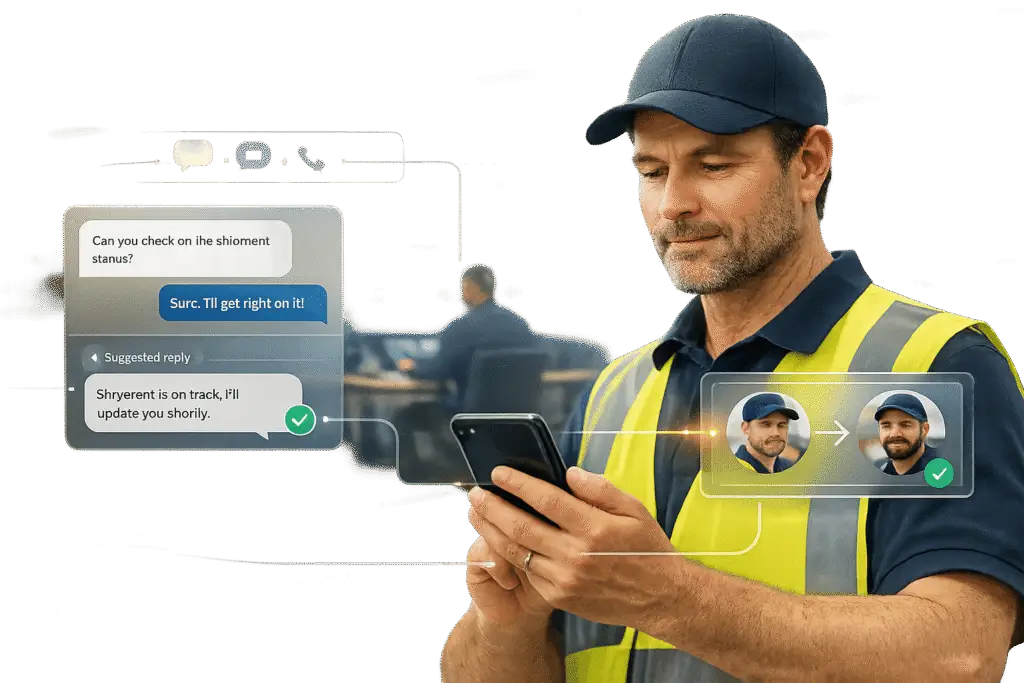
Frontline teams don’t rely on email because their fast-paced, mobile work environments demand instant communication. Traditional email systems fail to meet their needs due to delays, poor task tracking, and lack of accessibility on shared devices. Instead, these teams benefit from AI-powered tools and mobile-first platforms that integrate communication channels like SMS, chat, and Slack into one system. This approach ensures faster responses, better task handoffs, and improved accountability.
Key Takeaways:
- Why email fails: It’s slow, desk-centric, and unsuitable for mobile, shift-based work.
- Better tools: AI-powered platforms unify communication channels and automate tasks.
- Key features to look for: Real-time messaging, multilingual support, and mobile accessibility.
- Results: Faster resolution times, fewer escalations, and improved employee engagement.
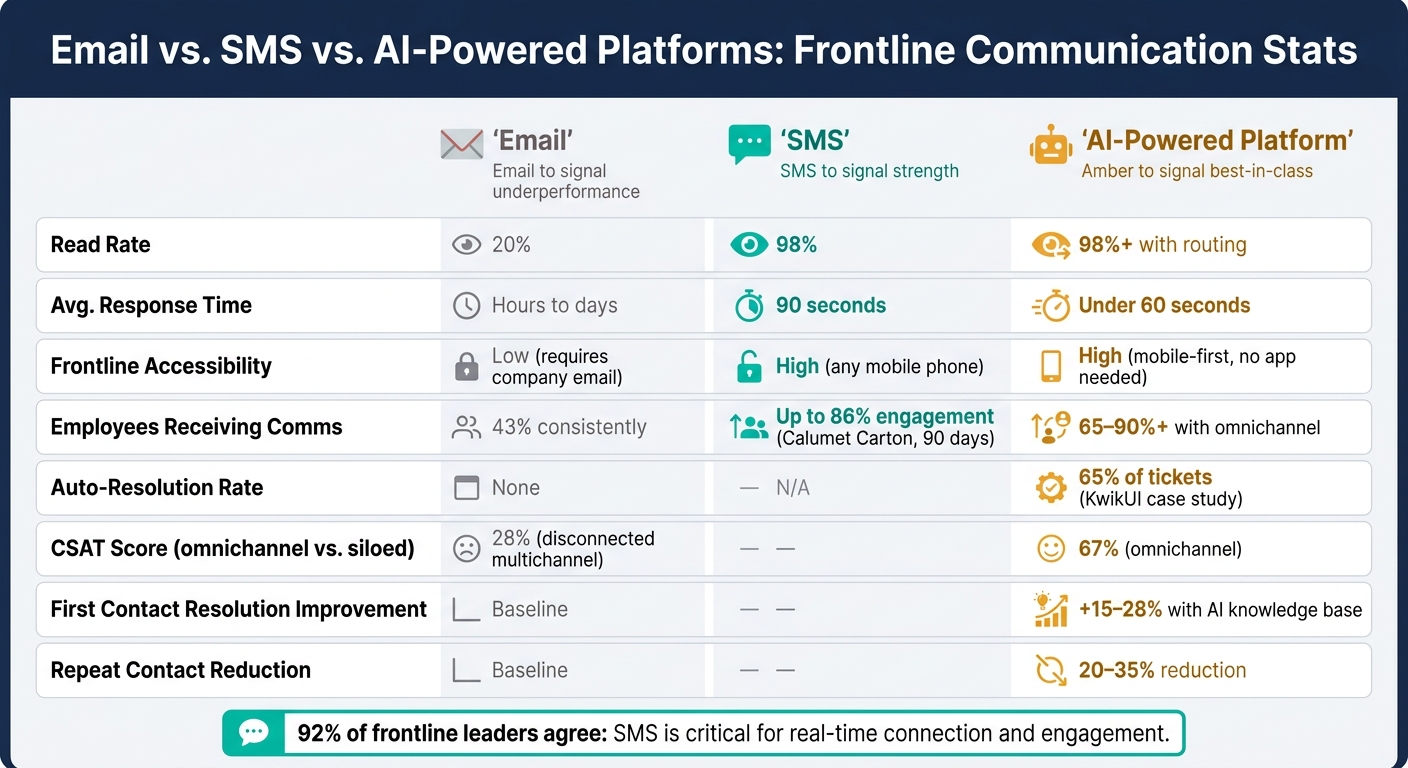
Email vs. SMS vs. AI-Powered Platforms: Frontline Communication Stats
Zello AI: How Ella and AI Digests Help Frontline Teams
sbb-itb-e60d259
Define Frontline Communication Needs Before Choosing Tools
Before introducing any new tool, it’s crucial to understand how frontline teams communicate in practice.
Map How Frontline Communication Works Today
Start by documenting every communication channel your team uses – both official and unofficial. This includes SMS, WhatsApp groups, verbal exchanges, paper logs, and even radio systems. These informal methods often pop up when official tools don’t meet the needs of frontline workers. Pay close attention to shift-change periods, as this is when critical information – like equipment issues, safety concerns, or incomplete tasks – can easily get lost as one team clocks out and another clocks in.
Also, take note of any unauthorized messaging apps employees rely on to bridge communication gaps. Robert Cain, Employee Relations Specialist at Yourco, highlights this issue:
"If your communication tool requires email, an app, or a smartphone, it’s not a frontline communication tool. It’s an office tool you’re trying to force onto a workforce it was never designed for." [1]
Research shows that only 43% of frontline employees consistently receive company communications, and just 36% actually read them [1]. This isn’t a lack of interest – it’s a mismatch between the tools and the workforce’s needs.
These observations will help you define the exact requirements for any new communication tool.
Turn Workflow Findings Into Tool Requirements
Once you’ve mapped out the communication landscape, transform your findings into specific tool requirements. Here’s how those needs translate into actionable features:
| Requirement | What It Means in Practice |
|---|---|
| Accessibility | Works on any phone – no app download, data plan, or company email needed [1] |
| Read receipts & audit trails | Ensures messages are not only sent but also received and understood [1] |
| Real-time messaging | Allows for instant, two-way communication rather than one-way broadcasts |
| CRM/backend integration | Enables workers to access live account or order data without switching platforms [3] |
| AI readiness | Automates routine tasks and provides analytics to reduce manual workload [2] |
| Multilingual support | Automatically translates safety alerts and instructions for diverse teams [1] |
SMS often stands out as the best foundation for frontline communication. It works on any mobile phone, boasts a 98% read rate, and gets responses within an average of 90 seconds – far outperforming email’s 20% read rate [1]. If a tool doesn’t meet these benchmarks, it’s probably not designed for frontline use.
Check Your Current Tools Against Those Requirements
Compare your existing tools against these requirements and be honest about any shortcomings. If employees are still resorting to personal messaging apps, even if your metrics look good on paper, it’s a clear sign the current tools aren’t cutting it [5]. This kind of audit will help you pinpoint specific areas for improvement, whether it’s adding read receipts, improving shift-handoff tracking, or enhancing mobile accessibility.
For example, at Calumet Carton Company, HR Manager Terri Kasper implemented an SMS-based platform that required no apps or Wi-Fi. Within just 90 days, it achieved 86% two-way employee engagement [1]. The key to its success? It eliminated the barriers that had made previous systems ineffective.
This process isn’t about overhauling everything at once. It’s about identifying gaps and making targeted, meaningful improvements to better support your frontline teams.
Build a Centralized, AI-Driven Support System
Once you’ve pinpointed communication gaps, the next step is to bring all your channels together into a single, unified system. Many teams juggle SMS threads, WhatsApp groups, Slack channels, and more – each operating in isolation. This fragmentation not only inflates costs but also hampers efficiency. Studies reveal that omnichannel support boosts CSAT scores to 67%, compared to just 28% for disconnected multichannel setups [4]. The key isn’t having more channels – it’s ensuring they’re connected. Here’s how consolidating channels can revolutionize case tracking and reporting.
Connect Frontline Channels to One Support Platform
Imagine a single inbox where every message – no matter its origin – becomes a trackable case complete with a detailed history. By tagging each message with its source and implementing deduplication, you can merge cases from the same contact within 30–60 minutes [6]. This is crucial for frontline teams, where customers might send the same query via SMS and WhatsApp within minutes. Platforms like Supportbench excel at this by consolidating case histories, contact records, and channel details into one view. This way, agents never have to ask, "Have we already discussed this?"
"Omnichannel support solves this by connecting every customer touchpoint into one coherent experience." – Nicolas Morvan, General Manager, Mava [4]
Use AI to Automate and Assist in Real Time
Once your channels are unified, AI can step in to enhance efficiency. Start with auto-summarization – AI can condense interaction histories, cutting handle times by 25–40% [8]. Then, leverage AI for intelligent routing and prioritization: automate responses for simple queries like order statuses or FAQs, while routing more complex issues to agents with full context included. Supportbench’s AI Agent-Copilot is designed for this, scanning case histories and knowledge bases to suggest relevant answers or draft responses for agents. Confidence thresholds ensure AI only handles responses when appropriate, escalating cases when certainty is higher [7].
Set Consistent SLAs and Escalation Paths Across All Channels
Service Level Agreements (SLAs) shouldn’t be one-size-fits-all. Different channels come with different expectations – responding to a WhatsApp message is often more urgent than replying to an Instagram DM. Your SLA framework should reflect these nuances while remaining centrally managed.
| Channel | Response Time Target | Escalation Priority |
|---|---|---|
| WhatsApp / SMS | < 5 min (auto) / 15 min (human) | Medium-High |
| Discord / Telegram | < 15 minutes | Medium |
| < 1 hour | Medium | |
| Phone | < 90 seconds on hold | High (immediate human) |
Automate escalation triggers to ensure urgent cases are handled promptly. For instance, set rules to bypass AI for keywords like "cancel", "chargeback", or "lawsuit", directing these cases straight to senior agents [9]. Sentiment analysis can also flag messages with high frustration levels for immediate escalation. Supportbench’s dynamic SLA engine supports such conditional logic, tightening response times automatically when cases show risk factors like repeated contacts or an upcoming renewal.
Between February and April 2026, KwikUI – a SaaS communication platform with over 3,000 users – introduced AI-powered routing, clear escalation triggers, and auto-responses for routine queries. The results were striking: 65% of tickets were auto-resolved, first-response times dropped from 4–6 hours to under 60 seconds, and churn decreased by 40% [9]. This success was possible because escalation paths were pre-defined, not improvised on the fly. These strategies are a game-changer, especially for mobile-first frontline teams, laying the groundwork for efficient and seamless communication practices.
Build Communication Practices Around Mobile-First Teams
With channels unified and AI managing tasks like routing and escalation management, the next step is figuring out how to communicate effectively through these channels. Messaging plays a huge role for mobile-first teams, especially since 83% of frontline workers don’t have access to corporate email [12]. These workers often have just seconds to check updates. Take Edinburgh Airport, for example: their internal communications team found that gate agents only had 45-second windows between tasks to review updates. This insight led them to redesign their "Gate 8" intranet for maximum brevity and speed [11]. The goal? Tailoring communication channels to meet specific operational needs.
Match Each Channel to a Specific Use Case
Every communication channel should serve a distinct purpose. If updates flood all channels indiscriminately, important messages can easily get lost. Here’s a breakdown of how to assign roles to different channels and optimize your support workflows:
| Channel | Best Use Case |
|---|---|
| SMS / Push Notifications | Urgent alerts, last-minute shift changes, and time-sensitive updates |
| Mobile App | Two-way feedback, training, and access to detailed tasks |
| Digital Signage | Passive updates, safety reminders, and team-wide performance indicators |
| Shift Huddles | Daily alignment and discussions requiring more context |
Servpro, which supports 15,000 franchise users across North America, has a "one message, 10 channels" approach. If a worker misses an app notification, the same critical update shows up on digital signage or video [11]. For frontline operations, redundancy isn’t overkill – it’s a necessity to ensure no one misses vital information.
Write Messages That Are Short, Clear, and Actionable
On busy factory floors or loading docks, long messages just don’t get read. Here’s a telling stat: 90% of text messages are read within 3 minutes, but only when they’re short and actionable [13]. For shift updates, consider using a simple SMS template: clearly state the task, note any changes, outline required actions, and include reply options (e.g., "Reply 1 for OK, 2 for ISSUE") [14]. For compliance or safety updates, requiring a digital acknowledgment ensures accountability while keeping things efficient.
Establish Two-Way Communication and Feedback Loops
One-way communication can leave frontline teams feeling disconnected. While 68% of frontline workers have ideas for improving their workplace, only 39% feel their voices are heard [12]. Tools like mobile pulse surveys, anonymous feedback forms, and structured issue-reporting systems give workers a direct way to share concerns before they become bigger problems.
For example, Euromaster, a French automotive service provider with 2,700 technicians across 450 locations, replaced fragmented manager relays with a mobile-first platform. This change empowered employees to generate 90% of the platform’s content and led to a 70% active usage rate [10]. When workers feel like contributors rather than just recipients, engagement naturally increases.
Turn Frontline Conversations into Knowledge and Insights
Every chat thread, SMS exchange, and app interaction your frontline team handles holds untapped potential – but only if it’s captured effectively. Ignoring this opportunity can be costly. For example, teams managing 10,000 tickets monthly may end up spending over $2 million annually re-solving issues they’ve already addressed [16].
Store and Organize Conversation History in One Place
The first step is ensuring nothing slips through the cracks. Chat threads, SMS messages, and in-app interactions should be stored as searchable case records, rather than being buried in inaccessible archives. This involves consistent tagging across channels, so each record clearly outlines the problem, attempted solutions, and the final resolution. For voice interactions, Automatic Speech Recognition (ASR) with at least 90% accuracy is essential for accurately capturing details [15]. Additionally, automated PII redaction must be implemented from the start to comply with regulations like HIPAA [15].
When all this data is consolidated into a single searchable platform, it makes life easier for your team. Whether troubleshooting, conducting compliance reviews, or preparing for audits, they won’t need to dig through multiple apps to find what they need.
Use AI to Build a Knowledge Base from Resolved Cases
Once conversations are stored, AI can transform them into reusable knowledge. One practical method is an "emoji workflow" within your chat platform. For instance, when an agent reacts to a resolved thread with a specific emoji (like :brain:), an AI bot automatically extracts the thread and drafts a knowledge article [17]. This approach keeps knowledge creation embedded in the workflow, eliminating the need for it to be a separate task.
"A Slack thread about fixing a production issue often contains better documentation than anything written after the fact – it includes the symptoms, the investigation steps, the red herrings, and the actual fix." – Terminal Skills [17]
AI-generated drafts usually achieve a 78–85% usefulness rate before human review [15]. However, a tiered approval process is still essential. High-risk content should be reviewed by subject matter experts, while general reference material can be published more quickly. Organizations that adopt systematic workflows for turning conversations into knowledge often see a 15–28% improvement in first contact resolution and a 20–35% reduction in repeat contacts [15]. Tools like Supportbench make this process easier, automatically converting closed cases into knowledge base articles, complete with subjects, summaries, and keywords.
Use AI Analytics to Track Performance and Spot Risk
Storing and organizing conversations is just the beginning. AI analytics can transform this data into actionable insights. Key metrics to monitor include First Contact Resolution (FCR), Average Handle Time (AHT), script adherence scores, and predictive CSAT – which predicts customer dissatisfaction before they even submit a survey. Supportbench’s AI Predictive CSAT tool excels at this, identifying risks at the case level so supervisors can intervene early.
AI also helps identify emerging trends 2–3 weeks before they escalate into larger issues [16]. By analyzing recurring friction points across informal channels, it highlights potential problems early. Monitoring "most-searched-but-missing" topics further exposes knowledge gaps – areas where frontline teams lack documented solutions [17]. As Alex James, SVP of Global Customer Support at Fivetran, explains:
"The north star was an AI-first support system where humans act as architects, governors, and escalation experts, not ticket processors." [18]
This is the direction to aim for: reducing time spent on repetitive tasks and focusing on building a smarter, more efficient system with every resolved case. These insights pave the way for continuously improving support operations.
Conclusion: Bringing Modern AI Support to Frontline Ops
Supporting frontline operations means designing tools that fit how these teams naturally communicate, rather than imposing outdated email systems they’re unlikely to use. This approach sets the stage for integrating channels and incorporating AI, as discussed earlier.
Start by identifying communication gaps, streamlining channels, and letting AI handle repetitive tasks. For example, Calumet Carton Company saw an 86% two-way engagement rate within just 90 days by implementing an SMS-based system – no app downloads or company email required [1]. Currently, only 43% of frontline employees consistently receive company communications [1]. This isn’t a people problem; it’s a tools problem. Mobile-first, AI-powered platforms ensure managers can connect with frontline workers effectively. With real-time AI support, automated processes, and built-in accountability, these platforms can help close the communication gap.
"The frontline is no longer the last mile of execution – it is the center of it." – MangoApps Team [19]
FAQs
What’s the fastest way to audit how our frontline teams really communicate today?
The fastest way to get insights is by conducting a 30-escalation review. Take your last 30 escalations and track a few key details: where the issue originated, how many handoffs occurred, whether important context was maintained, and the time it took before escalation happened. This process can reveal patterns and recurring problems. It also provides a chance to evaluate your Slack activity, such as the number of active customer-facing Slack Connect channels and the volume of support-related messages in your internal channels.
How can we unify SMS, chat, and app messages into one trackable support queue?
To bring SMS, chat, and app messages together, consider using an omnichannel support platform as your central hub. Start by auditing your current communication methods to ensure all channels feed into a shared inbox. This setup transforms incoming messages into trackable tickets, making it easier to manage and organize interactions.
With AI’s help, related messages can be grouped into threads, tickets can be prioritized automatically, and conversation histories are preserved. This minimizes the need for agents to switch between platforms or duplicate efforts, giving them complete visibility into customer interactions in one place.
Which frontline metrics should we track to prove ROI from AI and omnichannel support?
To show the ROI of AI and omnichannel support, focus on tracking metrics in four key areas: efficiency, quality, customer experience, and business outcomes.
For efficiency, monitor metrics like Ticket Deflection Rate, First-Contact Resolution (FCR), and Average Handle Time (AHT). When it comes to quality, evaluate AI performance by measuring accuracy and keeping an eye on hallucination rates.
For business outcomes, calculate ROI using this formula:
ROI = ((Total savings – Total AI costs) / Total AI costs) x 100.
Pay attention to metrics like retention rates and Customer Lifetime Value (CLV) to assess long-term impact.
These metrics provide a clear picture of how AI and omnichannel strategies contribute to overall success.






