


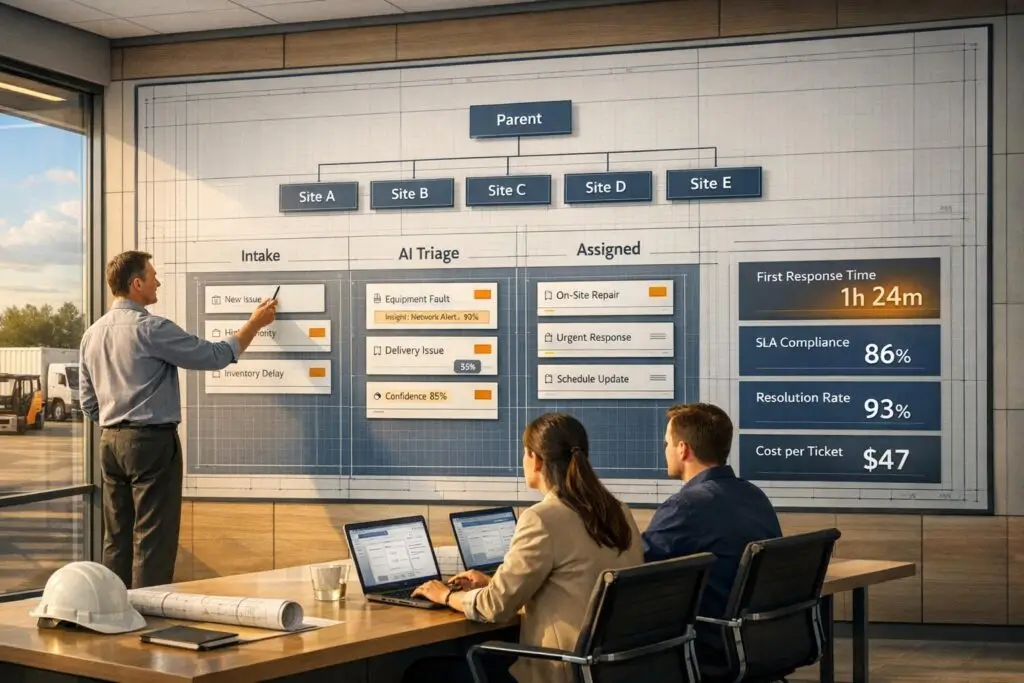
When supporting construction and logistics companies, standard helpdesk models often fail due to the complexity and time-sensitive nature of their operations. These industries require tailored systems to handle event-driven issues, like shipment delays or project disruptions, which can trigger multiple inquiries across teams. Here’s how to build an effective support framework:
- Account Structure: Use parent/sub-account hierarchies to manage multi-site operations and role-based permissions to streamline access.
- Efficient Intake: Simplify ticket submission with AI tools that extract details from emails and prioritize based on urgency.
- Aligned Support Hours: Match support availability with field operations, offering tiered coverage and faster response times for critical accounts.
- AI Integration: Automate triage, routing, and repetitive tasks to save time and reduce errors, ensuring quicker resolutions.
- Performance Tracking: Focus on metrics like escalation rate, repeat incidents, and response times to identify and resolve inefficiencies.
Building a Support Model for Construction and Logistics
How to Structure Accounts and Projects in Your Support Platform
In construction and logistics, accounts rarely follow a straightforward, single-contact approach. For instance, a general contractor might oversee multiple job sites, each with its own project manager, timeline, and unique set of challenges. Similarly, a logistics client may operate separate divisions for regional freight, last-mile delivery, and warehousing – each with distinct contacts and varying levels of urgency.
To handle this complexity, consider using a parent and sub-account hierarchy. This setup allows you to manage the overarching company relationship while keeping individual projects or divisions separate. It also ensures agents can quickly access a specific job site’s complete case history without sifting through unrelated tickets from other parts of the organization.
Integrate CRM data to enable AI-driven case scoring. This helps prioritize issues based on value and urgency. For example, a shipment exception for a key account should be flagged differently than a routine query from a smaller client.
Role-based permissions are another critical piece. These permissions ensure agents only see information relevant to their role. For example, a site supervisor doesn’t need access to billing disputes, and a dispatcher shouldn’t see notes about contract renewals. With this structure in place, you can focus on streamlining how support requests are received and routed.
Designing a Simple, Channel-Agnostic Intake Process
In the field, non-technical users often submit support requests with minimal details – maybe a quick email with a vague subject line and an attachment. Your intake process needs to account for this reality.
Start with an email-first workflow. Use AI to extract key details, such as tracking numbers or account information, directly from emails and attachments. A great example of this is Airlite Plastics. In February 2026, under the leadership of Senior Director of Supply Chain Jeremy Forster, the company implemented a track-and-trace AI system. This system automated 98% of tracking updates, eliminated manual carrier emails, and saved employees about an hour of manual work every day.
Natural language processing (NLP) can also enhance triage. Users in the field often mislabel issues or use vague language like "something’s wrong." AI that understands context and tone can classify and route cases accurately, even when users don’t provide precise details.
"AI determines priority not just based on a selected field or a single keyword, but by analyzing a confluence of factors." – Nooshin Alibhai, Founder and CEO, Supportbench
For support portals, keep required fields to a minimum – just contact details and a short description should suffice. Use dependent picklist fields with AI assistance to ensure accurate data collection on the back end while keeping the process simple for users [1].
Once you’ve streamlined intake, the next step is to align support hours with the needs of field operations.
Aligning Support Hours and SLAs with Field Operations
Construction crews often start their day early, and freight operations run around the clock. To meet these demands, implement tiered coverage. For strategic accounts, aim for real-time support with a 10-minute response target. For commercial accounts, a one-hour response window is often sufficient. Meanwhile, AI-powered self-service tools can handle routine inquiries 24/7, ensuring field teams get answers whenever they need them.
Design SLAs around project milestones and delivery deadlines to address urgent issues more effectively. For instance, keywords like "shipment lost" or signs of user frustration should trigger faster responses. Focus on resolution time rather than just response time. Proactive milestone alerts can also significantly reduce inbound inquiries – up to 64% fewer "where is my package" questions, according to some studies [4].
Finally, introduce an "In Transfer" status for tickets being passed between internal teams. This makes handoff delays more visible and prevents unresolved issues from slipping through the cracks.
Using AI to Improve Support Efficiency
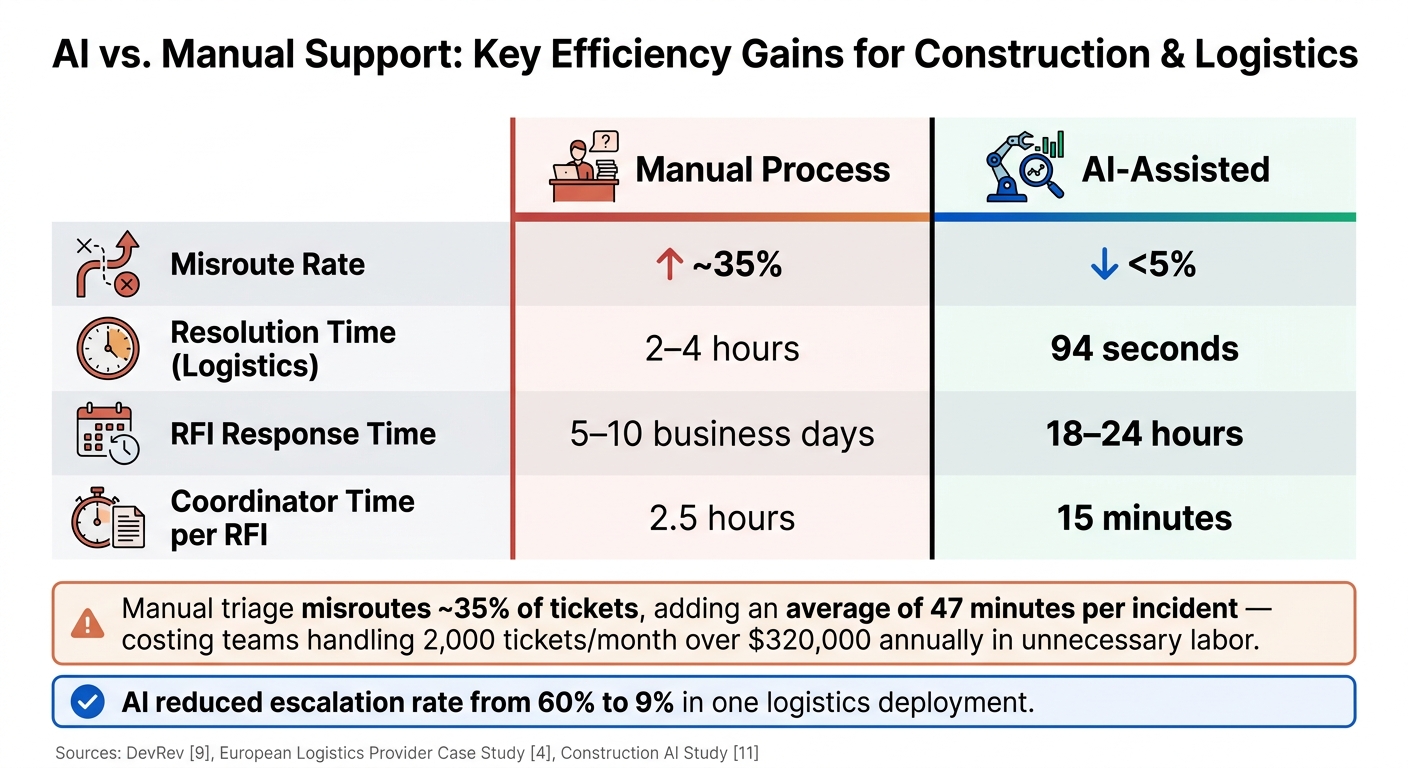
AI vs. Manual Support: Key Efficiency Gains for Construction & Logistics
AI-Driven Triage and Case Classification
Manual triage often leads to errors, with about 35% of tickets being misrouted. This adds an average of 47 minutes per incident [5]. For a team handling 2,000 tickets monthly, these inefficiencies can result in over $320,000 in unnecessary labor costs annually [5].
Modern AI triage systems go beyond basic keyword matching. Instead, they analyze complex relationships – like customer account details, product modules, known bugs, and project history – to assess the true urgency of a ticket. This kind of precision is especially critical in industries like construction and logistics, where a single unresolved issue could halt operations for 50+ workers, costing up to $50,000 per day [7].
AI prioritizes tickets based on real business impact, considering factors like project stages, contract renewal risks, and whether an issue disrupts field operations [5][7]. This ensures the ticket queue reflects actual risks rather than just the order tickets were submitted.
"The real opportunity isn’t just faster classification. It’s using AI support ticket triaging strategies that eliminate tickets by resolving them at the point of triage." – Neelabja Adkuloo, DevRev [5]
AI-driven classifications also integrate seamlessly with automated routing systems, ensuring tickets are directed to the right experts quickly and efficiently.
Intelligent Routing and Queue Management
Accurate ticket routing is essential for effective support. In construction, this might mean routing tickets by technical discipline (e.g., structural, MEP, or architectural) or jobsite location. In logistics, routing could depend on shipment type, regional division, or account tier.
For example, in April 2026, a European logistics provider implemented a composite AI system across five core platforms (WMS, TMS, CRM, accounting, and compliance). Within 18 months, their average resolution time dropped from 2–4 hours to just 94 seconds. Autonomous resolutions reached 99.2% across 1,200+ daily tickets, and annual support costs decreased by $980,000 [2].
To ensure reliability, automated routing flows should always offer a path to human agents. For instance, users might be prompted with, "Reply ‘no’ to connect with a person", so they never feel trapped [6]. Additionally, high-risk cases – like structural changes or safety-critical concerns – should always involve human review, even if AI drafts the initial response [7][8].
Here’s a look at the efficiency gains when AI supports routing:
| Metric | Manual Process | AI-Assisted |
|---|---|---|
| Misroute rate | ~35% | <5% [5][6] |
| Resolution time (logistics) | 2–4 hours | 94 seconds [2] |
| RFI response time | 5–10 business days | 18–24 hours [7] |
| Coordinator time per RFI | 2.5 hours | 15 minutes [7] |
Preventing Escalations with AI Copilots and Knowledge Tools
AI copilots help prevent escalations by instantly surfacing relevant case histories, contract details, and knowledge articles as soon as a ticket is opened. In fact, tools like Supportbench’s AI Agent-Copilot can search internal and external knowledge bases alongside past case records to suggest the most relevant context and responses, reducing the time agents spend hunting for information.
The results speak for themselves. In one logistics deployment, composite AI reduced the escalation rate from 60% to just 9% [2]. Similarly, in a $50M healthcare renovation project, AI agents indexed thousands of specification pages and drawings, cutting RFI response times from 8 days to just 16 hours. This saved over $2.1M in overtime and expedited costs [7].
"If you replicate this composite approach – starting with integration, then layering predictive flags, agentic resolution, and strict policy rules – you can turn high-volume, multi-system support work from a cost center into a defensible competitive advantage." – Elsa Petterson, Leadership Success Manager, Put It Forward [2]
For AI tools to succeed, a well-structured content architecture is essential [1]. Knowledge articles should be concise and focused on single topics, avoiding long, cluttered documents. This ensures AI tools can quickly provide accurate suggestions, delivering faster answers for field users and support teams alike.
Managing Long-Running Issues and Multi-Stakeholder Coordination
Structuring Cases for Long-Term Projects
Construction and logistics projects often extend over months, involving numerous teams, contractors, and system updates. Without a clear framework, critical context can easily slip through the cracks, forcing customers to repeat themselves during every handoff – a frustrating experience for everyone involved.
To avoid this, organize cases so that key project details – like contract terms, account history, and overall progress – are readily accessible alongside specific issues, such as delayed shipments, failed inspections, or billing disputes. Using AI insights from earlier interactions helps maintain clarity and ensures that no essential details are lost. This approach connects related information while avoiding the chaos of an unmanageable "mega-ticket."
Dynamic SLAs (Service Level Agreements) can further refine this process by adjusting deadlines in real-time based on urgency. For example, if an upcoming contract renewal or a dip in customer sentiment is detected, the system can automatically tighten response windows. Supportbench’s SLA engine adjusts timelines based on factors like customer tier, sentiment analysis, and renewal schedules, ensuring that high-priority cases get the attention they need.
Consistency in agent assignment also plays a vital role in preserving context. When handoffs are necessary, tracking key timestamps – such as Escalated, Claimed, and Started Times – can highlight where delays occur. Adding an "In Transfer" status with a secondary alert for unclaimed cases (e.g., after 2–4 hours) introduces another layer of accountability, ensuring no case falls through the cracks.
Coordinating Across Internal Teams and External Partners
Once cases are structured for long-term management, the next challenge is coordinating effectively across internal teams and external partners to prevent unnecessary delays.
"A haphazard approach to escalations directly undermines your team’s ability to deliver exceptional B2B service." – Nooshin Alibhai, Founder and CEO, Supportbench
Preloaded context is a game-changer here. Every escalated case should come with a comprehensive overview – including account history, prior communications, current SLA status, and AI-driven recommendations – so specialists can hit the ground running as soon as a case reaches their queue.
For cases involving external partners like subcontractors, freight carriers, or compliance auditors, internal notes with role-based visibility are a smart way to keep sensitive data secure while ensuring all parties stay aligned. By referencing AI tools and preloaded context, you can maintain a single source of truth that both internal teams and approved partners can rely on. This eliminates the confusion of scattered emails and spreadsheets, streamlining coordination and decision-making.
"Escalations have a much more significant impact than they realize. It’s a bottleneck that can be removed rather easily." – Tina Grubisa, Value Consultant, Mosaic AI
sbb-itb-e60d259
Tracking Performance and Improving Support Over Time
After diving into AI-driven triage and routing, the next step is tracking performance. This helps confirm progress and guides adjustments to maintain and improve support systems.
Key Metrics to Track for Construction and Logistics Support
For industries like construction and logistics, performance tracking goes beyond basic help desk metrics. These fields are project-based, involve on-site work, and often require collaboration among multiple stakeholders. Your metrics should reflect these unique challenges.
In addition to standard metrics like first response time and resolution time, two other metrics stand out: escalation rate and repeat incident rate. A high repeat incident rate for a single account can reveal deeper problems, such as system misconfigurations, recurring compliance issues, or breakdowns in team handoffs. Spotting these patterns early is far better than repeatedly fixing the same issue. These metrics tie directly to the efficiency and responsiveness improvements central to AI-powered support systems.
For logistics, tracking WISMO (Where Is My Order) inquiry rate is especially important. These inquiries often make up 40–60% of inbound support volume for logistics companies [9]. Monitoring how well AI handles these queries – measured by the AI deflection rate – can reveal the effectiveness of automation. Simple steps like proactive delivery updates can cut inbound inquiries by 25–35% [9].
| KPI Category | Specific Metric | Why It Matters |
|---|---|---|
| Efficiency | WISMO Deflection Rate | Tracks how many order tracking queries AI resolves without agent involvement [9] |
| Quality | Repeat Incident Rate | Identifies recurring issues linked to specific accounts or project phases |
| Responsiveness | Escalation Rate | Measures how often cases require escalation beyond standard resolution paths |
| Customer Experience | Resolution Time | Highlights how quickly teams resolve issues so field teams can stay productive |
By tracking these metrics, AI tools can predict trends and pinpoint areas for improvement, further refining support operations.
Using AI for Predictive Insights and Process Improvement
AI tools like Supportbench’s AI Predictive CSAT and AI Predictive CES bring a proactive edge to customer support. These tools can identify cases likely to result in a poor experience before a survey is even sent. For industries like construction and logistics, where one bad experience can jeopardize a long-term contract, this early warning system is invaluable. AI can also track sentiment shifts within accounts over time, giving support leaders a chance to address at-risk relationships before they escalate into major issues.
Take Pacific Freight Solutions, for example. This 450-employee logistics company implemented AI ticket resolution in early 2026. The results? A 47% reduction in support costs (saving $395,000 annually), a drop in resolution time from 4.2 hours to just 1.4 hours, and an NPS improvement from 34 to 51 – all within six months [3].
Turning Support Data into Actionable Insights
Tracking key metrics is only the first step. To truly drive improvement, raw data must be transformed into insights that decision-makers can act on. Operations managers, project leads, and account executives – who may not spend their days inside the support platform – need clear, digestible updates.
KPI scorecards and dashboards can bridge this gap. They turn complex data into easy-to-understand visuals, enabling weekly reviews of AI classification accuracy, monthly adjustments to routing strategies, and quarterly SLA updates based on evolving trends. Treat AI as an ongoing system that requires regular fine-tuning, not a one-and-done setup. Teams that embrace this approach often see continuous gains in efficiency and customer satisfaction over time [2].
Conclusion: Building Efficient Support for Non-Tech Buyers
Creating an effective support model for construction and logistics organizations requires more than just conventional solutions. These buyers are often on-site, managing multiple priorities, and don’t have the luxury of navigating cumbersome ticketing systems. A tailored approach is key to meeting their unique needs.
Recent case studies have demonstrated impressive outcomes, such as faster resolution times and reduced costs [2]. These successes are tied to robust knowledge management, adaptable SLAs, and AI-powered triage and routing. In this context, the operational model is just as critical as the technology driving it.
Supportbench stands out as a solution designed specifically for complex accounts and extended cases. It provides straightforward, actionable support without unnecessary complications – perfect for buyers who need quick, clear answers. Caitlyn Langston, Chief Technology Officer, highlighted this advantage:
"Supportbench is incredible at getting things done compared to other success and case management solutions I’ve used. In my opinion, it is incomparably superior when it comes to resolving end-user issues." [10]
The way forward is clear: adopt automated triage, dynamic SLAs, AI copilots, and precise metrics to capture real-world field experiences. As discussed earlier, aligning workflows with AI capabilities not only improves response times but also builds lasting trust with non-tech buyers. By streamlining processes and embracing automation, support operations can transform from a cost burden into a strategic advantage.
FAQs
What’s the best way to set up parent and sub-accounts for multi-site customers?
To manage multi-site customers effectively, it’s crucial to establish a clear hierarchy that connects subsidiaries and branches to a Global Ultimate Parent. Start by auditing your CRM data using a consistent identifier, like a domain name or DUNS number, to ensure all entities are accurately linked.
Centralize this information into a unified customer record. This simplifies management and ensures a single source of truth. For security, implement role-based access control (RBAC) so team members only access the data they need. Additionally, leverage AI-driven mapping tools to automate the process of defining relationships between accounts. This not only improves ticket routing but also enhances coordination across teams.
How can we use AI to triage vague field emails without slowing agents down?
Handling vague field emails can be a time-consuming challenge. Here’s where AI, especially with Natural Language Processing (NLP), steps in to make the process faster and more efficient. By analyzing the intent, sentiment, and urgency of emails in under two seconds, AI helps streamline the workflow.
Start with an AI-powered classification layer that integrates with your CRM. This allows you to prioritize high-value issues right away. During the initial rollout, use an "assist mode" where agents can confirm AI suggestions. Over time, you can enable auto-routing for low-risk cases, freeing up agents to focus on more complex, high-impact tasks. This approach ensures efficiency without losing the human touch where it matters most.
Which KPIs matter most for construction and logistics support teams?
Support teams in construction and logistics need to strike a balance between operational efficiency and delivering a positive customer experience. To achieve this, tracking the right KPIs is essential. Here are some key metrics to prioritize:
- First Contact Resolution (FCR): This measures how often customer issues are resolved during the first interaction. A high FCR minimizes repeat inquiries, saving time for both the customer and the support team.
- Resolution Velocity: Timely issue handling is critical in these fast-paced industries. This metric ensures problems are addressed quickly, preventing delays that could disrupt operations.
- Escalation Rates: Keeping escalation rates low – ideally under 5% – indicates that most issues are resolved at the initial support level, reducing complexity and costs.
- Cost Per Ticket (CPT): Monitoring CPT by category helps manage expenses effectively. For logistics, a typical range is between $6.00 and $18.00 per ticket.
- Customer Effort Score (CES): This metric evaluates how much effort customers must exert to get their issues resolved. A lower CES often correlates with higher customer loyalty, making it a valuable predictor of future satisfaction.
By keeping a close eye on these metrics, support teams can fine-tune their processes to meet customer needs while maintaining efficiency.
Related Blog Posts
- How to Manage Customer Support Across Multiple Products with Different Complexity Levels
- Zoho Desk vs. Supportbench: Which Offers Better Customization for B2B?
- Groove vs. Supportbench: Why Sales-Centric Tools Fail at Post-Sales Support
- Why Pylon’s “Slack Wrapper” Approach Breaks Down for Tier 2 Support






