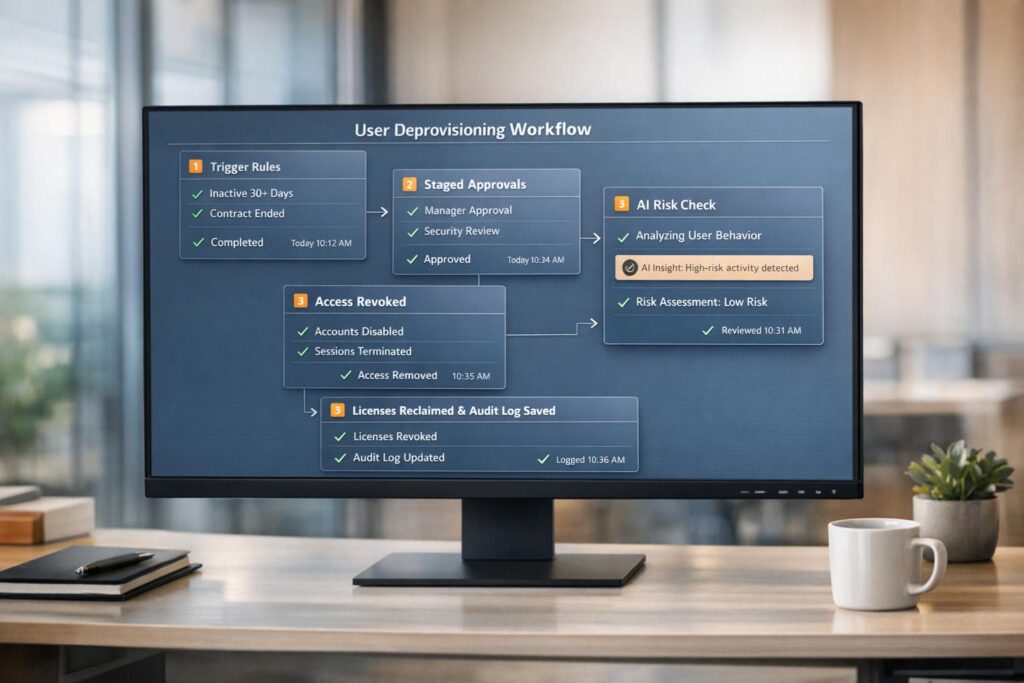
Automated deprovisioning is essential for securing your portal and meeting compliance standards. When users leave, failing to revoke access promptly can lead to security risks, compliance issues, and financial losses. Manual processes are slow and error-prone, often leaving orphaned accounts active. Automating deprovisioning ensures access is revoked across all systems, licenses are reclaimed, and audit trails are created.
Here’s a quick summary of how to implement it:
- Define requirements: Identify user roles, access levels, and triggers like HR status changes or inactivity thresholds.
- Set up automation: Create rules for deprovisioning actions, covering all apps, including those without SCIM support.
- Use a phased workflow: Suspend accounts, reclaim licenses, archive data, and delete accounts systematically.
- Leverage AI: Detect shadow IT, OAuth grants, and unregistered accounts to close security gaps.
- Test and monitor: Pilot the system, track metrics like Mean Time to Revoke (MTTRevoke), and review audit logs regularly.
Automating the process reduces risks, saves time, and ensures compliance with frameworks like SOC 2, ISO 27001, and HIPAA. Start small, refine over time, and focus on closing the window where security breaches can occur.
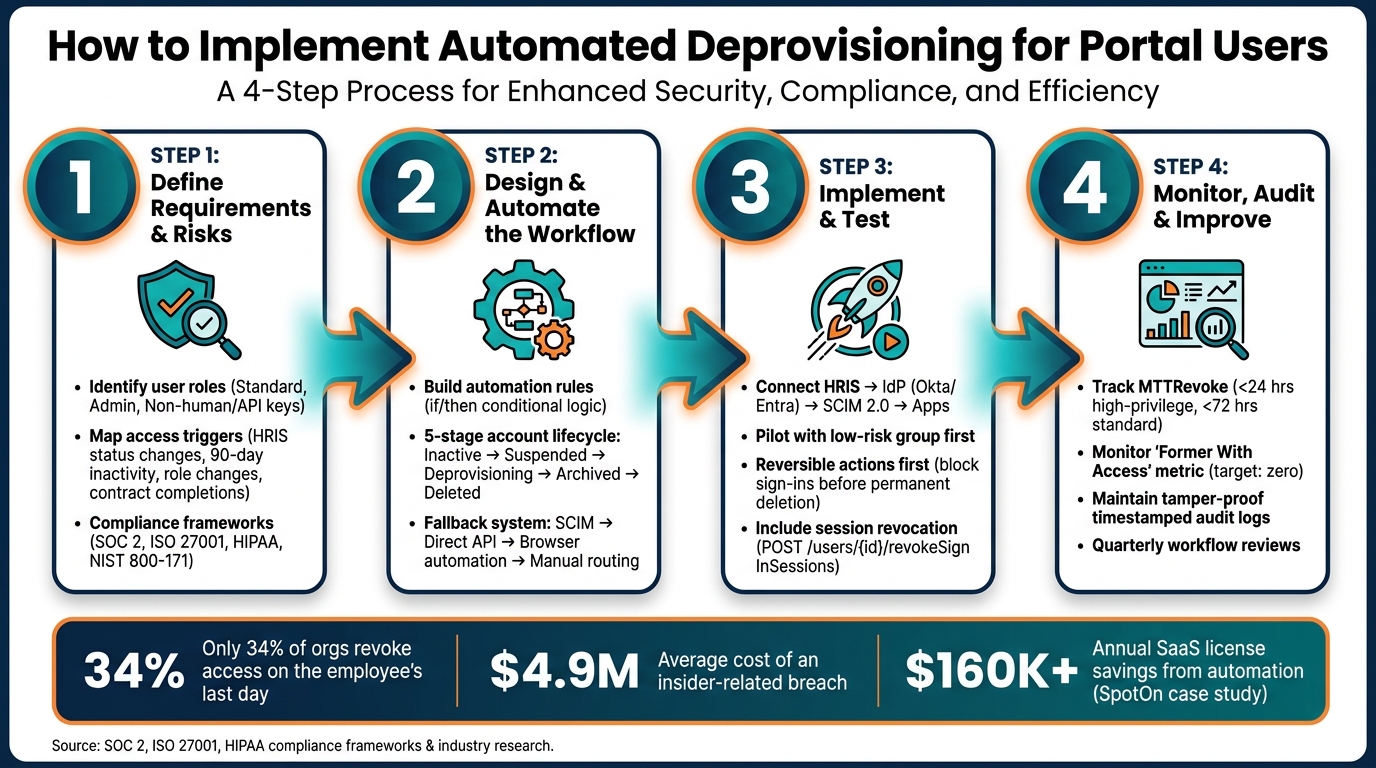
Automated User Deprovisioning: 4-Step Implementation Workflow
Automated User Provisioning and Deprovisioning | Best Practices
sbb-itb-e60d259
Step 1: Define Your Deprovisioning Requirements and Risks
Before diving into automating deprovisioning, it’s crucial to map out user access and identify the triggers for revocation. Skipping this foundational step often leads to gaps, which is a common reason deprovisioning projects fail.
Identify Portal User Roles and Access Levels
User roles come with varying levels of risk. For instance, a read-only user doesn’t pose the same threat as an admin with full control. Start by grouping your users into categories like standard users, project-level users, admins, and non-human identities (such as API keys and service accounts).
Once you’ve sorted users into these groups, map out their access across all systems: the core portal, SaaS tools, mailboxes, and downstream systems. Keep in mind that standard SSO and SCIM provisioning might only cover 60–70% of your SaaS stack, potentially leaving a 30–40% gap that requires manual intervention [2]. Pay special attention to high-risk roles – like admins, account owners, and finance-related users – and prioritize their access revocation [1][7].
Map the Events That Should Trigger Deprovisioning
Defining triggers upfront helps shift from a reactive to a proactive approach. The most reliable trigger is a status change in your HRIS system. Platforms like Workday, BambooHR, or Rippling can send real-time alerts when a user’s status changes, eliminating delays caused by manual ticketing systems [6][9].
Triggers should go beyond terminations. Include events like role or department changes to maintain least privilege, inactivity thresholds (90 days is a common standard) [5], project or contract completions for temporary users, and removal from an IdP group or app assignment. Each of these scenarios could lead to security gaps if not addressed quickly. These operational triggers also align with regulatory standards.
Understand Your Compliance and Security Obligations
To ensure both security and audit readiness, integrate compliance frameworks into your deprovisioning process. Here’s how major frameworks address access removal:
| Framework | Deprovisioning Requirement |
|---|---|
| SOC 2 | Requires timestamped logs to confirm access removal and ensure no inactive accounts retain access [2][9]. |
| ISO 27001 | Specifies Control A.9.2.6, which mandates a formal process for removing access rights at the end of employment or contracts [2][8]. |
| HIPAA | Demands immediate termination of access to ePHI upon departure and requires audit controls to document all access revocations [2][8]. |
| NIST 800-171 | Control PS.L2-3.9.2 mandates disabling or removing accounts when they are no longer needed [10]. |
Incorporating these compliance requirements strengthens your process and ensures reliability. One often-overlooked step is clearly defining revocation SLAs (service-level agreements). For example, privileged accounts should be disabled immediately, while standard accounts might be deprovisioned within 24 hours. By documenting these SLAs, you turn policy into actionable, enforceable timelines.
Step 2: Design and Automate the Deprovisioning Workflow
Now that you’ve mapped out your triggers and compliance requirements, it’s time to transform that foundation into a fully automated system.
Turn Deprovisioning Scenarios into Automation Rules
For every deprovisioning trigger identified earlier, you’ll need a matching automation rule. These rules rely on straightforward conditional logic. For instance: if an HRIS webhook signals a termination, then disable the SSO account, revoke all active sessions, and initiate a license reclamation task.
Combine event-driven triggers with condition-based logic to create tailored responses based on factors like role, department, or access level. Incorporating RBAC (Role-Based Access Control) inputs allows you to refine these rules, prioritizing actions according to the user’s role and its level of access.
One challenge to address is ensuring coverage across your SaaS stack. While standard SCIM provisioning can handle most applications, some apps lack SCIM support. To manage these, implement a fallback system with three layers: direct API calls for apps that support them, browser automation for apps without an API, and task routing to app owners for any remaining gaps [4].
Define the Stages of a Portal Account Lifecycle
Once your automation rules are in place, structure the deprovisioning process into distinct stages to ensure every aspect of account management is addressed systematically.
| Lifecycle Stage | Primary Action | Automation Trigger |
|---|---|---|
| Inactive | Flag for review or queue for deletion | 90 days of no sign-in events [5] |
| Suspended | Revoke sessions and disable SSO | HRIS webhook or termination event [1][6] |
| Deprovisioning | Reclaim licenses and rotate secrets | Completion of suspension phase [11][1] |
| Archived | Transfer file ownership / legal hold | Pre-deletion compliance check [12][8] |
| Deleted | Permanent removal from directory | Expiration of retention period [11][5] |
This phased approach ensures risks are mitigated at every step of the termination process. Pay special attention to the "Former With Access" window to shut down any lingering access points promptly. The table above outlines the triggers for each stage, and your workflow should include a clear step to detect and eliminate these access points within minutes of account suspension.
"Deactivating the IdP account does not offboard the user. The IdP account is the smallest surface a departing employee leaves behind." – Reco Security Experts [8]
Before deletion, always reassign ownership of files and workflows. For example, files in Google Drive or OneDrive, as well as any automation workflows the user managed, should be transferred to their manager automatically. Skipping this step can leave behind orphaned resources that are tough to recover later [12][8].
Use AI to Make Deprovisioning Smarter
With automation rules and staged workflows in place, AI can help fill the gaps left by legacy systems or shadow IT practices. AI tools can identify risks that rule-based systems might miss by scanning communication logs and flagging unregistered SaaS accounts – catching those that slip through traditional methods [9].
For sensitive roles, like administrators or executives, introduce a human-in-the-loop checkpoint. For example, a "Wait for Webhook" step can pause critical actions, such as permanent data deletions, until a SecOps lead or CTO approves. This ensures automation remains fast for routine cases while adding an extra layer of oversight for high-stakes scenarios [9].
"Automation acts as a rigid security enforcement policy, ensuring that every step defined in your protocol is executed without exception, every single time." – Latenode [9]
The end result is more than just a checklist. AI enhances the process by analyzing unstructured data, identifying anomalies, and flagging risks that a simple script might overlook. This shifts deprovisioning from being a routine task to an active component of your security strategy [9].
Step 3: Implement and Test Automated Deprovisioning
Automation isn’t just about convenience – it’s about ensuring your portal stays secure and compliant. To achieve this, precise implementation and thorough testing are key.
Connect with Identity and Access Management Systems
Your HRIS (like Workday, BambooHR, or Rippling) should act as the central source for triggering deprovisioning events when an employee or contractor’s status changes. These events can be sent via webhook or scheduled sync to your Identity Provider (IdP), such as Microsoft Entra ID or Okta. From there, changes are pushed downstream to connected applications using SCIM 2.0.
Here’s an important note: disabling an account doesn’t automatically end active sessions. To handle this, include a session revocation call (e.g., POST /users/{id}/revokeSignInSessions) in your process [13][15]. For applications that don’t support SCIM, consider using orchestration tools like Azure Functions or Power Automate to interact with their APIs directly. And remember, always rely on certificate-based authentication or Managed Identities for scripts – never hardcode passwords [14].
"Offboarding goes far beyond simply disabling an account – it requires a careful, methodical approach to revoke access across multiple services." – Sujin Nelladath, Microsoft Graph MVP [15]
Once these connections are set up, validate them through controlled pilot testing.
Run Pilot Tests and Verify Outcomes
Before fully deploying automation, simulate the process to log actions without executing them. These logs will help you identify and fix issues like attribute mismatches or permission errors [14][17].
Start small – pick a low-risk group, such as a single department or geographic region, for your pilot. Test a variety of scenarios, including full terminations, role changes, and contractor expirations – not just standard offboarding cases [16][19]. Don’t forget non-human identities like service accounts and API keys, which often carry significant permissions and can easily be overlooked [18]. Use clear metrics to measure success: ensure no termination triggers are missed, and avoid false-positive deactivations during simulations.
Once the pilot proves successful, you can proceed with a phased rollout to address any remaining edge cases.
Roll Out Automation and Tune the Configuration
After confirming the pilot runs error-free, start your phased rollout. Begin with reversible actions like blocking sign-ins and revoking sessions, while keeping permanent deletions subject to manual approval. This "disable-first" approach provides a safety net in case of unexpected issues [20][14].
As you expand automation to more departments, stay vigilant for edge cases that may not have appeared during the pilot. For example, shared credentials for vendor portals, OAuth grants from tools like Slack bots or GitHub Actions, and on-premises Active Directory accounts outside your SSO perimeter can all pose challenges [2]. SpotOn, a fintech company, discovered over 400 such gaps after automating their offboarding process – and saved $160,000 annually in SaaS license costs as a result [2].
To ensure reliability, use idempotent logic. This guarantees that rerunning processes after partial failures won’t lead to duplicate actions or unintended changes [14].
"Good identity automation does not just create accounts faster. It makes the right access happen consistently, and it removes access on time." – Vision Training Systems [14]
Step 4: Monitor, Audit, and Improve the Process
Once automated deprovisioning is up and running, the next step is all about keeping things on track and refining the system. Simply deploying automation isn’t enough – without regular monitoring and updates, workflows can fall behind evolving security needs.
Track the Right Metrics and KPIs
Focusing solely on metrics like SSO disablement isn’t sufficient. Instead, aim for a complete picture by measuring Mean Time to Revoke (MTTRevoke) – the time it takes from an HR termination event to fully removing all access points. This includes not just SSO access but also Shadow SaaS accounts, OAuth grants, API tokens, AI agents, and file ownership [8].
Here are some key metrics to monitor:
| Metric | What It Measures | Target |
|---|---|---|
| MTTRevoke | Time from HR event to full access removal | <24 hours (high-privilege), <72 hours (standard) |
| Former With Access | Departed users with lingering access | Single digits or zero |
| Automation Coverage | Percentage of apps deprovisioned without manual steps | 100% for SCIM/API-supported apps |
| Exception Aging | How long manual deprovisioning tasks remain open | <72 hours |
The "Former With Access" metric should ideally hit zero for users who left more than 30 days ago [8]. Another valuable measure is license recovery – track the dollar value of SaaS licenses automatically reclaimed and reassigned. This not only optimizes resources but also helps demonstrate the financial impact of your automation efforts to leadership. Together, these metrics provide a solid foundation for refining your process over time.
Keep Detailed Audit Trails
Audit trails are your safety net when issues arise or during compliance checks. Every deprovisioning event should create a tamper-proof, timestamped log that includes the trigger event, specific actions taken (e.g., account disabled or deleted), before-and-after access states, and any required approvals [8][1].
"Automated de-provisioning systems maintain detailed records of access removals, providing an audit trail for security audits and compliance checks." – OpenIAM [16]
These records are especially critical for audits like SOC 2 or ISO 27001. According to Stitchflow, 47% of audit failures stem from incomplete offboarding evidence – often because apps outside the IdP’s scope weren’t logged [21]. Don’t overlook non-human identities like service accounts, API keys, and bots, as they often hold extensive permissions and can be easily forgotten [18].
To streamline this, automate the creation of evidence packages as part of the deprovisioning process. This way, audit records are automatically generated, saving time and reducing human error. Regularly reviewing these logs ensures your process evolves to address emerging security risks.
Review and Update Workflows on a Regular Schedule
What worked six months ago might not fit today’s app stack, compliance rules, or user roles. Set a quarterly schedule to review offboarding metrics and audit results, catching any misalignments before they become security gaps [21].
During these reviews, use AI-driven insights – like "last-used" data or dormant account alerts – to spot privilege creep or missed accounts. Studies show that security teams often uncover three to four times more applications in use than IT initially recorded [8]. Use these discoveries to fine-tune your automation rules and ensure nothing slips through the cracks.
Conclusion: Building a Secure and Efficient Deprovisioning Process
Automated deprovisioning isn’t just a convenience – it’s a critical security measure. The stats back this up: only 34% of organizations revoke access on the day an employee leaves, and 20% have faced breaches caused by former employees [3]. Relying on manual processes simply can’t match the pace or complexity of today’s access environments.
To get it right, start by linking your process to your HRIS as your central source of truth. Disable the primary identity within the first hour, and ensure access revocation extends to every corner – OAuth grants, API tokens, AI agents, and file ownership. This aligns with the earlier steps: defining clear requirements, automating workflows, and rigorous testing. From there, monitor performance, enforce SLAs, and use audit trails to maintain compliance.
Delays in deprovisioning can have serious consequences.
"When a new hire starts, a 24-hour delay in setting up their Slack access is inconvenient. When an employee leaves, a 24-hour delay in revoking their access is a security incident." – Mohit Sanjay, eZintegrations [22]
The financial argument is just as strong as the security one. Insider-related breaches cost an average of $4.9 million [22], while an automation platform typically costs just a few thousand dollars annually [22]. Add in savings from SaaS license recovery, reduced IT ticket volumes, and reclaimed labor hours. For example, Rula saved two full days of IT labor per week after implementing offboarding automation [21], proving a clear return on investment.
If your current process relies on manual checklists or ad-hoc IT tickets, start small. Standardize your workflows, automate SCIM-enabled apps, and address shadow IT and non-API tools over time. The goal isn’t to achieve perfection immediately – it’s about shortening the window between an employee’s departure and full access revocation. That window is where security breaches thrive [23].
FAQs
What should my offboarding SLA be?
Your offboarding process should prioritize swift action, especially for employees with high-risk or privileged access. The goal? Revoke access within 45–60 minutes of termination. Automating workflows can help make this happen by disabling accounts, revoking active sessions, and removing credentials efficiently. For less critical accounts, a 24–72 hour window may be acceptable, but automating tasks and ensuring smooth coordination between HR and IT is essential to reduce security vulnerabilities.
How do we deprovision apps without SCIM?
To handle app deprovisioning without SCIM, you’ll need to go beyond basic SSO and incorporate an automation layer to manage apps your identity provider can’t directly control.
For apps that support admin APIs, set up your workflow engine to interact with their disable or delete endpoints. If no APIs are available, AI-driven browser automation can step in to perform admin interface tasks. When programmatic options are entirely unavailable, assign and monitor manual tasks through ITSM tools or messaging platforms to ensure everything gets done properly.
How do we revoke tokens and active sessions fast?
To block sign-ins swiftly, disable the user in your IdP or SSO. This step immediately revokes tokens and sessions. Next, use your IdP’s options like “revoke sign-in sessions” or “clear user sessions” to invalidate any active sessions and credentials. Be sure to revoke API or OAuth tokens and remove any MFA methods to prevent re-authentication attempts.
For apps under your control, ensure they reject revoked tokens and require users to log in again. Keep in mind, though, that some third-party apps may only terminate sessions once the tokens naturally expire.