Want to resolve support tickets faster? The secret lies in improving diagnostic data collection. Many delays in resolving tickets stem from incomplete details provided during the intake process. This results in back-and-forth communication, wasted time, and frustrated customers. Here’s how to fix that:
- Map your workflow: Identify where diagnostic processes break down and pinpoint delays caused by tool-switching or missing context.
- Standardize intake: Collect key details upfront, such as error messages, environment specifics, and timestamps.
- Use AI tools: Automate diagnostics, route tickets accurately, and suggest solutions to speed up resolutions.
- Measure and improve: Track metrics like "time to first useful response" and create reusable resources from resolved cases.
How to Use AI to Resolve Support Tickets Faster
Mapping Your Current Diagnostic Workflow
Before you can fix issues in your diagnostic process, you need to understand where things are breaking down. This means tracing the entire journey of a support case – from when a customer submits a ticket to when an agent has all the information they need to start debugging.
Document Your Diagnostic Data Flow
Start by mapping out every entry point for tickets – email, live chat, web portals, and in-app submissions. For each channel, determine where the diagnostic data ends up once the ticket is created. In many B2B support setups, critical information is spread across multiple systems, such as your CRM, product admin tools, an observability platform like Datadog or Splunk, and your help desk. Creating a flowchart can help you identify excessive handoffs that slow down access to complete case context.
"The ‘work’ starts before debugging starts." – Matthew Plotkin, Head of Accounts, Inkeep [1]
Pay close attention to Tier 1-to-Tier 2/3 escalations – this is often where context gaps become most problematic. If your escalation process doesn’t include key elements like an environment snapshot, relevant log traces, or a summary of similar past cases, your senior engineers are left starting from scratch every time.
From there, identify exactly where these handoffs and tools are causing delays.
Find Gaps and Common Delays
Once you’ve mapped the workflow, look for areas where tickets get stuck. Common culprits include tool-switching and time-consuming tasks like pulling logs, searching through internal documents, or copying data between systems. For example, if agents spend an extra 5 minutes per ticket and handle 25 tickets a day, that’s over an hour of lost productivity per shift. For a team of 100 agents, this adds up to around $1.1M in annual salary waste. [2]
Another issue to watch for is doc drift – when your knowledge base describes functionality that no longer exists in the product.
"A big chunk of the tickets you’d otherwise escalate aren’t bugs. They’re doc drift. The KB promised something the code doesn’t do, or stopped doing." – Thomas Hils, 10+ year veteran of customer support [3]
To uncover these inefficiencies, shadow agents during their shifts and track every tool they use outside the core help desk. Ask them directly which tasks slow ticket progress. Their feedback will often reveal your biggest bottlenecks faster than any analytics dashboard. [2]
By pinpointing these inefficiencies, you can start building the case for AI-driven solutions to streamline diagnostics.
Use Historical Data to Measure Impact
Dive into past case data to identify patterns: which ticket types required multiple rounds of clarification? Which ones consistently breached SLA? Which escalations forced engineering teams to ask follow-up questions before making progress?
The quality of escalations is especially revealing.
"Escalation rate was the obvious metric. Escalation quality was the useful one: how thorough was the writeup, did engineering have to come back, did the ticket move forward without a hard stop." – Thomas Hils, 10+ year veteran of customer support [3]
Tools like Supportbench can help you filter historical case data by resolution time, escalation path, and SLA outcomes. Focus on tickets where the "agent working" status dragged on without any visible updates to the customer – this often signals manual log retrieval or tool-switching delays. [2] Once you’ve measured the cost of these inefficiencies, you’ll have a clear baseline to assess improvements moving forward.
Building a Diagnostically Complete Intake Process
Refining your intake process starts with ensuring that all necessary diagnostic data is collected upfront. Most delays in resolving issues don’t stem from debugging – they’re rooted in vague or incomplete information gathered during intake. A well-structured process can save time and resources by eliminating unnecessary follow-ups.
Define What ‘Diagnostically Complete’ Means
A diagnostically complete ticket includes the critical "Five Ws", giving agents or engineers everything they need to act without needing additional details. Here’s what this looks like:
- Who is affected: Account ID, User ID, and permissions.
- What is happening: Exact error messages and request IDs.
- Where it’s occurring: Browser version, operating system, and whether it’s happening in production or staging.
- When it started: Timestamp of the first occurrence and how often it happens.
- Under what conditions: Steps to reproduce the issue and session recordings.
"Verbatim error text beats retyped descriptions every time." – Syed Ali, Pluno [4]
To standardize this process, consider creating a reference table for your team. This table should outline each diagnostic element, the specific data to collect, and its purpose:
| Diagnostic Element | Specific Data to Collect | Purpose |
|---|---|---|
| Who | Account ID, User ID, Permissions | Identify scope and access levels |
| What | Verbatim error messages, Request IDs | Pinpoint specific failure points in logs |
| Where | Browser version, OS, Environment (Prod/Staging) | Rule out client-side compatibility issues |
| When | Timestamp of first occurrence, Frequency | Correlate with system deploys or incidents |
| Conditions | Steps to reproduce, Session recordings | Allow engineering to replicate the failure |
Sharing this schema with your team helps ensure everyone is aligned before escalating an issue. Keep in mind, every hour spent investigating a customer ticket costs around $55 in direct expenses, not to mention the disruption to other work [4].
Use AI-Driven Dynamic Intake Forms
Dynamic forms with conditional logic can streamline data collection by tailoring fields based on the customer’s issue. For instance, selecting "Technical Bug" could automatically prompt for environment details and reproduction steps, while choosing "Billing" might lead to invoice-related questions. This approach keeps forms concise for customers while ensuring relevant details are gathered [5].
"A well‑designed intake form acts like a structured conversation: it asks the right questions in the right order [and] adapts based on what the user says." – Charlie Clark, Ezpa.ge [5]
Dynamic forms should validate required fields and offer inline guidance to ensure completeness. For simpler issues, they can even prevent a ticket from being created by directing users to self-help resources [6]. To make the data actionable, structured fields like "Issue Type", "Product Area", and "Environment" should rely on dropdown menus rather than free text. This ensures consistency and improves downstream automation for routing and prioritization [5].
Equip Agents with AI-Assisted Diagnostic Checklists
Even with dynamic forms, live interactions – like chats or phone calls – require additional support. AI-assisted diagnostic checklists can guide agents through clarifying questions, surface relevant past cases, and pull from knowledge bases in real time, reducing the need to switch between tools.
A single Slack query can disrupt focus for 30–45 minutes [4].
"Repetitive questions are a design problem, not a destiny." – Charlie Clark, Ezpa.ge [6]
Agents should also focus on isolating variables – testing on different devices or networks, for example – to narrow down the issue. Recording these findings during the interaction, rather than after escalation, minimizes back-and-forth communication. Additionally, AI-driven diagnostic tools can cut new-hire training time by 40% to 71%, making them a worthwhile investment beyond immediate ticket resolution [4].
These tools and processes set the stage for future AI automation, ensuring a smoother resolution workflow from start to finish.
sbb-itb-e60d259
Automating Diagnostics and Triage with AI
AI automation takes diagnostics and triage to the next level by immediately processing inquiry details. With a complete diagnostic intake, AI can analyze, route, and suggest solutions, cutting out delays in handling tickets.
Automate Diagnostics at Case Creation
The biggest bottleneck in resolution time isn’t the debugging process – it’s the lag between ticket submission and the start of investigation. AI eliminates this delay entirely.
By querying databases, scanning logs, reviewing error trackers, and analyzing recordings, AI delivers a diagnostic summary complete with evidence and recommended actions [4]. Instead of starting from scratch, agents open tickets already equipped with context and insights.
"The engineering escalation loop happens because support cannot reach the code, logs, database, and error tracking that hold the underlying cause… Automate the investigation layer." – Syed Ali, Pluno [4]
AI can also identify customer-side issues – like a misformatted CSV file – and resolve them independently, bypassing the need for engineering involvement [4]. This AI-driven troubleshooting has been proven to shorten mean time to resolution (MTTR) by over 80% [7].
Use AI to Route Cases to the Right Teams
Once diagnostics are automated, AI ensures tickets are routed to the appropriate teams. Manual triage often leads to errors, with 15–25% of tickets being reassigned – each reassignment adding about 47 minutes to resolution time [8].
AI is moving beyond rule-based routing, which struggles with unexpected customer phrasing, to what’s called "Era 3" agentic triage. These systems use knowledge graphs to map connections between customers, products, features, and known bugs, pinpointing root causes before routing the ticket [8].
AI also enhances prioritization by considering factors like customer ARR, renewal risks, and sentiment trends. This ensures high-priority accounts get the attention they need, directly improving resolution times for critical cases. For instance, one company reduced its average resolution time from 129.8 hours in February 2024 to 62.7 hours by January 2025 after adopting AI-driven routing and root cause analysis [8].
Build Reusable Diagnostic Runbooks
Recurring issues can be tackled more efficiently with reusable diagnostic runbooks, providing a clear roadmap for agents. When paired with AI, these systems suggest the next diagnostic steps based on available data [8]. Knowledge graph–enhanced solutions further refine these runbooks in real time, adapting to new bugs or product updates without requiring retraining [8].
One organization implemented this AI-powered approach across its data and documentation, achieving a 70%+ autonomous resolution rate and saving $5 million [8]. By allowing AI to handle the groundwork and guiding agents with structured runbooks, resolution times drop significantly, improving both efficiency and outcomes.
Improving Diagnostic Processes Over Time
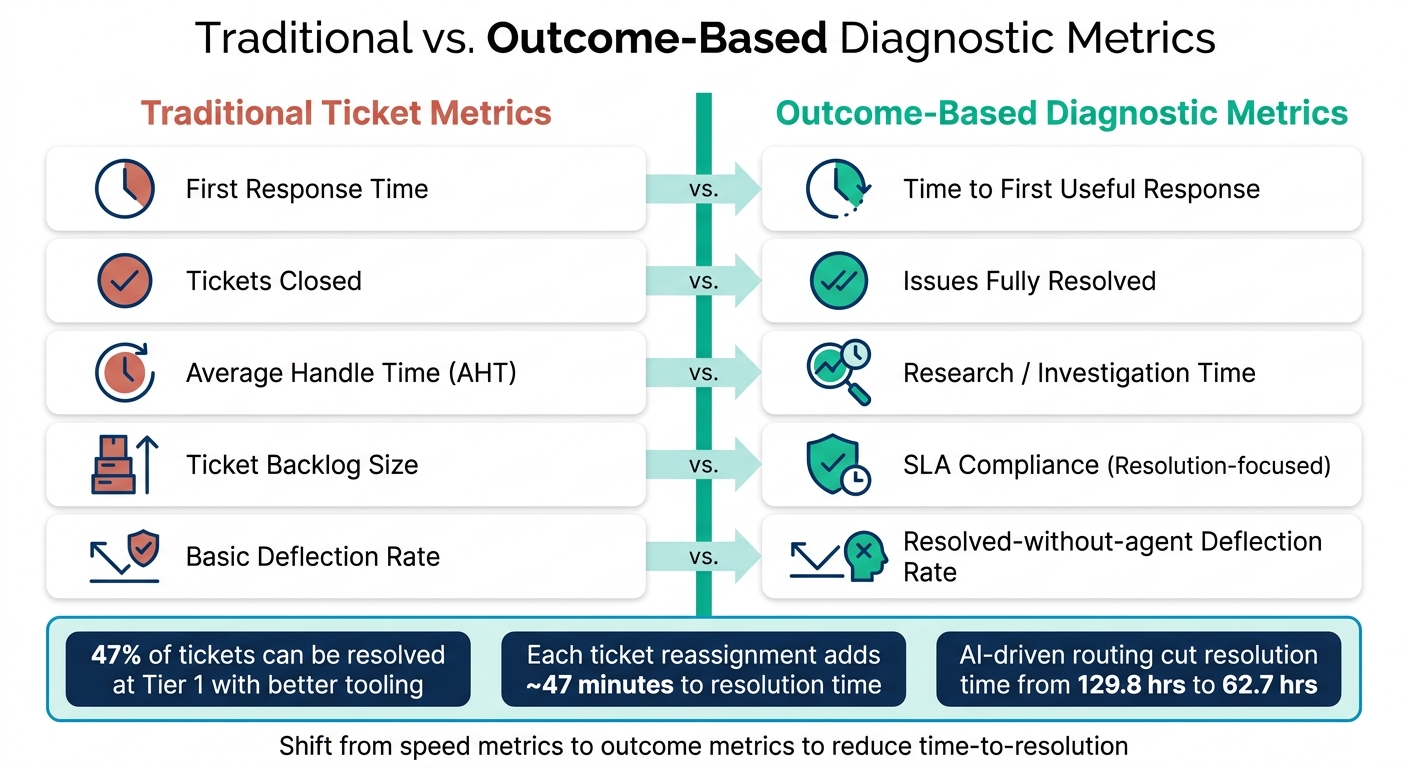
Traditional vs. Outcome-Based Diagnostic Metrics for Faster Ticket Resolution
Automation and structured intake can take you a long way, but teams that consistently excel in reducing time-to-resolution treat diagnostics as an evolving system that needs regular updates and improvements.
Track Diagnostic Quality Metrics
Traditional metrics often focus on speed rather than the actual resolution of problems. Metrics like first response time and tickets closed only show how fast things are moving, not how effectively issues are being solved. Instead, focus on outcome-based metrics to gauge true problem-solving efficiency.
One standout metric for technical B2B support is time to first useful response – the time it takes from when a ticket is opened to when the customer receives a response that includes meaningful context and a clear next step.
"Time from ticket open to the first useful response – meaning a response that includes key context and a clear next step, not just ‘we’re looking.’" – Matthew Plotkin, Head of Accounts, Inkeep [1]
In addition to this, monitor metrics like Tier 1 resolution rate and ticket reopen rate. A high reopen rate often signals that tickets are being closed prematurely without fully resolving the issue. For B2B environments, where problems are typically more complex, consider defining "resolution" within a five-business-day window instead of the shorter 24–48-hour standard used in B2C settings.
| Traditional Ticket Metrics | Outcome-Based Diagnostic Metrics |
|---|---|
| First Response Time | Time to First Useful Response |
| Tickets Closed | Issues Fully Resolved |
| Average Handle Time (AHT) | Research/Investigation Time |
| Ticket Backlog Size | SLA Compliance (Resolution-focused) |
| Basic Deflection Rate | Resolved-without-agent Deflection Rate |
Using these metrics, you can turn every resolved ticket into an opportunity to improve your diagnostic process.
Turn Resolved Cases into Diagnostic Resources
Closed tickets can become valuable diagnostic tools when knowledge-centered service (KCS) practices are integrated into the resolution process. This approach ensures that diagnostic data is preserved as part of the workflow [10].
"Knowledge creation should happen in the flow of work, not separate from it. When an agent resolves a ticket, they shouldn’t hand off a note to the knowledge team to document later. Instead, they should document the information as part of the ticket-solving process." – Tina Grubisa, Mosaic AI [10]
AI can make this process scalable. Instead of requiring agents to draft articles from scratch, AI tools can analyze resolved tickets and generate knowledge base content automatically. Agents then act as reviewers, not writers [10]. For example, in March 2026, HR platform HiBob used Mosaic AI to create over 800 support articles from existing case data. This led to a 30% reduction in time-to-resolution and a 40% drop in overall ticket volume [10].
To decide which cases to convert into resources first, prioritize tickets with long handle times and high escalation rates – these are often the areas with the most room for improvement.
Train Teams on Diagnostic Best Practices
Building on documented insights, continuous training ensures that diagnostic quality keeps improving. The most effective training sessions use real cases rather than abstract theories. Regularly review both successful and less effective diagnostic efforts. Analyze what information was collected initially, where clarification was needed, and whether escalations included all relevant context.
Shift the focus of training from escalation rate to escalation quality. High-quality escalations – with thorough diagnostic write-ups – help cut down on unnecessary follow-ups. Better knowledge automation and diagnostic tools can help resolve nearly 47% of tickets at Tier 1 [10], indicating that many escalations stem from training and tooling gaps rather than the complexity of the issues.
New agents, in particular, face challenges in this area. In B2B support, it typically takes 3 to 6 months for new hires to work independently and 9 to 12 months to reach full productivity [10]. Tools like standardized intake templates, AI-generated diagnostic drafts, and tiered review systems – where senior agents review new hires’ work – can significantly shorten this learning curve without creating bottlenecks.
Conclusion: Key Steps to Faster Resolutions
The key to quicker resolutions lies in gathering better information right from the start. Every strategy in this guide ties back to one core idea: when diagnostic data is thorough and accessible, support agents can focus on solving problems instead of hunting for missing context.
To refine your diagnostic process, focus on these steps: identify workflow gaps, ensure diagnostic completeness, use AI for intake and triage, and continuously improve diagnostics based on resolved cases. These steps work together, strengthening the overall process.
The results speak for themselves. Between January and May 2026, Cynet revamped its diagnostic and triage systems. This led to a reduction in time-to-resolution from a week to just 4–5 days, a 47% ticket deflection rate, and a jump in CSAT scores from 79 to 93 points [11][9]. Adi Boxer, Director of Global Customer Support at Cynet, explained:
"Time to resolve went from one week to 4-5 days. It dramatically reduced the noise and the time it takes to get an answer." [11]
Beyond operational improvements, better diagnostic capture enhances customer satisfaction. When customers don’t have to repeat themselves, escalations include full context, and support teams shift from reactive problem-solving to proactive prevention, the customer experience transforms. Josh Solomon, General Manager and VP of Revenue at Mosaic AI, highlighted this shift:
"There’s an opportunity for support to move from a very reactive state… to one that is much more proactive, where the measure of success is how impactful support is at driving great customer outcomes." [9]
Ultimately, refining your diagnostic process is an ongoing effort. By committing to better data capture, you pave the way for faster resolutions and stronger customer relationships.
FAQs
What diagnostic details should every ticket include?
Every support ticket needs to cover the essentials for effective troubleshooting. Include who is affected, what is happening (be sure to note any exact error messages), where the issue occurs (specific device, browser, or environment), when it started and any patterns you’ve noticed, and the conditions under which it happens (such as OS or app version, and steps already attempted). Providing screenshots and the exact error text can also make diagnosing the problem much easier and more precise.
How do we measure diagnostic quality (not just speed)?
Diagnostic quality hinges on three key factors: accuracy, completeness, and evidentiary support – not just how quickly a diagnosis is made. AI-powered QA systems evaluate interactions based on elements like tone, accuracy, adherence to processes, and the quality of resolution. To dig deeper, metrics such as diagnosis score, resolution score, and compliance with best practices are used. These tools provide a well-rounded assessment of how thorough and correct the diagnostic process is, moving the focus beyond just speed.
Where should we automate diagnostics first for the biggest MTTR drop?
The triage stage is the ideal starting point for automating diagnostics if you want to see the biggest reduction in Mean Time to Resolution (MTTR). By automating root cause analysis and resolution during this phase, you can aim to resolve tickets instantly whenever feasible. AI tools excel here – they can address known issues, walk users through solutions, and enhance ticket details. This approach cuts down on delays caused by manual troubleshooting and unnecessary ticket processing.