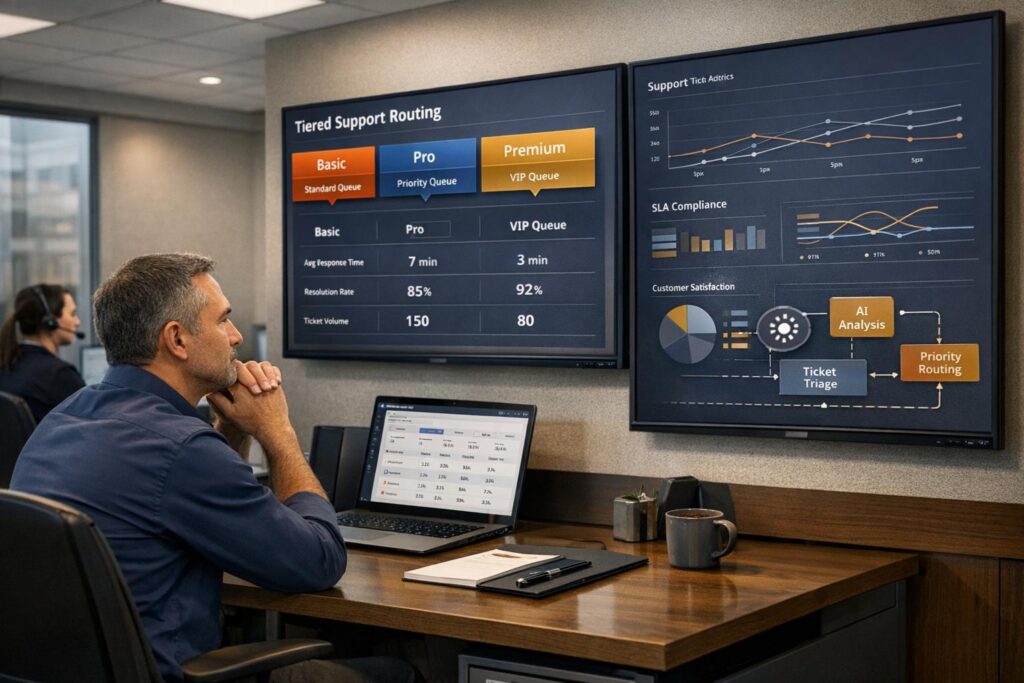
Struggling to balance support for all customer tiers? Here’s the challenge: Enterprise customers expect fast, high-touch service, but ignoring lower-tier users can lead to churn and missed SLAs. This article breaks down how to create a support routing system that prioritizes high-value customers while keeping service commitments to everyone.
Key Takeaways:
- Tier-Based Routing: Allocate resources based on product tier and ticket urgency using a priority score.
- Dynamic SLAs: Adjust response times based on customer value, issue severity, and timing.
- AI Automation: Use AI to classify and assign tickets, reducing errors and saving time.
- Safeguards: Protect expert teams from low-priority tickets and ensure consistent service for all tiers.
Quick Stats:
- 60% of customers say long wait times are their biggest frustration.
- Misrouted tickets increase churn risk 3x within 90 days.
- AI triage can cut SLA breaches to under 5% in 10 days.
The solution? A clear routing matrix, AI-driven workflows, and regular system reviews to keep everything running smoothly.
How to Organize A Tier 1, 2, 3 Customer Service Team
sbb-itb-e60d259
Understanding Product Tiers and Support Tiers
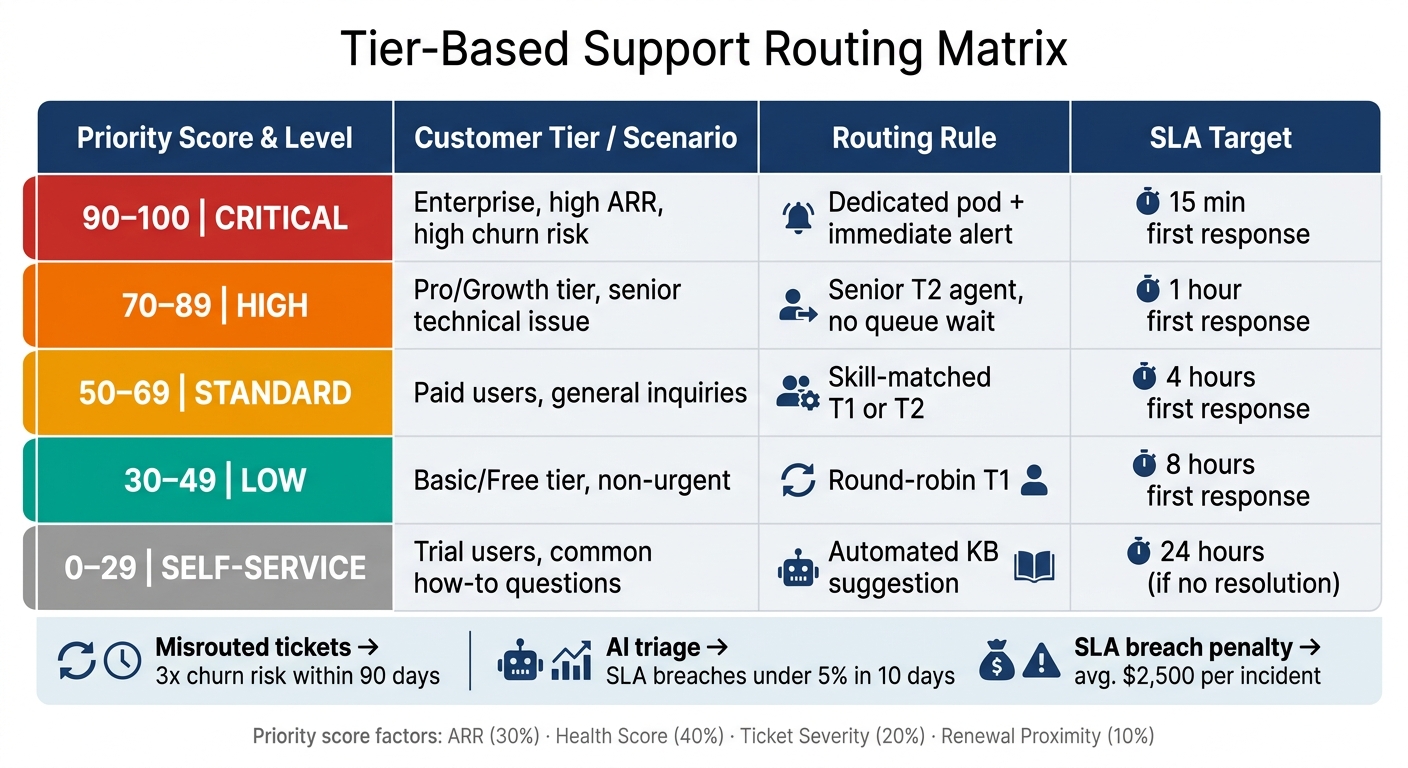
Tier-Based Support Routing Matrix: Priority Scores, SLAs & Routing Rules
Defining Product Tiers and Their Support Entitlements
Product tiers – like Free, Basic, Pro/Growth, and Enterprise – go beyond simple pricing distinctions. Each tier comes with specific support entitlements, which define the service levels, communication methods, and expertise customers are guaranteed.
For example, a Basic customer might only have access to email support with an 8-hour first-response window. On the other hand, Enterprise customers typically expect a 15-minute response via phone or chat with a senior specialist. These aren’t just guidelines – they’re contractual obligations. Failing to meet these expectations at the Enterprise level can have real financial consequences, with average SLA breach penalties hitting $2,500 per incident [4].
Mapping Support Tiers to Product Tiers
Once you’ve established support entitlements, the next step is connecting them to your internal support structure – such as T1 generalists, T2 specialists, or dedicated Enterprise Pods. This alignment ensures that routing decisions are consistent and efficient.
Modern routing systems often rely on a composite priority score. This score takes multiple factors into account, such as account ARR (30%), customer health score (40%), ticket severity (20%), and renewal proximity (10%) [4]. For instance, a billing question from a $200,000 ARR account nearing renewal will be treated with urgency, even if the issue itself seems routine.
"A billing question from a $200K ARR account in renewal is infinitely more urgent than a feature request from a $5K ARR account on month 2 of a 12-month contract." – US Tech Automations [4]
Here’s how priority scores can guide routing and SLA targets:
| Priority Score | Customer Tier / Scenario | Routing Rule | SLA Target |
|---|---|---|---|
| 90–100 (Critical) | Enterprise, high ARR, high churn risk | Dedicated pod, immediate alert | 15 min first response |
| 70–89 (High) | Pro/Growth tier, senior technical issue | Senior T2 agent, no queue wait | 1 hour first response |
| 50–69 (Standard) | Paid users, general inquiries | Skill-matched T1 or T2 | 4 hours first response |
| 30–49 (Low) | Basic/Free tier, non-urgent | Round-robin T1 | 8 hours first response |
| 0–29 (Self-Service) | Trial users, common "how-to" | Automated KB suggestion | 24 hours (if no resolution) |
Even with a strong mapping strategy, it’s essential to regularly review and adjust the system to address any imbalances or fairness issues. Without these reviews, SLA performance and resource distribution can start to falter.
Spotting Fairness Gaps and Resource Overuse
Even a well-designed system can develop inefficiencies over time. One common issue is "cherry-picking", where agents prioritize easier tickets from lower tiers, leaving complex, high-value issues unresolved. Teams using self-assignment often experience 2.3× greater variation in individual workloads compared to automated systems [4]. This imbalance can lead to missed SLAs and uneven workloads.
The solution lies in your historical data. Analyze 90 days of ticket records to identify key patterns, like your misrouted ticket rate (tickets reassigned at least once) and SLA breach distribution by tier. If you notice that lower-tier tickets are consuming too much senior agent time or that Enterprise-level tickets are breaching SLAs despite their priority, there’s likely a gap in your routing logic. These issues don’t always show up in dashboards – you’ll need to dig into the data to uncover them.
Designing a Fair Tier-Based Routing Policy
Once you’ve identified gaps in your routing process, the next step is to create a policy that prioritizes high-value customers while still meeting the needs of lower-tier users. At the heart of this policy lies a well-constructed routing matrix.
Building a Routing Matrix
A routing matrix is the foundation of a tier-based system. It connects incoming tickets to the right support level, taking into account factors like product tier, case severity, customer health score, and the required expertise.
Support is typically structured into five layers:
- Tier 0: This is self-service, including resources like knowledge bases, AI chatbots, and FAQs. It allows customers to find quick answers without human intervention.
- Tier 1: Acts as a filter, handling high-volume, simple requests before passing complex cases to specialists.
- Tiers 2 and 3: These tiers manage more technical challenges, with Tier 3 focusing exclusively on expert-level issues and high-value accounts.
- Tier 4: Handles external vendor support for third-party components, freeing up internal experts for higher-priority tasks [5].
The matrix should clearly define how tickets are routed across all combinations of tier and severity. For instance, even a high-priority (P1) issue from a lower-tier customer should follow a specific path – like assignment to a Tier 1 agent with a 4-hour SLA. This clarity forms the basis for fair and efficient routing.
Adding Safeguards to Keep Routing Fair
One of the biggest challenges in tier-based routing is the lack of proper safeguards. Without them, expert teams may get bogged down with basic issues, lower-tier tickets might be ignored, and escalation rates could spiral out of control.
Here are a few safeguards to consider:
- Protect expert resources: Make Tier 3 accessible only through defined escalation triggers, such as a P1 severity classification or a failure by Tier 2 to resolve the issue within SLA. This prevents unnecessary manual reassignments or agent preferences [1][2].
- Monitor escalation rates: Compare your rates to industry benchmarks, aiming for less than 20% of tickets escalating from Tier 1 to Tier 2, and under 10% moving from Tier 2 to Tier 3 [1].
- Standardize severity classifications: Use consistent P1–P4 classifications across all tiers. For example, a full system outage for a Basic-tier customer should still be treated as a P1 and receive an immediate response [1].
"SLA policies aren’t about control – they’re about creating predictable rhythm." – Toms Krauklis, RevOps & Customer Success, NC Squared [6]
Using Dynamic SLAs and Prioritization Rules
Static SLAs often fail to address the complexities of real-world scenarios. For instance, a blanket "4-hour response for Pro tier" rule might not reflect the urgency of a Pro customer facing a critical issue like a data sync failure. Dynamic SLAs adapt to the situation by considering factors like customer health scores, case severity, and real-time agent availability [6].
These SLAs aren’t fixed at ticket creation. They can tighten if the customer’s situation worsens or the issue escalates. For example, if a 2-hour first-response target is missed, the system should automatically reassign the ticket to the next qualified agent, avoiding delays caused by manual intervention [6]. Aetna adopted this dynamic approach, tailoring SLA-driven routing by product type, region, and agent availability. This change saved the company 8 hours of manual case assignment work every day [6].
Setting Up AI-Driven Routing Workflows
Handling support tickets manually can be a time sink. On average, it takes 2–6 minutes per ticket for manual triage, with a misrouting rate of 10–20% [3]. Worse yet, every time a ticket is reassigned, resolution time increases by about 47 minutes. And the stakes are high – just one misrouted ticket can make a customer three times more likely to churn within 90 days [8].
Automating Case Classification and Assignment
AI-driven triage simplifies this process by analyzing three key signals from each ticket: intent, urgency, and complexity. It then enriches the ticket with customer data – like plan tier, monthly recurring revenue (MRR), health score, and VIP status – pulled directly from your CRM. Using this information, the system calculates a priority score and assigns tickets to the correct queue [3].
The results speak for themselves. By leveraging vector databases to compare new tickets with historical data, AI classification can achieve 93% precision [7]. For example, a startup that adopted AI-driven triage saw its SLA misses drop below 5% in just 10 days [3]. For teams managing around 400 tickets weekly, this kind of automation can save about $600 per week in agent time, assuming a $30/hour pay rate [3].
To maintain accuracy, it’s wise to set a confidence threshold. If the AI assigns a ticket a confidence score below 0.6, it should flag it as "needs_review" and send it to a human triage queue. This ensures that low-confidence cases don’t slip through the cracks [3].
"The pain wasn’t technical. It was seconds and minutes lost on a simple decision: what is this ticket, who should get it, and how urgent is it?" – Kai Devlin, AI Automation Engineer [3]
This automated system not only reduces errors but also frees up agents to focus on more complex and impactful cases.
Using AI to Close Support Quality Gaps
Tier 1 agents often struggle to resolve complex issues due to a lack of context, leading to unnecessary escalations – especially for Basic or Starter customers. AI agent copilots bridge this gap by reviewing past cases, consulting internal documentation, and tapping into the full knowledge base. These copilots provide real-time suggestions while agents work on tickets, making the process smoother and faster.
Supportbench’s platform takes this a step further by generating concise internal summaries – just 2–3 sentences – when a ticket is created. These summaries highlight the customer’s plan, the main issue, and the desired outcome, saving agents 3–5 minutes of reading time per case [3]. One mid-market B2B SaaS company serving 4,200 accounts used this approach to reduce its misrouting rate from 15% to just 2.1% within 90 days. The result? An impressive recovery of $380,000 in annualized revenue [8].
AI doesn’t just help agents – it also transforms self-service, which we’ll explore next.
Improving Self-Service with AI
AI-powered self-service tools handle many Tier 0 inquiries before they even reach an agent. Supportbench’s Customer QA AI Bot, for instance, uses structured FAQ and knowledge base content to intelligently answer common questions. If it can’t find an answer, only then does it create a new case. This approach deflects routine queries, allowing agents to focus on more complex problems.
The impact is undeniable. BILL, an AI-native platform, achieved over 70% autonomous resolution of support tickets. This not only saved the company $5 million but also improved the overall customer experience [9].
Measuring and Refining Your Routing System Over Time
Getting your routing system up and running is just the start. To keep it effective as your products, customer base, and teams evolve, you need to measure its performance and make adjustments over time. This process relies on tracking the right metrics and using insights to refine your approach.
Tracking Key Metrics by Tier
Different customer tiers require tracking specific metrics to ensure the system works efficiently. For example, if your misroute rate exceeds 8%, it’s a clear sign that your automated routing needs improvement [8]. Similarly, dynamic SLA compliance reveals whether high-value customers are getting the service they were promised – and whether lower-tier customers are being unintentionally overlooked [8].
Another critical metric is the escalation rate by issue type. If you notice a spike in escalations from a particular product area, it might mean Tier 1 agents need better training or that your self-service content (Tier 0) is outdated [10].
Metrics like reopen rates and agent utilization also highlight inefficiencies. A high reopen rate usually means tickets are being closed before the root problem is resolved, often due to rushed handoffs. Agent utilization, on the other hand, measures how much time your team spends on actual problem-solving versus administrative tasks like manual triage. Considering that every ticket transfer takes an average of 11 minutes across the agents involved [8], even small improvements in this area can save a lot of time.
These metrics not only help you identify areas for improvement but also pave the way for using AI to uncover deeper issues like hidden biases or service inconsistencies.
Using AI Insights to Detect Bias and Service Drift
Over time, routing bias can creep into your system. AI-driven quality assurance tools can help by analyzing predictive CSAT scores and sentiment trends across different customer tiers. For instance, if sentiment scores for Basic-tier customers drop while Enterprise-tier scores stay steady, it might indicate that your routing policy is unintentionally deprioritizing lower-tier customers, even if your SLAs don’t explicitly reflect this [10].
To improve routing accuracy, you can use a technique called reasoning extraction. This involves requiring your AI system to explain its decision-making process before finalizing a routing choice. By auditing these explanations regularly, you can catch mistakes like misjudged urgency or tier entitlements [7].
For teams managing more than 20 intent categories, a cascading classifier approach can help maintain accuracy. In this setup, a top-level model first routes queries into broad categories like "Technical" or "Billing", and then a second model handles the finer details [7].
"Traditional routing based on static rules like skills and queues often fails to capture the complexity of today’s expectations, while AI-powered routing can use context to optimize outcomes." – NiCE [11]
Reviewing and Updating Routing Policies Regularly
Metrics and AI insights should lead to regular updates in your routing policies to keep them fair and effective as your business grows. A good schedule includes monthly reviews of NLP intent categories and agent skill sets, along with quarterly reviews of your overall routing matrix, SLA thresholds, and ARR-based priority rules [8]. Before rolling out changes, test them alongside your current system for at least 48 hours to catch any edge cases [8].
It’s also important to establish a set of hard escalation rules that AI cannot override, no matter how confident the system is. For example, tickets containing keywords like "security breach", "data loss", or "payment failure" should always go directly to a specialist [11]. These rules act as critical safeguards, protecting both your customers and your business from high-stakes errors.
"AI routing is not ‘automation for automation’s sake.’ It’s an operating model upgrade: turning intent and context into real-time decisions so work flows to the right resolution path the first time." – Ameya Deshmukh, EverWorker [11]
Conclusion: Balancing Efficiency, Fairness, and Customer Satisfaction
A tier-based routing system works best when it’s designed as a structured process, not a hierarchy that prioritizes premium customers over others. The key takeaway? Think of your support tiers as a funnel. Address straightforward, repetitive issues early with self-service tools and frontline agents. Reserve your specialists for complex cases that genuinely require their expertise. And when escalations happen, ensure the handoff includes enough context so customers don’t have to repeat themselves.
The numbers back this up. Misrouted tickets can dramatically increase churn rates within 90 days. On the flip side, a great service experience directly impacts revenue. 73% of customers report that a positive service experience influences their decision to renew or expand [4].
"A tiered customer support model is a routing system. It is not just a hierarchy chart. The point is to resolve simple work early, protect specialist time, and move complex cases upward with enough context to avoid wasted handoffs." – William Westerlund, Suptask [10]
FAQs
How do I calculate a fair priority score?
A fair priority score comes from evaluating measurable factors like impact (e.g., how many users are affected or the potential revenue impact) and urgency (e.g., the risk of escalation). To do this, you assign weights to specific attributes such as customer value, urgency, and system status. These weights are then combined using a weighted scoring model, which adds up the values to create a clear priority ranking.
AI tools can also step in to analyze tickets in real time, assessing elements like sentiment and revenue impact. This approach ensures prioritization is both consistent and objective, leaving less room for bias or guesswork.
What rules stop lower tiers from being ignored?
To ensure lower-tier requests aren’t overlooked, it’s essential to implement strategies that balance efficiency with fairness. One effective approach is prioritizing requests based on their enqueue time. This ensures that all requests, regardless of tier, are handled in the order they arrive, preventing any group from being sidelined.
Another key tactic is setting up routing rules with fallback options. These rules help redirect resources when higher-tier demands are low, ensuring lower-tier requests still receive attention. Additionally, using explicit priority settings and fairness-aware policies can further distribute focus across all tiers. Together, these measures help maintain service quality while ensuring no tier is left behind.
When should AI routing send tickets to humans?
When automation falls short – whether it’s unable to resolve an issue, prioritize effectively, or handle cases that demand a human touch – AI routing should pass the ticket to a human. This is especially important for situations involving high impact, urgency, or sensitive sentiment that require human judgment. Additionally, when specialized knowledge or deeper context is necessary, or if automation rules are unclear and overrides point to human involvement, escalating to a person ensures the issue is addressed accurately and maintains the quality of support.
Related Blog Posts
- How to Manage Customer Support Across Multiple Products with Different Complexity Levels
- How do you handle support for “mission-critical” customers without building a VIP mess?
- Omnichannel Routing Logic: Balancing Chat, Email, and Portal Loads
- Queue design: by severity, by team, by product, or by customer tier?