


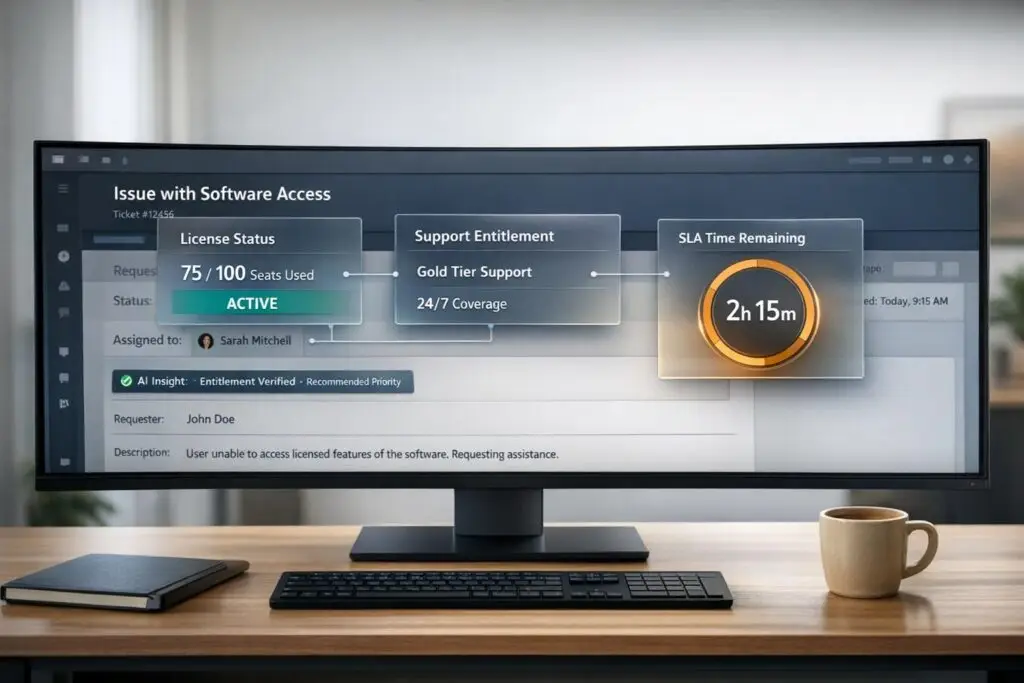
Support teams waste nearly an hour daily searching for scattered contract and licensing data. This inefficiency impacts case resolution times, SLA compliance, and customer satisfaction. By centralizing this data into support workflows, teams can resolve cases faster, prioritize high-value accounts, and reduce errors.
Here’s what you need to know:
- The Problem: Licensing and contract data is fragmented across CRMs, billing systems, and spreadsheets, leaving agents without quick access.
- The Solution: Integrate key data fields like contract status, SLA terms, and renewal dates directly into your support platform.
- The Outcome: Faster resolutions (up to 83% improvement), fewer escalations, and reduced revenue loss from missed renewals.
To get started:
- Identify systems holding licensing data (e.g., CRM, billing platforms).
- Standardize and connect data across tools using APIs or middleware.
- Configure agent views to display critical contract details for case triage and resolution.
Platforms like Supportbench simplify this process by integrating licensing data into workflows, ensuring agents have the right information at the right time. Start by auditing your current systems and defining the most critical contract fields your team needs.
What Licensing and Contract Data Your Support Team Actually Needs
Give your support team the tools they need to make quick, informed decisions by ensuring they have access to the right data.
Core Licensing and Contract Fields for Support Teams
To provide effective support, agents must know if a customer is eligible for assistance and understand the scope of their entitlements. This requires instant access to key details like contract status, support tier, SLA parameters, and license type – whether it’s a perpetual license, subscription, or maintenance agreement. Additionally, understanding the license model (e.g., per-user, per-core) helps in resolving issues related to access or usage limits.
Here’s a breakdown of the essential data categories and why they matter:
| Data Category | Essential Fields | Why It Matters for Support |
|---|---|---|
| Contract Core | Contract ID, Status, Vendor, Approver | Confirms whether the customer is eligible for service before initiating support |
| Entitlements | Support Level (e.g., Gold/Platinum), SLA Terms | Determines response times and escalation paths |
| Licensing | License Model (User/Core/Device), License Type | Helps identify overuse or licensing violations |
| Lifecycle | Expiry Date, Renewal Terms, EOL/EOS Dates | Flags upcoming renewals or outdated software |
| Financials | MRR/ARR, Billing Contact, Payment Status | Provides insight into account health for escalations |
Two often-overlooked fields are the node-locked and user-locked flags. These are critical for resolving access issues like "activation failed" errors. The resolution often depends on how the license is bound [4].
Supplementing these core fields with additional metadata can make case triage and prioritization even more efficient.
Metadata That Helps Agents Triage Cases Faster
Metadata beyond the contract itself provides the technical context needed to route and prioritize cases effectively. Key factors include the product module, environment (e.g., production vs. development), and customer region. These details influence how cases are handled and ensure the right resources are allocated.
EOL (End-of-Life) and EOS (End-of-Service) dates are particularly valuable. If an agent can quickly see that a customer is using software past its EOL date, they can focus on migration support rather than troubleshooting issues that stem from outdated software [4]. When combined with usage trends and open ticket history, this metadata helps teams identify accounts at risk of churn before they escalate [1].
Keeping licensing data accurate is essential to maintain these advantages.
Keeping Licensing Data Accurate and Up to Date
Data accuracy is a persistent challenge. On average, CRM systems have less than 80% accuracy, and poor data quality costs organizations around $12.9 million annually [1]. Inaccurate or outdated data slows agents down and undermines customer trust.
To ensure data accuracy, ownership is key. Every critical field – contract status, renewal dates, license counts – needs a designated owner and a clear update schedule. Automated tools that scan infrastructure for software installations and version changes can significantly reduce the manual workload, ensuring agents see the most up-to-date usage data rather than outdated contract records [4]. Additionally, automated alerts for license or contract expirations at 30, 60, and 90 days can help prevent service disruptions [2][3].
Another simple but effective practice is enforcing mandatory fields for Contract ID and License Type when creating new records. This ensures no critical data is missed at the point of entry [2].
sbb-itb-e60d259
How to Connect Licensing Data to Your Support Platform
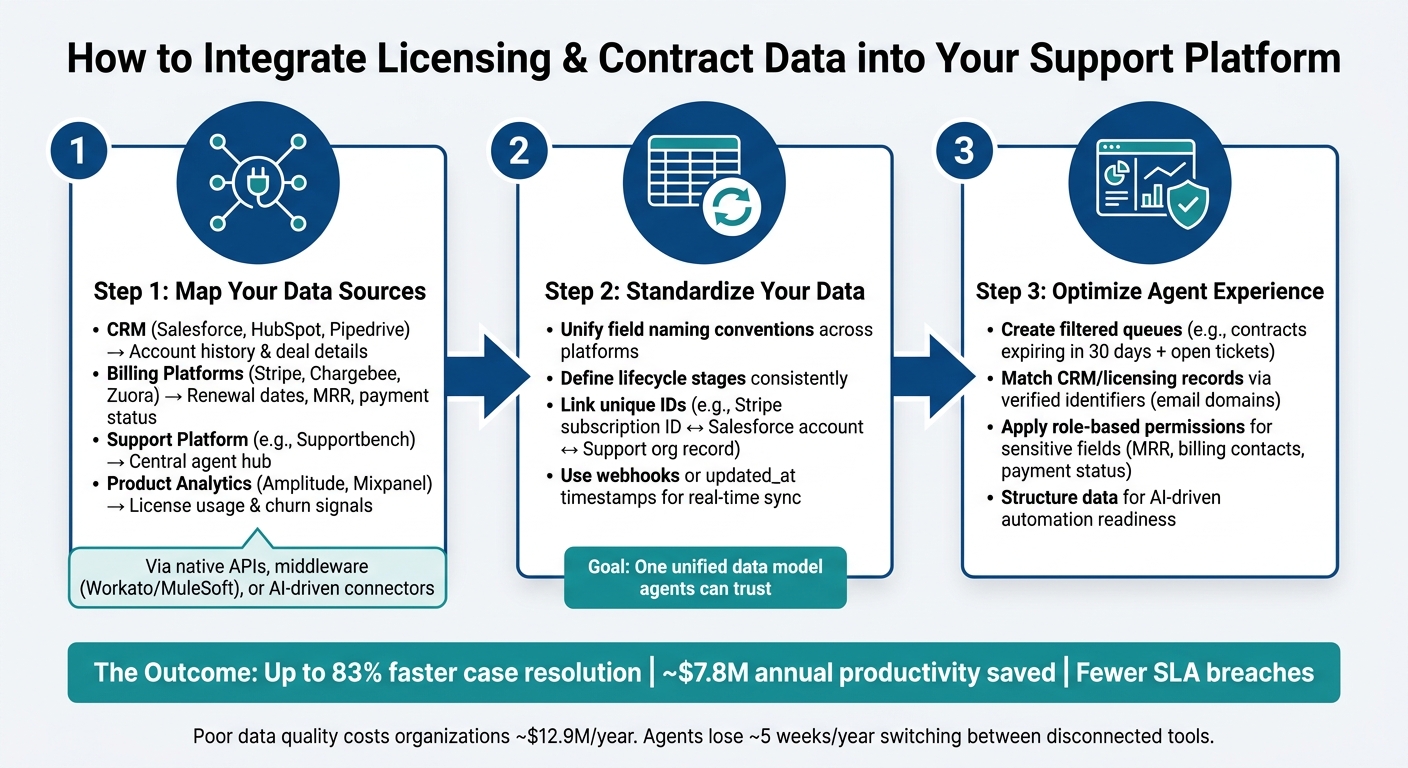
How to Integrate Licensing Data into Support Workflows: 3-Step Process
Once you’ve identified the data your team needs, the next step is bringing it all together in one place where agents can easily act on it. This lack of integration can be costly – organizations lose about $7.8 million annually in productivity, with agents spending nearly five weeks each year switching between disconnected tools [1].
Step 1: Identify and Connect Your Key Systems
Start by mapping out every system that holds licensing and contract data. For most B2B support teams, this typically involves four main categories:
- CRM: Tools like Salesforce, HubSpot, or Pipedrive store account history and deal details.
- Billing Platforms: Systems such as Stripe, Chargebee, or Zuora track renewal dates, monthly recurring revenue (MRR), and payment statuses.
- Support Platforms: Your central hub – like Supportbench – where agents access and work with customer data.
- Product Analytics Tools: Platforms like Amplitude or Mixpanel provide insights into license usage and churn risks [1].
These systems are usually connected through native API integrations, middleware like Workato or MuleSoft, or AI-driven tools that consolidate data without requiring custom coding. For example, Supportbench integrates with Salesforce, allowing agents to view Salesforce licensing data directly within their workflows.
"AI is only as good as the data it can access, and siloed data means siloed intelligence." – Andrey Avtomonov, CTO, Kaelio [1]
Once you’ve connected these systems, the next step is ensuring your data is standardized.
Step 2: Map and Normalize Your Licensing Data
Before integrating your systems, standardize your data fields – things like names, dates, and identifiers – so they align across platforms. For instance, what Stripe labels as current_period_end_at might be called something entirely different in your CRM [5].
To avoid confusion, define a unified data model. Agree on consistent naming conventions, lifecycle definitions, and a method for linking unique IDs. For example, connect a Stripe subscription ID to a Salesforce account and a Supportbench organization record. Use triggers like webhooks or updated_at timestamps to ensure your data stays current, giving agents access to real-time information rather than outdated snapshots [5].
Once your data is standardized and integrated, the final step is to optimize how agents interact with it by prioritizing their support workflow.
Step 3: Configure Agent Views and Access Controls
Now that your data is flowing seamlessly, organize it so agents can act on it quickly. Create filtered views – for example, a queue showing accounts with contracts set to expire in the next 30 days alongside any open tickets [6]. This eliminates the need for agents to manually cross-check information across different tools.
Implement access controls to keep data secure and accurate. Use verified identifiers, like email domains, to match CRM and licensing records to the right customer, especially when multiple contracts are involved [6]. Role-based permissions can restrict sensitive data – such as MRR, billing contacts, or payment statuses – to only those who need access. Structuring your data in this way not only improves manual workflows but also sets the stage for AI-driven automation, which relies on clean, well-organized inputs [1].
"Customer context plays a critical role in support operations. Details like account size, lifecycle stage, deal status, or industry often determine how requests are handled, routed, and prioritized." – Shipra Sharma, ClearFeed [6]
Using Licensing Data Across Your Core Support Processes
Once your licensing data is connected, standardized, and integrated into agent views, the real value comes from applying it effectively to support cases. Here’s how licensing data can transform key support processes.
Triage and Prioritization Based on Entitlements
Licensing data proves its worth right at the intake stage. Your support platform can automatically match incoming tickets with your license database to check if an account is active, expired, or out of entitlement. Cases involving expired or out-of-entitlement accounts can be tagged and redirected to renewal or self-service channels, freeing up agents to focus on active accounts that require immediate attention.
You can take this a step further by syncing Annual Contract Value (ACV) from your CRM. This allows the system to prioritize high-revenue accounts automatically. For example, a ticket from an account with a $250,000 ACV would naturally take precedence over one worth $5,000.
Routing and Escalation Driven by Contract Terms
After prioritization, the next challenge is efficient routing. Contract data can streamline this process by automating routing logic based on factors like support tier, contract value, and renewal status. This ensures that cases land with the right agent or team from the outset. For instance, an enterprise-tier customer with a dedicated success manager should follow a different routing path than a standard-plan customer.
AI plays a significant role here by monitoring key indicators like usage drops, multiple open tickets, or upcoming renewals. When these triggers are detected, the system can automatically escalate cases to managers before the risk of churn becomes critical [1]. For cases where contract terms are unclear, AI agents can flag the ambiguity for human review instead of making potentially flawed decisions.
"What we saw… was an agent that had a calibrated sense of its own uncertainty. When the data was clear, it was decisive. When the data was genuinely ambiguous… it surfaced the ambiguity rather than resolving it silently." – Paul Lacey, Flank.ai [7]
This approach ensures that cases are routed accurately and handled in alignment with the customer’s specific contract terms.
Resolving Cases in Line with Contract Obligations
At the resolution stage, having clear visibility into contract details is essential. For example, if a customer’s contract includes SLA credits for missed response times or unique support terms for a certain product tier, agents need this information upfront to close cases properly. AI can analyze complex agreements, even those with multiple conditional clauses, and compare them against CRM records to flag discrepancies in support obligations [7].
This means that if a case involves regional contract variations or custom SLAs, the system can guide agents with the correct steps automatically. The result? Faster resolutions, fewer SLA breaches, and a smoother experience for both customers and agents.
How AI Improves the Way You Work with Licensing Data
Managing contracts manually becomes nearly impossible when you’re juggling hundreds of agreements, each with its own SLAs, renewal dates, and entitlement terms. AI steps in to handle the repetitive tasks that slow you down. By integrating AI into licensing workflows, you reduce errors and streamline processes, building on the benefits of system integration we’ve discussed earlier. Let’s break down how AI transforms contract data handling – from extraction to actionable insights.
Automated Data Extraction and Validation
Licensing agreements often come in formats like unstructured PDFs, scans, or Word documents, which can be a nightmare to process manually. AI, powered by Large Language Models (LLMs) and Natural Language Processing (NLP), extracts key details – contract numbers, effective dates, renewal terms, payment schedules, and more – turning messy documents into structured data that your ticket management platform can actually use [8][9][10].
For instance, AI-driven tools can cut manual review times dramatically. In May 2026, a major film and TV studio implemented PwC‘s AI annotation tool (AIDA) on AWS. The result? They slashed rights research time by 90%, speeding up decisions on global distribution and sequels [8].
But it doesn’t stop at extraction. AI also validates the extracted data by cross-checking it against CRM and billing records. This helps flag inconsistencies – like mismatched entitlement terms across similar accounts – before they snowball into support headaches.
To ensure accuracy, a human-in-the-loop review can be added. This step allows for a quick manual check of AI-processed data before it flows into systems like CRM or ERP, catching edge cases and maintaining data quality [8].
AI-Driven Routing, Entitlement Checks, and Risk Predictions
Once the data is validated, AI takes over to optimize support actions in real time. For example, when a support request comes in, AI can instantly verify if the account’s contract entitles them to the requested service – eliminating the need for agents to manually cross-check details.
AI also monitors patterns across systems. It might notice a 40% drop in product usage, a looming 30-day renewal window, and multiple unresolved tickets. Together, these signals highlight an at-risk account, allowing teams to intervene before renewal [1]. This shifts support from reactive problem-solving to proactive, intelligence-driven action.
"AI is only as good as the data it can access, and siloed data means siloed intelligence." – Andrey Avtomonov, CTO, Kaelio [1]
Organizations with well-integrated systems – linking CRM, billing, and support platforms – see a 10.3x ROI on AI initiatives, compared to just 3.7x for those with disconnected systems [1].
Building Internal Knowledge from Licensing Data
Every resolved licensing case is an opportunity to create a knowledge asset – if captured effectively. AI can analyze closed cases involving contract disputes or entitlement questions and automatically generate internal knowledge articles summarizing the issue and its resolution [8][10].
For example, Supportbench’s AI KB Article Creation feature turns case histories into structured, searchable articles. These include a subject, summary, and keywords, enabling agents to find solutions for similar issues quickly. Over time, your case history evolves into a powerful, ever-improving knowledge base.
"Before this agent, finding one expiration date meant opening an 80-page contract and scrolling until you found it. Now it takes about three seconds and a question typed in plain English." – Domo [10]
AI also simplifies contract searches using Retrieval-Augmented Generation (RAG). Agents can ask plain-English questions like, “What SLA credits apply for missed response times?” and get answers complete with citations to specific clauses and page numbers [8][10]. This leap forward replaces hours of manual document review with precise, sourced answers in seconds.
Conclusion: Better Support Starts with Better Contract Visibility
Visible and reliable contract data is the backbone of delivering exceptional support. Licensing and contract information provides critical insights that enhance every support interaction. When agents have direct access to details like SLA tiers, entitlement limits, renewal dates, and support coverage windows within their case view, they can stop guessing and focus on resolving issues. This leads to faster resolutions, fewer escalations, and better adherence to SLA commitments, especially for premium tiers [11][12].
To get started, audit where your contract data is stored – whether it’s in a CLM, CRM, billing system, or even spreadsheets. Identify the 10–15 most critical contract fields that agents need, such as SLA level, active seats, support tier, renewal dates, and local business hours. Once you’ve pinpointed these, connect your systems, standardize data formats, and integrate this information directly into workflows for triage, routing, and escalation. By using AI to extract and validate licensing data, your support platform can transform insights into immediate actions, making support processes faster and more informed.
Keeping data accurate is non-negotiable. Assign someone to oversee contract data maintenance, conduct regular audits, and implement role-based access controls. This ensures agents only see the data they need, right when they need it.
Platforms like Supportbench simplify this process by bringing everything together. Instead of forcing agents to juggle multiple systems, Supportbench surfaces relevant contract and licensing details directly in the agent console. Its AI capabilities manage intake, determine entitlement levels, set priorities, and route cases based on contract terms – all in real time. This not only streamlines case handling but also enhances customer satisfaction by ensuring every interaction is backed by precise and accessible contract data [12][13].
Take the first step today: audit your systems, define the key contract fields, and test one workflow improvement. These actions can help you achieve faster resolutions and a more proactive support experience.
FAQs
Which contract fields should agents see in every ticket?
Agents need quick access to essential contract details in every ticket to handle licensing and contract-related support efficiently. Key fields should include contract name, type, vendor, approver, start and end dates, status, and any relevant custom fields like descriptions or attached assets. Having this information readily available allows agents to quickly understand the contract’s scope, expiration, and renewal timelines, streamlining triage and escalation workflows.
How do we keep contract and license data accurate across systems?
To keep contract and license data accurate, focus on standardizing essential fields such as vendor names, renewal dates, and usage metrics. Assign clear responsibilities for updates – this could involve teams like IT, finance, or legal. Regularly validate the data by performing sample checks to catch and correct errors.
Implement governance policies to manage changes effectively and ensure every update is trackable and auditable. Where feasible, automate processes to improve data accuracy and minimize inconsistencies across systems. This approach not only saves time but also strengthens overall data reliability.
What should we automate with AI vs. keep human-reviewed?
AI shines when it comes to automating repetitive tasks like triage, categorization, prioritization, and ticket routing – particularly for handling routine or high-volume issues. It can quickly analyze incoming requests, assign appropriate tags, and even identify high-risk accounts that need attention.
However, for tasks that demand judgment or emotional intelligence, such as managing escalations, resolving complex problems, or making strategic decisions, human expertise is essential. Similarly, tickets flagged by AI with low confidence scores or those involving sensitive matters should always be reviewed by human agents to ensure accuracy and care.






