


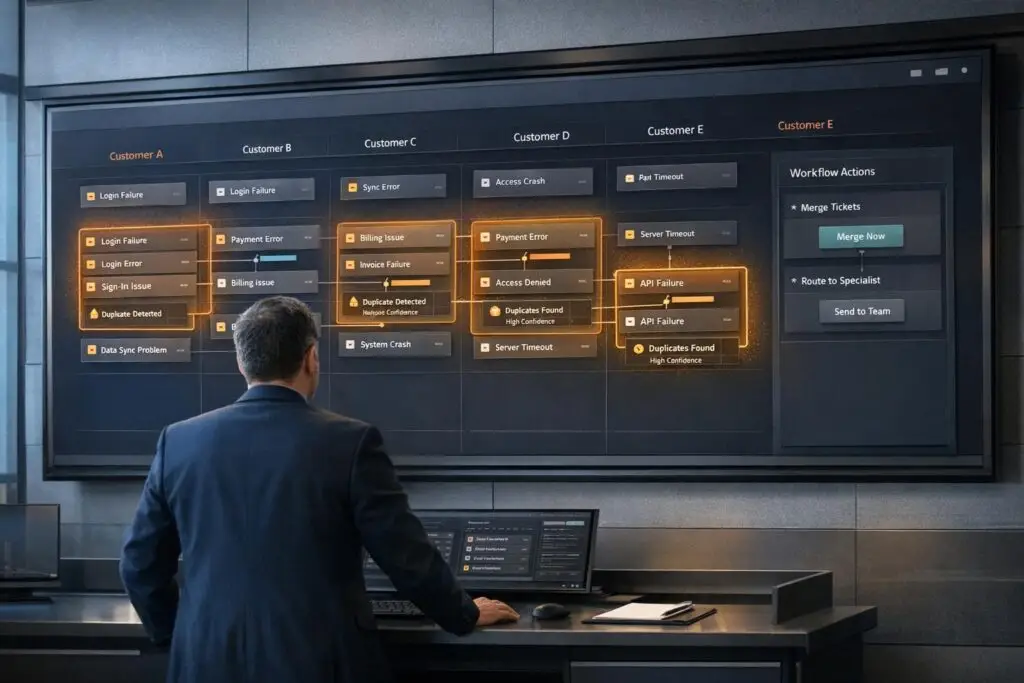
Duplicate issues in B2B support can waste time, create inconsistent responses, and obscure the real number of unique problems. AI solves this by using vector embeddings and semantic similarity to detect related tickets, even when phrased differently. This approach improves efficiency, reduces ticket backlogs, and enhances decision-making for engineering and support teams.
Key Takeaways:
- AI Process: Combines text analysis, operational signals, and semantic understanding to identify duplicates.
- Data Preparation: Centralize, normalize, and clean ticket data for accuracy.
- Workflow Integration: Embed AI into case creation, triage, and backlog review stages.
- Handling Duplicates: Consolidate under a master issue, avoid data loss, and maintain audit logs.
- Metrics to Track: Duplication rate, time-to-triage, and false positive/negative rates.
By streamlining duplicate detection, AI not only saves time but also provides insights into recurring issues, helping teams focus on resolving root causes effectively.
Preparing Your Data for AI Duplicate Detection
Data Requirements for AI Models
For AI models to effectively detect duplicate tickets, they need access to centralized data from all communication channels – email, chat, web forms, and phone calls. Scattered or disconnected data sources lead to unreliable results and hinder the AI’s ability to perform accurately.
To function properly, the AI relies on four key types of data:
| Data Category | Specific Data Points |
|---|---|
| Identity | Email, Account ID, User ID, Signed Session Data |
| Content | Subject, Message Body, Internal Notes |
| Technical | Email Headers, File Hashes, Device IDs, Error Codes |
| Contextual | Product Version, Order IDs, Region, Created Date |
Historical ticket data is just as important. Information about past merges and reopened cases provides valuable training signals, helping the AI refine its detection capabilities over time [2].
Once you’ve gathered this data, the next challenge is organizing it in a way that allows the AI to process it efficiently.
How to Structure Your Data for AI
Even with the right data in hand, inconsistent formatting can derail accurate duplicate detection. One common issue is mismatched field formats – different teams might use varying names for the same categories, or apply inconsistent resolution codes. For example, the AI might interpret "Bug", "bug", and "BUG" as entirely unrelated values, which can skew its results.
The solution? Normalization. Unify schemas, convert text fields to lowercase, and standardize formats for dates and user IDs. For email-based tickets, make sure to preserve the In-Reply-to: and References: header strings. These headers are critical for linking threads correctly and preventing duplicates from being created at the source [4].
"A dependable deduplication model requires mapping every data field that informs a decision." – Typewise [2]
Another critical step is identity triangulation. Customers often submit tickets through multiple channels – like using a work email for a web form and following up by phone under a slightly different name. Your data structure must link these records using overlapping identifiers, such as account IDs, user IDs, and session data. This step ensures the AI can accurately match and compare tickets, reducing false duplicate flags.
Using AI to Clean and Normalize Case Data
After normalizing your data, the AI takes over to clean ticket text. The first step is stripping away irrelevant content from ticket bodies, such as HTML tags, email signatures, legal disclaimers, and quoted reply threads. For example, convert HTML <br> tags into line breaks and normalize whitespace to create clean, streamlined text [2].
Supportbench offers tools like auto-tagging and case summaries to simplify this process. Auto-tagging applies consistent labels to incoming tickets based on their content, addressing inconsistencies before they escalate. Meanwhile, case summaries condense lengthy ticket threads into concise, structured text, making it easier for the AI to perform similarity comparisons.
Before feeding tickets into an AI model, ensure sensitive information – like phone numbers and security tokens – is redacted. Also, set a character limit for ticket bodies (8,000 characters is a reasonable cap) to stay within the model’s token limits [2]. These steps help the AI focus on the most relevant data while keeping processing efficient.
sbb-itb-e60d259
Build a Sigma Agent: Automated Ticket Triage, Escalation & Email in One Workflow
Setting Up AI Workflows for Duplicate Detection
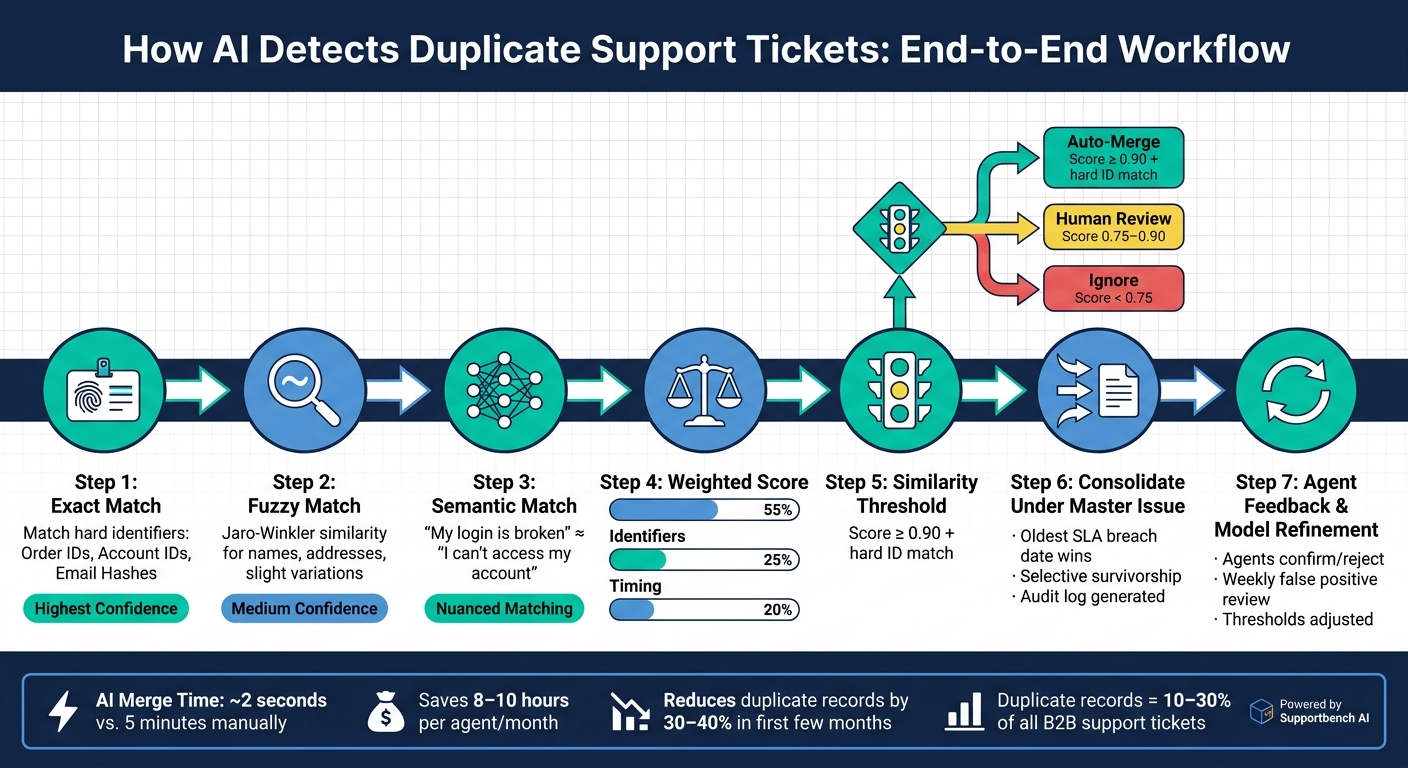
AI Duplicate Ticket Detection: End-to-End Workflow
Configuring AI Models to Find Similar Cases
To set up AI for detecting duplicates, design a workflow with a layered matching system that progresses from straightforward to more nuanced comparisons.
Start with deterministic matching, focusing on exact matches for identifiers like order IDs, account IDs, or email hashes. For example, if two tickets share the same order ID, it’s almost certain they are connected. Next, move to fuzzy matching techniques, such as Jaro-Winkler similarity, which can identify close matches even with slight variations in names or addresses. Finally, apply semantic similarity using vector embeddings to detect cases where the language differs but the intent is the same – like comparing "my login is broken" with "I can’t access my account."
When assigning weights to these signals, a good starting point is: weight_text = 0.55, weight_ids = 0.25, and weight_time = 0.20 [2]. This reflects the importance of ticket content while still considering identifiers and timing.
To group related tickets, use a union-find clustering algorithm. Limit cluster sizes to a manageable number – around 8 tickets per cluster is a practical starting point – to avoid grouping unrelated issues [2].
"In deduplication, accuracy should always trump aggressiveness." – Typewise [2]
Set an initial similarity threshold of 0.90 or higher before flagging or merging tickets. This conservative approach ensures accuracy while allowing room for fine-tuning based on results.
Connecting AI to Your Support Workflows
Once the AI matching hierarchy is configured, integrate it into key stages of your support process. The best points for embedding duplicate detection are during case creation, triage, and backlog review.
- Case Creation: AI compares incoming tickets to existing ones in real time, surfacing potential matches before a new ticket is logged. For instance, Linear’s "Similar Issues" feature, launched in November 2023, uses vector embeddings with
pgvectoron Google Cloud. By partitioning data by workspace ID, they flag related issues immediately, reducing duplicate work and speeding up support consolidation [3]. - Triage: AI provides agents with preview cards that include similarity scores, shared identifiers (like matching error codes), and explanations of relatedness. This allows agents to make informed decisions without slowing down.
Before automating merges, test the AI in shadow mode, where it only suggests matches without acting on them. Agents can confirm or reject suggestions, and this feedback helps refine the model. While automated merging can process a ticket in about 2 seconds compared to 5 minutes manually [4], accuracy is crucial for this speed to deliver value.
Managing Master Issues and Linking Duplicates
Once duplicates are flagged, consolidate them under a single master issue. Choose the master issue based on the earliest SLA breach or the oldest creation date [2]. This ensures that the most time-sensitive case drives resolution.
When merging, avoid overwriting data from duplicate tickets. Instead, use selective survivorship: retain the most complete or recent details for individual fields (like a phone number) while combining list-type fields (such as product tags) to preserve all relevant context [5]. Additionally, keep external IDs from merged tickets as aliases on the master record, ensuring future searches or integrations locate the correct case.
Every merge should generate an audit log that includes the merge_id, timestamp, original ticket IDs, and the AI’s reasoning [2][5]. Maintain a rollback window of 30–90 days to allow quick correction of any errors. Tools like Supportbench provide features such as auto-tagging and case summaries, making it easier to manage these structured workflows without adding extra manual effort.
Best Practices for Handling AI-Flagged Duplicate Issues
Setting Clear Rules for Duplicate Handling
One of the biggest challenges with AI-flagged duplicates is maintaining consistency. To address this, establish clear rules:
- Automatically accept duplicates when the similarity score exceeds 0.90 and a hard identifier matches.
- Escalate cases with scores between 0.75 and 0.90 for human review.
- Ignore cases with lower scores to avoid unnecessary effort.
To prevent confusion, consolidate all interactions related to a duplicate into a single thread. This ensures multiple agents aren’t working on the same issue. Additionally, send an automated notification to customers, letting them know their requests have been merged.
Before processing, filter out spam, auto-responses, and bot notifications. This step helps reduce clutter and false positives in duplicate clusters [2].
These guidelines not only simplify operations but also lay the groundwork for smoother workflows using Supportbench’s AI tools.
Using Supportbench AI Features to Work Faster
The time savings between manual and AI-assisted duplicate handling are substantial. While manually searching and merging tickets can take around 5 minutes per ticket, AI-powered merging cuts that down to just 2 seconds [4]. This translates to saving 8–10 hours per agent each month [4].
Supportbench’s Agent-Copilot further accelerates workflows by automatically pulling up relevant context from previous cases and the knowledge base as soon as an agent opens a ticket. For master issues with multiple linked duplicates, the copilot provides a clear overview of the problem without requiring agents to sift through every thread. Paired with AI-generated Case Summaries created at the start of the case, agents can immediately focus on resolving the core issue within the duplicate cluster.
When recurring issues are resolved, Supportbench’s AI Knowledge Base Article Creation tool allows agents to turn case histories into knowledge base articles. For duplicate clusters, this feature is especially helpful because the merged thread – containing input from multiple customers – offers broader coverage and better search relevance.
Efficiently managing duplicates not only streamlines support operations but also delivers valuable insights for product and engineering teams.
Working with Product and Engineering Teams
Effective duplicate handling can reveal deeper operational challenges, especially when clusters grow beyond a certain size (e.g., more than 8 tickets).
"Recurring support issues are usually a signal of unresolved root causes, not just high ticket volume." – Layer8 Labs [1]
By sharing AI-generated system notes that include merged ticket IDs and the reasoning behind the merge (e.g., "95% semantic similarity + matching Order ID"), product teams gain actionable data to investigate root causes [2].
"One way to view duplicates is not as mere noise, but as lost context. By recovering this context, your team can deliver a higher level of service quality." – Typewise [2]
Lastly, standardizing resolution codes across support and engineering teams is essential. When both teams use the same categories, AI duplicate detection becomes more accurate over time. This also helps product teams track whether fixes have successfully reduced duplicate clusters in the following weeks [1].
Measuring Results and Improving AI Workflows Over Time
Metrics to Track
A well-tuned duplicate detection system doesn’t just cut down ticket volume – it also makes support teams more efficient. To gauge how well your AI is performing, keep an eye on several key metrics. Start with your duplication rate, which measures the percentage of submitted cases flagged as duplicates. In many B2B support settings, duplicate records can make up 10% to 30% of all business records[7].
Another critical metric is time-to-triage, which measures how quickly duplicates are identified and confirmed after submission. Teams relying on manual processes might spend up to 48 person-hours daily just searching for and validating duplicate reports[6]. Beyond these, track metrics like false positive and false negative rates, auto-resolved duplicate volume, and agent collision rate to get a full picture of how effective your workflow is.
| Metric | Insights Provided |
|---|---|
| Duplication Rate | Proportion of incoming cases flagged as duplicates |
| Time-to-Triage | Speed of duplicate detection post-submission |
| False Positive Rate | Frequency of merging non-duplicates incorrectly |
| False Negative Rate | Number of true duplicates the AI fails to catch |
| % of Auto-Resolved Duplicates | Cases resolved without agent involvement |
| Agent Collision Rate | Instances where multiple agents work on the same issue |
AI-driven duplicate detection can reduce duplicate records by 30%–40% within the first few months of implementation. These improvements translate into quicker resolutions and more cost-effective support operations. Use these metrics to design dashboards that highlight actionable trends and opportunities for improvement.
Building Dashboards to Monitor Duplicate Trends
Dashboards are essential for spotting trends and understanding the bigger picture. By segmenting duplicate cases by product version, customer account, and region, you can quickly identify whether an uptick in duplicates is isolated to a specific group or affecting your entire customer base.
Key metrics to include are First Contact Resolution (FCR) for ticket clusters, time to first response on master issues, and backlog volume and age. For example, FCR for clusters measures the percentage of ticket clusters resolved on the first reply. If this number doesn’t improve after implementing deduplication, it could mean that merged threads lack enough context for agents to resolve issues effectively.
Set up alerts for clusters that grow beyond 8 tickets – this often signals a broader product issue. By automating these alerts, your team can address potential problems before they escalate. Tools like Supportbench’s customizable dashboards make it easy to configure these alerts without needing IT support.
Refining AI Workflows Using Feedback
AI systems thrive on feedback, and refining your workflows requires a structured feedback loop. Allow agents to confirm or reject proposed merges directly within their workflow. Each confirmation or rejection helps the AI learn what your team defines as a duplicate.
Make it a habit to review false positives and false negatives weekly. Adjust thresholds based on this feedback: for example, prioritize higher precision for complex technical cases, while slightly loosening thresholds for simpler issues like account or billing inquiries.
Keep an eye on unanswered cases to identify gaps in your documentation. These gaps often indicate areas where additional resources are needed. Using tools like Supportbench’s AI KB Article Creation feature, you can turn these gaps into knowledge base articles, helping to preempt future duplicate issues and improve overall efficiency.
Conclusion: Getting More from AI in B2B Support
Key Takeaways for B2B Support Leaders
AI-powered duplicate detection isn’t just about cutting down ticket numbers – it transforms how your support team operates. By consolidating duplicate reports into a single thread, agents save time and focus on resolving issues faster. This process eliminates agent collisions and ensures precise SLA management by prioritizing the ticket closest to breaching its deadline. Plus, what once appeared as isolated issues can now be identified as recurring patterns, offering valuable insights into root causes that need permanent fixes.
"Duplicates represent hidden operating costs that erode efficiency." – Julien Quintard, Founder & CEO, Routine [5]
The benefits are clear: fewer redundant tickets lead to shorter queues, reduced resolution costs, and a smoother experience for customers waiting for solutions.
Next Steps to Get Started
Start with a focused, four-week rollout plan:
- Week 1: Identify duplicate patterns and define identity keys.
- Week 2: Test deterministic matching in a sandbox environment.
- Week 3: Finalize data contracts and train agents on reviewing merges.
- Week 4: Launch merge automation and closely monitor precision and rollback rates.
Use a shadow mode approach initially, allowing agents to review AI-suggested merges before fully automating the process. Begin with high similarity thresholds, as previously explained, and adjust them as confidence in the system grows [2]. With tools like Supportbench’s AI automation and customizable dashboards, configuring these workflows can be done without needing IT involvement.
"In deduplication, accuracy should always trump aggressiveness." – Typewise [2]
The objective isn’t to automate everything immediately. It’s about creating a system your team can trust, refining it with real-world feedback, and gradually expanding its capabilities as the data demonstrates success. These steps align with a broader AI strategy aimed at streamlining support operations.
FAQs
How do I choose the right similarity threshold for duplicates?
To determine the best similarity threshold, it’s wise to start with a cautious approach – try something like 0.90. This ensures that only the most likely duplicates are automatically linked or merged, minimizing the risk of false positives that could mess with audit trails or erase important context.
For matches with lower scores, consider flagging them for manual review rather than automating the process. Keep an eye on false positives and use performance data to fine-tune the thresholds. Over time, this approach can help improve accuracy while gradually broadening your coverage.
What ticket fields matter most for accurate deduping?
To ensure accurate deduplication, focus on requester identity (like email addresses) and the ticket subject as your main indicators. Incorporate business-specific details, such as order IDs or subscription IDs, which can be pulled from custom fields or ticket content, to identify recurring transactions. Standardized fields – like product or service type, environment, and tags (e.g., version, region, language) – are also helpful, especially when paired with critical error details. Additionally, use timestamps and attachment fingerprints (such as hash values or file sizes) to differentiate between similar tickets effectively.
How can I undo a bad AI merge without losing data?
To reverse an AI-driven merge without losing critical data, begin by reviewing the audit trail. If the option is available, perform an immediate unmerge and notify the responsible agent to reassess the situation.
To minimize similar problems in the future, consider using assisted merging. This means allowing AI to identify potential duplicates and assign a confidence score, but leaving the final decision to human agents. For more complex cases, stick to manual reviews to reduce the risk of irreversible mistakes.






